

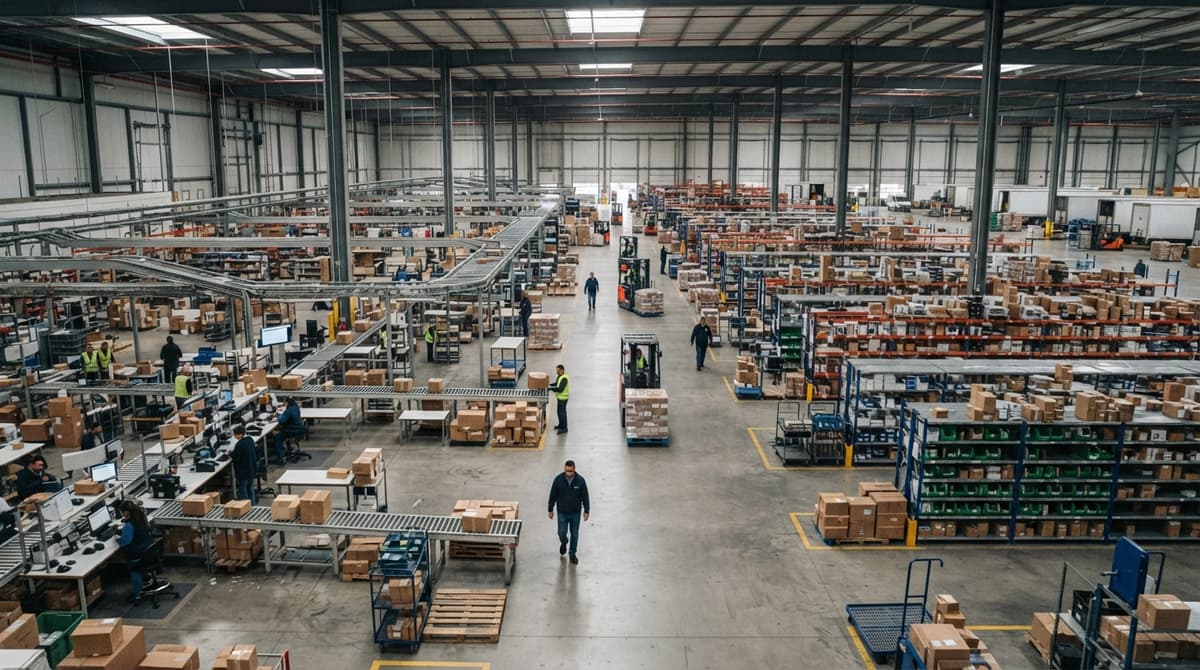
Product Fulfillment Center
A product fulfillment center is a warehouse that receives, stores, picks, packs, and ships orders for the businesses that sell the goods. Its whole value rests on the stock count being right for every client. For an operation shipping 500 to 20,000 orders a month, the software is the difference between a fulfillment center and a plain warehouse: orders in from each client's channels, tracking numbers out on their own, and a count that moves on every scan. This guide, reviewed in September 2026, covers what happens inside, what manual reconciliation costs in labor, and the 6 signs the software has run out.
Published 24 August 2026. Reviewed and updated 15 September 2026.
Reviewed August 2026. Each figure comes from the assumptions stated beside it, so you can substitute your own and the arithmetic still holds.
Book a callWhat Is a Product Fulfillment Center?
A product fulfillment center is a facility where a business receives inventory, stores it, picks items from storage, packs them into boxes, and ships them to customers. That is the whole job. Receive, store, pick, pack, ship.
It is not a factory. Nothing is made there. It is not a showroom. Customers do not visit. It is the place that turns an order into a parcel on a doorstep.
Operations managers sometimes hear the term used the same way as "warehouse" or "distribution center." Those words are close, but they are not the same thing.
A fulfillment center is built to move goods fast, one order at a time. That distinction matters when you are choosing a facility layout or picking software to run it.
Would you rather have it built around your operation?
The first look is free. If you would rather not compare products, describe how your operation already works and we build the system around it.
No build cost. You see it running on your own process first, and the monthly subscription starts only once it is live.
Book a callHow Does a Product Fulfillment Center Differ from a Warehouse?
A warehouse stores goods for a long time. A fulfillment center moves goods as fast as possible. That is the whole difference.
Think of it this way. A warehouse is a parking lot. A fulfillment center is a busy intersection.
One is built for things to sit still. The other is built for things to keep moving.
Order velocity is what a fulfillment center is built around, not storage volume.
Every square foot, every shelf label, every workflow is designed to get an order picked, packed, and out the door in the shortest time possible.
This distinction matters when you choose software. Warehouse software is built for bulk storage, lot tracking, and slow-moving goods.
Fulfillment center software needs to handle dozens or hundreds of individual orders a day, each with its own customer, address, and carrier.
Why Are Inventory Records Not Optional in Either Setting?
Whether your goods sit in a warehouse for months or move through a fulfillment center in days, the count is the one record that has to be right.
The IRS is direct about the legal weight of inventory records: as stated in IRS Publication 538, "To figure taxable income, you must value your inventory at the beginning and end of each tax year." That is not optional.
What Does a Product Fulfillment Center Actually Do Inside?
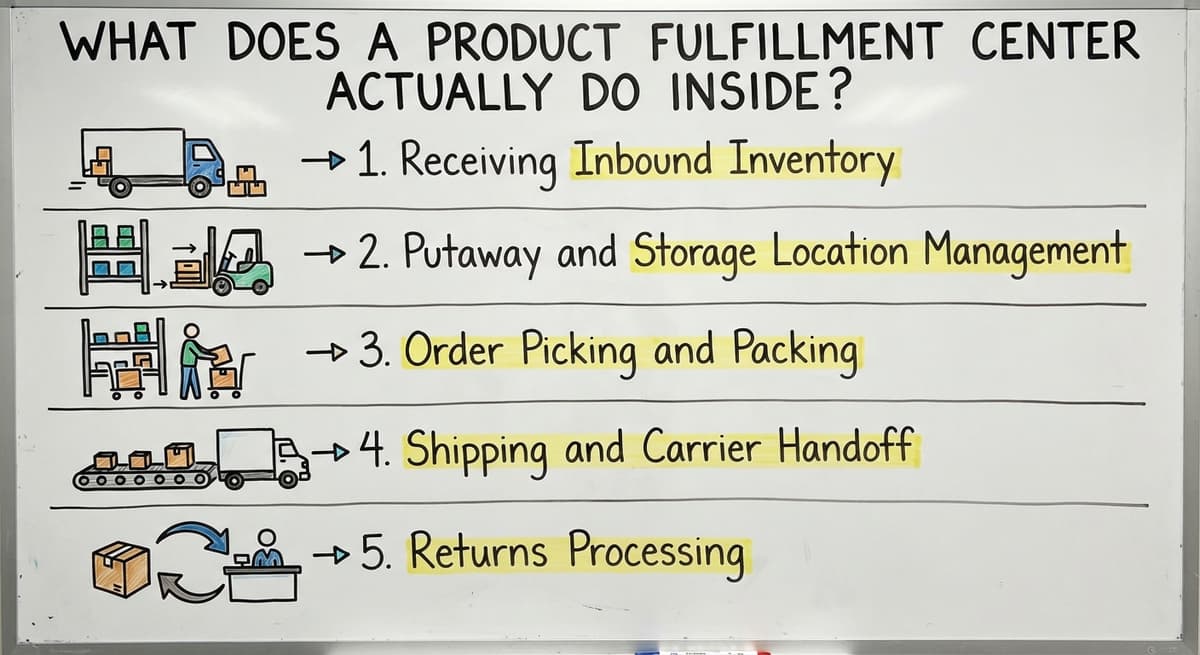
A product fulfillment center handles five core functions, and every one of them can break down without the right system.
Receiving is the first step: goods arrive from a supplier and get logged into the system with quantities, SKUs, and condition noted. Putaway means moving received goods to their storage spot.
Location management means knowing exactly where every SKU lives, so a picker does not wander the floor guessing. Good location logic cuts pick time. Bad location logic costs you in labor every single day.
Picking is pulling items from storage to fill an order. Packing is putting those items in a box with the right materials and label. These two steps together, called pick pack ship, are where most errors happen and where most labor time is spent.
The packed order then gets a shipping label, a tracking number, and a spot on the carrier's truck, and the customer gets a notification. Finally, returns processing brings items back into the facility for inspection and either restocking or disposal. Without a clear process at each of these five stages, errors at one step compound into bigger problems at the next.
Why Do Small Operations Run Into Trouble Without the Right System?
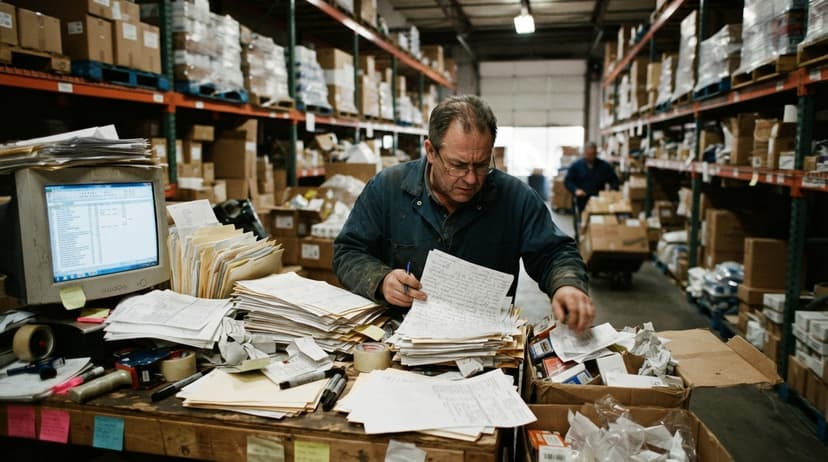
Here is a picture most small fulfillment operations know well. The accounting software handles the accounting. Spreadsheet tracks inventory. Pick sheets get printed each morning and carried onto the floor.
Orders come in by email, phone, and maybe a website. Someone reconciles everything at the end of the day, or tries to.
This works at low volume. It stops working fast as orders grow.
Errors compound. A picker misreads a handwritten sheet and grabs the wrong SKU. The packer does not catch it. The wrong item ships. The customer calls.
Someone spends 20 minutes tracing what happened. The return comes back. Now inventory is off by 2 units and no one updated the spreadsheet.
Multiply that by 50 orders a day and you have a systems problem. Not a people problem. The team is not failing. The tools are.
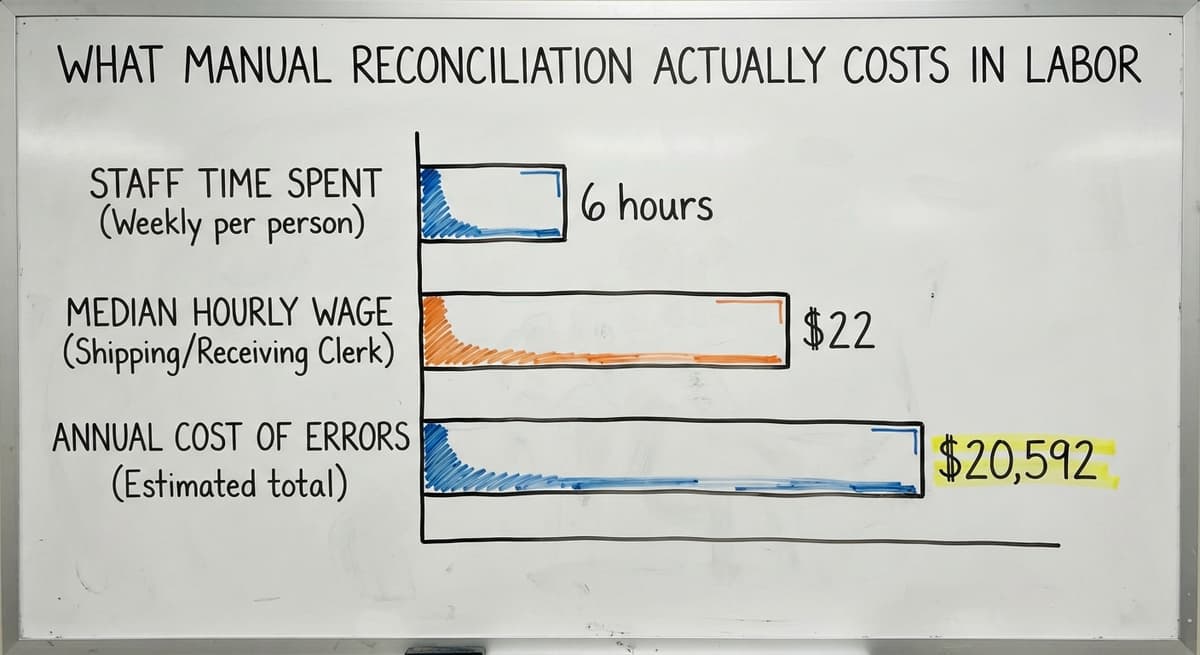
What Does Manual Reconciliation Actually Cost in Labor?
Consider the labor cost alone. If 3 staff members each spend 6 hours a week reconciling inventory and chasing order errors, at the current median wage for shipping and receiving clerks of around $22 an hour according to the US Bureau of Labor Statistics, that is roughly $20,592 a year in labor spent fixing what a system should prevent. That number does not include the cost of returns, lost customers, or overtime during peak season.
What Does a 3PL Warehouse Management System Do for a Fulfillment Center?
A 3PL warehouse management system, or 3PL WMS, is software built to run the floor of a fulfillment or distribution operation.
The "3PL" part stands for third-party logistics, but the software works just as well for an in-house operation as for a company managing inventory for other businesses.
A 3PL WMS connects every step in one place. Receiving creates a location record. Putaway updates that record.
A pick order pulls from it. Shipping closes it. Returns reopen it. Every step talks to every other step.
Not sure this is the right shape for your operation?
The call is free. Describe how you receive, pick and count today. We map it on a call and show you what the system would look like built around that, before you spend anything.
Book a callReal-Time Inventory Visibility as the Core Benefit
For a small fulfillment center, the key benefit is real-time inventory visibility. At any moment, a manager can see exactly how many units of each SKU are on hand, where they sit, and what orders are pending. No spreadsheet refresh needed. No end-of-day reconciliation.
A 3PL warehouse management system overview will show you options ranging from large enterprise platforms to tools built for operations your size. The right fit depends on your order volume, your team size, and whether you need to manage inventory for one brand or several.
Inventory Accuracy and Why It Defines Fulfillment Success
Bad inventory data causes 3 specific problems: mispicks, stockouts, and angry customers. All 3 are avoidable.
A mispick happens when a picker pulls the wrong item because the system shows it in the wrong location or the quantity is off.
A stockout happens when the system shows units on hand that do not exist, so an order gets accepted that cannot be filled. Angry customers follow both.

How Does Cycle Counting Keep Inventory Data Clean?
The fix is cycle counting. Cycle counting means counting a portion of your inventory on a rolling schedule, a few SKUs each day, rather than shutting down for a full annual count. A WMS automates the cycle count schedule and logs the results without extra spreadsheets. Inventory accuracy is achievable without enterprise software.
A small warehouse software tool built around your workflow can deliver the same accuracy as a platform serving a company 10 times your size, as long as it logs every movement and flags every discrepancy. The NIST Manufacturing Extension Partnership offers vendor-neutral guidance on supply chain process improvement, including inventory controls, for small and mid-size operations. Their resources are free and practical.
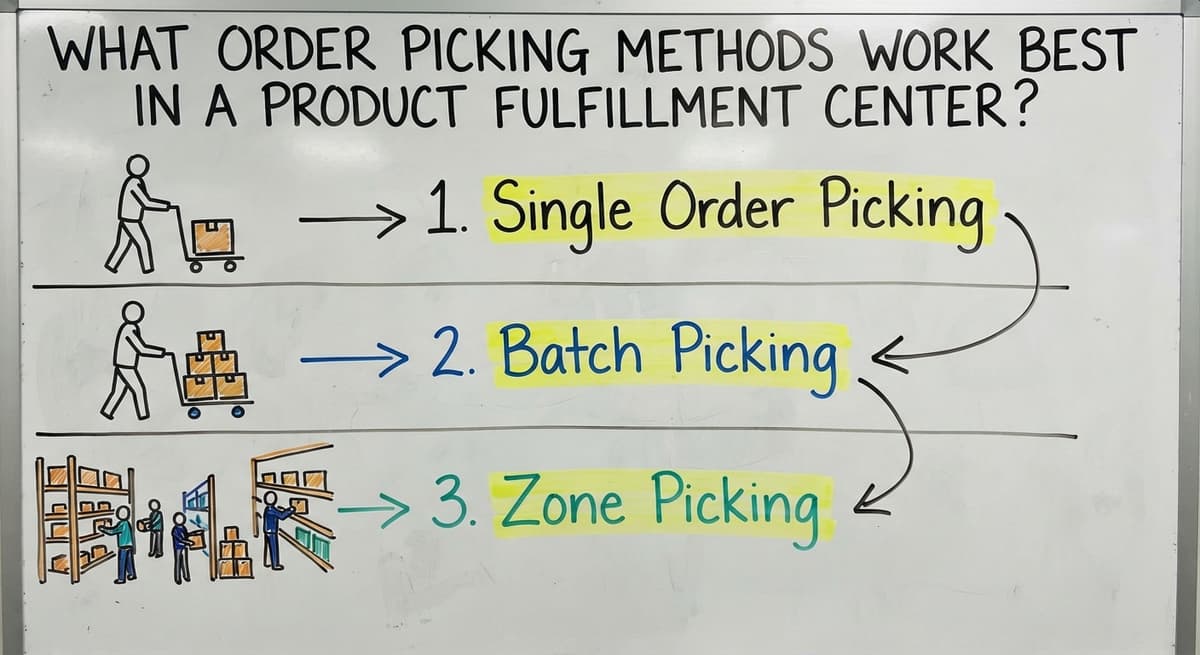
What Order Picking Methods Work Best in a Product Fulfillment Center?
Order picking method is one of the biggest levers a fulfillment center has on labor cost and speed.
Single order picking means one picker fills one order at a time. It is simple to manage and works well at low volume, but gets slow fast as orders grow because pickers travel the same aisles repeatedly for every order.
Batch picking means one picker fills multiple orders in a single pass through the facility, sorting items into order slots as they go. It cuts travel time significantly and works well for operations doing 30 to 200 orders a day.
The right method depends on your order volume, your facility layout, and how many SKUs a typical order contains. A WMS can enforce whichever method fits your operation and generate pick lists sorted by location so pickers follow the shortest possible path regardless of which method you use.
Single Order Picking
One picker fills one order at a time. Simple to manage. Works well at low volume. Gets slow fast as orders grow because pickers travel the same aisles repeatedly.
Batch Picking
One picker fills multiple orders in a single pass through the facility, sorting items into order slots as they go.
Cuts travel time significantly. Works well for operations doing 30 to 200 orders a day.
Zone Picking
The facility is divided into zones. Each picker owns a zone and only picks from it. Orders move through zones until complete. Works well for large facilities or operations with very high order volume.
Software drives the picker to the right location regardless of method. A WMS generates a pick list sorted by location, so the picker follows a logical path rather than crisscrossing the floor. That alone can cut pick time by 20 to 30 percent in a small operation.
Packing and Shipping Inside a Fulfillment Center
Packing stations slow down for 3 common reasons: the wrong box size is grabbed, packing materials run out, or the label printer is on the other side of the room. Each delay adds up across hundreds of orders.
Good packing station design puts everything within arm's reach. Carrier rate shopping means the software compares rates across the parcel carriers in real time and picks the cheapest option that meets the delivery window.
Labels print at the station. No one walks to a shared printer.
How Do Automatic Updates Remove the Costliest Manual Step?
Tracking numbers go back to the customer or sales channel automatically, which is the step that used to take 2 minutes per order by hand. The customer gets a notification without anyone sending an email.
The sales channel marks the order as shipped without anyone logging in to update it. That last step, the automatic update, is where manual processes cost the most time. A team doing it by hand for 100 orders a day spends hours on a task that software handles in seconds.
How Do Fulfillment Centers Handle Returns?
Returns are a cost center that a clear process can shrink. Every returned item that sits uninspected or unlogged is a unit missing from your available inventory and a potential write-off that shows up at tax time.
The returns workflow has 3 steps:
- Receive. Log the return against the original order. Note the reason.
- Inspect. Decide if the item goes back to stock, gets refurbished, or gets disposed of.
- Restock or dispose. Update inventory accordingly.
Is the comparison easier when one option is built for you?
Yes. Off-the-shelf means fitting your process to the software, and custom is the other way round. The first look costs nothing.
Book a callWhat Does Returns Data Tell You About Products and Packing?
A WMS logs every step without a separate spreadsheet. The inventory count updates the moment a decision is made. Poor returns management is one of the fastest ways to corrupt inventory data, because a returned unit that is not logged properly either disappears from the count or shows as available when it is not.
Returns management handled well also gives you data. If the same SKU comes back repeatedly for the same reason, that is a product or packing problem worth fixing.
How Does the Accounting Software Fit Into a Modern Fulfillment Operation?
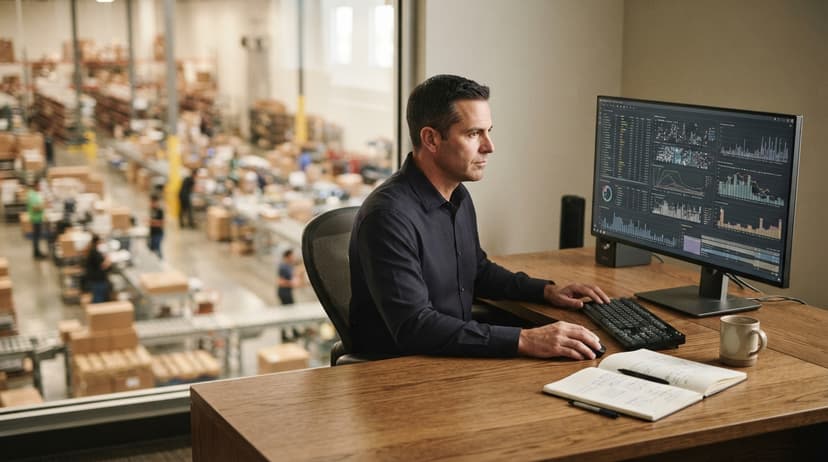
The accounting software is good at accounting. It tracks money in and money out. It generates financial reports. It handles payroll and tax prep. It is not built to manage a warehouse floor.
The typical workaround stack looks like this: the accounting software for invoices and payments, spreadsheet for inventory counts, email for purchase orders, and printed sheets for picking.
Each tool works on its own. Together they create gaps where data falls through.
Connecting a WMS to the accounting software Without Replacing Either
Custom software fills the gap without replacing the accounting software. A WMS built for your operation can sync with the accounting software so that inventory values, cost of goods sold, and purchase orders flow between systems automatically. You keep the accounting tool your bookkeeper knows.
You add the warehouse tool your floor team needs. A accounting integration for warehouses does not require a full ERP migration. It does not require a new chart of accounts or a new way of doing your books. It requires a connection between two systems that each do their job well.
Custom Software vs. Off-the-Shelf WMS for Small Fulfillment Centers
Off-the-shelf warehouse management tools target an average workflow. Your workflow is not average. It reflects years of decisions about your products, your customers, and your team.
| Factor | Off-the-Shelf WMS | Custom Warehouse Software |
|---|---|---|
| Fit to your workflow | Built for average | Built for yours |
| Implementation time | Weeks to months | Depends on scope |
| Change to your process | Significant | Minimal |
| Cost at small scale | Can be high per user | Built to your budget |
| Integration with the accounting software | Varies | Designed in from the start |

How Do You Reduce the Risk of a Custom Build?
Custom warehouse software for small operations is built around how the operation already works. The team does not learn a new process. The software learns the existing one. That cuts training time and reduces the risk of staff ignoring the tool.
The fear of a long, expensive implementation is real and fair. The answer is a short discovery phase before any build begins, so the scope is clear and the timeline is fixed before money changes hands.
Key Metrics Every Product Fulfillment Center Should Track
There are 5 numbers a fulfillment center has to measure before it can improve any of them. Four numbers tell most of the story.
- Order accuracy rate. The percentage of orders shipped with no errors. Below 99% means something in the pick or pack process is broken.
- On-time ship rate. The percentage of orders that leave on the promised day. Delays here show up as customer complaints before they show up in your data.
- Inventory turnover. How many times your average inventory sells and is replaced in a period. The US Census Bureau's Monthly Wholesale Trade data tracks this ratio across industries, which gives small operators a benchmark.
- Cost per order. Total fulfillment cost divided by orders shipped. This number tells you whether growth is making you more or less efficient.
How Does a WMS Surface These Numbers Without Extra Work?
A WMS surfaces these numbers automatically from the data it already collects. No separate report to build. No spreadsheet to maintain.
How Do You Know When Your Fulfillment Center Needs Better Software?
The warning signs are specific. Count how many apply to your operation right now.
- Mispicks are rising and the team cannot explain why
- Staff spend more than 2 hours a day reconciling inventory or chasing order status
- Orders go out late during peak periods even when the team works overtime
- Returns pile up because no one has a clear process for logging them
- A new sales channel was added and it made everything harder
- Inventory counts at month end never match what the system shows
What Do These Warning Signs Actually Mean?
If 3 or more of those are true, the problem is not the team. The problem is the system. Adding headcount fixes nothing if the process feeding those people is broken. Frame this as a growth signal.
Your operation grew past what manual tools can handle. That is a good problem. The fix is a system that grows with you, not more spreadsheets and more staff to manage them.
What does it look like running on your own process?
The first thing you see is it running on your own process, at no build cost. The subscription starts once it is live and doing the job, not before.
Book a callWhat Should You Look for When Choosing Fulfillment Center Software?
Four criteria matter most for a small or mid-size fulfillment operation.
- Fits your current workflow. The software should adapt to how you work, not force you to redesign your operation before you see any benefit.
- Integrates with the accounting software without replacing it. Your books stay in the accounting software. Your floor runs on the WMS. The two talk to each other.
- Works at your scale. Enterprise platforms charge for features you will never use and require implementation teams you cannot afford. Small warehouse software is priced and scoped for operations your size.
- Short timeline with real support. A local implementation partner who knows your industry can get a system running in weeks, not quarters. Ask for a fixed timeline before you sign anything.

Does Your Fulfillment Center Need Automation?
Automation in a fulfillment center does not mean robots. It means removing manual steps from tasks a computer can handle.
Examples that matter for a small team:
- Pick lists generate automatically when an order is confirmed, sorted by location so the picker follows the shortest path
- Tracking emails go to the customer the moment a label prints, with no one touching a keyboard
- Reorder alerts fire when a SKU drops below a set threshold, so a buyer sees it before a stockout happens
- Returns are logged against the original order without a separate entry in a spreadsheet
The Labor Math Behind Removing Manual Steps
Each of those removes a manual step. Remove enough manual steps and a team of 8 can handle the volume that used to need a team of 12. That math is the real return on a software investment.
Inventory management for small distributors does not require a platform built for a national chain. It requires a system that removes the right manual steps for your specific operation.
Integrating Sales Channels with Your Fulfillment Center
Orders from 3 or more channels are where the confusion starts without a central system.
An order from your website, a wholesale portal order, a phone order, and an EDI order from a retail partner all need to go into one pick queue. If they do not, someone manages 4 inboxes and things fall through.
A WMS pulls orders from every source into a single queue. The picker sees one list. The packing station sees one flow.
The shipping system sees one batch. Channel management at scale without this central hub is where small operations absorb the most hidden cost.
Wholesale distribution software handles EDI orders alongside direct orders without requiring a separate process for each channel. That matters as your customer mix grows more complex.
Staff Training and Adoption Inside a Fulfillment Center
New software only works if the team uses it. The team uses it if it is simple and if it matches how they already work.
A complex interface with dozens of menu options and required fields slows down a picker who needs to move fast.
A simple screen that shows the next location and the next quantity gets adopted in a day.
Local implementation support makes adoption faster because a real person can stand on the floor, watch how the team works, and adjust the system before bad habits form. That is different from a remote onboarding call and a PDF manual.
Custom software built around existing habits is easier to learn because the team recognizes the workflow. The labels match what they already call things. The steps follow the order they already follow.
Common Mistakes Product Fulfillment Centers Make with Technology
Four mistakes show up repeatedly in small and mid-size fulfillment operations.
- Buying software built for companies 10 times their size. Enterprise WMS platforms require dedicated IT staff, months of implementation, and ongoing licensing fees that eat the ROI before the system is live.
- Trying to manage everything in the accounting software alone. the accounting software was not designed for warehouse floor management. Forcing it into that role creates workarounds that break under volume.
- Adding tools that do not talk to each other. A separate tool for receiving, another for shipping, another for returns, and none of them synced means manual data entry between systems, which is just a slower version of the spreadsheet problem.
- Waiting too long to act. Every month of delay absorbs the cost of errors, overtime, and lost customers. The break-even on a right-sized system is faster than owners expect.
Next Steps for Improving Your Product Fulfillment Center
Here is what this article covered in plain terms. A product fulfillment center receives, stores, picks, packs, and ships goods. It is built for speed, not storage.
Small operations run into trouble when manual tools like spreadsheet and printed pick sheets cannot keep up with order volume. A warehouse management system connects every step and removes the manual work that causes errors.
The accounting software stays. The floor gets a system built around it.
Custom warehouse software for small operations fits your workflow rather than forcing you to change it. The right metrics, tracked automatically, tell you where to improve.
How Do You Start the Conversation About a Better System?
The first step is mapping your current process. Write down every manual step in one order cycle, from the moment an order comes in to the moment a tracking number reaches the customer. Count the steps. Count the people touching it. That map shows you exactly where a system would save time and money.
When you are ready to talk through what a system built around your operation would look like, The Software Society works with fulfillment and distribution operations to build connected systems that fit how you already work. No pressure. No pitch for software you do not need. Just a straight conversation about your process and whether there is a practical fix. Reach out and describe your current workflow. That is the right place to start.
Frequently asked questions
Frequently asked questions
What is a product fulfillment center?
A product fulfillment center is a facility that receives inventory from suppliers, stores it, picks items to fill customer orders, packs them, and ships them out. It is built to move goods quickly rather than store them long term.
The core job is to turn a customer order into a delivered parcel as fast and accurately as possible.
What is a package from a fulfillment center?
A package from a fulfillment center is a parcel that was picked, packed, and shipped from a dedicated order fulfillment facility rather than directly from a store or manufacturer. It includes a packing slip, a shipping label generated by warehouse software, and a tracking number sent to the customer automatically when the label prints.
What does product fulfillment do?
Product fulfillment covers every step between a customer placing an order and that order arriving at their door. That includes receiving inventory, storing it in a logical location, picking the right items, packing them safely, choosing a carrier, printing a label, and sending tracking information. Returns processing is also part of fulfillment.
What is a marketplace's own fulfillment program called?
Each large marketplace runs a fulfillment program for its sellers under its own name. They all work the same way: sellers send inventory to the marketplace's fulfillment centers and the marketplace handles pick, pack, and ship for orders placed on its site. This article focuses on in-house and 3PL fulfillment operations rather than marketplace programs.
Can a small fulfillment center use a 3PL warehouse management system?
Yes. A 3PL warehouse management system is not limited to large third-party logistics providers. Small and mid-size in-house fulfillment operations use the same type of software to connect receiving, picking, packing, and shipping in one place.
The key is choosing a platform sized and priced for your order volume rather than an enterprise tool built for operations far larger than yours.
What are the warning signs that a fulfillment center needs better software?
The clearest signs are rising mispick rates, staff spending more than 2 hours a day reconciling inventory, orders going out late during busy periods, returns piling up without a clear process, and inventory counts that never match the system.
If 3 or more of those are true, the problem is the system, not the team.
What is the difference between custom software and off-the-shelf WMS for a small fulfillment center?
Off-the-shelf warehouse management software is built for an average workflow and often requires you to change your process to fit the tool.
Custom warehouse software is built around how your operation already works, which cuts training time and reduces the risk of the team ignoring the system. Custom software also integrates with the accounting software from the start rather than as an afterthought.
How does the accounting software fit into a fulfillment center operation?
The accounting software handles accounting well: invoices, payments, payroll, and financial reports. It is not designed to manage a warehouse floor.
The practical answer is a warehouse management system that syncs with the accounting software so inventory values, cost of goods sold, and purchase orders flow between the two systems automatically. Your bookkeeper keeps the accounting software. Your floor team gets a tool built for picking, packing, and shipping.
What does a product fulfillment center cost?
Storage at $10 to $40 per pallet a month, receiving at $5 to $15 per pallet, pick and pack at $2 to $4 per order plus $0.25 to $0.75 per extra item, and postage at the center's negotiated rate.
A 1,000-order month with 50 pallets stored runs $4,000 to $8,000 before postage.
How do I choose the best fulfillment center for my business?
Match on location near your customers, experience with your product type, a rate card you can model against your order profile, and a portal that shows live stock.
Then send a test batch of 50 orders before signing a term.
How does the product fulfillment process work?
Goods arrive and are scanned in against the purchase order, put away to a bin, and counted as available.
An order comes in from the sales channel, a pick list sends a picker to the bin, the pack station verifies the items by scan, the label prints, and the tracking number goes back to the channel. Six steps, and every one is a scan.
How do fulfillment centers handle returns?
Returns arrive with a return authorisation, are inspected at a returns station, and are either restocked by scan, quarantined, or written off.
The center charges $2 to $5 per return for the inspection, and the disposition goes back to the client's system so the refund can be released.
What is in a free first look?
A 30 minute call, your operation mapped, and a clear picture of what we would build. No obligation and nothing to install.
Book a callRelated guides
The rest of this guide, for the parts of the job this page does not cover.
Guides
- Serial Numbers on Products
- 3pl Software
- 3pl Companies
- Best 3pl Wms Software
- 3pl Warehouse Management System