


3pl Software
3PL software is the system that runs a warehouse holding other companies' stock. It keeps each client's inventory separate, bills each client for storage and handling, and gives each client a portal into their own orders. For a fulfillment centre with 3 to 30 clients it costs $500 to $3,000 a month packaged, or $15,000 to $40,000 once for a build around your own rate card. This guide, reviewed in September 2026, explains what 3PL software does, when you need it, and how to pick one without buying more than your operation can use.
Published 23 August 2026. Reviewed and updated 15 September 2026.
Reviewed August 2026. Each figure comes from the assumptions stated beside it, so you can substitute your own and the arithmetic still holds.
Book a callWhat Is 3PL Software?
3PL software is a tool that helps third-party logistics providers run their warehouse. It tracks inventory, records orders, manages receiving, and handles billing, all in one system.
Unlike a general warehouse tool, it is built for operations that store goods for multiple clients at the same time.
The key difference is the multi-client layer. A standard warehouse tool tracks one company's stock. 3PL software separates each client's inventory, generates client-level reports, and bills each client based on what they actually used. That distinction matters a great deal when you are managing 8 clients in the same building.
You do not need to be a technology expert to use it. The best systems are built around how warehouses actually work, not how software engineers think they work.
Would you rather have it built around your operation?
The first look is free. If you would rather not compare products, describe how your operation already works and we build the system around it.
No build cost. You see it running on your own process first, and the monthly subscription starts only once it is live.
Book a callWho Uses 3PL Software
The typical users are fulfillment centers, contract warehouses, and distributors who store goods for multiple clients.
Most operations that need this software have between 5 and 100 staff. Below 5, spreadsheets can still work. Above 100, you are likely already using something.
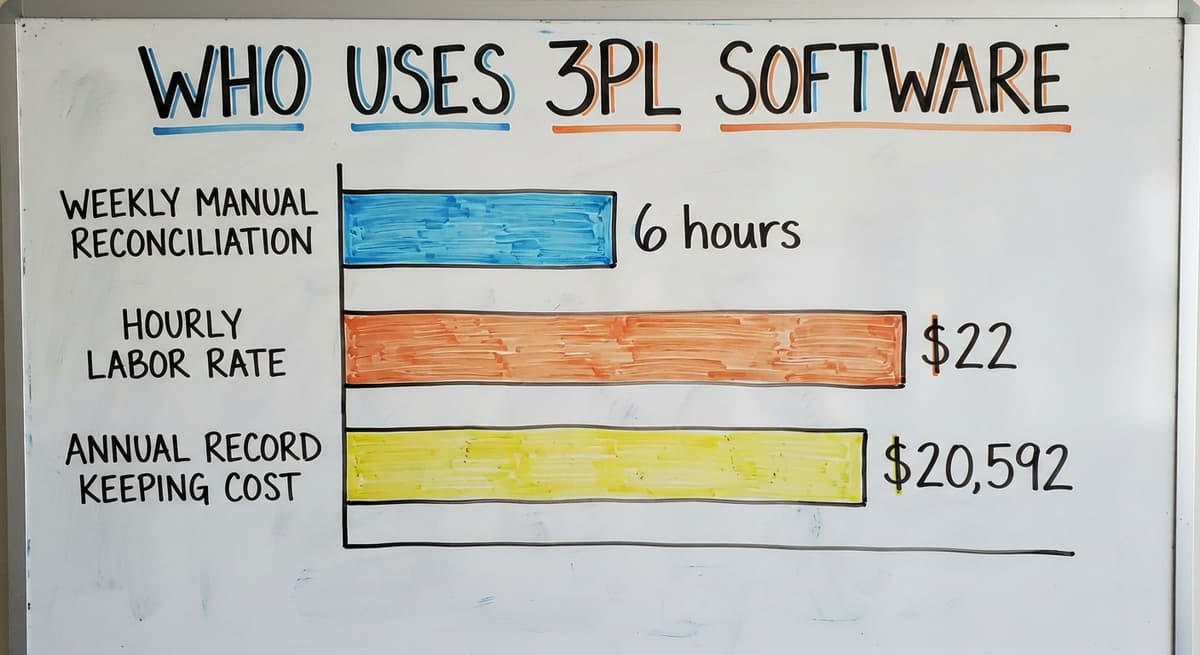
The pain point is clear. Managing 10 clients with spreadsheets and email takes hours every week. Consider 3 people each spending 6 hours a week on manual reconciliation at $22 an hour. That is $20,592 a year in labor, just to keep records straight.
The US Bureau of Labor Statistics puts the median wage for stock clerks and order fillers in this range, so the math is conservative, not generous.
Inventory accuracy also carries a legal weight most operators do not think about. The IRS is direct on this point.
IRS Publication 538 states: "To figure taxable income, you must value your inventory at the beginning and end of each tax year." That is not optional. A system that keeps accurate counts by client makes that obligation easier to meet.
How Does 3PL Software Differ from a Standard WMS?
A standard warehouse management system, or WMS, tracks one company's inventory inside one building. It works well if you own all the goods you store. It breaks down the moment you store goods for 5 different clients in the same space.
3PL software adds the client layer on top of everything. Here is what that means in practice:
| Feature | Standard WMS | 3PL Software |
|---|---|---|
| Inventory tracking | One company | Many clients, same building |
| Reporting | One set of reports | Reports by client |
| Billing | Internal cost tracking | Client-level billing by event |
| Client access | None | Client portal with live data |
This distinction matters when you are choosing software. Buying a standard WMS for a multi-client operation is like buying a car when you need a van. It looks similar. It does not do the job.
Not sure this is the right shape for your operation?
The call is free. Describe how you receive, pick and count today.
We map it on a call and show you what the system would look like built around that, before you spend anything.
Book a callCore Features Every 3PL Software Should Have
Use this as a checklist when you talk to vendors. Not every feature below fits every operation.
A 10-person fulfillment center does not need everything a 200-person 3PL uses. Know which ones you need before you start the conversation.
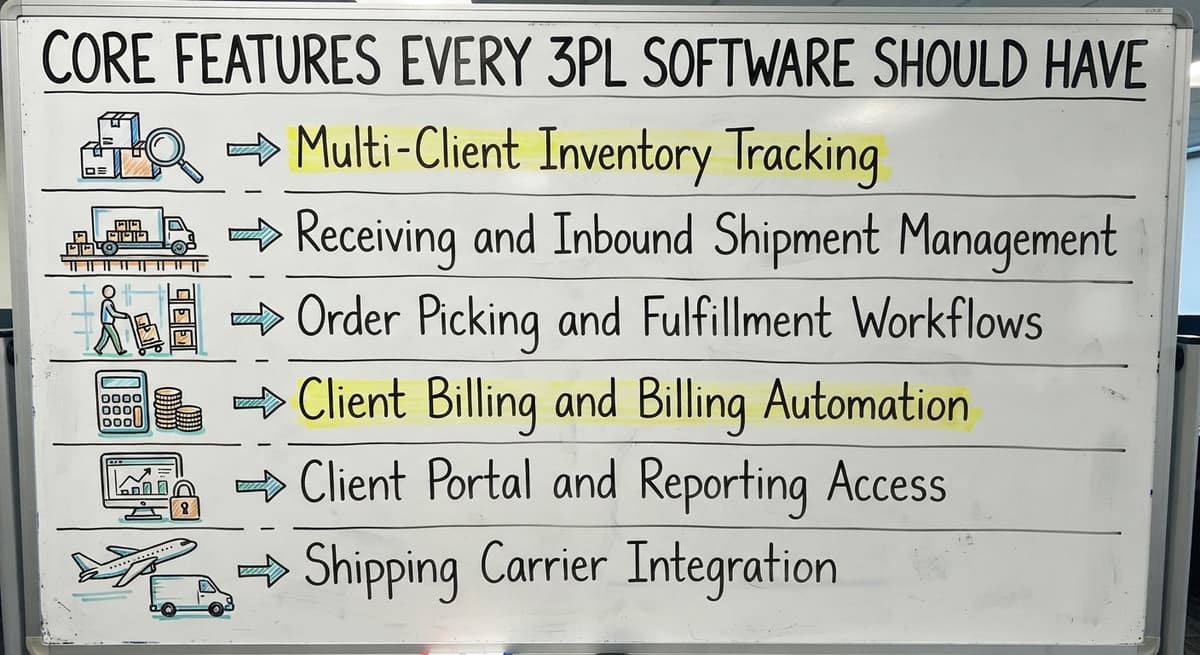
Here are the core features to evaluate:
- Multi-client inventory tracking
- Receiving and inbound shipment management
- Order picking and fulfillment workflows
- Client billing and billing automation
- Client portal and reporting access
- Shipping carrier integration
Multi-Client Inventory Tracking
Client-separated stock is the first thing 3PL software has to get right.
The system keeps each client's stock separate, even when goods share the same shelf or aisle. It tracks by SKU, lot number, and location, all tied to the correct client account.
When Client A's stock runs low, the system alerts you. Client B's count is not affected. This replaces the manual work of maintaining separate spreadsheets for each client and then trying to reconcile them at month end.
Receiving and Inbound Shipment Management
When a truck arrives, the system matches the incoming goods to a purchase order or advance shipping notice. It assigns the received items to the right client account without manual sorting.
Staff scan or enter what came in, and the system does the rest. This replaces printed receiving sheets and the data entry that follows them. Errors drop because the system checks the count against what was expected.
Order Picking and Fulfillment Workflows
The software generates pick lists by client order. For small operations, that means a simple list of what to pull and where to find it.
Larger operations can use wave picking, where the system batches orders to reduce travel time, or zone picking, where each staff member works one area. Either way, the system guides the pick. Errors drop. Speed goes up. The client gets the right order.
Client Billing and Billing Automation
3PL billing is complex. You might charge Client A a flat storage fee, charge Client B by pallet, and charge Client C a per-pick fee plus a special project rate.
Tracking that manually is where billing errors happen and where clients lose trust.
Good 3PL software records every billable event as it happens. A pallet moves in. The system logs it. An order ships. The system logs the pick fee.
At month end, the invoice is already built. The software connects to or exports into accounting tools like The accounting software without replacing them. More on that below.
Client Portal and Reporting Access
The portal is the feature clients notice most, because it replaces the emails.
A client portal gives each client a login to see their own inventory, orders, and reports. They do not need to call or email you to find out where their stock stands. This cuts inbound questions and builds trust.
Clients who can see their own data stay longer. Transparency is a retention tool, not just a convenience.
Shipping Carrier Integration
The software connects to the parcel carriers and freight carriers. It can compare rates across carriers and print the label from inside the system.
When the label prints, the tracking number goes back to the client record automatically. The client can see it in their portal. Your staff does not need to copy and paste tracking numbers into emails.

How Does 3PL Software Connect to Your Existing Tools?
The most common fear operators have is that new software means starting over. It does not.
Good 3PL software is built to work alongside the tools you already use, not to replace them.
The goal is to fill the gaps in your current setup, not to tear it down. Your accounting system stays. Your carrier accounts stay. The software plugs into them.
The accounting software and Accounting Integration
The accounting software handles invoicing and financials well. It is not built to manage warehouse operations, and it was never meant to. 3PL software does the warehouse work and passes billing data to the accounting software when it is time to invoice.
Your accounting team keeps working the way they always have. The data just arrives cleaner and faster. accounting integration for warehouse operations is one of the most common requests in this space, and most modern 3PL platforms support it.
Is the comparison easier when one option is built for you?
Yes. Off-the-shelf means fitting your process to the software, and custom is the other way round. The first look costs nothing.
Book a calleCommerce Platform Connections
If your clients sell through an online store or a marketplace, orders can flow directly into your 3PL software without anyone typing them in.
When you ship an order, the inventory count updates back to the client's store automatically. This prevents overselling. It also removes the back-and-forth emails where clients ask you to confirm what shipped.

Signs Your Operation Has Outgrown Spreadsheets
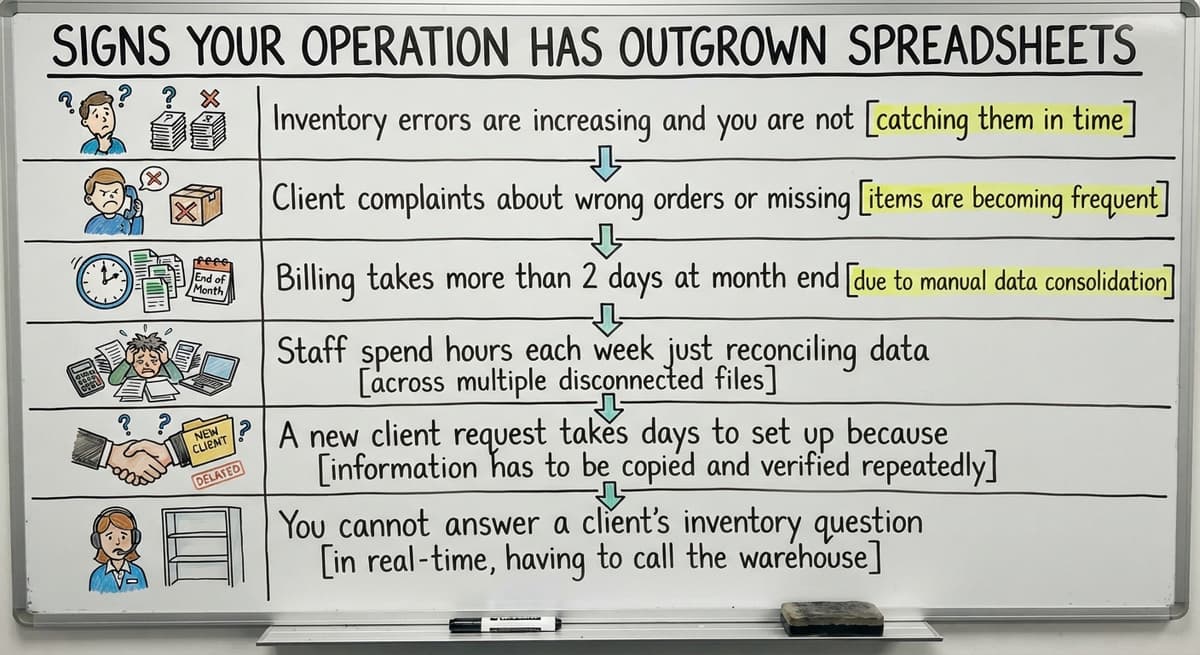
The signs your operation has outgrown spreadsheets are not failures. They are signals. Catch them early and you save clients before you lose them.
- Inventory errors are increasing and you are not sure why
- Client complaints about wrong orders or missing stock are rising
- Billing takes more than 2 days at month end
- Staff spend hours each week just reconciling data between files
- A new client request takes days to set up because nothing is templated
- You cannot answer a client's inventory question without opening 3 files
If 3 or more of these are true right now, the spreadsheet era is over for your operation.

What Should You Look for When Choosing 3PL Software?
Choosing 3PL software is a practical buying decision for operators who are not software experts. The right software fits your operation.
You do not change how you work to fit the software. That is the frame to hold when you talk to any vendor.
What does it look like running on your own process?
The first thing you see is it running on your own process, at no build cost. The subscription starts once it is live and doing the job, not before.
Book a call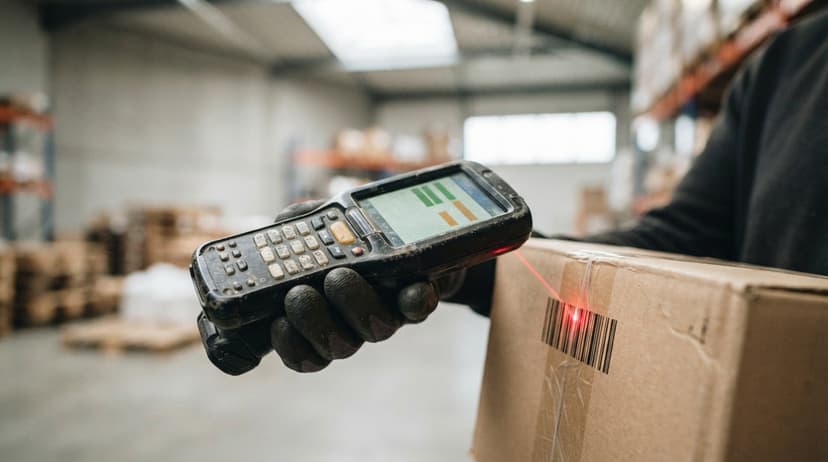
Custom 3PL Software vs Off-the-Shelf Platforms
Off-the-shelf 3PL platforms work well for operations that fit the standard mold. If your workflows match what the platform expects, setup is faster and cost is lower.
Custom 3PL software makes more sense when your operation has specific workflows that packaged tools cannot handle without forcing you to change how you work.
The forced process changes are where off-the-shelf implementations fail. Staff resist the new way. Errors go up during the change. Clients notice.
A custom build starts with how your operation already works. It fills the gaps without asking you to rebuild your process around the software.
The NIST Manufacturing Extension Partnership offers vendor-neutral guidance on supply chain process improvement that reinforces this point: the process should drive the tool, not the other way around.
Common Mistakes When Implementing 3PL Software
The most common mistakes when implementing 3PL software come from real implementations, not theory.
- Buying more than you need. Features you will not use in year one cost money and slow adoption.
- Skipping staff training. The best system fails if staff do not know how to use it.
- Not cleaning up data before migration. Dirty data in means dirty data out. Fix your records first.
- Going live without a parallel period. Run the old system and the new one side by side for at least 2 weeks. Catch errors before they reach clients.
- Choosing a vendor based on price alone. The cheapest option is the most expensive when you count support time and rework.

How Does a Local Software Partner Build 3PL Software Differently?
A local team can visit your operation. They can watch how goods move, where delays happen, and where staff work around the system rather than with it. That is information a remote vendor configuring a template never gets.
For operators in the Columbus, Ohio region and across the Midwest, working with a team that can walk your floor changes the result. The software gets built around your workflow, not a generic one.
Your the accounting software stays in place. Your carrier accounts stay in place. The manual parts get replaced. The parts that already work stay exactly as they are.
Fulfillment center software built this way takes less time to adopt because staff recognize their own process inside it. That is the difference between a tool people use and a tool that sits unused after month two.

Frequently Asked Questions About 3PL Software
Does 3PL software replace the accounting software? No. 3PL software handles warehouse operations and billing events. It passes that data to the accounting software for invoicing and financials. Your accounting workflow stays intact.
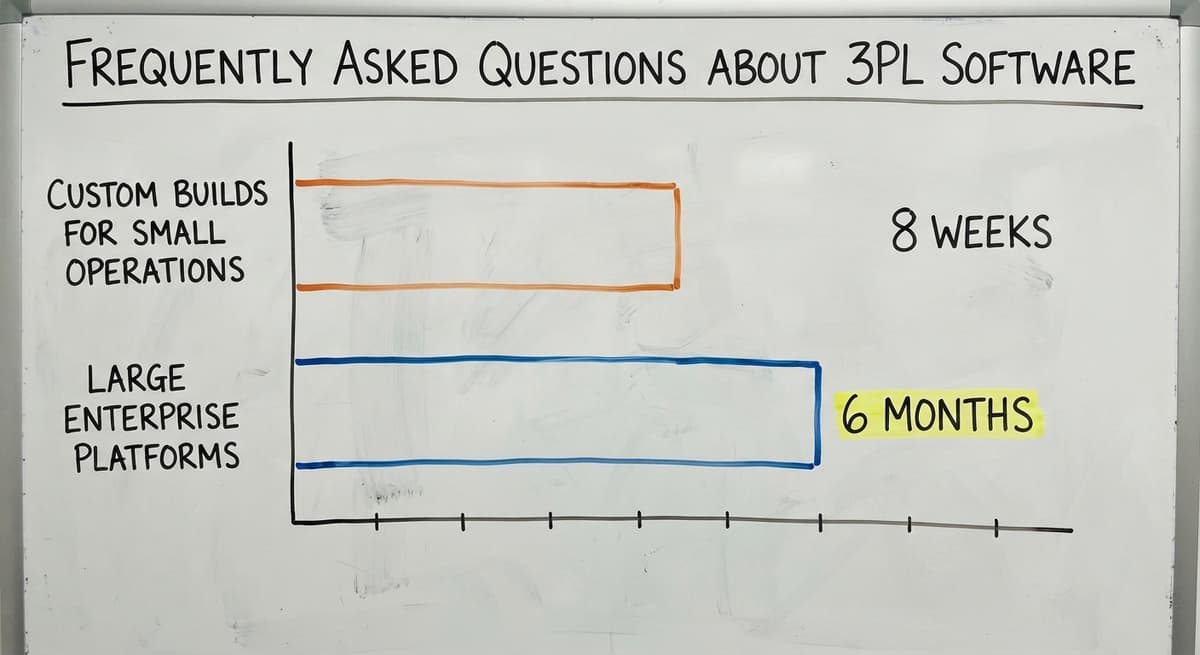
How long does implementation take? It depends on complexity. Custom builds for small operations can go live in 4 to 8 weeks. Large enterprise platforms can take 6 months or more.
Can a small warehouse with fewer than 50 employees use 3PL software? Yes.
Custom solutions built to your current size are more affordable and faster to adopt than enterprise platforms with features you will never use.
What is the difference between 3PL software and an ERP? An ERP covers the whole business: finance, HR, purchasing, and operations. 3PL software focuses on warehouse and fulfillment. It is a narrower, deeper tool for the work that happens inside the building.
If your operation is still running on spreadsheets and email, the cost is already showing up in errors, billing delays, and client questions you cannot answer fast enough.
The Software Society builds warehouse and fulfillment systems around how your operation already works, not around a template. If you want to see what that looks like for your size of operation, start with a conversation.
Frequently asked questions
Frequently asked questions
What is the best 3PL software?
There is no single best option. The right 3PL software depends on your operation size, number of clients, billing complexity, and whether you need ecommerce integrations.
Small operations do better with a custom build than an enterprise platform they will never fully use.
Is Amazon a 3PL or 4PL?
Amazon operates as both, depending on the service. Fulfillment by Amazon (FBA) functions as a 3PL: it stores and ships goods on behalf of sellers.
Amazon also acts as a 4PL in some supply chain arrangements where it manages multiple logistics providers on a client's behalf.
Who is the largest 3PL in the US?
C.H. Robinson is consistently ranked among the largest 3PL providers in the US by revenue.
XPO Logistics, Ryder, and UPS Supply Chain Solutions also rank near the top. Rankings shift year to year based on acquisitions and revenue reporting.
Does Costco use 3PL?
Costco uses a mix of in-house logistics and third-party logistics providers depending on the region and product category.
Large retailers routinely use 3PL partners for overflow warehousing, cross-docking, and last-mile delivery without disclosing specific vendor names publicly.
How does 3PL software handle billing for multiple clients?
The software records every billable event as it happens: storage, receiving, picks, and special projects. Each event is tied to the correct client account.
At month end, the invoice is already built from real activity data, not from memory or manual logs.
What does a client portal do in 3PL software?
A client portal gives each client a secure login to view their own inventory levels, order status, and reports. It reduces inbound emails and phone calls asking for updates, and it builds client trust through real-time transparency.
How does 3PL software connect to ecommerce platforms?
Orders from online stores and marketplaces flow directly into the 3PL software without manual entry. When an order ships, inventory counts update back to the store automatically to prevent overselling.
What signs indicate a warehouse has outgrown spreadsheets?
Key signs include rising inventory errors, client complaints about wrong or missing orders, billing that takes more than 2 days at month end, and staff spending hours each week just reconciling data between files.
How much does 3PL software cost?
Packaged 3PL platforms run $500 to $3,000 a month depending on order volume and client count, plus setup fees of $2,000 to $10,000.
A custom build scoped to one operation runs $15,000 to $40,000 once with a smaller monthly fee for hosting and support.
What is the difference between 3PL software and a WMS?
A WMS runs one company's warehouse. 3PL software runs a warehouse that holds many clients' stock, so it adds client-level inventory, per-client billing for storage and handling, and a portal where each client sees only their own orders.
What is the best 3PL software for small warehouses?
The one that bills your clients the way you already bill them and connects to the accounting package you already run.
For under 10 clients and under 500 orders a day, a build around your own rate card costs less over 3 years than a platform priced for 50 clients.
What features should a 3PL warehouse management system have?
Client-separated inventory, per-client billing on storage, receiving, picking, and packaging, a client portal, order import from the client's sales channels, carrier label printing, and an export to the accounting package. Anything else is a nice-to-have.
What is in a free first look?
A 30 minute call, your operation mapped, and a clear picture of what we would build. No obligation and nothing to install.
Book a callRelated guides
The rest of this guide, for the parts of the job this page does not cover.
Guides
- Best 3pl Wms Software
- 3pl Companies
- 3pl Warehouse Management System
- Warehouse Inventory Management Software
- Warehouse Inventory Tracking Software
- Best Inventory Software
- Warehouse Receiving Software
- Quickbooks Inventory Management Software
- Warehouse Stock Management Software
- Software for Warehouse Management System
- Inventory and Warehouse Management Software
- Custom Inventory Management Software
- List of Warehouse Management Software
- Online Warehouse Management Software
- Warehouse Stock Software
- Multi Location Inventory Management Software
- Warehouse Inventory Software Programs
- Cloud Stock Management Software
- Manufacturing Inventory Management Software
- Cost of Inventory Management Software
- Inventory Software Warehouse
- Small Business Stock Management Software