

Best 3pl Wms Software
The best 3PL WMS software bills clients the way you already bill them and gives each client a portal. Extensiv, Infoplus, and Deposco cover most 3PLs under 20 clients at $500 to $3,000 a month; a custom build at $15,000 to $40,000 once suits the operations those platforms force to change. This guide, reviewed in September 2026, compares the 5 platforms that appear on shortlists most, sets out the 6 features a 3PL WMS needs that a standard WMS does not, and runs the cost comparison over 3 years.
Published 23 August 2026. Reviewed and updated 15 September 2026.
Book a callWhat Is 3PL WMS Software?
A 3PL, or third-party logistics provider, runs a warehouse on behalf of other businesses. You store their goods, pick their orders, and ship to their customers.
A warehouse management system, or WMS, is the software that tracks every item from the moment it arrives to the moment it leaves.
Reviewed August 2026. Each figure comes from the assumptions stated beside it, so you can substitute your own and the arithmetic still holds.
A standard WMS tracks inventory for one company. A 3PL WMS tracks inventory for many clients at once, each with their own stock, their own billing rates, and their own reporting needs. That difference matters more than most vendors admit.
Would you rather have it built around your operation?
The first look is free. If you would rather not compare products, describe how your operation already works and we build the system around it.
No build cost. You see it running on your own process first, and the monthly subscription starts only once it is live.
Book a callWhat Must a 3PL WMS Do That a Standard WMS Does Not?
Features a 3PL WMS must have that a standard WMS does not:
- Separate inventory records for each client
- Billing by pallet, pick, or storage unit per client
- A client portal so each customer can check their own stock
- Rate cards that differ from one client to the next
- Reporting that shows each client only their own data
If a system cannot do those things, it is a warehouse tool, not a 3PL warehouse management system.
Who Needs 3PL WMS Software
The typical buyer runs a fulfilment centre with 5 to 100 staff. They have between 3 and 30 clients. They are managing inventory in spreadsheets, emailing clients stock reports, and billing in QuickBooks by hand. Every new client makes the problem worse.
The moment a business outgrows its current tools looks like one of these:
- A billing dispute with a client you cannot resolve because the data lives in 3 places
- A mis-pick that reached a customer because no one could see the real stock level
- A new client you had to turn down because your system could not handle another account
The Real Cost of Manual Warehouse Operations
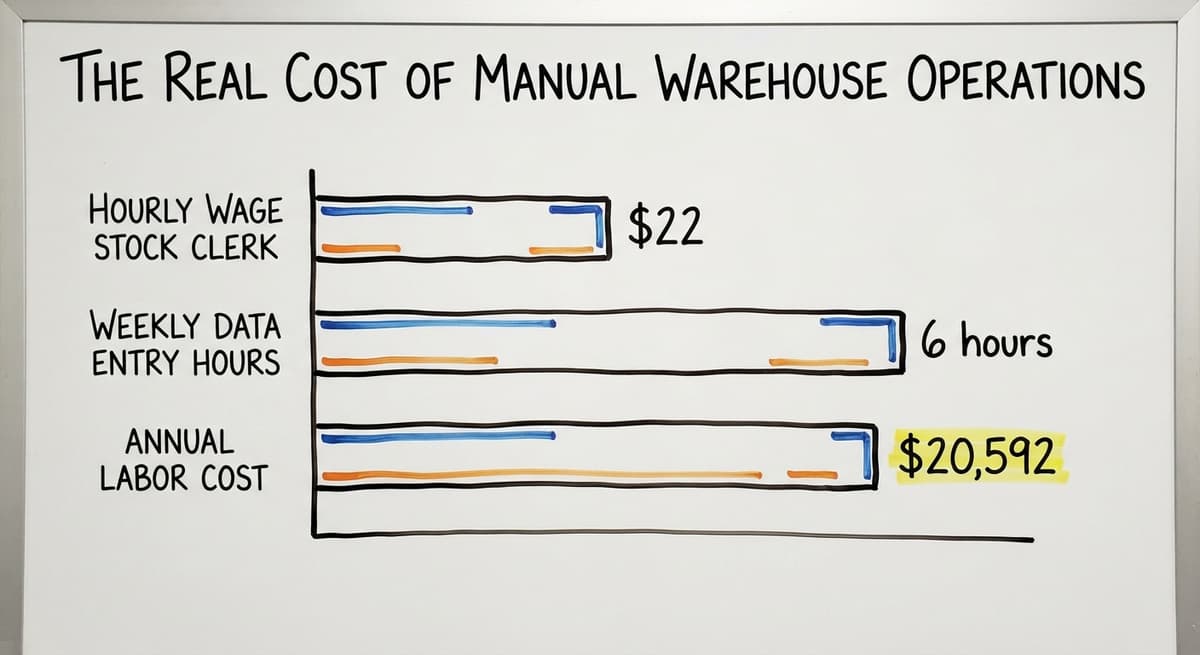
Operations running on QuickBooks plus manual workarounds are not broken. They are just slow. The cost adds up. The US Bureau of Labor Statistics reports that warehouse stock clerks earn around $22 per hour.
Three people spending 6 hours a week on manual data entry costs about $20,592 a year in labour alone. That does not count the errors.
Inventory tracking is also a legal matter, not just an operational one.
The IRS is direct about it: as stated in IRS Publication 538, "To figure taxable income, you must value your inventory at the beginning and end of each tax year." Spreadsheets make that harder than it needs to be.
Core Features to Look for in Any 3PL WMS
Before you look at vendor demos, agree on what your operation actually needs. These are the features every 3PL warehouse management system should cover:
- Inventory tracking by client and SKU. Stock must be separated by owner, not just by location.
- Receiving, put-away, pick, pack, and ship workflows. The full cycle, in one system.
- Multi-client billing and rate cards. Each client pays differently. The system should handle that.
- Real-time stock visibility. Staff and clients should see the same number at the same time.
- Readable reporting. If your operations manager needs a spreadsheet to interpret the report, the report is wrong.
These are the baseline. Any system missing one of these is not ready for a 3PL environment.
Features That Matter Only to 3PLs
Generic WMS tools cover the basics above. What separates true 3PL software is the layer built for multi-client operations.
- Client-facing portals. Customers log in and check their own inventory without calling you.
- Billing by pallet, pick, or storage unit. Not just "per order" but per the unit you agreed with each client.
- Lot and expiry tracking. Food and pharma clients need this. It is non-negotiable for those verticals.
- Carrier integration. Multi-carrier shipping means UPS, FedEx, USPS, and regional carriers all in one place.
- Per-client reporting. Each client sees their data. No one sees anyone else's.
When you evaluate a shortlist, ask vendors to show you each of these features in a live system. If they switch to slides, that is a warning sign.
How Do You Evaluate 3PL WMS Software Without Getting Overwhelmed?
Most buyers start with a feature checklist. That is the wrong place to start. Begin with your biggest daily pain.
If billing disputes eat 4 hours a week, billing accuracy is your first filter. If clients call every day to ask about stock, a client portal is your first filter.
The feature that solves your worst problem is worth more than 10 features you will never use.
Not sure this is the right shape for your operation?
The call is free. Describe how you receive, pick and count today. We map it on a call and show you what the system would look like built around that, before you spend anything.
Book a callA Practical Process for Evaluating 3PL WMS Vendors
A practical evaluation process:
- Write down your 3 biggest daily problems in plain language.
- Ask each vendor to show you how their system solves those 3 problems. Use your real workflows, not their demo script.
- Ask how the system connects to QuickBooks or whether it replaces it entirely.
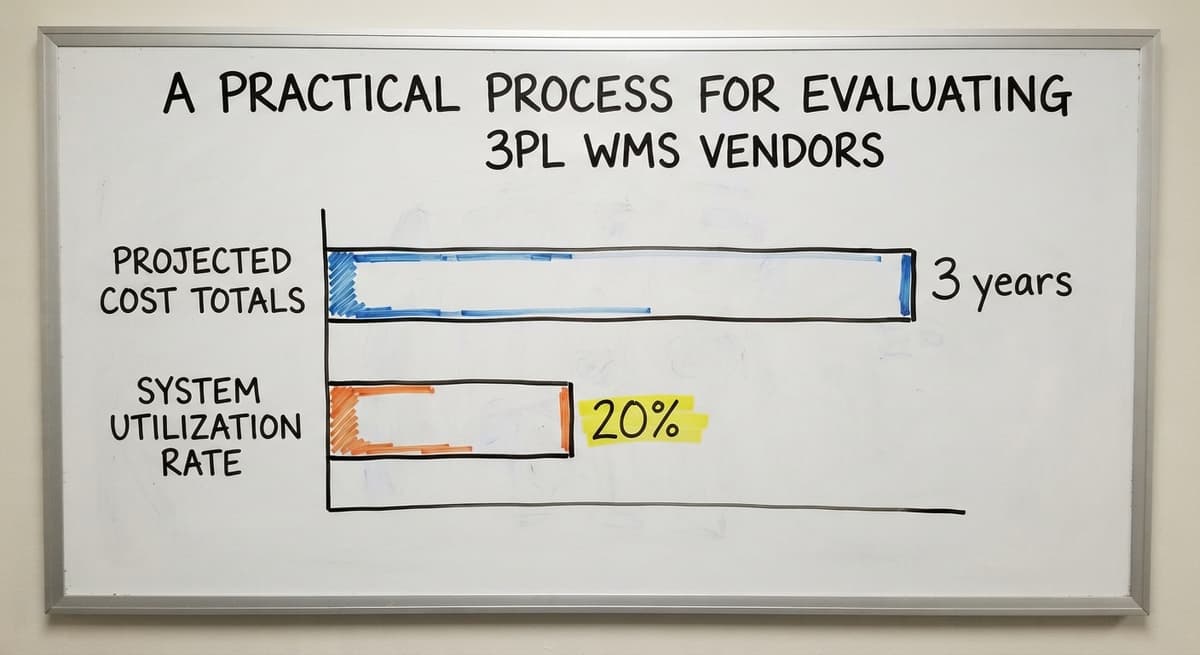
- Get a full cost breakdown: license, setup, training, and monthly fees. Add them up for 3 years.
- Cut any vendor who cannot show you a live demo with real data.
Buying for features you will never use is the most common mistake in this category. A smaller, well-fitted system beats a large system you only use at 20% capacity.
Cloud-Based vs On-Premise 3PL WMS
Cloud-based means the software runs on servers you do not own. You log in through a browser. Updates happen automatically.
You pay a monthly or annual fee. Most small 3PLs benefit from this model because the upfront cost is lower and there is no server to maintain.
On-premise means the software runs on your own hardware. You control the data and the updates. The IT burden is higher. The upfront cost is higher too.
A simple comparison:
| Factor | Cloud-Based | On-Premise |
|---|---|---|
| Upfront cost | Low | High |
| Monthly cost | Ongoing | Lower after setup |
| IT needed | Minimal | More |
| Access from anywhere | Yes | Requires setup |
| Updates | Automatic | Manual |
| Data control | Vendor holds it | You hold it |
Some systems, like Latitude WMS, can be hosted either way. Most new buyers in the small to mid-size range choose cloud-based and find it works well.
Top Commercial 3PL WMS Software Options
The following is a shortlist for small to mid-size fulfilment centre operations, not an exhaustive ranking of every product on the market.
Each option below suits a different type of buyer. Read the description before you book a demo.
- Extensiv: Strong multi-client billing and a client portal. Appears most often on shortlists for small to mid-size 3PLs. QuickBooks integration requires some configuration.
- Infoplus: Cloud-based and priced to scale with order volume. Connects to QuickBooks Online. A practical starting point for operations moving off spreadsheets.
- Deposco: Handles both B2B and B2C fulfilment. Better suited to operations with mixed order types. Integration with QuickBooks is more complex and may need middleware.
- Fishbowl: Deepest native QuickBooks integration of any option on this list. Works better for simpler setups with fewer clients rather than high-volume multi-client 3PLs.
- Latitude WMS: Flexible configuration but less standardised QuickBooks integration. Worth evaluating if your workflows are unusual and off-the-shelf options have not fit well.

When Is Off-the-Shelf 3PL WMS Software Not the Right Fit?
Commercial software is built for the most common version of your business. If your operation is unusual, the software may fight you.
Signs that a commercial WMS is the wrong fit:
- You spend more time building workarounds than using the system
- Your billing structure does not match any of the rate card templates
- A vendor asks you to change your process to fit their software
- You are paying for modules you never open
Operations with niche client requirements, unusual storage billing, or highly specific workflows find that no off-the-shelf product fits cleanly. That is not a failure. It is a signal to look at a different kind of solution.
Custom 3PL WMS Software Built Around Your Operation
Custom WMS software is built to match the way you already work, not to replace it. The goal is to remove the manual parts without changing what works.
What custom means in practice:
- QuickBooks stays in place for accounting. Only the manual warehouse steps are replaced.
- No six-month ERP rollout. No six-figure license.
- The system is built to your billing structure, your client list, your workflows.
- A local team builds it and stays involved after launch.
Is the comparison easier when one option is built for you?
Yes. Off-the-shelf means fitting your process to the software, and custom is the other way round. The first look costs nothing.
Book a call
When Does a Custom WMS Make More Sense Than Off-the-Shelf?
Custom warehouse software is the approach The Software Society takes with small distributors.
The focus is on replacing the fragmented manual work, not on selling a platform with features you will never use. It suits operations where the off-the-shelf options either cost too much for what they deliver or force process changes that do not make sense.
Custom is not always cheaper upfront. It is cheaper over 3 years when you stop paying for unused features and avoid a second implementation when the first system does not fit.
How Does a Custom WMS Compare to Commercial Platforms on Total Cost?
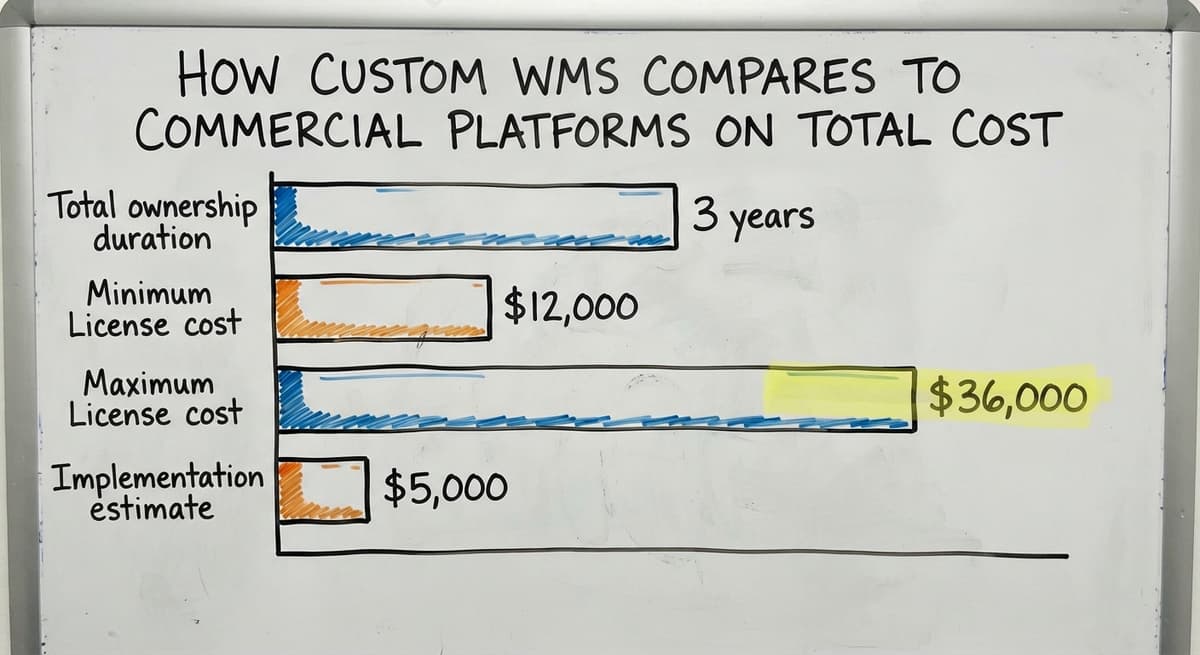
Most buyers compare monthly fees. That is the wrong comparison. Total cost of ownership over 3 years is the right number.
A typical commercial WMS for a small 3PL might look like this:
| Cost item | Estimate |
|---|---|
| License (year 1) | $12,000 to $36,000 |
| Implementation | $5,000 to $20,000 |
| Training | $2,000 to $8,000 |
| Year 2 and 3 fees | $10,000 to $30,000 per year |
| 3-year total | $39,000 to $114,000 |

Scoping a Custom Build to Control Total Cost
A custom build scoped to what you actually need can come in well below the top of that range, and it includes only the features your operation uses.
The NIST Manufacturing Extension Partnership notes that supply chain software decisions should be evaluated on process fit, not feature count. A system that fits your process at 80% of the cost of one that does not is the better investment.
Small operations pay for enterprise features they never touch. Scope the build to your real needs and the number changes fast.
QuickBooks Integration and Your 3PL WMS
Most small 3PLs rely on QuickBooks for accounting and do not want to abandon it. That is a reasonable position. QuickBooks works. The goal is to stop re-entering data by hand.
Commercial WMS options and their QuickBooks fit:
- Fishbowl: Deepest native QuickBooks integration. Built for it.
- Infoplus: Connects via QuickBooks Online. Works well for most setups.
- Extensiv: Integration available but may need configuration.
- Deposco: More complex integration. May require middleware.
- Latitude WMS: Integration possible but less standardised.

The Risk of Poor QuickBooks Integration
The risk with poor integration is double-entry. You record a shipment in the WMS and then re-enter it in QuickBooks. That is exactly the manual work you were trying to eliminate.
Ask any vendor to show you the QuickBooks sync in a live demo before you sign.
A custom solution built for QuickBooks integration for warehouse operations can sync the two systems directly, so data flows one way automatically. No double-entry, no reconciliation headaches.
Implementation: What to Expect When You Switch WMS Platforms
Vendors tend to understate how long implementation takes. Here is a more honest picture for a small 3PL.
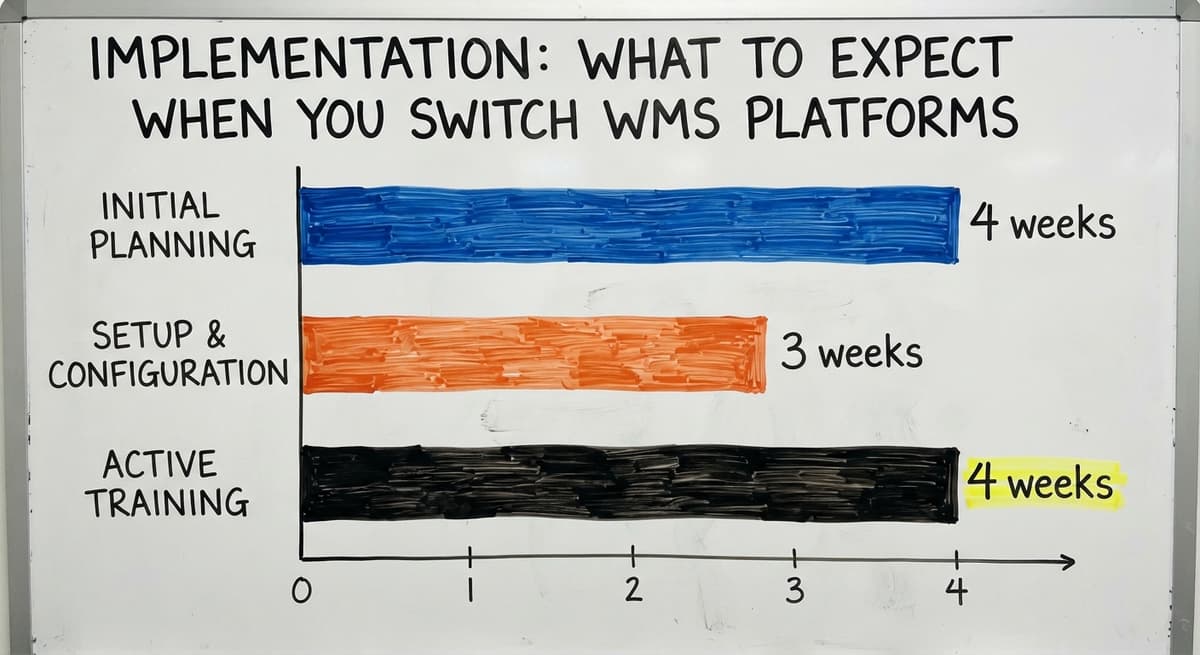
- Data migration. Moving client records, SKUs, and stock levels to a new system is the hardest part. Plan 2 to 4 weeks for this alone.
- Configuration. Setting up rate cards, client accounts, and workflows takes 1 to 3 weeks.
- Staff training. Your team needs time to learn the new system. Budget 2 to 4 weeks of active training, not a one-day session.

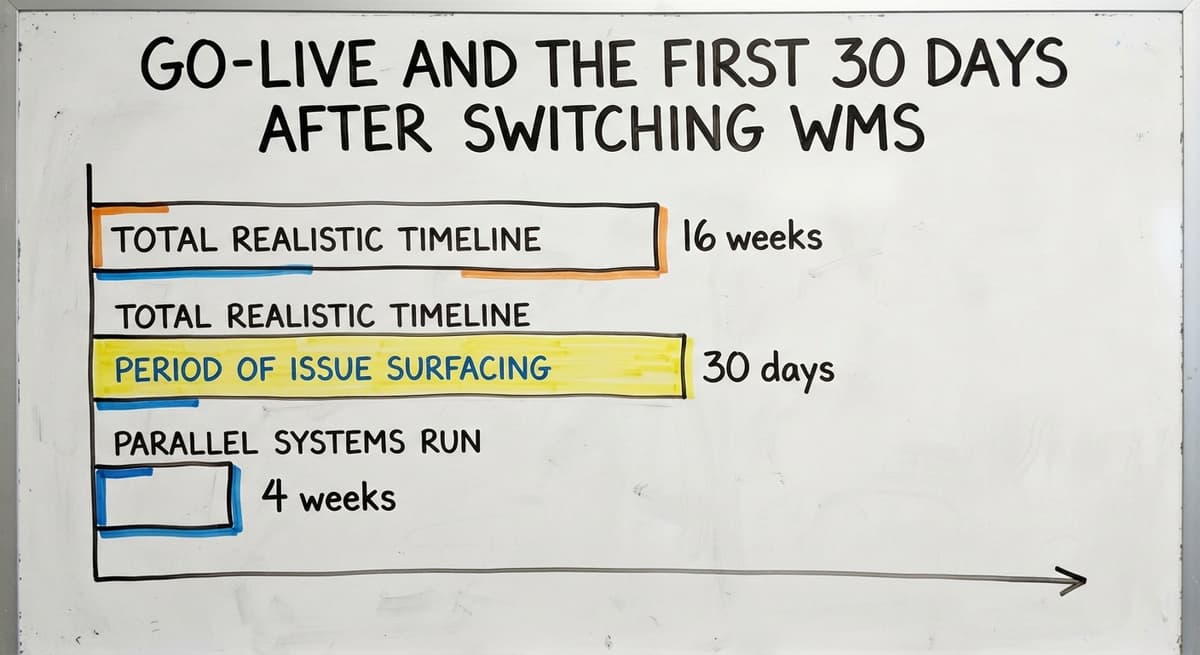
Go-Live and the First 30 Days After Switching WMS
- Parallel running. Run both systems at the same time for 2 to 4 weeks before you cut over fully. This catches errors before they reach clients.
- Go-live and support. The first 30 days after go-live will surface issues. Make sure your vendor is available during that period.
Total realistic timeline: 8 to 16 weeks for a small operation. Ask vendors who handles implementation and whether the same team stays involved after go-live.
Handoffs to a third party mid-project are a common source of problems.
What does it look like running on your own process?
The first thing you see is it running on your own process, at no build cost. The subscription starts once it is live and doing the job, not before.
Book a callRed Flags When Evaluating a 3PL WMS Vendor
Not every vendor is a good partner. These are the warning signs to watch for before you sign anything.
- Vague pricing. If the number only appears after 3 calls and a formal proposal, the number is probably not in your favour.
- Demo only on their data. A vendor who will not let you run a demo on your own workflows is hiding something.
- Implementation handed to a third party. If the vendor sells the software but someone else implements it, ask who is accountable when it goes wrong.
- No pilot period. A contract that locks you in before you have tested the system in production is a risk you should not take.
- Offshore support with no local contact. If you have a problem at 9am on a Monday, you need someone who picks up the phone.
These are not hypothetical. They are the most common complaints from small 3PL operators who switched systems and regretted it.

Questions to Ask Any 3PL WMS Provider Before You Sign
Take these into every vendor conversation. The answers will tell you more than the demo.
- How does billing work for multiple clients with different rate cards? Ask them to show you, not describe it.
- What does implementation include and who does the work? Get names, not job titles.
- How does the system connect to our current QuickBooks setup? Ask to see the sync in action.
- What happens to our data if we cancel? You need a clean export in a usable format.
- Can we speak to a reference customer of similar size? Not a logo on a slide. An actual conversation.
A vendor who struggles with any of these questions is telling you something important.
How Do You Build a Business Case for New 3PL WMS Software?
If you need to justify the investment to a partner, a board, or yourself, build the case from numbers you already have.
Step 1: Calculate hours lost to manual work. Count the hours your team spends on data entry, client reporting, and billing each week. Multiply by the hourly rate.
Use the Bureau of Labor Statistics figure of around $22 per hour if you do not have your own number. 2 people spending 8 hours a week on manual tasks costs about $18,304 a year.
Step 2: Estimate error costs. Mis-picks, mis-shipments, and billing disputes each have a cost.
A single mis-shipment that requires a re-send and a credit note can cost $50 to $200. If that happens 10 times a month, that is $6,000 to $24,000 a year.

Projecting Revenue Upside and Payback Period
Step 3: Project new client capacity. If better software lets you onboard 2 more clients without adding staff, what is that worth in annual revenue? Put a number on it.
Step 4: Calculate payback period. Add up the costs above. Divide by the annual cost of the new system. If the system pays back in under 18 months, the case is strong.
Present this as a simple table. Stakeholders respond to numbers, not to feature lists.
Frequently Asked Questions About 3PL WMS Software
What is the best software for 3PLs? There is no single best answer. Extensiv and Infoplus are strong choices for small to mid-size fulfilment centres that need a client portal and multi-client billing.
Deposco suits operations handling both B2B and B2C. Fishbowl works better for simpler, single-client setups. The right answer depends on your client mix, billing structure, and budget.
What is the most popular WMS system? In large enterprise settings, Manhattan Associates and Blue Yonder are widely used. For small to mid-size 3PLs, Extensiv and Infoplus appear most often on shortlists.
Popularity does not equal fit. The most popular system for your size and type of operation matters more than overall market share.
Who are the top 10 3PL companies? The top-10 question is about logistics providers, not software.
The largest 3PL operators by revenue include DHL Supply Chain, XPO Logistics, and Ryder. This article covers software for businesses that run 3PL operations, not rankings of the providers themselves.

More Frequently Asked Questions About 3PL WMS Software
Which WMS does Amazon use? Amazon runs a proprietary, internally built warehouse management system. It is not available to outside businesses. It is not a useful comparison for a small fulfilment centre choosing a commercial or custom WMS.
What is the difference between a WMS and an ERP for a 3PL? A WMS manages what happens inside the warehouse: receiving, picking, packing, shipping, and inventory. An ERP, or enterprise resource planning system, covers the whole business: accounting, HR, purchasing, and more.
Many small 3PLs do not need an ERP. They need a WMS that connects to QuickBooks. Buying a full ERP to solve a warehouse problem is the wrong tool for the job.
Can a small 3PL afford a proper WMS? Yes. Cloud-based options like Infoplus and SkuVault Core are priced to scale with order volume.
A custom build scoped to your real needs can also be more affordable than a mid-market commercial platform. The key is to compare total cost over 3 years, not just the monthly fee.
How long does it take to implement 3PL WMS software? For a small 3PL, plan for 8 to 16 weeks from contract to full go-live.
Data migration and staff training take longer than most vendors say. A parallel-run period before full cutover adds time but reduces risk.
Is custom WMS software only for large enterprises? No. Custom WMS is a good fit for small and mid-size operations whose workflows do not match any off-the-shelf product. It is also worth considering when a commercial platform would require you to change your billing structure or client processes to fit the software.
Next Steps for Choosing the Right 3PL WMS Software
The best 3PL WMS software is the one your team will actually use. A system with every feature on the market is worthless if it sits unused because it does not match your workflows.
A simple decision framework:
- Name your biggest daily pain. Start there, not with a feature list.
- Shortlist 2 to 3 systems that solve that pain. Use this guide to filter.
- Test each one with your real data and your real workflows.
- Compare total cost over 3 years, not just the monthly fee.
- Check the vendor's support model before you sign.

When Should You Consider a Custom-Built WMS Instead?
If none of the commercial options fit cleanly, a custom-built fulfilment centre operations software may be the better path. It is not the right answer for everyone. It is the right answer when the off-the-shelf options would cost you more in workarounds than the build itself.
The Software Society works with small and mid-size operations that have outgrown their current tools and want a system built around how they actually work.
If you are not sure which direction makes sense for your operation, a short discovery conversation costs nothing and often clarifies the decision quickly. There is no sales pitch. Just a straight conversation about what you have, what is not working, and what the options look like.
Frequently asked questions
Frequently asked questions
What is the best software for 3PLs?
There is no single best answer. Extensiv and Infoplus are strong choices for small to mid-size fulfilment centres that need a client portal and multi-client billing. Deposco suits operations handling both B2B and B2C orders.
Fishbowl works better for simpler, single-client setups. The right answer depends on your client mix, billing structure, and budget. Use your biggest daily pain as the first filter, not a feature checklist.
What is the most popular WMS system?
In large enterprise settings, Manhattan Associates and Blue Yonder are widely used. For small to mid-size 3PLs, Extensiv and Infoplus appear most often on shortlists.
Popularity does not equal fit. The most popular system for your size and type of operation matters more than overall market share.
Who are the top 10 3PL companies?
The top-10 question is about logistics providers, not software. The largest 3PL operators by revenue include DHL Supply Chain, XPO Logistics, and Ryder. This article covers software for businesses that run 3PL operations, not rankings of the providers themselves.
Which WMS does Amazon use?
Amazon runs a proprietary, internally built warehouse management system. It is not available to outside businesses. It is not a useful comparison for a small fulfilment centre choosing a commercial or custom WMS.
What is the difference between a WMS and an ERP for a 3PL?
A WMS manages what happens inside the warehouse: receiving, picking, packing, shipping, and inventory. An ERP covers the whole business: accounting, HR, purchasing, and more.
Many small 3PLs do not need an ERP. They need a WMS that connects to QuickBooks. Buying a full ERP to solve a warehouse problem is the wrong tool for the job.
Can a small 3PL afford a proper WMS?
Yes. Cloud-based options like Infoplus and SkuVault Core are priced to scale with order volume.
A custom build scoped to your real needs can also be more affordable than a mid-market commercial platform. Compare total cost over 3 years, not just the monthly fee.
How long does it take to implement 3PL WMS software?
For a small 3PL, plan for 8 to 16 weeks from contract to full go-live. Data migration and staff training take longer than most vendors say.
Running both systems in parallel for 2 to 4 weeks before full cutover adds time but reduces risk significantly.
Is custom WMS software only for large enterprises?
No. Custom WMS is a good fit for small and mid-size operations whose workflows do not match any off-the-shelf product. It is also worth considering when a commercial platform would require you to change your billing structure or client processes to fit the software rather than the other way around.
What features should a 3PL WMS include?
Client-separated inventory, per-client billing on storage, receiving, picking, and packaging, a client portal, order import from each client's sales channels, multi-carrier label printing, and an export to the accounting package. Those 6 are the difference from a standard WMS.
How much does 3PL WMS software cost?
Cloud platforms run $500 to $3,000 a month by order volume and client count, plus $2,000 to $10,000 setup.
A custom build scoped to one operation runs $15,000 to $40,000 once with $200 to $600 a month for hosting and support. Compare both over 3 years.
How does Extensiv compare with ShipHero?
Extensiv is built for multi-client 3PLs, with billing and a client portal at the centre.
ShipHero started as a brand's own e-commerce WMS and added 3PL features later, so it is stronger on high-volume parcel picking and weaker on client billing. A 3PL with more than 5 clients shortlists Extensiv first.
What is in a free first look?
A 30 minute call, your operation mapped, and a clear picture of what we would build. No obligation and nothing to install.
Book a callRelated guides
The rest of this guide, for the parts of the job this page does not cover.
Guides
- 3pl Software
- 3pl Companies
- 3pl Warehouse Management System
- Wms for Small Business
- Top 10 Wms Systems
- Warehouse Inventory Management Software
- Warehouse Inventory Tracking Software
- Best Inventory Software
- Warehouse Receiving Software
- Quickbooks Inventory Management Software
- Warehouse Stock Management Software
- Software for Warehouse Management System
- Inventory and Warehouse Management Software
- Custom Inventory Management Software
- List of Warehouse Management Software
- Online Warehouse Management Software
- Warehouse Stock Software
- Multi Location Inventory Management Software
- Warehouse Inventory Software Programs
- Cloud Stock Management Software
- Manufacturing Inventory Management Software
- Cost of Inventory Management Software