


Inventory Control Software For Small Business
Inventory control software for small business tracks stock levels, incoming orders, and product movement in one place, in real time. It replaces spreadsheets and manual counts. Most small businesses can be up and running in weeks, not months. You do not need to replace the accounting software or hire an IT team to make it work.
Reviewed August 2026. Each figure comes from the assumptions stated beside it, so you can substitute your own and the arithmetic still holds.
Published 25 August 2026. Reviewed and updated 15 September 2026.
Book a callWhat Does Inventory Control Software Actually Do?
Inventory control software is a tool that watches your stock for you. Every time a product moves, the system records it.
You can see what you have, where it is, and when you are running low, without walking the floor or opening a spreadsheet.
The software connects receiving, storage, picking, and shipping in one place. When a shipment arrives, the system logs it.
When an order ships, the count drops. Nothing falls through the cracks between those two steps.
Manual methods break down fast. A spreadsheet updated by one person is already wrong by the time a second person opens it.
Printed pick sheets do not update when stock changes. Email chains between your warehouse and your office create gaps that cost you orders and time.
Would you rather have it built around your operation?
The first look is free. If you would rather not compare products, describe how your operation already works and we build the system around it.
No build cost. You see it running on your own process first, and the monthly subscription starts only once it is live.
Book a callWhy Do Small Businesses Struggle with Inventory?
The most common problems are overselling, lost stock, and counting errors. Each one is painful on its own. Together, they compound.
Most small distributors and warehouse operators rely on spreadsheet, email, and paper logs. That works at low volume.
As order volume grows, those tools slow you down. One missed count leads to a backorder. One backorder leads to a lost customer.
The US Federal Trade Commission requires sellers to ship within the timeframe they promise, or notify the buyer and offer a refund.
Accurate stock counts protect you from that obligation. Selling something you do not have puts you on the wrong side of that rule.
The IRS adds another layer. "To figure taxable income, you must value your inventory at the beginning and end of each tax year," according to IRS Publication 538. That is not optional.
A system that cannot produce an accurate count at year-end creates a tax problem, not just an operations problem.
As GS1, the global standards body behind product barcodes, explains, standardised barcode data is what makes any scan-based count reliable. Without that foundation, scanning is just guessing with a device.
Have You Outgrown Your Current System?
You have outgrown your current system if your staff spend more time working around it than working in it. That is the clearest sign.
Other signs include:
- Stockouts that surprise you, even on fast-moving items
- Backorders that could have been avoided with a week's notice
- Manual counts that take a full day or more each month
- Staff keeping their own side spreadsheets to track what the system misses
- The accounting software inventory limits slowing down your picking or ordering process
The accounting software is an accounting tool. Its inventory features cover the basics, but they are not built for warehouses with multiple storage areas, high SKU counts, or complex receiving workflows.
When the accounting software starts to feel like the problem, it is.
None of this means you have done something wrong. It means your business has grown past the tools that got you here.
How Does Inventory Control Software Fit with the Accounting Software?
You do not need to replace the accounting software. Most small business inventory software is built to sync with it.
The accounting software handles what it is good at: invoicing, accounts payable, payroll, and financial reporting.
The inventory tool handles what the accounting software is not built for: real-time stock levels, bin locations, receiving logs, and pick workflows.
The two systems share data. When an order ships in the inventory tool, the sale flows into the accounting software.
When a purchase order is received, the cost posts to your books. Your accounting history stays intact. Your billing process does not change.
This matters because the fear of losing financial history stops many owners from making a move they need to make.
A good accounting integration for distributors means you keep the records you have built and add the warehouse control you are missing.
Core Features to Look for in Inventory Control Software
Not every feature on a vendor's list matters at small business scale. Focus on the ones that solve your actual problems.
Real-Time Stock Visibility
Real-time visibility means the count you see right now is the count that exists right now. Not yesterday's count. Not last week's import.
That matters because overselling happens in the gap between the real count and the number your team is working from. Close that gap and you stop promising stock you do not have.
For businesses with more than one storage area, multi-location tracking shows you exactly where each product sits. You stop searching. Your staff stop guessing.
Reorder Points and Low-Stock Alerts
A reorder point is the stock level at which you need to place a new order. The software watches that number for you and sends an alert when you hit it.
For a small distributor carrying 200 SKUs, checking every item manually each week is not realistic. Automated alerts mean you only look when something needs attention.
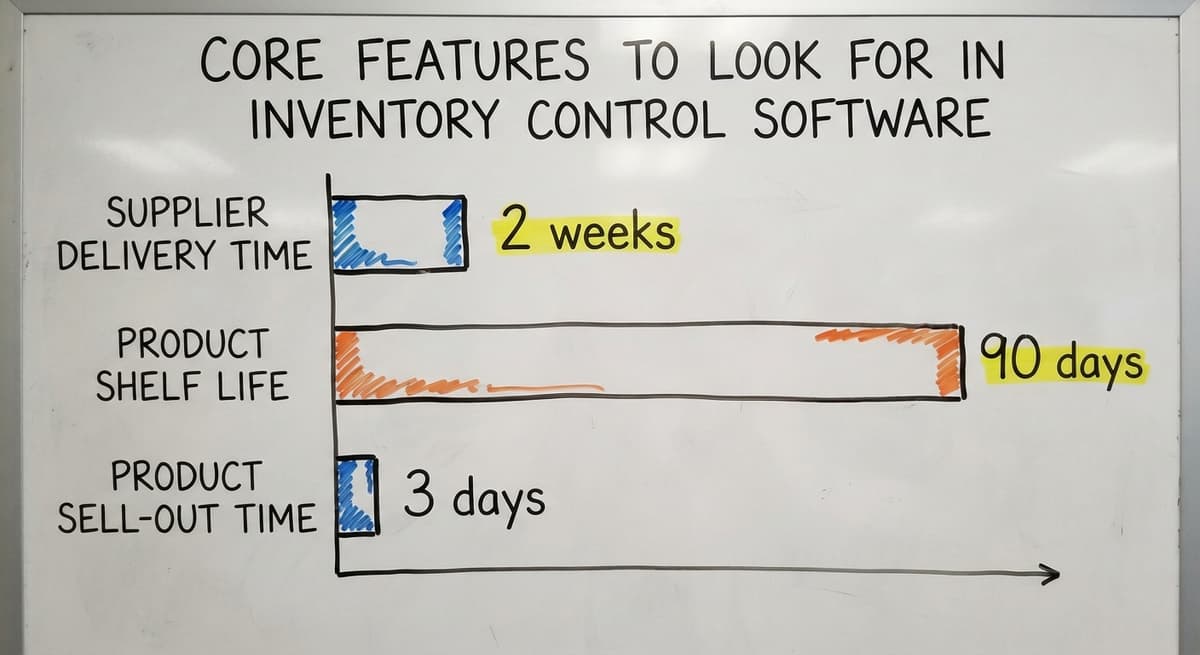
A simple example: if you sell 50 units of a product each week and your supplier takes 2 weeks to deliver, your reorder point is 100 units. The system flags it. You order. You never run out.
Is the comparison easier when one option is built for you?
Yes. Off-the-shelf means fitting your process to the software, and custom is the other way round. The first look costs nothing.
Book a callReceiving and Purchase Order Tracking
When a shipment arrives, the software checks it against the purchase order. Quantities match or they do not. Discrepancies are logged immediately.
This replaces paper receiving logs and email confirmations. It also gives you a clean record if a supplier disputes a shortage.
Every receiving event is timestamped and tied to a specific order. That is the kind of detail that resolves disputes fast.
Does Barcode Scanning Require Expensive Hardware?
No. Most modern barcode inventory software works with a $150 Bluetooth scanner or a smartphone camera. You do not need a dedicated device for every staff member.
Scanning speeds up picking and receiving by removing manual data entry. A staff member scans a barcode, the system updates, and they move on.
Mobile access means warehouse staff can check and update stock from the floor, without walking back to a desk.
GS1 barcode standards are the foundation that makes this work across suppliers and products. Any scanner that reads GS1 barcodes connects to a reliable, consistent data layer.
Reporting and Inventory History
Inventory history shows you how stock has moved over time. That is useful for buying decisions and supplier negotiations.
If a product sits for 90 days, you know to order less next time.
If a product sells out in 3 days every time you stock it, you know to order more. Simple reports make those patterns visible without requiring a data analyst to read them.
The best reports are readable at a glance. A table showing top sellers, slow movers, and current stock levels is more useful than a complex dashboard that takes 20 minutes to interpret.
Off-the-Shelf Software vs. Custom Inventory Software
Packaged SaaS tools are fast to start and easy to price. You pay a monthly fee, set up your products, and go. For many small businesses, that is enough.
Off-the-shelf tools work well when your operation is fairly standard: one warehouse, straightforward SKUs, common supplier relationships. They struggle when your workflows are specific to your business, your customers have unusual pricing rules, or you need the tool to connect to systems the vendor did not plan for.
| Factor | Off-the-Shelf | Custom Build |
|---|---|---|
| Time to start | Days to weeks | Weeks to months |
| Upfront cost | Low | Higher |
| Ongoing cost | Monthly subscription | Lower long-term |
| Fit to your workflow | Partial | Exact |
| Flexibility | Limited by vendor | Built in |
Neither option is wrong. The right choice depends on how standard your operation is and how much the gaps in a packaged tool will cost you over time.

What Makes Custom Inventory Software Different?
Custom inventory software is built around how your team already works, not around how a vendor thinks you should work.
That matters because staff resist tools that feel wrong. If the software does not match the physical reality of your warehouse, people find workarounds. Workarounds mean errors. Errors mean lost stock and unhappy customers.
Custom software can also replace only the broken parts. If your receiving process works but your picking process is a mess, you build the picking fix and leave everything else alone. You do not disrupt a working operation to fix one problem.
This connects directly to the fear of long, painful rollouts. A focused build is faster than a full system replacement. Your team keeps familiar habits where those habits work.
What does it look like running on your own process?
The first thing you see is it running on your own process, at no build cost. The subscription starts once it is live and doing the job, not before.
Book a callHow Long Does Implementation Take?
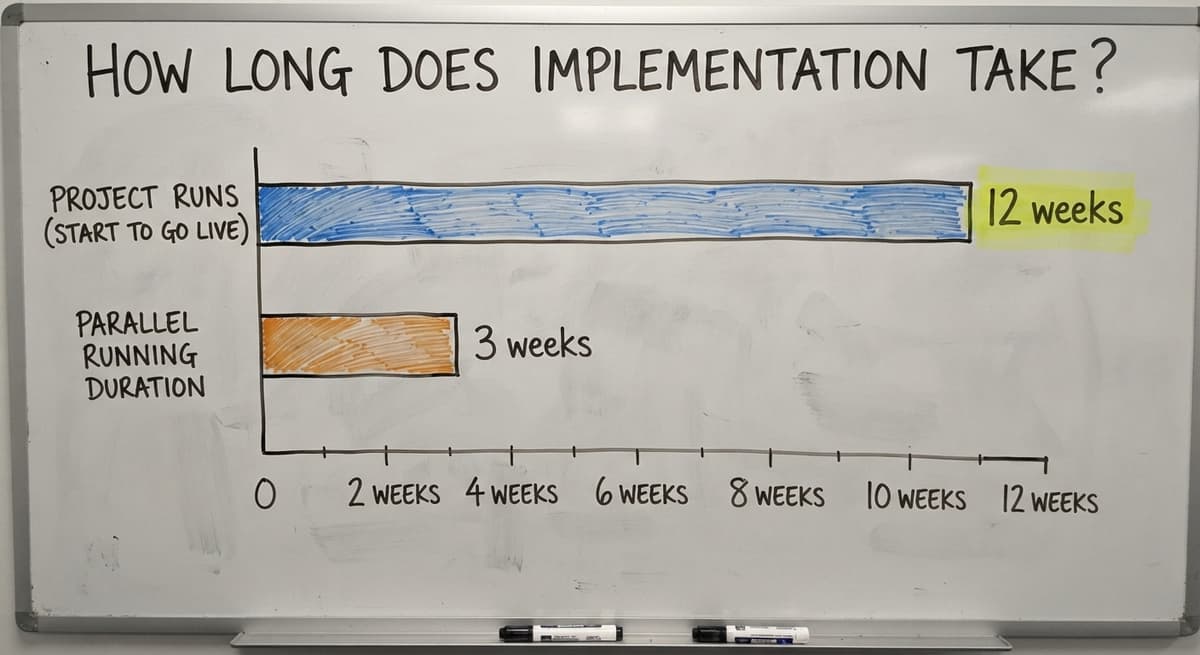
Most small business inventory software projects, off-the-shelf or custom, run between 4 and 12 weeks from start to go-live.
The range depends on how complex your data is and how many systems need to connect.
Phased rollouts let you stay operational during the switch. You might run the new system alongside your current process for 2 to 3 weeks before cutting over fully. That overlap catches problems before they affect customers.
You do not need an internal IT team to manage this. A good software partner handles the setup, data migration, and testing.
Your job is to know your own operation well enough to answer questions during discovery.

What Should You Expect During Setup?
A standard inventory software setup follows 4 steps:
- Discovery. The partner maps your current process. They ask how stock moves, where it lives, and what breaks most often.
- Data migration. Your product list, supplier records, and opening stock counts move into the new system.
- Testing. The team runs real scenarios through the system before it goes live. Receiving a shipment, picking an order, running a report.
- Training. Staff learn the parts of the system they will use. Not a full product tour. Just what they need to do their job.
A good partner does the heavy lifting on steps 1 through 3. Your team's time is mostly spent in step 4.
How Much Does Inventory Control Software Cost?
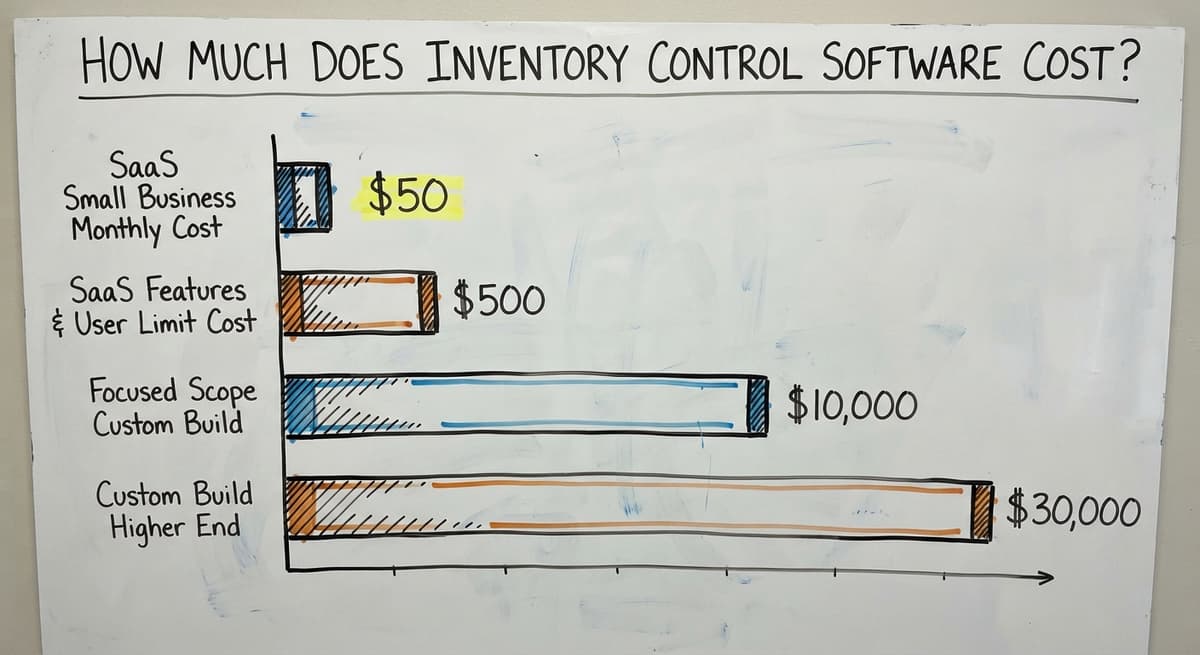
Cost is $50 to $300 a month for a subscription or $8,000 to $25,000 once for a custom build. Both have trade-offs worth understanding before you commit.
SaaS tools for small businesses run between $50 and $500 per month, depending on the number of users and features.
Custom builds carry a higher upfront cost, starting around $10,000 to $30,000 for a focused scope, with lower ongoing costs after that.
Watch for hidden costs in SaaS tools: per-user fees, add-ons for barcode scanning, and charges for integrations.
A tool that looks like $99 per month can reach $400 per month once you add the features you actually need.
For a manual comparison: 3 staff members spending 6 hours each per week on manual counts, at the median wage for stock clerks reported by the US Bureau of Labor Statistics, adds up to real money fast.
Calculate your own number and compare it to the software cost. That is your business case.

Questions to Ask Before You Buy
Before you commit to any tool or vendor, there are 6 questions to ask:
- Does this sync with the accounting software, and how does that sync work?
- Who owns the data if I leave?
- What does support look like after go-live, and what does it cost?
- Can the system grow if I add a second warehouse or double my SKU count?
- What happens if I need a feature that is not in the standard package?
- How long have other small businesses taken to go live?
Short questions get honest answers. Long questions give vendors room to dodge.
Common Mistakes Small Businesses Make When Choosing Inventory Software
The most common mistake is buying more software than you need. A tool built for a 50-person enterprise will not shrink down to fit a 10-person warehouse.
The features you do not need create noise. The workflows designed for larger teams feel wrong for yours.
Other mistakes include:
- Skipping the accounting integration question until after purchase
- Choosing a tool because it is familiar, not because it fits
- Ignoring staff training, then blaming the software when adoption fails
- Picking a vendor based on price alone, without asking about support
- Replacing spreadsheet with custom business software before documenting what the spreadsheets actually do
None of these are unique to your business. They happen constantly. Knowing them in advance puts you ahead of most buyers.
What is in a free first look?
A 30 minute call, your operation mapped, and a clear picture of what we would build. No obligation and nothing to install.
Book a call
How Does Inventory Software Connect to the Rest of Your Operation?
Inventory data touches every part of the business. When stock levels are accurate, purchasing improves. When purchasing improves, cash flow stabilises. When fulfilment is accurate, customer complaints drop.
A connected system removes double entry. You do not type the same shipment into 3 different places. The data flows from receiving to stock to accounting without a human copying it between tools.
Wholesale order management software and fulfilment centre software solutions both depend on clean inventory data at their core. Without it, every downstream process carries the same errors the inventory system created.
Inventory Control for Wholesale Distributors
Wholesale distributors face a specific set of 4 problems. High SKU counts, multiple suppliers, and customer-specific pricing make standard tools feel thin fast.
Wholesale inventory management needs to handle price tiers by customer, track stock across supplier lead times, and flag slow movers before they tie up cash.
The US Census Bureau's Monthly Wholesale Trade data shows that inventory-to-sales ratios shift constantly across distribution categories. Carrying too much of the wrong product is a real cost, not just an inconvenience.
Inventory software built for distribution handles these needs without requiring a full ERP. You get the control without the complexity.

Inventory Control for Fulfilment Centres and Warehouses
Fulfilment-specific needs are 3 things beyond stock counts. Bin locations, pick-pack-ship workflows, and carrier connections all affect whether orders go out right and on time.
Fulfilment inventory tracking improves pick accuracy by telling staff exactly where to go and what to grab.
When a bin location is wrong in the system, the pick is wrong. When it is right, errors drop.
Even a small warehouse with 3 storage areas benefits from location-based tracking.
The NIST Manufacturing Extension Partnership notes that supply chain visibility and process documentation are among the highest-leverage improvements available to small manufacturers and distributors. That applies equally to warehouse operations.
Are You Ready to Switch?
You are ready to switch when you can describe your current process clearly enough to explain it to someone else. That is the real test.
Readiness signals include:
- A specific pain point driving the decision, not just general frustration
- A team that is willing to learn a new tool, even if they are not excited about it
- Processes stable enough to document, even if they are not perfect
There is no perfect time. But if orders are growing, errors are increasing, and your current tools are slowing you down, waiting costs more than starting.

Getting Started with Inventory Control Software
Start with an audit of your current process. Write down how stock moves from receiving to shipping. Note where things go wrong most often. That list is your requirements document.
Then identify your biggest single pain point. Not a list of ten problems. One. The one that costs you the most time or money each week.
Shortlist 2 or 3 tools or vendors that address that problem. Talk to them before you buy anything.
A good partner will map your current state before recommending a solution. If a vendor skips that step, so should you.
The goal is not to find perfect software. The goal is to stop losing time and stock to a process that has outgrown its tools.
Frequently asked questions
Frequently asked questions
What is the best inventory control system for a small business?
There is no single best system. The right choice depends on your SKU count, whether you use the accounting software, how many locations you manage, and whether your workflows are standard or specific to your operation.
Three or four small-business inventory apps cover most of that market. Custom inventory software is worth considering if packaged tools keep falling short of how you actually work.
What is the best app for managing inventory for a small business?
Again, no single app fits every business. The simplest apps work well for plain stock tracking, the mid-range ones suit small distributors with purchase orders and customer records, and the accounting-led ones are popular with businesses already on the accounting software.
The best app is the one your staff will actually use consistently, so ease of use matters as much as features.
Can inventory control software work with the accounting software?
Yes. Most small business inventory tools are built to sync with the accounting software. Financials stay in the accounting software.
Stock levels, receiving, and picking move into the inventory tool. The two systems share data so you avoid double entry and keep your accounting history intact.
Do I need to replace my whole system to get better inventory control?
No. You can replace only the parts that are causing problems. Many businesses keep the accounting software for accounting and add an inventory tool on top.
Custom inventory software can be scoped even more narrowly, fixing one broken workflow while leaving everything else alone.
What is the best software for managing inventory?
For small businesses, 3 packaged tools are cited most often, and each suits a slightly different operation: one fits small distributors, one connects tightly with the accounting software, and one suits businesses with more complex fulfilment needs.
If none of these fit your workflows, a custom build may be a better investment than forcing your operation into a packaged tool.
Can I use spreadsheet for inventory management?
Spreadsheet works at low volume and low complexity. It breaks down when more than one person updates it, when order volume grows, or when you need real-time stock levels.
The bigger risk is that spreadsheet gives you a false sense of control. The count looks right until it is not, and by then you have already oversold or run out of something critical.
How many SKUs do I need before inventory software makes sense?
There is no hard threshold. Businesses with as few as 50 SKUs benefit from inventory software if order volume is high or if stock errors are costing them customer relationships.
The real trigger is not SKU count. It is whether manual tracking is causing errors that affect customers or eating staff time that could go elsewhere.
Is custom inventory software affordable for a small business?
Custom builds start higher than a SaaS subscription, in the $10,000 to $30,000 range for a focused scope. Over 3 to 5 years, the total cost is lower than a SaaS tool with per-user fees and add-ons.
The right question is not whether custom is cheap. It is whether the cost of your current process, in staff time and errors, is higher than the cost of fixing it.
Can inventory software integrate with accounting and e-commerce platforms?
Yes. Any current inventory system syncs items, stock values, and invoices with the mainstream accounting packages through their APIs, and pulls orders from the store platforms the same way. Ask to see your own accounting file connected in the demo.
What is the best free inventory management software for a small business?
A hosted free tier for one user and a few hundred items, scanning with a phone camera.
The caps on users, locations, and orders are the product, so plan on the paid tier or a build at the second user or the first accounting sync.
What inventory software is best for a retail store?
For one store, the inventory built into the point-of-sale system, since every sale already reduces the count.
For 2 or more stores, or a store plus an online channel, a system that holds one count per location and syncs the channels.
Is a spreadsheet good enough for inventory management?
For one person and under 200 items, yes. It breaks at the second person, because 2 people cannot update one file at once, and at the first physical count that disagrees with it.
Not sure this is the right shape for your operation?
The call is free. Describe how the work runs today. We map it on a call and show you what it would look like built around that, before you spend anything.
Book a callRelated guides
The rest of this guide, for the parts of the job this page does not cover.
Guides
- Inventory Control for Small Business
- Inventory Tracking Software for Small Business
- Best Inventory Management Software for Small Businesses
- Inventory Sales Software Small Business
- Small Business Stock Management Software
- Inventory Management Small Businesses
- Inventory Tracking Systems for Small Businesses
- Simple Inventory System for Small Business
- Small Business Inventory Management System
- Inventory System for Small Business
- Small Business Inventory Management
- Accounting and Inventory Software for Small Business
- Free Inventory Management Software for Small Business
- Wms for Small Business
- Small Business Warehouse Management System
- Erp System for Small Businesses
- Warehouse Management System for Small Business
- Inventory Control with Excel
Common questions
- What is the Best Inventory Management Software for Small Business
- How to Organize Inventory for Small Business
- How to Keep Track of Inventory Small Business
- Why is Inventory Management Important for Small Businesses
- How to Manage Inventory for Small Business
- What is the Best Inventory Management System for Small Businesses?