


Pick List
A pick list is a document or screen that tells a warehouse worker which items to pull, from which location, and in what quantity. It comes from a customer order. Without one, workers rely on memory, and memory ships the wrong item about 1 time in 50. This guide, reviewed in September 2026, covers what belongs on a pick list, the 4 types warehouses use, paper against digital, and the problems a bad list creates for a warehouse of 5 to 100 people.
Published 30 July 2026. Reviewed and updated 15 September 2026.
Book a callWhat Is a Pick List?
The Basic Definition
A pick list is a simple instruction sheet. It tells your picker what to grab, where to find it, and how many to take.
Your team generates it from a customer's order or a batch of orders. It is the first physical step in getting a product out the door.
A pick list is not the same as a packing slip. That slip goes inside the box and tells the customer what they received.
A pick list stays on the warehouse floor and tells your worker what to collect. An invoice is a billing document. These 3 documents serve different people at different stages.
A Real-World Example
Imagine a wholesale distributor filling a retailer's weekly order. The retailer orders 4 product lines across 12 SKUs. Someone has to walk the warehouse and pull the right items in the right quantities from the right shelves.
A pick list makes that walk fast and accurate. Without it, your picker is reading a sales order that was written for a customer, not for a warehouse floor.
Pick lists can be paper or digital. Many small and mid-size operations still print them. That is not wrong. But paper has real limits, which we cover below.
Would you rather have it built around your operation?
The first look is free. If you would rather not compare products, describe how your operation already works and we build the system around it.
No build cost. You see it running on your own process first, and the monthly subscription starts only once it is live.
Book a callWhy Do Pick Lists Matter in a Warehouse?
Errors Cost More Than You Think
Without a structured pick list, your team relies on memory or handwritten notes. Both fail under volume. A mis-pick, which means sending the wrong item to a customer, costs you the return shipping, the restock time, and often the customer's trust.
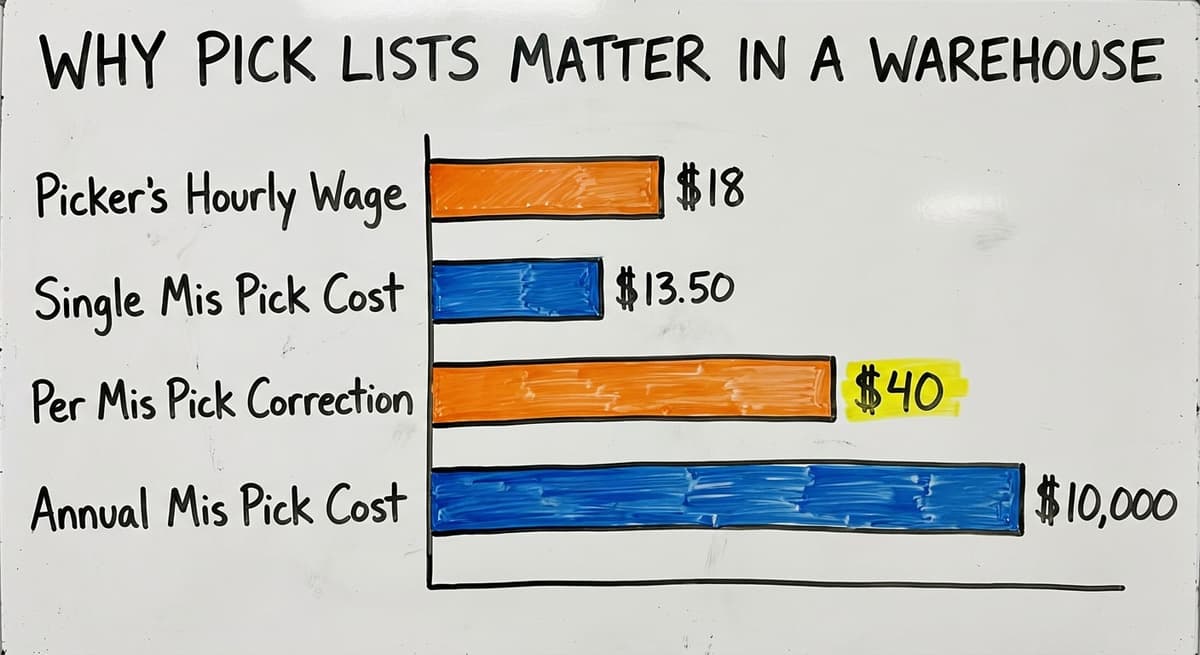
If a picker earns around $18 an hour and spends 45 minutes correcting a single mis-pick, that is $13.50 in direct labor before you count freight.
The arithmetic is worth doing before the software conversation. 3 people spending 6 hours a week between them chasing stock questions, at 22 dollars an hour, is 936 hours a year of paid time spent confirming numbers the system already knows. Over 3 years that is 2,808 hours.
Picking accuracy connects directly to customer satisfaction and return rates. One wrong shipment a day adds up fast. 5 mis-picks a week at $40 each in correction costs is over $10,000 a year.
Accountability and the Missing Record
A pick list is also a record. It shows who picked what and when. That record matters for inventory management and for resolving disputes with customers.
For operations running on printed sheets or email threads, that record is missing. The IRS makes inventory tracking a legal obligation, not just a best practice.
As stated in IRS Publication 538, "To figure taxable income, you must value your inventory at the beginning and end of each tax year." A pick list that logs what left the shelf is part of how you keep that count accurate.

What Information Belongs on a Pick List?
Item Identity Fields
Every pick list needs these 4 fields to identify the product clearly:
- Item SKU or product code. This removes any ambiguity between similar products.
- Item description in plain language. A SKU alone means nothing to a new picker. Add the name.
- Unit of measure. Specify each, case, or pallet. "Pick 6" means something different depending on the unit.
When these 3 fields are missing or wrong, your picker has to guess. Guessing causes mis-picks.
Location and Quantity Fields
Knowing what to pick is only half the job. Your picker also needs to know where to go and how much to take:
- Bin, aisle, shelf, or zone location. This is the most important field for speed. A clear bin location cuts walk time and removes the need to memorize the warehouse layout.
- Quantity to pick. State the exact number. Do not make the picker do math from a case count.
- Order number or customer reference. This ties the pick back to the order and prevents items from going to the wrong shipment.
Priority and Handling Fields
For operations running multiple orders at once, there are 3 fields that reduce confusion:
Reviewed August 2026. Each figure comes from the assumptions stated beside it, so you can substitute your own and the arithmetic still holds.
- Priority or due date. When batching orders, your picker needs to know which ones ship today and which can wait.
- Special handling notes. Fragile items, cold storage requirements, or hazmat flags belong here. A picker who does not know an item needs careful handling will not treat it carefully.
Every field on a pick list exists to reduce a decision your picker would otherwise have to make on the floor.

Types of Pick Lists Used in Warehouses
Single Order and Zone Picking
The most basic method is single order picking. One picker handles one order from start to finish. This works well for small operations with low order volume. It is easy to manage and easy to trace if something goes wrong.
Zone picking assigns each picker to a section of the warehouse. Each picker pulls only the items in their zone. The items are then consolidated into one shipment. This method reduces walking and works well when your warehouse has clear product categories by area.
Batch Picking and Cluster Picking
Batch picking is the method that groups multiple orders together. Your picker pulls items for several orders in one pass through the warehouse. This cuts travel time significantly when many orders share the same SKUs.
Cluster picking is a variation. The picker carries multiple totes or containers at once, one per order, and sorts items into the right container as they pick. Both methods require a pick list that is organized by warehouse location, not by order. Software handles this sequencing automatically.
The comparison is easier when one option is built for you
Comparing off-the-shelf software against a system built for your process is easier when one option is already shaped around how you work. We do it the other way round, and the first look costs nothing.
Book a callWave Picking
Wave picking releases groups of orders at set times during the day, called waves. Each wave is optimized for the pickers available and the shipping deadlines that apply. This method suits operations with defined shipping cutoffs and enough volume to justify the planning.
For most 10-to-80-person wholesale operations, batch picking or zone picking is the right starting point. Wave picking adds complexity that only pays off at higher volumes.

Paper Pick Lists vs Digital Pick Lists
Where Does Paper Fall Short?
Many small and mid-size warehouses still print pick lists. That is a reasonable starting point. But paper has real limits as volume grows:
- No real-time inventory updates
- No confirmation that an item was actually picked
- Easy to lose, smudge, or misread
- No data trail showing who picked what
- Changes to an order after printing go unnoticed
If your team is printing a new sheet every time an order changes, someone is wasting time and introducing risk.
What Does a Digital Pick List Do Differently?
A digital pick list is one that displays on a screen, tablet, or handheld scanner. Your picker sees the current list, not the one that was printed an hour ago. When an order changes, the list updates before the picker reaches the item.
Digital pick lists also connect to your inventory counts. When a picker confirms a pick by scanning a barcode, the inventory adjusts automatically.
Barcode scanning for small warehouses is one of the fastest ways to close the gap between what your system says you have and what is actually on the shelf.
The Upgrade Does Not Have to Be a Big Project
Moving from paper to digital is not a replacement of your entire system. You do not need a full ERP to get a digital pick list.
A targeted layer added to your current process can handle pick list generation and confirmation without touching your accounting setup.
If your team runs on accounting software and printed sheets, you can add a digital pick list layer without replacing anything else. That is the practical upgrade path for most operations at this size.

How Does Warehouse Software Generate Pick Lists?
From Order to Pick List
Here is the basic flow. An order comes in. The software reads the order. It checks your inventory locations. It produces a pick list that is organized by warehouse layout, not by the order in which the customer listed the items. This matters because a sales order addresses a customer, not for a picker walking a warehouse.
Path optimization, which means sequencing picks to cut walking distance, is one of the clearest wins software delivers. A picker who walks 30% less per order handles more orders in the same shift.
Handling Inventory Problems at the Right Moment
Good warehouse software catches inventory problems at pick list generation, not when the picker arrives at an empty shelf. If an item is out of stock or in a different location than expected, the software flags it before the picker starts walking.
This is where managing bin locations in a small warehouse pays off directly. When your bin locations are accurate in the system, the pick list is accurate on the floor.
Connecting to Your Accounting Software and Other Tools
Warehouse inventory management tools can pull order data from your accounting platform, generate optimized pick lists, and feed inventory updates back when picks are confirmed. Orders flow in. Pick lists flow out. Inventory and invoicing stay in sync.
Custom software takes shape around your existing layout and processes. You do not have to change how your warehouse works to get better pick lists.
What does it look like running on your own process?
The first thing you see is it running on your own process, at no build cost. The subscription starts once it is live and doing the job, not before.
Book a call
Common Pick List Problems and How to Fix Them
Location and Quantity Errors
Two of the most common pick list problems are stale-data problems:
- Wrong location listed. This happens when inventory moves but the system does not update. Real-time location tracking fixes it.
- Quantity mismatch. This happens when manual counts drift from actual stock. Scan-to-confirm picking adjusts inventory on the spot, so the next pick list reflects what is actually there.
Both problems get worse as order volume grows. They do not fix themselves.
Process and Coordination Problems
Some picking problems come from how the process is set up, not just bad data:
- Multiple pickers going to the same location at once. Zone assignment or batch sequencing in software prevents this.
- Pick lists printed before orders finalize. Digital pick lists update in real time, so your picker always sees the current version.
These are problems your team is likely dealing with right now, not hypothetical scenarios.
The Missing Record Problem
If no one can tell you who picked a specific order or when, that is a record problem.
Assigning pick lists to specific users and logging completions solves this. It also gives you data to spot patterns, such as which picker has the highest mis-pick rate or which location causes the most confusion.
The order fulfillment process for wholesale distributors depends on this kind of traceability. Without it, every dispute with a customer is a guessing game.
Pick Lists and Your Accounting Software: Bridging the Gap
What Does Your Accounting Software Do and Not Do?
Many wholesale distributors are on their accounting software for financials and basic order management. It handles invoicing, payments, and basic sales orders well. It was not built for warehouse floor operations.
Accounting software for warehouses covers what it does and does not do in detail, but the short version is this: that software does not generate optimized pick lists or manage bin locations.
The Typical Workaround and Why It Breaks
The common workaround looks like this. Someone exports an order from the accounting software. They format it in a spreadsheet. They print it and hand it to a picker. This process is slow. It is error-prone. And it produces no data trail.
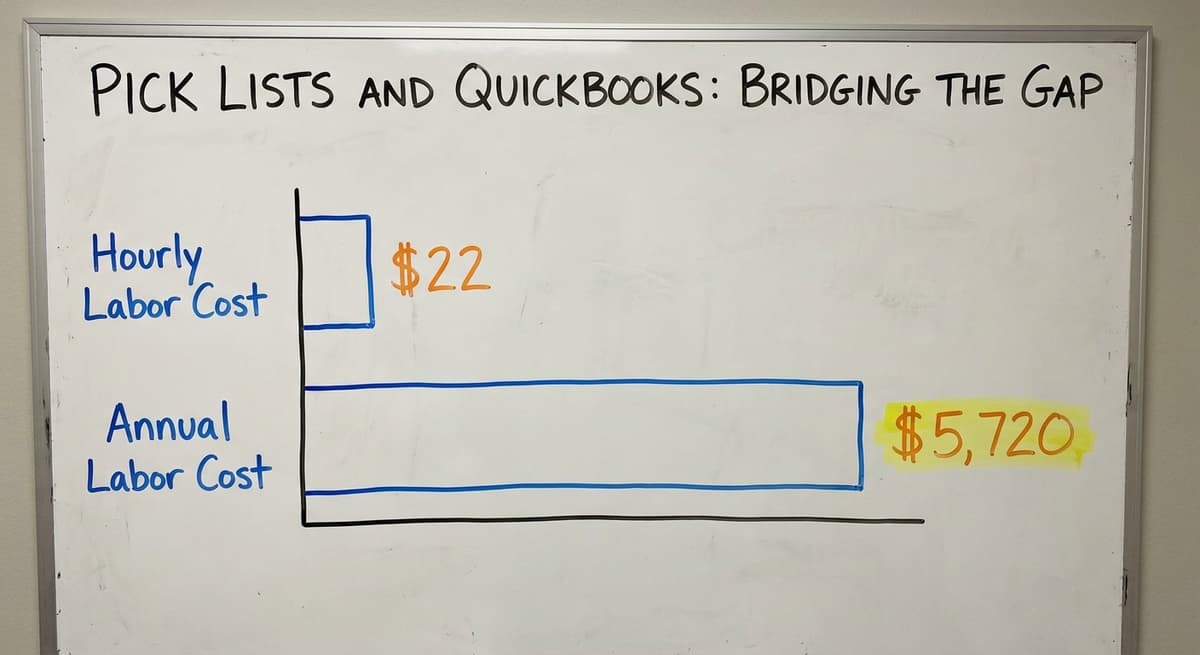
If 2 people spend 30 minutes each morning formatting and printing pick lists at $22 an hour, that is $5,720 a year in labor before you count the errors those sheets produce.
The Bridge Approach
A custom warehouse software layer can sit between your accounting software and your warehouse floor. It pulls order data from it, generates proper pick lists, and feeds inventory updates back when picks are confirmed. That software stays in place for what it does well. The manual steps that cause problems get replaced.
This is not a full ERP replacement. It is a targeted fix for a specific part of your operation. The custom workflow implementation approach means the software fits your process, not the other way around.
Signs Your Pick List Process Needs an Upgrade
Use this as a quick self-check. If 3 or more of these are true, your current process is costing you money:
- Orders are mis-picked more than once a week
- Pickers regularly cannot find items because locations are outdated
- Supervisors spend time reformatting spreadsheets before printing pick lists
- Inventory counts after a pick run never match what your accounting software shows
- New pickers take weeks to learn the warehouse layout because pick lists do not guide them
- Customer complaints about wrong or missing items are increasing
- You have no record of who picked a specific order if a customer calls to dispute it
None of these problems require a year-long ERP project to fix. A tailored software layer built around your existing tools and layout can replace the manual steps that cause these problems without disrupting the rest of your operation.
If your pick list process has any of these signs, the right next step is a review of where the manual work is happening and what a targeted software layer could replace. That is a conversation worth having before the next mis-pick costs you a customer.
Frequently asked questions
The sources behind this guide
The public record on this is worth reading directly: US Bureau of Labor Statistics covers what the staff doing this work are actually paid, for any cost-of-manual-process argument.
Frequently asked questions
What is the meaning of picklist?
A picklist, also written as pick list, is a document or screen that tells a warehouse worker which items to pull, from which location, and in what quantity. It is generated from a customer order and used on the warehouse floor to guide the picking process.
Is it pick list or picklist?
Both spellings are used and both are correct. "Pick list" as two words is more common in warehouse and logistics documentation. "Picklist" as one word appears more often in software interfaces and CRM tools. The meaning is the same either way.
How to do a picklist?
To create a pick list, start with a customer order. Pull the item SKU, description, bin location, quantity, and unit of measure for each line. Organize the list by warehouse location so the picker walks a logical path.
Add the order number and any special handling notes. In a manual process, this is done in a spreadsheet and printed. In a digital process, software generates and sequences the list automatically.
What is the difference between a picklist and a dropdown list?
In warehouse operations, a picklist is a work instruction telling a picker what items to pull and where to find them.
In software and database design, a dropdown list (sometimes also called a picklist) is a user interface element that lets someone choose from a set of pre-defined options. The two uses of the word come from completely different contexts and are not related.
What is the difference between a pick list and a packing slip?
A pick list is used inside the warehouse. It tells your picker what to collect and where it sits on the shelf. A packing slip goes inside the box and tells the customer what they received.
An invoice is a billing document sent to the customer. All 3 come from the same order but serve different people at different stages.
Can I Add Digital Pick Lists Without Replacing Your Accounting Software?
Yes. A software layer can sit between your bookkeeping platform and your warehouse floor. It pulls order data from it, generates optimized pick lists, and sends inventory updates back when picks are confirmed. That platform stays in place for invoicing and financials. Only the manual pick list steps get replaced.
What causes picking errors and how can software prevent them?
Most picking errors come from stale location data, quantity mismatches from manual counts, or pick lists that were printed before an order finalized.
Software prevents these by tracking bin locations in real time, adjusting inventory when a scan confirms a pick, and updating digital pick lists before the picker reaches the item.
When should I use batch picking instead of single order picking?
Use batch picking when multiple orders share the same SKUs and your order volume makes single order picking slow.
Batch picking lets one picker pull items for several orders in a single pass through the warehouse, which cuts travel time. It works best when software sequences the picks by location rather than by order.
What information should a pick list contain?
A pick list should contain item identity fields such as SKU or product code, a plain language description, and how items are counted, each, case, or pallet. It should also include the bin, aisle, shelf, or zone location, the exact quantity to pick, and the order or customer reference number.
For busy operations, priority or due date and notes on fragile, cold storage, or hazardous handling should also be included.
How can warehouse software automate pick lists?
Warehouse software automates pick lists by generating them directly from customer orders, removing manual guesswork. It can sequence items by warehouse location rather than by order, which is essential for batch and cluster picking.
Digital systems update the list in real time when an order changes, and when a picker scans a barcode to confirm a pick, inventory counts adjust automatically, creating a clear record of who picked what and when.
What are the different types of order picking?
The main types are single order picking, where one picker completes one order start to finish, and zone picking, where pickers are assigned to sections of the warehouse and items are consolidated afterward.
Batch picking groups multiple orders into one pass, while cluster picking has a picker carry several totes at once, sorting items by order. Wave picking releases groups of orders at scheduled times to match staffing and shipping deadlines.
What should a pick list include?
A pick list should include clear item identity details like SKU, description, and how items are measured, each, case, or pallet, along with the exact location such as bin, aisle, shelf, or zone. It needs the precise quantity to pick and the order or customer reference so items reach the correct shipment.
When handling multiple orders, priority or due date and notes on careful handling reduce confusion and prevent mistakes on the floor.
What is in a free first look?
A 30 minute call, your operation mapped, and a clear picture of what we would build. No obligation and nothing to install.
Book a callRelated guides
The rest of this guide, for the parts of the job this page does not cover.
Guides
- Pick Lists
- Pick and Pack in Warehouse
- List of Warehouse Management Software
- Warehousing Pick and Pack
- On Page Seo Check List
- Warehouse Inventory Management Software
- Warehouse Inventory Tracking Software
- Warehouse Inventory Management Systems
- Warehouse Receiving Software
- Quickbooks Inventory Management Software
- Warehouse Inventory Systems
- Warehouse Stock Management Software
- Warehouse Management System Top 10
- Software for Warehouse Management System
- Warehouse Shipment
- Warehouse Tracking System
- Warehousing Operations
- Inventory and Warehouse Management Software
- Small Business Warehouse Management System