


Contractor website design that win more jobs.
Contractor website design is a system that books local jobs. It helps roofing, HVAC, and remodeling owners win more calls. Plain words, clear pages, and call tracking work together.
A new website for your trade, built for you and hosted, fast on a phone with tap-to-call right at the top.
See your new homepage free before you pay. Cancel anytime.
For contractors
organic traffic growth over 14 months
growth on a second SEO campaign
job success score across Upwork projects
Trusted by local service businesses across the country and by New Balance. Before The Software Society, our founders' agency worked with Planned Parenthood.

What you get
One website. Built to book jobs.
A fast, clear site that turns the people who find you into calls. Add Google pages whenever you want more of them.
A new website, built for you
Fast on a phone, your best projects up front, and an estimate button people see right away.
Pricing
One price. Everything included.
Everything included
$50a month
- Website design for your trade
- Hosting, security and updates
- Tap-to-call and a quote or booking button up top
- Edit it yourself, or ask the AI assistant
- Month to month, no contract
Free checklist
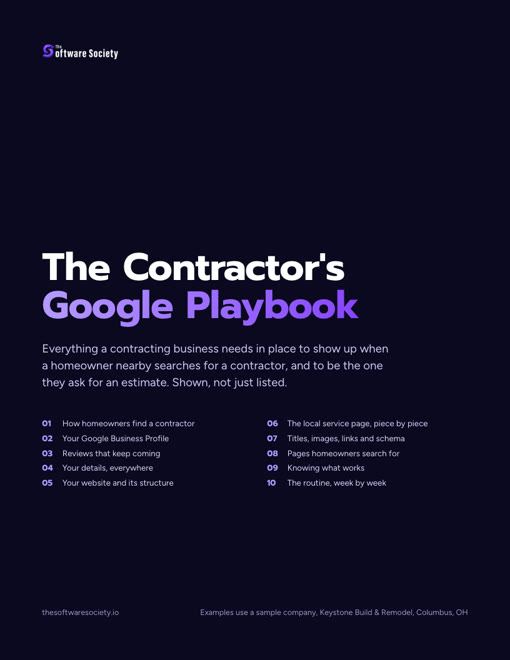
The contractor's Google playbook
Every part of showing up on Google for a contracting business, shown page by page: your profile, reviews, listings, website and the pages homeowners search for.
- Your Google Business Profile set up field by field, with "General contractor" as the primary category
- The service and the town in the address, title, headline, first sentence and photo names of every page
- The same name, address and phone on every listing, checked line by line
- A review request sent at every final walkthrough, with reply scripts
Send me the full checklist
On its way. You can also open it now.
We will email you the checklist and the occasional tip. Unsubscribe anytime. PDF
Each page answers one search from a local homeowner. Every page points that visitor to call or get a quote.
You will learn which pages to build and what proof to show. You will also learn to track 3 lead sources.
Strong sites turn local searches into booked work every week.
What Is Contractor Website Design?
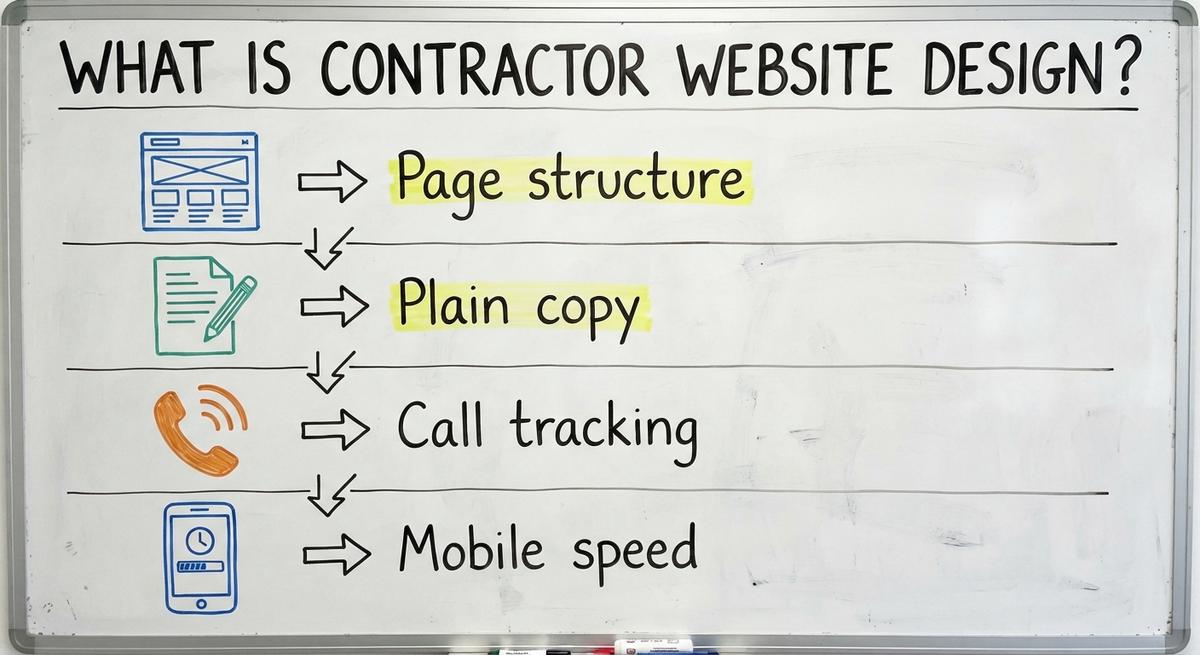
Contractor website design is a process for turning searches into booked service jobs. A pretty layout means nothing if the phone stays silent.
Home service owners need a site built for their trade. Roofers, HVAC techs, painters, and remodelers all sell differently. Every element on the screen serves a clear job.
- Page structure: Separate pages target each service and each town.
- Plain copy: Short sentences explain the problem and the fix.
- Call tracking: Tools count calls and forms by source.
- Mobile speed: Pages load fast for a homeowner with a roof leak.
For a wider view, see our guide to websites for contractors.
See your new homepage before you pay anything
Your homepage, rebuilt free. You see it before you pay anything.
Past SEO campaigns grew organic traffic 26x in 14 months.
New website: $50 a month, built and hosted, cancel anytime
What a Contractor Website Needs to Do
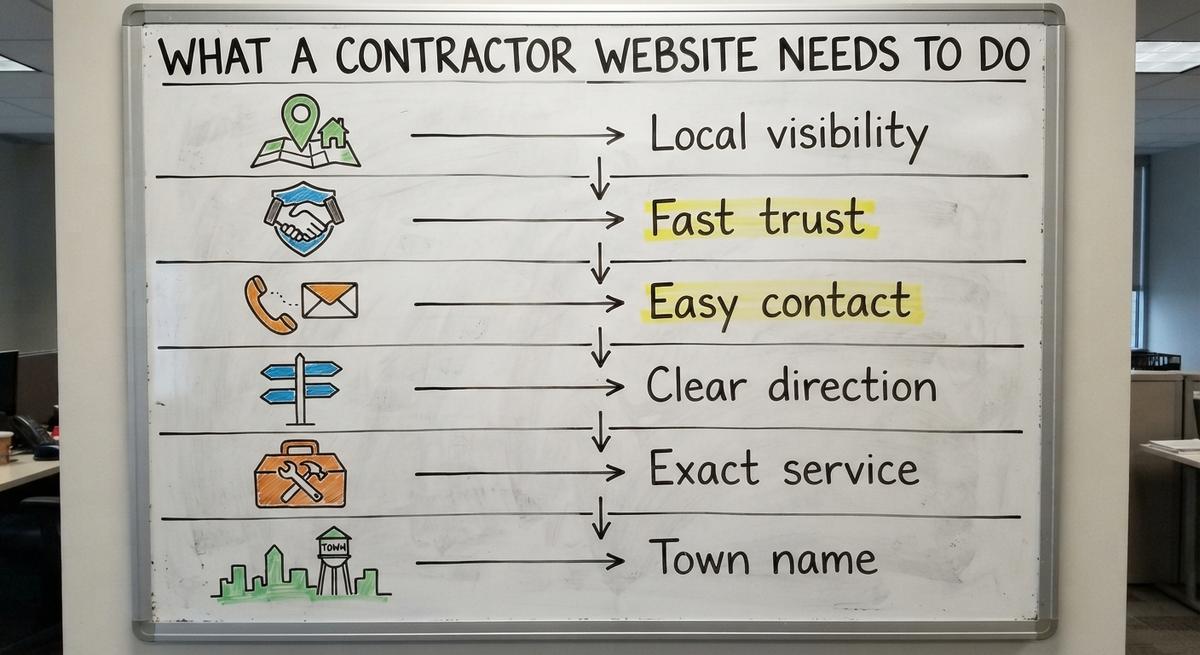
A contractor site has 3 main jobs on every visit. First, it helps local homeowners find you on Google.
Second, a strong site builds trust in seconds. Third, it makes calling or asking for a quote fast.
Google Business Profile Help says local results rest on 3 core signals. Those signals are relevance, distance, and popularity.
- Local visibility: Service and town pages help Google match you.
- Fast trust: Real crew photos and reviews prove quality.
- Easy contact: Tap-to-call buttons reach you in 1 tap.
- Clear direction: Every page gives one clear next step.
A sharp site with zero calls has failed its job.
How Do Homeowners Use a Contractor Website?
Homeowners use a contractor site to solve an urgent home problem fast. Most visitors stand near a leak or a dead furnace. They hold a phone.
People rarely read long stories about your company history. Visitors scan the top of the screen for 3 quick facts.
- Exact service: Do you fix their specific problem?
- Town name: Do you work in their city?
- Phone number: Can they tap it without scrolling?
- Fast comparison: Most compare 2 or 3 local companies in minutes.
Clear headings and short lines help owners pick your crew first. Our list of the best contractor websites shows this in action.
Pages Every Contractor Website Needs
A strong site needs 5 core page types to rank and convert. Cramming every trade and town onto one page confuses visitors. It confuses search engines too.
Each page answers one specific question for one local searcher. Core pages cover your main offer.
- Homepage: Your trade, service area, and main phone number.
- Service pages: One repair or install job per page.
- Town pages: Proof that you work in one city.
- About page: Real crew photos and facts about your team.
- Contact page: Your phone, service area, and a short form.
Optional pages support those 5 core pages. Think projects, reviews, financing, and FAQs.
What Goes on a Contractor Homepage
A contractor homepage is a main directory for urgent callers and new visitors. The top of the screen shows what you do and where.
Place a tap-to-call number and a quote button at the top. Visitors must see both without scrolling.
- Service links: Link each main trade to its service page.
- Job photos: Show your trucks and crews at work.
- Local reviews: Add short quotes that name the town and job.
- Service area: List the nearby towns your trucks cover.
Keep the homepage short. It should guide people deeper into the site. A general contractor website homepage works the same way.
Service Pages for Each Job You Want
A service page is a dedicated page for one profitable job. Roofers need separate pages for roof replacement and leak repair.
HVAC teams need pages for AC repair and furnace installs. A painter needs separate pages for interior and exterior work. Our guide to painting contractor website design covers that trade.
- Problem details: Explain the signs of trouble in plain words.
- Work scope: Describe what your crew does on the job.
- Real job photos: Show finished work from real homes nearby.
- Call buttons: Put a quote button and phone link on each page.
Never copy text across pages and swap only the job title.
Town Pages for Each Area You Serve
A town page is a local landing page built for one city. Homeowners type town names when they search for repairs near them. Google counts distance as a local signal.
Each page needs real local details. A swapped city name is not enough. Google's spam policies warn against doorway abuse on thin, near-duplicate pages.
- Local proof: Mention neighborhoods, landmarks, or common home styles.
- Recent work: Add notes and photos from real jobs there.
- True coverage: Build pages only where your trucks go.
Unique local facts keep town pages helpful and inside the rules. Roofers can see a full example in our roofing contractor website design guide. Our local SEO for contractors guide goes deeper.
How Google Decides Local Results for Contractor Website Design
Google ranks local businesses on 3 core signals across search and maps. Strong contractor website design gives Google clear facts for each one.
Relevance is a ranking signal that matches your pages to the search. Distance depends on where the homeowner stands.
Popularity grows through real reviews, local mentions, and a clear site. BrightLocal points to two ranking-factor studies, from 2016 and 2017, behind this view.
- Clear services: Service pages prove relevance for specific repair searches.
- Town signals: City pages and local addresses help confirm distance.
- Real reviews: Steady feedback builds popularity across your area.
No web designer can promise a top spot. Focus on accurate facts. See SEO for contractors for the full ranking picture.
How Does My Website Work With My Google Business Profile?
Your website backs up your Google Business Profile with deeper service proof. The profile appears in the Map Pack on search pages.
A Map Pack is a local box of three businesses shown on Google. Your website closes the call after the homeowner clicks your listing.
- Exact match: Keep your name, phone, and address the same.
- Smart links: Point your profile to the best matching page.
- Shared lists: List the same trades and towns on both.
When your profile and site agree, customers find you faster. Google names relevance first among its local signals.
Find out where you show up on the map
A free map check for your company. See which towns find you and which call a competitor.
Helpful Content vs. Search Tricks
Helpful content is a writing approach built for real homeowners. Google rewards pages that answer real questions without filler.
Google Search Central calls this people-first content. It means pages made mainly for people. They are not made to game search rankings.
Solid local SEO relies on clear job details and honest photos.
- Plain answers: Explain pricing factors, repair steps, and timelines.
- Honest photos: Show real team pictures, not stock images.
- Zero stuffing: Skip awkward repeated keywords. Write for the caller.
Writing for real homeowners beats search tricks on every trade site. Our contractor SEO services guide covers the SEO side.
Turning Visitors Into Calls With Contractor Web Design
Good contractor web design removes every barrier to a booked estimate. Traffic means nothing if homeowners cannot reach you in seconds.
Clear buttons, short forms, real photos, and honest reviews work together. Every visual element should support trust and action.
- Fast contact: Keep phone links and forms in easy reach.
- Visual proof: Show real crews and labeled before and after shots.
- Social proof: Put genuine local reviews right beside call buttons.
Next, look at the 3 parts that turn visits into calls. Good contractor marketing starts here. Our contractor web design guide has more layout examples.
Click-to-Call Buttons and Forms That Get Used
Click-to-call is a phone link that dials your office with one tap. Place that button at the top of every mobile screen.
A quote form is a short request box for an estimate. Keep forms short. Busy homeowners will finish them.
- Name field: Ask for the caller's first and last name.
- Phone field: Collect a cell number for a fast callback.
- Service field: Let the homeowner pick the exact job needed.
- Town field: Confirm the city is inside your service area.
Tell visitors what happens next. Do not promise a specific callback time.
Photos and Proof That Build Trust
Real job photos are pictures of your crews, trucks, and finished work. Stock photos of smiling models make homeowners doubt you.
Show before and after pictures labeled with the town and job type. Only display proof you can back up with real project records.
- Crew pictures: Show your real techs in company shirts.
- Truck photos: Show branded vans outside real local homes.
- Fast files: Shrink big images so mobile pages load fast.
Real job photos prove you do real work. They matter most in roofing website design. Buyers want to see finished roofs.
Putting Reviews on Your Website
Customer reviews are short quotes from past clients about real jobs. Ask permission first. Then list the job type and town next to each quote.
BrightLocal found that 97% of consumers still use reviews to guide what they buy. Place reviews beside call buttons.
Google's review policy adds a clear rule. Every review on Google Maps must reflect a genuine experience.
Never edit or invent reviews. Ask happy clients to post on Google too. Our guide on how to get more Google reviews has simple scripts.
Mobile Speed and Plain Words in Web Design for Contractors
Good web design for contractors puts mobile speed and plain language first. A visitor with a leaking ceiling will not wait 6 seconds.
Plain words confirm the right trade in under 3 seconds. Fancy industry terms slow people down.
- Quick loading: Light pages open fast on weak cell signals.
- Simple words: Everyday terms match what homeowners type into Google.
- Clear focus: Short lines keep visitors reading, not leaving.
A light and readable site protects your ad spend. That holds for any trade, even an electrical contractor website.
Mobile Layout and Page Speed for Contractors
Page speed is how fast a site loads on a phone. Slow pages lose callers to the next listing.
Most homeowners find a contractor on a phone. A page built for a desktop screen loses them. Test on a real phone, not just a laptop. HubSpot keeps a list of website design statistics worth reading before a redesign.
- Thumb buttons: Use big buttons a thumb can tap.
- Zero pop-ups: Remove pop-ups that cover your number.
- Phone testing: Check every page on a real phone.
A clean mobile layout keeps homeowners on your site until they call. Google's helpful content guide also asks about page experience.
The Words to Use on a Contractor Website
Plain language is a writing style that uses everyday customer words. Say roof leak repair, not building envelope solutions.
Put the service and town in your headings and first lines. Keep sentences short. Stick to 1 idea per line.
- Service words: Name the job, like gutter install or AC tune-up.
- Town names: Mention the city early.
- Direct action: Tell the reader how to call or get an estimate.
Clear, simple copy beats clever slogans on every trade site. Painters can borrow ideas from our paint contractor website guide.
What Claims Should I Leave Off My Website?
Leave off any license, award, or rating claim you cannot prove today. An outdated claim is a legal and trust risk.
Never claim 24/7 emergency service if nobody answers at 3 AM. Ask your designer to use only facts you give in writing.
- License numbers: Check every license is current.
- Years open: State your real founding year.
- Service hours: List only hours your team answers live.
Checking every badge and policy protects your name before launch.


Results you can check
Past SEO campaigns grew organic traffic 26x in 14 months, and 15x on another. Top Rated Plus on Upwork with 99% job success.
Work for hundreds of small businesses and large clients like New Balance. Before The Software Society, our founders’ agency worked with Planned Parenthood.
Choosing Between Templates and Custom Contractor Website Designs
Comparing contractor website designs comes down to room to grow. A cheap starter layout can save money today. It can also trap you next year.
You need to add towns and services as you hire. Ownership matters as much as the look.
- Growth room: Add service pages without a rebuild.
- Full control: Own your domain, text, and job photos.
- Fair edits: Update numbers or towns fast.
Look closely at how the site is built before you sign. Our contractor website builder guide covers the do-it-yourself route. Good website design should outlast your next hire.
Template Sites vs. Custom Contractor Sites
A template site is a pre-built layout reused by many trade companies. Templates launch fast and cost less up front. They also look like your rivals.
A custom site is a build shaped around your services and towns. Ask any provider what it costs to add pages later.
- Template pros: Lower cost and a fast launch for solo crews.
- Template cons: Shared layouts and limits on town pages.
- Custom pros: Built for your trades, towns, and tracking.
Pick the option that lets your service area grow. Our contractor website development guide covers the build itself.
How Easy Is It to Change Your Website?
Site maintenance is the routine of updating numbers, photos, and towns. Slow updates cost you real calls when details change.
Ask any designer how long a small edit takes. Ask who handles it. You should never wait weeks to fix a broken form.
- Edit speed: Small updates should take 1 or 2 days at most.
- Form alerts: Test forms monthly so leads reach the right inbox.
- Account access: Keep admin logins in your office.
Make sure you own your domain name and content if you leave. Our guide to website hosting monthly costs explains the ownership side.
Hiring for Contractor Website Design Without Getting Burned
Hiring for contractor website design starts with direct questions before you pay. A team that builds trade sites knows urgent local leads. A roofing website builder, for example, plans for storm calls.
A firm that builds long-read sites for other fields may not. Make sure your provider knows how trades win local calls. Our contractor website design company guide covers the hiring side.
- Trade focus: Pick a team that builds trade sites.
- Clear scope: Get the page count and tracking in writing.
- Full ownership: Own the domain and content from day 1.
Use the checklists below to vet any agency or freelancer.
Questions to Ask a Contractor Web Designer
Ask these 5 direct questions before you sign a website agreement. Clear answers protect your budget and your ownership.
- Work ownership: Who builds the pages? Can I talk to them?
- Upfront proof: Can I see sample work before I pay?
- Page structure: How do you keep town pages unique?
- Lead tracking: What calls and forms do you track? How do I see reports?
- Account control: Who owns the files and domain if we part ways?
A trustworthy builder answers every question plainly in writing. Any reviews they add must follow Google's review policy.
Red Flags When Hiring for Contractor Web Design
There are 4 warning signs of wasted money or locked accounts. Honest providers never hide how they work.
- Guaranteed rankings: A promised top spot is fake.
- Cookie-cutter samples: Identical templates mean weak quality.
- Hidden reports: Blocked call logs hide poor results.
- Sales pressure: A long contract before you see work is risky.
Walk away if a salesperson dodges basic questions about site ownership. A website redesign package should spell all of this out.

Get a second opinion on your current setup
Already paying for marketing? Get a free second opinion on what works and what wastes money.
Tracking Results From Your Contractor Website
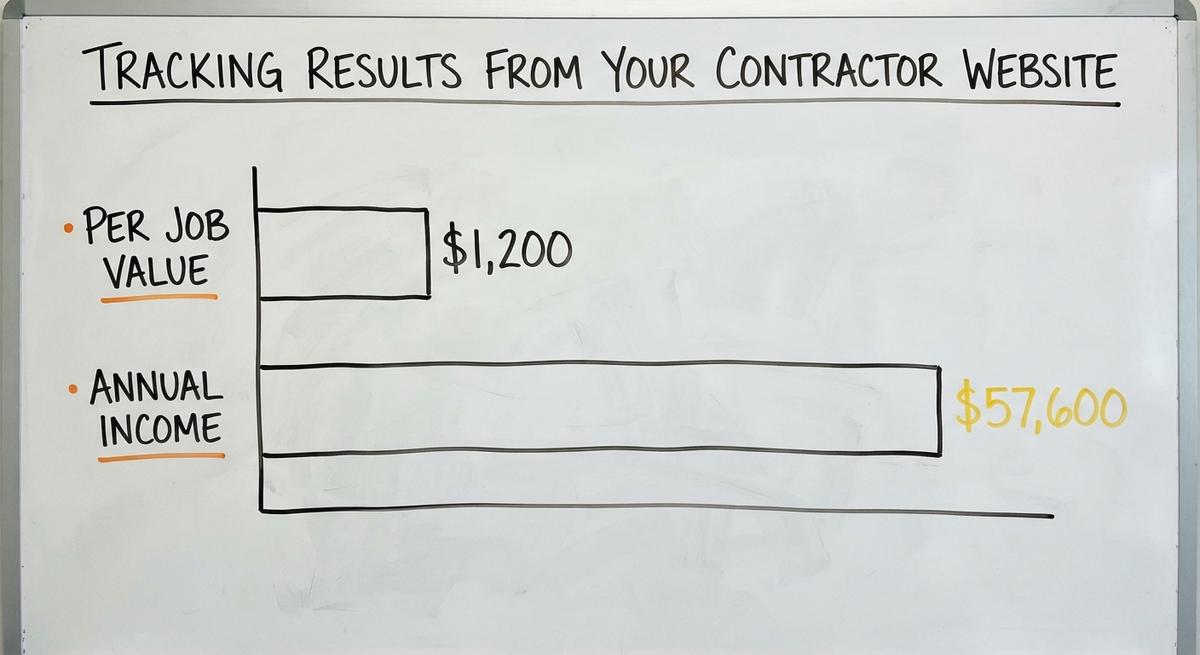
Consider simple math. Say 4 booked jobs a month bring in $1,200 each. That is $4,800 a month. Over a year, it is $57,600 from 4 steady calls.
Tracking proves if your website pays for itself in booked jobs. Guessing what works wastes thousands of dollars a year.
Google Local Services Ads Help states: "Pay only for leads related to your business and the services you offer."
Your website should measure organic calls just as clearly. Our contractor lead generation guide shows how it fits with paid sources.
What to Track After Your Site Goes Live
Call tracking is a method for counting calls and forms by source. Split leads across search, Maps, paid ads, and AI tools.
Check your Map Pack position on a grid every month. That grid shows the towns that see your listing. It also shows the ones that miss it.
- Call sources: Count organic calls apart from paid ad clicks.
- Form leads: Track the pages that bring the most quotes.
- Map grids: Watch your rankings in every town.
Judge your contractor website by booked jobs, not visits. Paid ads need the same split. See our Google Ads for contractors guide.
Should I Track Visits From AI Tools?
Yes. AI tools are a separate channel worth tracking. Homeowners now ask ChatGPT, Gemini, and Perplexity to recommend local trades.
Keep AI visits apart from normal search traffic. Your numbers stay accurate that way. Clear pages and provable facts make your site easy for AI tools to quote.
- Separate logs: Tag AI visits apart from search clicks.
- Clear facts: List services, towns, and credentials on each page.
- Steady tracking: Count the AI visits that turn into calls.
Treat AI traffic as a growing channel, not a sure thing. Google's people-first content advice applies here too.
Mistakes and a Final Contractor Website Design Checklist
Even a good roofing or HVAC site loses calls when setup fails. Fixing small errors unlocks calls from traffic you already get.
The 2 lists below cover common errors and final checks. Review your site against both today.
- Audit pages: Each main service and town gets its own page.
- Test mobile: Tap every phone link and test every form.
- Verify claims: Remove any claim you cannot back up.
Fixing simple gaps puts more booked jobs on your weekly schedule. Our general contractor website guide adds items for remodelers.
Common Contractor Website Mistakes
Most weak trade sites share the same 4 avoidable errors. Fixing them turns wasted clicks into real calls.
- Single catch-all page: One page for everything ranks for nothing.
- Fake stock images: Photos of models make homeowners doubt you.
- Hidden contact info: A buried number or a 10-field form kills calls.
- Zero call tracking: Without it, you are guessing.
Fixing just 1 of these errors can lift your monthly booked jobs. Google's spam rules are a good check on the first one.
Contractor Website Design Checklist
Use this final list on your current site or a new build. Each item turns local searches into steady work.
- Dedicated local pages: 1 unique page per service and per town.
- Fast mobile contact: A tap-to-call number and short form on every page.
- Verified trust proof: Real crew photos, genuine reviews, and provable claims.
- Clean speed and tracking: Fast pages, easy edits, and tracking by source.
Audit your site against this list before you spend more on ads. BrightLocal's review research shows why the trust items matter.

Frequently asked questions
What is contractor website design?
Contractor website design is building a fast, clear website that turns local searches into booked calls. It relies on separate service pages and accurate town pages. It also uses real crew photos and call tracking by lead source. The goal is simple. A homeowner should find the right service, trust your crew, and call within a minute.
Do I need a separate page for each service and town?
Yes. Each profitable service and each town you serve needs its own unique page. Separate pages help Google match your company to exact local searches. Each page needs real local details, not a swapped city name. Thin copies of the same page can count as doorway abuse under Google's spam policies. Start with your top towns.
Should a contractor use a template or a custom site?
A custom site fits your exact services and towns better than a shared template. Templates launch fast and cost less up front. They also look like your rivals, and they can limit how you add local pages. A brand-new solo crew can start on a template. A growing shop with several towns usually outgrows one.
How fast can I change my website?
Small edits should take minutes or hours. That covers a new phone number, a swapped photo, or a new town. Ask any web provider how they handle edits and who does them. Get the answer in writing. Also confirm you own your domain and content. Slow edits cost real calls when your details change.
What should I track to know if my site is working?
Track phone calls and quote form fills split by source. Use four buckets: search, map, paid ads, and AI tools. Pair those lead counts with a monthly Map Pack grid scan. Then judge success by booked jobs, not visits. A site that brings fewer visits but more booked jobs is doing its job better.
Start with a free homepage rebuild
Book a short call. Your new homepage is free to see and yours to keep.
New website: $50 a month, built and hosted, cancel anytime
Ready when you are
Ready for the phone to ring more?
Book a short call. We rebuild your homepage first, and you decide after you have seen it.