website general contractor

Website General Contractor

A website general contractor site is a sales tool. Good ones turn clicks into calls and jobs. This general contractor guide covers the pages, proof, and tracking a general contractor site needs.

Book a call

What a General Contractor Website Does for Your Business

A general contractor website has 3 core jobs in April 2026. First, it must get found fast.

Second, it must build trust with local homeowners. Third, it must make phone calls easy.

A pretty site without calls wastes your cash. Every page should drive booked work.

Roofers, remodelers, and HVAC teams share these rules. Roofing website design needs fast pages too.

Complete business details also help you on Google. Start with a fast site that asks for calls.

Why Do Homeowners Check Your Site Before Calling?

Homeowners check a general contractor website to verify you are real. Most search Google and scan the map first.

Then they click your link to decide. A weak website loses jobs the map already won.

Three visitor types land on your pages daily.

  • Urgent callers need a phone number up top.
  • Bid planners compare your work against two rivals, some after finding you on a contractor bidding website.
  • Referred neighbors look you up to confirm your area.

Each visitor needs fast answers. Your website must satisfy all three within seconds.

What Makes a General Contractor Site Different?

A general contractor sells many trades at once. Kitchens, additions, decks, and roofs share one site.

That range is a strength and a risk. One crowded page buries every service.

Clear structure fixes it. Each trade gets its own page and proof. Solid contractor website development plans for that from day one. The general contractor website guide shows the page map.

What a Website General Contractor Needs Does for Your Business, drawn out
Urgent callers need a phone number right at the top; bid planners compare your past work against two local rivals; referred neighbors look up your name to confirm your area.

See your new homepage before you pay anything

Your homepage, rebuilt free. You see it before you pay anything.

Past SEO campaigns grew organic traffic 26x in 14 months.

New website: $50 a month, built and hosted, cancel anytime

Book a call

Core Pages Every General Contractor Website Needs

A strong general contractor website has 7 core page types. Each page answers one homeowner question.

  • Homepage states what you do and how to call.
  • Service pages explain one job in plain words.
  • Town pages prove you serve each city.
  • Project gallery shows real photos of local work.
  • Reviews page shares verified feedback and a Google link.
  • About page introduces the people running your crew.
  • Contact page gives a form and service area.

Focused pages help visitors find answers fast. Dedicated pages bring more qualified calls.

Core Pages Every General Contractor Website Needs, drawn out
Homepage and Top-of-Screen Layout; What Proof Should You Show on Your Homepage?; about, Reviews, and Contact Pages.

What Belongs at the Top of Your Homepage?

The first phone screen decides if visitors stay. Keep the top of your general contractor website clean.

Show what you do and where you work. Add a tap-to-call button that stays visible.

Use the same phone number on every page. Trackable numbers measure calls without confusing customers.

How Should the Homepage List Your Services?

List services in words homeowners type. Use "kitchen remodel," not "interior solutions."

Link each service name to its own page. Clear top links keep homeowners moving toward a call.

A clean homepage turns visits into estimates. The best general contractor website examples follow this pattern.

What Proof Should You Show on Your Homepage?

Show only true proof on your website. Unverified claims create real trust risks.

Back up every claim. Photos of real jobs beat generic badges. Check every license and insurance line against your files.

Update the homepage when a policy changes. List your real city and years in business.

Skip fake awards and stock crew photos. Honest proof protects your name and wins trust. The best contractor websites all show it.

What Goes on Your About and Reviews Pages?

Your About page shows who answers the phone. Plain words about your contractor crew build comfort.

Name the owner and the lead carpenters. Add a real team photo from a job.

Reviews pages show real customer quotes with permission, in line with Google's review policy. Link out to your Google reviews. Never edit feedback.

What Does a Good Contact Page Include?

A contractor contact page needs a phone number. It also needs a short form. List hours only if you answer then.

Match your name, address, and phone to your Google listing. Consistent details across these pages build trust.

Add your service area in one plain line. Homeowners outside it can skip a wasted call.

What Should Go on a Project Gallery Page?

A website gallery needs real job photos and notes. Show the problem and the fix you delivered.

Label the town and service on every card. Add short captions on the materials used.

Real work proves your team treats houses with care. Strong gallery pages help bid planners choose you.

A crew mid-task: website general contractor

How to Build Service Pages for a Website General Contractor

A service page on a general contractor website covers one job. Searchers land on these pages ready to hire.

Separate repair and replacement pages match exact searches. Merging unlike jobs hurts rankings and clarity.

Build separate pages for roofs and kitchen remodels. Siding and deck builds need their own pages too.

Matching the exact service earns more estimate requests. Good general contractor SEO starts here.

What Should You Write on Each Service Page?

Service pages are 4-part guides for buyer questions. Write short paragraphs in everyday words.

Include four elements on every contractor service page.

  • Job overview explains the service and trouble signs.
  • Work process shows how your crew protects homes.
  • Real job photos show finished work nearby.
  • Price factors explain how size and materials change cost.

Put a call button near the top and bottom.

Should Service Pages Show Prices?

Skip made-up price tags on your website. Job costs vary too much by house.

Explain what moves the price instead.

  • Size: Square footage sets labor and material totals.
  • Materials: Stock grade and finish change the bill.
  • Site access: Tight lots and steep roofs add hours.
  • Hidden damage: Rot or old wiring shows up once walls open.

Then explain how to request a written estimate. Honest price factors beat a teaser number.

How Should You Organize Internal Links on Service Pages?

Internal links are direct paths between website pages. Homeowners jump from services to local proof.

Link each service page to your project gallery. Add links to the towns where you do that work.

Link to your contact page below each section. Keep anchor text plain. Readers should know where each click goes.

Smart links guide homeowners and search engines alike. Visitors keep moving toward a call.

The problem before the work starts: website general contractor

Why Town Pages Matter for a General Contractor Website

Town pages are local pages for cities a general contractor serves. Homeowners add their town to searches daily.

Without them, Google guesses where your crew drives. Listing towns you skip brings bad leads.

Strong local SEO for contractors starts with true service areas. Build one honest page per town on your route.

Do I Need a Separate Page for Each Town I Serve?

Yes, a general contractor needs one page per town served. Separate website pages win city searches.

Avoid copying text and swapping the town name. Google's spam policies treat that as doorway abuse.

Add real local details you can verify on every town page.

  • Local project notes describe recent work there.
  • Neighborhood names show you know local homes.
  • Local weather or codes cover hail or permit rules.

Unique local facts keep town pages safe and helpful.

Find out where you show up on the map

A free map check for your company. See which towns find you and which call a competitor.

Book a call

What Do 17 Town Pages Look Like in Practice?

One central Ohio roofing company runs 17 town pages today. Each page covers one town served weekly.

Its service pages link to all 17 town pages. Every town page links back to core services.

Each city page shows real hail repairs there. A monthly grid scan tracks their results.

Real town-by-town coverage turns local map searches into steady calls.

How a Website General Contractor Connects to Google Maps

Local searches show Google Maps above website links. Your website and Google Business Profile work together.

Use the same name, phone, and address everywhere. Google Business Profile Help asks for complete, accurate details.

Link your profile to your homepage. Roofers can follow this Google Business Profile guide for roofers. List the same service categories on both.

Aligning site and profile lifts Map Pack visibility. If you cannot find your listing at all, read why a business is not showing up on Google.

What Does Google Say Local Results Are Based On?

Local rankings follow 3 core factors from Google. "Local results are mainly based on relevance, distance, and popularity," says Google Business Profile Help.

Relevance is how well your website matches the search. Distance is how far you sit from the searcher.

Popularity reflects reviews, mentions, and brand strength. You cannot move offices for every search.

Focus on relevance and popularity instead. Service pages and steady reviews lift visibility.

Why Does Map Pack Position Change Block by Block?

Map Pack position shifts. Searchers stand in different spots. A contractor ranked first downtown can drop to eighth five miles east.

Grid scans check your position at dozens of points. One scan never promises a rank forever.

Competition shifts weekly as rivals earn reviews. Grid scans spot weak towns that need stronger pages.

Grid of nearby towns ranked for local SEO targeting
Nearby towns ranked by fit, each with a reason, before any page is written for them.
Local SEO setup with a home city and a travel radius
Local SEO begins with where the business works from and how far it travels.

Photos, Reviews, and Proof That Win Calls

Trust is the main sale when strangers enter a home. Real photos and honest reviews lower homeowner fear.

Show before and after shots. Show your contractor crew at work. Stock photos of smiling models destroy trust.

Caption every photo with the town. Mention the exact repair on that house.

Real local proof shows your team works down their street. Authentic photos turn skeptical visitors into callers.

How Should Contractors Handle Reviews?

Ask every happy customer for an honest Google review after the job. "97% of consumers still lean on reviews to guide their purchase decisions," per BrightLocal's Local Consumer Review Survey.

BrightLocal also reports that 47% skip firms under 20 reviews. And 89% of buyers expect replies.

Reply calmly to every review on your contractor profile.

What Are the Rules for Reviews and Credentials?

Never buy, fake, or trade gifts for reviews. "Reviews and other user contributions to Google Maps must reflect a genuine experience," says Google's review policy.

Post only licenses, insurance, and bonding on your website that you can verify today. Skip round-the-clock claims unless your team answers at night.

Honest reviews and real credentials protect your reputation.

Photos, Reviews, and Proof That Win Calls, in figures
BrightLocal also reports that 47% skip firms under 20 reviews; Their survey shows 89% of buyers expect business replies.

Results you can check

Past SEO campaigns grew organic traffic 26x in 14 months, and 15x on another. Top Rated Plus on Upwork with 99% job success.

Work for hundreds of small businesses and large clients like New Balance. Before The Software Society, our founders’ agency worked with Planned Parenthood.

Book a call
Close detail from the work: website general contractor

Mobile Speed and Layout for a General Contractor Website

Most home service business searches start on phones. "In the second quarter of 2026, mobile devices (excluding tablets) accounted for 51.48 percent of global website traffic," Statista reports.

Open your general contractor website on your own phone this week. Text should read clearly without pinching.

Leave white space around buttons for thumbs. Keep sentences short. Show one main button per screen.

Test your tap-to-call link on iPhone and Android. Clean mobile layouts turn searchers into booked estimates.

Why Do Slow Pages Lose Homeowner Calls?

Slow pages lose calls. Visitors leave before loading finishes. Huge photo files stall sites on mobile data.

Resize job photos before uploading. Every page should open fast.

Fast pages capture leads before callers bounce. A contractor website builder or website builder for contractors should resize images for you.

How Long Should a Contact Form Be?

Keep website contact forms short. Tired homeowners will finish them. Ask only for name, phone, town, and job type.

Add one line on when you call back. Then keep that promise.

Every extra field costs finished forms. Four fields are enough to start talking.

What to Track on a General Contractor Website

Call tracking is a system that logs each call's traffic source. Measure calls and booked jobs on your general contractor website, not visits.

The whole job site: website general contractor

Missing 5 calls weekly at $400 profit costs $104,000 a year. Set up tracking before judging any marketing plan.

Split every call and form into four buckets.

  • Organic search tracks calls from free Google clicks.
  • Map Pack measures calls from your map listing.
  • Paid ads counts Google Ads or Local Services leads.
  • Spam and bots filters junk out of reports.

How Do Paid Leads Fit the Tracking?

Paid leads need the same buckets. "Pay only for leads related to your business and the services you offer," says Google Local Services Ads Help.

Clean data proves what pays for itself. It also guides your contractor lead generation budget. Compare cost per booked job. The same math applies to bought contractor leads.

How Do Grid Scans and AI Visits Fit In?

Homeowners ask ChatGPT, Gemini, and Perplexity for contractor names in 2026. Count AI visits as their own channel.

Run a monthly map grid scan of nearby towns. Improve town pages where map pins look weak. Scan on the same date each month. Compare each scan to the last one. Note the towns that moved and the ones that did not. Then add photos, reviews, or detail where the pins stay red.

Why Do Plain Pages Help AI Tools?

Plain website pages help AI tools describe you. "People-first content means content that's created primarily for people... " according to Google Search Central.

Clear writing wins clicks from human readers and AI tools alike. Name your services, towns, and hours plainly.

Movement heatmap over a website homepage
A movement heatmap shows which parts of a page people actually look at.

Common Mistakes on General Contractor Websites

Most general contractor sites fail from 6 fixable mistakes. Fixing two improves SEO for contractors right away. Most take an afternoon.

Walking the job with the homeowner: website general contractor
  • No town pages: Build one unique page for each served city.
  • One page for all services: Split every job onto its own page.
  • Hidden phone numbers: Put a tap-to-call button on mobile screens.
  • Fake stock photos: Replace generic images with real job site photos.
  • Zero call tracking: Log every call by its exact source.
  • Outdated business hours: Update hours and phones across every directory.

Audit your site against these six points quarterly.

Why Are Copied Town Pages the Costliest Mistake?

Swapping the city name across 20 pages is a common shortcut. "Doorway abuse is when sites or pages are created to rank for specific, similar search queries," Google's spam policies warn.

Thin copies fail to rank and erode trust. Write fewer town pages with real detail.

Scroll depth heatmap on a website page
Scroll depth shows how far down the page most visitors get, and where the offer needs to sit.

Get a second opinion on your current setup

Already paying for marketing? Get a free second opinion on what works and what wastes money.

Book a call

How to Choose a General Contractor Website Design Provider

Good general contractor website design needs a transparent partner. Judge real work first.

Live sites built for similar trades show how a provider writes. Check how fast their sites load on your phone.

Ask to call a current contractor client. Ask any provider to show a homepage draft before you pay.

Live examples protect your budget. Compare at least two contractor website design companies side by side.

What Should You Ask Any Website Provider?

Ask 4 direct questions before signing anything. Clear answers up front prevent expensive surprises.

  1. Who actually builds the site? Confirm you can talk directly with your builder.
  2. How fast do edits go live? Ask how many days simple photo updates take.
  3. What assets do I own? Ensure you own your domain, pages, and photos.
  4. How do you report leads? Request sample reports splitting calls by source.

Write down their answers before sending a deposit. Honest providers answer all four clearly. Vague answers now mean vague reports later. Keep the notes with your contract.

Which Red Flags Should You Watch For?

Watch for these three warning signs.

  • Locked domains: A contract that keeps your domain or content in their account.
  • Rank promises: Nobody guarantees top spots or fixed monthly leads.
  • Missing reports: Skipped call reports hide what your marketing earns.

How Are SEO Plans Priced?

Real SEO plans scale with towns and pages. Covering 20 towns takes more writing than 3.

Pay for transparent monthly work. A contractor web design quote should spell it out. Ask each provider to list build fees and monthly items separately.

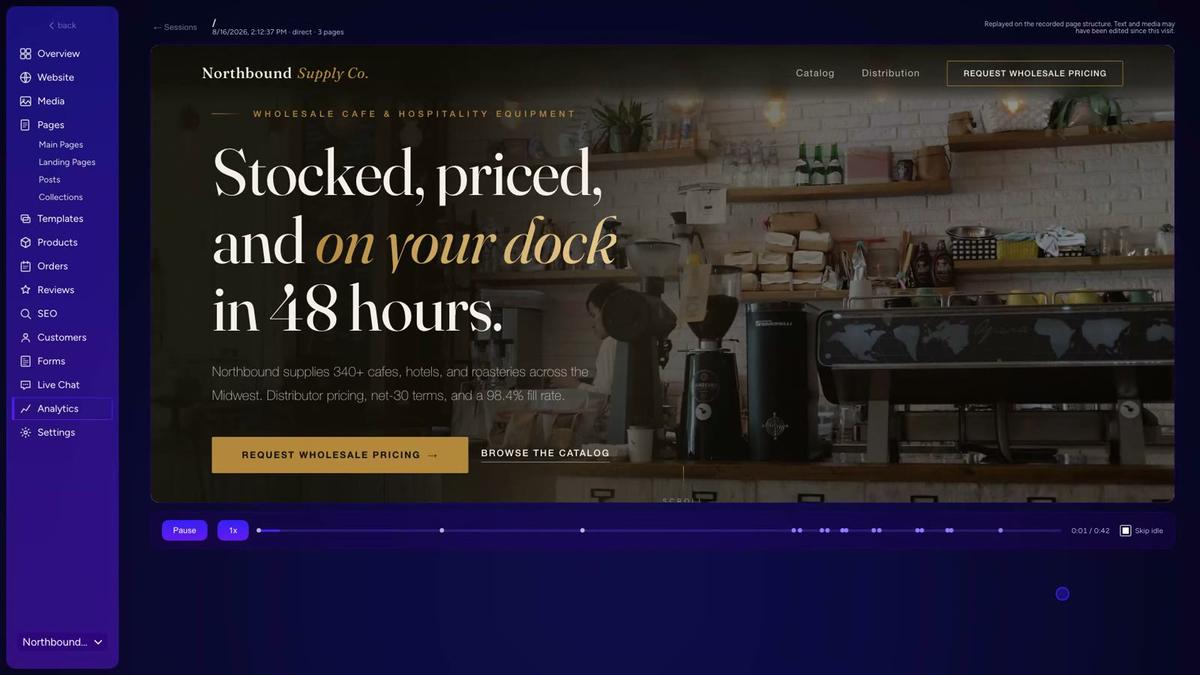
Session replay of a visitor browsing a wholesale supply website
Replaying a real visit shows where a visitor hesitated before leaving.

Simple Website Checklist for General Contractors

Score your general contractor website against 7 core items today. Each item supports more calls from local homeowners.

Website CheckPassing Standard
Sticky tap-to-call button.Visible on mobile screens.
Dedicated service pages.One page per job.
Unique town pages.One page per city.
Real project photos.Captioned with town name.
Google review link.Real quotes without edits.
Matching Google profile.Same name and phone.
Source call tracking.Splits search, maps, ads.

Print this table and grade your top five pages this week. Fixing missing items helps your site convert.

Online booking page for a wholesale operations conversation, showing available times
A booking page where customers pick a date without calling.
The equipment used for website general contractor

Next Steps for Your Contractor Website

Take 3 practical steps this week. Small, steady fixes beat a long overhaul. If the site is past saving, compare a website redesign package.

  1. Turn on call and form tracking first.
  2. Pick 3 missing checklist items and fix them.
  3. Review a homepage draft before any long build.

Set a 30-minute block on Friday to review your first call report. Tracking plus your top gaps fills your calendar. More ideas live in our websites for contractors.

Frequently asked questions

How many pages does a general contractor website need?

A general contractor website needs a homepage, about page, contact page, reviews page, and gallery. Add 1 page per service and town. A contractor offering 6 services across 10 towns needs about 21 focused pages.

Does a general contractor website help Google Maps rankings?

Yes. A clear general contractor website strengthens your Google Business Profile relevance. Service and town pages that match your profile categories show Google where and what your crew works on.

Should a contractor put prices on service pages?

Skip flat quotes on service pages. Job costs vary widely. Explain what drives price, such as square footage, materials, site access, and hidden damage. Then invite homeowners to call for an exact estimate.

Can AI tools send visitors to a contractor website?

Yes. Homeowners ask ChatGPT, Gemini, and Perplexity for local contractors in 2026. Plain service names, real town details, and honest proof make your site easy for AI tools to recommend and link.

How soon do website updates show results in local search?

Mobile speed and tap-to-call fixes can lift call rates right away. Search and map visibility take longer. They depend on local competition, your reviews, and how fast Google crawls your new pages.

How do I count calls from search, maps, ads, and bots?

Use call tracking numbers and form source tags. They separate organic search, Map Pack, and paid ad leads. Review form entries weekly so spam and bots never inflate your real lead count.

What are the biggest red flags when hiring a website company?

Avoid any provider who guarantees a top Google rank or a set number of leads. Hidden call reports and a domain locked in their account are red flags too. Keep full ownership of your domain, photos, and pages.

Start with a free homepage rebuild

Book a short call. Your new homepage is free to see and yours to keep.

New website: $50 a month, built and hosted, cancel anytime

Book a call

Related guides

More on the same work.