



Contractor Website Builder: How to Pick One in 2026
A contractor website builder is software that builds trade sites without code. Roofers, painters, and HVAC shops use these tools to win local jobs. They turn Google searches into booked calls. Reviews carry the most weight: BrightLocal finds 97% of consumers lean on them.
Book a call
What Is a Contractor Website Builder and Who Needs One?
Builders are tools for trade shops to publish pages and capture leads. Most fall into 3 groups: DIY tools, templates, and managed sites.
Homeowners search on phones when a roof leaks. They also search when an AC unit quits. Shops with slow sites lose those calls.
Showing up on Google takes clear details. Google Business Profile Help ranks local results on relevance, distance, and popularity.
Your site must pass one test. Can local homeowners find you and call?
What Must a Contractor Website Do?
Job one is turning a visit into a call or quote request. Homeowners search on cell phones during urgent repairs. Every page must load fast on phones.
Your roofing, HVAC, or painting site needs a clear trade list. A general contractor website needs one per trade. List every city your trucks cover. Link those pages to your Google Business Profile.
That match helps Google connect you to local searches. Design choices must serve the caller first. A hidden phone number sends jobs to rivals.
See your new homepage before you pay anything
Your homepage, rebuilt free. You see it before you pay anything.
Past SEO campaigns grew organic traffic 26x in 14 months.
New website: $50 a month, built and hosted, cancel anytime
Book a callShould You Use a DIY Builder, a Template, or a Built-for-You Site?
Trade owners have 3 main paths. Each one trades your time for cash.
- Do-it-yourself tools: Owners with spare time build every page from scratch.
- Template setups: Busy owners start with a layout and swap in photos.
- Built-for-you sites: Growing shops pay a team to build pages and handle updates.
DIY plans are cheap to start. Squarespace notes that its annual plans include one year of free domain registration. Wix advertises free hosting with 99.99% uptime.
What Does DIY Really Cost in Time?
DIY edits cost your evenings and weekends. Say you spend 5 hours a week at $60 an hour. That is $300 a week.
Over a year, it adds up to $15,600 in lost time. Protect your billable hours on the job site. Managing crews pays more than fixing layouts.
The website builder for contractors guide compares the main tools side by side.
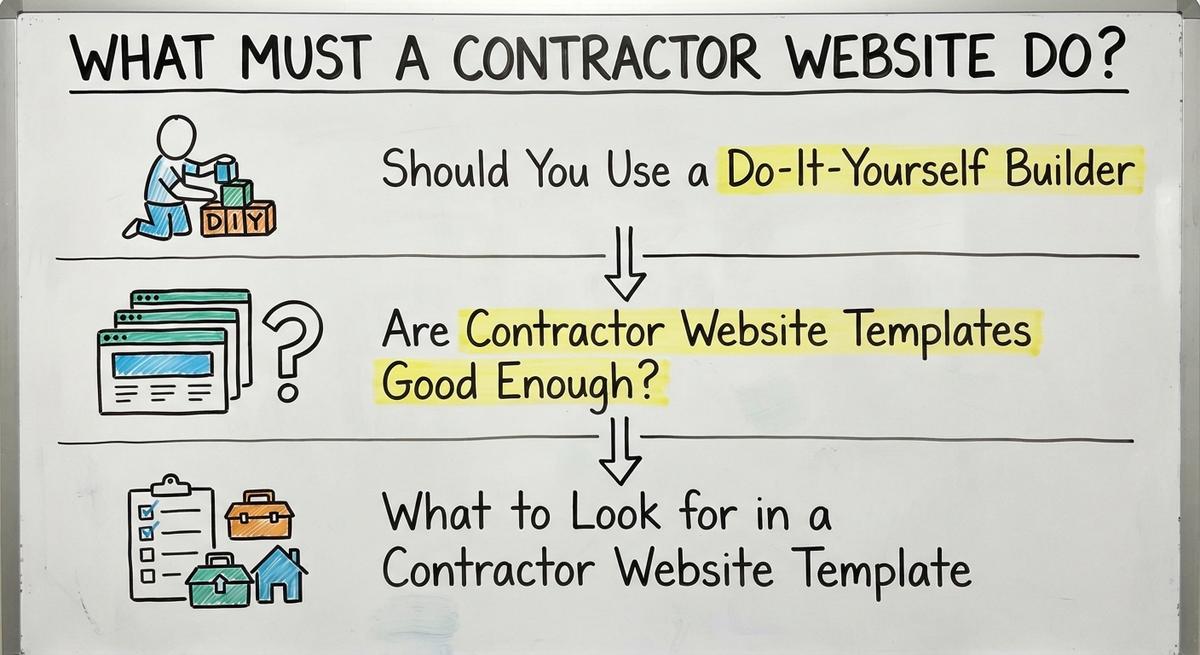
Are Contractor Website Templates Good Enough?
Templates are fast frames for getting online. Many owners pick one to launch in days. Yola and similar builders offer template libraries.
Templates have limits once you try to rank. Dozens of other roofers use the same layout and stock photos.
Thin text hurts your visibility on Google. Most pre-built layouts skip job and city pages. A template is a frame, not a lead system.
What Makes a Good Contractor Template?
Five core features matter in any template. Missing one costs you mobile calls.
- Sticky call buttons: A tap-to-call button stays at the top of phone screens.
- Page slots: The layout makes room for 1 page per trade and city.
- Short quote forms: A form asks for name, phone, ZIP code, and job.
- Proof sections: Space sits ready for crew photos and real reviews.
- Fast edit access: You or your provider can update text right away.
Reviews build trust before anyone dials. "97% of consumers still lean on reviews to guide their purchase decisions," reports BrightLocal's Local Consumer Review Survey.
That survey also shows 47% of shoppers skip firms under 20 reviews. And 89% expect a reply from the owner. Pick a layout that puts reviews up front. Collect them the right way.
How a Contractor Website Builder Handles Service and Town Pages
A builder works when it supports separate job and city pages. One page for every trade confuses everyone.

Homeowners type a problem plus their city name. Strong local SEO for contractors gives each search its own page.
A good builder lets you add pages as your crew grows. Rigid tools trap you when you expand.
How Should Service Pages Be Built?
One page per job beats a list of 12. Roof repair, AC installs, and exterior painting each need a page.
Each page answers 3 quick questions. What do you fix? Where do you work? How do they book?
Good roofing website design guides callers to a button. So does every strong painting contractor website.
Helpful pages answer real questions. "People-first content means content that's created primarily for people... " says Google Search Central.
Your builder should let you launch a new page in minutes. Your site needs to grow with your trucks.
How Do Town Pages Win Local Searches?
Town pages are local guides that prove your trucks work nearby. Homeowners search with a city name when they need fast help.
Swapping only the city name fails. "Doorway abuse is when sites or pages are created to rank for specific, similar search queries," Google's spam policies warn.
Real local details make each page useful. One roofing company in central Ohio runs pages for 17 towns.
Check that your site handles 50 pages. Menus must not break. Clean structure keeps the site easy to tap on a phone.
How Does a Contractor Website Connect to the Map?
Map connections come from matching details. Many urgent calls come from Google Maps.
Match your business name, phone, trades, and cities in both places. Listing 15 towns on your site and 5 on your listing hurts trust.
Fake reviews put your listing at risk. "Reviews and other user contributions to Google Maps must reflect a genuine experience," says Google's review policy.
Do Paid Map Ads Need the Same Details?
Paid map ads need accurate trade lists too. "Pay only for leads related to your business and the services you offer," explains Google Local Services Ads Help.
No builder can promise a top map spot. Aligned details give Google clear facts. A guide on how to get more Google reviews covers the popularity side.

Find out where you show up on the map
A free map check for your company. See which towns find you and which call a competitor.
Book a call
Speed, Phone Use, and Fast Site Edits
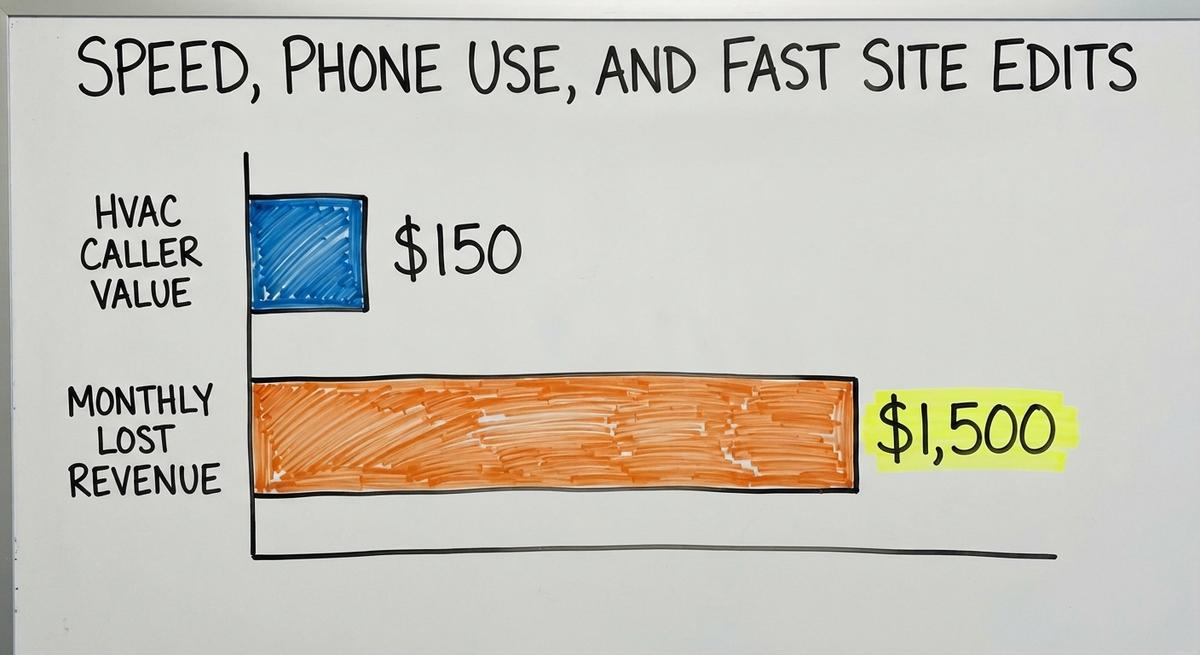
Slow contractor websites cost trade shops every month. Say 10 HVAC callers hang up. At $150 a visit, that is $1,500 a month.
Your website builder controls load speed and edit speed. Both matter when storm season hits.
Treat speed as a daily tool. Uptime matters too: Wix advertises 99.99%. Fast platforms keep your phone ringing.
How Do You Test Speed on a Phone?
Speed is critical during a roof leak. Homeowners want an answer in 3 seconds. Heavy images stall screens. Callers go back to Google.
Test any demo on cellular data. Never judge speed from an office desktop.
- Fast page load: Pages open without blank screens.
- Readable text: Words stay readable without pinching.
- Easy tap buttons: Phone links sit far enough apart for thumbs.
Checking a live demo takes 2 minutes. That test stops you from buying a slow system.
How Fast Should Site Edits Be?
Site edits update offers, cities, or photos. Ask how each change gets made. Ask how long it takes.
A seasonal tune-up offer should change in minutes. A 5-day support ticket stalls your marketing.
Fast edits let you react to weather. Ask who makes each change. Direct access saves time and stops errors.

Tracking Calls, Forms, and AI Tool Visits
Call tracking is a system that logs leads by exact source. A website with no tracking is a guess.
Knowing what brought an $8,500 roof job helps you spend smarter. Two extra roofs a month add $17,000.
Make sure your contractor website builder tracks leads from day 1. Guessing wastes ad dollars.
How Do You Set Up Lead Tracking?
Lead tracking covers 4 sources. They are search, maps, ads, and bots. Ask if a provider tracks all 4. Each channel performs differently.
Total clicks say nothing about booked jobs. Paid leads from Local Services Ads need their own line too. Four $250 repairs from Maps equal $1,000. That math proves the map channel works.
Confirm tracking numbers and form tags work. Monthly reports should show which source delivered customers.
Should You Track Visits From AI Tools?
ChatGPT and Perplexity are new search channels. Homeowners ask them for roofer picks. Track AI visits as their own channel.
Clear headings and people-first answers help AI tools read your details. Image-only text hides your trades from them. Type every service on your contractor website as plain text.
Skip the hype and focus on facts. Tracking shows if AI visits book calls.
Results you can check
Past SEO campaigns grew organic traffic 26x in 14 months, and 15x on another. Top Rated Plus on Upwork with 99% job success.
Work for hundreds of small businesses and large clients like New Balance. Before The Software Society, our founders’ agency worked with Planned Parenthood.
Book a callJudging a Website Builder for Contractors Without Getting Burned
The best fit matches your trade and schedule. No single tool fits a 1-truck painter and a 20-truck HVAC shop.
Judge every builder on 5 hard numbers. The contractor web design guide uses the same list. Check calls, pages, speed, edit time, and tracking.
Those 5 checks work for a roofing website builder or an electrical contractor website. Ignore sales pitches and focus on booked work.
Which Features Look Nice but Bring Zero Jobs?
Photo sliders are slow add-ons. Busy drop-down menus hide your core trades.
Empty blog sections sit stale for years. Fancy layouts with no top phone line fail the first test.
Ask 1 question about every design piece. Does it help a homeowner call now? Cut anything that blocks the phone button.
What Hidden Costs Should Contractors Watch For?
Hidden costs are surprise fees for forms, extra pages, or domain moves. Many providers start low and bill extra later. Free domains on Squarespace annual plans cover one year, so check the renewal. Jimdo asks you to cancel at least 1 month before your term ends.
Ask who owns your domain before signing. You should hold full ownership from day 1.
Never lock your shop into a system that holds your domain hostage. Clear ownership protects you if you switch.
Does a Contractor Website Builder Handle SEO?
A builder is page tools, not SEO. Launching puts your truck on the road. SEO for contractors is the work that brings calls.
Real SEO means writing local pages and managing your Google listing. You also check results every month. Avoid anyone promising a rank.
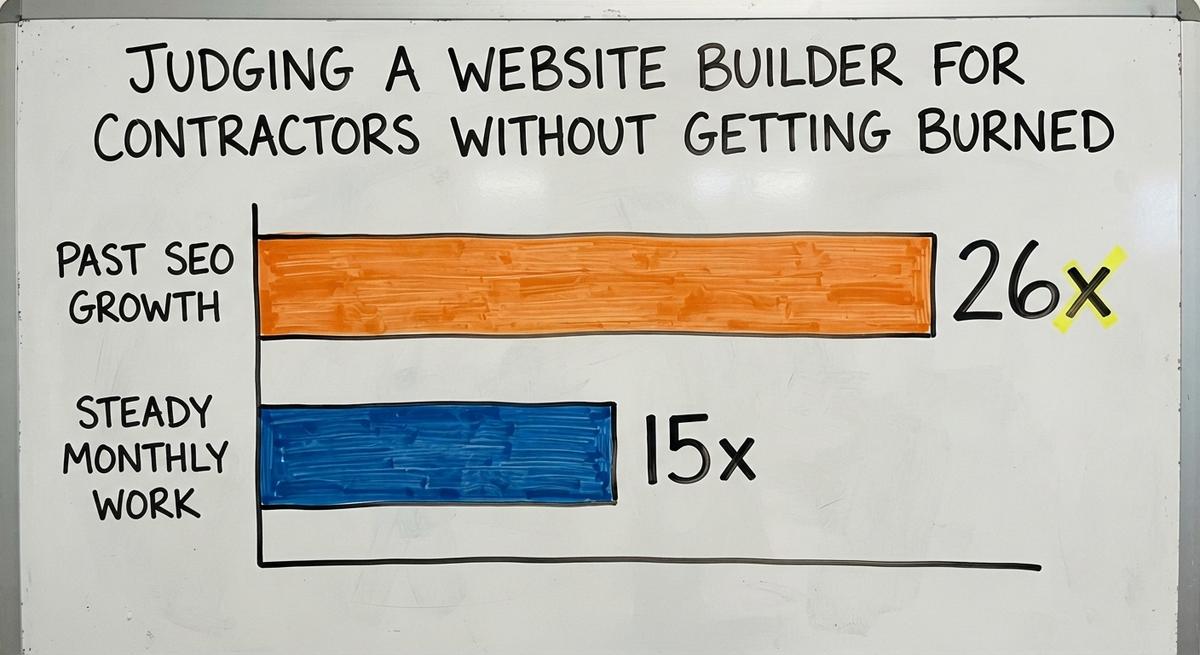
Steady work compounds for trade shops. Past SEO campaigns grew traffic 26x in 14 months. Another grew 15x with steady monthly work.
Look for a builder made for ongoing SEO. Tools sit idle without someone working them.

What Common Mistakes Do Contractors Make?
Picking by looks is the top mistake. Pretty colors never fix missing pages.
- One catch-all page: Every trade on 1 page kills local visibility.
- No launch tracking: No call tracking leaves you blind to results.
- Zero updates: A 2-year-old site looks stale.
- Stock photos: Fake model pictures lower trust.
Avoid these traps with any DIY site or contractor website design partner. Fixing them early saves months of wasted traffic.


Get a second opinion on your current setup
Already paying for marketing? Get a free second opinion on what works and what wastes money.
Book a callHow to Pick and Launch a Contractor Website Builder
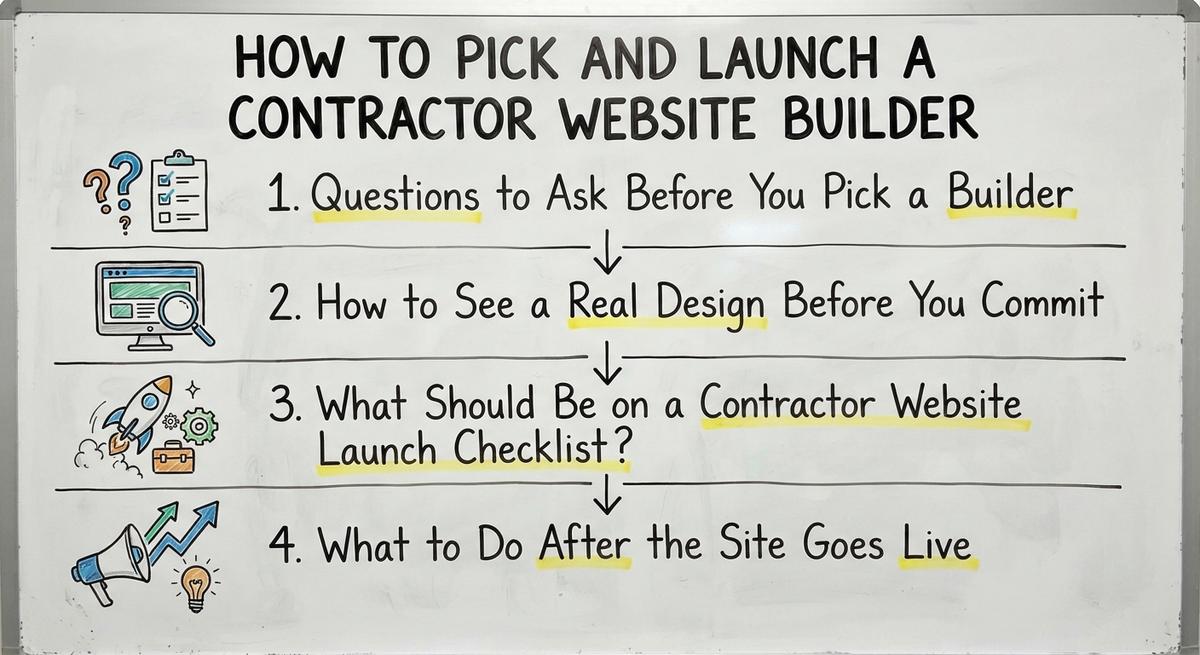
A scorecard is the best way to pick a website builder contractor platform. Compare providers on hard facts, not sales talk.
| Builder Check | What to Verify |
|---|---|
| Call Readiness | Phone line and sticky call button stay visible. |
| Page Capacity | Easy setup for 1 page per trade and city. |
| Mobile Speed | Pages load fast on cellular data. |
| Edit Time | Text and photo updates take minutes. |
| Lead Tracking | Calls, forms, and AI visits track by source. |
Use this 5-point table for any contractor website builder. A platform that passes all 5 is ready to win jobs.
What Should You Ask a Builder First?
Ask 5 questions before paying a setup fee. Clear answers show how a provider works.
- Page growth: Can I add job and city pages as my crew grows?
- Domain ownership: Who owns my domain and copy?
- Edit turnaround: How fast can a price change or new city go live?
- Lead data: What call, form, and AI data can I track by source?
- Support contact: Who will I talk to for an urgent update?
Write down every answer. Good providers answer all 5 plainly.
How Can You See a Design First?
A sample homepage is the safest preview. Ask any provider to show a draft for your own shop first. Your logo and towns beat a generic template.
Open that sample on your phone next to your current site. Compare it with the websites for contractors checklist. Tap the call buttons. Read the text. Test the quote form.
Avoid paying in full before you see your company on the page. A real preview proves they know your trade.
What Belongs on a Contractor Website Launch Checklist?
A launch checklist is your 5-step safety net before buying ads. Check all 5 before sending a single click.
- Visible call buttons: Your number sits at the top of every page.
- Live local pages: Job and city pages are live in the menu.
- Matched map listing: Your listing matches your site name, line, and towns.
- Active tracking: Calls and quotes record search, map, ad, and AI visits.
- Real project proof: Crew photos and reviews sit on key pages.
This check takes 15 minutes on launch day. Skipping it wastes paid traffic.
What Happens After Launch?
Monthly reviews turn a site into steady work. Check calls and forms by source each month. Your best jobs guide next month's budget.
Scan your Map Pack rankings on a grid across your area. Keep asking for reviews. BrightLocal finds 47% of shoppers skip firms under 20. Grid scans show which towns need stronger pages.
Add pages as you add trucks. Test speed and layout on your phone before spending a dollar. The best contractor websites show what a finished site looks like.
Frequently asked questions
What is a contractor website builder?
A contractor website builder lets roofing, HVAC, and painting owners launch and edit a site without code. It gives trade businesses mobile layouts, quote forms, and pages built to turn local searches into calls.
Should I build my own site or have it built for me?
Building your own site saves upfront cash. It costs evenings and weekends that could go toward billable jobs. A site built for you on a managed platform saves time and sets up tracking from day 1.
Do I need separate pages for each service and town?
Yes. Separate service and town pages help homeowners and Google match your company to exact local searches. One page for every job and city weakens local relevance and confuses visitors.
What is the best website builder for contractors?
The best builder for contractors loads fast on phones and supports service and town pages. It also allows quick edits and tracks calls by source. Judge any platform by booked jobs, not flashy design.
Can a website builder do my SEO?
No website builder does SEO on its own. A builder gives you page and editing tools. Real SEO means writing local content, managing your Google Business Profile, and checking call and map results monthly.
How do I know if my site is bringing in calls?
Call tracking and form tracking show which channel sent each lead. Separate calls and quote requests from organic search, Google Maps, paid ads, and AI tools. Then you can see what drives real jobs.
Who should own my domain and content?
You should always own your domain name, photos, and page content. Before signing with any builder or agency, confirm in writing that your domain and content leave with you.
Start with a free homepage rebuild
Book a short call. Your new homepage is free to see and yours to keep.
New website: $50 a month, built and hosted, cancel anytime
Book a callRelated guides
More on the same work.
- Website Builder Contractor
- Website General Contractor
- Contractor Website Development
- Contractor Website Design Company
- Best Contractor Websites
- Painting Contractor Website Design
- Electrical Contractor Website
- Paint Contractor Website
- General Contractor Website
- Contractor Bidding Website
- Roofing Contractor Website
- Contractor Website Design
- Roofing Contractor Website Design
- Website for Electrical Contractor
- Best General Contractor Website
- Websites for Contractor
- Painting Contractor Website
- Roofing Website Builder
- Concrete Contractor SEO
- General Contractor SEO
- Roofer Contractor Marketing
- How to Get More Jobs as a Contractor
- Roofing Contractor Leads
- Free Leads for Contractors