


Reorder Period
A reorder period is the set time between one order and the next. Some teams call it the review period or the order cycle. A distributor that orders a product every 14 days has a 14-day reorder period.
Book a call
What Is a Reorder Period?
A reorder period is a fixed gap on the calendar. You check stock, place an order, then wait the same gap before you check again. Weekly, every 2 weeks and monthly are common gaps.
Say you order on June 2, 2025. A 14-day period puts your next order on June 16, 2025.
Other names point to the same idea. A review period is the time between stock checks. An order cycle is the time between orders. In a fixed schedule system, the three terms match.
The gap is a schedule choice, not a law of nature.
Reorder Period vs. Reorder Point and Lead Time
2 terms get mixed up with the reorder period more than any others. Each one answers a different question about your stock.
Reorder Period vs. Reorder Point
A reorder period is time-based. A reorder point is quantity-based. One asks when you look. The other asks how low stock has fallen.
| Method | What triggers the order and what you watch |
|---|---|
| Reorder period | The calendar date arrives. You watch the clock. |
| Reorder point | Stock hits a set count. You watch the shelf. |
Counts matter by law too. As the IRS says in Publication 538, "you must value your inventory at the beginning and end of each tax year."
Many teams use both. Shared-supplier items get periods, and costly single items get reorder points.
What Is the Difference Between Reorder Period and Lead Time?
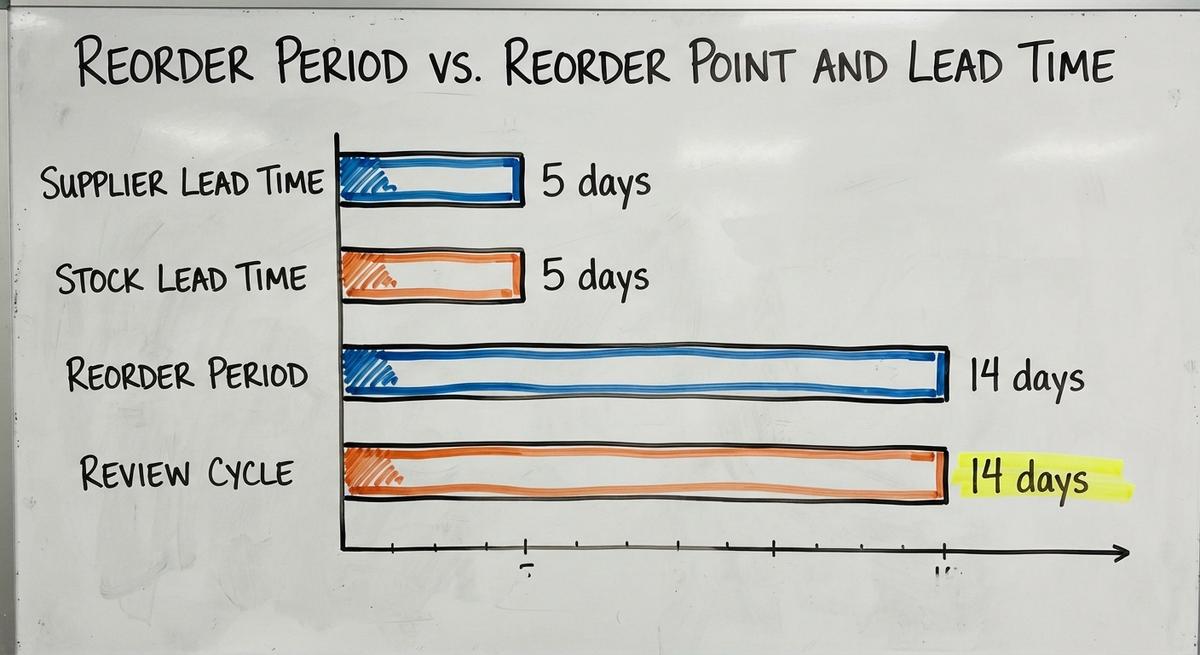
Lead time is how long the supplier takes to deliver after you order. The reorder period is how often you place orders.
Picture one product. The supplier ships in 5 days, so lead time is 5 days. You order every 14 days, so the period is 14 days. Swap the two and you place orders too late.
We build it for your operation, and the first look is free
If you would rather not compare products, describe how your operation already works and we build the system around it.
No build cost. You see it running on your own process first, and the monthly subscription starts only once it is live.
Book a callWhy the Reorder Period Matters
The reorder period is the rhythm of your buying. Get it wrong in either direction and you pay.
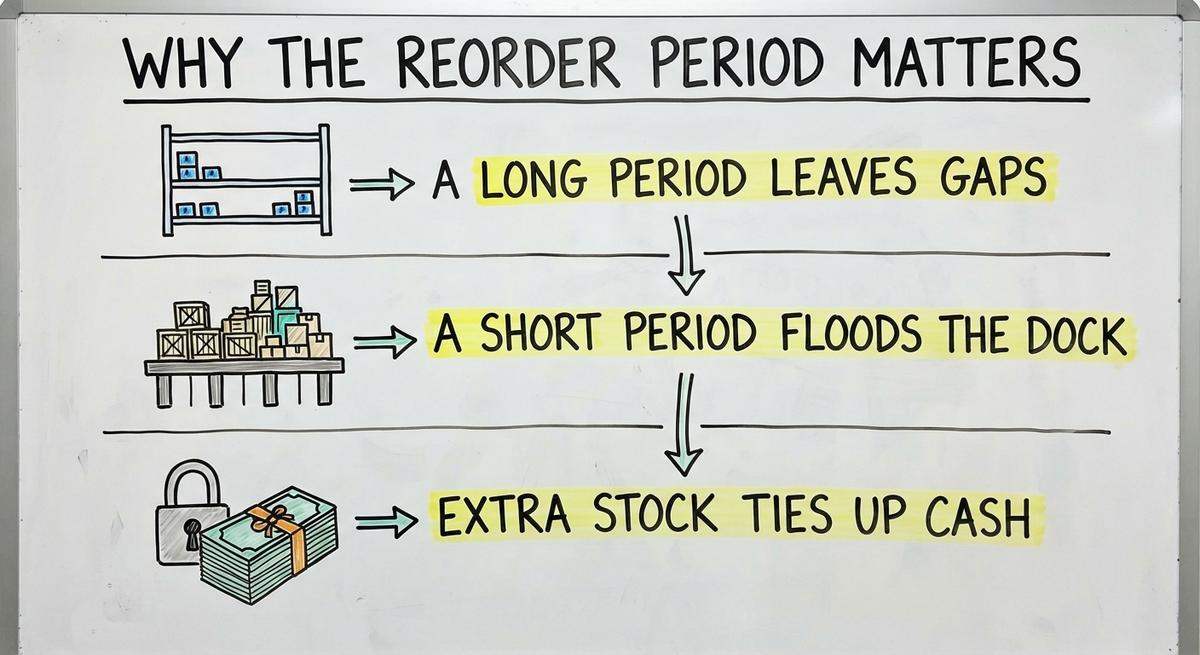
- A long period leaves gaps, so shelves run bare between orders and you lose sales to stockouts, times when an item is not on hand.
- A short period floods the dock with small orders, and freight bills climb as staff spend more hours on paperwork.
- Extra stock ties up cash. Say 200 surplus units cost $10 each. That is $2,000 sitting on a shelf.
The Census Bureau tracks the inventories-to-sales ratio for wholesale firms each month. Small teams feel a rise in that ratio first. They have less cash to spare.
A good period keeps shelves full without burying cash.
How a Periodic Review System Works
A periodic review system is a stock method that checks every item on a fixed schedule. The schedule never moves. The order size does.
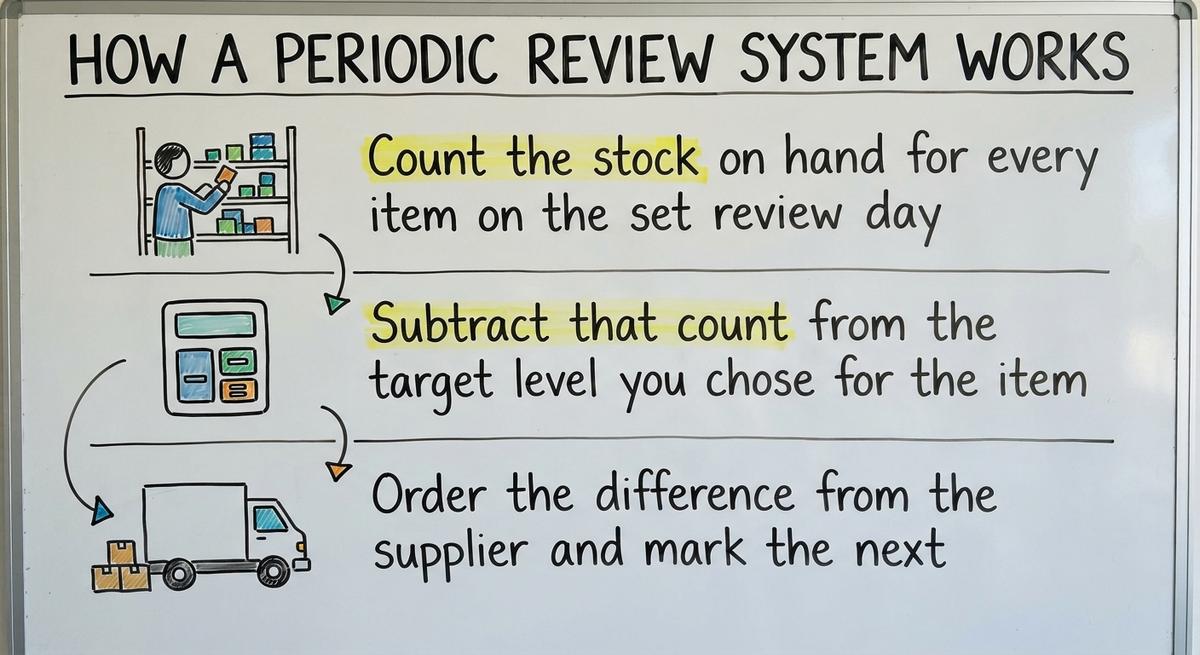
- Count the stock on hand for every item on the set review day.
- Subtract that count from the target level you chose for the item.
- Order the difference from the supplier and mark the next review date.
A slow week means a small order. A busy week means a large one. The date stays put.
The method fits teams that buy many items from one supplier. One count, one order, one truck. Staff learn the rhythm fast, and the supplier knows when to expect the call.
The schedule is fixed and the quantity floats.
Not sure this is the right shape for your operation
Describe how the work runs today. We map it on a call and show you what it would look like built around that, before you spend anything.
Book a callWhat Decides the Right Reorder Period
3 limits shape the period: trucks, shelves and suppliers. No formula alone picks the number.

Four Factors That Set the Gap
4 limits do most of the work of setting the reorder period. Check each one before you pick a number.
- Supplier days: Some suppliers deliver on set days and have minimum order sizes that force a longer gap.
- Freight breaks: A full truck or pallet costs less per unit, so a longer gap can cut shipping cost.
- Space and shelf life: Short-dated goods and small storage rooms call for shorter gaps between orders.
- Demand: Fast sellers with swings in sales need checks more often than steady, slow sellers do.
How to Choose a Reorder Period for One Supplier
Your cutoff day is the first anchor. If orders placed by Tuesday ship Thursday, Tuesday is your order day. Group every item from that supplier into one order.
Then compare two costs. One is the freight you save with bigger, rarer orders. The other is the cost of holding the extra stock. Pick the gap where the two meet.
The supplier's calendar sets the first draft of your period.

How to Find Your Reorder Period Step by Step
4 steps set the period and take a few hours with your sales records. The NIST Manufacturing Extension Partnership offers vendor-neutral guidance on supply chain process if you want more background.
- Pull 6 to 12 months of sales for each item, and use units instead of dollars.
- Note supplier lead time and order minimums for each vendor you buy from.
- Pick a trial period, such as weekly, every 2 weeks or monthly.
- Test it for a few cycles. Count stockouts and overstock, then adjust the gap.
Start with the supplier that causes the most trouble.

What Does a Reorder Period Look Like in Numbers?
A 2-week reorder period for an item that sells 50 units a week gives a target level of 175 units. Here are the round numbers:
- Weekly sales for this item are steady at 50 units each week.
- Lead time from the supplier is 1 week from order to dock.
- You review the item and place an order every 2 weeks.
- Safety stock is a buffer of 25 units held for surprises.
The math is target = 50 x (2 + 1) + 25 = 175 units. You cover the 2 weeks until the next review plus 1 week of delivery wait. Then you add the buffer.
On review day, 60 units sit on the shelf. Order 175 minus 60, or 115 units.
The same sum works for any item once you know its three inputs.
How Safety Stock Fits In
Safety stock is extra inventory held to cover sales spikes and late deliveries. Look at the example above. Without the 25 units, one busy week empties the shelf.
A longer reorder period needs more safety stock. You check less often, so surprises grow before you see them. Cut the gap from 2 weeks to 1 and the buffer can shrink.
Keep the math simple. Set the buffer by how much the item matters. A top seller gets 1 week of cover. A minor item gets a few days.
The buffer pays for the time you are not looking.
The comparison is easier when one option is built for you
Off-the-shelf means fitting your process to the software. We do it the other way round, and the first look costs nothing.
Book a callShould Every Item Have the Same Reorder Period?
No, items differ in speed and value, so their gaps should differ too. One period for the whole warehouse wastes effort on slow goods and starves fast ones.

A, B, C Grouping
A, B, C grouping is a simple sort that works for small teams. Rank items by yearly sales value, then split them into 3 groups. Each group gets its own reorder period.
- A items sell fast and carry high value, so review them every week without fail.
- B items sit in the middle of the range, so review them every 2 weeks.
- C items are slow and cheap, so review them monthly or even less often.
Split by supplier first, then by group. Each supplier gets one order day, and the A items on that day get the closest look.
Sort by speed and value, and the work shrinks where it matters least.
When to Change Your Reorder Period
A reorder period is a setting, not a rule carved in stone. 4 events call for a fresh look:
- Seasons: Busy months need shorter gaps, and slow months allow longer ones.
- Supplier change: New delivery days or lead times shift the whole plan for that vendor.
- Price breaks: A new discount tier or minimum can favor larger, rarer orders.
- Warning signs: Repeated stockouts or overstock mean the current gap is wrong.
Common Reorder Period Mistakes
4 errors show up again and again.
- One period for every product wastes time on slow items and starves the fast ones.
- Ignoring lead time makes orders land late and leaves shelves empty.
- Never rechecking leaves old demand baked into the plan long after sales change.
- Relying on memory or a sheet only one person understands breaks the process when that person is out.
Check the gap each quarter, and write the plan where everyone can read it.
How to Track Reorder Periods Without an ERP
An ERP is enterprise resource planning software, a large system that links stock, buying and money. Many small teams run without one. A calendar and clean data are enough to start a reorder plan.
What Your Accounting Package and Spreadsheets Can Do
An accounting package is a program that holds item and vendor data. A review calendar for each reorder period can sit beside it. Many teams use Excel or printed sheets. These work until the item list grows.
Give each supplier one owner. That person knows the order day, runs the count and sends the order.

Are Spreadsheets Holding Your Reorders Back?
Spreadsheets are the problem when any of these signs shows up. Each sign points to the tool, not the people who run the reorder.
- Order days slip when the one person who owns the sheet is out.
- Sheets disagree with each other on stock counts for the same item.
- Buyers re-key data by hand from emails and printouts into the sheet.
- Stockouts still happen even though the team keeps up regular reviews.
The pay for that time is real. The Bureau of Labor Statistics lists wages for stock clerks. Say 3 people spend 6 hours a week on re-keying at $22 an hour. That is $20,592 a year.
See it running on your own process first
No build cost. The subscription starts once it is live and doing the job, not before.
Book a callWhat to Automate in Reorder Reviews
4 jobs fit a tool well in each reorder review. Automate the chores and keep the judgment.
- Reminders go out to the buyer before each supplier's order day arrives.
- Suggested amounts come from current stock and recent sales for every item.
- Low-stock flags catch items that will run out before the next review.
- A person approves every order before it goes out to the supplier.
A tool should prepare the order, and a person should sign it.

How to Measure Whether Your Reorder Period Works
4 numbers show if the period works. Review them every quarter.
- Stockout count and fill rate show how often you miss a sale on the shelf.
- Inventory turns show how fast stock sells and is replaced over the year.
- Days of stock on hand show how much cash sits idle in the warehouse.
- Rush freight costs show how often you pay extra to fix a late order.
If rush freight rises, the gap is too long.
Reorder Period Checklist
6 checks cover each reorder period review. Use this list at each quarterly review.
- Know the lead time for every supplier you buy from.
- Group your items by supplier so each vendor gets one order.
- Sort items into A, B and C groups by yearly sales value.
- Set safety stock for each item based on how much it matters.
- Put every order day on a shared calendar that the whole team sees.
- Measure the results of the period and adjust the gap as needed.
A short checklist beats a long manual.
Pick One Supplier and Start
1 supplier is enough to start today. Pull 6 months of sales, set a trial period and mark the order day on a shared calendar. Run 3 cycles, check your four numbers, then add the next supplier.
Frequently asked questions
How to calculate reorder period?
Divide your usual order size by weekly demand. For 100-unit orders and 50 units sold a week, the period is 2 weeks. Then check it against supplier cutoff days and freight breaks.
Is the reorder period the same as lead time?
No. Lead time is the supplier's wait after you order. The reorder period is the gap between your own orders. A 3-day wait and a 30-day gap can sit on one product.
Can I use a reorder period with a reorder point?
Yes. Put items that share a supplier on a period, and put costly single items on a reorder point. Many warehouses run both side by side without trouble.
How long should a reorder period be?
The right length depends on supplier days, freight breaks, shelf space and sales speed. Fast sellers suit 1 week. Slow, cheap goods suit a month or more.
How often should I change my reorder period?
Review it every quarter, and sooner after a new supplier, a price break or repeat stockouts. Season shifts also call for a fresh look at the gap.
Can I manage reorder periods with my accounting software and spreadsheets?
Yes, for short item lists. Keep item and vendor data in the accounting package and a review calendar in a sheet. Errors rise once the list grows or staff change.
Start with a free first look
A 30 minute call, your operation mapped, and a clear picture of what we would build. No obligation and nothing to install.
Book a callRelated guides
More on the same work.
Guides
- Reorder Point Calculator
- Cycle Count Software
- Warehouse Audit Checklist
- Inventory Accuracy Formula
- Weighted Average Inventory Valuation Method
- Replenish Stock
- Cycle Counting Inventory
- Inventory Audit Checklist
- Inventory Audit
- Inventory Management Best Practices
- Abc Cycle Counting
- Specific Identification Inventory Method
- Moving Average Method Inventory
- Inventory Shrinkage Accounting Entry
- Inventory Shrinkage is Recorded When
- Calculate Inventory Shrinkage