

Distributor Example
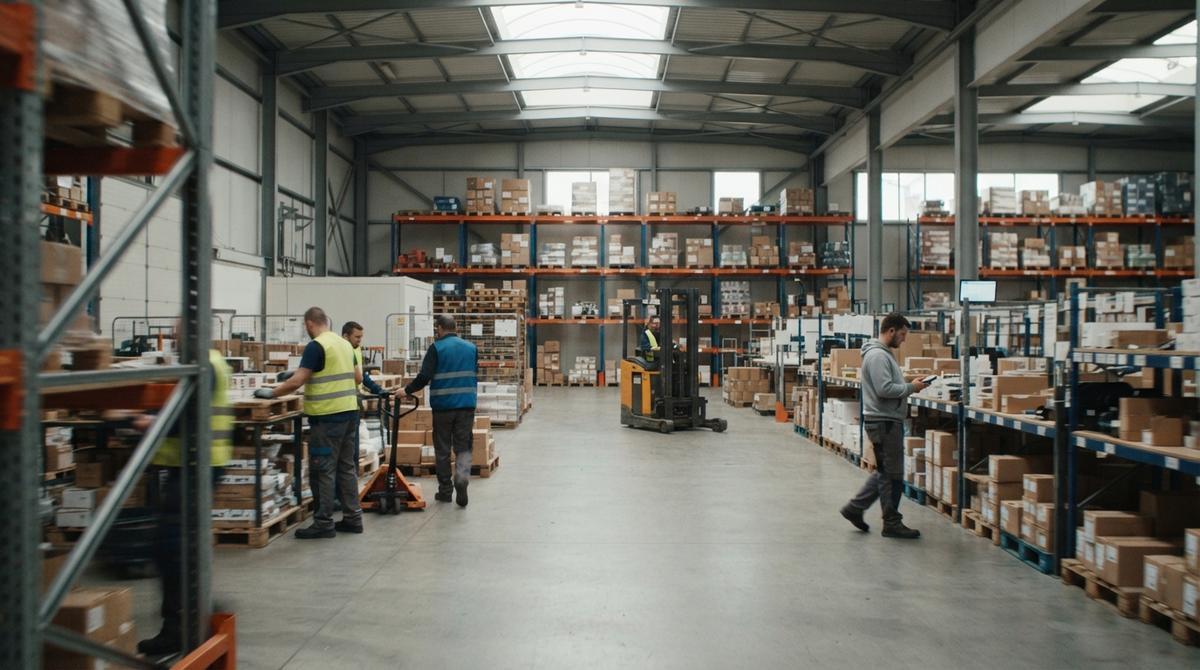
A distributor example is a business that buys goods in bulk and sells them in smaller lots to other businesses. Ours is a made-up supplier of restaurant and janitorial goods with 22 staff. We follow one order from phone call to payment. We show where manual steps cost money.
Book a callWhat Is a Distributor Example?
What is a distributor? A distributor is a business that buys goods in bulk and sells them to other businesses. This distributor business example is one typical small shop. It is a teaching composite. It is not a case study, and it makes no claim about any client.
Reviewed November 2026.
Meet the firm. It sells restaurant and janitorial supplies near a Midwest city. It has one warehouse, 2 delivery trucks and about 300 active customers. It runs on an accounting package, a spreadsheet, paper and email.
Even a small firm must count its stock. According to IRS Publication 538, "To figure taxable income, you must value your inventory at the beginning and end of each tax year." Good counts are a legal duty, not a preference.
We build it for your operation, and the first look is free
If you would rather not compare products, describe how your operation already works and we build the system around it.
No build cost. You see it running on your own process first, and the monthly subscription starts only once it is live.
Book a callHow Does a Distributor Make Money?
A distributor makes money by buying in bulk at a low price and selling smaller lots at a markup. Our firm buys a pallet of trash bags and sells them by the case. The gap between the 2 prices is the margin.
Three things shape that margin: pricing, stock levels and fast delivery. A wrong price loses cents on every case. Too much stock locks up cash. A late truck loses the customer. Business distributors work on thin gaps, so one small error in any step eats real profit.
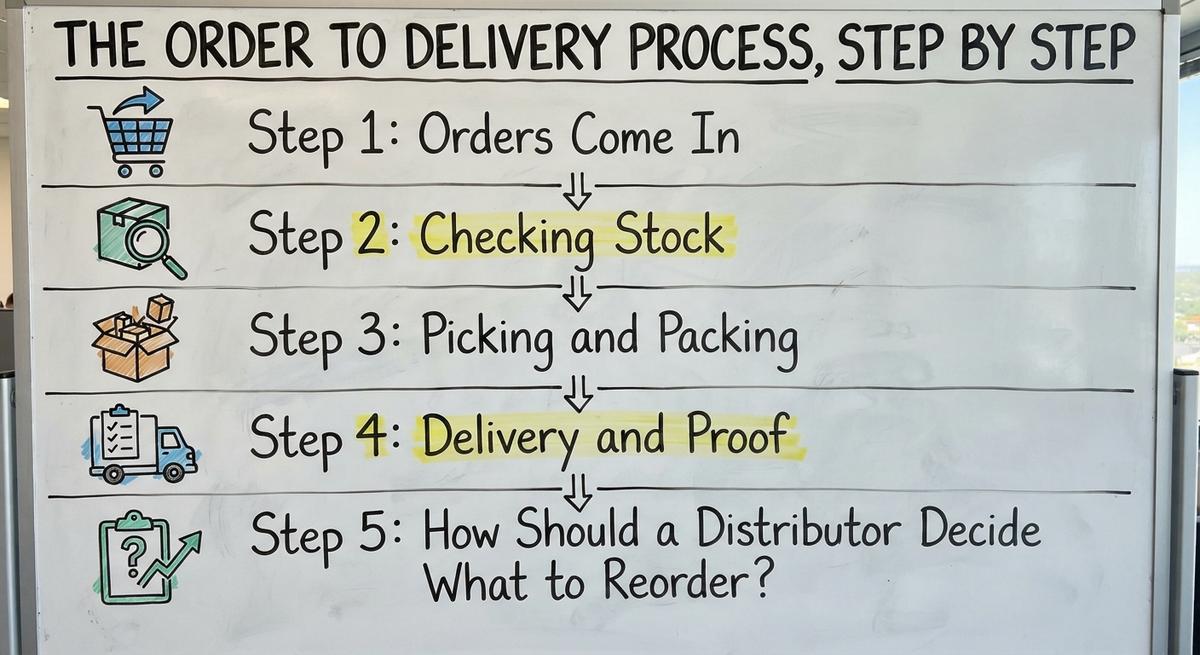
The Order to Delivery Process, Step by Step
The order to delivery process has 6 stages: order, pick, pack, ship, bill and collect. This wholesale distribution workflow looks simple on paper. Watch for the spots where a person retypes data or hunts for it.
Step 1: Orders Come In
Put a price on it. Say 2 clerks spend 5 hours a week each on retyping at $22 an hour. That is 2 x 5 x $22 x 52 weeks, or $11,440 a year. The Bureau of Labor Statistics lists pay for clerks who do this kind of work.
Orders arrive by phone, email and text. Staff retype each one into the accounting package. Typos creep in, and a missed email becomes a late order.
Step 2: Checking Stock
Stock counts live in one spreadsheet. One person updates it. Sales reps cannot see the real counts.
So a rep promises 40 cases that the shelf no longer holds. That is overselling: selling goods you do not have. The customer waits, the rep apologizes and the owner scrambles. Weak inventory tracking turns a sale into a complaint.
Step 3: Picking and Packing
Pick sheets are lists of what to pull from the shelves. The office prints them and staff add handwritten notes. Paper gets lost. A sheet goes stale when the order changes after printing.
Fixes then happen after the truck leaves. Warehouse operations run on paper that is already wrong by the time a picker reads it.
Step 4: Delivery and Proof
Short-shipped items fare worse. When a truck leaves 6 cases behind, no clean record shows it. Billing and delivery drift apart.
Route plans sit in a spreadsheet. Signed delivery slips sit in a folder. A customer calls and asks, "Did it arrive?" Someone must dig through the folder to find out.
Step 5: How Should a Distributor Decide What to Reorder?
The result is cash tied up in slow stock and empty shelves for fast sellers. The Census Bureau's monthly wholesale report tracks inventories against sales for the whole sector. Each owner needs that same ratio for their own shelves.
A distributor should reorder from real sales data and current supplier prices. Our example reorders from memory and gut feel. Supplier prices hide in email threads.
Not sure this is the right shape for your operation
Describe how the work runs today. We map it on a call and show you what it would look like built around that, before you spend anything.
Book a callWhere Your Accounting Software Works and Where the Gaps Show Up
Your accounting software does accounting well. It keeps the books, sends invoices and records payments. Our example keeps it. A tool that works does not need to go.
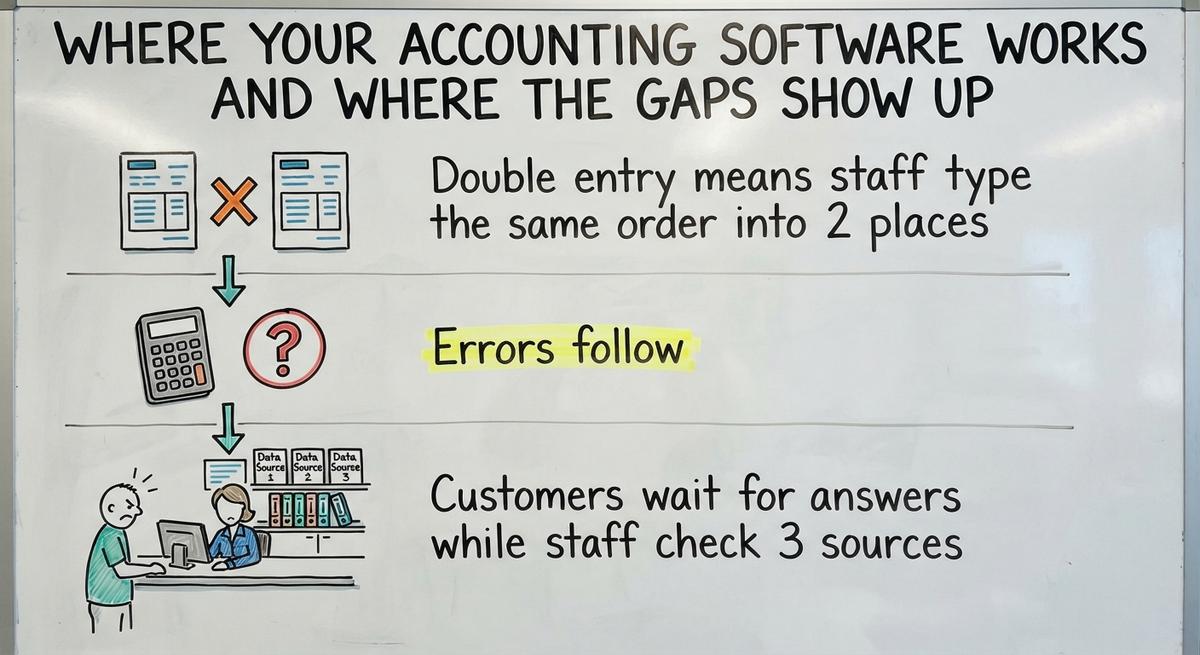
The gaps sit in the handoffs between the accounting software and a spreadsheet, paper and email. Those handoffs cost the firm in 3 ways:
- Double entry means staff type the same order into 2 places.
- Errors follow, because each retype is a new chance for a wrong number.
- Customers wait for answers while staff check 3 sources.
The owner ends up as the human link between systems. Every question runs through one tired person.

What Should the Distributor Fix First?
The distributor should fix the one step that hurts most. For many small firms that is order entry or stock counts. Start small. A big overhaul stalls the work you already do.
Then measure. Count wrong orders per month before the change and after. Count the hours saved. The NIST Manufacturing Extension Partnership gives vendor-neutral guidance on supply chain and inventory process. Use plain numbers to judge whether the fix paid off.
The comparison is easier when one option is built for you
Off-the-shelf means fitting your process to the software. We do it the other way round, and the first look costs nothing.
Book a callWhat a Custom-Built Fix Looks Like
Custom operations software is built around how the team already works. It does not force new habits. For our example, the build could look like this:
- Staff enter each order once.
- Stock counts drop as items ship.
- Pick lists print straight from the order.
- The accounting software stays in place for the books.
The build replaces only the manual parts. Scope and timing depend on the shop, so a good partner reviews your steps first.
Why not buy a big ERP, a large all-in-one business system? Big systems often mean long, costly projects and forced data moves. Small teams use few of the features. A big system fits a firm with complex needs and a large budget. A 22-person shop can fix its worst step for less.

What Changes for the Team?
The team retypes fewer orders and answers fewer calls about stock. Staff keep the steps they know. They lose most of the paper.
The owner sees clearer numbers without chasing sheets. Sales reps check real counts before they promise a delivery. The office spends its hours on customers instead of on copying data.
Other Distributor Examples
Other distributor examples share the same pattern: scattered tools and manual handoffs. The differences sit in the goods. A wholesale distributor example in each field shows it:
- A food wholesaler tracks lots and expiry dates, so old stock ships first.
- An auto parts distributor handles many small items and frequent returns.
- A building supplies firm sells by length and weight and delivers to job sites.
- A fulfillment center kits items into bundles for other sellers.
Who sells and who stocks differs too, so wholesale vs distributor questions come up. The workflow problem is the same in each shop.

Signs Your Distributor Looks Like This Example
Use this list as a self-check. No tool or calculator is needed. Your firm looks like our example if you see these signs:
- Staff retype orders from email, text or phone notes.
- Stock counts live in a spreadsheet.
- Pick sheets are printed paper.
- One person knows how everything works.
How to Start Mapping Your Own Operation
Map your process in 4 moves. Write down each step from order to payment. Mark where data is typed twice or held on paper. Circle the step that causes the most mistakes. Bring the map to a software partner.
The Software Society builds custom workflow software around the way you already work. A local Columbus, Ohio team is glad to look at your map with you.
Frequently asked questions
What does a distributor do?
A distributor buys goods in bulk from makers or suppliers. It stores them and sells smaller lots to other businesses. It also picks, packs and delivers orders, then bills the customer. Its profit comes from the gap between what it pays and what it charges.
What is an example of a distributor?
A supplier of restaurant and janitorial goods is one example. It buys trash bags, soap and paper goods by the pallet. It sells them by the case to about 300 restaurants and offices, and delivers them by truck.
How does an order move through a distributor?
An order moves through 6 stages: order, pick, pack, ship, bill and collect. A customer places the order. Staff pull and pack the goods. A truck delivers them. The office sends an invoice and collects payment.
Do I need to replace my accounting software?
No. Your accounting software handles books, invoices and payments well. Keep it for those jobs. Fix the manual handoffs around it, such as retyped orders, spreadsheet stock counts and paper pick sheets. Replace only the parts that cause errors and delays.
Do I need a big ERP to fix these problems?
Not always. A big ERP means a long, costly project and a move of all your data. Many small distributors fix their worst step first with software built around their own process. Weigh the size of your needs against the cost and time.
How small is too small for custom software?
No set size rule exists. The test is pain, not headcount. If staff retype orders, stock counts are wrong or one person holds all the knowledge, a fix can pay off. A local Columbus, Ohio team can talk through your case with you.
How do I map my own distribution process?
Write down each step from order to payment. Mark where data is typed twice or kept on paper. Circle the step with the most mistakes. Take that one-page map to a software partner and start with the circled step.
Start with a free first look
A 30 minute call, your operation mapped, and a clear picture of what we would build. No obligation and nothing to install.
Book a callRelated guides
More on the same work.
Guides
- Distributor Examples
- Business Distributors
- Is a Distributor a Wholesaler
- Distributor Rate
- Company Distributor
- Software for Distributors
- Dealer and Distributor
- Define Wholesale Distributor
- Distributor Markets
- Distributor Brand
- Warehouse Management System Examples
- Examples of Warehouse Management System
- Make to Stock Examples
Common questions
- Wholesale vs Distributor
- Wholesale Distributor Meaning
- Distributor vs Wholesaler
- What is the Distributor
- Difference Between a Wholesaler and a Distributor
- Distributors vs Suppliers
- Dealer vs Distributor
- How Distributors Work
- Difference Between a Dealer and a Distributor
- Wholesale Distributors Definition
- What is a Warehouse Management System Example