

Warehouse Management System Examples
Real warehouse management system examples show how software tracks inventory, guides workers, and records every move inside a warehouse. The 6 examples below are drawn from small and mid-size operations, each one a before-and-after with the numbers that changed, from receiving and put-away to reporting. This guide, reviewed in September 2026, ends with how those examples compare to packaged software and the features that recur across all of them.
Published 3 August 2026. Reviewed and updated 15 September 2026.
Book a callWhat Does a Warehouse Management System Actually Do?
A warehouse management system, or WMS, is software that tracks inventory, guides workers, and records every movement inside a warehouse or distribution centre. It is not accounting software. It handles the physical side of your operation, not the financial side.
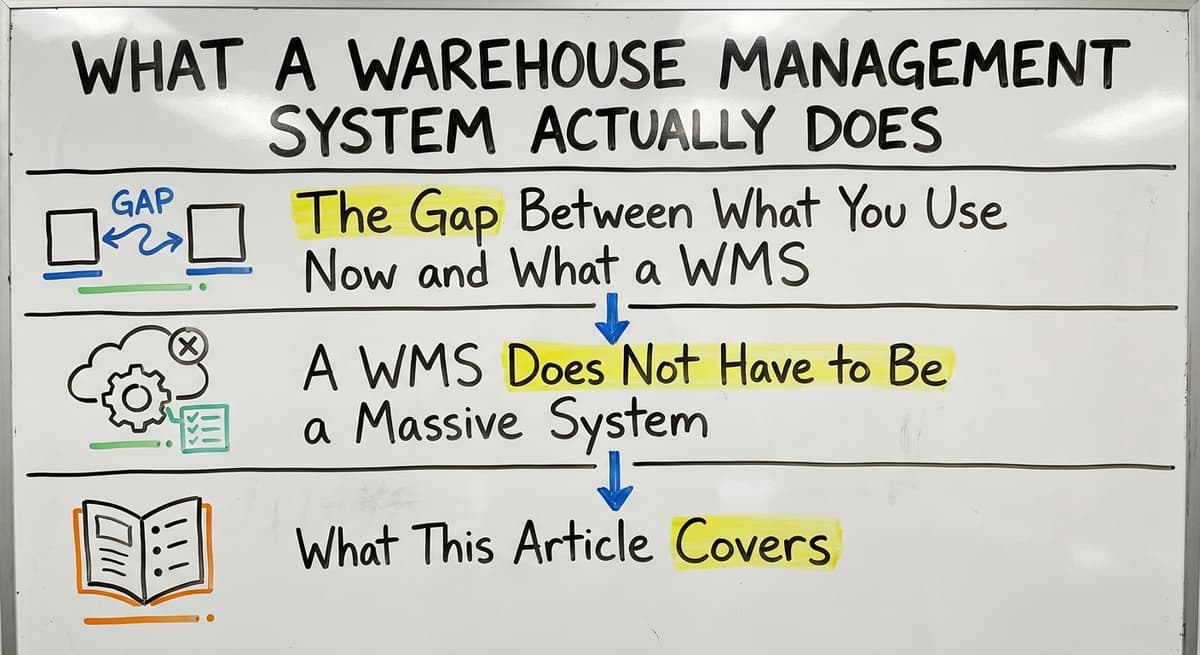
The Gap Between What You Use Now and What a WMS Replaces
Most small operations run on a mix of tools. Spreadsheets track stock levels. Printed pick lists guide pickers. Email carries order updates. The accounting package handles the money. Each tool works on its own.
Together, they create gaps. A picker grabs the wrong item. A count goes unrecorded. A customer gets the wrong order. A WMS closes those gaps by connecting every physical action to a single record.
A WMS Does Not Have to Be a Massive System
A warehouse management system does not have to mean a six-figure ERP rollout. That is not the only option.
Small and mid-size operations can use purpose-built systems that fit their existing workflow. The goal is to replace the manual parts that cause errors, not to rebuild everything from scratch.
What This Article Covers
The sections below walk through 6 real warehouse management system examples. Each one is drawn from the daily reality of a small distributor or fulfilment centre.
You will see what the problem looks like before a WMS and what it looks like after. By the end, you will know which examples apply to your operation.
Would you rather have it built around your operation?
The first look is free. If you would rather not compare products, describe how your operation already works and we build the system around it.
No build cost. You see it running on your own process first, and the monthly subscription starts only once it is live.
Book a callExample 1: Receiving and Put-Away Tracking
Receiving is where most inventory errors start. A truck arrives. Staff count boxes. Someone writes numbers on a clipboard. Later, someone types those numbers into the accounting system. At every step, a mistake is possible.
The obligation behind all of this is not optional. IRS Publication 538 states: “To figure taxable income, you must value your inventory at the beginning and end of each tax year.” A stock figure nobody trusts makes that number a guess.
Reviewed August 2026. Each figure comes from the assumptions stated beside it, so you can substitute your own and the arithmetic still holds.
The Before State at a Typical Distributor
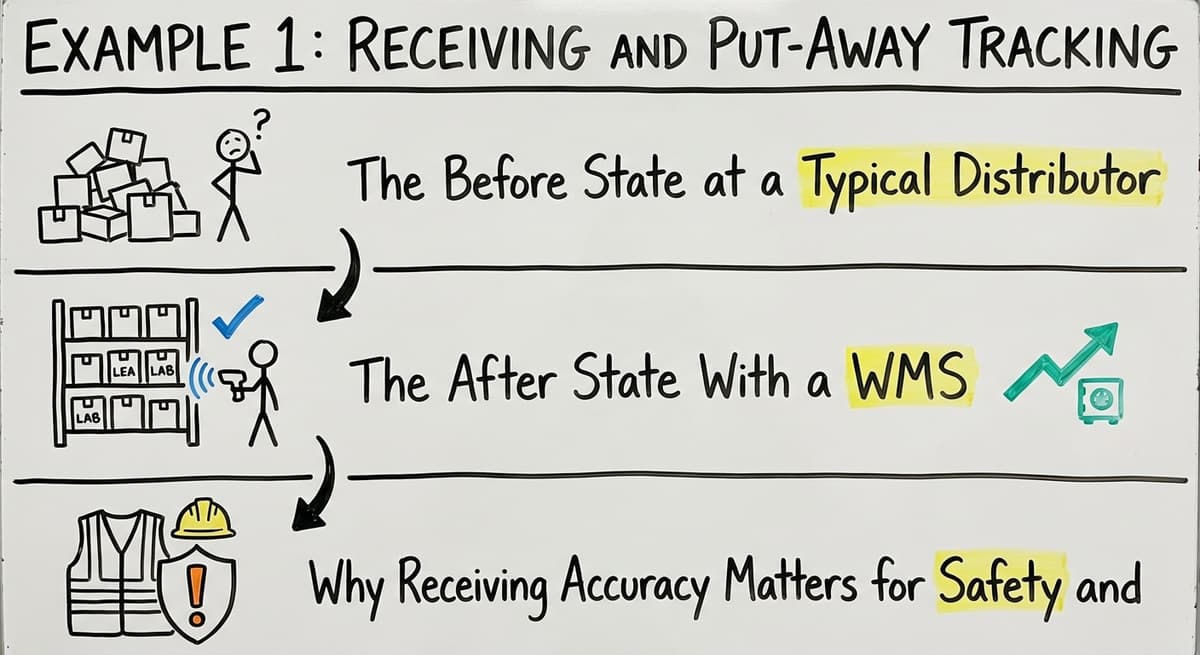
Picture a wholesale distributor with 15 staff. A truck delivers 40 line items. A receiver writes counts on a paper log. At the end of the day, an office worker types the data into the accounting system.
Two items get transposed. One count is wrong by 12 units. Nobody knows until a customer calls about a missing order. That error costs time, a recount, and a credit note.
The After State With a WMS
With a WMS, the receiver scans each item as it comes off the truck. The system records the quantity and assigns a bin location automatically. The accounting software still handles the financial side.
The WMS handles the physical movement. The 2 systems talk to each other, so there is no double entry. Errors at receiving drop because the data goes straight from the scan to the record.
Why Receiving Accuracy Matters for Safety and Operations
OSHA states that "The warehousing and storage industry includes establishments operating facilities for general merchandise, refrigerated goods, and other products", and receiving docks are among the highest-risk areas in those facilities.
Accurate receiving records also matter beyond safety. Wrong counts lead to overselling, lost product, and customer complaints. A 10-person fulfilment centre and a 60-person distribution warehouse face the same risk. The WMS example here applies at both scales.
Example 2: Real-Time Inventory Visibility
Real-time inventory visibility means knowing exactly how many units of a SKU are on hand, on order, and committed to open orders right now, not at the end of the day.
The Current Reality for Many Small Distributors
A sales rep gets a call. A customer wants 80 units of a product. The rep checks a spreadsheet. The spreadsheet was updated yesterday. The rep calls the warehouse floor. Nobody picks up.
The rep guesses and confirms the order. Two days later, the warehouse finds only 60 units. The order ships short. The customer is unhappy. This happens because no single live record exists.
How a WMS Maintains a Live Inventory Ledger
A WMS updates inventory with every pick, receive, and transfer. When a picker pulls 10 units, the count drops by 10 immediately. When a truck is received, the count rises. The sales rep checks the system and sees the real number.
No calls to the floor. No guessing. The US Census Bureau's Monthly Wholesale Trade data shows that wholesale inventories represent a large share of working capital for distributors. Inaccurate counts mean that capital is either overstated or understated on your books.
Cycle Counting as Part of Inventory Visibility
Cycle counting means counting a small portion of your inventory each day instead of shutting down for one big annual count. A WMS schedules and records those small daily counts. Staff count 50 bins on Monday, 50 on Tuesday, and so on.
By the end of the month, every location has been checked. Errors get caught early.
The IRS is clear on why this matters: "To figure taxable income, you must value your inventory at the beginning and end of each tax year", and accurate cycle counts make that valuation defensible.
The comparison is easier when one option is built for you
Custom warehouse software fits your process rather than forcing you to fit the software. We do it the other way round, and the first look costs nothing.
Book a callExample 3: Pick, Pack, and Ship Workflows
Order fulfilment is where errors are most visible to customers. A pick, pack, and ship workflow inside a WMS moves an order from receipt to shipping label with less manual handling at each step.
The Problem With Paper Pick Lists
A small fulfilment centre with 8 pickers runs on printed pick lists. A picker grabs the list, walks the floor, and pulls items by memory and habit. Two pickers get the same list by mistake. One item is picked twice. Another is skipped.
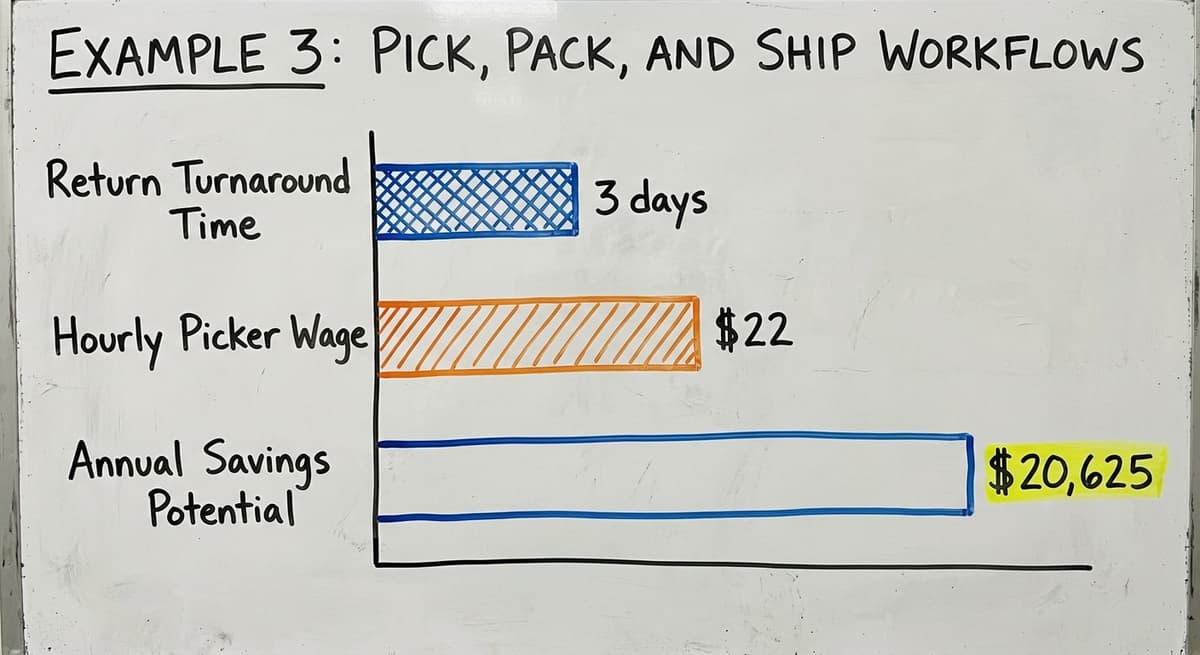
The wrong size ships. A return comes back 3 days later. The cost of that return includes labour, shipping both ways, and a lost customer. Paper pick lists create errors because they give the picker no confirmation at the point of pick.
How a WMS Guides the Pick Process
With a WMS, an order arrives and the system generates a digital pick list. The picker sees the bin location, the SKU, and the quantity. The picker scans the item. The system confirms the pick or flags a mismatch. The pick is recorded.
Inventory drops. The order moves to packing. The packer sees what should be in the box. The shipping label prints. The carrier data passes back to the books without double entry. Every step is recorded and every error is caught before the box closes.
Wave Picking for Higher Order Volume
Wave picking groups multiple orders together so pickers travel the warehouse once and collect items for several orders at the same time.
A WMS manages this automatically. For a fulfilment centre running 3 to 15 pickers and daily carrier pickups, wave picking can cut travel time significantly.
If 5 pickers each save 45 minutes a day at $22 an hour, that is $20,625 saved per year, based on the Bureau of Labor Statistics wage data for warehouse workers. The WMS does the routing. Your team does the picking.
Example 4: Location and Bin Management
Bin location management means giving every SKU a fixed home in the warehouse and recording that home in the system. It sounds simple. For operations without it, the cost is real.
The 20-Minute Problem
A distributor carries 2,000 SKUs. New staff spend 20 minutes finding a product that experienced staff find in 2. That gap exists because product locations live in people's heads, not in a system.
When experienced staff are out sick or leave the company, that knowledge walks out with them. Multiply 18 extra minutes by 10 picks a day by 5 new staff and you lose 1,500 minutes, or 25 hours, every day.
How Location Management Solves This
A WMS maps every aisle, rack, shelf, and bin. Every SKU gets a home location. When a receiver puts away a product, the system tells them exactly where it goes. When a picker needs it, the system shows the exact bin.
New staff and experienced staff find the same product in the same time. The NIST Manufacturing Extension Partnership notes that clear location systems are a foundational step in supply chain process improvement, and the benefit applies even to a single-aisle warehouse.
Dynamic Slotting for High-Velocity Items
Dynamic slotting is an advanced form of location management. The WMS tracks which SKUs move fastest and suggests moving them closer to the packing station. A product that ships 200 times a day should not live at the back of aisle 4.
A WMS can flag that and guide the move. Even a modest operation with 1 warehouse and 2 aisles benefits from formal location management. The system does not have to be complex. It just has to be consistent.
What does it look like running on your own process?
The first thing you see is it running on your own process, at no build cost. The subscription starts once it is live and doing the job, not before.
Book a call
Example 5: Custom Workflows Built Around Your Operation
Off-the-shelf warehouse management system examples show what generic software can do. Custom-built systems show what software designed around your specific operation can do. The difference matters.
Lot Tracking and FEFO for Perishable Goods
A wholesale distributor handles perishable goods. Each lot has an expiry date. Staff are supposed to ship the oldest stock first. This is called FEFO, or first expired, first out.
On paper, it is a policy. In practice, it depends on whoever is picking that day remembering to check dates.
A custom WMS enforces FEFO automatically. The system tells the picker which lot to pull. The picker cannot skip to a newer lot without overriding the system. The result is less waste and fewer expired goods reaching customers.
Kitting and Assembly Tracking
A fulfilment centre handles kitting. Staff assemble 3 components into 1 finished product. A generic WMS treats this poorly. A custom WMS tracks component inventory and finished goods separately. It records each assembly step and updates both counts in real time.
When a sales rep checks stock, they see finished kits and available components.
The system can also flag when components are running low before the line stops. This is the kind of workflow a generic system forces you to work around. A custom build makes it native.
Custom Does Not Mean Slow or Expensive
Custom warehouse software for small distributors does not have to be slow or expensive to build. A team that understands small-to-mid distribution operations can build something that fits without months of setup.
Custom warehouse software for small distributors is a real option, not a luxury. The goal is a system that matches how your team already works, not one that forces your team to learn a new way of working.

Example 6: Reporting and Operations Dashboards
Good warehouse reporting tells an operations manager what happened, what is happening now, and what needs attention. It does not require a separate business intelligence tool.
What Useful WMS Reporting Looks Like
A useful WMS reporting dashboard gives an operations manager a clear picture the moment they sit down each morning. They see inventory turnover by SKU, order fill rate, receiving accuracy, and pick error rate. They see which SKUs are running low, which orders are behind, and which staff members have the highest error rate.
Every number comes from the same system that ran the warehouse yesterday. No spreadsheet assembly required.
The Current State for Most Small Operations
Without a WMS, building that picture takes real work. Data lives in the accounting system, in a spreadsheet, and in a paper log. Someone spends an hour pulling it together. By the time the report is ready, the morning is half over.
The Warehousing Education and Research Council publishes standard benchmarks for distribution centre performance, including fill rate and order accuracy. Most small operations cannot measure against those benchmarks because they cannot easily pull the data.
Reporting That Feeds Back Into the Books
A well-built WMS surfaces the right numbers in plain language. Reports can also feed back into the accounting software for financial reconciliation without double entry. The WMS holds the physical record.
The books hold the financial record. They stay in sync. An operations manager gets the warehouse picture. An accountant gets the financial picture. Neither has to rekey data. This is what accounting integration for warehouse operations looks like in practice.

How Do These Examples Compare to Off-the-Shelf WMS Software?
Large WMS vendors exist and serve enterprise operations well. They target complexity, high volume, and large teams. For a 20-person distributor, that complexity is the problem, not the solution.
Common Problems Small Operations Face With Off-the-Shelf Systems
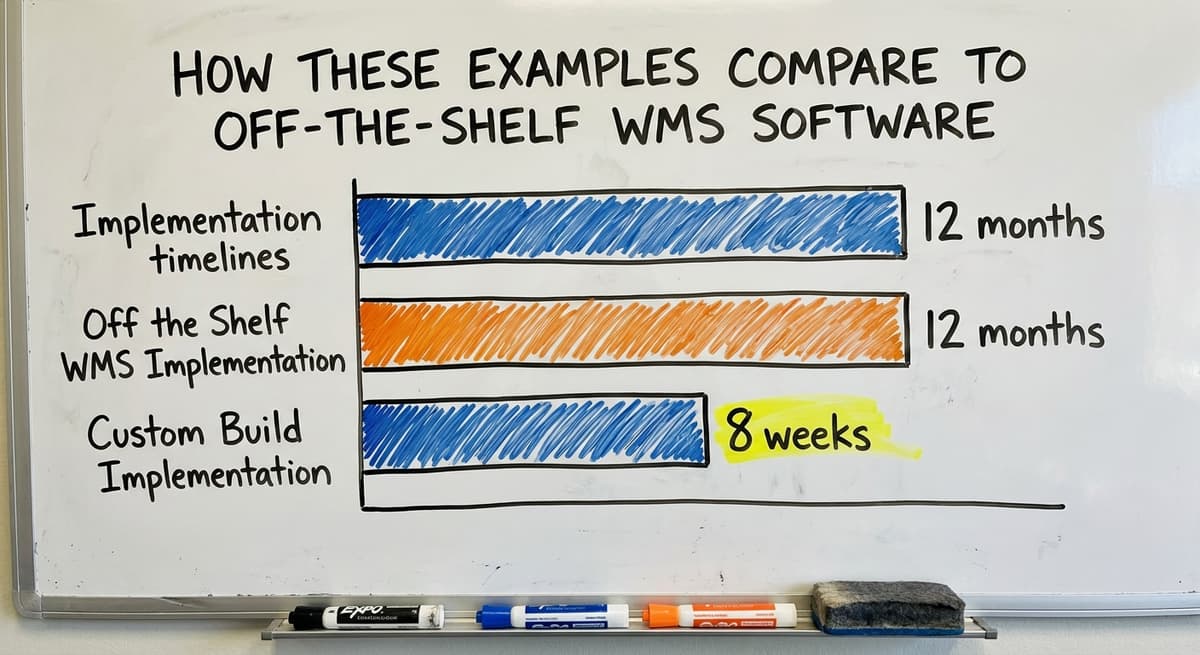
Off-the-shelf WMS products come with features a small operation will never use. Implementation timelines run 6 to 12 months. Per-user pricing grows fast as the team expands.
Many systems push you to migrate away from your accounting software entirely, which means retraining your finance team and rebuilding reports you already rely on. The system becomes a project that consumes the operation instead of supporting it.
What is in a free first look?
A 30 minute call, your operation mapped, and a clear picture of what we would build. No obligation and nothing to install.
Book a callWhat a Focused Custom Build Looks Like Instead
A focused custom build does the 5 or 6 things your operation actually needs. It connects to the accounting software. It takes shape and running in weeks rather than months. It does not come with 40 configuration screens for features you will never touch.
The goal is not the most feature-rich system. The goal is the system that eliminates the specific manual work slowing your operation down.
| Factor | Off-the-Shelf WMS | Custom Build for Small Distributor |
|---|---|---|
| Implementation time | 6 to 12 months | 4 to 8 weeks |
| Features | Hundreds, many unused | Only what you need |
| Accounting software | Replaced | Kept and connected |
| Per-user cost | Grows with headcount | Fixed or low per seat |
| Training burden | High | Low, built to your workflow |

Choosing the Right Warehouse Management System Example for Your Operation
Not every operation needs all 6 examples above. Most small operations need 2 or 3 implemented well. The key is starting with the right problem.
Start With Your Biggest Manual Pain Point
Finding the right starting point means asking where errors happen most. Ask where your team spends time on tasks a system could handle.
Ask what data you wish you had but currently do not. The answers point to the examples that matter most for your operation.
If receiving is your biggest source of errors, start with Example 1. If your pickers make mistakes, start with Example 3. If you cannot answer a stock question without calling the floor, start with Example 2.
Diagnostic Questions to Ask Before You Evaluate Any System
Before you talk to any software partner, map your current workflow on paper. Walk through a receiving event. Walk through an order pick. Note every step where a human writes something down or types something in. Those steps are your targets.
Useful questions to ask:
- Where do errors happen most often in our current process?
- Which tasks consume the most staff time without adding value?
- What data do we wish we had access to right now?
- Which manual steps cause the most customer-facing problems?
- Where does information get lost between systems?
What a Good Software Partner Will Do First
A good software partner will ask about your existing workflow before showing you anything. They will want to understand how your team works today, not how a generic warehouse is supposed to work.
If a partner leads with a product demo before asking about your operation, that is a sign the system is built for a generic warehouse, not yours.
Inventory tracking software for wholesale distributors works best when it is built around the real workflow, not installed on top of it.
Frequently Asked Questions About Warehouse Management System Examples

What to Do Next
You now have 6 real warehouse management system examples drawn from the daily work of small distributors and fulfilment centres. Each one shows a clear before state and a clear after state. The next step is simple.
Map your current workflow on paper. Pick the 1 or 2 examples above that match your biggest pain points. Then talk to a software partner who will ask about your operation before showing you a demo.
Fulfilment centre software solutions and warehouse inventory management software work best when they are built around how your team already works.
If your operation is running on spreadsheets, printed pick lists, and an accounting package, you do not need to replace everything. You need a focused system that closes the gaps.
The Software Society builds custom workflow systems for small and mid-size distributors. We start by understanding your operation, not by showing you a product catalogue.
If you are ready to replace the manual work that is slowing your team down, reach out and we will start with your workflow first.
Frequently asked questions
Frequently asked questions
Do I need a warehouse management system if I already track inventory in my accounting software?
Accounting software tracks financial inventory well but does not manage physical movement, bin locations, or pick workflows. A WMS handles the physical side of your operation and passes data back to the books. The 2 systems work together without replacing each other.
How long does it take to implement a warehouse management system?
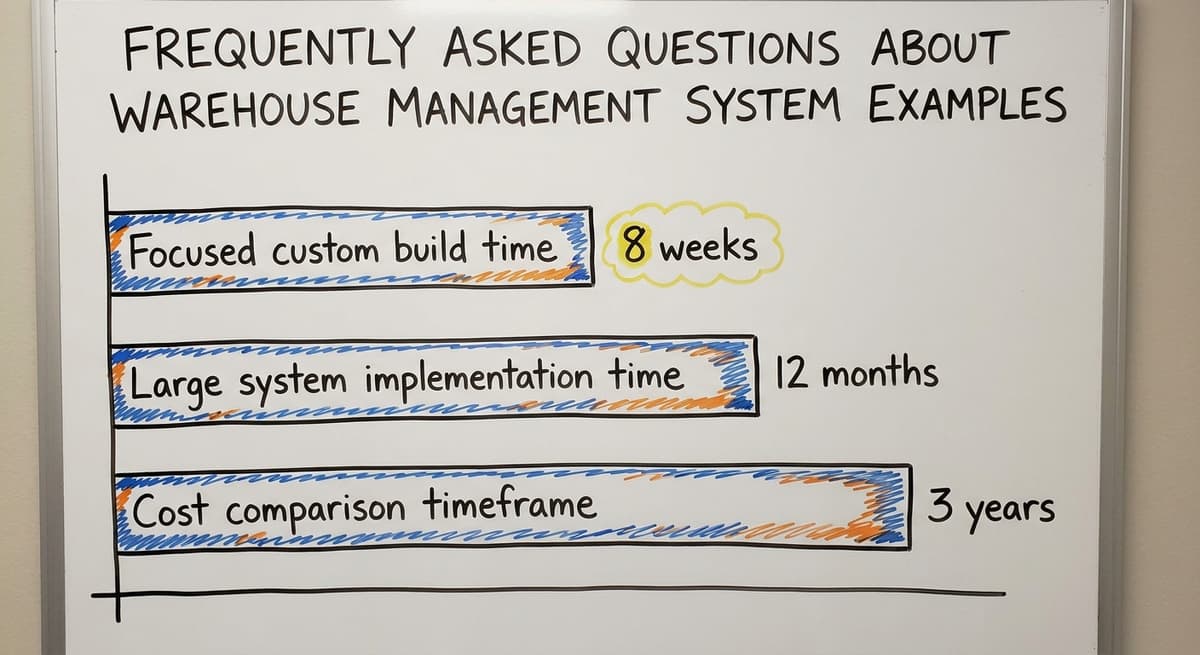
A focused custom build for a small operation can go live in 4 to 8 weeks. Large off-the-shelf systems take 6 to 12 months because they come with far more to configure, test, and train. The scope of the build drives the timeline.
What are the most common warehouse management system examples for small distributors?
The most common examples are receiving and put-away tracking, real-time inventory visibility, pick and pack workflows, and bin location management. Most small operations need 2 or 3 of these implemented well rather than all features at once.
How does a WMS connect to accounting software without replacing it?
A WMS records physical warehouse events: receives, picks, transfers, and counts. It passes that data to the accounting software through an integration, which updates its financial records automatically. Neither system has to be replaced and staff do not rekey data.
Can a small warehouse with fewer than 20 staff benefit from a WMS?
Yes. The return on investment comes faster at small scale because manual processes consume a higher share of available labour. A team of 10 has less slack to absorb errors than a team of 100, so fixing mistakes costs proportionally more.
What is the difference between a WMS and an ERP, and which one does a small distributor need?
An ERP covers the whole business including finance, HR, purchasing, and sales. A WMS focuses on warehouse operations. Most small distributors are better served by a WMS that connects to their existing accounting setup than by replacing everything with a full ERP.
What manual tasks does a WMS replace, and which ones does it leave alone?
A WMS replaces paper receiving logs, printed pick lists, manual bin searches, and end-of-day spreadsheet updates. It leaves financial accounting, customer invoicing, and purchasing decisions in your accounting software or existing tools. It handles the physical side of the operation.
What are the main features of a warehouse management system?
The core set is the same across warehouse management system examples of every size: receiving with purchase order matching, bin and location tracking, barcode scanning at pick and pack, real-time stock levels, order routing through the building, cycle counting, and a sync to the accounting software so nothing is keyed twice.
Reporting on accuracy and throughput is what turns those records into decisions.
Which WMS is best for a small business?
There is no single best system. For a small business the right choice is the one that matches how orders already move through the building, connects to the accounting package without replacing it, runs on the devices staff carry, and can be live in weeks.
A focused custom build does the five or six things a small operation needs better than a large platform full of features it will never use.
How much does warehouse management software cost?
The answer depends on the model. Subscription products charge by user, by order or by location, plus setup, hardware and support tiers underneath the monthly fee.
A custom build is a one-time cost, comparable to a year of subscription fees for a larger platform, with a smaller ongoing charge. Compare total cost over three years against the manual hours and the stock errors the system removes.
How do I choose the right warehouse management system?
Map the process first: how goods are received, stored, picked, packed and shipped today, and where the errors happen. Shortlist systems that handle those steps without forcing the team to change how it works.
Check the accounting integration on real data, pilot one product line, and compare total cost over three years. The right system is the one your team will actually use every day.
What is the best warehouse management system for a small business?
The best warehouse management system for a small business is the one built or configured around its own workflow, not the one with the longest feature list.
Look for receiving with scanning, bin locations, digital pick lists, a live link to the books, and a rollout measured in weeks. If no packaged product fits without a process change, a custom system scoped to the real bottlenecks is the better answer.
Not sure this is the right shape for your operation?
The call is free. Describe how the work runs today. We map it on a call and show you what it would look like built around that, before you spend anything.
Book a callRelated guides
The rest of this guide, for the parts of the job this page does not cover.
Guides
- Examples of Warehouse Management System
- Warehouse Inventory Management Systems
- Warehouse Management System Top 10
- Software for Warehouse Management System
- Small Business Warehouse Management System
- Warehouse Management System Types
- Warehouse Inventory Management System
- Warehouse Management System Implementation
- Cloud Warehouse Management System
- Warehouse Stock Management System
Common questions
- What is a Warehouse Management System Example
- What Are the Benefits of Warehouse Management System
- What is the Point of Warehouse Management System
- How to Choose a Warehouse Management System
- What is Asn in Warehouse Management System
- How to Create a Warehouse Management System
- What is a Warehouse Management System
- Which Warehouse Management System Would a Jeweler Most Likely Use
- How to Build a Warehouse Management System
- What is a Warehouse Management System Used For
- Warehouse Management System vs Warehouse Control System
- Meaning of Warehouse Management System
- Definition of Warehouse Management System
- Warehouse Management System Comparison