

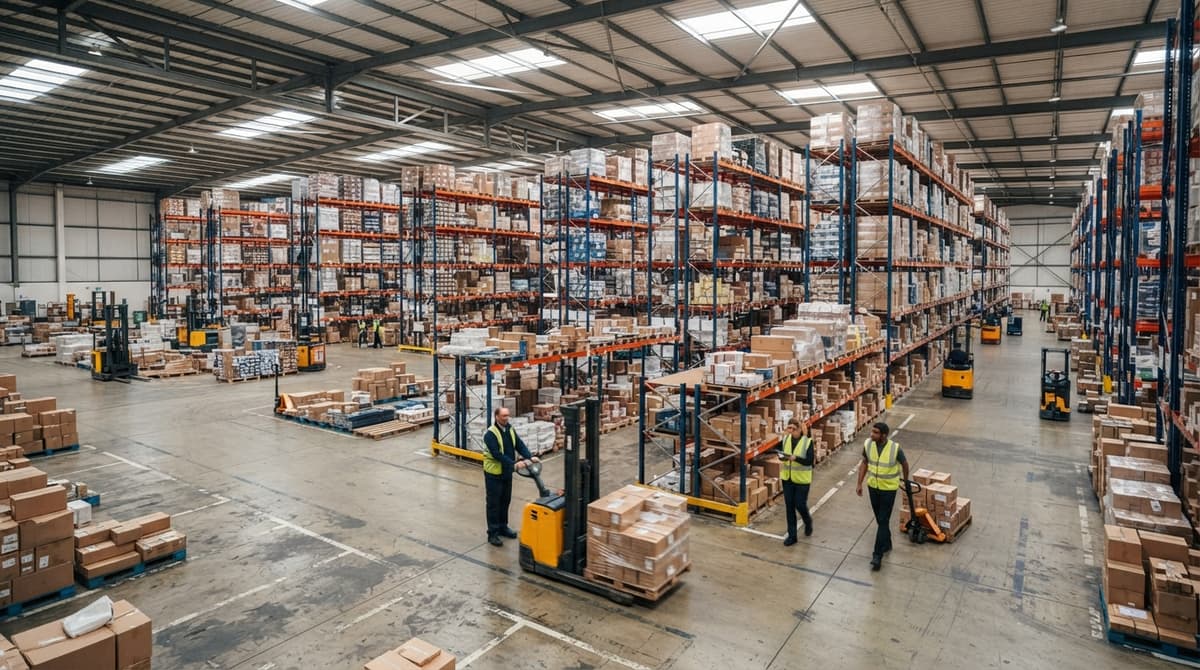
What Is A Warehouse Management System Example
A warehouse management system example is easiest to see in one small operation: a 12-person distributor that replaced a spreadsheet, a printed pick sheet, and a whiteboard with one system. This guide, reviewed in September 2026, walks that example from receiving to shipping, then the features behind it and the signs a warehouse is ready for the same.
Published 21 August 2026. Reviewed and updated 15 September 2026.
Reviewed August 2026. Each figure comes from the assumptions stated beside it, so you can substitute your own and the arithmetic still holds.
Book a callWhat Is a Warehouse Management System?
A warehouse management system is software that runs your physical warehouse. It logs items in when a shipment arrives. It tells your team where to put stock. It guides pickers to the right shelf. It confirms when an order ships. Everything happens in one place, in real time.
Think of it like a GPS for your stock. Just as a GPS knows where every road is, a WMS knows where every pallet, case, or unit sits at any moment.
Would you rather have it built around your operation?
The first look is free. If you would rather not compare products, describe how your operation already works and we build the system around it.
No build cost. You see it running on your own process first, and the monthly subscription starts only once it is live.
Book a callWhat a WMS Is Not
A WMS is not accounting software. It does not replace your bookkeeping platform. It does not manage invoices or payroll. It handles the physical side of your operation: inventory tracking, receiving, pick and pack, and shipping confirmation. Your accounting software stays in place and handles the money side.
A WMS also is not an ERP (enterprise resource planning system, the large all-in-one platforms that big companies spend years installing).
A focused WMS is a targeted tool. It solves one set of problems: knowing what you have, where it is, and what happens to it.
A Simple Warehouse Management System Example
Picture a wholesale distributor with 18 staff in Columbus, Ohio. They sell cleaning supplies to janitorial companies across the Midwest.
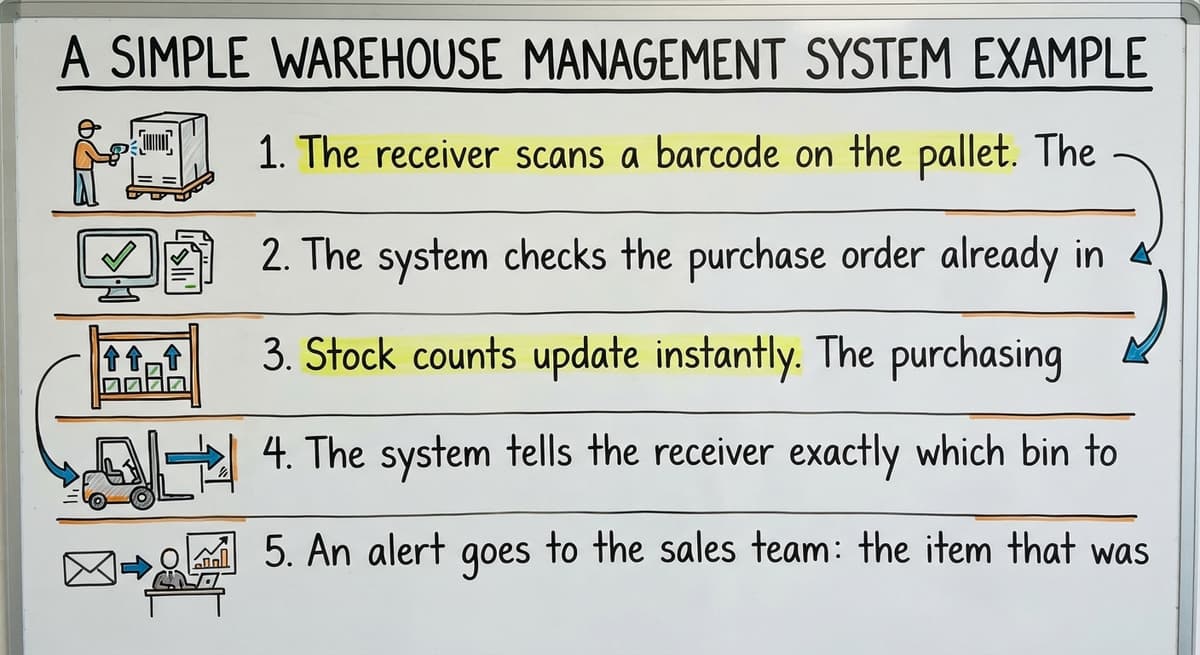
A truck pulls in with 240 cases of product. Here is what happens with a WMS in place:
- The receiver scans a barcode on the pallet. The WMS logs the item, quantity, and lot number in seconds.
- The system checks the purchase order already in the system. It flags any short shipment right away.
- Stock counts update instantly. The purchasing manager sees the new inventory from her desk without calling the floor.
- The system tells the receiver exactly which bin to put the stock in, based on what is already there and what orders are pending.
- An alert goes to the sales team: the item that was on backorder is now in stock.
None of that required a spreadsheet, a phone call, or a paper log.
What This Looks Like for a 10 to 50 Staff Operation
You do not need a giant automated warehouse for this to work. The example above fits a team of 18.
The WMS does not require conveyor belts or robotic sorters. It works on a tablet, a handheld scanner, or a desktop. The scale is yours to set.
OSHA notes that "the warehousing and storage industry includes establishments operating facilities for general merchandise, refrigerated goods, and other products." Those facilities share one challenge: people and products moving in the same space, fast.
A WMS reduces the confusion that leads to errors and near-misses by giving every person a clear, system-driven task.
Is the comparison easier when one option is built for you?
Yes. Off-the-shelf means fitting your process to the software, and custom is the other way round. The first look costs nothing.
Book a call
What Does a WMS Actually Replace in a Small Warehouse?
A WMS is the replacement for the manual tools your team already hates using. Most small operations run on some mix of these:
- Printed pick sheets. Someone prints them in the morning. By noon they are out of date. Staff pick from old information and errors follow.
- Spreadsheet trackers. One person owns the file. When they are out sick, no one can update it. Two people editing at once creates a conflict. Formulas break.
- Email threads. "Did we get that shipment?" "Where is order 4421?" The answer is buried in someone's inbox.
- Legacy database tools. Built years ago by someone who left. No one knows how it works. No one wants to touch it.
Each of these tools creates the same problem: information sits in one place and does not talk to the rest of your operation. Your team wastes time chasing answers instead of doing the work.
Why Manual Inventory Creates Legal and Financial Risk
The IRS requires that you "value your inventory at the beginning and end of each tax year" to figure taxable income. That is a legal obligation, not a preference.
Manual systems make that count slow, error-prone, and stressful. A WMS makes it a report you run in minutes.
A WMS replaces these tools for warehouse tasks only. Connecting your accounting software to warehouse operations means your bookkeeping stays exactly where it is. The WMS sends data to that system, so nothing gets re-entered.
The Real Cost of Manual Inventory
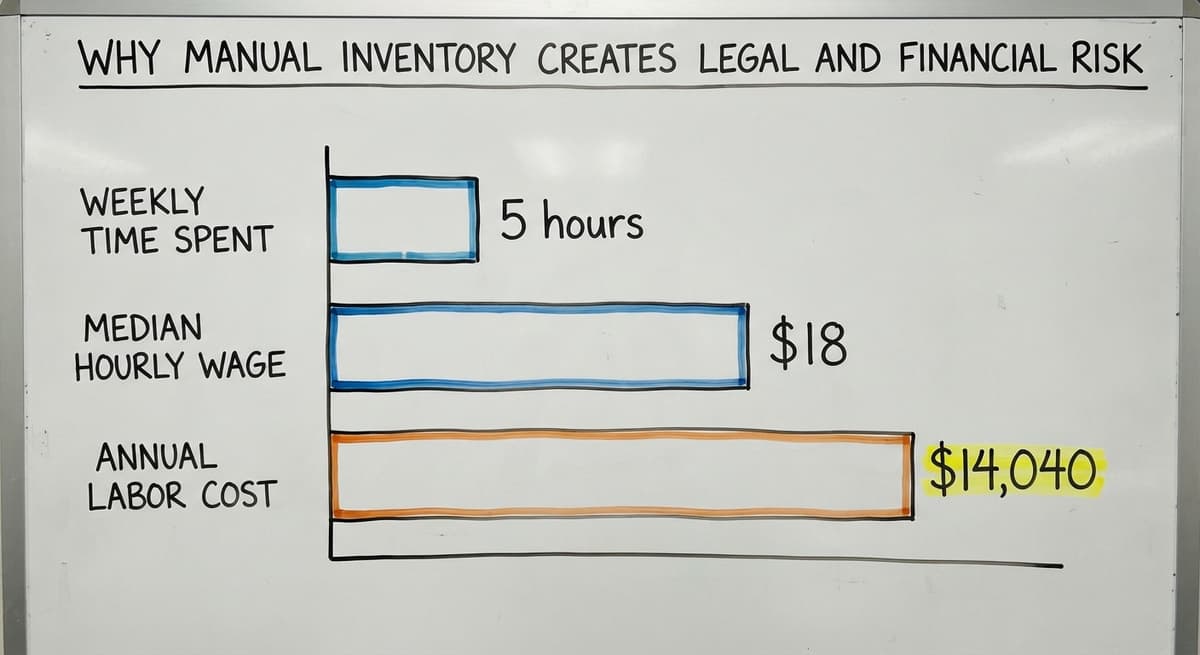
Consider this: 3 warehouse staff each spending 5 hours a week on manual counts and spreadsheet updates.
At the current median wage for stock clerks and order fillers, around $18 per hour according to the US Bureau of Labor Statistics, that is $14,040 a year spent on tasks a WMS handles automatically. That number does not include the cost of errors those manual processes produce.

Core Features in a Real Warehouse Management System Example
A WMS built for a small wholesale distributor or fulfillment center is 6 features, not dozens. It needs the right ones.
How a WMS Works Alongside Your Accounting Software
A well-built WMS is one that does not ask you to leave your accounting software. The two systems handle different jobs.
| Task | your accounting software | WMS |
|---|---|---|
| Invoices and payments | Yes | No |
| Payroll | Yes | No |
| Physical stock levels | No | Yes |
| Pick and pack workflow | No | Yes |
| Shipping confirmation | No | Yes |
| Inventory valuation data | Receives it | Sends it |
Here is a simple data flow: a customer places an order. The WMS picks, packs, and ships it.
On shipment, the WMS sends a confirmed quantity and item record to your accounting software. That software uses it to generate the invoice. No one types the same data twice.
The fear of double entry is real and fair. A WMS that forces you to enter data in two places is not a solution; it is more work.
The right system is built so data moves automatically. Your team enters it once, at the source, and both systems stay current.
What does it look like running on your own process?
The first thing you see is it running on your own process, at no build cost. The subscription starts once it is live and doing the job, not before.
Book a call
Off-the-Shelf vs Custom Warehouse Management System Examples
When you look for a WMS, you will find 2 broad types.
Off-the-shelf tools are designed to serve a wide range of businesses. They work well when your operation matches their assumptions.
The problem is that most small wholesale distributors and fulfillment centers have workflows that do not match a generic template. You end up changing how your team works to fit the software, not the other way around.
Custom warehouse software is built around how your operation already runs. Your bin numbering, your receiving steps, your customer order formats: the system matches them. Staff learn it faster because it mirrors what they already do.
Why Custom Does Not Mean Expensive
Custom does not mean expensive or slow. A focused custom WMS for a 10 to 50 staff operation is a much smaller build than an enterprise ERP.
A local team that understands your scale can map your workflow, build to match it, test with your staff, and go live in weeks, not months. Custom operational software for wholesale distributors built this way costs a fraction of what most owners expect.
The NIST Manufacturing Extension Partnership offers vendor-neutral guidance on supply chain processes and consistently points small manufacturers and distributors toward solutions that fit existing workflows rather than forcing process change for its own sake.

Signs Your Operation Is Ready for a Warehouse Management System
There are 5 signs, and none of them needs a consultant to read. These signals will tell you.
- You find stock errors after the order ships. A customer calls about a short shipment. Your team scrambles to check what actually left the dock.
- Orders take longer to fulfill than they should. Pickers walk the warehouse twice because the pick sheet was wrong or the stock was not where it was supposed to be.
- Your team spends hours each week on manual counts. Staff doing physical counts by hand cannot be on the floor doing other work.
- No one can see real-time inventory. Someone has to walk the floor or call a colleague to answer "do we have this in stock?"
- Your spreadsheet has become a full-time job. One person spends most of their day keeping the inventory file current instead of doing warehouse work.
What the Benchmarks Say
Any one of these is a reason to look at a WMS. All of them together mean the cost of waiting is growing every week.
The Warehousing Education and Research Council publishes standard benchmarks for distribution center performance. Operations running on manual inventory consistently score below benchmark on order accuracy and fulfillment speed. A WMS is the most direct path to closing that gap.
What is in a free first look?
A 30 minute call, your operation mapped, and a clear picture of what we would build. No obligation and nothing to install.
Book a call
What to Expect During Implementation
The word "implementation" stops a lot of small business owners. They picture a 12-month ERP rollout with consultants camped in the building. That is not what a focused WMS looks like.
A realistic phased approach for a 10 to 50 staff operation looks like this:
- Map the current workflow. A good builder spends time with your team before writing a line of code. They learn how you receive, store, pick, pack, and ship today.
- Build to match. The system follows your actual steps, not a generic template.
- Test with the team. The people who will use the system test it before it goes live. They find the gaps. They shape the final version.
- Go live. You switch over. Support is close. Issues get fixed fast.
How Long Implementation Actually Takes
For a small operation with a clear workflow, this process can run in 4 to 8 weeks. The team using the system is involved from day one, so adoption is faster and resistance is lower.
Replacing spreadsheets in warehouse management does not require a big-bang cutover. Many teams run the old and new systems side by side for a short period, then switch fully when confidence is high.
Where Do Wholesale Distributors and Fulfillment Centers Start?
The best starting point is the manual process that costs your team the most time each week. That is the first thing a WMS should fix. Not every feature at once. The one thing that slows you down most.
For most small wholesale distributors, that is either receiving or inventory counts. For most fulfillment centers, it is pick and pack accuracy. Start there. Get that working. Build from it.
Why the Barrier Is Lower Than Most Owners Think
A warehouse management system example like the one in this article is not a vision of some future state. It is a practical, targeted tool that teams your size use today.
The technology is not new. The barrier is not cost or complexity. The barrier is just knowing where to begin.
The US Census Bureau's Monthly Wholesale Trade data shows that wholesale distributors carry significant inventory relative to sales. Errors in that inventory have a direct impact on cash flow and customer trust. A WMS is how you protect both.
Warehousing inventory management software built for your scale, connected to your accounting software, and matched to your existing workflow isn't a luxury. It is the next logical step when manual processes start costing more than a system would.
If you run a wholesale distribution or fulfillment operation in or around Columbus, Ohio, and you are ready to stop managing inventory by hand, talk to a local team that builds custom warehouse software at your scale.
No pressure, no lengthy sales process. Just a direct conversation about which manual process costs you the most and what it would take to fix it.
Frequently asked questions
Frequently asked questions
What is a warehouse management system in simple terms?
A warehouse management system is software that tracks every item in your warehouse from arrival to shipment. It replaces paper pick lists, spreadsheets, and email threads. It is not accounting software and it does not replace your accounting platform.
Can you give a real example of a warehouse management system in use?
Yes. A wholesale distributor with 18 staff receives a shipment. A receiver scans a barcode.
The WMS logs the item and quantity, checks it against the purchase order, updates stock counts instantly, directs the receiver to the right bin, and alerts the sales team that a backordered item is now available. No spreadsheet, no phone call, no paper log.
What does a WMS actually replace in a small warehouse?
A WMS replaces printed pick sheets, spreadsheet files, email threads, and old desktop databases for warehouse tasks. Each of those tools keeps information isolated and out of reach for the rest of the team.
The WMS puts everything in one system so anyone with access can see what is happening in real time.
Do I have to give up your accounting software to use a WMS?
No. A well-built WMS works alongside your accounting software. That software handles invoices, payments, and payroll. The WMS handles physical inventory, receiving, picking and packing, and shipping.
When an order ships, the WMS sends the confirmed data to the accounting system automatically. Nothing has to be entered twice.
What is the difference between an off-the-shelf and a custom WMS?
An off-the-shelf WMS serves a wide range of businesses by design. You have to change how your team works to fit the software.
A custom WMS is built around how your operation already runs, so your team learns it faster and it solves your specific problems from day one.
How long does it take to implement a warehouse management system?
For a 10 to 50 staff operation with a clear workflow, a focused WMS can go from workflow mapping to go-live in 4 to 8 weeks. That is very different from a large ERP rollout.
The team using the system is involved from the start, which speeds up testing and adoption.
Is a WMS only for large warehouses or does it work for small operations?
A WMS works at any scale. The example in this article involves a team of 18. The system runs on a tablet, a handheld scanner, or a desktop.
You do not need conveyor belts or robotic equipment. The features scale down to match your operation's size.
How do I know if my business needs a warehouse management system?
Five clear signals: you find stock errors after orders ship, fulfillment takes longer than it should, staff spend hours on manual counts, no one can see real-time inventory without walking the floor, and one person spends most of their day keeping a spreadsheet current.
Any one of these is a reason to look at a WMS.
What are the main features of a warehouse management system?
A warehouse management system tracks every item from arrival to shipment, logging quantities and lot numbers as barcodes are scanned. It checks incoming stock against purchase orders, flags short shipments, and updates counts instantly. It also directs staff to the correct storage bin, guides picking and packing, confirms shipments, and sends alerts when backordered items become available, all from one real time system.
How much does a warehouse management system cost?
Cost depends on whether you choose an off the shelf tool or a custom built system, and on the size of your operation.
A focused system built for a small to mid sized warehouse is a much smaller project than a large enterprise platform, so it costs far less than owners expect.
Some providers avoid upfront build costs and only begin charging a subscription once the system is live and working.
What are the benefits of using a warehouse management system?
A warehouse management system removes the guesswork of outdated pick sheets, spreadsheets, and email threads by keeping inventory information in a single system that updates in real time. It reduces picking errors, speeds up receiving, gives instant visibility into stock levels, and automatically sends shipment data to accounting software so no one has to enter the same information twice. This saves staff time and lowers the risk of costly mistakes.
What are the benefits of using a WMS?
A WMS saves time by replacing manual counts, outdated pick sheets, and scattered spreadsheets with a single system that updates instantly as items are received, stored, and shipped. It reduces errors, gives managers real time visibility into stock without walking the floor, and produces accurate inventory reports quickly, which also helps meet legal requirements for valuing inventory at tax time.
Not sure this is the right shape for your operation?
The call is free. Describe how the work runs today. We map it on a call and show you what it would look like built around that, before you spend anything.
Book a callRelated guides
The rest of this guide, for the parts of the job this page does not cover.
Guides
- Warehouse Management System Examples
- Examples of Warehouse Management System
- Warehouse Inventory Management Systems
- Warehouse Management System Top 10
- Software for Warehouse Management System
- Small Business Warehouse Management System
- Warehouse Management System Types
- Warehouse Inventory Management System
- Warehouse Management System Implementation
Common questions
- What Are the Benefits of Warehouse Management System
- What is the Point of Warehouse Management System
- What is Asn in Warehouse Management System
- What is a Warehouse Management System
- What is a Warehouse Management System Used For
- What is the Purpose of a Warehouse Management System
- What is a Warehouse Management System Pdf
- What Warehouse Management System Does Amazon Use
- What Are the Top 5 Warehouse Management Systems?
- What is the Best Warehouse Inventory Management System?
- What is the Difference Between Warehousing and Inventory Management
- What is the Most Popular Warehouse Management System?
- What is B Type of Inventory in Warehouse Management
- What is a Simple Warehouse Management System?
- What is Warehousing and Inventory Management