


Examples Of Warehouse Management System
Real examples of a warehouse management system show software that tracks inventory, logs shipments, guides picks, and updates stock counts on every scan. The 10 examples below come from small and mid-size operations, each one a before-and-after with the numbers that changed, and this guide, reviewed in September 2026, ends with the features that show up in nearly all of them.
Published 12 August 2026. Reviewed and updated 15 September 2026.
Book a callWhat Does a Warehouse Management System Actually Do?
A warehouse management system, or WMS, is software that tracks every item in a warehouse. It records when stock arrives, where it goes, who picks it, and when it ships. It replaces the mix of spreadsheets, printed pick lists, and email chains that most small operations rely on.
Reviewed August 2026. Each figure comes from the assumptions stated beside it, so you can substitute your own and the arithmetic still holds.
Put numbers on the errors and it gets clearer. 200 orders a day at a 2 percent mispick rate is 4 wrong shipments a day and roughly 1,000 orders a year going out wrong.
Cutting that to 0.5 percent leaves 250 orders a year, which is 750 fewer apologies.
A spreadsheet tells you what you had last time someone counted. A WMS tells you what you have right now. That difference matters every time a customer places an order.
The page does not list software brand names. It shows real use cases. Each example describes a daily problem and what life looks like after a WMS is in place.
Would you rather have it built around your operation?
The first look is free. If you would rather not compare products, describe how your operation already works and we build the system around it.
No build cost. You see it running on your own process first, and the monthly subscription starts only once it is live.
Book a callWhy Do Small Warehouses Need WMS Examples, Not Just Definitions?
A definition tells you what a WMS is. An example shows you what it fixes. Owners and operations managers learn faster from a scenario they recognise than from a feature list they have to decode.
Small operations face the same core problems as large ones. Stock goes missing. Orders ship wrong. Counts are off. The difference is that a small team has less time to chase errors and less margin to absorb them.
OSHA states directly that "The warehousing and storage industry includes establishments operating facilities for general merchandise, refrigerated goods, and other products," and publishes guidance on the hazards workers face on those floors.
A WMS reduces the manual movement and paper-chasing that create those hazards in the first place.
The examples below address operations with 5 to 50 staff. Each one describes a real friction point and a real fix.
Example One: Inventory Tracking Replacing a Spreadsheet
The first example is a wholesale distributor that counted stock every Friday afternoon. One person walked the floor with a clipboard. Another typed the numbers into Excel. By Monday morning, the file was already wrong because shipments had gone out over the weekend.
A WMS updates inventory counts in real time. When a box ships, the count drops. When a pallet arrives, the count rises. Every person in the business sees the same number at the same moment.
The outcome: fewer stockouts, less time counting, and one accurate number everyone trusts. The Friday count still happens, but it takes 20 minutes instead of 3 hours.
The IRS requires a count and a valuation of inventory for tax purposes. As IRS Publication 538 states: "To figure taxable income, you must value your inventory at the beginning and end of each tax year." A WMS makes that valuation faster and more accurate.
Inventory Tracking: Before and After
| Before WMS | After WMS |
|---|---|
| Weekly manual count | Real-time count updates |
| One person owns the spreadsheet | Everyone sees the same number |
| Stockouts discovered after the fact | Low-stock alerts before a problem starts |
| Count takes half a day | Verification takes minutes |
Example Two: Receiving and Put-Away Workflow
The second example is a receiving dock without a WMS, where workers wrote incoming shipments into a paper log. They noted the supplier, the quantity, and the date.
Then they moved the stock to a shelf. Sometimes they wrote the shelf down. Sometimes they did not.
A WMS assigns a bin location the moment the receiver logs a receipt. The worker scans the item, the system says where it goes, and the receipt records itself. No paper. No guessing.
The outcome: items are findable right away. No lost stock sitting in the wrong aisle. New staff can put stock away correctly on their first day because the system tells them where to go.
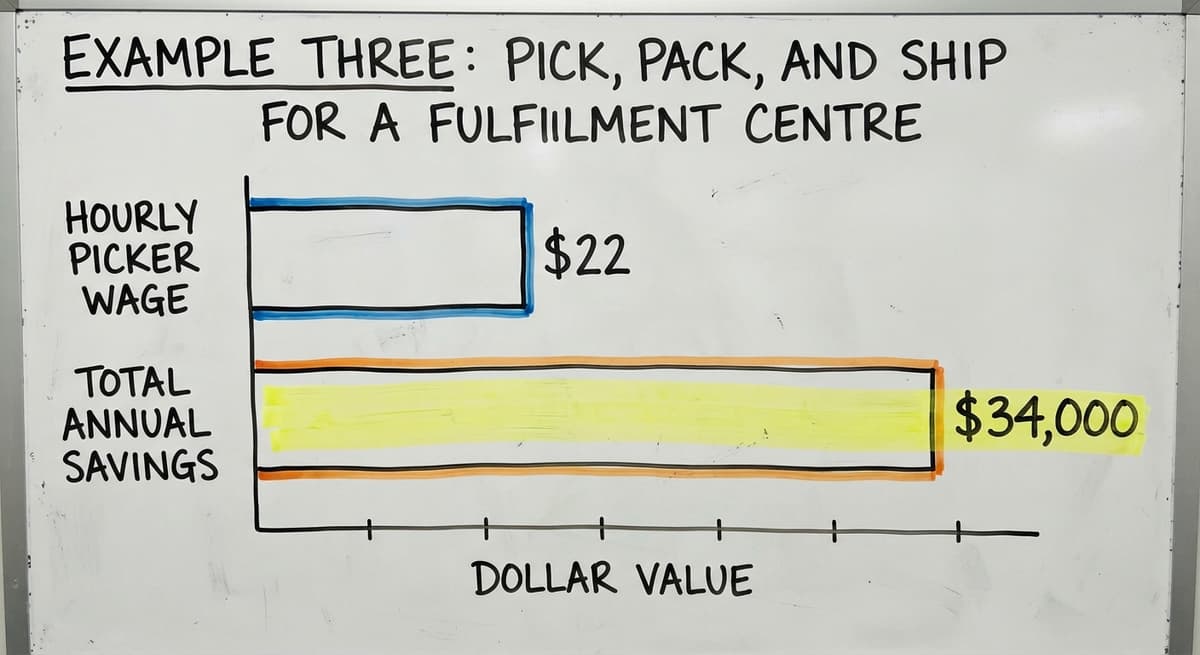
Example Three: Pick, Pack, and Ship for a Fulfilment Centre
The third example is a fulfilment centre that printed pick lists each morning. Workers walked the floor with paper, crossed off items by hand, and handed the list to the packing bench. Wrong picks were only caught at packing or, worse, by the customer.
A WMS generates an optimised pick route. The system groups items by location so the picker walks the shortest path. A scan confirms each pick. If the picker scans the wrong item, the system flags it before it reaches the box.
The outcome: faster picks, fewer wrong items shipped, and a digital record for every order.
Fulfilment centre software built around this flow can cut pick time by enough to matter. 3 pickers spending 2 fewer hours a day at $22 an hour saves over $34,000 a year. That arithmetic uses the Bureau of Labor Statistics median wage for stock and order fillers.
Is the comparison easier when one option is built for you?
Yes. Off-the-shelf means fitting your process to the software, and custom is the other way round. The first look costs nothing.
Book a callExample Four: Barcode Scanning Replacing Manual Data Entry
Workers at a small distributor typed SKUs, or stock-keeping unit codes, into a spreadsheet after every move. A SKU is the unique code that identifies each product. Typing errors were common. A transposed digit sent the count for one product to another.
Barcode scanning feeds data straight into the WMS. The worker scans the item. The system logs the move. No typing.
GS1, the global standards body for barcodes, sets the rules that make a barcode printed by one company scan correctly at another. A WMS built on those standards works with any compliant label.
The outcome: fewer entry errors, faster processing, and staff freed from repetitive keying. The work does not disappear. It just happens in a second instead of a minute.
Example Five: Reorder Alerts Instead of Gut-Feel Buying
The fifth example is a purchasing manager at a small wholesale distributor who reordered from memory and a weekly walkthrough. Sometimes she caught a low-stock item in time. Sometimes she did not, and the operation paid for an emergency order at a higher price.
A WMS flags items that fall below a set threshold. The manager sets the number. When stock drops to that level, the system sends an alert. Some systems can auto-generate a purchase order and send it to the supplier.
The outcome: fewer emergency orders, better cash flow, and less time spent on purchasing decisions. The manager still approves the orders. The system just makes sure she sees them before it is urgent.
Example Six: Multi-Location Inventory Visibility
A wholesale distributor ran 2 warehouses. Each location kept its own spreadsheet. When a customer ordered more than one location had in stock, staff had to call the other site, check their file, and call back.
Sometimes they double-ordered because neither site knew the other had stock on the way.
A WMS gives one view of stock across all locations. Staff see both warehouses in the same screen. They can fill an order from the right location and avoid buying stock that is already sitting 40 miles away.
The outcome: smarter fulfilment, less double-ordering, and faster answers for customers. Wholesale distributor software built for multi-site operations makes this the default rather than a workaround.
Multi-Location: Before and After
| Before WMS | After WMS |
|---|---|
| Separate spreadsheets per site | One view across all locations |
| Phone calls to check other site | Instant visibility in the same screen |
| Risk of double-ordering | System flags stock already on order |

Example Seven: Returns Processing Without the Paper Trail
Returns at many small operations travel through email and handwritten notes. A driver drops off a return. Someone writes it on a slip. The slip goes to the office. Days later, someone updates the spreadsheet. Sometimes the slip is lost.
A WMS logs each return at the point of receipt. The worker scans the item. The system updates inventory and flags the item for inspection or disposal. Nothing waits for a slip to reach the office.
The outcome: returns count right away and inventory stays accurate. Staff spend less time chasing paperwork and more time on work that moves the business forward.
Example Eight: Lot and Expiry Tracking for Regulated Products
The eighth example is a food distributor that tracked lot numbers on a paper sheet taped to each pallet. When a recall notice arrived, staff had to search the floor, check the sheets, and call customers manually. It took days.
A WMS records lot numbers at receiving. When a picker pulls a box, the system confirms the lot and enforces FIFO, which means first in, first out.
The oldest stock ships first. If a recall arrives, the system shows exactly where every affected lot is and which orders it went into.
The outcome: faster recall response, FIFO compliance, and less expired product shipped. For regulated products, this is not a convenience. It is a requirement.
Example Nine: Cycle Counting Instead of Annual Shutdown Counts
Many small operations close for a full day, sometimes 2, once a year to count everything. Staff walk every aisle. The business stops. Orders wait. Errors found during the count can take weeks to trace.
A WMS schedules cycle counts, which are small rolling counts of a portion of the warehouse each week. By the end of the year, every item has 4 or more counts behind it without a single shutdown day.
The outcome: inventory stays accurate year-round. Errors are caught and fixed quickly rather than discovered once a year.
The Warehousing Education and Research Council tracks inventory accuracy as a core benchmark for distribution centre performance. Cycle counting is one of the primary ways operations hit that benchmark.
What does it look like running on your own process?
The first thing you see is it running on your own process, at no build cost. The subscription starts once it is live and doing the job, not before.
Book a callExample Ten: Connecting the WMS to QuickBooks
Many small operations use QuickBooks for accounting. After a day of shipments and receipts, someone re-enters all of it into QuickBooks by hand. That work takes time and introduces errors. The two systems are always slightly out of sync.
A WMS can push confirmed transactions straight to QuickBooks. When a shipment is logged in the WMS, the entry appears in QuickBooks without anyone typing it.
QuickBooks stays in place. The WMS handles what QuickBooks was never built to do: tracking physical movement inside a warehouse.
QuickBooks integration for warehouse operations does not mean replacing your accounting software. It means the two systems talk to each other so your team does not have to be the bridge.

Cloud-Based WMS Examples vs. On-Premise Options
A cloud-based WMS runs in a browser. Staff log in from any device, anywhere. Updates happen automatically. There is no server to maintain. For most small operations, this is simpler and cheaper than the alternative.
An on-premise WMS runs on local servers inside the building. Some operations prefer this for data control or because their internet connection is unreliable. Custom warehouse software takes shape either way depending on what the operation needs.
For a 5 to 50 person team, cloud is the right starting point. It is faster to set up and easier to support.
Off-the-Shelf WMS Examples and Their Limits
Packaged WMS products are built for an average warehouse. They cover the most common workflows and charge a monthly fee per user. For some operations, they work well.
For most operations this size, they do not. The average warehouse is not your warehouse.
Packaged systems include modules the operation will never use and lack the specific flow the team actually needs. Configuration to match a real operation can cost more than the software itself.
Small warehouse software bought off the shelf sometimes forces the operation to change how it works to match the software. That is the wrong direction. The software should match the operation.
Custom WMS Examples Built Around Existing Operations
A custom WMS starts with how the operation already works. The builder walks the floor, maps the flow, and designs the system around the real zones, real staff, and real daily tasks.
A distributor with a unique zone layout gets a pick flow that matches that layout exactly. No forced process changes. No unused modules. No expensive configuration work to make a generic system behave like a specific one.
Custom warehouse software for small distributors costs more upfront than a packaged product. It costs less over time because staff use it as built, not around it.
The NIST Manufacturing Extension Partnership offers vendor-neutral guidance on supply chain process design that supports this approach: build the process first, then build the system that serves it.
What Features Show Up in Most WMS Examples?
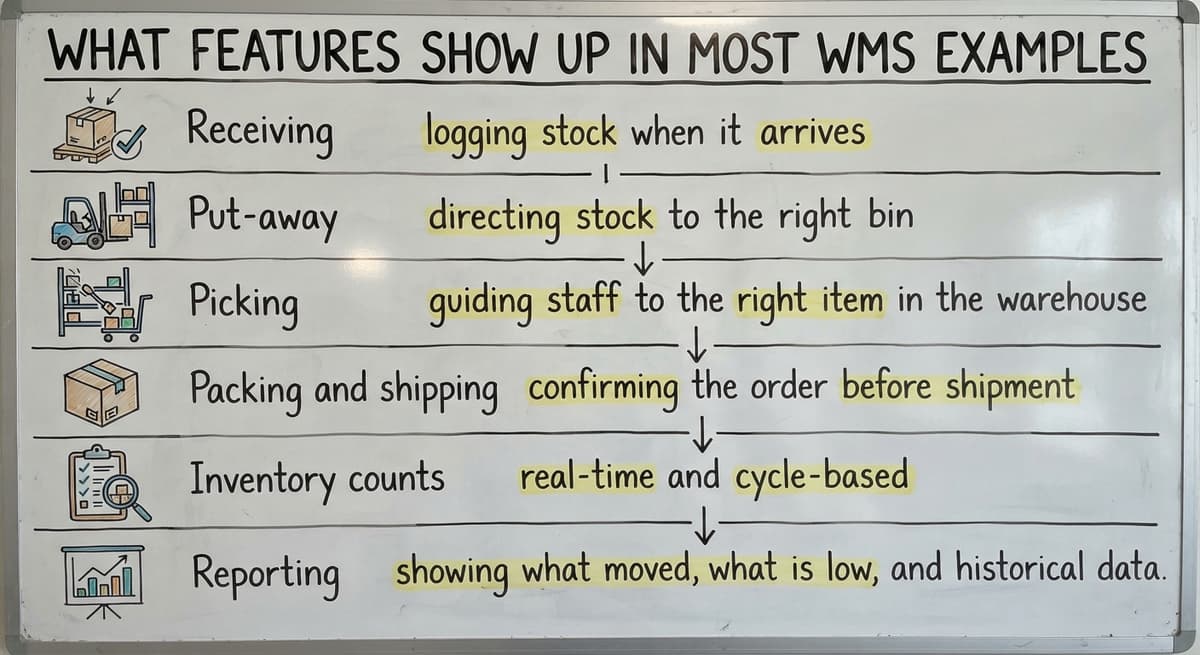
Across nearly every example of a warehouse management system, the same 6 core features appear:
- Receiving: logging stock when it arrives
- Put-away: directing stock to the right bin
- Picking: guiding staff to the right item in the right order
- Packing and shipping: confirming the order before it leaves
- Inventory counts: real-time and cycle-based
- Reporting: showing what moved, what is low, and what is late
Not every operation needs every feature from day one. A good WMS starts with the biggest pain points and adds features as the operation grows. Starting with everything at once is how implementations fail.

How Do You Read a WMS Example and Apply It to Your Operation?
Each example in this page describes a friction point. The question to ask is: does this sound like my operation?
Start with where errors happen most. If wrong picks are the biggest problem, Example Three is the one to study. If purchasing is reactive and expensive, Example Five is the place to start.
The right example to follow is the one that describes your biggest current problem. A WMS that solves the wrong problem is just new software with old pain.
What is in a free first look?
A 30 minute call, your operation mapped, and a clear picture of what we would build. No obligation and nothing to install.
Book a callSigns Your Operation Is Ready for a WMS
Most operations that need a WMS already know something is wrong. The signs are consistent:
- Inventory counts are wrong more than once a month
- Orders ship late or with errors on a regular basis
- Staff spend hours on data entry that a scan could handle in seconds
- QuickBooks and the physical warehouse are always out of sync
- A single person holds all the knowledge about where things are
If 2 or more of these are true, the operation is ready. Waiting for the problem to get worse is not a strategy.
What Does a WMS Implementation Look Like for a Small Team?
The fear of implementation is real. ERP projects at large companies take years and cost millions. That is not what a focused WMS for a small team looks like.
A WMS built for a 5 to 50 person operation can be live in weeks. The goal is to replace the manual parts only, not rebuild the entire business.
The first version handles the biggest pain point. Later versions add what the team asks for after they have used the system for a while.
The US Census Bureau's Monthly Wholesale Trade data shows that wholesale inventories represent a significant share of business assets. Getting those assets under accurate control is worth the weeks it takes to build the right system.
How Does a Local Partner Change the WMS Experience?
A remote software vendor sells a product. A local partner builds a system. The difference shows up the moment something does not work as expected.
A local team can walk the floor. They see the physical layout, meet the staff, and understand the real workflow before writing a line of code.
When a change is needed, they are reachable. When something breaks, they fix it fast because they built it and they know it.
This matters more for small operations than large ones. A team of five or ten cannot afford weeks of back-and-forth with a support queue. They need someone accountable who picks up the phone.

Common Mistakes When Choosing a WMS Based on Examples
Examples of a warehouse management system are useful. They can also lead to bad decisions if the wrong lesson is drawn.
The most common mistakes:
- Picking a system because a larger competitor uses it, not because it fits your scale
- Choosing the most feature-rich option instead of the best-fit option
- Underestimating the cost of changing how staff work versus changing software
- Assuming the cheapest monthly fee means the lowest total cost
The right system is whichever one your team will actually use. A system that sits unused because it does not match the real workflow is not a bargain at any price.
Questions to Ask Before Selecting a Warehouse Management System
Before signing anything, there are 7 questions that need clear answers:
- Will this work with QuickBooks as it is today, without replacing it?
- Can it be built around our current process, or do we have to change for it?
- What does implementation actually look like and how many weeks will it take?
- Who do we call when something breaks, and what is the response time?
- What does the system cost when configuration and training are included, not just the licence fee?
A vendor who cannot answer these clearly is not the right partner for a small operation.
Next Steps After Reviewing Warehouse Management System Examples
The examples on this page cover the most common problems small warehouses and fulfilment centres face. Each one has a before and an after. The before is the daily friction. The after is what changes when the right system is in place.
The next step is to map these examples to your own operation. Where do errors happen most? Where does the team spend time they should not have to? The example that matches your biggest problem is the one that points to your starting place.
A warehouse management system does not have to be a large project. For a small team, it can be a focused tool that solves one real problem well and grows from there.
If you want to talk through what a fit looks like for your operation, describe what your biggest daily friction is.
A no-pressure conversation with a local team that builds custom WMS for small and mid-size operations costs nothing and takes less time than another Friday afternoon count.
Frequently asked questions
Frequently asked questions
What are the top 5 warehouse management systems?
There is no single answer that fits every operation. The right WMS depends on your size, your workflow, and what you need it to connect to. Packaged products used widely in the market include Manhattan Associates, Blue Yonder, Oracle WMS, Fishbowl, and Infor WMS.
Each is built for a different scale and type of operation. A small wholesale distributor running on QuickBooks will find a custom-built or mid-market system a better fit than an enterprise platform built for operations with hundreds of staff.
Is SAP an ERP or WMS?
SAP is primarily an ERP, which stands for enterprise resource planning. An ERP manages the full business: finance, HR, procurement, and operations. SAP does include a WMS module called SAP Extended Warehouse Management, or SAP EWM. That module handles warehouse-specific tasks.
For most small and mid-size operations, a full SAP implementation is far more than is needed. A focused WMS that connects to QuickBooks will solve the same warehouse problems at a fraction of the cost and complexity.
What is a simple warehouse management system?
A simple warehouse management system is one that handles the core tasks without extra complexity. At its most basic, it tracks stock levels in real time, logs receipts and shipments, and guides picks.
For a small operation moving from spreadsheets, a simple WMS might cover just receiving, inventory counts, and pick confirmation.
The goal is to solve the biggest daily problem first. A system that does 3 things well is more useful than one that does 20 things badly.
What are the top 20 WMS systems?
Listing 20 systems is less useful than knowing which type fits your operation. The market includes enterprise platforms like Manhattan Associates, Blue Yonder, and Oracle for large operations. Mid-market options include Fishbowl, Extensiv, and Deposco.
For small operations, many find that a custom-built system designed around their specific workflow outperforms any packaged product. The best approach is to define your core problems first, then find the system that solves them, rather than picking from a ranked list and working backwards.
Can a WMS work alongside QuickBooks instead of replacing it?
Yes. A WMS handles physical warehouse tasks: receiving, put-away, picking, and shipping. QuickBooks handles accounting. The two systems serve different jobs.
A WMS built with QuickBooks integration pushes confirmed transactions to QuickBooks automatically, so your team does not re-enter data by hand. QuickBooks stays in place. The WMS handles what QuickBooks was never designed to do.
How long does it take to implement a WMS for a small operation?
A focused WMS for a 5 to 50 person operation can be live in weeks, not months. The timeline depends on how many features are included in the first version and how complex the existing workflow is.
Starting with the single biggest pain point, such as inventory tracking or pick confirmation, keeps the first version small and fast. Additional features can be added after the team has used the system and knows what they need next.
What is the difference between an off-the-shelf WMS and a custom-built one?
An off-the-shelf WMS is built for an average warehouse. It covers common workflows and charges a monthly fee. A custom-built WMS follows your specific day-to-day process. Off-the-shelf systems include features you will never use and lack the specific flow your team needs.
Custom systems cost more to build but cost less over time because staff use them as designed rather than working around them. For operations that have a unique layout, product type, or workflow, custom is the better fit.
Which WMS features matter most for a wholesale distributor or fulfilment centre?
For wholesale distributors, the highest-value features are real-time inventory tracking, reorder alerts, multi-location visibility, and QuickBooks integration.
For fulfilment centres, optimised pick routes, barcode scanning confirmation, and shipping accuracy matter most. Both operations benefit from cycle counting and returns processing. The right starting point is the feature that fixes your biggest daily problem, not the longest feature list.
What are the main types of warehouse management systems?
Based on how they are built and deployed, warehouse management systems fall into cloud-based WMS, off-the-shelf WMS, and custom WMS built around a specific operation.
Cloud-based systems run on remote servers and update in real time, off-the-shelf options come with fixed features you adapt your process to, and custom systems are built to match how your warehouse already works, rather than forcing you to change your workflow to fit the software.
How much does warehouse management software cost?
The page does not list specific prices, since costs depend on the size of the operation and how the system is built.
One approach described is a custom build with no build cost, where you see the system running on your own process first and a monthly subscription only starts once it is live, rather than paying upfront for features you may not use.
Which WMS is best for a small business?
The page avoids naming specific software brands, but it notes that a WMS built around your existing process, rather than an off-the-shelf product you must adapt to, tends to suit small operations best.
The examples described address teams of 5 to 50 staff, where a system that fits daily workflow directly reduces stockouts, mispicks, and manual counting without requiring a large team to manage it.
How do you implement a warehouse management system?
Implementation starts by describing how your operation already works so the system takes shape around that process, rather than forcing you to adapt to off-the-shelf software.
From there it covers inventory tracking, receiving and put-away, picking and shipping, barcode scanning, reorder alerts, and multi-location visibility, with the system introduced step by step so staff can see it running on their own process before it goes fully live.
Not sure this is the right shape for your operation?
The call is free. Describe how the work runs today. We map it on a call and show you what it would look like built around that, before you spend anything.
Book a callRelated guides
The rest of this guide, for the parts of the job this page does not cover.
Guides
- Warehouse Management System Examples
- Warehouse Inventory Management Systems
- Warehouse Management System Top 10
- Software for Warehouse Management System
- Small Business Warehouse Management System
- Warehouse Management System Types
- Warehouse Inventory Management System
- Warehouse Management System Implementation
- Cloud Warehouse Management System
- Warehouse Stock Management System
Common questions
- What is a Warehouse Management System Example
- What Are the Benefits of Warehouse Management System
- What is the Point of Warehouse Management System
- How to Choose a Warehouse Management System
- What is Asn in Warehouse Management System
- How to Create a Warehouse Management System
- What is a Warehouse Management System
- Which Warehouse Management System Would a Jeweler Most Likely Use
- How to Build a Warehouse Management System
- What is a Warehouse Management System Used For
- Warehouse Management System vs Warehouse Control System
- Meaning of Warehouse Management System
- Definition of Warehouse Management System
- Warehouse Management System Comparison