


Business Distributors
Business distributors buy goods from suppliers and sell them to retailers, contractors, or other businesses. Day to day, that means receiving stock, storing it, picking and packing orders, shipping, and invoicing. If your operation runs on QuickBooks, Excel, and printed pick sheets, this page explains why that breaks down at higher volume and what a realistic fix looks like.
Reviewed September 2026. Each figure comes from the assumptions stated beside it, so you can substitute your own and the arithmetic still holds.
Published 3 August 2026. Reviewed and updated 15 September 2026.
Book a callWhat Do Business Distributors Actually Do?
A distributor sits between a supplier and a buyer. You take on the physical work: receiving pallets, checking counts, storing product, pulling orders, packing boxes, booking carriers, and chasing proof of delivery.
On the back end, someone is cutting invoices, tracking what is owed, and reconciling what came in against what was ordered.
For a 5 to 100 person operation, those tasks happen across a handful of people who each own a piece of the process. The warehouse team works from pick sheets.
The office team works from QuickBooks. Someone in the middle translates between them, by re-typing the same numbers into 2 or 3 different places.
That is the job. It works until the volume gets high enough that the re-typing starts causing mistakes.
Would you rather have it built around your operation?
The first look is free. If you would rather not compare products, describe how your operation already works and we build the system around it.
No build cost. You see it running on your own process first, and the monthly subscription starts only once it is live.
Book a callHow Do Most Small Distributors Run Their Operations Today?
The typical setup at a small or mid-size distribution business looks like this:
- QuickBooks handles accounting, invoicing, and payment tracking
- Excel tracks inventory levels, open orders, and fulfillment status
- Printed pick sheets travel to the warehouse floor and come back signed
- Email threads manage supplier communication and buy orders
- An Access database or shared drive fills whatever gap is left
Each tool was chosen because it was familiar and cheap. QuickBooks is the right call for accounting. Excel is flexible enough to track almost anything. The problem is not any single tool. The problem is that none of them talk to each other.
Why Is Inventory Accuracy a Legal Requirement, Not Just a Best Practice?
Inventory rules are not optional. The IRS is clear: "To figure taxable income, you must value your inventory at the beginning and end of each tax year," according to IRS Publication 538. That means your inventory count has to be accurate, not just close enough.
When the count lives in a spreadsheet that 4 people edit manually, accurate is hard to guarantee.
Why Do Spreadsheets and QuickBooks Stop Being Enough as a Distribution Business Grows?
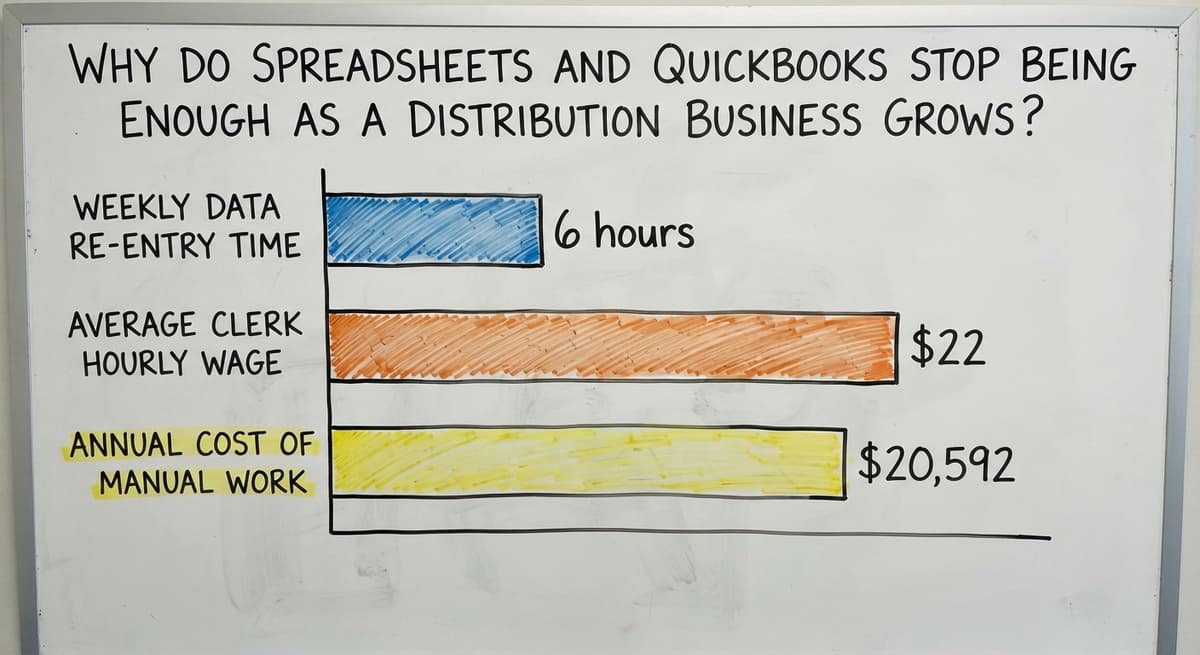
Spreadsheets and QuickBooks stop being enough because every extra order adds a new opportunity for a human to enter the wrong number. At low volume, 1 mistake a week is manageable. At higher volume, that same error rate means wrong shipments going out daily.
Here is what that costs in real terms. If 3 warehouse staff each spend 6 hours a week re-entering data across systems, and the average wage for a shipping and receiving clerk runs around $22 an hour according to BLS occupational data, that is roughly $20,592 a year spent on work that produces no output. That figure does not count the time spent fixing the mistakes that re-entry causes.
What Do the Specific Breakdowns Look Like in Practice?
The failures that come from outgrown tools follow a predictable pattern:
- A pick sheet is printed in the morning but the order changes before it reaches the warehouse
- Inventory in Excel shows 40 units but the shelf has 12 because a receipt was not logged
- A customer calls for a status update and no one can answer without walking to the warehouse
- Two people update the same Excel file and one version overwrites the other
None of these are signs that your team is doing something wrong. They are signs that the tools have hit their ceiling.
Is the comparison easier when one option is built for you?
Yes. Off-the-shelf means fitting your process to the software, and custom is the other way round. The first look costs nothing.
Book a callThe Tools Business Distributors Rely On and Where Each One Falls Short
Every tool in a distributor's stack was chosen for a reason. Understanding why each one falls short helps you decide what to replace and what to keep.
QuickBooks is genuinely good at accounting. It tracks payables, receivables, and produces reports the accountant can use. It was not designed to manage warehouse locations, live inventory counts, or pick-and-pack workflows. Asking it to do those things means building workarounds.
Excel is flexible enough to track almost anything once. As the file grows and more people touch it, version control breaks down. Formulas break. Filters get cleared. The file that tracked 200 SKUs cleanly becomes unreliable at 2,000.

Why Do Email and Paper Create Gaps That Cost Money?
Email works for low-frequency supplier conversations. When buy orders, shipping confirmations, and discrepancy notes all live in an inbox, finding the right thread takes longer than the task itself.
Printed pick sheets give the warehouse team something to hold. They also go missing, get marked up incorrectly, and carry information that was accurate at print time but not at pick time.
The NIST Manufacturing Extension Partnership notes that supply chain visibility gaps are one of the most common sources of avoidable cost in small manufacturing and distribution operations. The tools above create those gaps by design.
What Is Custom Distribution Software and How Is It Different From an ERP?
Custom distribution software is built around the operation you already run. It replaces the parts that are slow or error-prone without touching the parts that work.
An ERP like SAP or NetSuite is built around a standard process and asks your team to change how they work to fit the software.
For most small distributors, a full ERP is the wrong answer. The reasons come up in every conversation:
- Rollouts run 6 to 18 months and need a dedicated project team
- Licensing fees are priced for companies with 200 or more seats
- The software assumes processes that a 20-person distributor does not have yet
- Staff resistance is high when the new system looks nothing like the old one

What Does Custom Software for Small Distributors Actually Look Like?
Custom software for distributors starts from the opposite direction. The developer maps what you do now, finds the 3 to 5 places where manual work causes the most pain, and builds something that fits into the existing flow.
QuickBooks stays. The warehouse team gets a screen instead of a paper sheet. The office team stops re-keying.
This is what Wholesale Distribution Software built for small operations actually looks like in practice.
Can a Distributor Keep QuickBooks and Still Add Better Software?
Yes. QuickBooks does not need to be removed to improve operations. Custom software can sit alongside QuickBooks and push or pull data automatically through a QuickBooks integration for distributors.
Here is what that looks like in practice:
- An order is entered once and flows to the warehouse without a second keystroke
- When the shipment goes out, the invoice is created in QuickBooks automatically
- Inventory updates in real time so the count in the system matches the shelf
- The accounting team keeps the interface they know; the warehouse team gets something built for their work
No double entry, no migration, no retraining the bookkeeper. The goal is to remove the manual handoffs between systems, not to replace every system at once.

Inventory Management, Order Processing, and Warehouse Operations
Inventory management, order processing, and warehouse operations cause the most pain for growing distributors, and they are where custom software delivers the fastest return.
Inventory Management
Real-time inventory counts replace the end-of-day spreadsheet update. When a shipment is received, the system logs it against the open buy order and updates the count. When an order ships, the count drops. Low-stock alerts trigger a reorder prompt before a stockout happens.
The US Census Bureau's Monthly Wholesale Trade data tracks inventory-to-sales ratios across wholesale firms. Operations that carry excess inventory because they cannot trust their counts pay for that uncertainty in tied-up capital. Accurate counts let you carry less and order smarter.
What does it look like running on your own process?
The first thing you see is it running on your own process, at no build cost. The subscription starts once it is live and doing the job, not before.
Book a callOrder Processing Without the Paper Trail
How do business distributors manage orders and shipping without paper? Orders flow from the customer record to a pick list on a screen in the warehouse.
The picker confirms each item. The system updates the order status in real time so customer service can answer status questions without making a call to the floor.
Errors from misread handwriting or lost sheets drop to near zero. Warehouse management software built for pick-and-pack operations handles this natively, with pick lists organized by location to cut walking time.
Receiving and Shipping
Receiving is one of the most manual steps in a distribution warehouse. Custom software matches incoming shipments against open buy orders automatically. Discrepancies are flagged before product is put away, not discovered during the next inventory count.
On the outbound side, shipping labels, carrier selection, and tracking numbers are generated inside one system. Customers receive automatic updates. Proof of delivery records are stored and searchable. Fulfillment centre software handles this end of the operation without requiring a separate platform.
Reporting, Pricing, and Supplier Management
Three back-office tasks eat time at almost every small distributor: pulling reports, managing customer pricing, and tracking buy orders.
Reports should answer 3 questions: what sold, what is left, and what is on order. Custom dashboards surface those numbers without exporting from QuickBooks or digging through spreadsheet tabs. A scheduled morning email can deliver the numbers the operations manager checks first thing.
Customer pricing is a common source of error when it lives in a spreadsheet. Many distributors offer different tiers to different accounts.
Custom software stores and applies customer-specific pricing automatically. Credit terms, order minimums, and account notes travel with the customer record so sales staff stop looking up prices manually.
Buy orders live in email. Custom software tracks open POs, expected delivery dates, and supplier lead times in one place.
When a PO is received, inventory updates without a manual step. Over time, the system builds a record of supplier performance that is visible without building a separate tracking sheet.

What Does a Realistic Software Rollout Look Like for a 10 to 50 Person Operation?
A realistic rollout for a small distributor takes weeks, not months, and it starts with mapping the current process rather than replacing it.
The steps look like this:
- Map how orders, inventory, and shipments move through the operation today
- Identify the 3 to 5 steps that cause the most errors or take the most time
- Build and test those pieces first, with the actual staff who will use them
- Go live on one part of the operation before expanding to the rest
- Add features as the team gets comfortable, not all at once
How Quickly Do Staff Adapt to a New System?
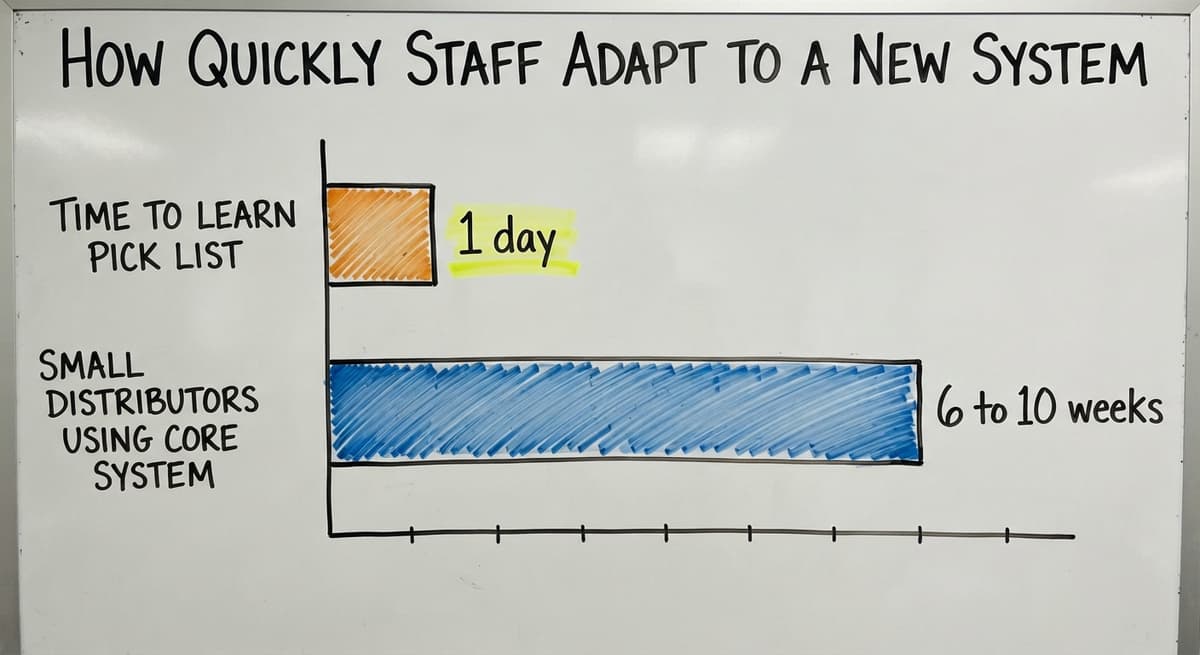
A custom rollout for a small distributor is not a year-long ERP rollout. Custom workflow rollout services are scoped to the problem, not to a vendor's standard package. Most small distributors are using the core system within 6 to 10 weeks of the first conversation.
Staff adapt faster when the new tool matches how they already think about the work. A picker who has used a paper sheet for 5 years can learn a screen-based pick list in a day if the logic is the same.
How Long Does It Take to See Results, and What Should You Expect to Pay?
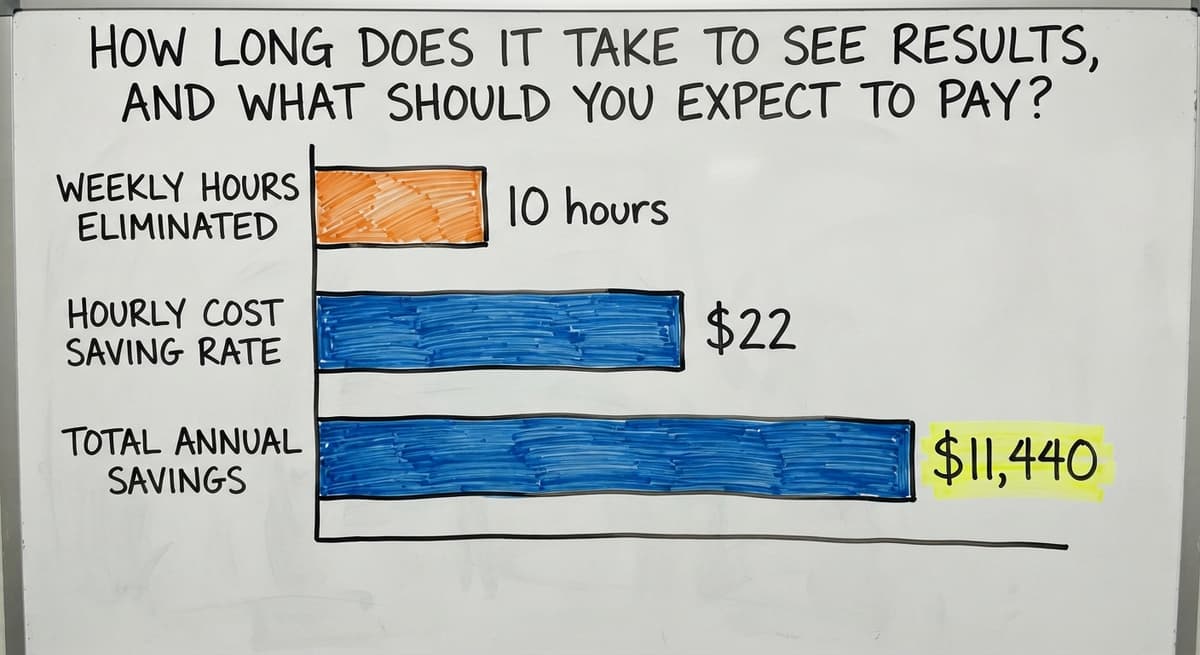
Most small distributors see measurable time savings within the first month. Error rates drop quickly when manual re-entry is removed. The staff who were spending hours a day on data entry shift that time to work that moves orders.
On cost: custom software is scoped by work, not by seat count. A system that removes 10 hours of manual work per week at $22 an hour saves $11,440 a year.
A system scoped to solve 3 specific problems for a 20-person distributor costs a fraction of an enterprise platform and pays for itself faster than most owners expect.
Not sure this is the right shape for your operation?
The call is free. Describe how the work runs today. We map it on a call and show you what it would look like built around that, before you spend anything.
Book a callHow Should You Think About the Cost of Not Changing?
Compare that to the cost of a wrong shipment: a reshipping fee, a customer credit, and the staff time to sort it out. At more than 1 wrong shipment a week, the math moves quickly.
Avoid framing this as a software buy. It is closer to hiring a process that does not call in sick.

Signs Your Distribution Business Is Ready for Custom Software
Not every distributor needs custom software today. These are the signs that the current setup is costing more than a change would:
- Staff spend more than 1 hour a day on data entry or re-entry across systems
- Shipping errors happen more than once a week
- The owner cannot check inventory levels without asking someone
- Excel files are too large or too slow to be reliable
- A new customer, product line, or location is about to push volume higher
If 3 or more of those are true, the patchwork has hit its limit.
Working with a Local Software Partner vs. a National Platform
A national SaaS platform gives you a feature list and a help desk. A local software partner can visit the warehouse, watch how orders move, and build something around what they saw.
Support calls reach someone who knows your operation, not a queue. Changes after go-live happen in days, not months.
For distributors in Columbus, Ohio and the surrounding region, a local presence means the partner understands the specific mix of industries and logistics networks in the area.
The question to ask any partner: who do we call when something breaks, and how fast do they answer?
Questions to Ask Before Committing to Any Distribution Software
Before signing anything, get clear answers to these:
- Will this work alongside QuickBooks or replace it entirely?
- Who manages the rollout and what does the timeline look like?
- What happens when we need a change after go-live?
- Is pricing based on users, transactions, or a flat project fee?
- Can you show us a system built for an operation similar to ours?
A vendor who cannot answer the last question clearly has not built for small distributors. They have built for enterprise and are trying to shrink it down.
How Does the Right Software Grow with the Business?
How does custom distribution software scale as the operation adds locations, staff, or product lines? Custom software is extended rather than replaced.
New features are added to the system that already exists. The team does not learn a new platform every time the business hits a new ceiling.
A spreadsheet outgrows itself. A well-built custom system does not, because the architecture is built to change alongside the operation. Adding a second warehouse location means adding a location to the existing system, not starting a new rollout.
Growth is the goal. The software should make it easier, not create a new project every time it happens.
Getting Started
The first step is a conversation about how your operation works right now. No commitment required. The goal is to understand where the manual work is happening before recommending anything.
If your team is spending real hours on re-entry, if wrong shipments are a weekly problem, or if a new customer is about to push your current setup past its limit, reach out and describe what a typical order looks like from the moment it comes in to the moment it ships. That conversation is where a useful answer starts.
Frequently asked questions
How do I find a distributor for my small business?
Start by searching trade directories specific to your product category, such as ThomasNet for industrial goods or Faire for retail. Attend trade shows where distributors exhibit alongside suppliers.
Contact the manufacturer of the product you want to carry and ask who their authorized distributors are in your region. Many regional distributors are not heavily marketed online, so a direct call to a manufacturer's sales team is the fastest route.
Who is the largest wholesale distributor?
There is no single answer because the largest distributor depends on the product category. McKesson is the largest in healthcare and pharmaceuticals. Sysco leads in foodservice. Genuine Parts Company dominates automotive parts. W.W. Grainger covers industrial supplies.
Each operates at a scale that is not relevant to most small or mid-size buyers. If you are looking for a supplier, the right distributor is the one who covers your category and your region, not the one with the highest revenue.
Do distributors make a lot of money?
Margins in distribution are thin, running between 10% and 30% gross depending on the category. Profit comes from volume and working efficiency, not from high per-unit margins. A distributor who moves product quickly, keeps inventory costs low, and avoids shipping errors can run a healthy business.
One who carries too much stock, ships wrong orders, or spends staff time on manual re-entry erodes that margin fast. The business model rewards tight operations more than any other factor.
How do I start my own distribution company?
Start by choosing a product category you understand and identifying suppliers willing to work with a new account. Register the business, set up a basic accounting system such as QuickBooks, and secure a storage location appropriate for the product type. Negotiate terms with at least 2 suppliers before approaching buyers.
Keep the initial product range narrow so you can manage inventory correctly from day one. The IRS needs you to value inventory at the beginning and end of each tax year, so set up a counting process before you receive your first shipment.
Can a small distributor keep QuickBooks and still improve operations?
Yes. QuickBooks handles accounting well and does not need to be replaced. Custom software can connect to QuickBooks and handle the warehouse and order management work that QuickBooks was not designed for.
Orders flow from entry to shipment without re-keying. Invoices are created in QuickBooks automatically when orders ship. The accounting team keeps what they know and the warehouse team gets tools built for their work.
What are the signs that a distribution business needs better software?
The clearest signs are staff spending more than an hour a day on data entry, shipping errors happening more than once a week, and the owner being unable to check inventory without asking someone.
If Excel files are becoming too slow or too complicated to keep reliably, or if a new customer or product line is about to push volume higher, those are signals that the current setup is costing more than a change would.
How long does it take to implement custom software for a small distributor?
Most small distributors are using a core custom system within 6 to 10 weeks of the first conversation. Rollout starts by mapping the current process, then builds and tests the highest-priority pieces first. Staff go live on one part of the operation before the rest is added.
A custom rollout for a small distributor is not a year-long ERP rollout. The timeline depends on the number of integrations and the complexity of the existing process, but a focused scope moves quickly.
How much does custom distribution software cost?
Custom software is priced by scope, not by seat count. A system built to solve 3 to 5 specific problems for a 20-person distributor costs far less than an enterprise platform. A useful way to frame the cost is against the manual work it replaces.
Three staff members spending 6 hours a week on re-entry at $22 an hour is over $20,000 a year. A system that removes that work pays for itself within the first year in most cases.
How do I find distributors for my business?
Start with the trade association for your product category and the exhibitor list of its main trade show, then ask 3 retailers who already stock similar products who delivers to them. A distributor's customers are the best reference for what it actually handles well.
What is the difference between a distributor and a wholesaler?
A wholesaler buys in bulk and resells to retailers from a warehouse, across many brands. A distributor holds a contract with a manufacturer, exclusive to a territory, and does the selling and servicing for that brand as well as the delivery.
What should be included in a distributor agreement?
Territory, exclusivity, minimum purchase volumes, pricing and payment terms, marketing obligations, product warranty handling, the term and how either side ends it, and who owns the customer relationship at the end. The last point is the one that gets fought over.
How much commission or margin do distributors charge?
Distributors work on margin, not commission: 20 to 40 percent between what they pay the manufacturer and what the retailer pays them, depending on the category. Food and consumer goods sit near 20 to 30; industrial and specialist products near 30 to 40.
What is in a free first look?
A 30 minute call, your operation mapped, and a clear picture of what we would build. No obligation and nothing to install.
Book a callRelated guides
The rest of this guide, for the parts of the job this page does not cover.
Guides
- Small Business Warehouse Management System
- Small Business Stock Management Software
- Inventory Tracking Software for Small Business
- Accounting and Inventory Software for Small Business
- Inventory Control Software for Small Business
- Inventory Management Small Businesses
- Inventory Tracking Systems for Small Businesses
- Simple Inventory System for Small Business
- Best Inventory Management Software for Small Businesses
- Inventory Sales Software Small Business
- Small Business Inventory Management System
- Free Inventory Management Software for Small Business
- Erp System for Small Businesses
- Inventory Control for Small Business
- Inventory System for Small Business
- Warehouse Management System for Small Business
- Small Business Inventory Management
- Wms for Small Business