

Free Software for Warehouse Inventory Management
Free inventory software is license-free. Last.
That means open source code, free-forever plans, and free trials.
Free tools fit very small operations.
Here is what you get, what you give up, and when to move on.
Review year: 2025.
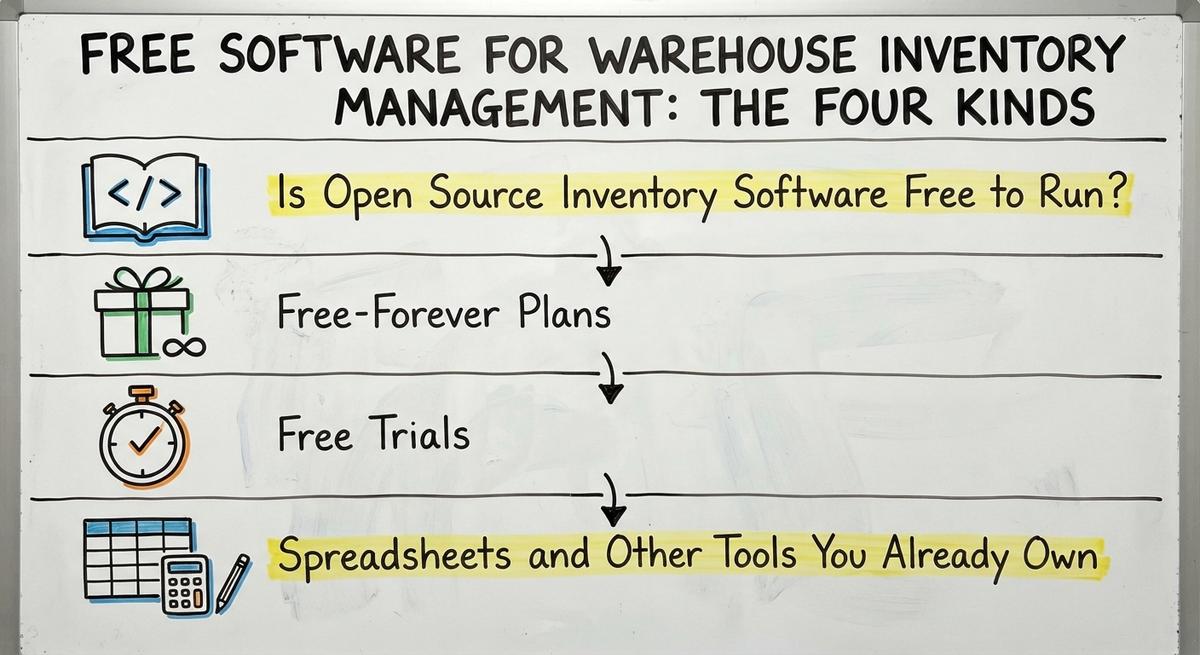
Book a callFree Software for Warehouse Inventory Management: The Four Kinds
Four kinds of free tool exist, and each has a catch.
OSHA lists "facilities for general merchandise, refrigerated goods, and other products."
Your tool must fit that real floor. Here are the four kinds:
- Open source code that you host yourself.
- Free-forever plans with set limits on use.
- Free trials that end after a short time.
- Free add-ons inside tools you already own.
Pick the kind whose catch you can live with.
Is Open Source Inventory Software Free to Run?
Open source software has no license fee, but it costs effort to run.
Someone must install it, host it, and fix it. That takes tech skill or paid help.
Odoo lists "Community: Open Source, 100% free." Its Enterprise edition adds apps, infrastructure, and professional services.
- An in-house tech person makes open source a fair fit.
- Without one, you pay a contractor for each fix.
- Updates and security patches fall on your team.
- Backups are your job, not the vendor's job.
Open source suits shops with a tech person on staff.
We build it for your operation, and the first look is free
If you would rather not compare products, describe how your operation already works and we build the system around it.
No build cost. You see it running on your own process first, and the monthly subscription starts only once it is live.
Book a callFree-Forever Plans
A free-forever plan is a paid product with a small free tier.
The vendor caps what you can do. Plan for the day you hit the cap.
Zoho Inventory pitches "Manage your stock across multiple warehouse locations." Check the tier that includes it.
- Caps hit items, users, locations, or orders.
- Features like barcode scanning and reports sit behind a paywall.
- Moving your data out takes work if the vendor makes it hard.
- Support on a free tier is thin or absent.
A free plan is a ramp to a paid plan, so read the limits first.
Free Trials
A free trial is a test, not a way to run a business.
Trials last days or weeks. Then you pay or leave. You lose your data entry work if you leave.
- Set one test goal before you sign up.
- Use a small, real set of items.
- Check that you can export your data.
A trial answers one question: does the tool fit your steps?
Spreadsheets and Other Tools You Already Own
Spreadsheet inventory tracking costs nothing extra if you own the software.
Excel and Access fit that case. Your accounting software also has some inventory tracking built in, depending on the plan. These tools hold a small item list well. Their limits show up fast:
- They stop working when many people edit one file.
- They lack bin locations and scan input.
- They lack audit trails for count changes.
- They give no warning when two people overwrite each other.
A shared sheet with five editors breaks fast.
What Free Tools Do Well and What They Leave Out
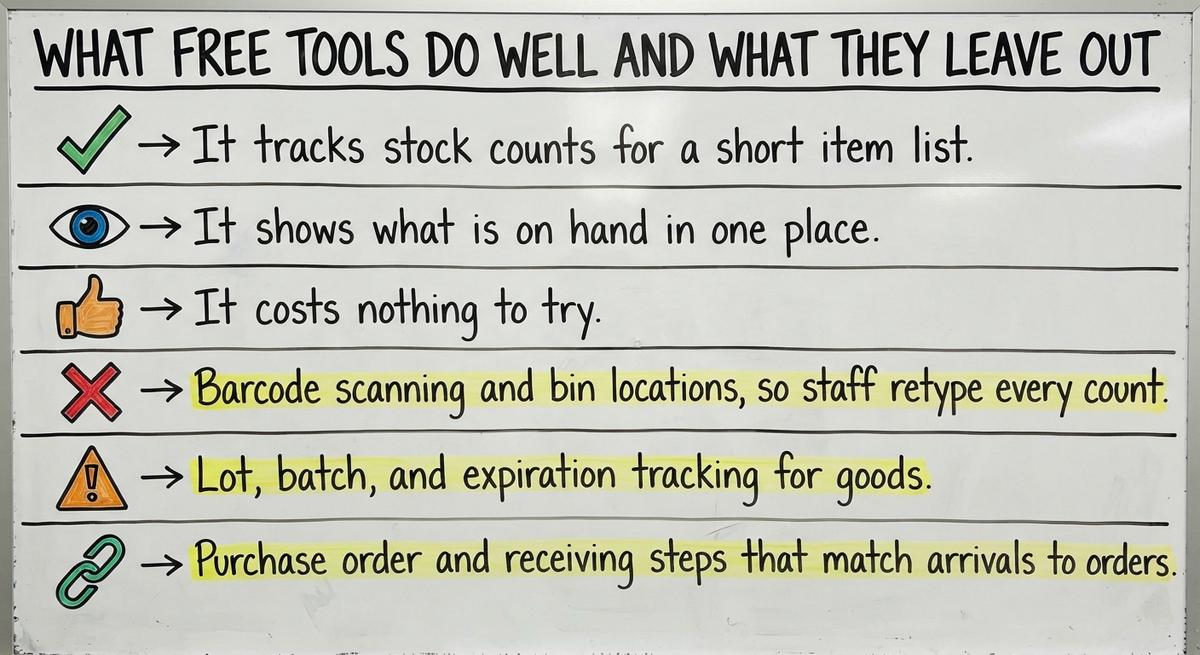
Free inventory management software does three jobs well.
- It tracks stock counts for a short item list.
- It shows what is on hand in one place.
- It costs nothing to try.
For a startup, that is a good first step. The gaps are real. Free tools skip these things:
- Barcode scanning and bin locations, so staff retype every count.
- Lot, batch, and expiration tracking for goods that spoil or get recalled.
- Buy order and receiving steps that match arrivals to orders.
- User permissions and audit trails that show who changed a count.
- Support from a real person who answers.
Free handles counting, and paid or custom handles the steps around it.
Is Free Inventory Software Really Free? The Hidden Costs
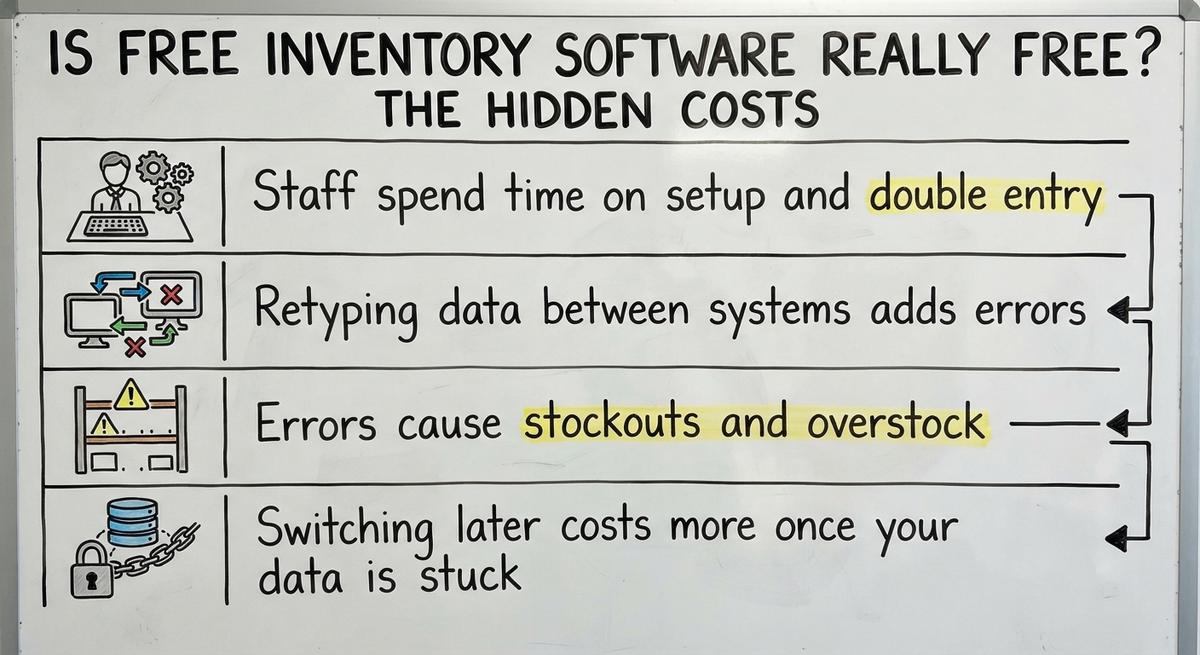
Free inventory software is not free once you count labor.
- Staff spend time on setup and double entry.
- Retyping data between systems adds errors.
- Errors cause stockouts and overstock.
- Switching later costs more once your data is stuck.
Here is the math. Say 2 people spend 5 hours a week on double entry. Pay is $22 an hour.
That is 10 hours, or $220 a week. Over a year, that is $11,440.
The Bureau of Labor Statistics tracks pay for this work. Check your own wage.
The tool costs $0 and the workaround costs thousands.
Not sure this is the right shape for your operation
Describe how the work runs today. We map it on a call and show you what it would look like built around that, before you spend anything.
Book a callWho Can Stay on a Small Warehouse Inventory System That Is Free
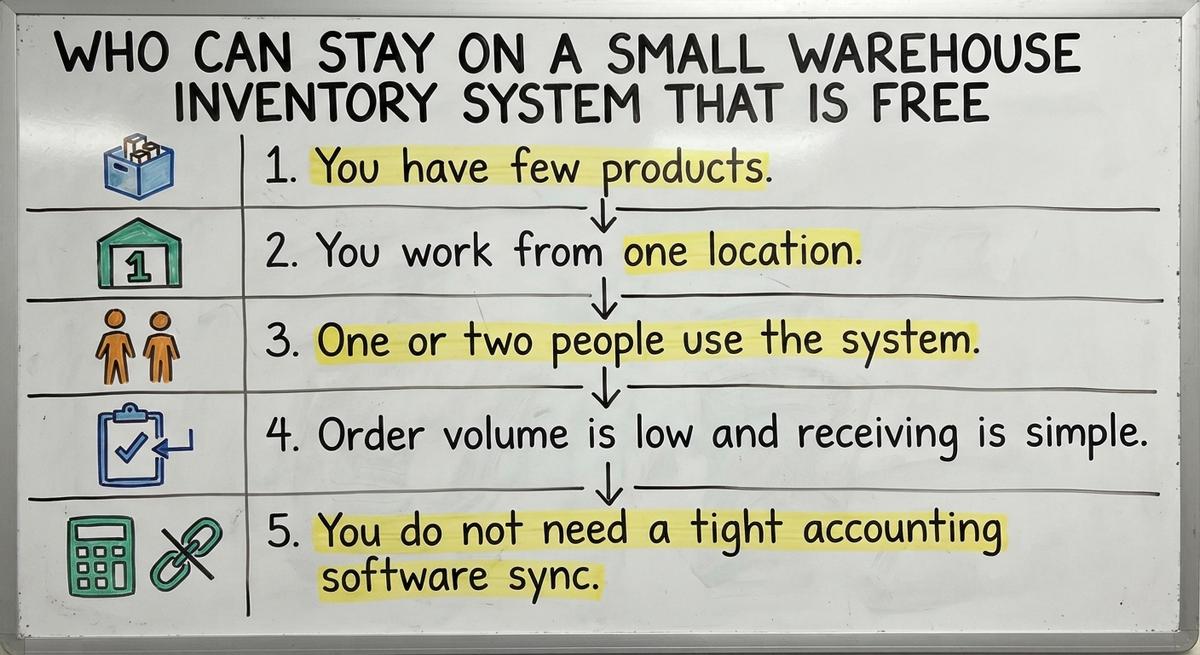
A small warehouse inventory system can stay free in a narrow case.
Five things must all be true:
- You have few products.
- You work from one location.
- One or two people use the system.
- Order volume is low and receiving is simple.
- You do not need a tight accounting software sync.
If all five fit, free is a fine home. Do not pay for features you will not use.
Free is enough only while your warehouse stays simple.
Signs You Have Outgrown Free Software
The signs are easy to spot. Each one costs you money each week.
You have outgrown free software when the system stops matching the shelf.
The IRS rule on stock is plain:
"you must value your inventory at the beginning and end of each tax year."
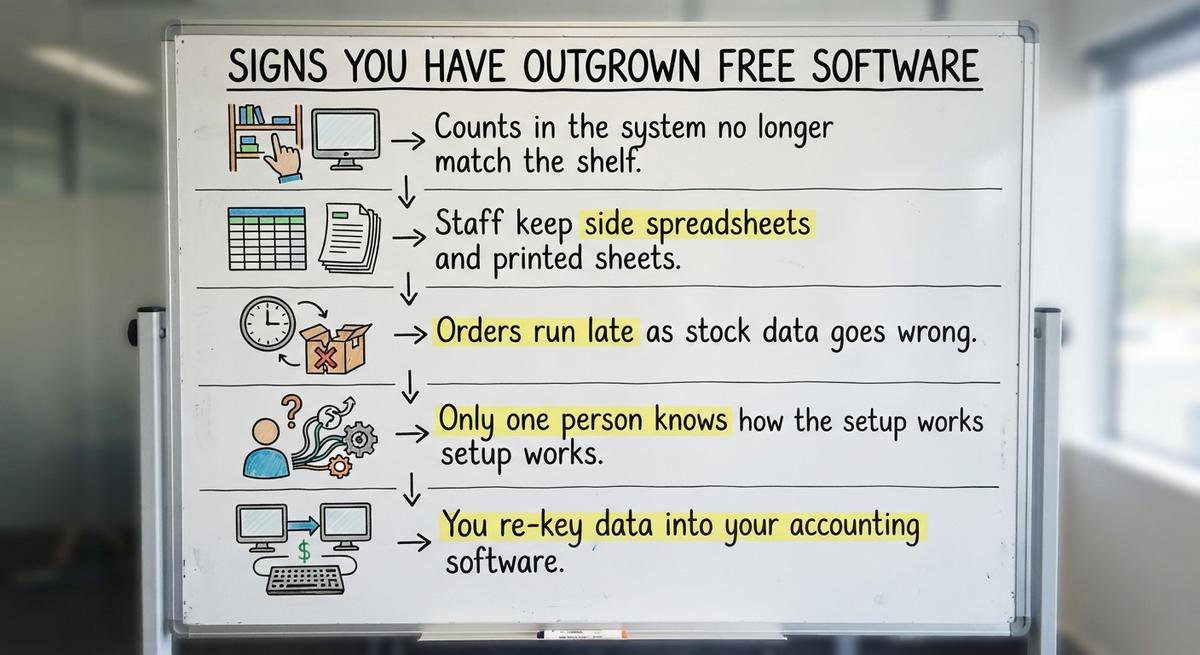
Bad counts make that value wrong. Watch for these signs:
- Counts in the system no longer match the shelf.
- Staff keep side spreadsheets and printed sheets.
- Orders run late as stock data goes wrong.
- Only one person knows how the setup works.
- You re-key data into your accounting software.
Two or more signs mean the workarounds now cost more than the savings. That is also the time to stop using spreadsheets.
Act on the second sign, not the fifth.
The comparison is easier when one option is built for you
Off-the-shelf means fitting your process to the software. We do it the other way round, and the first look costs nothing.
Book a call
How to Choose a Free Tool Without Regret
A good choice starts with your process, not the tool.
First, list your steps. Then test each tool against them:
- Write down receive, put away, pick, ship, and count.
- Check the item, user, and order limits.
- Test with a real week of data.
- Confirm that you can export your data.
That last check is your exit door. Many people skip it and get stuck.
Choose the tool that fits your steps, not the one with the most features.
A Simple Checklist Before You Start
Five checks come before you commit to any free tool.
- Limits: items, users, locations, and orders.
- Export: can you pull all your data out?
- Accounting software fit: what syncs, and how often?
- Support: who answers when it breaks?
- Owner: who keeps the setup?
If you cannot answer all five, keep looking.

Does Free Inventory Software Work With Accounting Software?
Most free inventory tools have weak links to accounting software.
Many have no link at all. Others connect only on paid plans. Manual export and import invites errors. A wrong column can post bad numbers to your books.
Ask the vendor three things:
- Exactly which fields sync.
- How often the sync runs.
- What happens when a sync fails.
Inventory management with accounting software works best when the link is built in, not typed by hand.

How Do You Move Off Spreadsheets Step by Step?
You move off spreadsheets by changing one process at a time.
Do not switch everything in a day. Follow these steps:
- Clean item names and numbers first.
- Start with one process, such as receiving.
- Run old and new side by side for a short time.
- Train the team on one change at a time.
- Retire the sheet once counts match.
Small steps keep the floor running as you change.

Free vs Paid vs Custom: How the Costs Compare
Inventory software cost has three shapes.
Think in total cost of ownership, not sticker price.
- Free: no license fee, but high labor and hard limits.
- Off-the-shelf paid: monthly fees per user or feature.
- Custom: an upfront build that fits how you work.
Free costs time, paid costs rent, and custom costs a build you then own.
When Custom Inventory Software Costs Less Than Free
Custom software costs less than free when workarounds pile up.
Add up the staff hours lost each week. Then add the costs that errors cause:
- Returns from wrong shipments.
- Shortages that stall orders.
- Lost customers who stop reordering.
The FTC rule on mail and online orders expects you to ship when you said you would. An accurate count protects that promise.
Custom work fits how your team already works. It keeps your accounting software where it helps. It replaces only the manual parts.
Count the full cost of errors before you call free cheaper.

You Do Not Need a Big ERP
An ERP is a large system that runs many parts of a company at once.
You do not need one to fix a small warehouse. Many owners fear a long, costly rollout. That fear is fair for big projects.
Small fixes come first:
- A receiving screen.
- A pick list.
- A count sheet.
Each one works at small scale. Add the next when the first pays off.
Start with the smallest fix that removes the most retyping.
See it running on your own process first
No build cost. The subscription starts once it is live and doing the job, not before.
Book a call
What a Small Custom Build Can Look Like
A small custom build is one narrow tool that fixes one manual step.
These examples are general, not past client results.
- Replace a printed pick sheet with a simple screen.
- Replace an Access database with a shared tool.
- Send order data to your accounting software without retyping.
Each build targets one pain, so the team learns one change at a time.
Questions to Ask Any Software Provider
Four questions sort good providers from bad ones.
Ask them before you sign:
- Who owns the data, and can I export it?
- What happens when I pass the free limit?
- How long does setup take, and who does it?
- Who supports the system after launch?
A clear answer to each one tells you the vendor plans to keep you as a customer.

Are You Making These Common Mistakes With Free Software?
Yes, most owners make at least one of four mistakes.
- They pick a tool before they map the process.
- They ignore data export.
- They skip staff training.
- They wait too long to switch.
Each mistake is cheap to avoid early and costly to fix late. Map first, test the exit, train the team, and set a review date.
Avoid all four and a free start stays safe.

Next Step: Map What Your Warehouse Does Today
A process map is a written list of each step from receiving to shipping.
It shows where free tools fail. Build it in three moves:
- Write down each step in order.
- Mark where data is retyped or lost.
- Use the map to judge free, paid, or custom.
If you want a second view, talk with our Columbus, Ohio team. We build software around the way your operation already runs.
The map costs nothing and tells you what to buy.
Summary: Is Free Enough for You?
Free works for very small, simple setups.
- The costs show up in time, errors, and limits.
- Move when workarounds outweigh the savings.
- Be honest about your count of items, users, and orders.
- Use the checklist above before you commit.
A free start is smart, and a planned exit is smarter.
Frequently asked questions
Is there truly free warehouse inventory software?
Yes. Open source tools, free-forever plans, and free trials all exist. Free-forever plans cap items, users, or orders. Open source needs someone to host and fix it. Both work for very small shops with simple steps and a short item list.
Is open source inventory software safe for business?
Open source software is safe when someone keeps it patched, backed up, and locked down. You carry that duty, not a vendor. If you have no in-house tech person, plan to pay for help. Without upkeep, the risk grows over time.
Can accounting software manage warehouse inventory alone?
For a small item list, some accounting software plans track stock counts. Bin locations, barcode scanning, lot tracking, and receiving steps need more than that. Check what your plan includes. Many shops pair their accounting software with a small custom tool for the missing parts.
How do I know when to pay for software?
Pay when workarounds cost more than the fee. Watch for counts that miss the shelf, side spreadsheets, late orders, and re-keying into your accounting software. Add up the staff hours lost each week at your hourly pay. If that total beats the fee, switch.
Start with a free first look
A 30 minute call, your operation mapped, and a clear picture of what we would build. No obligation and nothing to install.
Book a callRelated guides
More on the same work.
Guides
- Free Inventory Management Software for Small Business
- Simple Inventory Management Software Free
- Inventory Management Software Free
- Inventory Pc Software Free
- Free Inventory Control Software for Small Business
- Cost of Inventory Management Software
- Inventory Management Software Freeware
- Price of Inventory Management Software
- Cheap Inventory Management Software
- Warehouse Management Cost
- Warehouse Management System Open Source
- Warehouse Management System Pricing
- Warehouse Inventory Management Software
- Warehouse Inventory Management Systems
- Inventory and Warehouse Management Software
- Warehouse Inventory Management System
Common questions
- What is the Best Free Software for Warehouse Inventory Management?
- What is the Best Free Inventory Management Software to Download?
- What is Free Stock in Inventory Management
- How Much Does Inventory Management Software Cost
- How to Keep Track of Inventory for Small Business Free
- How to Track Inventory Free
- Warehouse Management System Price Comparison
- Why is Warehousing and Inventory Management Important