


Simple Inventory System For Small Business
A simple inventory system for small business is one record per SKU. Add one scan per movement, a location code per shelf, and a reorder point per item, and that is enough for a team of 1 to 20 people and up to a few thousand items, at $0 to $150 a month for a packaged tool or $8,000 to $15,000 once for a build around your own process. This guide, reviewed in September 2026, sets out what you do not need when you are small, when to move past a spreadsheet, and how a custom build stays simple at small scale.
Reviewed August 2026. Each figure comes from the assumptions stated beside it, so you can substitute your own and the arithmetic still holds.
Published 25 August 2026. Reviewed and updated 15 September 2026.
Book a callWhat Does a Simple Inventory System Mean for a Small Business?
"Simple" does not mean stripped down. It means fewer manual steps, less guesswork, and no spreadsheet juggling between three people who each saved a different version.
A simple inventory system for small business operations is one that fits the size of the team and the pace of the work. It is not a scaled-down version of what a 500-person warehouse uses. It is built for what you actually do.
The guide is for business owners and operations managers running warehouses, wholesale operations, or fulfillment with 5 to 100 staff. Not enterprise IT departments.
Would you rather have it built around your operation?
The first look is free. If you would rather not compare products, describe how your operation already works and we build the system around it.
No build cost. You see it running on your own process first, and the monthly subscription starts only once it is live.
Book a callWhy Do Most Small Businesses Struggle with Inventory?
The pain is familiar: you oversell something that is not in stock, a customer gets the wrong order, and your the accounting software numbers do not match the physical shelf. The data lives in a spreadsheet, email threads, and someone's memory.
The accounting software is strong for accounting. It is not built for real-time warehouse operations. It records what happened after the fact. It does not tell a picker what to grab or flag a low-stock item before you run out.
Where the problem sits
The problem is rarely the product you sell. It is the missing system around it.
As GS1 explains in its barcode standards documentation, consistent product identification is the foundation of any reliable count. Without it, every manual step adds a chance for error.
Why the count matters at tax time
The IRS is direct on why this matters beyond operations: "To figure taxable income, you must value your inventory at the beginning and end of each tax year," per IRS Publication 538. Inventory tracking is a legal obligation, not just a business preference.
Have You Outgrown Your Current Setup?
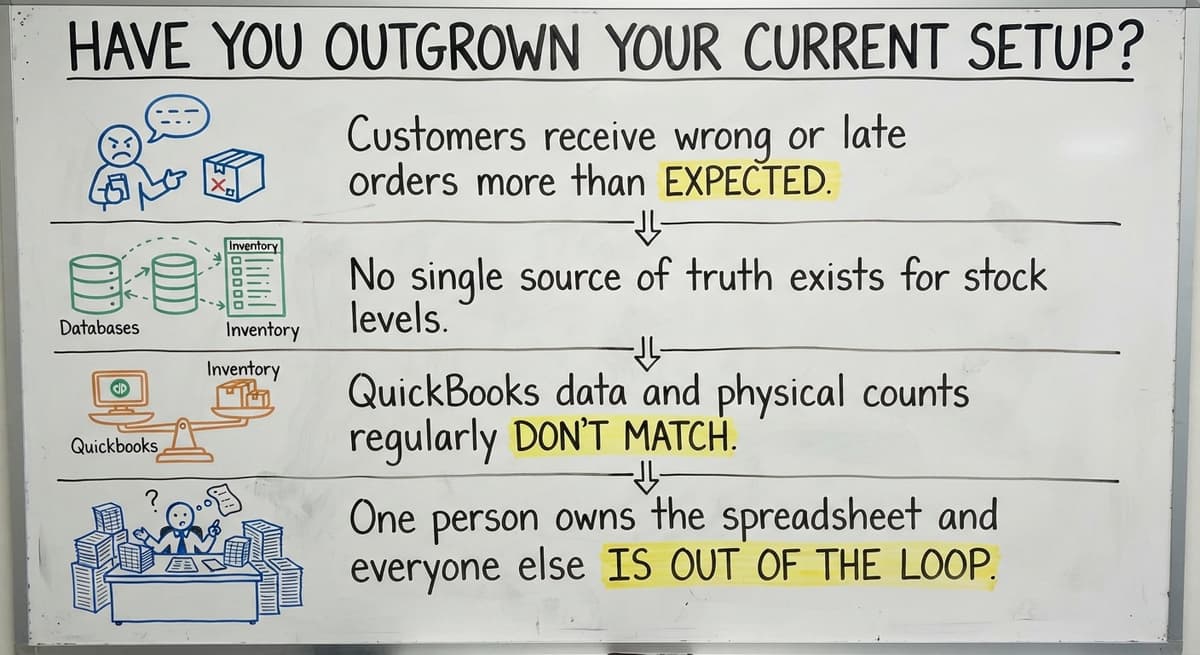
You have outgrown your current setup if your staff spend more than a few hours each week reconciling spreadsheet versions. Other clear signs:
- Customers receive wrong or late orders more than once a month
- No single source of truth exists for stock levels
- The accounting software data and physical counts regularly disagree
- One person owns the spreadsheet and everyone else waits on them
The US Federal Trade Commission's Mail, Internet, or Telephone Order Rule requires merchants to ship when they said they would. An inaccurate stock count is a direct risk to that obligation.
The Core Functions Every Simple Inventory System Needs
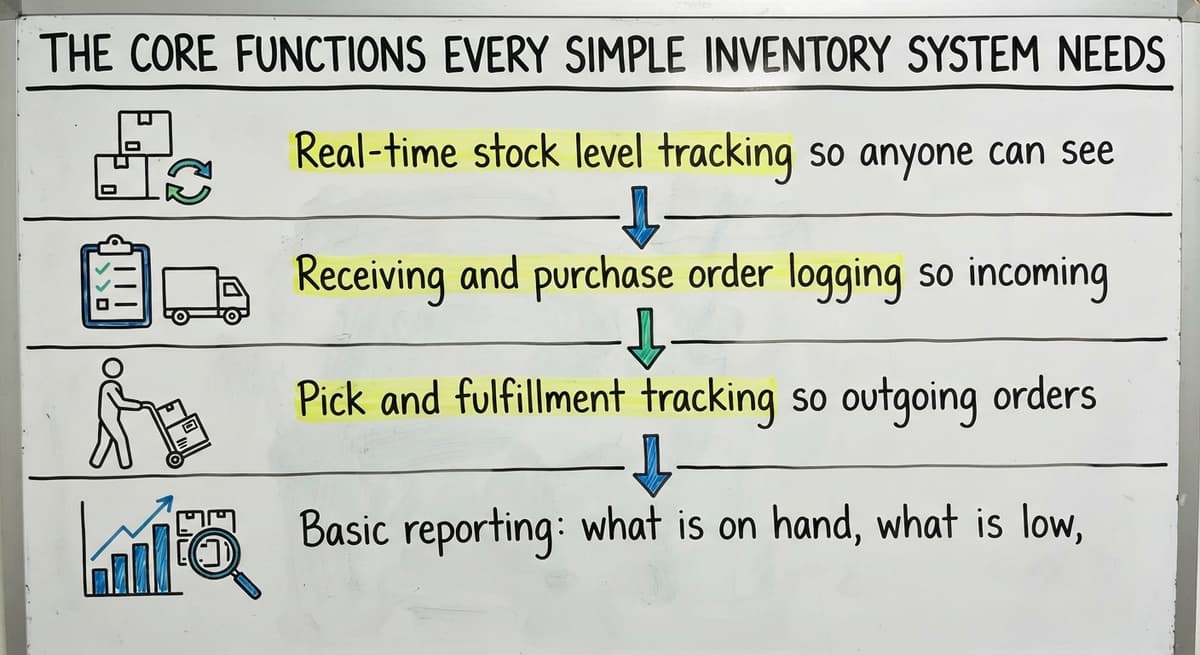
A small business does not need much. It needs these 4 things to work reliably:
- Real-time stock level tracking so anyone can see what is on hand
- Receiving and purchase order logging so incoming stock is recorded at the dock
- Pick and fulfillment tracking so outgoing orders reduce the count immediately
- Basic reporting: what is on hand, what is low, what has moved recently
That is the whole list. If a system does those 4 things without requiring a manual workaround, it is doing its job.
What Do You Not Need When You Are Small?
Most small businesses need none of the 3 features vendors lead with: demand forecasting, AI-driven replenishment, or multi-currency ERP modules. These features add tabs to manage and training time to absorb. They rarely add value at small scale.
The goal is fewer manual steps, not more software. Every feature that does not match a real task in your warehouse is a distraction. Pay for what you use. Ignore the rest.
Spreadsheets as a Starting Point
A well-built spreadsheet is a real first step. It costs nothing and most staff already know how to use one. A basic inventory spreadsheet should include:
- SKU (a short code that identifies each product)
- Description
- Quantity on hand
- Reorder point (the stock level that triggers a new order)
- Supplier name and lead time
The honest limit of spreadsheets: they break when more than one person needs to edit at the same time. They have no automation.
Version control is a headache. When a file gets emailed around, someone is always working from yesterday's numbers.
Is the comparison easier when one option is built for you?
Yes. Off-the-shelf means fitting your process to the software, and custom is the other way round. The first look costs nothing.
Book a callWhen Should You Move Beyond a Spreadsheet?
Move on when any of these are true:
- More than 1 person needs to update stock at the same time
- Orders arrive faster than the sheet can keep up
- Errors are costing real money in mis-ships or write-offs
- Maintaining the spreadsheet has become someone's main job
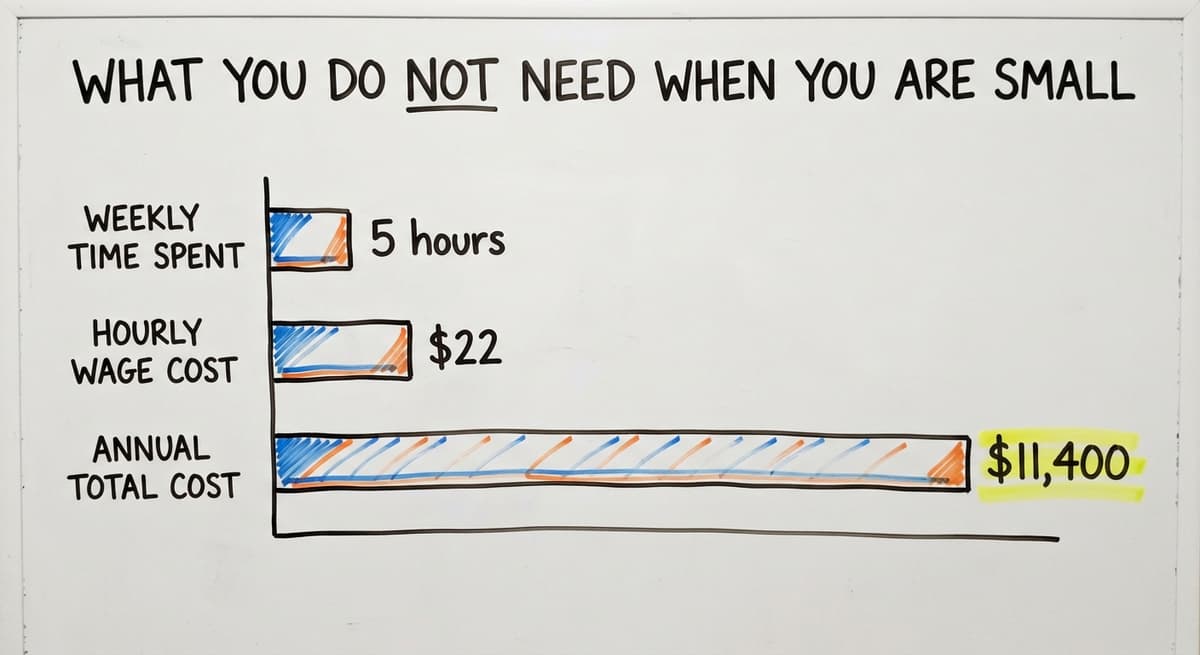
Consider the math: 2 people spending 5 hours a week on spreadsheet reconciliation, at the median wage for stock clerks of around $22 per hour per the US Bureau of Labor Statistics, costs over $11,400 a year in labor alone. That is before counting the cost of errors.
How Does the Accounting Software Fit Into a Simple Inventory System?
The accounting software handles accounting and invoicing well. It records a sale, generates an invoice, and tracks what you owe vendors.
What it does not do well is manage the physical warehouse floor in real time.
Keep the accounting software. Replacing it is rarely smart for a small business. The accounts are already there. The tax history is there. Your bookkeeper knows it.
The smarter move is to add a lightweight inventory layer that syncs with the accounting software. The warehouse system handles receiving, picking, and stock counts.
The accounting software handles the money side. Data flows one way: from the warehouse into the accounting software. No double entry.
Can I add an inventory layer without replacing the accounting software?
Yes, and for most small businesses, that is exactly the right approach. A separate inventory tool records what comes in and goes out.
At the end of the day or in real time, it pushes that data into the accounting software. Staff learn one new screen, not a whole new accounting system. The migration risk is low because nothing in the accounting software changes.
This is how accounting integration for wholesale distributors works in practice: two systems, each doing what it does best, talking to each other.

Off-the-Shelf Inventory Software Options
Four kinds of cloud-based tool cover most standard operations. They are worth looking at if your workflow is straightforward.
| Tool | Best For | Pricing Model | The accounting software Sync |
|---|---|---|---|
| Entry-level inventory app | Small product businesses | Monthly per user | Yes |
| Accounting-led inventory add-on | Manufacturing and wholesale | One-time license | Yes |
| Multichannel inventory platform | Retail and multichannel | Monthly tiered | Yes |
| Visual stock tracker | Simple asset and stock tracking | Monthly per user | Limited |
The catch: these tools target the average business. If your receiving process, pick logic, or reporting needs do not match what the software expects, you end up building workarounds. Workarounds pile up. Two years later, you are switching platforms again.
The Hidden Cost of Off-the-Shelf Software
Subscription fees grow with users and transaction volume. Training staff on a system built for someone else's workflow takes time.
And when the software does not quite fit, the team finds ways around it, which defeats the purpose.
Migration risk is real. When you switch platforms in year 3, your data is in the old system's format.
Exporting and cleaning it is a project of its own. Factor that cost in before you sign up.
What does it look like running on your own process?
The first thing you see is it running on your own process, at no build cost. The subscription starts once it is live and doing the job, not before.
Book a callCustom Inventory Systems Built Around How You Already Work
The alternative is a system built to match your operation rather than one that asks you to change how you work.
Custom does not have to mean slow or expensive if the scope is clear from the start.
This approach fits wholesale, distribution, and fulfillment businesses with unique steps that off-the-shelf tools do not handle cleanly.
Custom warehouse management software built for your floor means staff learn a system that already matches their habits. Adoption is faster. Workarounds are rare.
What Does a Custom Build Look Like at Small Scale?
A realistic example: a small distributor with 10 staff replaces their spreadsheet sheets with a simple web-based tool. The key screens are:
- Receiving dock entry: staff scan or type items as they arrive
- Pick list generation: the system builds the pick list from open orders
- Stock level dashboard: one screen shows what is on hand, what is low, what is on order
The accounting software still handles invoicing. The new system handles the warehouse floor. Replacing spreadsheet with a custom operations system like this takes weeks, not months, when the scope is tight.

Barcode Scanning and Mobile Access
Barcode scanning removes the biggest source of manual error: typing. When a receiver scans a barcode at the dock, the system records the item, quantity, and location without anyone keying it in. The same applies at picking.
Barcode scanning is no longer an enterprise-only feature. A basic scanner costs under $100. The GS1 barcode standards that govern product codes are free to reference and widely supported by inventory tools.
Mobile-friendly systems let warehouse staff update stock from the floor on a phone or tablet. No walking to a desktop.
No paper slip that gets lost. This matters on a busy dock where speed and accuracy both count.
How do reorder points and low stock alerts work?
A reorder point is the stock level at which you need to place a new order to avoid running out before the next delivery arrives.
Set it once per product, and the system flags the item when stock drops to that level.
For example: if a supplier takes 5 days to deliver and you sell 20 units a day, your reorder point is 100 units.
When stock hits 100, the alert fires. You place the order. Stock does not hit zero.
Even a spreadsheet can do this with conditional formatting. A proper inventory system automates the alert and can generate a draft purchase order.
The NIST Manufacturing Extension Partnership notes that supply chain visibility starts with knowing your stock position before a problem occurs, not after.

How Do You Track Inventory Across Multiple Locations?
Businesses with a warehouse plus a retail counter, or multiple storage areas, need stock tracked by location. Total on-hand is not enough if half the stock is in the wrong building.
A simple system shows stock by location. Transfers between locations are logged as transactions, not managed by memory or sticky notes.
The US Census Bureau's Monthly Wholesale Trade data shows that inventory-to-sales ratios vary sharply by sector. Businesses with tight ratios cannot afford stock sitting in the wrong place.
Reporting That Actually Helps a Small Business Owner
Three reports are enough for most of what a small business owner needs:
- Stock on hand: what do I have right now, by location
- Items below reorder point: what do I need to order today
- Slow-moving items: what has not moved in 60 or 90 days
Too many dashboards are as useless as none. If a report does not answer one of those 3 questions, it is probably not worth building.
Good inventory management reporting is fast to read and leads directly to a decision.
What is in a free first look?
A 30 minute call, your operation mapped, and a clear picture of what we would build. No obligation and nothing to install.
Book a call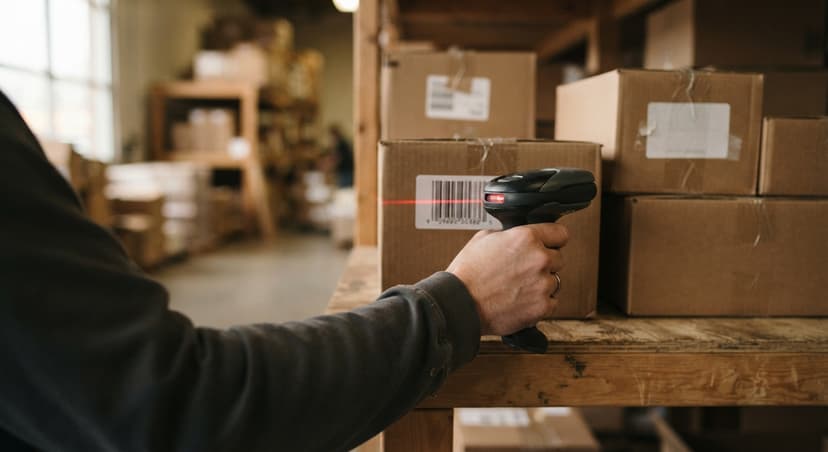
How Long Does It Take to Set Up a Simple Inventory System?
Setup time depends on what you are building:
- Spreadsheet: a few hours to build, ongoing effort every week to maintain
- Off-the-shelf software: days to weeks, depending on data migration and staff training
- Custom system scoped to your workflow: weeks, not months, when built by a focused team
The biggest time cost is always the starting data. If your current stock counts are wrong, importing them into a new system locks in the errors. A clean physical count before go-live is not optional.
How do I do a physical count before switching to a new inventory system?
Count everything before you go live with any new system. Use a simple count sheet with 4 columns: SKU, description, location, and quantity.
Count in zones so nothing gets missed and nothing gets counted twice.
Reconcile the count against the accounting software before entering data into the new system. Where the numbers disagree, investigate before going live.
A clean starting point prevents months of compounding errors. One wrong number on day one becomes 30 wrong numbers by month two.
Getting Your Team to Actually Use the System
Adoption is the biggest risk in any rollout. A system that fights existing habits gets abandoned. A system that matches them gets used from day one.
Keep training short and practical. Staff should see a clear benefit within their first shift. If the system makes their job harder before it makes it easier, expect resistance.
Inventory management for fulfillment centers and warehouses works best when the people on the floor helped shape the process.
Common Mistakes When Setting Up Inventory Tracking
There are 5 mistakes to avoid:
- Importing wrong quantities into a new system without a physical count first
- Tracking too many product attributes before the basics are solid
- Skipping the reconciliation step between old data and new system
- Choosing a system based on its feature list rather than how well it fits your workflow

Questions to Ask Before Choosing a System
Before you sign anything, get clear answers to these:
- Does it sync with the accounting software without replacing it?
- Can my team learn it in a day?
- Does it handle how we actually receive and pick orders?
- What happens to my data if I cancel the subscription?
- Is there a local team I can call when something breaks?
That last question matters more than most buyers expect. Small business operations software in Columbus, Ohio and similar markets works best when a local partner can walk your floor, understand your process, and pick up the phone when something goes wrong.

When Does a Local Partner Make More Sense Than a SaaS Platform?
SaaS platforms target the average business. A local partner builds for your business.
The difference shows up in year one, when the edge cases appear and the software's support queue is not the right place to resolve them.
A team that can visit your warehouse, map your receiving process, and build to match it will deliver a system your staff actually use. Ongoing support is a conversation, not a help ticket.
For businesses with unique workflows or growth plans that do not fit a standard template, that kind of partnership is worth more than another subscription.
If your operation is growing past what spreadsheets can handle and off-the-shelf tools have not been the right fit, talk to a team that builds around how you work rather than asking you to change.
Frequently asked questions
Frequently asked questions
How to create a simple inventory system?
Start with a spreadsheet that tracks SKU, description, quantity on hand, reorder point, and supplier.
Once more than one person needs to edit it at the same time, or errors start costing money, move to a cloud-based tool or a custom web system that syncs with the accounting software. The key is to start with a physical count so your opening numbers are accurate.
What is the best inventory management system for small businesses?
There is no single best answer. The right system depends on how many people touch stock, how fast orders move, and whether your workflow matches what off-the-shelf tools expect.
The entry-level apps work well for simple product businesses, and the accounting-led add-ons suit wholesale and manufacturing. Businesses with unique processes get better results from a custom-built system than from adapting a generic one.
Is there a free inventory management system?
Yes. A well-structured spreadsheet in a shared spreadsheet or spreadsheet is free and works for many small businesses starting out. Among dedicated tools, 2 or 3 offer free tiers with limited SKUs and users.
Free plans cap the number of products or transactions, so check the limits before committing. Most businesses outgrow the free tier once orders pick up.
How do I do inventory for a small business?
Do a full physical count first. Record every item by SKU, location, and quantity. Reconcile that count against your accounting records. Then pick a system, enter your clean starting data, and set reorder points for each product.
Train staff on how to record receiving and picking in the system. Run a second count within 30 days to catch anything that was missed.
Can I use the accounting software as my inventory system?
The accounting software tracks inventory value for accounting purposes but it is not built for real-time warehouse operations. It does not manage pick lists, flag low stock in real time, or handle barcode scanning at the dock.
Most small businesses keep the accounting software for accounting and add a separate inventory tool that syncs data into it, rather than replacing the accounting software entirely.
When should a small business stop using spreadsheets for inventory?
Stop when more than one person needs to update stock at the same time, when errors are causing mis-ships or write-offs, or when maintaining the spreadsheet takes more than a few hours a week.
If the spreadsheet has become someone's main job, the cost of a proper system is almost certainly lower than the labor you are spending to keep the sheet alive.
What is the difference between off-the-shelf inventory software and a custom system?
Off-the-shelf software is built for the average business and asks you to adapt your workflow to fit it. A custom system is built to match how your operation already works.
Off-the-shelf tools are faster to start and cheaper upfront. Custom systems cost more to build but require fewer workarounds, have higher adoption rates, and do not charge per-user fees that grow as you hire.
Can a small business afford barcode scanning?
Yes. A basic barcode scanner costs under $100. Most cloud-based inventory tools support scanning out of the box.
Barcode scanning reduces receiving errors and speeds up picking without requiring expensive hardware. GS1 barcode standards, which govern the codes on most products, are free to reference and widely supported.
How often should a small business count inventory?
Count the fast movers weekly, everything else monthly, and the whole stockroom once a year for the accountant.
Cycle counting 20 items a day keeps the record within 2 percent without ever closing for a count.
How do I create an inventory spreadsheet?
One row per SKU with columns for SKU, description, location, quantity, unit cost, reorder point, and supplier, and a second sheet that logs every receipt and sale by date.
Lock the SKU column and give the file one owner. That structure lasts to about 200 items and 1 person.
How do I calculate inventory reorder points?
Average daily sales multiplied by supplier lead time in days, plus safety stock.
A product selling 4 a day on a 10-day lead time with 3 days of safety stock reorders at 52 units. Review the numbers each quarter.
Can I use barcodes to track small-business inventory?
Yes, from day one. A phone camera scans through the inventory app, a $150 scanner is faster, and Code 128 labels print from any thermal printer.
Scanning is the step that takes a small operation from about 85 percent count accuracy to over 97.
Not sure this is the right shape for your operation?
The call is free. Describe how the work runs today. We map it on a call and show you what it would look like built around that, before you spend anything.
Book a callRelated guides
The rest of this guide, for the parts of the job this page does not cover.
Guides
- Inventory Tracking Systems for Small Businesses
- Small Business Inventory Management System
- Inventory System for Small Business
- Inventory Tracking Software for Small Business
- Inventory Control Software for Small Business
- Inventory Management Small Businesses
- Best Inventory Management Software for Small Businesses
- Inventory Sales Software Small Business
- Inventory Control for Small Business
- Small Business Inventory Management
- Small Business Stock Management Software
- Wms for Small Business
- Small Business Warehouse Management System
- Erp System for Small Businesses
- Warehouse Management System for Small Business
- Accounting and Inventory Software for Small Business
- Free Inventory Management Software for Small Business
- Simple Warehouse Management System
Common questions
- How to Organize Inventory for Small Business
- How to Keep Track of Inventory Small Business
- What is the Best Inventory Management Software for Small Business
- Why is Inventory Management Important for Small Businesses
- How to Manage Inventory for Small Business
- What is the Best Inventory Management System for Small Businesses?