


Cost Of Inventory Management Software
Inventory management software costs anywhere from $0 to well over $100,000 depending on the size of your operation, the number of users, and how much setup work is involved. Most small distributors land between $50 and $500 per month for a subscription tool, but the first-year total, once you add implementation, training, and integrations, is two to four times that figure.
Reviewed September 2026. Each figure comes from the assumptions stated beside it, so you can substitute your own and the arithmetic still holds.
Published 24 July 2026. Reviewed and updated 15 September 2026.
Book a callWhy Does the Cost of Inventory Management Software Vary So Much?
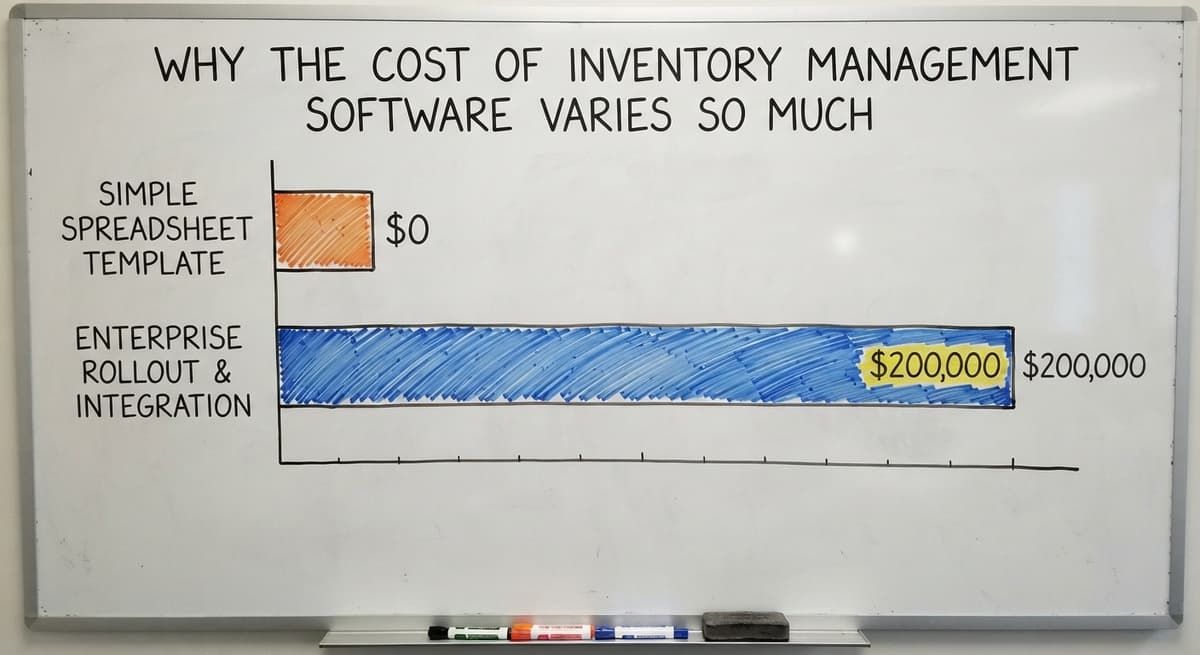
The gap between a $0 spreadsheet template and a $200,000 enterprise rollout exists because these products solve completely different problems. A bakery tracking 20 SKUs needs nothing like what a 40-person wholesale distributor needs to run receiving, picking, and replenishment across 3 warehouses.
The mistake most buyers make is shopping by monthly price without knowing which tier actually fits their scale. You end up either overpaying for features your team will never touch, or buying something cheap that breaks the moment your order volume grows.
Understanding what drives the cost of inventory management software protects your budget before you talk to a single vendor.
Would you rather have it built around your operation?
The first look is free. If you would rather not compare products, describe how your operation already works and we build the system around it.
No build cost. You see it running on your own process first, and the monthly subscription starts only once it is live.
Book a callWhat Are You Actually Paying For?
Software cost is not just the license fee. When you sign up for any inventory platform, you are paying across several categories, and the license is the smallest one.
As GS1, the global standards body behind barcode systems, explains at gs1.org/standards/barcodes, the barcode standards that make scan-based counting possible require both the right hardware setup and software that can read and process those codes correctly, which means any serious implementation includes more than just the app itself.
The 6 cost categories every buyer should plan for are:
- License or subscription fee
- Implementation and configuration
- Data migration from your old system or spreadsheets
- Training for your team
- Integrations with tools like the accounting software
- Ongoing support and maintenance
Most vendors quote only the first item. The others are real, and they add up fast.
Why Is Accurate Inventory Tracking a Legal Requirement?
The IRS is clear about why inventory tracking is not optional. IRS Publication 538 states: "To figure taxable income, you must value your inventory at the beginning and end of each tax year." That legal requirement means your counting system has to be accurate, not just convenient.
What Are the Six Cost Categories Every Buyer Should Know?
Breaking inventory software cost into 6 buckets makes it far easier to compare vendors on equal terms.
License fees are either a monthly subscription or a one-time purchase. Most modern tools charge monthly or annually, per user, per location, or as a flat rate. Annual contracts run 15 to 20 percent cheaper than month-to-month billing.
One-time licenses look cheaper upfront but almost always carry annual maintenance fees of 18 to 22 percent of the purchase price.
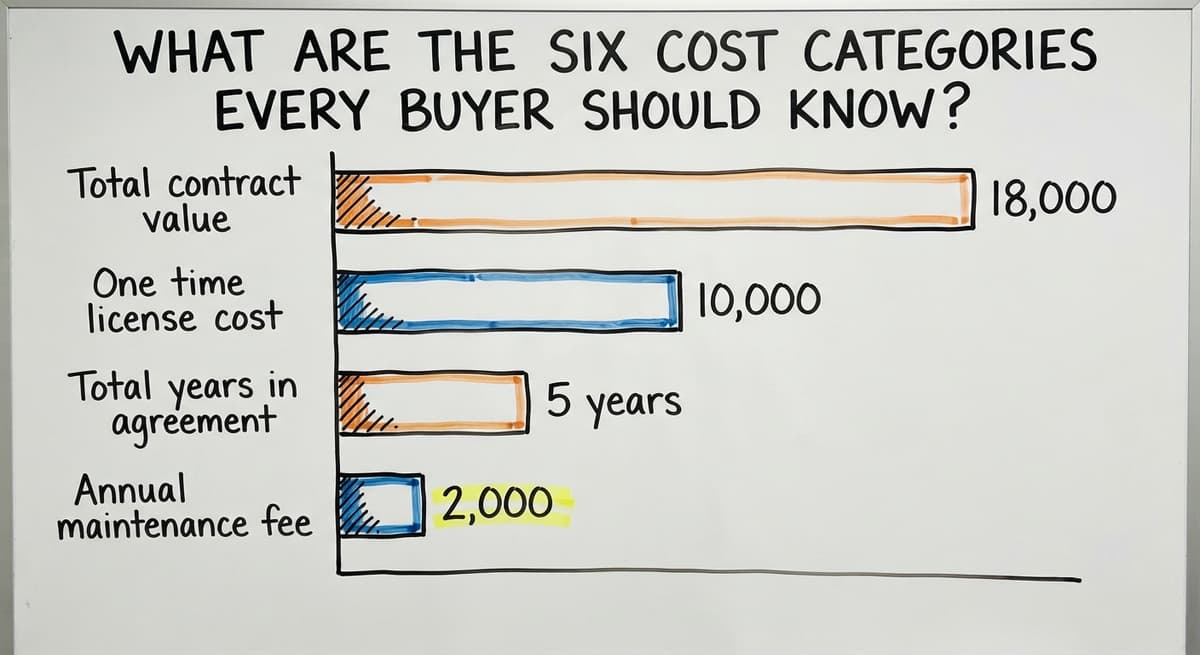
Over 5 years, a $10,000 one-time license with a $2,000 annual maintenance fee costs $18,000 total. A $300 per month subscription over the same period costs $18,000 as well. The math is closer than most buyers expect.
Implementation covers configuring the system to match your workflows, setting up user roles, connecting to your existing tools, and testing before go-live. Some vendors bundle this; others charge hourly.
Enterprise systems can run $20,000 to $200,000 in implementation alone. Smaller operations can keep this cost low by choosing software built for their scale.
Data Migration, Training, Integrations, and Support: What Each One Actually Costs
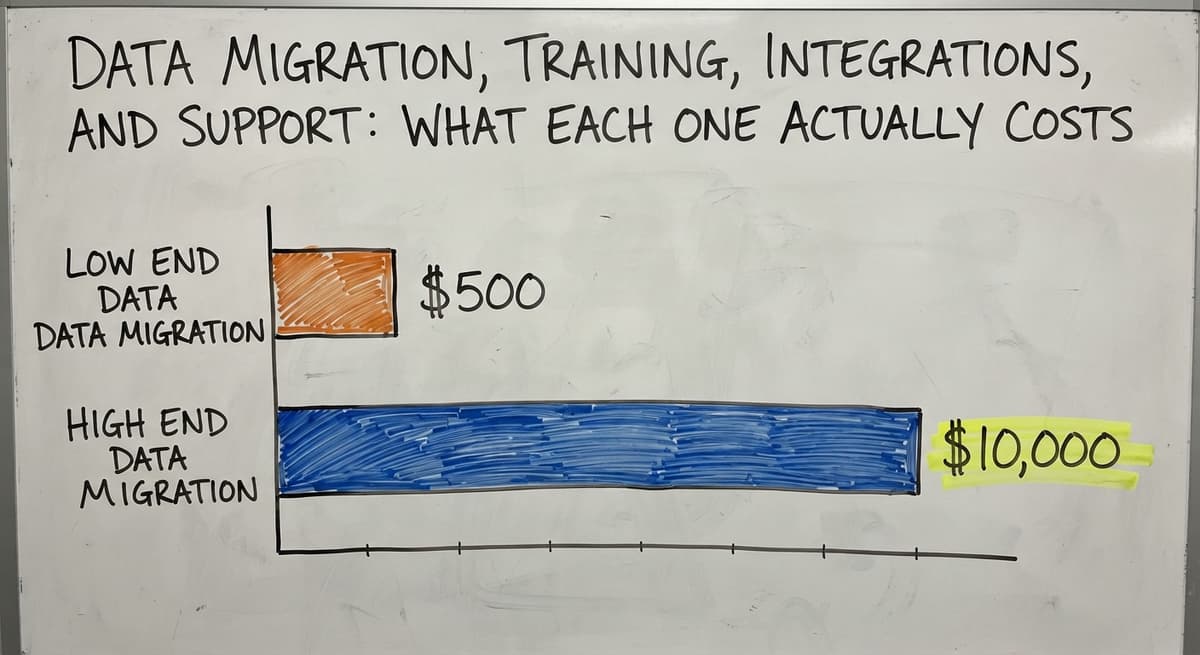
Data migration means moving your product catalog, supplier records, and order history into the new system. Clean data migrates faster. Messy spreadsheets take longer and cost more.
Vendors charge $500 to $10,000 depending on data volume and quality. Some small operations choose to start fresh rather than pay to clean up years of inconsistent records.
Training is the most underestimated line item. Software that matches how your team already works needs far less training time than a tool that forces a new process. Some vendors include training in the subscription; others charge per session or per user.
Integrations with tools like the accounting software are priced separately. Native integrations are cheaper than custom connectors.
A accounting integration should push sales orders and purchase orders automatically, sync inventory counts without manual re-entry, and avoid creating duplicate invoices. Poor integrations create double-entry work that quietly drains staff time every week.
Ongoing support continues after go-live. Some vendors include it in the subscription; others charge extra. Custom software maintenance is covered by a retainer or billed as needed.
Typical Price Ranges by Software Type
Prices vary enough across product categories that knowing which tier fits your operation saves you from comparing the wrong products.
| Tier | Monthly Cost | Best Fit | Typical Implementation Cost |
|---|---|---|---|
| Free and basic tools | $0 to $50 | Very early-stage, simple needs | Minimal |
| Small business SaaS | $50 to $300 | Standard workflows, small teams | $1,000 to $5,000 |
| Mid-market platforms | $300 to $1,500 | 20 to 100 staff, complex needs | $5,000 to $30,000 |
| Enterprise ERP | $1,500 and up | Large orgs with IT staff | $50,000 to $200,000+ |
| Custom build | Varies | Unique workflows, growing teams | $15,000 to $80,000 |
Free tools like limited SaaS tiers or spreadsheet templates work for very early-stage operations. Limitations appear quickly: no multi-location support, no barcode scanning, no real reporting. The hidden cost is staff time spent working around the gaps.
What does small business inventory software actually cost? Most off-the-shelf tools marketed to small businesses sit in the $50 to $300 per month range.
The small-business inventory apps live here. They handle standard workflows well but struggle when your process does not match their assumptions. Per-user fees can push the real cost above the advertised starting price faster than buyers expect.
Mid-Market and Enterprise Inventory Platforms: When the Higher Tier Is Worth It
Mid-market platforms offer more users, better reporting, and deeper features. They also require longer implementation timelines and more staff time to learn. A good fit for businesses with 20 to 100 staff and genuinely complex inventory needs.
Enterprise ERPs sit at the top. Implementation can take 12 to 24 months and run six figures. Most small distributors do not need this level and will struggle with the overhead long before they use the advanced features.
Is the comparison easier when one option is built for you?
Yes. Off-the-shelf means fitting your process to the software, and custom is the other way round. The first look costs nothing.
Book a callIs Custom Inventory Software More Expensive Than Off-the-Shelf?
Custom software is dismissed as too expensive without running the full math. For operations with unique workflows, that assumption is wrong.
A custom build costs more upfront. There is no getting around that.
But there is no per-user fee that grows with your team, no add-on module you have to buy to unlock a feature you need, and no forced migration away from tools like the accounting software that are already doing their job.
A 5-year comparison for a 15-person distributor:
| Cost Category | Off-the-Shelf SaaS | Custom Build |
|---|---|---|
| License (Year 1) | $3,600 | $0 |
| Implementation | $5,000 | $35,000 |
| Training | $1,500 | $500 |
| Integration | $1,200 | Included |
| Support (Years 2 to 5) | $14,400 | $8,000 |
| Per-user growth (5 added) | $3,600 | $0 |
| 5-Year Total | $29,300 | $43,500 |
At 15 people, the SaaS tool wins on total cost. Add 15 more staff over those 5 years and the gap closes fast.
Add a second location or a custom workflow the SaaS tool cannot handle natively, and the custom build wins by year 3.
Why Does Staff Adoption Make Custom Software Cheaper in Practice?
Software that matches how your team already works also needs less training. Staff adopt it faster because the screens reflect the process they already follow. The cost of disruption during a forced process change is real and rarely appears in any vendor's quote.

What Are the Hidden Costs of Inventory Management Software?
Hidden costs are one of the top complaints from small business software buyers. Knowing what to look for before you sign protects your budget.
Per-user fees compound quickly. A tool priced at $10 per user per month costs $500 per month for a team of 50. Some vendors define "user" broadly enough to include read-only staff or warehouse workers who only scan barcodes.
Ask for pricing at your current team size and at double that size before you commit. Flat-rate pricing is more predictable for growing operations.
Add-on modules lock features behind extra charges. Many platforms advertise a base price but require paid upgrades for barcode scanning, advanced reporting, or multi-location support.
Always ask for a full feature list at each pricing tier before comparing vendors. The true cost is the tier that includes everything you actually need, not the advertised starting price.
Contract Lock-In and Failed Implementations: The Risks That Hurt Most
Contract lock-in carries real risk. Annual contracts include early termination penalties. Multi-year contracts can lock you in at a price that feels fair now but becomes a burden when your needs change.
Read the cancellation terms before signing. Month-to-month pricing costs more per month but gives you the freedom to switch.
A failed implementation is the most expensive outcome. You lose the money spent, the time your team invested, and often have to start the whole process over. Choosing software that fits your current workflow reduces this risk more than any other single decision.
The Real Cost of Staying With Spreadsheets
Doing nothing has a cost too, even if it does not appear on an invoice.
According to the US Bureau of Labor Statistics, stock clerks and order fillers earn a median wage of around $18 per hour.
If 3 people on your team each spend 8 hours a week on manual inventory tasks, that is $22,464 per year in labor alone, before you count the cost of the errors those manual processes produce.
Errors in spreadsheets lead to stockouts, overstock, and fulfillment mistakes. The FTC's Mail, Internet, or Telephone Order Merchandise Rule requires you to ship when you said you would. An inaccurate inventory count is the reason you cannot.
What does it look like running on your own process?
The first thing you see is it running on your own process, at no build cost. The subscription starts once it is live and doing the job, not before.
Book a call
How Do You Calculate the Cost of Your Current Manual Process?
Start by estimating hours per week spent on manual inventory tasks. Multiply by the hourly cost of the staff doing that work.
Add the cost of errors: returned orders, emergency reorders, write-offs. Compare that annual total to the cost of software. For most small distributors, the math favors the software well before year 2.
How Do Pricing Models Affect Your Total Cost?
The pricing model shapes how your cost grows over time. The cheapest model today is not always the cheapest model in 3 years.
Per-user pricing scales directly with headcount. Predictable, but it becomes expensive as you grow. Common in SaaS tools targeting small and mid-sized businesses.
Flat-rate pricing charges one monthly fee regardless of how many users you add. Great for growing teams. Some flat-rate tools cap features or users at certain tiers, so confirm what the flat rate actually includes.
Transaction-Based and Tiered Pricing: What to Watch Before You Commit
Transaction-based pricing charges per order, shipment, or inventory movement. Cost is low when volume is low but rises with activity. This model can be unpredictable during busy seasons.
Tiered pricing increases cost as you cross usage thresholds like SKU count or order volume. A jump across a tier boundary can raise your bill significantly overnight.
Model your expected volume growth before choosing a tiered plan, and ask vendors where most of their current customers sit in the tier structure.

How Do I Budget for Inventory Management Software?
A realistic budget accounts for all 6 cost categories, not just the license. Build a first-year budget and a 3-year budget separately, because first-year costs are almost always higher due to setup and training.
A simple budget template for small distributors:
| Line Item | First Year | Annual (Ongoing) |
|---|---|---|
| License or subscription | $3,600 | $3,600 |
| Implementation | $5,000 | $0 |
| Data migration | $1,500 | $0 |
| Training | $1,000 | $300 |
| Integrations | $1,200 | $600 |
| Support | Included | Included |
| Contingency (15%) | $1,845 | $675 |
| Total | $15,145 | $5,175 |
Add a 15 to 20 percent contingency for costs you did not see coming.
Why Do First-Year and Ongoing Costs Tell Two Different Stories?
Include staff time as a cost even when it is not a cash payment to a vendor. A warehouse manager spending 3 weeks on a software rollout is not free, even if payroll does not change.
Present the budget as a first-year total and a separate annual ongoing cost. The two numbers tell very different stories, and both matter when you are deciding whether to move forward.
Questions to Ask Every Vendor Before You Sign
The right questions surface hidden costs and unrealistic promises before you commit. Vendors who cannot answer these clearly are a warning sign.
Pricing and contract questions:
- What is included in the base price and what costs extra?
- What happens to my price if I add 5 more users next year?
- What is the cancellation policy and are there termination fees?
- Is the price locked for the contract term or can it increase?
Implementation and support questions:
- How long does implementation take for a business my size?
- Who does the implementation work, your team or a third-party partner?
- What does support cost after go-live and how fast do you respond?
- Can I speak with a current customer in a similar business?

Integration Questions to Ask Before You Commit
Integration questions:
- Does the software have a native accounting integration or does it require a third-party connector?
- Who maintains the integration if the accounting software updates its API?
- What other tools does it connect to, and at what cost?
Write the answers down so you can compare vendors on the same terms.
A vendor who cannot give you a price without a discovery call, or whose demo requires a 2-hour session with a sales engineer to explain basic features, is probably not the right fit for a lean operation.
Not sure this is the right shape for your operation?
The call is free. Describe how the work runs today. We map it on a call and show you what it would look like built around that, before you spend anything.
Book a callWhat Do Small Distributors Get Wrong When Buying Inventory Software?
Buying based on price alone leads to the wrong tool for the job. These are the patterns that show up most often when a purchase goes wrong.
Choosing enterprise software to grow into it means paying for years of unused features. The overhead of a complex system slows your team down long before you reach the scale that justifies it.
Underestimating implementation complexity is the most common budget mistake. A system that looks simple in a demo can take months to configure for a real warehouse with real exceptions and real supplier quirks.
Not involving the operations team in the decision leads to low adoption. The people who run receiving, picking, and replenishment every day know where the current process breaks.
If they were not in the room when you chose the software, they will find workarounds the moment it goes live.
What Are the Signs You Are Looking at the Wrong Tier of Software?
The implementation timeline is longer than 6 months for a 20-person operation. The vendor cannot give you a price without a discovery call.
The software requires you to change your process to fit the tool rather than the other way around. Any one of these signals that the product was built for a different kind of business than yours.
The NIST Manufacturing Extension Partnership offers vendor-neutral guidance on supply chain processes that is worth reviewing before you commit to any platform. It helps you separate what your process actually needs from what a vendor's demo makes look essential.

How Do You Compare Inventory Software Costs Fairly?
Comparing only monthly fees is like comparing cars by monthly payment without knowing the loan term or the total price. Use a 5-year total cost of ownership as your comparison metric.
Include all 6 cost categories for every option. Factor in the cost of switching if the tool does not work out after 18 months.
A tool that costs $200 per month but fails at month 14 has cost you $2,800 in fees plus the time and money spent on a second implementation.
For inventory management software for distributors and warehouse operations specifically, also factor in whether the software handles your actual workflows natively or requires add-ons and workarounds.
The true cost of a workaround is staff time, and staff time is the one cost that never shows up in a vendor's pricing sheet.
What Should You Expect From a Scoping Call?
What should a good vendor scoping call actually cover? A good vendor wants to understand your current process before quoting a price. Be wary of any vendor who quotes a number before asking how your operation works.
A solid scoping call covers your current tools, your team size, your SKU count, your order volume, and where your current process breaks down. It should surface all 6 cost categories and give you a realistic range, not a starting-from price designed to get you in the door.
The outcome of a good scoping call is a proposal you can actually budget against, with line items for implementation, training, and integrations alongside the license fee.
If a vendor sends you a one-line quote, ask them to break it down. If they cannot, that tells you something important about how they handle complexity.
What Does Inventory Management Software Actually Cost, in Summary?
The cost of inventory management software depends on your scale, your workflow, and how honestly you account for all 6 categories: license, implementation, data migration, training, integrations, and ongoing support.
For most small distributors, the first-year total lands between $8,000 and $25,000 when you include everything. Annual ongoing costs settle lower once setup is done.
Custom builds cost more upfront but reach cost parity with mid-market SaaS tools by year 3, especially for teams that grow or have workflows that do not fit a standard product.

The Right Next Step If You Want a Real Number
The cheapest option is not always the lowest total cost. And doing nothing is not free.
The staff hours spent on manual processes, the errors those processes produce, and the orders you cannot fulfill accurately all carry a real price. Software is the tool that replaces that cost with a system that scales.
If you are ready to get a real number based on your specific operation rather than a starting-from price, the right next step is a scoping conversation where someone asks about your process before quoting anything.
Frequently asked questions
Is there a free software for inventory management?
Yes, free options exist. Several inventory apps offer a free tier for very small operations, and others a limited free plan. Spreadsheet templates are also free.
The catch is that free tools cap SKUs, users, or orders, and they rarely include barcode scanning, multi-location support, or real reporting. For a business with more than a few hundred SKUs or more than one location, a free tool creates more work than it saves.
Is free inventory software really free?
The typical free plan is limited to 1 user, 1 warehouse, and about 50 orders a month. For a working distributor or warehouse, those limits are hit quickly.
The paid plans start at around $29 per month and scale up from there based on order volume and users. The free tier is genuinely useful for very early-stage businesses testing whether inventory software fits their workflow.
What is the most popular inventory management software?
There is no single answer because popularity depends on business size and industry. A handful of small-business inventory apps are widely used at the small end, and 2 enterprise suites dominate larger operations.
The most popular tool for your operation is the one that fits your workflow and your team size, not the one with the most reviews.
How much does PMS software cost?
Property management software and inventory management software are different products. If you are asking about inventory software, the answer is $0 to $1,500 or more per month depending on the tier.
If you are asking about property management systems used in hospitality, those run $100 to $500 per month for small properties and scale up significantly for larger operations. This article covers the cost of inventory management software specifically.
What does inventory software implementation cost?
Implementation costs range from near zero for simple SaaS tools you configure yourself, to $5,000 to $30,000 for mid-market platforms, to $50,000 or more for enterprise systems.
The figure depends on how much configuration your workflow requires, how clean your existing data is, and whether the vendor does the work or hands it to a third-party partner. Always ask for an implementation quote separately from the license price.
How does per-user pricing affect the total cost of inventory software?
Per-user pricing compounds over time. A tool at $15 per user per month costs $900 per month for a team of 60. If you add 20 staff over 3 years, your monthly fee grows with them.
Some vendors also count read-only users or warehouse scanners as full users. Ask for pricing at your current size and at twice that size before signing. Flat-rate pricing avoids this problem entirely for growing teams.
When does custom-built inventory software cost less than a subscription tool?
Custom software tends to reach cost parity with mid-market SaaS tools by year 3 for teams that are growing or have workflows that do not fit a standard product. There are no per-user fees, no add-on modules to unlock, and no forced process changes.
The upfront cost is higher, but the ongoing cost is flat. For a 30-person distributor with a unique receiving or fulfillment process, the math favors a custom build before the end of year 4.
How do I compare inventory software pricing fairly?
Use a 5-year total cost of ownership rather than a monthly fee comparison. Include all 6 categories: license, implementation, data migration, training, integrations, and support. Build the same table for every vendor you are considering.
Factor in the cost of switching if the tool fails after a year. The vendor with the lowest monthly fee is rarely the lowest total cost once you account for implementation and per-user growth.
How much does custom inventory management software development cost?
A build scoped to one operation, covering receiving, bin locations, picking, cycle counts, and an accounting sync, runs $8,000 to $25,000 once, plus $100 to $400 a month for hosting and support. Multi-warehouse, lot tracking, or a client portal push it to $25,000 to $60,000.
Which inventory management software has the lowest cost?
A free tier at $0 for one user and a few hundred items, then the entry-level tools at $30 to $100 a month.
The lowest sticker price is rarely the lowest cost: per-user fees, a second location, and barcode scanning are where the entry tools climb past $300.
Is cloud-based or on-premise inventory software cheaper?
Cloud is cheaper for the first 2 to 3 years, with no server and no IT time, at $50 to $300 a month.
On-premise costs $5,000 to $20,000 up front plus maintenance and only pays back for operations that must run without an internet connection or keep data on site by contract.
What features should inventory management software include?
Stock by location, barcode scanning, reorder points, purchase orders, a sync to the accounting package, and reports the owner reads without help. Lot and serial tracking, multi-warehouse, and a client portal are add-ons that only some operations need, and each one moves the price.
What is in a free first look?
A 30 minute call, your operation mapped, and a clear picture of what we would build. No obligation and nothing to install.
Book a callRelated guides
The rest of this guide, for the parts of the job this page does not cover.
Guides
- Inventory Management Software Costs
- Inventory Management Software Freeware
- Free Inventory Management Software for Small Business
- Warehouse Management Costs
- Costing Inventory
- Warehouse Inventory Management Software
- Quickbooks Inventory Management Software
- Inventory and Warehouse Management Software
- Custom Inventory Management Software
- Multi Location Inventory Management Software
- Manufacturing Inventory Management Software
- Best Inventory Management Software for Small Businesses
- Inventory Management Software Barcode Scanner
- Inventory Management Software with Barcode
- Free Inventory Management Software with Barcode Scanner
- Hvac Inventory Management Software
- Inventory Management Software for Schools
- Warehouse Stock Management Software
- Software for Warehouse Management System
- List of Warehouse Management Software
- Online Warehouse Management Software
- Cloud Stock Management Software