


Warehouse Inventory Software Programs
Warehouse inventory software programs track what stock you have, where it sits, and what is moving in and out of your facility. They replace manual logs and spreadsheets with a live, searchable record that your whole team can trust. This guide covers every main type, what each one costs, and how to pick the right fit for a 10-to-75-person operation.
Published 20 August 2026. Reviewed and updated 15 September 2026.
Book a callWhat Do Warehouse Inventory Software Programs Actually Do?
Inventory software tracks physical goods through every step: receiving, putaway, picking, packing, and shipping. It also runs cycle counts, which are regular spot checks of specific shelf locations rather than one big annual count.
The public record on this is worth reading directly: Auburn University RFID Lab covers independent research on RFID in retail and supply chain.
Walking is the hidden cost. A picker covering 40 feet to a fast mover 60 times a shift walks 2,400 feet a day, and across 250 days that is 600,000 feet a year per picker.
Moving 20 fast movers nearer the pack bench removes most of it.
Reviewed August 2026. Each figure comes from the assumptions stated beside it, so you can substitute your own and the arithmetic still holds.
Generic business software handles invoices and payroll. Inventory programs are built around physical goods and storage locations. That difference matters when you need to know, right now, whether bin 4B has 12 units or 9.
For a first-time buyer, set a clear goal before you shop. Pick one painful process, such as receiving errors or missed picks, and find a program that fixes that first. You can add features later.
Would you rather have it built around your operation?
The first look is free. If you would rather not compare products, describe how your operation already works and we build the system around it.
No build cost. You see it running on your own process first, and the monthly subscription starts only once it is live.
Book a callWhy Do Spreadsheets and Printed Sheets Stop Working?
The breaking point is the day 2 people edit the same file at the same time. One version saves over the other.
During peak season, that kind of conflict can cost a mis-ship or a phantom stock count, meaning the sheet says you have stock that is not actually there.
Most warehouse teams hit this wall somewhere between 5 and 50 staff. The answer is not more people checking the sheet. The answer is a dedicated inventory program.
Disorganised Inventory Creates Physical and Financial Risk
OSHA states that "the warehousing and storage industry includes establishments operating facilities for general merchandise, refrigerated goods, and other products," and OSHA's warehousing guidance is clear that disorganised workflows create physical as well as financial risk.
A bad count is not just a bookkeeping problem. It puts people in the wrong place at the wrong time.
The IRS adds a financial reason to get counts right. IRS Publication 538 states: "To figure taxable income, you must value your inventory at the beginning and end of each tax year." Accurate software makes that obligation easy to meet.
What Are the Main Types of Warehouse Inventory Software Programs?
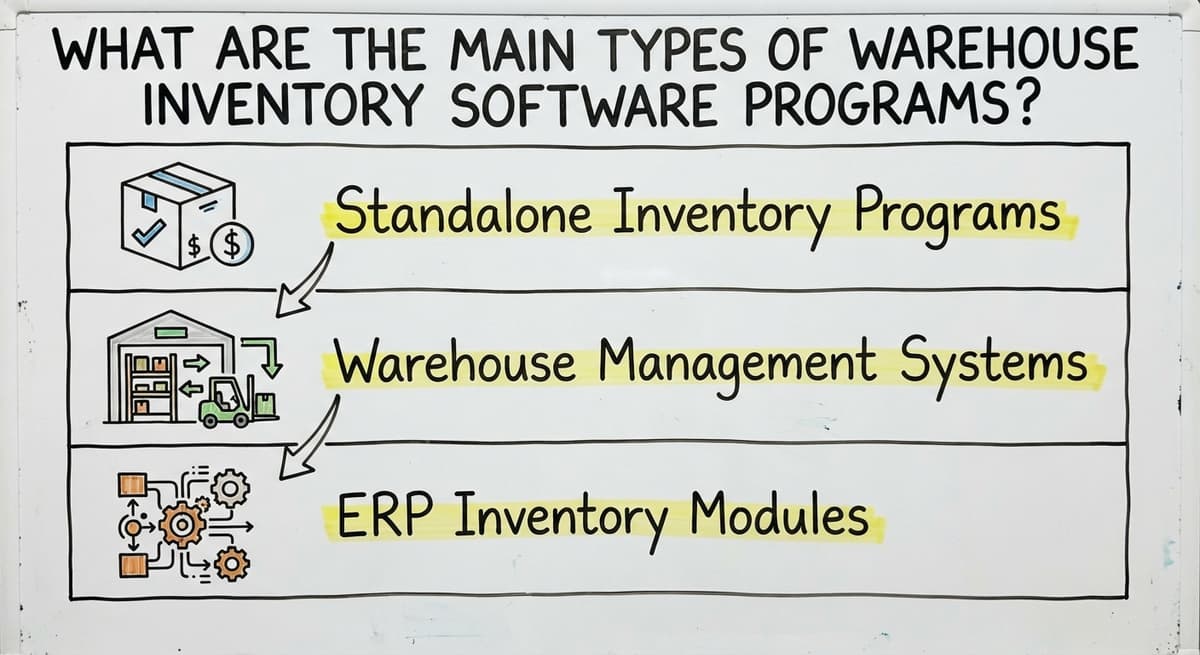
There are 3 types that cover most of the market: standalone inventory programs, warehouse management systems (WMS), and ERP inventory modules.
Each fits a different scale and budget. Read all three before you decide. An ERP (enterprise resource planning system) bundles inventory with finance, HR, purchasing, and more.
More coverage means longer setup and higher cost. Most small and mid-size warehouses do not need a full ERP. If QuickBooks already handles your accounting, an ERP is likely more than you need right now.
Standalone Inventory Programs
A standalone program focuses only on inventory. It does not touch accounting or customer records. Common users include small distributors, single-location warehouses, and seasonal operations.
Typical features include:
- Item master (a central list of every SKU and its details)
- Live stock levels by location
- Reorder alerts when stock drops below a set point
- Basic pick and pack workflows
- Simple reporting
Most standalone tools connect to QuickBooks rather than replacing it. Your books stay where they are. The inventory program handles the warehouse floor.
Warehouse Management Systems
A WMS goes further than stock counts. It controls physical warehouse processes: bin locations, pick paths, labor tracking, and shipping confirmations. A WMS is the right choice for multi-location warehouses, fulfilment centres, or distributors with complex picking needs.
WMS platforms vary widely in cost and setup time. Some are cloud-based and start in days. Others need months of configuration. Know your workflow before you start shopping.
ERP Inventory Modules
An ERP (enterprise resource planning system) bundles inventory with finance, HR, purchasing, and more. More coverage means longer setup and higher cost.
Most small and mid-size warehouses do not need a full ERP. If QuickBooks already handles your accounting, an ERP is likely more than you need right now.
Core Features to Look for in Any Inventory Program
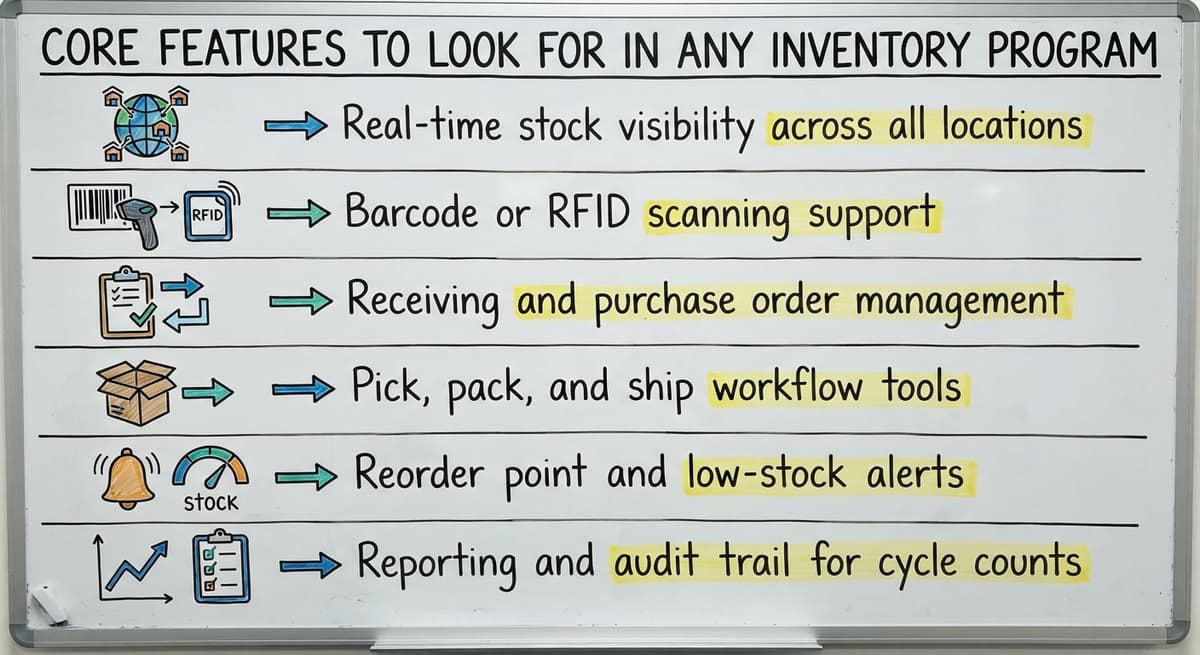
There are 6 basics every solid inventory program should cover:
- Real-time stock visibility across all locations
- Barcode or RFID scanning support
- Receiving and purchase order management
- Pick, pack, and ship workflow tools
- Reorder point and low-stock alerts
- Reporting and audit trail for cycle counts
GS1 sets the global barcode standards that let a label printed in one warehouse scan correctly at another. GS1's barcode standards explain why a program that supports GS1 formats saves time the moment you start receiving goods from suppliers.
Is the comparison easier when one option is built for you?
Yes. Off-the-shelf means fitting your process to the software, and custom is the other way round. The first look costs nothing.
Book a callFeatures That Matter More at Small Scale
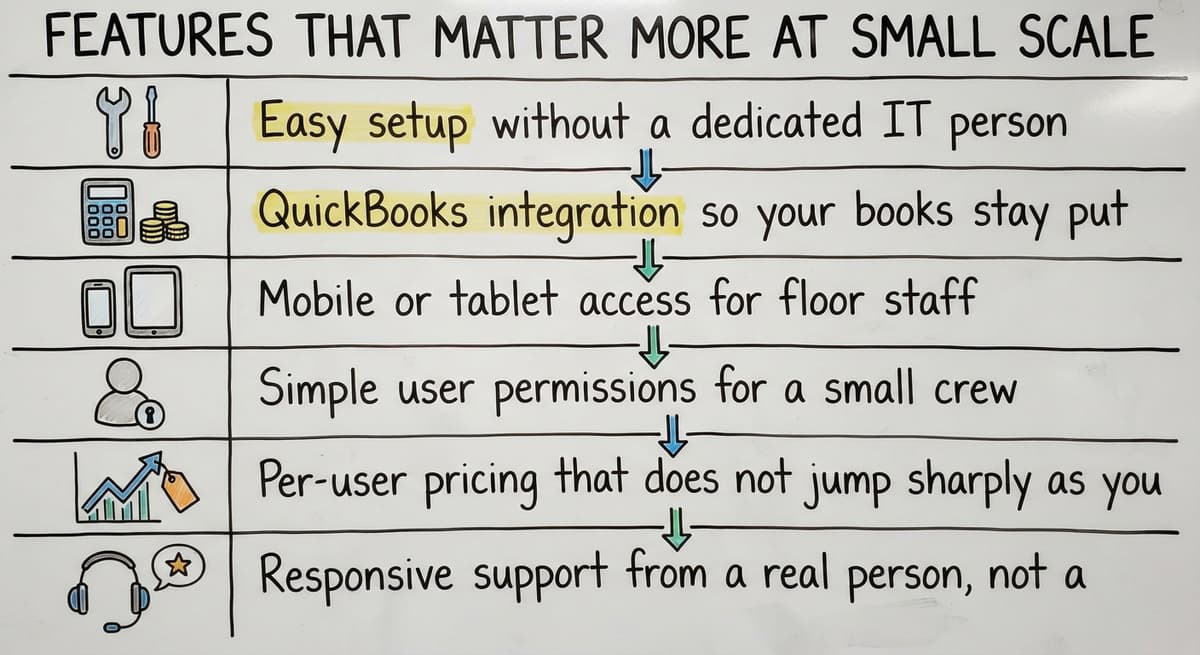
Small operations have different needs from warehouse inventory software programs than large ones. The features below matter most when your team is lean:
- Easy setup without a dedicated IT person
- QuickBooks integration so your books stay put
- Mobile or tablet access for floor staff
- Simple user permissions for a small crew
- Per-user pricing that does not jump sharply as you grow
- Responsive support from a real person, not a global help desk
Ease of setup is the deciding factor for a 10-to-20-person operation. A program that takes six months to configure is not a small-business tool, no matter what the sales page says.
How Do Inventory Programs Work with QuickBooks?
Most small operations are on QuickBooks for accounting and do not want to leave it. A well-built integration lets the inventory program handle the warehouse while QuickBooks handles the books. You keep what works and fix what does not.
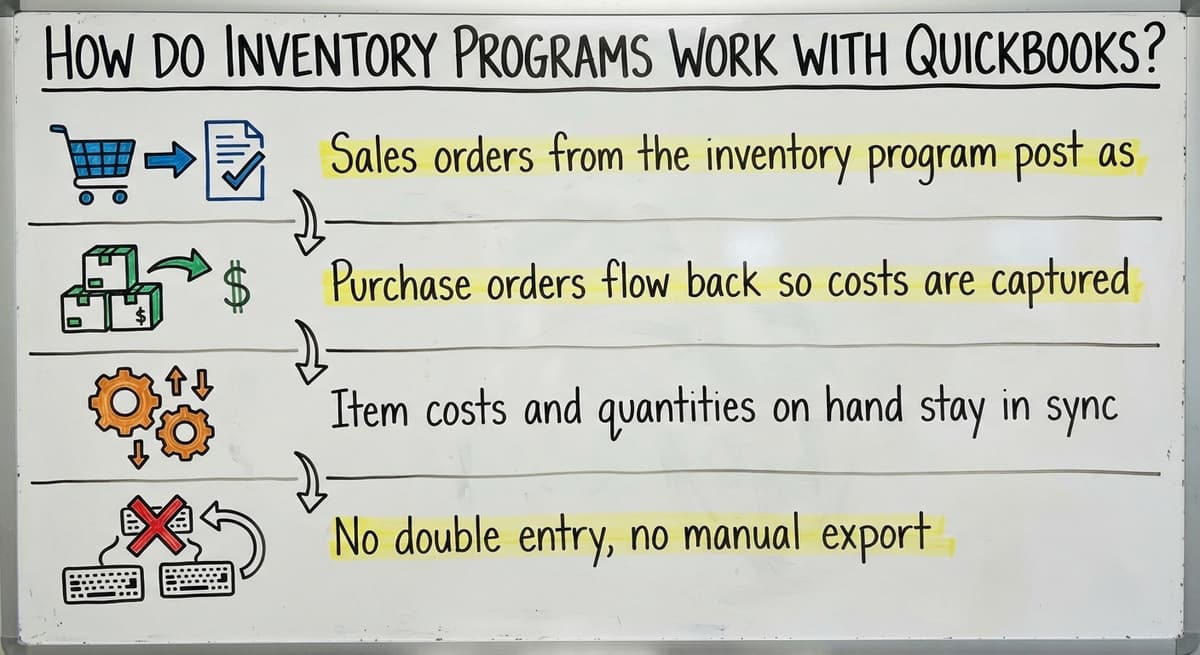
In a solid integration, these items sync automatically:
- Sales orders from the inventory program post as invoices in QuickBooks
- Purchase orders flow back so costs are captured
- Item costs and quantities on hand stay in sync
- No double entry, no manual export
Keeping QuickBooks is a valid choice. QuickBooks Integration for Distributors is a topic worth exploring separately if your sync needs are complex.
Cloud-Based vs On-Premise Inventory Software
| Factor | Cloud-Based | On-Premise |
|---|---|---|
| Where it runs | Hosted online | Local servers |
| Access | Any device, anywhere | Inside your network |
| Updates | Automatic | Manual, paid |
| IT needed | Minimal | Ongoing |
| Upfront cost | Low | Higher |
Cloud-based inventory software is now the default for most new programs, and it is the faster way to start. For a 10-to-50-person operation without an IT team, cloud is almost always the right call.

Off-the-Shelf Programs vs Custom-Built Software
Off-the-shelf tools come pre-built. You adapt your process to fit the software. That works well when your workflow is close to standard.
Custom-built software follows your existing workflow. No forced migration. No workarounds. The program does what your team already does, just faster and with fewer errors.
A common frustration: a team buys an off-the-shelf program, finds it does not match their process, and ends up building Excel macros to fill the gaps. If you are still using spreadsheets alongside your inventory software, the software is not doing its job.
Custom Warehouse Software for Small Operations is worth considering when packaged tools keep falling short.
What does it look like running on your own process?
The first thing you see is it running on your own process, at no build cost. The subscription starts once it is live and doing the job, not before.
Book a callSigns Your Operation Needs a Custom Inventory Program
Honest signals that off-the-shelf is not the right fit include the following:
- Your picking or receiving process does not match any standard template
- You have tried two or three packaged tools and kept going back to spreadsheets
- Your QuickBooks setup has custom fields that generic integrations break
- Your team has built Access databases or Excel macros to fill gaps
- You need the software to match your operation, not the other way around
None of these signals mean your operation is too complex to fix. They mean the fix needs to start with your workflow, not a vendor's feature list.

What Does a Typical Implementation Look Like?
A good warehouse inventory software implementation is discovery first: mapping your current workflows before anyone writes a line of code. That step alone prevents most post-launch problems.
From there, a phased rollout makes sense. Start with your biggest pain point, such as receiving accuracy or pick errors. Get that right. Then add features.
A focused implementation does not require months of downtime. Most small operations can keep running while the new system is being set up alongside their current process.
How Long Does It Take to Implement Inventory Software?
Off-the-shelf warehouse inventory software programs can be live in 3 days to a few weeks. Custom builds take a few weeks to a few months, depending on the number of SKUs, locations, and integrations involved.
ERP implementations can take a year or more. That is one reason most small and mid-size warehouses skip the ERP path.
Smaller, focused programs get teams running faster because there is less to configure and less to learn on day one.

What Mistakes Do Operations Make When Choosing Inventory Software?
The most common and most costly mistakes are:
- Buying for features you will not use in the next 12 months
- Choosing a program that forces you to abandon QuickBooks for no good reason
- Underestimating how long floor staff need to learn new habits
- Picking a vendor with no experience at your scale
- Not testing the software against your actual picking or receiving workflow before you commit
Testing against your real process, not a demo scenario, is the step most buyers skip. It is also the step that reveals the most.
How to Evaluate Warehouse Inventory Software Programs
Start with your top 3 workflow pain points. Not a feature checklist. Pain points.
Then:
- Ask vendors to demo against your actual process
- Request references from operations similar in size and industry
- Confirm exactly what the QuickBooks integration covers and what it does not
- Ask what happens when you need a feature the software does not have
Warehouse Management System Features is a useful reference when you are comparing WMS options side by side.

Questions to Ask Any Inventory Software Vendor
- How does your software handle our specific receiving process?
- What does the QuickBooks integration cover and what does it leave out?
- Who handles support and how fast do they respond?
- Can the software be modified if our workflow changes?
- What does the full cost look like over the first two years, including setup and training?
The answer to that last question is where most pricing surprises hide.
What is in a free first look?
A 30 minute call, your operation mapped, and a clear picture of what we would build. No obligation and nothing to install.
Book a callPricing Models for Warehouse Inventory Software Programs
There are 3 pricing models that cover most of the market:
| Model | How It Works | Typical Range |
|---|---|---|
| Monthly per user | Pay per seat | $50 to $200/month for light tools |
| Flat monthly fee | One price, all users | Varies by platform |
| One-time license | Pay once, own it | Higher upfront, lower over time |
Custom software is priced as a project fee plus ongoing support. Watch for hidden costs: data migration, training, integration setup, and annual support contracts can add up fast.

Inventory Software for Wholesale Distributors
Wholesale distributors need 4 specific tools that retail-focused software skips. Key needs include multi-customer order management, lot tracking, and visibility into vendor lead times.
Purchase order visibility is critical when you buy in bulk and need to know what is on order, what has landed, and what is still in transit. Wholesale Distribution Software covers this in more detail.
Most distributors already run QuickBooks on the accounting side. A good inventory program connects to that setup rather than replacing it.
Inventory Software for Fulfilment Centres
Fulfilment centres move fast. Multiple clients, high pick volume, and tight ship windows mean errors are expensive. The features that matter most here are bin-level locations, pick-to-ship speed, and client-level reporting.
A basic inventory program falls short in a fulfilment setting. The workflow control a fulfilment centre needs is closer to a WMS or a custom build than a standalone tool.

How Does Inventory Software Reduce Errors and Shrinkage?
Barcode scanning at receiving is the end of manual entry errors the moment a shipment arrives. Pick confirmation steps catch wrong items before they leave the building. Cycle count tools replace the annual physical inventory with regular, manageable spot checks.
The Warehousing Education and Research Council tracks distribution centre benchmarks, and mis-ship rates and inventory accuracy are two of the most watched. Fewer mis-ships mean fewer returns, less time reconciling counts, and lower cost per order.
The US Federal Trade Commission's Mail, Internet, or Telephone Order Merchandise Rule requires that you ship when you said you would. An accurate stock count is what makes that promise possible to keep.
What Should You Expect After Go-Live?
The first 30 to 60 days after launch reveal the most. Staff learn new habits. Edge cases surface that no one planned for. That is normal.
A vendor who stays engaged after launch is worth more than one who disappears after training. Ongoing adjustment is part of the value, not a sign that something went wrong.
Plan a check-in at day 30 and again at day 60. Use those sessions to tune the workflow, not to debate whether the software was the right choice.
Next Steps for Finding the Right Warehouse Inventory Software Program
Start by naming your 3 biggest pain points. Match those to the program type that addresses them. Then evaluate vendors against your actual workflow, not a feature list.
If you have already tried packaged tools and kept building workarounds, a custom-built program is a practical next step, not a luxury.
The Software Society builds custom warehouse inventory software for operations that have outgrown off-the-shelf tools and need a system that fits the way they actually work.
Start with a conversation, not a demo. Describe your workflow and your pain points. The right program follows from that, not from a vendor's slide deck.
Reach out to discuss your operation, whether you are based in Columbus, Ohio, or running a remote build from anywhere in the country.
Frequently asked questions
Frequently asked questions
What is the best software for warehouse inventory management?
There is no single best answer. The right software depends on your operation's size, workflow complexity, and budget. A small single-location warehouse does well with a standalone tool like inFlow or Fishbowl that connects to QuickBooks.
A multi-location distributor or fulfilment centre needs a WMS such as Fishbowl, Cin7, or a custom build. Start with your top pain points, not a feature list, and test any tool against your actual picking and receiving process before you commit.
What are the top 10 inventory management software?
Commonly cited options include inFlow Inventory, Fishbowl, Cin7, Finale Inventory, Skubana (now Extensiv), Brightpearl, Zoho Inventory, NetSuite, Acumatica, and Odoo. Each fits a different scale and budget. inFlow and Zoho Inventory suit smaller operations.
Cin7 and Fishbowl work well for mid-size distributors. NetSuite and Acumatica are ERP platforms aimed at larger businesses. The best choice is the one that matches your workflow and connects cleanly to your existing accounting setup.
What is the best software for inventory management?
For small and mid-size warehouses that already use QuickBooks, a standalone inventory program or light WMS with a solid QuickBooks integration is the best fit. Fishbowl and Cin7 are frequently recommended in this category.
For operations with non-standard workflows or complex picking processes, a custom-built program outperforms any off-the-shelf option because it follows your process rather than forcing you to adapt to someone else's template.
Which software is commonly used in inventory management?
QuickBooks with an inventory add-on is the most common setup for small businesses. Fishbowl, inFlow, Cin7, and Finale Inventory are widely used by small and mid-size distributors and warehouses.
Larger operations tend to use WMS platforms like Manhattan Associates, Blue Yonder, or Körber. Many operations that have non-standard workflows end up with a custom-built system after finding that packaged tools require too many workarounds.
How do warehouse inventory programs connect to QuickBooks?
A well-built integration lets the inventory program handle the warehouse floor while QuickBooks handles the books. Sales orders, purchase orders, item costs, and quantities on hand sync automatically between the two systems.
You avoid double entry and keep your accounting exactly where it is. Not all integrations cover the same fields, so ask any vendor to show you exactly what syncs and what does not before you sign.
How long does it take to implement warehouse inventory software?
Off-the-shelf tools can be live in days to a few weeks for a small operation. Custom builds take a few weeks to a few months, depending on the number of SKUs, locations, and integrations.
ERP implementations can take a year or more. A phased rollout, starting with your biggest pain point, gets your team running faster and reduces the risk of a long, disruptive cutover.
When does a custom inventory program make more sense than an off-the-shelf tool?
A custom build makes sense when your picking or receiving process does not match any standard template, when you have already tried two or three packaged tools and kept reverting to spreadsheets, or when your QuickBooks setup has custom fields that generic integrations break.
If your team has built Excel macros or Access databases to fill gaps in your current software, that is a clear sign the off-the-shelf path has run out.
How much do warehouse inventory software programs cost?
Light standalone tools start around $50 to $200 per month. Mid-tier WMS platforms run $300 to $1,000 per month or more, depending on users and features.
Custom software is priced as a project fee plus ongoing support, with the total cost spread over a longer period. Watch for hidden costs in any option: data migration, training, integration setup, and annual support contracts can add significantly to the first-year total.
What is the best warehouse inventory software for a small business?
The best of the warehouse inventory software programs for a small business is the one that matches how stock already moves through the building, connects to the accounting package without replacing it, runs on the scanners or phones the team carries, and is live in weeks.
Where no packaged program fits without a process change, a custom build scoped to the real bottlenecks serves a 10 to 50 person warehouse better.
What is the difference between inventory software and a WMS?
Inventory software records what you have, what you sold and when to reorder. A warehouse management system records where each item sits, who is picking it and in what order, and what has been received but not yet put away.
Many operations start with an inventory program and outgrow it the day two pickers disagree about where something is; that is the point a WMS earns its place.
How do I choose warehouse inventory software for multiple locations?
Insist on location-level stock as a first-class feature: quantities, orders and counts per site, transfers between sites with in-transit tracking, and reporting that rolls up across all of them.
Check that permissions can be set per location, that one sync feeds the accounting software for every site, and that adding a location is a setting change rather than a second program.
What features should I look for in warehouse inventory software?
Barcode scanning at receiving and picking, bin and location tracking, real-time stock levels, reorder points with alerts, purchase order matching, cycle counting, a live link to the accounting software, and reports on accuracy and slow movers.
For a small operation the feature that matters most is the one that removes its own biggest manual step, so map that step before comparing feature lists.
Not sure this is the right shape for your operation?
The call is free. Describe how the work runs today. We map it on a call and show you what it would look like built around that, before you spend anything.
Book a callRelated guides
The rest of this guide, for the parts of the job this page does not cover.
Guides
- Warehouse Inventory Management Software
- Warehouse Inventory Tracking Software
- Inventory and Warehouse Management Software
- Inventory Software Warehouse
- Warehouse Receiving Software
- Warehouse Stock Management Software
- Software for Warehouse Management System
- List of Warehouse Management Software
- Online Warehouse Management Software
- Warehouse Stock Software
- Software Warehouse Management
- Warehouse Software System
- Quickbooks Inventory Management Software
- Custom Inventory Management Software
- Warehouse Inventory Management Systems
- Warehouse Inventory Systems
- Warehouse Inventory Management System
- Warehouse Inventory Tracking System
Common questions
- Which Software is Best for Warehouse Management?
- Why is Warehousing and Inventory Management Important
- How to Manage Inventory in a Warehouse
- What is the Best Warehouse Inventory Management System?
- What is the Difference Between Warehousing and Inventory Management
- How to Keep Track of Inventory in Warehouse