


Why Is Warehousing And Inventory Management Important
Warehousing and inventory management are important because they keep products in the right place at the right time. Without them, orders get missed, stock runs out, and cash gets locked in items that do not move. This guide, reviewed in September 2026, puts numbers on each of those failures for a warehouse of 5 to 100 people.
Reviewed August 2026. Each figure comes from the assumptions stated beside it, so you can substitute your own and the arithmetic still holds.
Published 18 August 2026. Reviewed and updated 15 September 2026.
Book a callWhy Is Warehousing and Inventory Management Important?
Most warehouse problems trace back to one root cause: not knowing what you have or where it is. A wrong pick wastes time. A stockout loses a sale.
Dead stock ties up cash. Each of these is a direct result of poor warehousing and inventory management. The good news is that fixing the system fixes most of the problems at once.
What Does Warehousing Actually Mean?
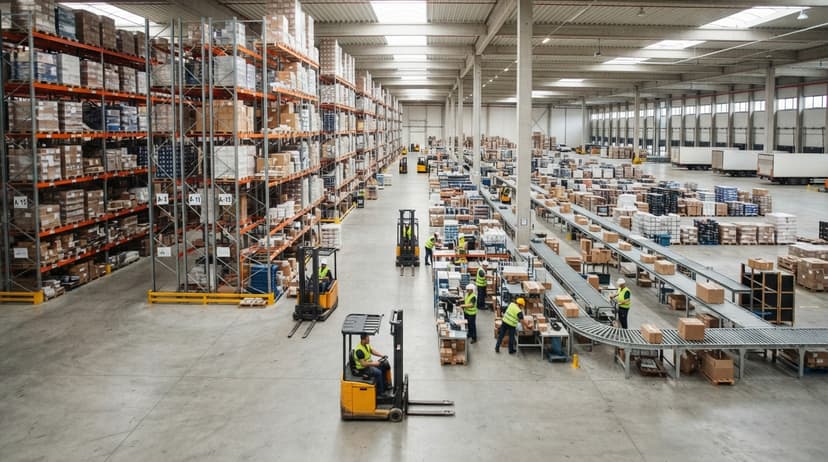
Warehousing is the physical side of the operation. It covers how goods are received, stored, moved, and shipped. It includes the layout of your shelves, how you label locations, and how staff move through the building.
A well-run warehouse is organized so that the right item is always easy to find.
What Does Inventory Management Actually Mean?
Inventory management is the information side. It tracks what you have, where it is, and how much. It tells you when to reorder and when to stop buying. It connects your physical stock to your financial records.
The two work together as one system, not 2 separate tasks. You cannot manage inventory well in a disorganized warehouse, and a tidy warehouse with bad records is just as broken.
The global standards body behind product barcodes notes that "barcodes are the most widely used automatic identification technology in the world" and that scan-based systems underpin accurate stock counts at every level of the supply chain. You can read their barcode standards at gs1.org/standards/barcodes.
Would you rather have it built around your operation?
The first look is free. If you would rather not compare products, describe how your operation already works and we build the system around it.
No build cost. You see it running on your own process first, and the monthly subscription starts only once it is live.
Book a callHow Does Inventory Management Affect Order Accuracy?
Wrong picks and late shipments cost money. They also damage the trust customers place in you. Good inventory data means staff pull the right item the first time, every time. Faster, accurate fulfillment follows directly from knowing what is where.
Think about a warehouse running on printed pick sheets and a shared spreadsheet. A staff member pulls a sheet, walks to the shelf, and finds the bin is empty. The spreadsheet said 12 units.
The shelf says zero. Now someone has to search the building, delay the order, and call the customer. That sequence plays out dozens of times a week in operations without a reliable system.
Why Is Order Accuracy a Legal Obligation?
The US Federal Trade Commission requires businesses to ship orders by the date they promise, or to notify the customer and offer a refund. You can read the full rule at ftc.gov. Accurate stock levels are what make that promise possible to keep.
The Real Cost of Manual Pick Processes
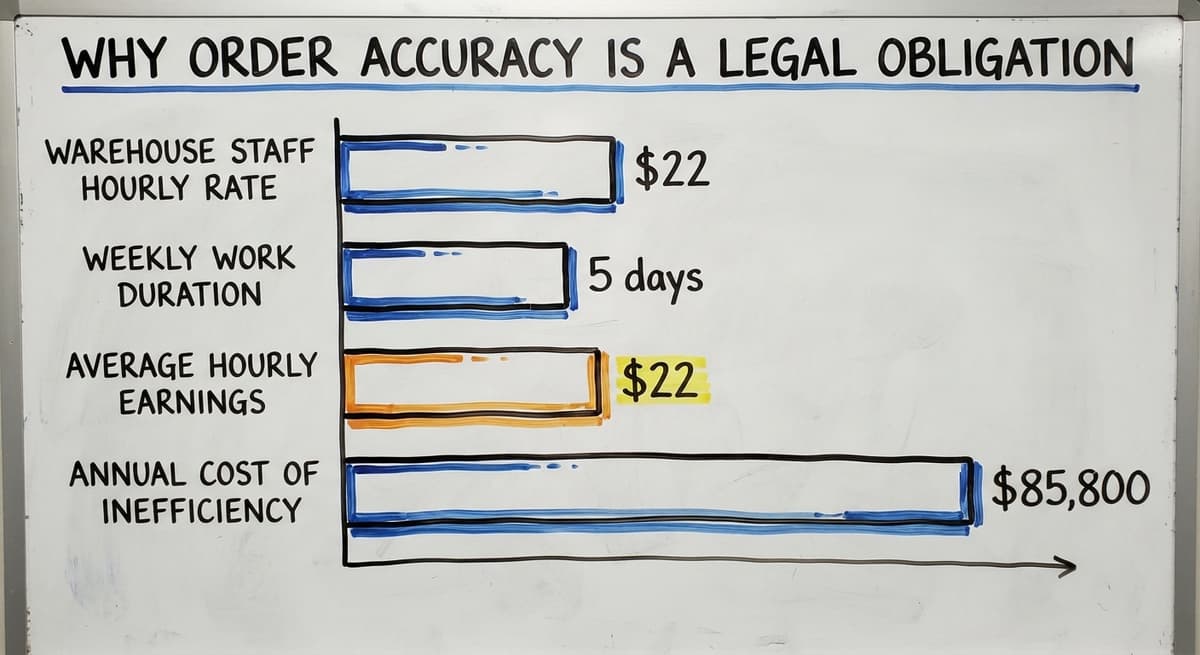
Consider a team of 3 pickers each spending 1 hour a day chasing stock that the system says exists but does not.
According to the US Bureau of Labor Statistics, warehouse staff earn around $22 an hour on average. That is 3 people, 5 days a week, at $22 an hour.
Over a year, that comes to roughly $85,800 in paid time spent on a problem that a reliable system would eliminate. The math is simple. The fix is not free, but it costs far less than the waste.
Stopping Stockouts and Overstocking
Stockouts are lost sales. A customer who cannot get what they need will find another supplier. Overstocking ties up cash and takes up shelf space you need for faster-moving items. Inventory management finds the balance between too much and too little.
Reorder points are one of the most practical tools that come from good inventory tracking. A reorder point is the stock level at which you place a new order, set based on how fast an item sells and how long it takes to arrive.
Stock alerts notify the right person before a bin runs dry. Neither tool works without accurate, real-time stock levels.
How Does the Inventories-to-Sales Ratio Signal Overstocking?
The US Census Bureau tracks the national inventories-to-sales ratio for wholesale firms through its Monthly Wholesale Trade survey at census.gov/wholesale. That ratio measures how much stock firms are holding relative to what they sell.
When the ratio rises, it signals that stock is building faster than it is moving, which is exactly the problem that good inventory management prevents.
Is the comparison easier when one option is built for you?
Yes. Off-the-shelf means fitting your process to the software, and custom is the other way round. The first look costs nothing.
Book a callHow Does Inventory Management Protect Cash Flow?
Inventory is money sitting on a shelf. Every unit you hold represents cash that could be doing something else. Poor management means cash is locked in slow-moving or dead stock while fast-moving items run out.
Knowing your real stock levels helps you buy smarter. You stop reordering items you already have too many of.
You catch the items that have not moved in 90 days before you order more. You spend on what sells, not on what the spreadsheet guesses you need.

Where Does Cash Disappear Between Your Accounting Software and the Shelf?
Many small operations run into a specific pain: the accounting software's number does not match the warehouse floor. The accounting software shows 40 units. The shelf has 17.
Someone sold from stock that was already reserved. Someone received a shipment and forgot to log it. The gap between the system and reality is where cash disappears.
Why Is Accurate Inventory a Legal Requirement?
The IRS is direct about why counts matter beyond operations. IRS Publication 538 states: "To figure taxable income, you must value your inventory at the beginning and end of each tax year." You can read the full guidance at irs.gov/publications/p538.
Accurate inventory is not just good practice. It is a legal requirement.
Dead Stock Is a Cash Drain
Dead stock is product that has stopped selling but is still taking up space and value on your books. It inflates your asset numbers while producing no revenue.
Regular cycle counts, which are rolling physical checks of a portion of stock rather than a full annual count, catch dead stock early. They also catch shrinkage before it adds up to a serious loss.

Why Do Warehousing and Inventory Management Make Your Team More Efficient?
Staff spend less time searching for items when locations are tracked. Receiving, picking, and shipping move faster when the process is clear and the data is right. Fewer errors mean less time fixing mistakes.
Manual systems slow teams down in ways that are easy to overlook. A printed pick sheet is already out of date the moment it is printed. An email chain to confirm stock availability adds minutes to every order.
A spreadsheet that 3 people edit at once produces conflicts and errors. Each of these is a drag on the team's time that compounds across every shift.
Replacing spreadsheets in warehouse operations does not mean rebuilding the business from scratch. It means removing the specific bottlenecks that cost the most time. The goal is to let staff do the work, not manage the paperwork around the work.
What does it look like running on your own process?
The first thing you see is it running on your own process, at no build cost. The subscription starts once it is live and doing the job, not before.
Book a callReducing Shrinkage and Loss
Shrinkage covers theft, damage, and items that go missing without clear explanation. It is a real cost in any warehouse, and it goes unnoticed until it adds up to something significant.
Regular cycle counts catch discrepancies early. When a bin count is off by 3 units, you find out this week, not at year-end.
Good records make it easy to spot patterns. If the same SKU keeps showing a gap between system and physical count, that is a signal worth investigating.

Why Does Shrinkage Hide in Manual Operations?
Without a system, losses blend into the background noise of a busy operation. Staff assume someone else logged it. Managers assume the count will balance out. By the time the gap becomes obvious, the root cause is long gone.
NIST's Manufacturing Extension Partnership offers vendor-neutral guidance on supply chain and inventory process improvement for small and mid-size operations at nist.gov/mep/supply-chain. Their framework treats shrinkage control as a core part of any reliable inventory process, not an add-on.
Better Data Means Better Decisions
Accurate numbers are what owners and managers need to make good calls on buying, staffing, and space. Gut feel works for a while. It stops working as the business grows.
Real-time inventory data replaces guesswork with facts. You know which items move fast and which sit still. You know which supplier delivers on time and which causes stockouts. You know whether you need more shelf space or just better organization of the space you have.
Contrast that with the experience of pulling numbers from 3 different spreadsheets and hoping they match. One tab has last week's receiving. Another has the open orders.
A third has what the accounting software thinks is on hand. None of them agree. A decision made from those numbers is a guess dressed up as a plan.
Inventory Data Supports Purchasing Decisions
When you know your real stock levels, your reorder points, and your lead times, purchasing becomes a process rather than a reaction.
You stop buying in panic when a stockout hits. You stop over-buying to feel safe. You buy what you need, when you need it, at the quantity that makes sense.

Why Do Small and Mid-Size Operations Need This Just as Much as Large Ones?
The idea that inventory management is only for big warehouses is wrong. Small operations feel errors more sharply because margins are tighter and there are fewer people to absorb the mistakes.
A 5 to 100 person warehouse has the same core problems as a large one. Wrong picks. Stockouts. Dead stock. Shrinkage.
The difference is that a large operation has more staff to catch and fix errors before they reach the customer. A small one does not.
The right solution does not have to be a massive ERP system that takes 18 months to set up. Software built for smaller wholesale distribution operations exists specifically for this gap.
The goal is a system that fits how the operation already works, not one that forces a new workflow on a team that is already stretched.
How Does Warehouse Inventory Management Software Help?
Warehouse inventory management software handles the parts that manual systems cannot. It tracks locations in real time. It flags when stock falls below a reorder point. It records every receive, pick, and shipment without relying on someone remembering to update a spreadsheet.
Connecting Software to Your Accounting Software Without Rebuilding the Operation
The key question for most small and mid-size operations is not whether to use software. It is how to bring software in without breaking what already works. Most operations are built around a core accounting software package.
The right software connects with that accounting system rather than replacing it. Stock updates flow into the books automatically. The numbers match because they come from the same source.
Understanding how custom warehouse software works with your bookkeeping system is worth doing before you commit to any system.
Custom-built tools can match how the operation already runs. They can mirror your location codes, your SKU naming, your receiving process. The aim is to remove the manual bottlenecks, not rebuild the entire business around a new platform.
What is in a free first look?
A 30 minute call, your operation mapped, and a clear picture of what we would build. No obligation and nothing to install.
Book a callWhat Should You Look for in a Warehouse Software System?
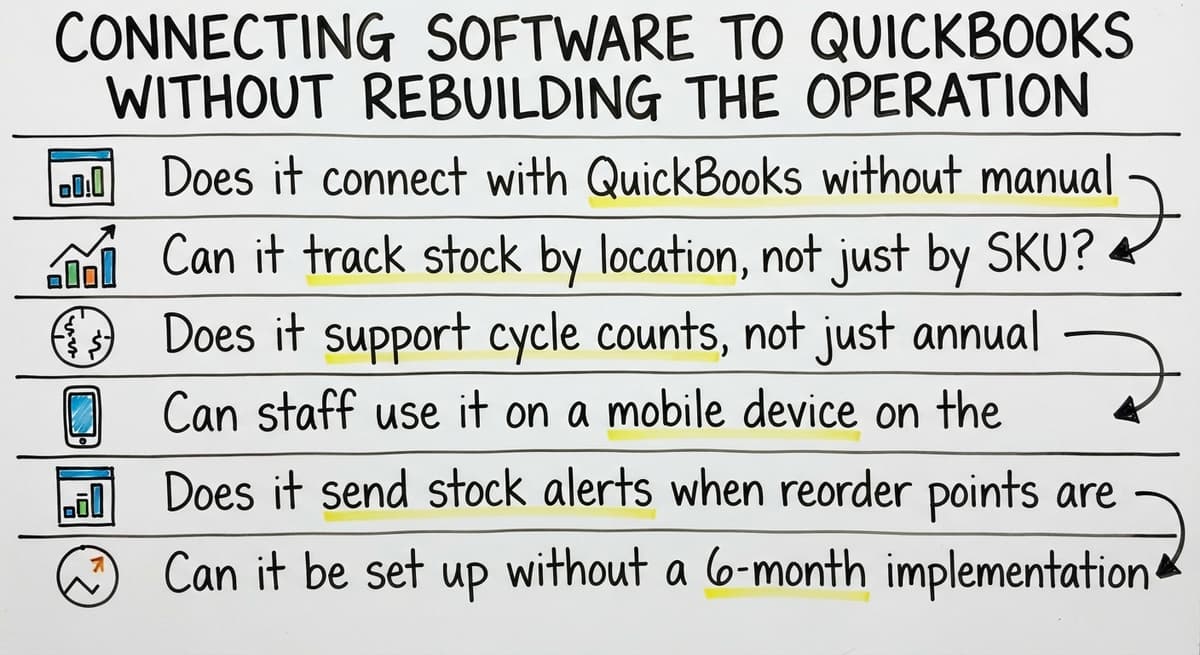
When evaluating warehouse inventory management software, there are 6 practical criteria that matter:
- Does it connect with your finance software without manual exports?
- Can it track stock by location, not just by SKU?
- Does it support cycle counts, not just annual stocktakes?
- Can staff use it on a mobile device on the warehouse floor?
- Does it send stock alerts when reorder points are hit?
- Can it be set up without a 6-month implementation project?
A system that checks these boxes removes the specific problems that manual processes create. It does not need to do everything. It needs to do these things well.
Signs Your Current System Is Holding You Back
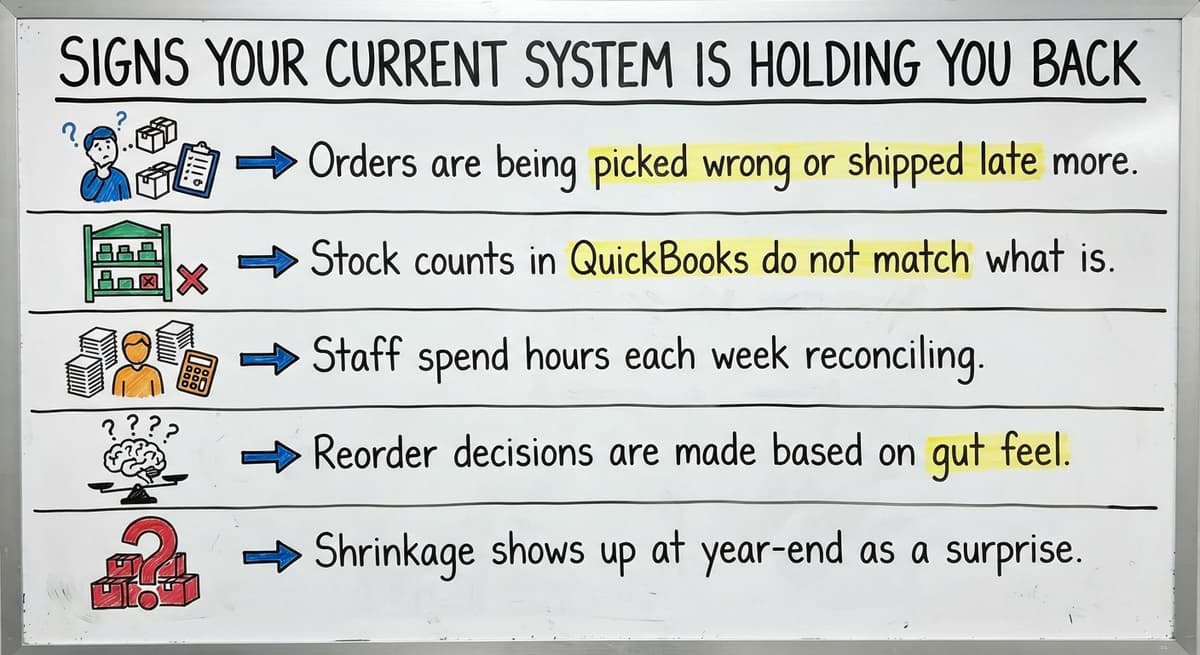
Some operations know they have a problem but are not sure whether the system is the cause or whether the team just needs better habits. These signs point clearly to a system problem:
- Orders are being picked wrong or shipped late more than once a week
- Stock counts in your accounting system do not match what is physically on the shelf
- Staff spend hours each week reconciling spreadsheets or chasing down information
- Reorder decisions are made based on gut feel rather than real stock data
- Shrinkage shows up at year-end as a surprise rather than being caught in real time

What Should You Do When the Manual System Has Hit Its Limit?
When more than 2 of these are true at once, the manual system has hit its limit. Adding more people to manage the paperwork is not the fix. The fix is a system that removes the paperwork.
An overview of warehouse inventory management software can help you understand what is available before you start comparing options. The intent is to find something that fits the operation, not to buy the most feature-rich product on the market.
The Bottom Line on Warehousing and Inventory Management
Warehousing and inventory management are not back-office concerns. They drive order accuracy, cash flow, team efficiency, and the ability to grow without adding chaos.
Every order that goes out wrong, every stockout, every hour spent reconciling spreadsheets is a direct cost of not having the system right.
Smaller operations assume this is a problem for bigger companies. It is not. The same problems exist at every scale. The difference is that a small team has less room to absorb the damage.

When Should You Stop Absorbing the Cost and Fix the System?
If your accounting software numbers do not match your shelves, if your team spends real hours each week chasing stock, or if wrong picks are a regular occurrence, the system needs to change.
The tools exist. The question is whether to keep absorbing the cost of the current one or to fix it.
If you are ready to stop managing the paperwork and start managing the operation, a connected system built around how you already work is the place to start.
The Software Society builds custom workflow systems that connect with your ledger software and fit the way your warehouse already runs. No forced workflow changes. No 18-month ERP project. Just the bottlenecks removed.
Frequently asked questions
Frequently asked questions
Why is inventory management important?
Inventory management keeps your stock counts accurate, your orders going out on time, and your cash from getting locked in items that do not move.
Without it, you run out of fast-moving products, overstock slow ones, and make buying decisions based on guesses rather than facts. It also satisfies a legal requirement: the IRS requires businesses to value inventory at the start and end of each tax year to calculate taxable income.
What is the difference between inventory management and warehousing?
Warehousing is the physical side: how goods are received, stored, moved, and shipped. Inventory management is the information side: tracking inventory counts, storage locations, and how much is available.
The two work together as one system. A tidy warehouse with bad records is just as broken as a well-tracked system stored in a disorganized building.
What are the five S's of warehouse management?
The five S's come from a Japanese workplace method: Sort (remove what is not needed), Set in order (give everything a fixed location), Shine (keep the space clean), Standardize (make the process consistent), and Sustain (keep the habits going over time). They are a practical framework for organizing a warehouse so that staff can find items quickly and errors are easy to spot.
What is the main purpose of a warehouse?
The main purpose of a warehouse is to store goods safely until they are needed, then get them to the right place at the right time.
A warehouse also buffers against supply and demand swings, lets businesses buy in bulk to reduce cost, and provides a central point for quality checks before goods go out to customers.
Does a small warehouse need inventory management software?
Yes. Small operations feel errors more sharply than large ones because margins are tighter and there are fewer staff to catch mistakes before they reach the customer.
The right software does not have to be a large ERP system. A tool that connects with your bookkeeping platform, tracks locations, and sends reorder alerts handles the core problems without rebuilding the whole operation.
What are the signs that a manual inventory system is no longer working?
The clearest signs are: orders being picked wrong or shipped late more than once a week, stock counts in your accounting system not matching the physical shelf, and staff spending several hours each week reconciling spreadsheets.
If more than 2 of these are true at once, the manual system has hit its limit and adding more people will not fix it.
How can software improve warehouse inventory management without replacing your accounting software?
The right warehouse inventory management software connects with your bookkeeping software rather than replacing it. Stock updates flow into the books automatically, so the numbers match because they come from the same source.
Custom-built tools can mirror your existing location codes, SKU naming, and receiving process so the team does not have to learn a completely new workflow.
What are the main functions of warehouse management?
Warehouse management covers the hands-on side of operations: receiving, storing, moving, and shipping goods. It includes organizing shelf layout, labeling storage locations clearly, and directing how staff move through the building.
The aim is to keep each product easy to find at all times. Done well, it works hand in hand with inventory management, since a well-kept space with poor records is still a broken system.
How can a business improve inventory accuracy?
A business improves inventory accuracy by tracking what it holds, its exact location, and the quantity on hand in real time, rather than relying on printed sheets or shared spreadsheets that go out of date instantly.
Regular cycle counts, which check portions of stock on a rolling basis, catch discrepancies and dead stock early. Connecting physical counts to financial records also closes the gap between what the system says and what the shelf actually holds.
Which inventory management methods are most effective?
Effective methods include setting reorder points, which trigger a new order once stock falls to a level based on sales speed and delivery time, and using stock alerts to warn staff before a bin runs dry.
Rolling cycle counts, rather than a single annual count, catch shrinkage and dead stock early. These methods only work when they rely on accurate, real-time stock levels rather than guesswork or outdated records.
What technologies are used in modern warehouse management?
Modern warehouse management relies on barcode scanning, which is the most widely used automatic identification technology worldwide, to support accurate stock counts throughout the supply chain.
Digital systems that track location, quantity, and reorder needs replace printed pick sheets and shared spreadsheets, which quickly become outdated and error-prone. These systems can also connect to financial software so physical stock and accounting records stay aligned.
Which inventory management techniques are most effective?
The most effective techniques include reorder points that trigger purchasing based on sales speed and lead time, stock alerts that flag low inventory before it runs out, and rolling cycle counts that check portions of stock regularly instead of once a year. These techniques depend on accurate, real-time data.
Together they prevent stockouts, reduce overstocking, and catch dead stock before it drains cash flow.
Not sure this is the right shape for your operation?
The call is free. Describe how the work runs today. We map it on a call and show you what it would look like built around that, before you spend anything.
Book a callRelated guides
The rest of this guide, for the parts of the job this page does not cover.
Guides
- Warehouse Inventory Management Software
- Warehouse Inventory Management Systems
- Inventory and Warehouse Management Software
- Warehouse Inventory Management System
- Warehouse Stock Management Software
- Warehouse Management System Top 10
- Software for Warehouse Management System
- Small Business Warehouse Management System
- Cloud Based Warehouse Management
- Warehouse Management System Types
- List of Warehouse Management Software
- Warehouse Management Costs
- Warehouse Management Cloud
Common questions
- Why Warehouse Management System
- Why is Inventory Management Important for Small Businesses
- What is Inventory Management and Why is It Important
- What is the Most Important Part of Warehouse Organization
- How to Manage Inventory in a Warehouse
- What is the Best Warehouse Inventory Management System?
- What is the Difference Between Warehousing and Inventory Management
- What is B Type of Inventory in Warehouse Management
- What is Warehousing and Inventory Management
- What Are the Benefits of Warehouse Management System
- What is the Point of Warehouse Management System