

Warehouse Inventory Management Systems
If your team is counting stock by hand, reconciling spreadsheets after hours, or shipping orders from the wrong bin, the problem is not effort. The problem is the system. A warehouse inventory management system gives your floor a single source of truth so your team stops guessing and starts moving.
Published 26 July 2026. Reviewed and updated 15 September 2026.
Book a callWhat Does a Warehouse Inventory Management System Actually Do?
A warehouse inventory management system, called a WIMS or WMS, is software that tracks what you have, where it is, and where it goes. It handles the physical layer of your operation: the bins, the pallets, the pick lists, and the receiving dock.
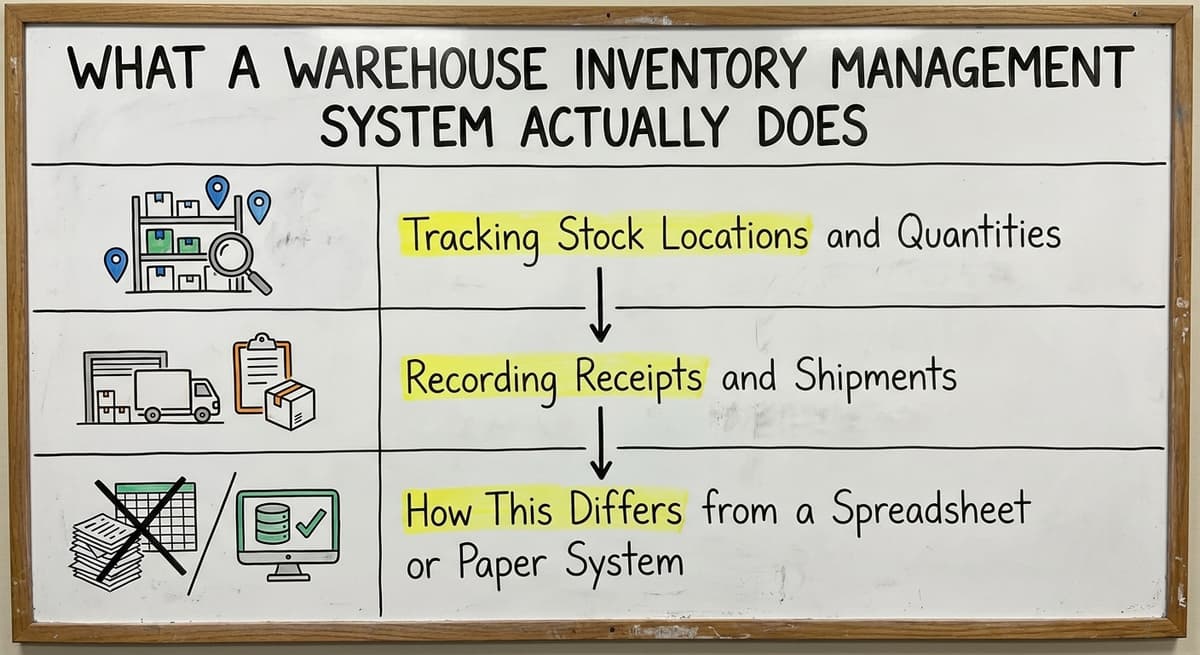
Tracking Stock Locations and Quantities
The core job of a warehouse inventory management system is knowing where every item lives. That means bin location tracking, real-time quantity updates, and a record of every movement from receiving to shipment.
When a picker scans a barcode, the system updates automatically. No one has to write it down or enter it later.
Recording Receipts and Shipments
A warehouse inventory management system manages the receiving workflow when goods arrive and records what leaves during fulfillment. It can flag a gap between the purchase order and what showed up. It can also generate pick and pack instructions so your team works from a list, not from memory.
How Does This Differ from a Spreadsheet or Paper System?
A spreadsheet is a number. A warehouse inventory management system shows you a location, a history, and a current status.
A distributor running 500 SKUs on spreadsheets will eventually over-order because the sheet says 50 units are available but 30 of them are already allocated to an open order.
The system prevents that. Paper-based approaches have the same problem at a larger scale: the information is always behind reality.
Would you rather have it built around your operation?
The first look is free. If you would rather not compare products, describe how your operation already works and we build the system around it.
No build cost. You see it running on your own process first, and the monthly subscription starts only once it is live.
Book a callSigns Your Current System Is Holding You Back
Before looking at software, it helps to name the specific problems you are already living with. These are operational pain points, not technology failures. If any of these sound familiar, your current process has reached its limit.
Walking is the hidden cost. A picker covering 40 feet to a fast mover 60 times a shift walks 2,400 feet a day, and across 250 days that is 600,000 feet a year per picker.
Moving 20 fast movers nearer the pack bench removes most of it.
Walking is the hidden cost. A picker covering 40 feet to a fast mover 60 times a shift walks 2,400 feet a day, and across 250 days that is 600,000 feet a year per picker.
Moving 20 fast movers nearer the pack bench removes most of it.
The obligation behind all of this is not optional. IRS Publication 538 states: “To figure taxable income, you must value your inventory at the beginning and end of each tax year.” A stock figure nobody trusts makes that number a guess.
Reviewed August 2026. Each figure comes from the assumptions stated beside it, so you can substitute your own and the arithmetic still holds.
Fulfillment Errors and Staff Inefficiency
- Staff spending hours reconciling Excel sheets against physical counts
- Orders shipped from the wrong bin or with missing items
- New hires taking weeks to learn where things are stored
These are not training problems. They are system problems. When location data lives in someone's head or in a shared spreadsheet that is always slightly out of date, errors are the expected outcome, not the exception.
Data That Does Not Match Reality
QuickBooks showing inventory numbers that do not match the floor is one of the most common complaints among small warehouse operations.
The accounting side says you have 200 units. The floor says 140. Someone has to figure out where the gap came from, and that takes time no one has.
Managers end up making purchasing decisions based on gut feel rather than real data. That leads to over-ordering, stockouts, and cash tied up in inventory that is sitting in the wrong place.
Safety and Compliance Exposure
Disorganized inventory is not just an operational problem. OSHA states directly on its warehousing resources page that "housekeeping is an important part of workplace safety" and that storage areas must be kept orderly to prevent hazards.
You can read the full guidance at https://www.osha.gov/warehousing. Customer complaints tied to fulfillment errors or delays are the visible symptom. The underlying cause is a floor that lacks structure.

Core Features to Look for in a Warehouse Inventory Management System
The following is a buyer-education section, not a product pitch. Every operation is different, but these are the features that solve the most common problems. Use this as a checklist when you evaluate options.
The comparison is easier when one option is built for you
Choosing between a custom-built system and an off-the-shelf product is easier when one option is built around how you already work, and the first look costs nothing.
Book a callHow Do Warehouse Inventory Management Systems Connect to Your Accounting Software?
Many small and mid-size warehouses already run their accounting in QuickBooks. The goal is not to replace it. The goal is to stop managing the gap between QuickBooks and the floor manually.
The Typical Integration Pattern
A QuickBooks inventory integration works like this: the warehouse inventory management system handles everything that happens on the floor, and QuickBooks handles the books.
Data flows between them automatically. When the WIMS logs a purchase receipt, the cost hits QuickBooks. When an order ships, the inventory adjustment updates without anyone re-entering it.
This is the pattern behind QuickBooks integration for warehouse operations. The two systems do different jobs, and a well-built integration keeps them in sync without double entry.
What Does Good Integration Eliminate?
The reconciliation problem, where QuickBooks shows one number and the floor shows another, goes away when the two systems talk to each other in real time.
Inventory adjustments, purchase receipts, and cost-of-goods updates sync automatically. Your accounting stays accurate without anyone manually transferring data at the end of the day.
What Should You Watch Out For?
Some vendors will push you toward a full migration away from QuickBooks when your accounting side is working fine. That is rarely necessary and often creates more problems than it solves.
If QuickBooks is doing its job, keep it. The right warehouse inventory management system replaces only the manual parts, not the parts that already work.

Types of Warehouse Inventory Management Systems
Before you start shopping, it helps to understand what categories of systems exist. The right fit depends on your scale, your budget, and how much you want to customize.
Off-the-Shelf Warehouse Management Software
Off-the-shelf warehouse management software is built for a broad audience and configured to fit your operation. Products like Fishbowl, inFlow, and Cin7 fall into this category. They are faster to deploy and lower in upfront cost.
The tradeoff is that you adapt your process to the software rather than the other way around. For operations with fairly standard workflows, this works well.
| Type | Best For | Tradeoff |
|---|---|---|
| Off-the-shelf | Standard workflows, faster deployment | Less flexibility |
| Custom warehouse software | Unique processes, complex operations | Higher upfront investment |
| ERP with WMS module | Businesses needing full financial integration | Overkill for most small warehouses |
Custom Warehouse Software for Small Distributors
Custom warehouse software for small distributors is a fit to your specific process, not a generic template. It takes longer to build and costs more upfront, but it does not require you to change how your operation works.
For businesses with unusual workflows, multiple locations, or specific integration needs, custom is the more practical long-term choice. You can learn more about this approach through custom warehouse software for small distributors.
Full ERP Systems
A full ERP handles everything: accounting, HR, purchasing, warehouse, and more. For most small-to-mid-size warehouses, this is more than the job needs.
If your accounting is already in QuickBooks and your main problem is the warehouse floor, a focused warehouse inventory management system will solve the problem faster and at a fraction of the cost.
What Should You Expect During Implementation?
Implementation is the part of a warehouse software project most business owners dread. Long timelines, big costs, and disruption to daily operations are real concerns. But a well-scoped project does not have to take a year or cost six figures.
The Phases of a Good Implementation
A good warehouse software implementation is a clear sequence of 4 phases:
- Discovery: the vendor learns how your operation actually works
- Configuration or build: the system is set up around your process
- Data migration: your existing inventory data is moved into the new system
- Staff training: your team learns the system before go-live
- Go-live: the system replaces the old process, with support available
The discovery phase is the most important. A vendor who starts with a demo before understanding your operation is selling a product, not solving a problem.
Phased Rollouts Reduce Risk
Starting with one workflow or one area of the warehouse is a practical way to reduce risk. Get receiving right before you tackle pick and pack.
Get one product line stable before you roll out to everything. Phased rollouts let your team build confidence without betting the whole operation on a single go-live.
What does it look like running on your own process?
The first thing you see is it running on your own process, at no build cost. The subscription starts once the system is live and doing the job, not before.
Book a callStaff Adoption Is the Hard Part
Staff adoption is where warehouse software implementations most often break down. Good training matters. A system that mirrors existing habits rather than forcing new ones gets adopted faster.
If your staff already scan barcodes, the new system should scan barcodes. If they are used to paper pick lists, a printed version of the digital list can bridge the gap during the transition.

How Do You Choose the Right Warehouse Inventory Management System for Your Operation?
The best system is the one your team will actually use. Complexity kills adoption. Start with your biggest bottleneck, not a wish list of every feature you might ever want.
Start with Your Pain Points, Not the Software
Before you talk to any vendor, write down the three things that cost your team the most time or cause the most errors. Is it receiving?
Picking and packing? Reconciliation? Knowing your specific problem makes it easier to evaluate whether a system actually solves it or just adds features you will not use.
If you work with wholesale distribution software solutions or run a fulfillment center, the pain points may look different than a single-site distributor. Map your operation first.
Questions to Ask Every Vendor
- Does this work at our scale and SKU count?
- Can it connect to QuickBooks without a full migration?
- How long does implementation take, and what does it include?
- Who supports us after go-live, and how do we reach them?
- Can we start with one part of the operation and expand later?
Red Flags and Green Flags
When evaluating warehouse software vendors, some signals are worth paying attention to. Red flags:
- Vendor quotes a price before understanding your operation
- Platform requires abandoning QuickBooks or other working tools
- Contract has no defined scope or timeline
- Demo happens before any discovery conversation
Green flags:
- Vendor asks about your process before showing software
- Phased implementation is an option
- Local or accessible support after go-live
- References from operations at a similar scale
For operations ready to move beyond spreadsheets, the warehouse inventory management software overview page is a useful starting point for comparing what is available.
Frequently Asked Questions About Warehouse Inventory Management Systems
The questions below are the ones warehouse buyers ask most about warehouse inventory management systems, answered from the operations we have built.
Costs, Timelines, and Fit
What the tiers cost
How much does a warehouse inventory management system cost for a small operation? Off-the-shelf systems start between a few hundred and a few thousand dollars per month depending on users and features.
Custom builds vary widely based on scope. The more useful question is: what does the current system cost you in labor, errors, and lost orders?
How long does implementation take? A focused, well-scoped implementation can go live in four to twelve weeks. Full ERP implementations can take six to eighteen months.
The timeline depends on how complex your operation is, how clean your data is, and whether you do a phased rollout or a full cutover.
Do I need a complete ERP, or will a focused warehouse inventory management system be enough? For most small-to-mid-size warehouses already using QuickBooks, a focused warehouse inventory management system is enough.
An ERP migration makes sense only if you also need to replace your accounting system. If QuickBooks is working, keep it and add a WIMS that connects to it.
Common Buyer Questions
Can I keep using QuickBooks and still get a warehouse inventory management system? Yes, and that is the normal arrangement. The warehouse system owns the floor; QuickBooks owns the books.
A good integration syncs the two without anyone touching a keyboard. You do not need to replace QuickBooks to fix your warehouse.
What is the difference between off-the-shelf and custom warehouse inventory management systems? Off-the-shelf systems target a broad audience and configured to fit. Custom systems are built around your specific process.
Off-the-shelf is faster and cheaper upfront. Custom is better when your workflow is unusual or when you have tried off-the-shelf tools and they did not fit.
What is the best warehouse inventory management system? There is no single best system. The right answer depends on your SKU count, your team size, your existing tools, and your budget.
For operations already on QuickBooks, a system with a clean QuickBooks integration is the right starting point. Fishbowl, Cin7, and inFlow are commonly used by small-to-mid-size distributors, but fit matters more than brand.
What are the four types of WMS? The four common types are standalone WMS, ERP-integrated WMS, cloud-based WMS, and supply chain module WMS. Standalone systems focus only on the warehouse.
ERP-integrated systems are part of a larger platform. Cloud-based systems run on a subscription model without on-site servers. Supply chain modules are add-ons to broader logistics platforms.
Your warehouse floor does not have to run on memory, spreadsheets, and hope. A warehouse inventory management system replaces the manual parts without touching what already works.
If you are ready to stop reconciling and start running, the right next step is a conversation about what your operation actually needs, not a demo of someone else's workflow.
The Software Society builds and implements warehouse and operations software around real processes, not generic templates. If you want to talk through what a connected system would look like for your operation, reach out and we will start with your process, not a pitch.
Frequently asked questions
The sources behind this guide
The public record on this is worth reading directly: Auburn University RFID Lab covers independent research on RFID across retail and the supply chain.
The guide addresses operations managers and business owners who already run QuickBooks and are tired of patching gaps with spreadsheets. You do not need a full ERP. Nothing that already works has to be torn out. Only the broken parts need fixing.
Frequently asked questions
What is the best warehouse inventory management system?
There is no single best system. Your SKU count, team size, existing tools like QuickBooks, and budget shape the right answer.
For small-to-mid-size distributors, commonly used options include Fishbowl, Cin7, and inFlow. Fit matters more than brand name. Match the choice to your specific pain points and evaluate systems against those.
What are the four types of WMS?
The four common types are standalone WMS, ERP-integrated WMS, cloud-based WMS, and supply chain module WMS. Standalone systems focus only on the warehouse floor.
ERP-integrated systems are part of a larger business platform. Cloud-based systems run on a subscription without on-site servers. Supply chain modules are add-ons to broader logistics platforms.
What are the top 10 WMS systems?
Commonly referenced warehouse management systems include Fishbowl, Cin7, inFlow, Extensiv, Manhattan Associates, Blue Yonder, SAP Extended Warehouse Management, Oracle WMS, 3PL Central, and Deposco.
The right choice hinges on your operation size and integration needs. Enterprise platforms like SAP and Oracle are overkill for most small warehouses.
What are the top 5 inventory management software?
For small-to-mid-size operations, frequently used inventory management software includes Fishbowl, Cin7, inFlow, Zoho Inventory, and QuickBooks Commerce. Each has different strengths. Fishbowl and Cin7 are popular with distributors who need QuickBooks integration. Your workflow, not a ranking list, determines the best fit.
What is a warehouse inventory management system and what does it do?
A warehouse inventory management system is software that tracks what you have, where it is stored, and where it goes. It handles bin location tracking, receiving workflows, picking and packing instructions, cycle counting, and reorder alerts. It replaces manual spreadsheets and paper-based tracking with real-time data your whole team can access.
How is a warehouse inventory management system different from QuickBooks?
QuickBooks handles your accounting: invoices, costs, and financial records. A warehouse inventory management system owns the physical floor: bin locations, stock movements, receiving, and fulfillment. They do different jobs.
With a good integration nobody enters data in both places.
How do I know if my warehouse is ready for an inventory management system?
If your team spends significant time reconciling spreadsheets, if orders ship with errors, if QuickBooks numbers do not match the floor, or if new hires take weeks to learn the layout, you are ready.
Being a large operation is not a requirement. The trigger is pain, not size.
What are the warning signs that my current inventory process is failing?
Key warning signs include frequent fulfillment errors, inventory numbers that differ between your software and the physical count, purchasing decisions made without reliable data, and staff spending hours each week on manual reconciliation.
Customer complaints about wrong or delayed orders are the most visible symptom of a deeper process problem.
What are the best warehouse inventory management systems for small businesses?
For small businesses with fairly standard workflows, off-the-shelf options like Fishbowl, inFlow, and Cin7 are strong choices because they deploy quickly and cost less upfront, though you adapt your process to the software.
If your workflow is unusual, a system built around how you already operate, rather than forcing you into a rigid template, can be the better fit.
How much does warehouse inventory management software cost?
Cost varies by vendor and approach. Off-the-shelf software costs less upfront because one product serves thousands of buyers.
Some custom-built approaches charge no build cost and only start a monthly subscription once the system is live and running on your actual process. Scale, budget, and how much customization you need guide the right choice.
What is the difference between inventory management software and a WMS?
A warehouse inventory management system, or WMS, handles the physical layer of your operation: bin locations, pallets, pick lists, receiving, and real-time quantity updates as items move through the warehouse.
Inventory management software more broadly can simply show you a number. A WMS goes further, showing location, movement history, and current status so nothing depends on memory or a spreadsheet.
How can barcode scanning improve warehouse inventory accuracy?
Barcode scanning removes the manual step where errors creep in. When a picker scans a barcode, the system updates automatically, so no one has to write the change down or enter it later. This keeps quantities and locations current in real time, preventing the kind of gap between recorded stock and actual floor stock that spreadsheets and paper systems allow to build up.
What is in a free first look?
A 30 minute call, your operation mapped, and a clear picture of what we would build. No obligation and nothing to install.
Book a callRelated guides
The rest of this guide, for the parts of the job this page does not cover.
Guides
- Warehouse Inventory Management System
- Warehouse Management System Top 10
- Software for Warehouse Management System
- Small Business Warehouse Management System
- Warehouse Management System Types
- Warehouse Management System Examples
- Warehouse Management System Implementation
- Cloud Warehouse Management System
- Warehouse Stock Management System
Common questions
- What Are the Benefits of Warehouse Management System
- What is the Point of Warehouse Management System
- How to Choose a Warehouse Management System
- What is Asn in Warehouse Management System
- How to Create a Warehouse Management System
- What is a Warehouse Management System
- Which Warehouse Management System Would a Jeweler Most Likely Use
- How to Build a Warehouse Management System
- What is a Warehouse Management System Used For
- Warehouse Management System vs Warehouse Control System
- Meaning of Warehouse Management System
- Definition of Warehouse Management System
- Warehouse Management System Comparison
- What is the Purpose of a Warehouse Management System
- Warehouse Execution System vs Warehouse Management System