

How Much Does Inventory Management Software Cost
How much does inventory management software cost? See real price ranges, pricing models, hidden fees, and how to get a clear quote for your warehouse.
Book a callHow Much Does Inventory Management Software Cost?
Inventory management software cost runs from under $100 a month for basic tools to tens of thousands of dollars for custom or large systems. Three things set the price: how many people use it, how many features you need, and how well it fits your work.
Reviewed November 2026.
These are general market ranges. Real quotes vary by vendor and scope. Below, you get a plain breakdown of what you pay and why. We also count the cost of doing nothing, which most price pages skip.
We build it for your operation, and the first look is free
If you would rather not compare products, describe how your operation already works and we build the system around it.
No build cost. You see it running on your own process first, and the monthly subscription starts only once it is live.
Book a callWhat Are the Main Pricing Models?
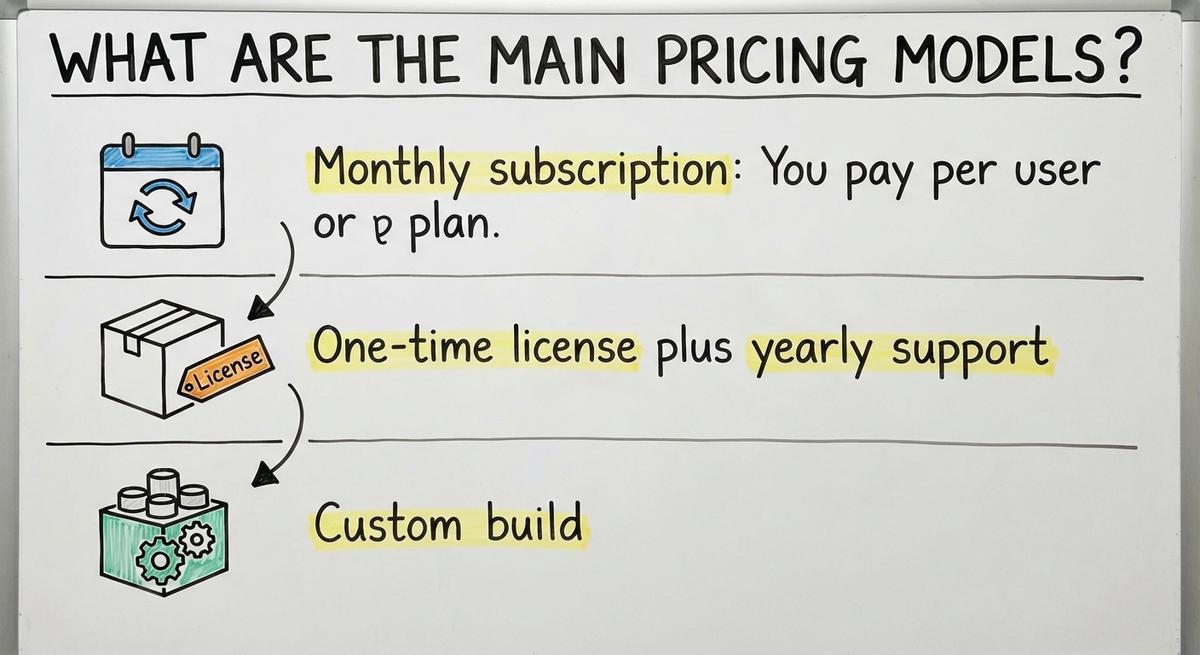
Inventory software comes in 3 pricing models: a monthly subscription, a one-time license with yearly support, or a custom build with a project fee. Each one hits your budget in a different way over 3 to 5 years.
- Monthly subscription: You pay per user or per plan. The start is cheap. The bill grows as your team grows, and it never ends.
- One-time license plus yearly support: You pay a large sum up front. Then you pay a smaller fee each year for help and updates.
- Custom build: You pay a project fee for work scoped to your process. After launch, the fee drops to little or nothing unless you add support.
Do Barcodes Matter in Every Pricing Model?
Barcodes matter in all 3 models, whichever one you choose. GS1 publishes the standards behind what it calls "barcodes," and scanners read those codes to speed up counts. Keep that in mind when you compare prices, because the model you pick does not change the role barcodes play. Over 5 years, a cheap subscription can cost more than a build.
What Does Off-the-Shelf Software Usually Cost?
The entry tier is light. It tracks stock levels and prints simple reports. Higher tiers add more seats, more locations, and extra tools. Fees climb as headcount, locations, or order volume grow. A tool that costs little at 3 users can cost far more at 25.
Off-the-shelf inventory software costs a low monthly fee for a small team, then more as you add users, locations, and features. Think of it as inventory software pricing built for the average shop.
Off-the-shelf is a good fit when your process is simple and standard. You receive goods, shelve them, pick orders, and ship. If that is you, a ready-made tool does the job.
It fits worse when your work has odd steps. You then pay for features you skip and still miss the ones you need.
A standard process earns a standard tool, and an odd one costs extra to bend.
What Does Custom Inventory Software Cost?
Custom inventory software cost depends on scope, not seats. You pay for the work that gets built, not for each person who logs in.
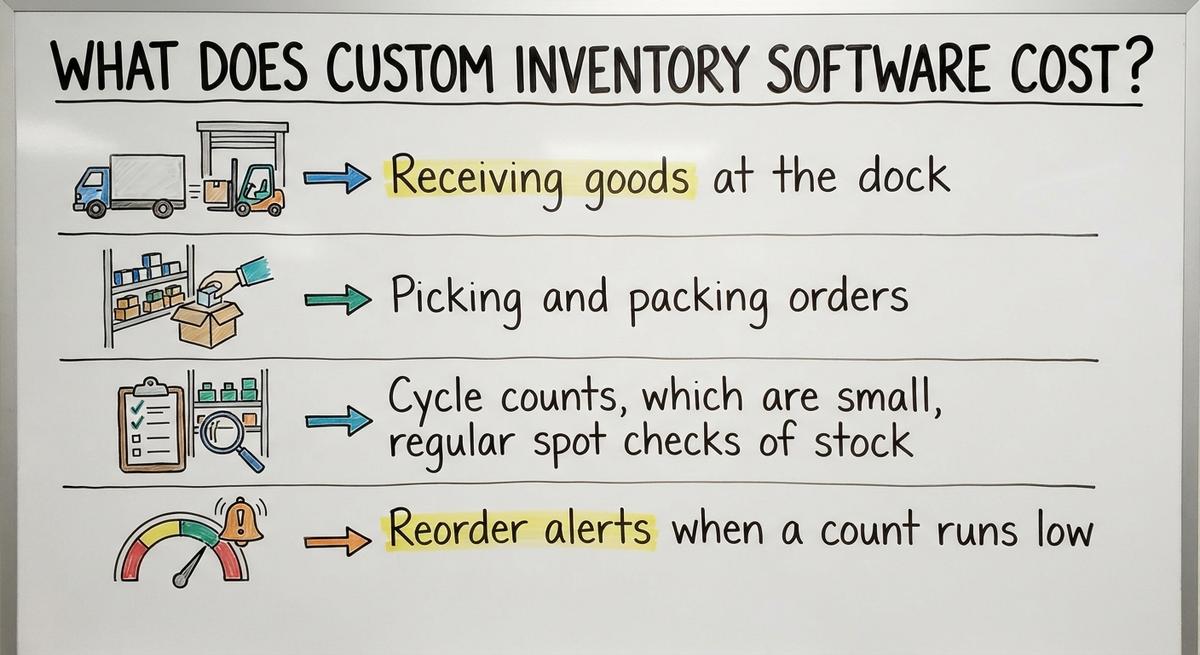
So the real question is how many jobs the software takes over. Look at the list:
- Receiving goods at the dock
- Picking and packing orders
- Cycle counts, which are small, regular spot checks of stock
- Reorder alerts when a count runs low
A focused build that replaces only the manual steps costs less than a full system. A build that handles all 4 jobs and many reports costs more.
Not sure this is the right shape for your operation
Describe how the work runs today. We map it on a call and show you what it would look like built around that, before you spend anything.
Book a callCan You Get an Exact Price Up Front?
We will not promise exact numbers here. No honest number exists until someone looks at your process. A scoping conversation gets you a real figure.
There are no ongoing per-user fees unless you add a support plan. Custom is not always the priciest option. For a lean team with a steady process, custom inventory software cost can land below years of subscription bills.
You own what you paid for, and the price follows the work, not the headcount.
What Costs Are Easy to Miss?
The hidden costs of inventory software fall into 2 groups: one-time costs at the start and costs that repeat. Add them up before you sign.

One-time costs
One-time costs are the expenses you pay once, around launch, rather than every month. They are easy to overlook when you compare prices, and they add to the total you need to budget. Two of them are listed here.
- Setup and data import: Someone must move your stock lists from spreadsheets, Access databases, and paper sheets into the new tool. Messy data takes longer to clean.
- Training time: Staff spend paid hours learning the system instead of shipping orders.
Costs that repeat
- Add-on fees: Barcode scanning, extra locations, and links to other tools often cost extra.
- Support and upgrades: Support plans and upgrade charges show up in year 2 and after.
- The cost of staying manual: Errors, stockouts, and double entry never appear on an invoice. They still drain money.
A quote that looks cheap on page 1 can grow by page 3.
What Drives the Price Up or Down?
Five factors move the price of any inventory tool. Know them before you ask for a quote, and you will spot a fair one.
- Users and locations: Each added seat or site raises the bill, mostly in subscription plans.
- SKUs and order volume: An SKU is one unique item you stock. More SKUs and more orders mean more load and a bigger tier.
- Integrations: A link to your accounting software or another tool adds work, and sometimes a fee.
- Reporting and custom rules: Special reports and your own approval steps cost more than the standard set.
- Old data to move: Years of records take time to clean and load.
A small team with clean data and plain needs pays the least.
How Much Does It Cost If You Keep Your Current Accounting Software?
The plan is simple. Build or buy a tool that handles stock. Then connect it to your accounting software so sales and costs flow into your books. That is inventory software accounting integration done at the right size.
Keeping your current accounting software costs less than replacing it, because you pay only for the inventory part. If your books already work, leave them alone.
The savings are easy to see:
- Smaller scope: You pay for fewer features.
- Less training: Your office staff keep the screens they know.
- No full migration: You skip the risky move of years of financial records.
This is the approach The Software Society takes. We replace only the manual parts of your process and keep what already works.
The smaller the piece you replace, the smaller the bill.

Do You Need a Big ERP to Manage Inventory?
No. Most operations with 5 to 100 people do not need a large ERP, which is a big system that runs finance, stock, sales, and more in one package.
Large systems mean long, costly rollouts. Your team spends months on setup and training. You then pay for many features you never touch.
Smaller, right-sized tools cover the real needs of a small warehouse. They track stock, guide picking, flag low items, and talk to your books. That is the whole job for most shops. Inventory software for small warehouses can stay lean and still work well.
If you want a wider view, read our guide on how to manage inventory in a warehouse. The right tool is the one that matches your work, not the biggest one on the market.
The comparison is easier when one option is built for you
Off-the-shelf means fitting your process to the software. We do it the other way round, and the first look costs nothing.
Book a callWhat Does a Spreadsheet Really Cost You?
A spreadsheet costs staff hours every week, even though the file itself is free. Here is the math, and you can check it with a calculator.
Say 3 people spend 6 hours a week counting and re-typing stock at $22 an hour. That is 3 x 6 x 52 x $22, or $20,592 a year. The Bureau of Labor Statistics publishes what staff in these jobs earn, so you can swap in your own wage.
Then add the errors. Wrong counts lead to late orders and overstock. Facts sit in Excel, email, and printed sheets, so decisions slow down.
Add up your own weekly hours on counting and re-keying. The total is the first number to weigh against any quote.
How Can You Tell If the Price Is Worth It?
A price is worth it when the money saved beats the money spent. Compare the cost to hours saved, fewer mistakes, and less excess stock.
Look at the total over 3 years, not just year 1. A low monthly fee adds up. A big build gets cheaper each year you use it.
Ask one more question: what happens if your process changes? A tool you cannot adjust becomes a new cost.

How Do You Run a Payback Check?
Run a simple payback check:
- Add up yearly hours lost to manual work, times the hourly wage.
- Add yearly losses from errors and stockouts.
- Divide the software price by that total.
The answer is how many years it takes to earn the price back.
Accurate counts also protect you in law. IRS Publication 538 says, "To figure taxable income, you must value your inventory at the beginning and end of each tax year."
How Do You Get an Accurate Quote?
You get an accurate quote by showing vendors how your stock really moves. Vague asks get vague prices.
Before you call anyone, do four things:
- Write down how stock moves through your business today, from dock to door.
- List your tools, users, locations, and biggest pain points.
- Ask each vendor what is included and what costs extra.
- Ask for a clear scope in writing.
A written scope stops surprise fees later. It also lets you compare 2 quotes on equal terms.
The NIST Manufacturing Extension Partnership offers vendor-neutral guidance on supply chain and inventory process. It helps you map your steps first.
If you are near Columbus, Ohio, we are happy to talk through your process in person.
What Should You Do Next?
Inventory management software cost depends on model, scope, and fit. Subscriptions start cheap and grow. Big systems cost too much for most small shops.
Right-sized, accounting-software-friendly options often cost less than people expect. If you want ideas on how to improve inventory management, start by writing down where your team loses time.
Describe your current process to us, and we will scope an estimate. One team builds your software, your website, and your search presence, so you deal with one partner.
Frequently asked questions
Is there an app for inventory management?
Yes. Many apps exist, and no single one is best for everyone. The choice depends on your user count, your SKU count, your need for barcode scanning, and whether it must link to your accounting tool. A spreadsheet works for a tiny stock. An off-the-shelf app suits a standard process. A custom build fits odd steps or a lean team that wants to avoid per-user fees.
What are the common pricing models?
There are 3: a monthly subscription per user or plan, a one-time license with yearly support, and a custom build with a project fee. Subscriptions cost less at the start but keep growing. Licenses and builds cost more up front and then cost little each year.
Is custom inventory software more expensive than off-the-shelf?
It costs more on day 1 and often less over 3 to 5 years. Custom work is priced by scope, so a focused build that replaces only manual steps can cost far less than a full system. There are no per-user fees unless you add support.
Can I keep my accounting software and still use inventory software?
Yes. You keep your accounting software for accounting and add a tool for stock. The two connect, so sales and costs flow into your books. You avoid a full migration and extra training.
What hidden costs should I plan for?
Plan for setup, data import from spreadsheets or paper, and staff training time. Add fees for barcode scanning, extra locations, and integrations. Include support plans and upgrade charges. Also count the cost of staying manual: errors, stockouts, and double entry.
Do I need a big ERP for a small warehouse?
No. Most operations with 5 to 100 people do well with a smaller, right-sized tool. Large systems bring long rollouts and features you never use.
How do I know if the cost is worth it?
Compare the price to hours saved, fewer mistakes, and less excess stock over 3 years. Divide the software price by your yearly losses from manual work. The result is your payback time in years.
Start with a free first look
A 30 minute call, your operation mapped, and a clear picture of what we would build. No obligation and nothing to install.
Book a callRelated guides
More on the same work.
Guides
- Cost of Inventory Management Software
- Warehouse Management Cost
- Inventory Management Software Freeware
- Free Inventory Management Software for Small Business
- Inventory Management Software Costs
- Warehouse Management Costs
- Costing Inventory
- Warehouse Inventory Management Software
- Warehouse Inventory Management Systems
- Quickbooks Inventory Management Software
- Inventory and Warehouse Management Software
- Custom Inventory Management Software
- Warehouse Inventory Management System
- Retail Inventory Management
- Multi Location Inventory Management Software
- Inventory Management for Multiple Locations
- Manufacturing Inventory Management Software
- Manufacturing Inventory Management
Common questions
- How to Calculate Cost of Goods Sold Without Ending Inventory
- Why is Warehousing and Inventory Management Important
- What is the Difference Between Aggregate and Item Inventory Management
- How to Manage Inventory in a Warehouse
- What is the Best Warehouse Inventory Management System?
- What is the Difference Between Warehousing and Inventory Management