


Free Inventory Management Software For Small Business
Free inventory management software for small business gives you basic stock tracking at no cost. Most free plans cap users at 1 or 2, limit SKU counts, and lock advanced features behind a paid tier. If you run a small retail shop or sell fewer than 50 items, a free tool may be enough. If you receive shipments, manage a warehouse, or need QuickBooks sync, it probably is not.
Reviewed September 2026. Each figure comes from the assumptions stated beside it, so you can substitute your own and the arithmetic still holds.
Published 2 August 2026. Reviewed and updated 15 September 2026.
Book a callWhat Does Free Inventory Software Actually Mean?
"Free" covers four very different things, and knowing which one you are looking at changes the decision entirely.
- Freemium: a permanent free tier with hard limits on users, SKUs, or features
- Open-source: free to download, but hosting and setup cost real money
- Free trial: full access for 14 to 30 days, then a paid plan is required
- Truly free: no cost, no upgrade path, very limited
Most tools marketed as free inventory management software for small business fall into the freemium category. The IRS is clear that inventory must be valued: "To figure taxable income, you must value your inventory at the beginning and end of each tax year," per IRS Publication 538.
A tool that cannot produce a reliable count at year-end is not a complete solution, regardless of price.
Would you rather have it built around your operation?
The first look is free. If you would rather not compare products, describe how your operation already works and we build the system around it.
No build cost. You see it running on your own process first, and the monthly subscription starts only once it is live.
Book a callWho Free Inventory Software Is Built For
Free tools target solo sellers, early-stage retail shops, and businesses with very low SKU counts. They are rarely built for wholesale distributors, warehouses, or any operation that receives product in bulk and ships to multiple customers.
Scan-based receiving is a good test. GS1, the body that sets global barcode standards, notes that barcodes are "the most widely used automatic spotting technology in the world" and that consistent scanning depends on those standards being applied at every point in the supply chain.
Most free plans do not support barcode scanning at all. If your operation depends on scanning to receive or count stock, a free tier will not cover it.
What Features Do Free Inventory Plans Actually Include?
Free plans offer basic stock tracking, a simple item list, and a count of what is on hand. That is the core of what most free inventory management tools provide.
Beyond that, expect these on most free tiers:
- Manual stock adjustments and item-level counts
- Basic buy order or sales order entry, limited to a set number per month
- A single report showing current stock levels
- 1 or 2 user seats
Advanced features are almost always locked. Barcode scanning, multi-location tracking, reorder point automating, and accounting integrations sit behind paid upgrades on every major platform. This matters because those are the exact features a growing operation needs first.
A warehouse manager cannot run receiving off a spreadsheet-style item list indefinitely.
What Do Free Plans Usually Leave Out?
The gap between a free plan and a working inventory system is wider than most buyers expect. The missing pieces are not minor extras. They are the functions that keep orders accurate and staff time under control.
Features absent from free tiers:
- Multi-location stock visibility, so you can see what is in each warehouse or store
- Barcode or QR scanning for fast, accurate receiving and picking
- Automated reorder points that trigger a buy order when stock drops below a set level
- QuickBooks inventory integration or any accounting sync
- Role-based user access so staff only see what they need
- Custom reporting beyond a basic on-hand count
These are not luxury features. For a wholesale or distribution business, they are the minimum needed to ship orders correctly and close the books without hours of manual matching. A free tool that skips all of them is a starting point, not a system.
Popular Free Inventory Tools Worth Knowing
Several well-known platforms offer free tiers. Each has real limits worth understanding before you commit time to a setup.
Zoho Inventory free tier allows 1 user, up to 50 orders per month, and connects to 1 online store. It works for a very small e-commerce seller and little else.
inFlow free plan gives you 1 user and caps stock at 100 products. Reporting is minimal. It suits a solo operator testing a process.
Sortly basic allows 1 user and 100 entries. It is closer to a visual item list than a full inventory system.
Square for Retail free tier handles basic point-of-sale stock tracking for a single location. It is retail-first and does not support wholesale or distribution workflows.
None of these platforms are bad. Each one does what it says within its limits. The limits are just tight enough that most operations outgrow them quickly.
Is the comparison easier when one option is built for you?
Yes. Off-the-shelf means fitting your process to the software, and custom is the other way round. The first look costs nothing.
Book a callIs Zoho Inventory Really Free?
Zoho Inventory does offer a permanent free plan, not just a trial. The free tier is capped at 1 user, 50 orders per month, and 1 connected sales channel.
For a solo seller with low volume, it works. For a business shipping more than 50 orders a month or managing multiple staff, the free plan runs out fast and a paid upgrade starts at around $29 per month.
How Does Free Inventory Software Handle QuickBooks Integration?
QuickBooks sync is almost never included on a free plan. This is a critical gap for any business already running its accounts in QuickBooks.
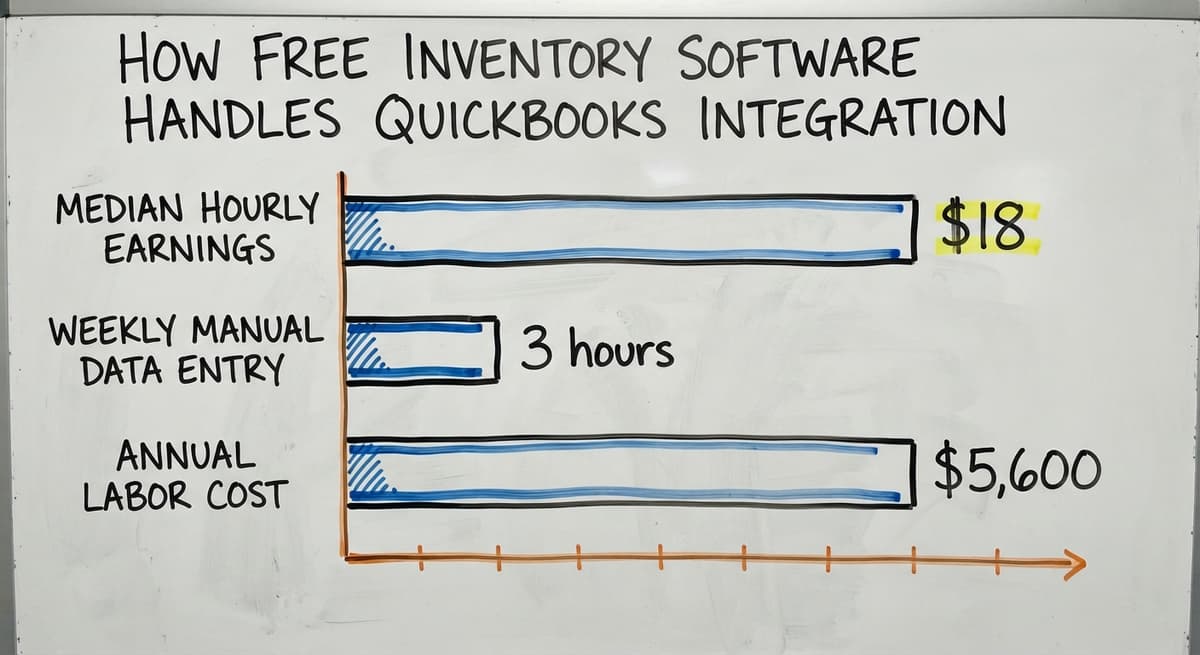
Without a direct integration, staff export data from the inventory tool and import it manually into QuickBooks. That process creates entry errors, takes time, and means the two systems are never fully in sync. The US Bureau of Labor Statistics reports that stock clerks and order fillers earn a median of around $18 per hour.
If 2 staff members each spend 3 hours a week on manual data entry that a sync would automate, that is over $5,600 a year in labor on a task the software should handle. QuickBooks Integration for Warehouse Operations is almost always a paid feature, and for most distribution businesses, it is the first reason to move off a free tier.

The Hidden Costs of Free Inventory Software
Free software has a price. It is just paid in staff time rather than subscription fees.
The real costs tend to appear in these places:
- Staff hours worked around feature limits, such as maintaining a parallel spreadsheet because the tool cannot handle multi-location stock
- Data entry errors from manual exports and imports between systems
- Upgrade costs when the business grows past the free tier's caps, with data migration risk attached
- Vendor pricing changes that remove free access without warning
- Missed orders caused by inaccurate counts, which carry a legal dimension: the FTC's Mail, Internet, or Telephone Order Rule needs sellers to ship within the time they promise or notify the customer
A small business inventory system that looks free costs more than a $50 per month paid plan once staff time is counted honestly.
When Is Free Inventory Software a Good Starting Point?
Free tools earn their place in specific situations. The key is knowing whether your operation fits.
A free plan is a reasonable choice when:
- Your catalog has fewer than 50 SKUs and is not growing fast
- One person manages all stock from a single location
- You have no accounting software that needs to sync
- Order volume is low enough that manual steps take minutes, not hours
- You are testing a workflow before committing to a paid system
At this stage, the structure a free tool provides is genuinely useful. It beats a notebook or a basic spreadsheet for keeping a count.
The NIST Manufacturing Extension Partnership notes that even small operations benefit from documented inventory processes. A free tool can help build that habit before the business grows into something more complex.
What does it look like running on your own process?
The first thing you see is it running on your own process, at no build cost. The subscription starts once it is live and doing the job, not before.
Book a call
When Does Free Inventory Software Start Costing More Than It Saves?
Free software starts costing more than it saves the moment staff are maintaining a separate system alongside it. That is the clearest sign the tool has stopped doing its job.
Other signals that the free tier has run its course:
- Orders are delayed or wrong because stock counts are unreliable
- Someone is printing sheets to track what the software cannot show
- QuickBooks entries are being made twice: once in the inventory tool and once by hand
- Stock across more than 1 location cannot be seen in one place
- Month-end matching takes hours because the two systems do not match
At that point, the free tool is not saving money. It is generating work. The opportunity cost of running on the wrong system grows each month, and the longer the delay, the more data cleanup is needed when the switch finally happens.
Free vs Paid Inventory Software: A Simple Comparison
The table below covers the dimensions that matter most to a small business choosing between tiers.
| Feature | Free tier | Paid plan |
|---|---|---|
| User seats | 1 to 2 | 3 or more, unlimited |
| SKU limit | 50 to 100 | Unlimited |
| QuickBooks sync | Not included | Included on most paid plans |
| Barcode scanning | Not included | Included on most paid plans |
| Multi-location tracking | Not included | Available on mid and upper tiers |
| Reorder automating | Not included | Available on most paid plans |
| Reporting | Basic on-hand count | Custom reports, trends, forecasting |
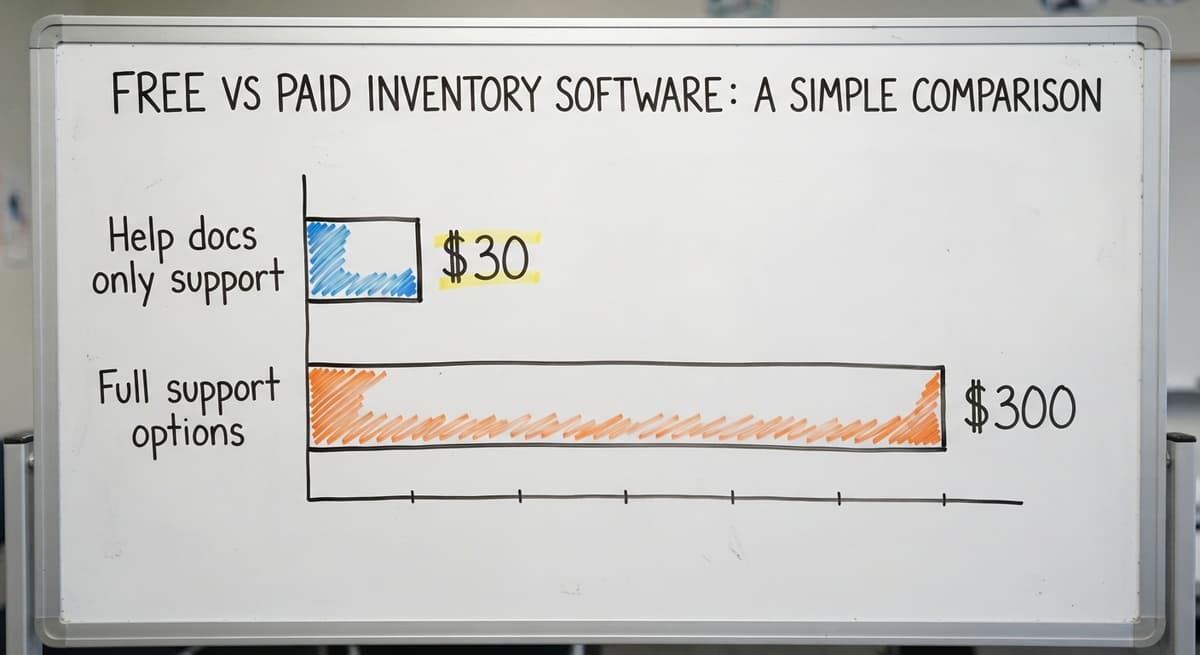
| Support | Help docs only | Email, chat, or phone |
Paid SaaS tools for small business inventory run from $30 to $300 per month depending on users and features. The right question is not what the software costs. It is what the current system is costing in staff time, errors, and missed orders.

What Do Wholesale and Distribution Businesses Actually Need?
Wholesale and distribution operations have workflows that free tools were not designed for. Retail inventory software tracks what is on a shelf. Distribution inventory tracks what comes in, where it goes, and what leaves under which customer's pricing.
A working small business inventory system for distribution needs:
- Receiving workflows that log product against a buy order and flag discrepancies
- Put-away and pick logic so warehouse staff know where stock lives
- Real-time stock visibility across every location, not a count that is hours old
- Reorder triggers tied to actual sales velocity rather than a fixed number
- QuickBooks sync that pushes clean data automatically, with no manual step
- Simple enough for warehouse staff to use on day one without a training week
The US Census Bureau's Monthly Wholesale Trade data tracks the inventories-to-sales ratio for wholesale firms nationally.
When that ratio rises, firms are holding more stock relative to what they sell, which is a sign that inventory visibility is poor. A system that cannot show real-time stock levels makes that problem worse, not better.
Open-Source and Spreadsheet Alternatives: Are They Worth It?
Two alternatives come up when buyers want to avoid a paid subscription: open-source software and spreadsheets. Both have real limits.
Open-source tools like Odoo Community or ERPNext are free to download. Running them is not free. Hosting, setup, and any customization need a developer.
For a 10-person operation without an IT team, the cost of rollout exceeds a year of a paid SaaS subscription. Open-source is a serious option for a business with technical staff. It is not a practical shortcut for most small operations.
Spreadsheets offer flexibility and no cost, but they break under volume. When 2 or more people edit the same file, version errors appear fast. There is no audit trail, no automatic reorder trigger, and no connection to QuickBooks.
Spreadsheets are better than nothing at the very start. They are not a substitute for inventory management for distributors who ship dozens of orders a day.
Neither option is a long-term answer for a growing operation. The real question is what replaces both.
Not sure this is the right shape for your operation?
The call is free. Describe how the work runs today. We map it on a call and show you what it would look like built around that, before you spend anything.
Book a call
What Should You Look for When Moving Beyond Free?
The right paid tool fits how your operation already works. It does not ask you to change your process to match its design.
Before choosing any system, check these points:
- QuickBooks integration that works without manual steps, so accounting data stays current automatically
- Scales with your team without jumping straight to enterprise pricing at a handful of users
- Handles the way you actually receive and ship product, not a generic retail workflow
- Can be set up in days, not months, without a consultant required
- Comes with support from people who understand warehouse and distribution operations
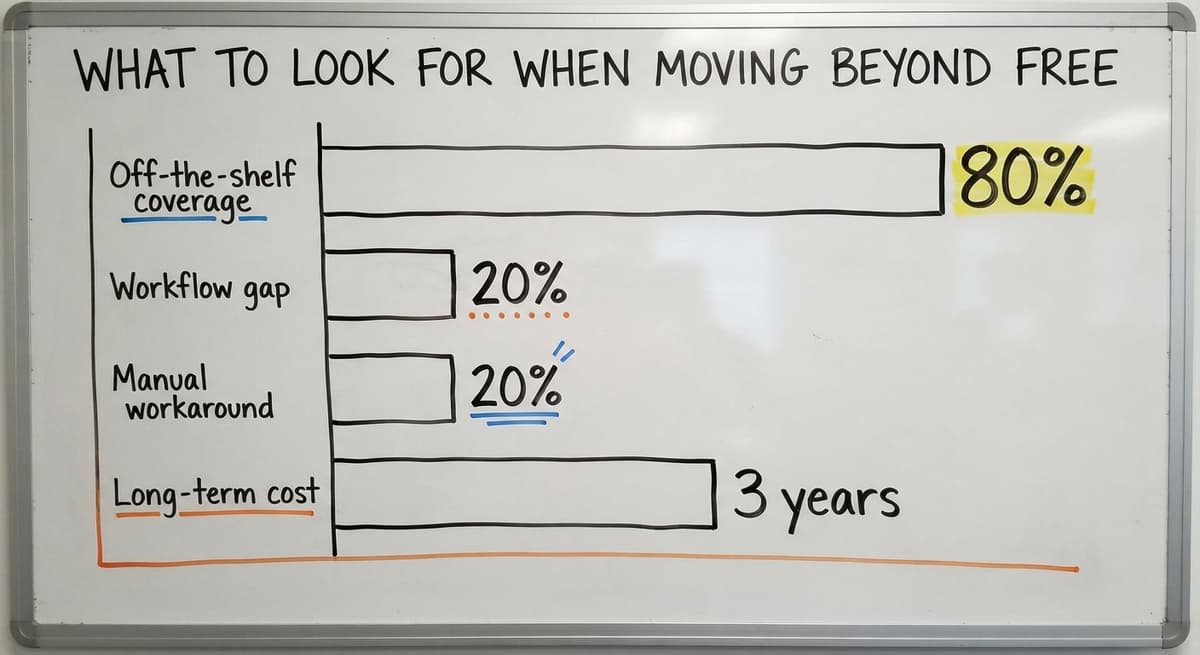
Custom Inventory Software for Wholesale Distributors is worth considering when off-the-shelf tools cover 80% of the workflow but leave the remaining 20% as a manual workaround. That 20% is where the errors and the staff time pile up.
Warehouse Management Software for Small Business built around your specific process costs less over 3 years than paying for features you never use on a generic platform.
How Does a Custom System Work Alongside QuickBooks?
QuickBooks handles accounting well. It was not built to run a warehouse. A custom inventory layer sits alongside QuickBooks and feeds it clean, structured data automatically.
This means:
- Stock movements in the warehouse post to QuickBooks without a manual export
- Staff keep using QuickBooks for invoicing, payroll, and tax prep
- No rip-and-replace of the accounting setup the business already knows
- The inventory system handles receiving, picking, and stock counts while QuickBooks handles the books
How We Build Custom Working Software follows this principle: keep what works, replace only what does not. A system built this way is faster to adopt and cheaper to run than one that tries to replace every tool at once.

Real Questions to Ask Before Choosing Any Inventory System
Every vendor will say their system is easy to use and fits your business. These questions cut through that.
- Does it connect to QuickBooks without a manual export step?
- How many users can log in at the same time, and what does each extra user cost?
- Can it handle the way we actually receive product, including partial shipments and discrepancies?
- What happens when we need a feature the system does not have?
- Who do we call when something breaks on a busy shipping day?
The answers reveal whether the tool was built for an operation like yours or for a different type of business entirely. A vendor who cannot answer the third question clearly has probably not worked with a distribution operation before.
Making the Decision: Free, Paid, or Custom
The right choice depends on where the operation sits right now, not where it hopes to be.
Free is right for a very early-stage business with fewer than 50 SKUs, one location, and no accounting integration needed. Use it to build the habit of tracking stock, and move on when the limits start creating work.
Paid off-the-shelf fits when your workflow matches a standard retail or e-commerce pattern, your team is small, and a monthly subscription is easier to justify than a build. Most tools in the $50 to $150 per month range cover the basics well.
Custom makes sense when your operation has specific workflows that no off-the-shelf tool handles cleanly. Inventory management for distributors falls here. Custom does not always mean expensive or slow.
For a business paying staff to work around a system that does not fit, a purpose-built tool pays back within the first year.
The decision should be based on what the operation actually costs to run today, not just the price on the software page.

Next Steps If Free Inventory Software Is Not Enough
If the free tool has stopped solving the problem, the next step is not to find another free tool. It is to get clear on what the current system is actually costing.
Start here:
- Write down the 3 tasks that take the most staff time each week because the software cannot handle them
- Count how many hours per week go into manual workarounds, then multiply by the hourly rate to get a weekly cost
- List the features that are missing and causing errors or delays
- Talk to a software partner who works at small business scale, not one whose smallest client is a 500-person company
The Software Society works with growing businesses that have outgrown manual processes and generic tools. If your inventory system is creating more work than it removes, a short conversation about your operation is the right place to start.
No commitment, no pitch deck. Just a direct look at what is not working and what a better system would look like for your specific workflow.
Frequently asked questions
Is Zoho Inventory really free?
Yes, Zoho Inventory has a permanent free plan, not just a trial. It is capped at 1 user, 50 orders per month, and 1 connected sales channel. For a solo seller with low order volume it works.
For a business shipping more than 50 orders a month or managing multiple staff, the free plan runs out quickly and a paid plan starts at around $29 per month.
What is the best free inventory management software to download?
There is no single best answer. The right choice depends on your SKU count, user needs, and whether you need any integrations. Zoho Inventory free tier suits very small e-commerce sellers. inFlow free plan works for a solo operator with under 100 products.
Sortly basic is closer to a visual item list. Square for Retail free tier fits a single retail location. If you need QuickBooks sync, barcode scanning, or multi-location tracking, none of these free tiers will cover it.
Can I download free inventory software in Excel?
Excel is not inventory software, but Microsoft and many third parties offer free inventory tracking templates for Excel. These work for a very small catalog managed by one person. They break down under volume, multiple users, or any need for real-time accuracy.
There is no automatic reorder trigger, no barcode scanning, and no QuickBooks sync. An Excel template is a starting point, not a system.
Can I use Excel for inventory management?
Excel can track stock at a basic level and costs nothing if you already have it. It works when one person manages a small, stable catalog and order volume is low. It stops working reliably when more than one person edits the file, when you need a count that is accurate by the hour, or when you need to connect stock levels to orders and accounting.
Most businesses that grow past around 100 SKUs or 2 staff find Excel creates more errors than it prevents.
What features are missing from most free inventory tools?
The features most commonly absent from free inventory plans are barcode scanning, multi-location stock tracking, automated reorder points, QuickBooks or accounting integration, role-based user access, and custom reporting. These are not extras.
For a wholesale or distribution business, they are the core features needed to ship orders correctly and close the books without hours of manual work each month.
When should a small business move from free to paid inventory software?
Move when the free tool is creating work rather than removing it. The clearest signs are staff maintaining a separate spreadsheet alongside the software, QuickBooks entries being made twice, orders being delayed due to stock errors, or stock across more than one location not visible in one place.
At that point the free tool is not saving money. It is generating avoidable cost in staff time and errors.
How much does inventory management software cost for a small business?
Paid SaaS inventory tools for small business run from about $30 to $300 per month depending on the number of users and features included.
Custom solutions vary but are more affordable than businesses expect, especially when compared against the ongoing cost of staff time spent on manual workarounds. The better question is what the current system costs in labor, errors, and missed orders each month.
Can I manage inventory for free with Square?
Yes, for one location. Square's free point-of-sale tier tracks stock per item, alerts on low stock, and reduces the count on every sale. It has no bins, no purchase orders beyond the basics, and no second location without the paid retail plan.
Can I use Square for inventory without a Square POS system?
Only in a limited way: the item library and stock counts live in the Square dashboard and can be edited there, but the counts only move automatically when a sale runs through Square.
Without the register it is a manual list, and a spreadsheet does the same job.
What is the easiest inventory app for a small business?
For one person, a visual tracker with a phone camera scanner, live in an afternoon. For a store, the inventory inside the point-of-sale system, because staff learn nothing new. Easy stops at the second user or the second location on every free tier.
How do I track inventory with barcode scanning for free?
Every free tier here scans with the phone camera through its app, and a $30 USB scanner works with any of them because it types the code like a keyboard.
Print Code 128 labels from a free generator on plain sheet labels. What the free tiers cap is items and users, not scanning.
What is in a free first look?
A 30 minute call, your operation mapped, and a clear picture of what we would build. No obligation and nothing to install.
Book a callRelated guides
The rest of this guide, for the parts of the job this page does not cover.
Guides
- Best Inventory Management Software for Small Businesses
- Small Business Stock Management Software
- Inventory Tracking Software for Small Business
- Accounting and Inventory Software for Small Business
- Inventory Control Software for Small Business
- Inventory Sales Software Small Business
- Free Inventory Management Software with Barcode Scanner
- Inventory Management Small Businesses
- Small Business Inventory Management System
- Small Business Inventory Management
- Cost of Inventory Management Software
- Inventory Management Software Freeware
- Small Business Warehouse Management System
- Warehouse Management System for Small Business
- Inventory Tracking Systems for Small Businesses
- Simple Inventory System for Small Business
- Inventory Control for Small Business
- Inventory System for Small Business
- Erp System for Small Businesses