


Warehouse Management System Price Comparison
A warehouse management system costs anywhere from a small monthly fee per user to a six-figure ERP project. The fair way to compare is total cost over 3 to 5 years. Price the model, not the brand.
Book a callWhat a Warehouse Management System Price Comparison Should Cover
A fair warehouse management system price comparison looks at total cost of ownership over several years. That means every fee you pay from the first quote to year 5. The first quote shows only a slice.
Reviewed November 2026.
Compare by pricing model first. Vendor names come second.
Your shop likely runs on QuickBooks, Excel sheets and printed pick lists. You fear a long rollout that stops work. Each model below is judged against that fear.
We build it for your operation, and the first look is free
If you would rather not compare products, describe how your operation already works and we build the system around it.
No build cost. You see it running on your own process first, and the monthly subscription starts only once it is live.
Book a callThe Four Main Ways a Warehouse System Is Priced
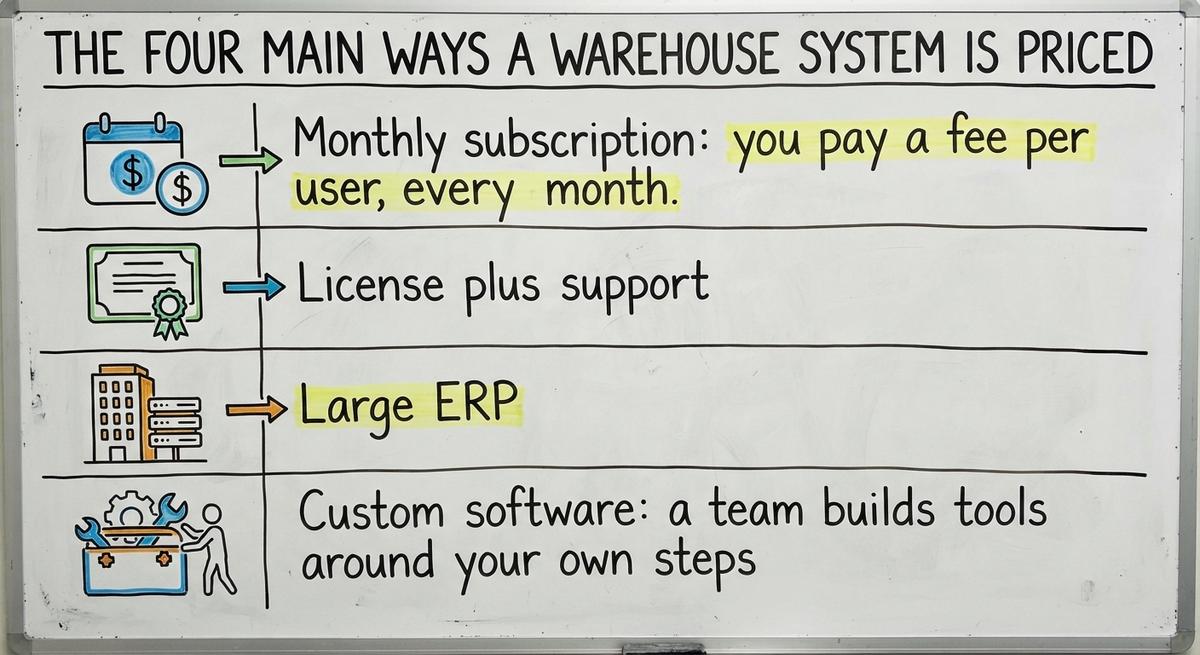
WMS pricing models fall into 4 groups. A WMS is software that tracks stock, bins and orders inside a building. Each group charges in a different way.
- Monthly subscription: you pay a fee per user, every month.
- License plus support: you pay once, then pay a yearly fee for help and updates.
- Large ERP: you buy a full business suite and a long setup project.
- Custom software: a team builds tools around your own steps.
The work is real work. The Occupational Safety and Health Administration says, in its warehousing overview, "The warehousing and storage industry includes establishments operating facilities for general merchandise, refrigerated goods, and other products." Software must fit that floor, not the other way around.
| Model | You pay | Main risk |
|---|---|---|
| Subscription | Monthly, per user | Total grows with headcount |
| License plus support | Big fee up front, then yearly | Paying for unused features |
| Large ERP | Fees plus a long project | Long rollout, side bills |
| Custom | Build fee, then upkeep | Scope creep without a plan |
Each model moves cost to a different place in time.

How Does Subscription Pricing Add Up Over Time?
Illustration with made-up round numbers: say each user costs $100 a month. A team of 10 pays $1,000 a month. That is $12,000 a year and $60,000 over 5 years. Add 5 more users in year 2 and the 5-year total climbs well past $60,000.
Subscription pricing adds up fast because each user costs money every month, so the bill grows when your team grows. Pickers, packers and office staff all count.
Add-ons raise the bill too. Barcode scanning, extra locations and links to other tools often cost extra.
A one-time cost of $45,000 would look pricey on day one. It would still cost less by year 5. Subscription wins on a low start and loses on a long hold.
Not sure this is the right shape for your operation
Describe how the work runs today. We map it on a call and show you what it would look like built around that, before you spend anything.
Book a call
How License and ERP Pricing Works
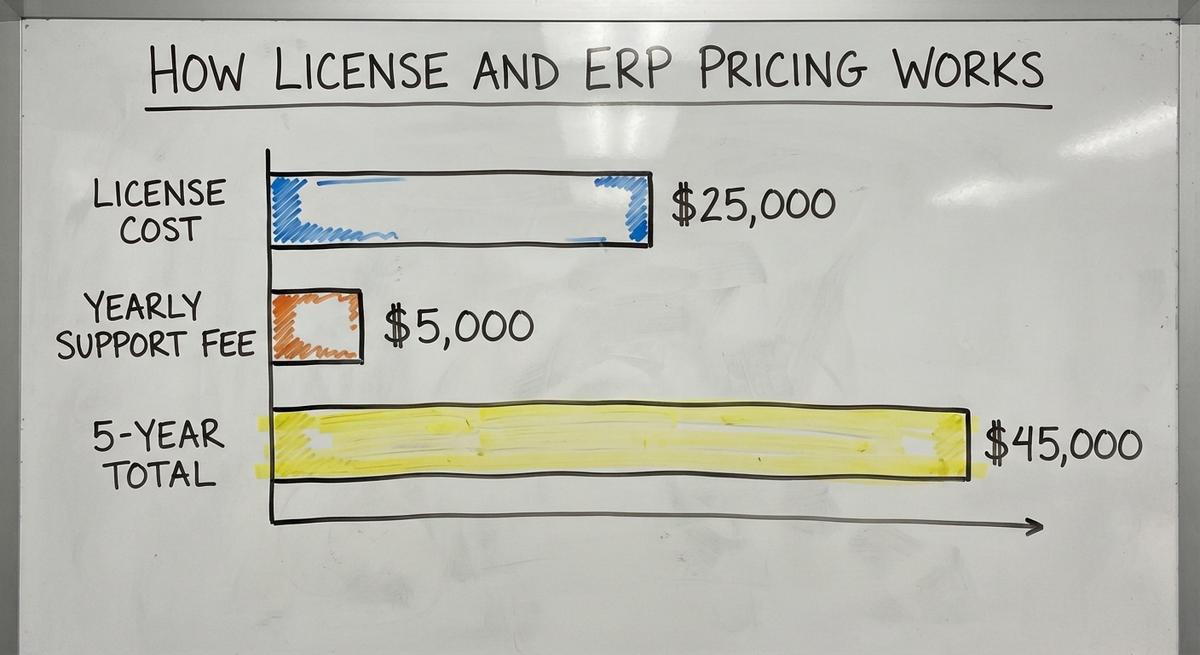
License pricing means you pay a big fee up front and a yearly fee after. Vendors often set that yearly fee as a share of the license price. Ask for the exact share in writing.
Illustration: a $25,000 license with a $5,000 yearly support fee costs $45,000 over 5 years. That math leaves out setup.
Setup is where bills grow. Rollout, data migration and training are often billed apart. Migration means moving your old records into the new system.
Long rollouts add cost. Staff split time between old and new tools. Orders slow down.
Many small warehouses also pay for features they never use. A big ERP has dozens of modules. Your team may need 3 of them.
Hidden Costs Buyers Often Miss
The quote is not the bill. Four extra costs show up after you sign, and each one has a fix if you plan for it.

Setup and Training
Data cleanup is first. Your stock lives in Excel, Access files and printed sheets. Someone must fix duplicates and bad part numbers before any system can load them.
Training costs wages. The US Bureau of Labor Statistics publishes pay for stockers and order fillers. Multiply that hourly rate by every hour of class and every slow day. Work slows at the start.
Hardware and Connections
Scanners, label printers and mobile devices cost money. Barcodes follow a shared system from GS1, so a label made by one firm scans at another. RFID tags cost more than barcodes. The Auburn University RFID Lab publishes independent research if you weigh them.
QuickBooks integration often carries a fee. Ask who builds it and who fixes it.
Changes Later
Paying to change how the system works is common. A new field or a new pick step can mean a paid request. Ask for the rate before you sign.
Where Custom Software Fits in the Price Comparison
Custom warehouse software costs less than a full migration when most of your process already works. It is built around how you run today. You do not move everything to a new tool.

The Software Society is a Columbus, Ohio team that builds custom workflows for small operations. The approach keeps QuickBooks where it helps. It replaces only the manual parts, such as paper pick lists and stock sheets. One team handles software, website and search.
Be honest about price. Custom is not always cheapest in year 1. A build fee lands early, while a subscription starts small.
Cost follows scope. Start with one painful step, such as receiving or cycle counts. Add more once the first piece pays off. The NIST Manufacturing Extension Partnership offers vendor-neutral guidance on supply chain and inventory process if you want a second view.
Small steps keep spend in your control.
The comparison is easier when one option is built for you
Off-the-shelf means fitting your process to the software. We do it the other way round, and the first look costs nothing.
Book a call
How to Compare Quotes Side by Side
A fair quote comparison starts with one number: the 3-year total cost. Ask every provider for it in writing. Use the same user count for all of them.
Then ask each provider these questions:
- What is included in setup, training, support, updates and integrations?
- What does it cost to add 5 users or a second location?
- How do I export my data if I leave, and in what format?
- What do you charge to change a workflow later?
Pick the numbers you will track. The Warehousing Education and Research Council keeps a standard set of DC measures. Ask each vendor how their tool reports them.
Line up the answers in one sheet. The cheapest first quote rarely stays cheapest.
Which Option Fits a Small Warehouse
The right option depends on how odd your process is. A standard process fits a standard tool. An odd process fits a built one.
- Simple needs, standard steps: a subscription is enough. Look at a small business warehouse management system built for your size.
- Odd workflows, many workarounds: custom may pay off.
- Wary of long rollouts: favor phased, small-scale starts.
Answer these yes or no questions:
- Does your process match how most shops work?
- Do you use fewer than 10 system users today?
- Can you stop work for weeks to switch?
- Do you want to drop QuickBooks?
- Do staff keep side spreadsheets to fix gaps?
Mostly yes on 1 to 3 points to a subscription. Yes on 5 points to custom.
Next Step
Record your 3-year numbers for each model. Your records also matter for tax. IRS Publication 538 says, "To figure taxable income, you must value your inventory at the beginning and end of each tax year." A tool that counts stock well helps you meet that rule.
Want a second opinion on a quote? Talk with The Software Society in Columbus, Ohio. We will review your process and show where replacing only the manual parts beats a full move.
Frequently asked questions
Which software is used in warehouse management?
There is no single answer. Small shops often use subscription tools such as Fishbowl or Zoho Inventory. Larger firms use ERP suites such as NetSuite or SAP. Others build custom software. Fit, size and process decide the pick.
How much does a warehouse management system cost for a small business?
Cost ranges from a monthly fee per user to a large project fee. Ask each provider for a 3-year total, including setup, training and support. Compare those totals, not the first quotes.
Is a subscription cheaper than custom software?
A subscription costs less in year 1. Over 3 to 5 years the total can pass a one-time build cost. Custom pays off most when your process is unusual.
Can a warehouse system work with QuickBooks?
Yes. Many systems link to QuickBooks. Ask who builds the link and what it costs. Custom software can keep QuickBooks and replace only the manual parts.
Do small warehouses need a big ERP?
No. Most small warehouses need fewer features than an ERP offers. A big ERP adds long setup and unused modules.
What hidden costs should small warehouses expect?
Expect data cleanup, staff training time and scanners and printers. QuickBooks links and later workflow changes can add fees. Ask for each in writing.
How do I compare warehouse system quotes fairly?
Ask each provider for a 3-year total with the same user count. List what is included and what happens when you add users. Ask how you can export data if you leave.
Start with a free first look
A 30 minute call, your operation mapped, and a clear picture of what we would build. No obligation and nothing to install.
Book a callRelated guides
More on the same work.
Guides
- Price of Inventory Management Software
- Warehouse Management System Open Source
- Warehouse Management Cost
- Warehouse Inventory Management Software
- Warehouse Inventory Management Systems
- Warehouse Stock Management Software
- Warehouse Management System Top 10
- Software for Warehouse Management System
- Inventory and Warehouse Management Software
- Small Business Warehouse Management System
- Cloud Based Warehouse Management
- Warehouse Management System Types
- Warehouse Inventory Management System
- List of Warehouse Management Software
- Warehouse Management Costs
- Warehouse Management Cloud
- Warehouse Management System Examples
- Warehouse Management System Implementation
- Online Warehouse Management Software