

What Is The Best Inventory Management System For Small Businesses?
The best inventory management system for a small business is the one that fits how you already work. For most small wholesale and warehouse operations running on QuickBooks, that is not a bloated SaaS platform. It is a focused system built around your real steps, connected to your accounting, and simple enough that warehouse staff can use it on day one.
Published 11 August 2026. Reviewed and updated 15 September 2026.
Reviewed and updated 15 September 2026. This guide covers the main options available to small wholesale and distribution businesses.
Book a callWhy Is Inventory Management Hard for Small Businesses?
Most small businesses start with a spreadsheet. Then a second one. Then a printed pick sheet someone leaves on the dock. Before long, you have 3 or 4 places where stock numbers live, and none of them match.
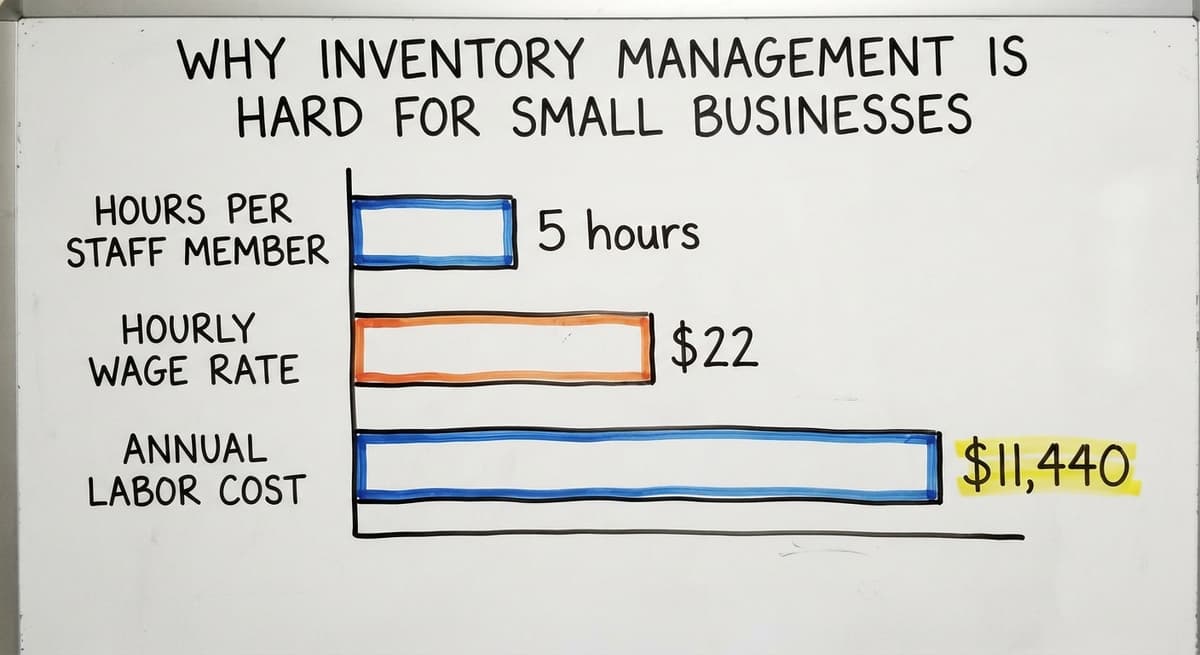
That gap costs real money. If 2 staff members each spend 5 hours a week reconciling counts at $22 an hour, that is $11,440 a year in labor, and that figure does not include the orders you ship wrong or the stock you buy twice.
Would you rather have it built around your operation?
The first look is free. If you would rather not compare products, describe how your operation already works and we build the system around it.
No build cost. You see it running on your own process first, and the monthly subscription starts only once it is live.
Book a callWhy Does the Problem Get Worse as Volume Grows?
What works at 20 orders a day breaks at 80. Manual steps that felt manageable become the bottleneck that slows everything down.
Off-the-shelf tools promise to fix this. Many of them do, for large companies with full IT teams. For a business with 10 to 50 staff and a warehouse manager who needs answers fast, most of those platforms feel like overkill from day one.
What Does a Good Inventory Management System Actually Do?
A good system does a small number of things well. It tracks what you have, records what moves, and tells you when to act. That sounds simple because it is.
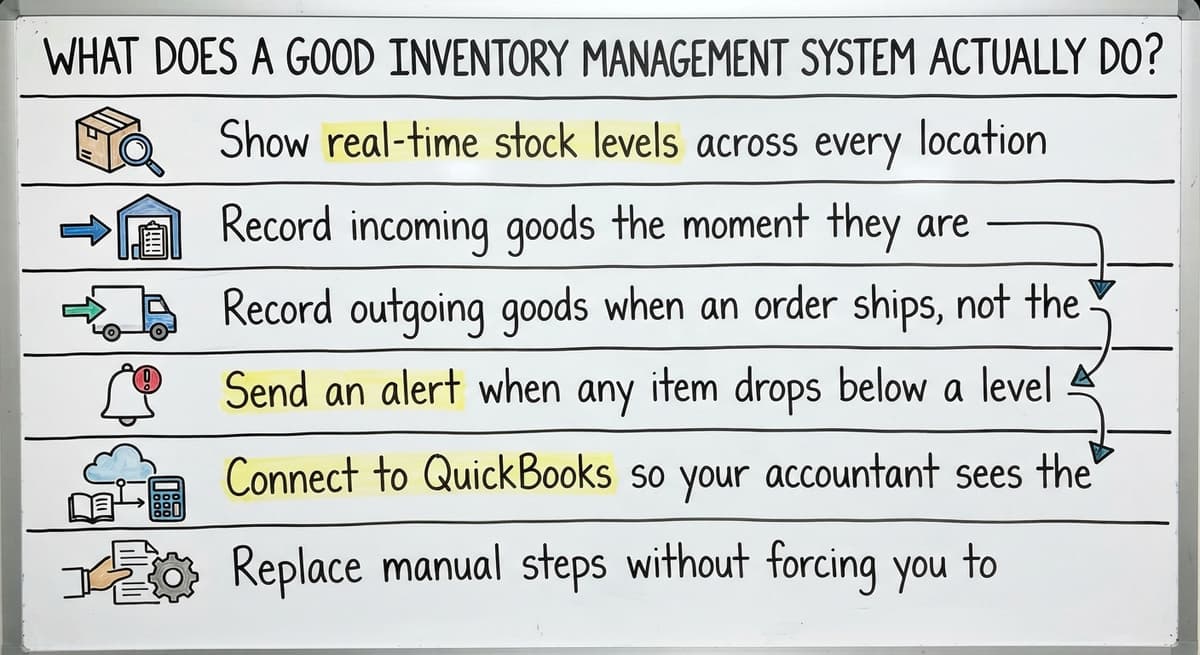
Specifically, a solid inventory management system for small business should:
- Show real-time stock levels across every location or zone in your warehouse
- Record incoming goods the moment they are received, without manual entry
- Record outgoing goods when an order ships, not the next morning
- Send an alert when any item drops below a level you set
- Connect to QuickBooks so your accountant sees the same numbers you do
- Replace manual steps without forcing you to rebuild every process from scratch
Why Are Barcode Scanning and Accurate Counts Legal Requirements?
Barcode scanning sits at the center of most of this. As GS1, the body that sets global barcode standards, explains, barcodes are "the backbone of global trade, enabling the identification, capture and sharing of information".
A scan-based count removes the manual entry step that causes most receiving errors.
The IRS also has a stake in your count being accurate. IRS Publication 538 states directly: "To figure taxable income, you must value your inventory at the beginning and end of each tax year." That is a legal obligation, not a suggestion.
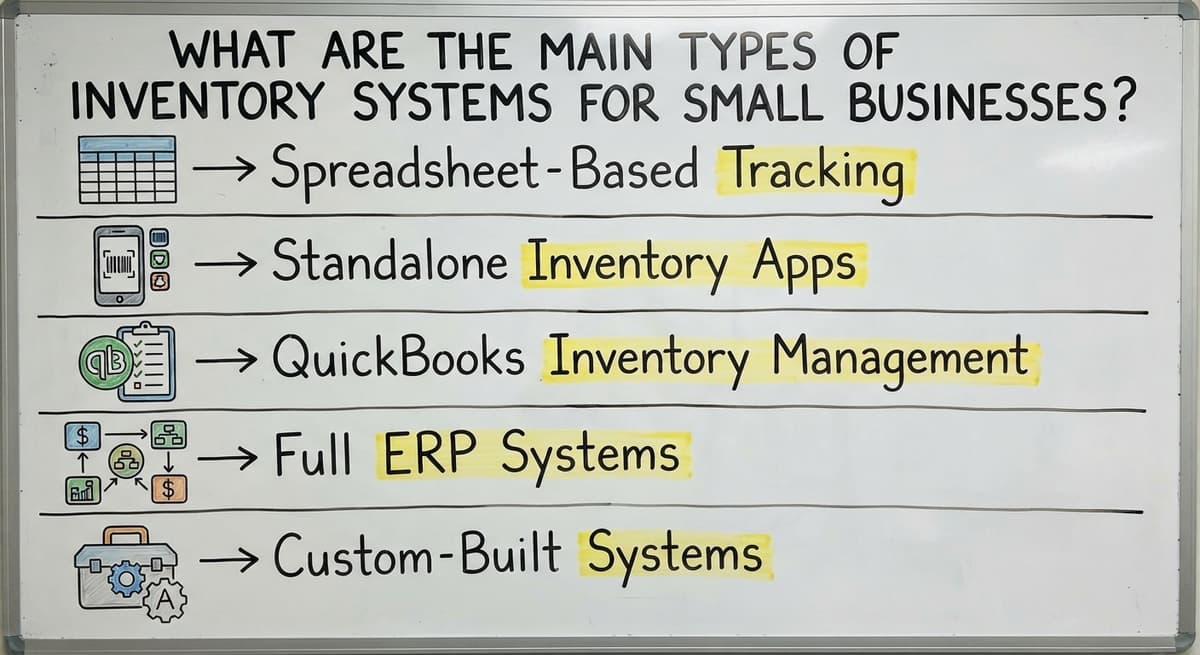
What Are the Main Types of Inventory Systems for Small Businesses?
The right type depends on your size, your complexity, and how much you want to change. Here is an honest look at each.
Standalone inventory apps such as inFlow or Sortly are easy to set up and work well for simple product businesses.
The gap shows up when you need them to talk to your accounting software or handle multi-location warehouses. Many require a workaround or a manual export to keep QuickBooks in sync.
Full ERP systems such as NetSuite or SAP target companies with hundreds of staff and complex supply chains. They are powerful. They are also expensive, slow to set up, and designed around processes that do not match how most small warehouses run. Implementation timelines measured in months are common.
Spreadsheet-Based Tracking
Spreadsheets are free and familiar. They break the moment 2 people try to update the same file, or someone forgets to save. They have no alerts, no scan input, and no live connection to your orders. They work fine at very low volume. Past that point, they create more problems than they solve.
Is the comparison easier when one option is built for you?
Yes. Off-the-shelf means fitting your process to the software, and custom is the other way round. The first look costs nothing.
Book a callStandalone Inventory Apps
Apps like inFlow or Sortly are easy to set up and work well for simple product businesses.
The gap shows up when you need them to talk to your accounting software or handle multi-location warehouses. Many require a workaround or a manual export to keep QuickBooks in sync.
QuickBooks Inventory Management
QuickBooks has built-in inventory tracking for product-based businesses. It handles basic stock counts and ties directly to your books. It struggles with warehouse-level detail: bin locations, lot tracking, and receiving workflows that need more than a line item. It is a good starting point, not a full warehouse inventory system.
Full ERP Systems
Enterprise platforms like NetSuite or SAP target companies with hundreds of staff and complex supply chains. They are powerful. They are also expensive, slow to set up, and designed around processes that do not match how most small warehouses run. Implementation timelines measured in months are common.
Custom-Built Systems
A custom inventory system is built around how your operation already works. It handles the specific steps your business uses, connects to the tools you already have, and does not ask you to change your process to fit the software.
For wholesale distributors and small warehouses with unique workflows, this path costs less over 3 years than a SaaS subscription that never quite fits.
Replacing spreadsheets with a custom operations system is a path more small businesses are taking as the cost of custom software has come down.
Popular Off-the-Shelf Options and Their Trade-Offs
Fishbowl, inFlow, and Cin7 come up most often when small businesses search for wholesale inventory software. Each has real strengths. Each also has real limits.
Fishbowl connects to QuickBooks and handles purchase orders well. It targets product businesses with straightforward workflows. Businesses with custom receiving steps or non-standard order types hit a wall.
inFlow is clean and easy to learn. It works well for businesses with one location and simple stock needs. Multi-warehouse visibility and deeper QuickBooks integration require higher-tier plans.
Cin7 covers more ground and handles omnichannel selling. The trade-off is complexity and price. For a team of 10 to 20 people, the monthly cost adds up fast, and the setup requires time your team may not have.

Why Does Off-the-Shelf Support Fall Short on Shipping Days?
The shared problem with all three is that they target the average business.
If your operation has steps that do not fit the average, you end up bending your process to fit the tool. That is the opposite of what a good system should do.
Support is also worth noting. Remote help desks are not familiar with your warehouse layout, your staff, or the way your specific products move. When something breaks at 7 a.m. on a shipping day, that matters.
What does it look like running on your own process?
The first thing you see is it running on your own process, at no build cost. The subscription starts once it is live and doing the job, not before.
Book a callWhat Do Small Wholesale and Distribution Businesses Need Most?
Wholesale and distribution businesses have needs that standard retail inventory apps do not fully cover. Stock tracking for small business at this level means more than counting units on a shelf.
Here is what actually matters for a small warehouse or distributor:
- Real-time visibility across zones or locations inside one warehouse, not just totals
- Purchase order tracking from the moment a PO is created to the moment goods are put away
- Receiving workflows that match how your dock actually operates
- QuickBooks integration for wholesale operations that keeps your books current without double entry
- Simple enough for dock staff to use without a week of training
- Room to grow from 5 staff to 50 without rebuilding the system

What Does Industry Data Say About Real-Time Inventory?
The US Census Bureau's Monthly Wholesale Trade data shows that inventory-to-sales ratios shift constantly across wholesale sectors. A system that cannot give you a current number is not a system. It is a record of what happened last week.
The NIST Manufacturing Extension Partnership offers vendor-neutral guidance on supply chain process and consistently points to real-time data as the single biggest lever for small distributors trying to reduce waste and improve fill rates.
When Does a Custom Inventory System Make More Sense?
Not every small business needs a custom build. But some do, and the signs are clear.
You are likely past what off-the-shelf tools can do if:
- You have tried 1 or 2 standard platforms and hit the same wall each time
- Your operation has steps no standard tool handles: kitting, lot tracking, zone-based picking, or multi-unit receiving
- You are already on QuickBooks and do not want to replace it or run a parallel system
- Your staff has pushed back on every new tool because none of them match how the work actually flows
- You are paying for features you never use while missing the 3 specific things you actually need

How Fast Can a Custom Build Actually Happen?
Custom warehouse management software for small distributors does not have to mean a year-long project and a six-figure invoice. Local builders who work with small operations can scope and deliver a focused system in weeks, not quarters.
The key is scoping tightly: solve the real problem, connect to what you have, and leave room to add later.
A system built around your process also costs less to train. Staff are not learning someone else's logic. They are using a digital version of the steps they already know.
How Do You Evaluate Any Inventory System Before You Buy?
Before you sign anything, ask these questions. The answers will tell you more than any demo.
- Does it connect to QuickBooks? Ask specifically how. A CSV export is not an integration.
- How long does setup take? Get a number in days, not a range. If the vendor cannot give one, that is your answer.
- Has the vendor worked with businesses your size? Ask for a reference from a company with a similar headcount and similar product types.
- What happens when something breaks? Find out who you call, what their hours are, and how fast they respond.
- Does it require you to change how you work? If the demo shows a workflow that does not match yours, ask how the system handles your actual steps. If the answer is vague, the system does not handle them.
- What does it cost at 3 years? Add up the monthly fee, the setup cost, the per-user cost, and any add-ons. Compare that to a one-time custom build.
Not sure this is the right shape for your operation?
The call is free. Describe how the work runs today. We map it on a call and show you what it would look like built around that, before you spend anything.
Book a call
Why Do Bad Inventory Counts Create Legal Exposure?
The US Federal Trade Commission's guidance on order fulfillment makes clear that businesses must ship when they say they will. An inventory system that gives you bad counts leads to promises you cannot keep. That is not just an operations problem.
Red Flags to Watch Out For
Some warning signs show up before you even get to the contract. Watch for these.
- Implementation timelines measured in months. A small business does not have that runway. If setup takes longer than 6 weeks, ask why.
- Pricing built for 500 users. Per-seat models that make sense at enterprise scale are punishing at 15 seats.
- Vendors who cannot describe your workflow. If a sales rep cannot explain how the system handles your specific receiving process, they have not listened to you.
- No dedicated support contact. A ticket queue and a knowledge base are not support for a warehouse that runs on tight margins.
- Pressure to replace QuickBooks. Most small businesses do not need to replace their accounting software. A system that requires it is solving a problem you do not have while creating one you do not want.
- Requests to migrate all your data before you see the system work. A good vendor proves value before asking for a full commitment.

What Do Manual Workarounds Actually Cost in Labor?
The Bureau of Labor Statistics reports that stock clerks and order fillers earn a median hourly wage that makes manual process costs add up fast.
Every extra hour your team spends on workarounds because the system does not fit is a direct labor cost. A bad system is not free just because the software is cheaper.
What Is the Right Inventory System for Your Small Business?
There is no single best inventory management system for every small business. The right answer depends on your workflow, your team size, your product types, and what you are already using.
For a small retailer with simple stock and no warehouse complexity, a tool like inFlow or QuickBooks' built-in tracking may be enough.
For a wholesale distributor with a warehouse, purchase orders, and a team of 10 to 50 staff, the off-the-shelf options fall short in the exact places that matter most.

A Practical Path to Choosing the Right System
The practical path for most small wholesale and distribution businesses looks like this:
- List your 3 biggest inventory pain points. Write them down in plain language.
- Check whether QuickBooks' built-in tools already solve any of them. They solve one.
- Demo 1 or 2 off-the-shelf tools with your actual workflow, not the vendor's demo data.
- If those tools require you to change more than 2 or 3 of your steps, price a custom build.
- Choose based on total 3-year cost, not monthly fee alone.
How we build operational software for small businesses starts with the process you already run, not a template. A local partner who has worked with operations your size can scope, build, and launch a focused system faster than a large vendor can finish onboarding you.
Start with your biggest pain point. Fix that first. Build from there. A system that solves the real problem is always better than a platform that covers every possible problem for a business twice your size.
If you are ready to stop patching and start running on a system built for how you actually work, that conversation starts with a clear look at what is breaking right now.
Frequently asked questions
Frequently asked questions
What is the best inventory management system for a small business?
The best system is the one that fits your existing workflow. For simple retail businesses, QuickBooks' built-in tracking or a tool like inFlow may be enough.
For small wholesale and distribution operations, a custom-built system connected to QuickBooks delivers more value than a generic SaaS platform that requires you to change how you work.
Should a small business use QuickBooks for inventory management?
QuickBooks handles basic inventory tracking well and keeps stock counts tied directly to your books. It struggles with warehouse-level detail like bin locations, lot tracking, and dock receiving workflows. It works as a starting point.
Most growing wholesale or distribution businesses eventually need a dedicated warehouse inventory system connected to QuickBooks rather than relying on QuickBooks alone.
What is the difference between off-the-shelf and custom inventory software?
Off-the-shelf tools target the average business and require you to adapt your process to fit their logic. Custom inventory software is built around how your operation already works.
Custom builds cost more upfront but cost less over 3 years when you factor in subscription fees, unused features, and the labor spent on workarounds that a better-fit system would eliminate.
How do I know if my small business needs a new inventory system?
Clear signs include stock counts that do not match across locations, orders shipped wrong because of bad counts, staff spending several hours a week reconciling numbers manually, and off-the-shelf tools you have already tried that did not fit your workflow.
If your current process creates errors that cost you money or customer trust, it is time to look at a better system.
What should I look for when choosing an inventory management system?
Start with QuickBooks compatibility and ask exactly how the connection works. Find out how long setup takes in days, not ranges. Ask for references from businesses your size.
Confirm what support looks like when something breaks. Calculate the total 3-year cost including setup, monthly fees, and per-user charges. Avoid any system that requires you to change more of your process than it fixes.
Are there inventory systems built for small wholesale and distribution businesses?
Yes, though they are less common than retail-focused tools. Fishbowl and Cin7 cover some wholesale needs but can be complex and expensive for teams under 50.
Custom warehouse management software built specifically for small distributors is increasingly practical and affordable, especially when scoped tightly around your real workflow and connected to your existing QuickBooks setup.
What are the red flags when evaluating inventory software vendors?
Watch for implementation timelines longer than 6 weeks, per-seat pricing designed for hundreds of users, sales reps who cannot describe your specific workflow, no dedicated support contact, and pressure to replace QuickBooks or migrate all your data before the system has proven its value.
Any vendor who cannot give a clear setup timeline in days is worth questioning.
When does a custom inventory system make more sense than a standard product?
A custom build makes sense when you have tried 1 or 2 standard platforms and hit the same limits each time, when your operation has steps no standard tool handles well, or when the total 3-year cost of a SaaS subscription exceeds what a focused custom build would cost.
Local builders who work with small operations can scope and deliver a working system in weeks.
Do small businesses need barcode scanners for inventory?
Not on day one; a phone camera scans through the inventory app.
A dedicated scanner at $150 to $400 pays for itself where one person scans more than 50 items a day, because it reads worn labels a camera misses and needs no unlocking between scans.
How do I choose inventory software for a small retail store?
For one store, the inventory built into the point-of-sale system, since every sale already reduces the count.
For 2 or more stores, or a store plus an online channel, a system that holds one count per location and syncs the channels, at $50 to $300 a month.
Can inventory management software integrate with QuickBooks?
Yes. Every tool on this page syncs items, stock values, and invoices with QuickBooks Online or Desktop through the QuickBooks API.
The difference is depth: some post a daily stock value, some post every receipt and sale as it happens. Ask to see the sync running on your own file.
How do I choose inventory software for online marketplaces?
Insist on one stock count that every channel reads from, an order queue that merges every channel, and a tracking push back to the channel the order came from. A tool that does those 3 handles multichannel; the rest is reporting.
What is in a free first look?
A 30 minute call, your operation mapped, and a clear picture of what we would build. No obligation and nothing to install.
Book a callRelated guides
The rest of this guide, for the parts of the job this page does not cover.
Guides
- Small Business Inventory Management System
- Inventory Tracking Systems for Small Businesses
- Simple Inventory System for Small Business
- Inventory System for Small Business
- Inventory Management Small Businesses
- Best Inventory Management Software for Small Businesses
- Small Business Inventory Management
- Small Business Stock Management Software
- Inventory Tracking Software for Small Business
- Inventory Control Software for Small Business
- Inventory Sales Software Small Business
- Inventory Control for Small Business
- Small Business Warehouse Management System
- Warehouse Management System for Small Business
- Free Inventory Management Software for Small Business
Common questions
- What is the Best Inventory Management Software for Small Business
- Why is Inventory Management Important for Small Businesses
- How to Manage Inventory for Small Business
- What is Kanban System of Inventory Management
- What is Sales and Inventory Management System
- What is Inventory Management System Project
- How to Organize Inventory for Small Business
- How to Keep Track of Inventory Small Business
- What Are the Benefits of Warehouse Management System