


Warehouse Inventory Management System
A warehouse inventory management system is the software that knows how many units are on hand, the bin each one sits in, and what moved today, without anyone walking the floor to check. For a team of 5 to 100 people it replaces the spreadsheet, the clipboard, and the tribal knowledge, and it sits beside the accounting package instead of replacing it. This guide, reviewed in September 2026, covers what the system does, the 6 functions it has to handle, and how a small warehouse gets one live in weeks.
Published 23 July 2026. Reviewed and updated 15 September 2026.
Book a callWhat a Warehouse Inventory Management System Is
A warehouse inventory management system is software that tracks what stock you have, where it is stored, and what is moving in and out of your building. That sounds simple.
But the difference between a list of products and a true management system is significant.
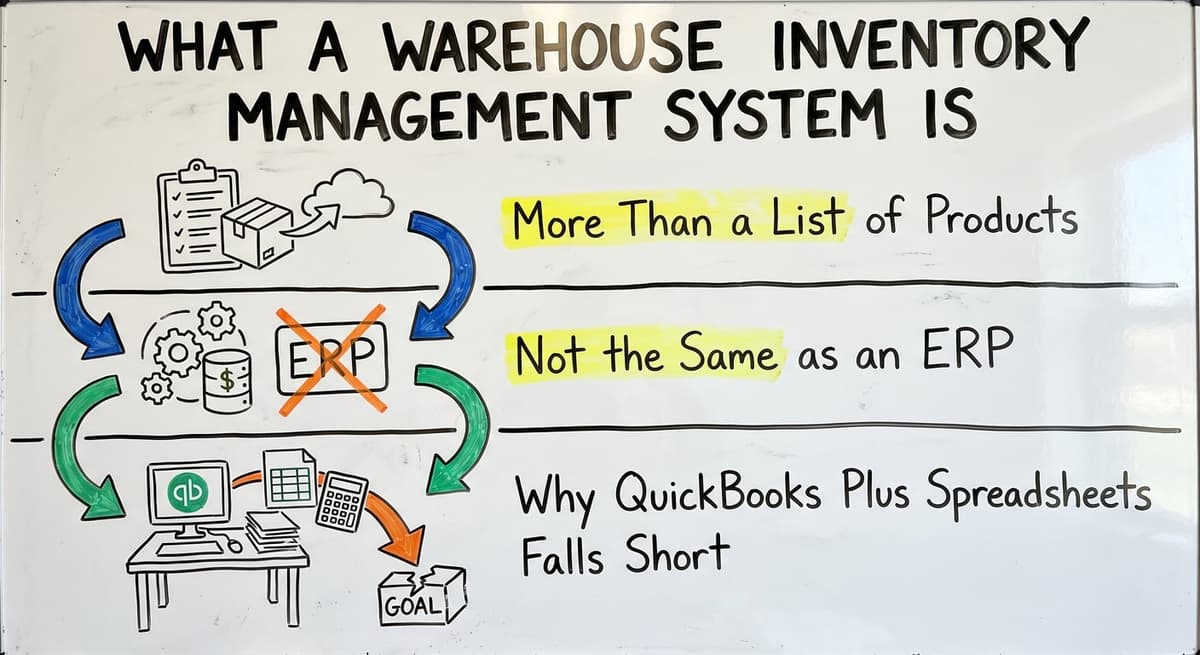
More Than a List of Products
A basic inventory list tells you what you carry. A warehouse inventory management system tells you how many units are on hand right now, the bin they sit in, when they arrived, and where they are headed. It updates automatically when stock moves. It does not require someone to manually change a number in a spreadsheet. That is the core difference.
Not the Same as an ERP
A full ERP (enterprise resource planning system) handles accounting, HR, purchasing, manufacturing, and much more. A warehouse inventory management system, or WMS, focuses on the warehouse side. It can connect to your accounting software, but it does not replace it.
Many small warehouses do not need an ERP. They need a focused tool that handles inventory control and warehouse operations well.
Why Your Accounting Software Plus Spreadsheets Falls Short
General ledger software is built for accounting, not warehouse operations. It can hold a product list and basic stock quantities, yet it will not track bin locations, guide a pick-pack-ship workflow, or update stock in real time as items move.
Spreadsheets fill the gaps for a while, and then volume breaks them. Errors creep in. Multiple versions circulate. Nobody is quite sure which number is right. A proper warehouse inventory management system replaces that patchwork with one reliable source of truth.
Would you rather have it built around your operation?
The first look is free. If you would rather not compare products, describe how your operation already works and we build the system around it.
No build cost. You see it running on your own process first, and the monthly subscription starts only once it is live.
Book a callCore Functions Every Warehouse Inventory Management System Should Handle
A solid WMS is not complicated, but the 6 basics below are non-negotiable. Here are the core functions to expect, and what each one actually means in practice.
The obligation behind all of this is not optional. IRS Publication 538 states: “To figure taxable income, you must value your inventory at the beginning and end of each tax year.” A stock figure nobody trusts makes that number a guess.
The cost of an error, in numbers
Put numbers on the errors and it gets clearer. 200 orders a day at a 2 percent mispick rate is 4 wrong shipments a day and roughly 1,000 orders a year going out wrong.
Cutting that to 0.5 percent leaves 250 orders a year: 750 fewer apologies.
Put numbers on the errors and it gets clearer. At 200 orders a day with a 2% mispick rate, that is 4 wrong shipments daily and about 1,000 a year.
At $18 each in return freight and repick labour, the errors alone cost $18,000 a year before anyone counts the lost customers.
Reviewed August 2026. Each figure comes from the assumptions stated beside it, so you can substitute your own and the arithmetic still holds.
Receiving, Put-Away, and Real-Time Stock Tracking
Real-time inventory means the system knows exactly how much of each SKU is on hand at any moment. When a shipment arrives, the receiving function logs each item and records where it is being stored. That is put-away.
Bin location tracking tells your team exactly where to find a product later, shelf 3B or zone 4 in the back corner. This eliminates the "who moved it" problem that slows down every warehouse running on memory and paper.
Pick, Pack, and Ship
A pick list is what the system creates when an order comes in: it tells workers exactly what to grab and where to find it. As items are picked, stock levels update automatically.
Pack and ship steps are logged the same way. This keeps fulfillment accurate and gives you a clear record of what left the building and when. Barcode scanning is part of this workflow, confirming each item before it moves to the next step.
Stock Adjustments and Cycle Counts
No inventory system stays perfectly accurate on its own. Products get damaged. Counts drift. A good warehouse inventory management system makes it easy to run cycle counts: rolling partial counts that check accuracy without shutting down operations.
Stock adjustments can be made and logged with a reason code, so there is a clear record of every correction. As OSHA notes on its warehousing resource page, organized storage and clear location systems are foundational to safe and efficient warehouse operations.
Reorder Alerts and Low-Stock Triggers
Reorder alerts are automatic notifications that fire when a product drops below a set threshold. This is one of the most practical functions in any warehouse inventory management system. Instead of discovering a stockout when a customer calls, the system warns you in advance.
You set the minimum stock level for each SKU, and the system does the watching. That alone saves significant time and prevents the revenue loss that comes from running out of fast-moving items.

How a Warehouse Inventory Management System Connects to Your Other Tools
One of the biggest fears small warehouse operators have is that adopting a new system means replacing everything they already use. In most cases, that is not true.
The Accounting Integration Question
Most small warehouses are on a standard bookkeeping program for accounting. A good warehouse inventory management system works alongside that program rather than replacing it. The bookkeeping tool keeps doing what it does well: invoicing, payroll, financial reporting. The WMS handles the warehouse side.
The two systems share data through an integration, so transactions flow between them without manual entry.
Linking accounting software for wholesale and distribution operations is one of the most common connection points small warehouses ask about, and it is a solved problem for most modern WMS platforms.
The Manual Entry Problem
Here is how many small warehouses currently operate: orders come in by email, stock is tracked in a spreadsheet, and someone manually updates the accounting system at the end of the day. That process works until the day something is missed. One missed entry, one outdated spreadsheet, and the numbers are off.
A connected warehouse inventory management system pulls order data automatically, updates stock levels as items move, and pushes the financial summary to the accounting system without anyone typing the same number twice.
Replacing spreadsheets with operational software is not about adding complexity. It is about removing the manual steps that cause errors.
Other Common Integration Points
Beyond the accounting software, there are 4 connections most operations benefit from:
- Shipping carriers, so labels print automatically and tracking numbers post back to the order
- Customer order portals or ecommerce platforms, so orders flow in without manual entry
- Purchasing systems, so reorder triggers can generate purchase orders directly
Connecting these tools does not require replacing your existing setup. It requires a system that is built to talk to the tools you already use.
The comparison is easier when one option is built for you
Choosing warehouse software is easier when one option follows your operation. We do it the other way round, and the first look costs nothing.
Book a callSigns Your Current Setup Is Holding the Warehouse Back
Most warehouse operators know something is wrong before they can name it. Here are the signs that come up most often.
Time and Accuracy Problems
If your team spends hours each week updating spreadsheets by hand, that time is coming from somewhere. It comes from checking and rechecking numbers because nobody fully trusts the count.
Frequent stockouts or overstock situations are a direct result of counts that are never quite accurate. When the spreadsheet says you have 40 units but the shelf says 12, you have a problem that a warehouse inventory management system solves at the source.
Shipping Errors and No Single Source of Truth
Shipping errors happen when workers pick from outdated records. A customer gets the wrong item or the wrong quantity because the pick list did not reflect the most current stock. The deeper problem is that different people have different numbers for the same SKU.
The warehouse manager has one count, the sales team has another, and the accounting software has a third. There is no single source of truth. That is exactly what a proper inventory tracking system provides.
Onboarding and Visibility Gaps
When your inventory system lives in someone's head or across a maze of files, new hires take 3 to 6 weeks to get up to speed. And when that person leaves, the knowledge goes with them.
A warehouse inventory management system makes the operation legible to anyone on the team. It also means you can answer basic questions quickly: How much do we have? Where is it? When did it arrive? If those questions take more than a minute to answer, the current setup is holding you back.

Types of Warehouse Inventory Management Systems
Not every WMS is built for the same kind of operation. Understanding the main types helps you figure out which one fits.
Off-the-Shelf and Enterprise Platforms
Off-the-shelf warehouse management software is packaged for a general warehouse audience. It is fast to start and often affordable. The tradeoff is that you may need to change how your warehouse operates to fit the software's assumptions.
Enterprise WMS platforms are powerful and feature-rich, but they target large operations with dedicated IT teams and implementation budgets that most small warehouses do not have. They also take months to implement and require significant process migration.
| Type | Best For | Tradeoff |
|---|---|---|
| Off-the-shelf WMS | General workflows, fast start | May require process changes |
| Enterprise WMS | Large, complex operations | Expensive, long implementation |
| Custom-built WMS | Unique or specific workflows | Longer to build, no migration needed |
| Cloud-based | Small teams, remote access | Requires internet reliability |
| On-premise | High security needs, no cloud | Higher upfront IT cost |
Custom-Built Warehouse Software
Custom warehouse software for small distributors is built around how a specific warehouse already operates.
There is no process migration: the system matches your workflow, not the other way around. It takes longer to build than installing an off-the-shelf product, yet it will not require the team to relearn how they work.
For operations with unique receiving processes, specialized products, or non-standard fulfillment workflows, custom is the more practical long-term choice.
Cloud vs. On-Premise
Cloud-based systems are the ones that run through a web browser and store data on remote servers. Your team can access them from anywhere with an internet connection. On-premise systems run on servers you own and manage.
For most small warehouses, cloud-based is simpler and cheaper to maintain. The right choice depends on your internet reliability, your IT resources, and whether your industry has specific data security requirements.
What does it look like running on your own process?
The first thing you see is it running on your own process, at no build cost. The subscription starts once the system is live and doing the job, not before.
Book a callWhat to Look for When Choosing a Warehouse Inventory Management System
Choosing the right system comes down to fit, not features. Here is what actually matters.
Workflow Fit and Your Accounting Software Compatibility
The most important question is whether the system matches how your warehouse actually operates. Does it handle your receiving process? Does it support your pick-pack-ship workflow? Does it track the location types you use?
A system that requires you to overhaul your operation to fit the software is a risk. Also confirm the system syncs cleanly with your accounting software before committing, so you do not end up with the same double-entry problem you started with.
Ease of Use and Scalability
Warehouse staff use the system every day. If it is confusing or slow, they will work around it, and the data will stop being reliable.
Look for a system that is straightforward for the people doing the physical work, not just the manager reviewing reports.
Also consider scalability. A good warehouse inventory management system should handle growth without forcing a full re-implementation. Fulfillment center software for growing operations should be able to add users, locations, and SKUs without requiring a new platform.
Support, Implementation, and Total Cost
Total cost of ownership is more than the monthly license fee. Factor in:
- Setup and data migration
- Staff training
- Ongoing support
- Any hardware like barcode scanners
Also ask who helps when something breaks or the business changes. A ticket queue that takes days to respond is a real operational risk for a small team.
Local or accessible support from someone who knows your setup is worth paying for. Wholesale distribution software built around your workflow should come with implementation support, not just a user manual.

How Implementation Works for a Small or Mid-Size Warehouse
The fear of a long, expensive implementation is legitimate. Large ERP rollouts can take six months or more and still fail. But a focused warehouse inventory management system for a small operation does not work that way.
Discovery, Configuration, and Data Migration
A warehouse management system implementation reasonably starts with discovery: understanding how the warehouse currently operates, where the biggest pain points are, and what the system needs to do on day one.
Then comes configuration or build, depending on whether you are using off-the-shelf or custom warehouse software. Data migration means moving your existing product list, stock counts, and location data into the new system. A good implementation partner does this with you, not to you.
A Leaner Approach to Going Live
For a warehouse with 5 to 50 staff, a six-month enterprise rollout is not necessary and not appropriate. A leaner approach starts with the parts of the operation that cause the most pain, gets those working reliably, and then expands.
If receiving and put-away are the biggest problems, start there. Get real-time inventory and bin location tracking working first. Add pick-pack-ship workflow once the team is comfortable. This reduces disruption and builds confidence in the system before adding complexity.
What to Expect After Go-Live
Some disruption during implementation is normal. Staff will have questions. A few processes will need adjustment. That is not a sign that something is wrong. It is part of any real change. The goal is to keep that disruption short and manageable.
A good implementation partner stays involved after go-live to fix issues quickly and help the team get comfortable. Expect a few weeks of adjustment, not months of chaos. After that, the system should make the operation faster and more accurate than it was before.
Getting Started With a Warehouse Inventory Management System
Before talking to any vendor or partner, it helps to know your own operation clearly.
Know Your Workflow and Your Constraints
Before choosing a warehouse management system, document what actually happens in your warehouse today. What happens when a shipment arrives? How is a pick list created? How are stock adjustments recorded? This does not need to be formal.
A simple written description of each major step is enough. It will help any implementation partner understand your operation quickly and tell you honestly whether their system fits.
Also know your constraints: your budget, your timeline, how much change the team can absorb at once, and which integrations are non-negotiable.
Take the Next Step
If your current setup is causing daily frustration, the answer is not a bigger spreadsheet. It is a system built for what a warehouse actually does.
Describe your operation and get a straight answer about what would actually help. No pressure, no oversell. Just a practical conversation about whether a warehouse inventory management system makes sense for your situation and what that would look like.
Frequently asked questions
Frequently asked questions
What is the best warehouse inventory management system?
There is no single best system. The right warehouse inventory management system depends on the size of your operation, how unique your workflow is, which accounting or business tools you already rely on, and how much disruption you can manage during implementation.
Off-the-shelf inventory platforms work well for general workflows. Custom-built systems are a better fit when your process does not match standard software assumptions. Focus on fit over features.
What are the four types of WMS?
The four common types are standalone WMS (focused only on warehouse functions), ERP-integrated WMS (built into a larger business system), cloud-based WMS (accessed through a browser, no local servers), and supply chain module WMS (part of a broader supply chain platform).
For small and mid-size warehouses, standalone or cloud-based systems are the most practical starting point.
Do I need to replace your accounting software to use a warehouse inventory management system?
No. A good warehouse inventory management system works alongside the accounting platform you use, not instead of it. That program handles accounting.
The WMS handles inventory tracking, receiving, and fulfillment. The two systems share data through an integration so you are not entering the same information twice.
What are the top 10 WMS systems?
Commonly referenced warehouse management options range from simple small-business inventory tools to large enterprise supply chain suites used by major distributors.
The enterprise platforms in that range target large operations with dedicated IT teams. Smaller warehouses are better served by focused tools or custom-built systems that match their actual workflow.
What are the top 5 inventory management software?
Frequently cited options for small and mid-size operations range from lightweight inventory apps to fuller warehouse suites, each with different strengths.
Some are strong on core warehouse functions, others are simply easier for smaller teams to pick up, and a few integrate tightly with a particular accounting package. The right choice depends on your workflow and integration needs, not a ranked list.
How long does it take to implement a warehouse inventory management system for a small operation?
For a warehouse with 5 to 50 staff, a focused implementation takes a few weeks to a couple of months, not six months.
The timeline depends on how complex the workflow is, how clean the existing data is, and how much configuration the system requires. Starting with the highest-pain areas first keeps the timeline short and the disruption manageable.
What happens to my existing data when I move to a new system?
Your existing product list, stock counts, and location data get migrated into the new system during implementation. A good implementation partner handles this process with you and checks the data for accuracy before go-live.
You do not lose your history. In most cases, historical records stay in your existing accounting system even as new transactions flow through the WMS.
Do I need barcode scanners or special hardware to use a warehouse inventory management system?
Not always. Many systems work without barcode scanning, especially at the start. Barcode scanning speeds up receiving and pick-pack-ship workflows and reduces manual entry errors, so it is worth adding when the operation is ready.
Some cloud-based systems work on standard tablets or smartphones, which lowers the hardware cost significantly.
What is the difference between inventory management software and a WMS?
Inventory management software mainly tracks what products you carry and basic stock counts, similar to a detailed list.
A warehouse inventory management system goes further, showing how many units are on hand right now, which bin they sit in, when they arrived, and where they are headed, updating automatically as stock moves. It is also different from a full ERP, since it focuses specifically on warehouse operations rather than accounting, HR, or manufacturing.
What are the best warehouse inventory management systems for small businesses?
The best option for a small business is one that fits how the operation already works rather than forcing a rigid process onto it.
Look for a system that handles receiving, put-away, real-time stock tracking, pick-pack-ship, cycle counts, and reorder alerts reliably, while connecting easily to accounting software, shipping carriers, and order channels. Simplicity and a smooth fit with existing tools matter more than having every possible feature.
How much does warehouse inventory management software cost?
Costs vary depending on the provider, the size of the operation, and how the system is built or configured.
Some approaches involve a build cost before anything is running, while others let you see the system working on your own process first and only begin charging a subscription once it goes live.
Because pricing structures differ so much, it is best to request a quote based on your specific operation rather than relying on a general figure.
What features should a warehouse inventory system include?
A solid system should include receiving and put-away with bin location tracking, real-time stock visibility, and a pick-pack-ship workflow, supported by barcode scanning for accuracy. It should also support cycle counts and stock adjustments with reason codes to keep records clean, plus reorder alerts that trigger automatically when stock drops below a set threshold.
Integration with accounting software, shipping carriers, and order channels is also important so data flows without manual re-entry.
What is in a free first look?
A 30 minute call, your operation mapped, and a clear picture of what we would build. No obligation and nothing to install.
Book a callRelated guides
The rest of this guide, for the parts of the job this page does not cover.
Guides
- Warehouse Inventory Management Systems
- Warehouse Management System Top 10
- Software for Warehouse Management System
- Small Business Warehouse Management System
- Warehouse Management System Types
- Warehouse Management System Examples
- Warehouse Management System Implementation
- Cloud Warehouse Management System
- Warehouse Stock Management System
Common questions
- What Are the Benefits of Warehouse Management System
- What is the Point of Warehouse Management System
- How to Choose a Warehouse Management System
- What is Asn in Warehouse Management System
- How to Create a Warehouse Management System
- What is a Warehouse Management System
- Which Warehouse Management System Would a Jeweler Most Likely Use
- How to Build a Warehouse Management System
- What is a Warehouse Management System Used For
- Warehouse Management System vs Warehouse Control System
- Meaning of Warehouse Management System
- Definition of Warehouse Management System
- Warehouse Management System Comparison
- What is the Purpose of a Warehouse Management System
- What is a Warehouse Management System Pdf