

Inventory Tracking Systems For Small Businesses
An inventory tracking system tells you what stock you have, where it sits, and when to reorder. Small businesses use these systems to stop losing sales to stockouts and stop tying up cash in overstock. You do not need enterprise software. A good system plugs into your existing operation and keeps QuickBooks exactly where it belongs.
Published 1 July 2026. Reviewed and updated 15 September 2026.
Reviewed August 2026. Each figure comes from the assumptions stated beside it, so you can substitute your own and the arithmetic still holds.
Reviewed and updated 15 September 2026.
Book a callWhat Is an Inventory Tracking System and How Does It Work?
An inventory tracking system is a tool that logs every item coming in and going out of your business. Think of it as a live count that updates itself.
When a shipment arrives, the system adds those units. When an order ships, the system removes them. Everyone on your team sees the same number at the same time.
Manual methods like printed sheets, Excel tabs, and sticky notes do the same job in theory. In practice, they fall behind fast.
One missed entry and your count is wrong. One wrong count and you either oversell or over-order.
This article is not about big ERP software that takes 18 months to roll out. It is about practical tools built for small teams running real warehouses.
Would you rather have it built around your operation?
The first look is free. If you would rather not compare products, describe how your operation already works and we build the system around it.
No build cost. You see it running on your own process first, and the monthly subscription starts only once it is live.
Book a callWhy Do Small Businesses Need Inventory Tracking?
Stockouts cost you sales, and overstock ties up cash you could spend elsewhere; together they are 20 to 30 percent of stock value in most small businesses. Both problems hurt small businesses harder than large ones because small teams have less room to absorb the damage.
Manual counting takes time. It also creates errors. A person re-keying numbers from a paper sheet into a spreadsheet will make mistakes. That is not a criticism. It is just what happens when humans do repetitive data entry at speed.
The IRS adds another reason to keep accurate counts. IRS Publication 538 states: "To figure taxable income, you must value your inventory at the beginning and end of each tax year." Accurate stock tracking is not optional. It is a legal requirement.
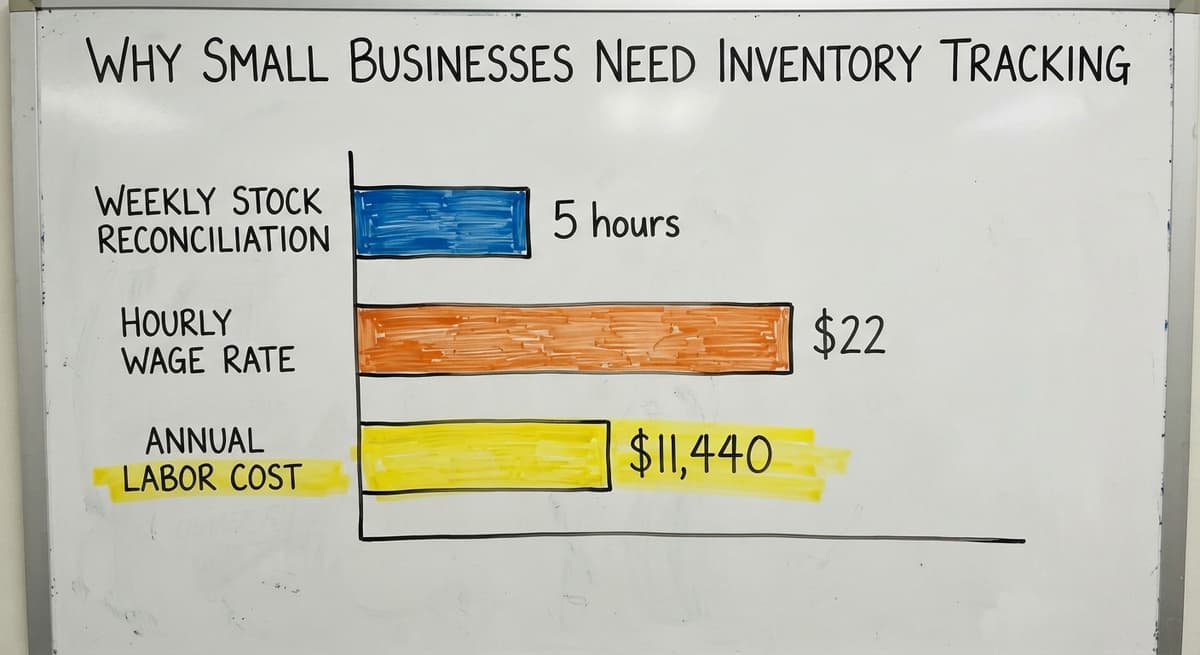
The cost of doing this manually adds up fast. If 2 people spend 5 hours a week reconciling stock counts at $22 an hour, that is $11,440 a year spent on a task a system could handle automatically.
The US Bureau of Labor Statistics puts the median wage for stock clerks and order fillers near that figure, which makes the arithmetic easy to check.
According to GS1, the global standards body behind barcodes, "GS1 standards are the most widely used supply chain standards in the world," and the barcode system those standards define is the foundation of any scan-based stock count.
Are These Signs That Your Current System Is Holding You Back?
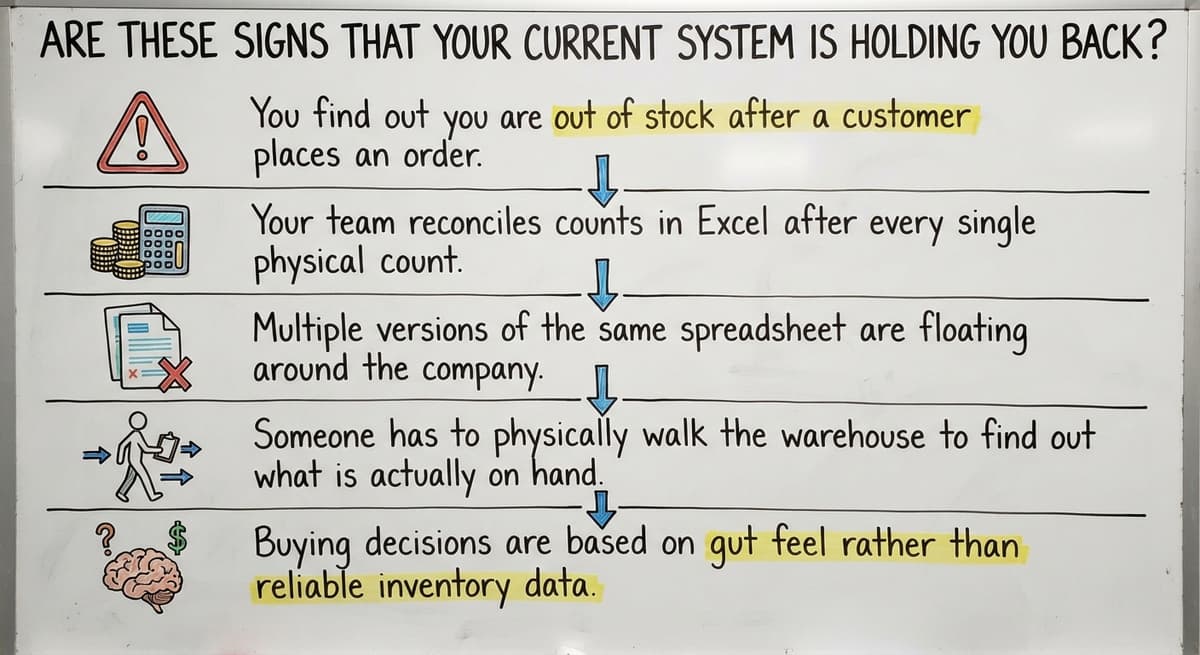
Yes, and most small business owners recognise at least 3 of them before they start looking for a solution.
- You find out you are out of stock after a customer has already ordered.
- Your team reconciles counts in Excel after every single shipment.
- Multiple versions of the same spreadsheet are floating around in email threads.
- Someone has to physically walk the warehouse to answer a stock question.
- Buying decisions are based on gut feel rather than real numbers.
The moment you find out about a stockout from a customer, your system has already failed. That is the clearest sign that small business inventory management needs an upgrade.
Replacing Excel workflows with custom software does not mean starting over. It means replacing the specific steps that cause errors, and leaving everything else alone.
How Do Inventory Tracking Systems Work?
The mechanics are straightforward. Items are logged when they arrive and logged again when they leave. A central record updates in real time so every person on your team sees the same numbers.
Alerts fire automatically when stock drops below a level you set. That level is called a reorder point: the quantity at which you need to place a new order to avoid running out before the next shipment arrives.
Nothing in that process requires a warehouse full of servers or a six-figure software budget.
Modern inventory tracking for small businesses runs on a tablet, a barcode scanner, and a cloud database your team can access from anywhere.
Core Features Every Small Business Should Look For
Not every inventory system is built the same way. Some target retail shops.
Others target warehouses. Before you buy anything, check that the tool you are looking at covers these basics.
Real-time stock levels visible to the whole team are the starting point. If two people can see different numbers at the same time, the system is not working.
Receiving and picking workflows should match how your warehouse actually runs. A system that forces your team to change their process to fit the software is a system your team will stop using.
Reorder point alerts and low-stock notifications mean you stop relying on someone remembering to check. The system tells you when to act.
Barcode and Scanning Support
Barcode scanning is simple in practice: scan an item when it comes in, scan it again when it goes out. The system does the arithmetic. Your team does not re-key anything.
Scanners reduce human entry errors significantly because the data comes from the barcode, not from a person reading a label and typing what they see.
A barcode inventory system is the single fastest way to improve count accuracy in a small warehouse.
Mobile scanning is now affordable for small operations. A basic handheld scanner costs less than a day of staff time spent fixing a bad count.
Location and Bin Tracking
Bin location tracking means every item has a recorded home: a shelf number, a bin label, a row and column.
When a picker needs an item, the system tells them exactly where to go.
Knowing which shelf holds an item saves pick time, even in a small warehouse with a few dozen SKUs.
The 'where did we put it' problem disappears when every item has a recorded location.
Location tracking also makes receiving faster. New stock goes to the right place the first time because the system tells the receiver where it belongs.
Is the comparison easier when one option is built for you?
Yes. Off-the-shelf means fitting your process to the software, and custom is the other way round. The first look costs nothing.
Book a callReporting and Stock History
Good reports are the 3 that show which items move fast, which sit for months, and what each is worth. That information shapes your buying decisions and helps you plan for seasonal demand.
Historical data is where small businesses gain a real edge over gut-feel buying.
You can see that you sell 3 times as many units of one SKU in October as you do in March, and order accordingly.
Reports should be readable without a data analyst. If your team needs training to understand a chart, the chart is wrong.
How Does an Inventory Tracking System Connect to QuickBooks?
Most small businesses already use QuickBooks for accounting, and the right system is one that keeps it there.
A good inventory system feeds data to QuickBooks rather than replacing it. One record updates both systems automatically, so your team never enters the same information twice.
QuickBooks integration for wholesale distributors works by pushing stock values, cost of goods, and purchase order data directly into the accounting layer.
Your books stay accurate without anyone re-keying numbers at the end of the week.
The short answer to the question is: yes, you can keep QuickBooks. The inventory system sits alongside it, not on top of it.

When Are QuickBooks Inventory Features Not Enough?
QuickBooks is enough for basic item counts in a small retail shop with 1 location. It struggles with warehouse workflows because it was built for accounting, not for picking, packing, or receiving.
When order volume grows, QuickBooks inventory becomes a bottleneck. It cannot tell a picker which bin to go to. It does not manage receiving against a purchase order line by line. It does not fire a reorder alert when stock drops below a threshold.
None of that is a criticism of QuickBooks. It is a great accounting tool. Warehouse inventory tracking just requires a different kind of tool, one built for operations rather than finance.
Off-the-Shelf Software Versus a Custom-Built System
Off-the-shelf inventory software is built for a generic business. It covers the most common use cases and charges a monthly fee. That works well for businesses whose operations match the template.
Custom inventory software is built around how your operation already runs. Your team does not change how they think about work. The system fits the business. The business does not fit the system.
| Factor | Off-the-shelf | Custom-built |
|---|---|---|
| Setup time | Days to weeks | Weeks to months |
| Fit to your workflow | Partial | Exact |
| Upfront cost | Low | Moderate |
| Ongoing cost | Monthly subscription | Lower long-term |
| QuickBooks connection | Available | Built to spec |
| Flexibility | Limited | High |
Custom does not always mean expensive or slow to build. A focused build that replaces one painful manual process can be live in a few weeks.
What does it look like running on your own process?
The first thing you see is it running on your own process, at no build cost. The subscription starts once it is live and doing the job, not before.
Book a callWhat Makes a Custom Inventory System Different?
A custom system is one that replaces only the manual parts that cause pain. It does not touch the rest of your operation.
Your team keeps doing what they know. The system handles the parts that used to require a person with a spreadsheet.
Custom operational software for small businesses works best when it is scoped tightly at the start. One problem, solved well, builds more trust than a full system rolled out all at once.
The team adopts it faster because it looks like their work, not like someone else's idea of their work.

Why Do Small Businesses Fear Inventory Software Implementations?
The fear is real and it is earned. Many small business owners have watched a software rollout drag on for months, cost twice the budget, and leave the team using spreadsheets anyway because the new system was too hard to learn.
Big ERP rollouts created that reputation. They target large organisations with dedicated IT teams and months of runway. A small warehouse does not have either.
The fear of disrupting daily operations is the most common reason businesses delay. They know the current system is painful. They are not sure the new one will be less painful during the changeover.
That fear is worth taking seriously. Any vendor who dismisses it is not listening.
How Do You Avoid a Long and Painful Implementation?
Start with the single biggest pain point, not the whole operation. If the biggest problem is that your team finds out about stockouts after customers order, fix that first. Prove it works. Then expand.
- The first step is mapping your current receiving and picking steps on paper before you talk to any vendor.
- Identify the one step that causes the most errors or delays.
- Ask vendors to show you how they would fix that specific step, not how their full platform works.
- Run a short pilot with real data before committing to a full rollout.
- Get your team involved in testing before go-live, not after.
A partner who builds around your process reduces risk more than a long feature list does. Short build cycles with real feedback from your team mean problems surface early, when they are cheap to fix.

Is Inventory Tracking for Wholesale Distributors Different From Standard Warehouse Software?
Yes. Distributors manage high SKU counts across multiple suppliers, and the stakes on each transaction are higher.
Accurate receiving and purchase order matching is critical because an error at the receiving dock ripples out to every customer order that depends on that stock.
Inventory management for distributors needs to handle purchase orders line by line, match received quantities against what was ordered, and flag discrepancies before stock is put away. A generic retail inventory tool does not do that well.
The US Census Bureau's Monthly Wholesale Trade data tracks national inventory-to-sales ratios for wholesale firms, and the numbers show how tightly distributors need to manage stock relative to sales volume.
Errors in that environment damage customer relationships in ways that are hard to repair.
Small business warehouse management software built for distribution handles these workflows natively. A retail-focused tool will need workarounds that create the same problems you are trying to solve.
Inventory Tracking for Fulfilment Centres and Warehouses
Fulfilment centre software solutions need to prioritise pick accuracy and speed above almost everything else. A wrong pick means a wrong shipment.
A wrong shipment means a return, a complaint, and a customer who may not come back.
Bin and location tracking becomes essential at fulfilment scale. When you are picking hundreds of orders a day, a picker who has to search for an item costs you time on every single order.
Real-time inventory tracking prevents shipping errors by ensuring the system and the physical shelf agree before an order is confirmed.
If the system says you have 12 units and the shelf has 8, you want to know before the order ships, not after.
The US Federal Trade Commission's Mail, Internet, or Telephone Order Merchandise Rule requires businesses to ship when they say they will or notify customers promptly. Accurate stock counts are what make that promise possible to keep.

How Do You Choose the Right Inventory Tracking System?
Start by listing your top 3 daily pain points before you look at any software. Be specific. "We find out about stockouts too late" is useful. "Our inventory is bad" is not.
Ask every vendor how their system connects to QuickBooks before you ask about anything else. If the answer involves double entry or manual exports, keep looking.
Evaluate the implementation plan, not just the feature list. A system with every feature you need but a 9-month rollout is not the right answer for a small team.
Questions to Ask Any Inventory Software Vendor
- How long does a rollout take for a business our size?
- Does it connect to QuickBooks without double entry?
- Who supports us after go-live and how fast do they respond?
- Can we start with one part of the operation and expand later?
- Will you show us a working demo with data that looks like ours?
What is in a free first look?
A 30 minute call, your operation mapped, and a clear picture of what we would build. No obligation and nothing to install.
Book a callRed Flags to Watch For
- Vendors who push a full migration before they understand your workflow.
- Long contracts with no pilot or proof-of-concept phase.
- Systems that require you to abandon QuickBooks entirely.
- Feature lists that cover everything but case studies that cover nothing like your business.
The right vendor asks more questions than they answer in the first conversation.
What Does Good Inventory Data Do for a Small Business?
Accurate stock counts are worth fewer emergency orders and 10 to 20 percent lower carrying costs.
Your team spends less time hunting for items and more time fulfilling orders. Owners can make buying decisions with real numbers instead of gut feel.
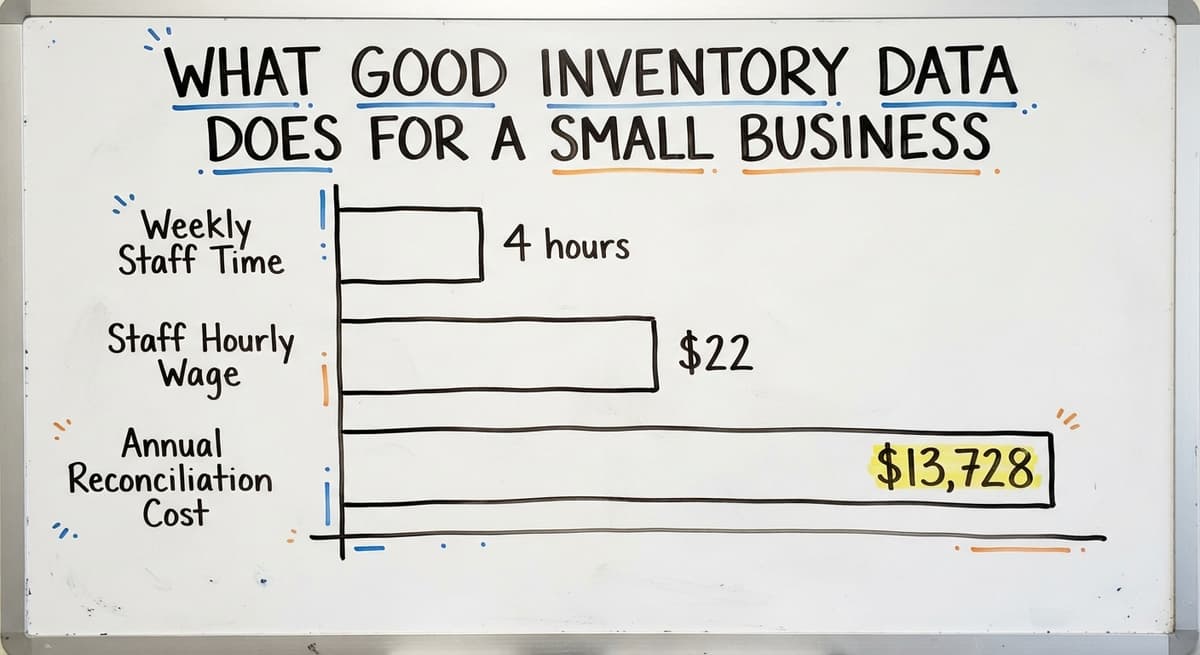
Consider the difference in a small warehouse where 3 staff members each spend 4 hours a week on manual stock reconciliation.
At $22 an hour, that is $13,728 a year spent on a task that a real-time inventory tracking system handles automatically. That number does not include the cost of the errors those manual counts produce.
Stock tracking also protects you at tax time. The IRS requires inventory to be valued accurately at year end.
A system that has been logging every movement gives you that number without a physical count that takes two days and pulls your whole team off other work.
The NIST Manufacturing Extension Partnership provides vendor-neutral guidance on supply chain and inventory processes, and their materials consistently point to accurate real-time data as the foundation of a well-run operation. That holds for small businesses just as much as it does for manufacturers.

What Mistakes Do Small Businesses Make When Buying Inventory Software?
The most common mistake is waiting until the pain is severe. By then, the team is exhausted, the data is a mess, and the pressure to fix everything at once leads to a bad buying decision.
- Buying a system built for retail when you run a warehouse.
- Skipping training and then blaming the software when the team does not adopt it.
- Choosing a vendor based on price alone without checking the implementation plan.
- Trying to fix every problem at once instead of starting with the worst one.
The second most common mistake is buying the wrong category of tool. Retail inventory software tracks items by SKU and handles point-of-sale transactions.
Warehouse inventory tracking handles bins, locations, pick workflows, and receiving against purchase orders. They are different tools for different jobs.
Skipping training is the fastest way to waste a software budget. A tool your team does not use is a tool that costs money and changes nothing.
How Do You Get Started Without Disrupting Operations?
Map your current receiving and picking steps on paper first. Do not rely on how you think it works. Watch it happen and write down what you see.
Identify which manual step causes the most errors or takes the most time. That is where you start. Not the whole system. One step.
Prove the value of fixing that one step before you expand. When your team sees that the new process is faster and more accurate than the old one, adoption follows naturally. You do not have to sell it. It sells itself.
Then expand the system one step at a time, always starting from the next biggest pain point. This approach keeps daily operations running throughout the process and gives your team time to adjust.

Next Steps for Small Businesses Ready to Improve Inventory Tracking
The key decision is whether off-the-shelf software fits your operation or whether a custom build makes more sense. If your workflows match what a standard tool expects, off-the-shelf is faster and cheaper to start.
If your operation has specific steps that standard tools cannot handle, a custom build saves more money over time.
QuickBooks stays in place either way. A good inventory tracking system for small businesses connects to QuickBooks and feeds it accurate data. It does not replace it.
If you are ready to talk through your specific operation, The Software Society builds custom workflow systems around how your business already runs. No long ERP rollout.
No forced migration. Just a focused build that fixes the parts that hurt, keeps what works, and connects to the tools your team already uses.
Start by writing down your 3 biggest inventory pain points. Then reach out and walk us through them. That conversation costs nothing and usually makes the path forward clear.
Frequently asked questions
Frequently asked questions
What is an inventory tracking system and how does it work?
An inventory tracking system logs every item that comes into and goes out of your business. It keeps a live count that updates in real time so your whole team sees the same stock numbers.
When stock drops below a level you set, the system sends an alert so you can reorder before you run out.
Can I keep using QuickBooks if I add an inventory tracking system?
Yes. A good inventory system connects to QuickBooks and feeds it accurate data automatically. Your accounting stays in QuickBooks.
The inventory system handles the warehouse side. One record updates both, so no one re-keys the same information twice.
How long does it take to implement an inventory tracking system?
The answer depends on the scope. Off-the-shelf tools can be set up in days to weeks. A custom build focused on one specific pain point can go live in a few weeks.
A full custom system covering receiving, picking, and reporting takes one to three months. Starting small and expanding reduces the risk and the timeline.
What features should a small business look for in inventory tracking software?
Look for real-time stock levels visible to your whole team, barcode scanning support, bin and location tracking, reorder point alerts, and a clean connection to QuickBooks.
Receiving and picking workflows should match how your warehouse actually runs, not force your team to change their process.
What is the difference between off-the-shelf and custom inventory tracking systems?
Off-the-shelf software is built for a generic business and works well if your operation matches the standard template. Custom inventory software is built around how your specific operation runs.
Custom systems cost more upfront but fit better, require less workaround, and tend to cost less over time because your team actually uses them.
Why do small businesses need an inventory tracking system?
Stockouts cost sales and overstock ties up cash. Manual counting with spreadsheets creates errors and takes staff time that could go toward fulfilling orders.
The IRS also requires accurate inventory valuation at tax time. A tracking system solves all three problems and pays for itself quickly in reduced errors and staff hours.
How do I choose the right inventory tracking system for my business?
Start by listing your top 3 daily pain points before you look at any software. Ask every vendor how their system connects to QuickBooks and whether it avoids double entry.
Then evaluate the implementation plan carefully. A system with a nine-month rollout is not the right answer for a small team, no matter how good the feature list looks.
What mistakes do small businesses make when buying inventory software?
The most common mistakes are waiting too long to act, buying retail software for a warehouse operation, and skipping team training. Choosing a vendor based on price alone without checking the implementation plan is also a frequent problem.
Start with your biggest pain point, involve your team in testing, and make sure the vendor understands your workflow before you sign anything.
How much does small business inventory software cost?
Packaged tools run $50 to $300 a month, rising with users and locations.
A build scoped to one operation runs $8,000 to $25,000 once with $100 to $400 a month for hosting and support. Scanners add $150 to $400 per station.
How do I set up barcode scanning for my inventory?
Give every product a SKU and every shelf a location code, print Code 128 labels for both on a thermal printer, load the lists into the software, and run one full count scanning product and location together. From then on each receipt, move, and pick is a scan.
How do I track inventory across online channels and a physical store?
Hold the stock in one system with a location for the store and one for the online stock, let each channel sell from its own location, and sync the totals to each channel every few minutes. A sale anywhere then reduces the right count.
What is the best free inventory tracking system for a small business?
A hosted free tier for one user and a few hundred items, scanning with a phone camera.
The caps on users, locations, and orders are the product, so plan on a paid tier or a build at the second user or the first QuickBooks sync.
Not sure this is the right shape for your operation?
The call is free. Describe how the work runs today. We map it on a call and show you what it would look like built around that, before you spend anything.
Book a callRelated guides
The rest of this guide, for the parts of the job this page does not cover.
Guides
- Inventory Tracking Software for Small Business
- Simple Inventory System for Small Business
- Small Business Inventory Management System
- Inventory System for Small Business
- Inventory Control Software for Small Business
- Inventory Management Small Businesses
- Best Inventory Management Software for Small Businesses
- Inventory Sales Software Small Business
- Inventory Control for Small Business
- Small Business Inventory Management
- Small Business Stock Management Software
- Wms for Small Business
- Small Business Warehouse Management System
- Erp System for Small Businesses
- Warehouse Management System for Small Business
- Accounting and Inventory Software for Small Business
- Free Inventory Management Software for Small Business
- Warehouse Inventory Tracking System
Common questions
- How to Keep Track of Inventory Small Business
- How to Organize Inventory for Small Business
- What is the Best Inventory Management Software for Small Business
- Why is Inventory Management Important for Small Businesses
- How to Manage Inventory for Small Business
- What is the Best Inventory Management System for Small Businesses?