


How To Keep Track Of Inventory On Clover
Yes. To keep track of inventory on Clover, add each item in the Inventory app, turn on stock tracking, and enter a counted starting quantity. Each sale then lowers the count. Add received stock the same day, and count on a set schedule to fix drift.
Reviewed October 2026. Menus and plan features change, so check them against your own screens.
Book a callCan You Keep Track of Inventory on Clover?
Yes. Clover inventory has built-in tools for items, stock counts and categories. You can run all of it from the device at the counter or from the web dashboard.
The tools work best for counter sales. Items sell one at a time, and each sale lowers the count. Steps follow below for setup, counts, receiving and low stock. Later, the article covers the limits. Some teams outgrow a point-of-sale tool, and that is normal.
We build it for your operation, and the first look is free
If you would rather not compare products, describe how your operation already works and we build the system around it.
No build cost. You see it running on your own process first, and the monthly subscription starts only once it is live.
Book a callWhat You Need Before You Start
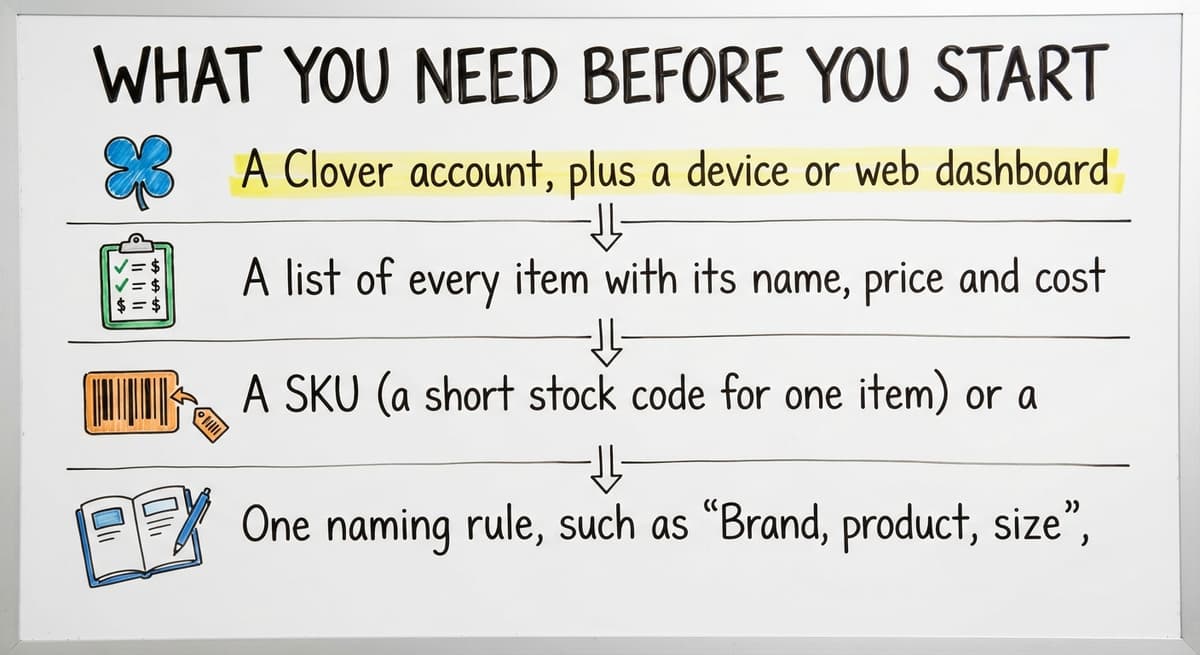
Clover inventory tracking is only as clean as the data you feed it. Gather four things first, so you do not fix mistakes later:
- A Clover account, plus a device or web dashboard login.
- A list of every item with its name, price and cost.
- A SKU (a short stock code for one item) or a barcode for each item.
- One naming rule, such as "Brand, product, size", used for every item.
Barcodes matter if you scan. GS1 is known for its "global standards", and its barcode standards page explains the codes behind most scan-based counts. Menus and plan features can differ, so check the current Clover screens before you begin.
A clear list and one naming rule save hours of cleanup later.
How Do You Add Items to Clover Inventory?
You add items to Clover inventory in the Inventory app, either one at a time or in bulk from a spreadsheet file. Pick the method that fits the size of your catalog.
Add one item at a time
Open the Inventory app and choose to add an item. Enter these fields:
- Name, using your naming rule.
- Price, which is what the customer pays.
- Cost, which is what you paid. Cost lets reports show profit.
- SKU or code, so the item can be scanned or searched.
Import many items at once
For a large catalog, use the spreadsheet import. Fill in a file with one row per item. Upload it and check the result on screen. Keep the file as a backup copy. If an edit goes wrong, you can compare against it.
A saved spreadsheet turns a bad edit into a 5 minute repair.
How Do You Turn On Stock Counts for an Item?
You turn on stock counts by opening the item and switching on stock tracking. Then you type in the starting quantity. Do this for every item you want counted.
Count the shelf by hand before you type the number. A guess at the start becomes a wrong count forever. Once tracking is on, each sale lowers the count by the amount sold.
Here is the catch. An item without tracking turned on shows no count at all. It will still sell. Nothing warns you, and the shelf drains out of sight. After setup, open your item list and look for items with a blank count.
A tracked item with a true starting number is the base of every report that follows.
The comparison is easier when one option is built for you
Off-the-shelf means fitting your process to the software. We do it the other way round, and the first look costs nothing.
Book a call
How Do You Group Items With Categories and Variants?
You group items with categories to find them fast, and with variants or modifiers for sizes and options. A category is a folder, such as "Cleaning supplies". A variant is a version of one product, such as small, medium and large.
Keep one clear code per variant. If two variants share a code, sales post to the wrong count.
Here is a simple case. A shop sells paper towels by the case and by the single roll. Set them up as 2 items with 2 codes, such as TOWEL-CASE and TOWEL-ROLL. Decide how a case relates to rolls, and write that rule down. Otherwise a case sale will not lower the roll count.
One product with two pack sizes needs two codes and a written rule that links them.
How Do You Update Stock When New Product Arrives?
You update stock by adding the received quantity to the item count. Do it the day the product arrives. A delay means a sale can happen against a count that is too low or too high.
Follow these steps:
- Check the boxes against the buy order or packing slip.
- Count what is actually in the boxes, not what the slip says.
- Add the counted amount to each item in Clover.
- Note any short or damaged goods on the slip.
Assign one person to receiving updates. When 4 people can edit counts, no one can say who changed what. A written Warehouse receiving and cycle counting process keeps the steps the same every time.
One owner for receiving makes every later count easier to trust.

How Often Should You Count Your Stock?
Count your stock fully on a set schedule, and count fast movers every week. Pick a date you can keep, such as the first Monday of each quarter. The law backs the habit. IRS Publication 538 states: "To figure taxable income, you must value your inventory at the beginning and end of each tax year."
Between full counts, run cycle counts. A cycle count is a quick check of a small group of items. Choose items that sell fast or cost a lot. Weekly is a good start.
After each count, fix the difference in Clover right away. Write down why it happened:
- Damage.
- A miscount at receiving.
- A sale rung up under the wrong item.
- Theft or loss.
The reasons, over time, show you which habit to fix first.
How Do You Know When Stock Is Running Low?
You know stock is low by reviewing counts on a schedule and by using low-stock alerts or reports where your Clover plan offers them. Plans differ, so check what yours includes.
Alerts only help if you know your limit. Set a reorder point for each top item. A reorder point is the count at which you place a new order. Keep the rule easy: when the count hits this number, order more.
To pick the number, think about how long your supplier takes to ship. Add the units you sell in that time. Add a small cushion. Write the result on a sheet or in the item notes.
A reorder point turns a stock count from a number into a decision.
See it running on your own process first
No build cost. The subscription starts once it is live and doing the job, not before.
Book a call
Why Do My Clover Counts Not Match My Real Stock?
Counts drift when something happens on the shelf that Clover never hears about. Five habits cause most of the gaps:
- Skipping the starting count. The first number was a guess, so every later number is off.
- Selling untracked items. The item sells, but no count falls.
- Forgetting returns, damage or transfers. Stock leaves or returns with no entry.
- Many editors and no rules. Several people change counts and no one knows why.
- A second count that disagrees. An Excel file or a paper sheet says one thing and Clover says another.
Fix the drift in order. Recount a few items. Find which habit fits the gap. Then write one rule to stop it.
When two counts exist, neither one can be trusted.
When Clover Inventory Is Not Enough for a Warehouse
Clover is built for point-of-sale, so it fits a counter well. Warehouse work asks for more. That is a difference in purpose, not a flaw.
Wholesale is a large field. The US Census Bureau's Monthly Wholesale Trade data tracks national inventories, sales and the inventories-to-sales ratio for wholesale firms. Those firms carry stock for others to sell, and that takes more tracking.
Signs of strain
Watch for these:
- You need bin locations, so staff know which shelf holds a part.
- You track lots or batches, such as expiry dates.
- You create buy orders to suppliers.
- You pick and pack orders for shipping.
- You hold stock in more than 1 location.
Where the counts split
Teams in this spot often hold counts in their accounting software's inventory module, spreadsheets, printed sheets and email. Each holds a slightly different number. Staff then spend time making them agree.
When five places each hold a count, the work is no longer inventory. It is reconciling.
What Can You Do When Spreadsheets and Clover Stop Matching?
The first step is to pick one source of truth for counts. That means one place where the real number lives, and every other file reads from it or is retired.

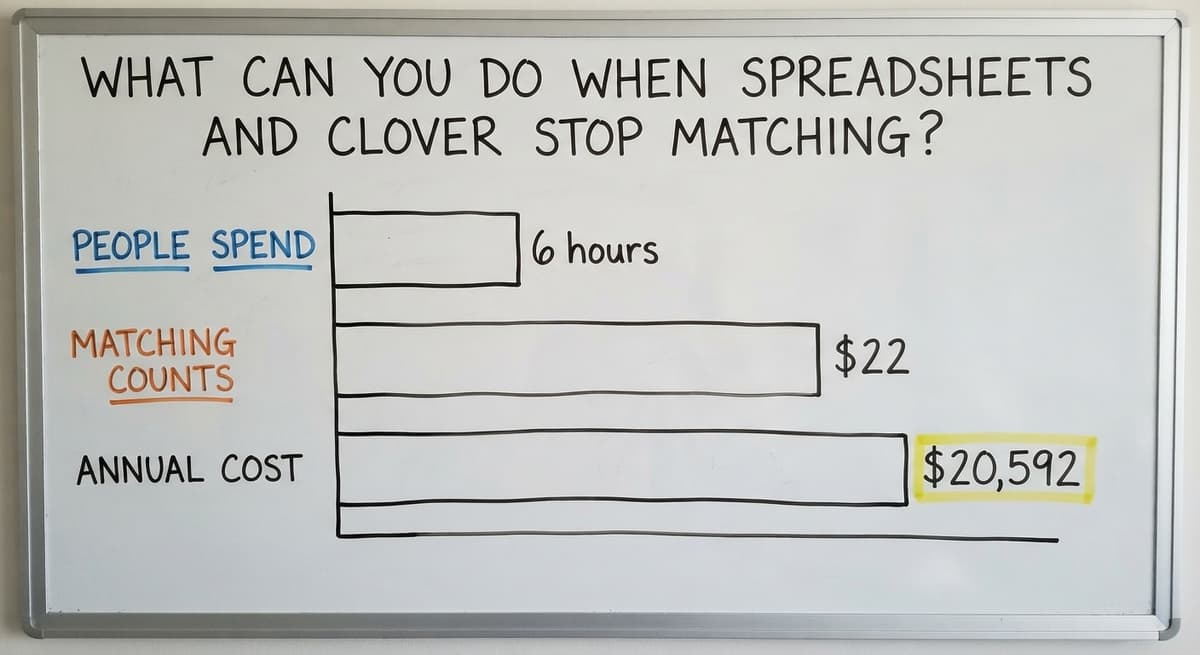
The cost of not doing this is easy to work out. Say 3 people spend 6 hours a week matching counts at $22 an hour. That is 3 x 6 x 22 x 52, or $20,592 a year. The US Bureau of Labor Statistics publishes pay data for stock clerks and order fillers if you want to use local wages instead.
One option is custom software built around how your team already works. It can keep your accounting software where it is useful. The goal is keeping your accounting software and replacing only the manual parts. This suits small teams and skips a big ERP or a long move. NIST's supply chain guidance is vendor-neutral and a good place to review process basics.
The Software Society is local to Columbus, Ohio. The same team builds the software, the website and the search presence. Ask about Custom workflow rollout services if you want to see what a small build could look like. Teams that want Moving inventory out of Excel and printed sheets, or Inventory management software for small wholesale distributors, can start there.
One trusted count beats five that almost agree.

Quick Checklist for Clover Inventory
Use this list to keep track of inventory on Clover from day one:
- Set up every item with a name, price, cost and code.
- Count the shelf by hand before you enter a starting number.
- Turn on stock tracking for each item.
- Log every delivery the same day it arrives.
- Count on a set schedule, with weekly checks on fast movers.
- Fix each difference right away and note the reason.
An accurate count also protects promises to buyers. The FTC's merchandise rule guide covers the duty to ship when you said you would. If your counts no longer hold up, talk to The Software Society about a system built for how you work.
Frequently asked questions
How do I keep track of my inventory?
Pick one place for counts and keep every item there with a name, price and code. Count the shelf by hand to set a starting number. Log each delivery, sale, return and loss. Then count on a set schedule and fix any gap right away. A spreadsheet, an inventory app, a cloud platform or a custom build can all work. Size, scanning needs and the number of locations decide which fits.
How do I add inventory to the Clover dashboard?
Open the Inventory section of the web dashboard and choose to add an item. Enter the name, price, cost and SKU or code. For many items, use the spreadsheet import. Then turn on stock tracking and enter a counted starting quantity. Menus can differ by plan, so check your current screens.
Is there an inventory app for Clover?
Yes. Clover has a built-in Inventory app for items, categories and stock counts. Other apps may add extra features, such as deeper reports. There is no single best choice. Match the tool to your needs: how many items you carry, whether you scan barcodes, and whether you work from more than 1 location.
How do I create an inventory report?
Look in the reporting or inventory area of your Clover dashboard for stock and item reports. Which reports you see depends on your plan. If you need more, export your item list to a spreadsheet. Check that tracking is on for every item first, or the report will have blanks.
How often should you count inventory?
Run a full count on a fixed schedule, such as once a quarter. Run quick cycle counts on fast or costly items each week. Fix every difference in the system right after the count and write down the cause.
When is a POS inventory tool not enough for a warehouse or distributor?
A point-of-sale tool starts to strain when you need bin locations, lot tracking, buy orders, pick and pack, or stock in several places. Another sign is counts that live in your accounting software, a spreadsheet and on paper and do not agree. At that point, pick one source of truth. A small custom system can fill the gap without a big enterprise resource planning system.
Start with a free first look
A 30 minute call, your operation mapped, and a clear picture of what we would build. No obligation and nothing to install.
Book a callRelated guides
More on the same work.
- How to Keep Track of Inventory
- How to Keep Track of Consignment Inventory
- How to Keep Track of Alcohol Inventory
- How to Keep Track of Ebay Inventory
- How to Keep Track of Poshmark Inventory
- How to Keep Track of Grocery Inventory
- How to Keep Track of Freezer Inventory
- How to Keep Track of Cigarette Inventory
- How to Create an Inventory Tracking System?
- How to Keep Track of Inventory in Warehouse
- How to Keep Track of Inventory Small Business
- How to Record Inventory on Hand
- How to Manage Inventory in Rocket League
- How to Improve Inventory Management
- How to Manage Fba Inventory
- How to Manage Inventory in Stardew Valley
- How to Manage Inventory Fallout 76
- How to Manage Inventory Diablo 4
- How to Manage Pharmacy Inventory
- How to Manage Hardware Inventory
- How to Manage Food Inventory
- How to Manage Inventory Efficiently
- How to Manage Inventory Apex Legends
- How to Manage Consignment Inventory