


How To Manage Food Inventory
To manage food inventory well, count everything you have, assign lot numbers, set par levels for each item, use FIFO rotation, and track expiration dates from the moment product arrives. Small food distributors running on spreadsheets can act on these steps today without buying a large system.
Reviewed and updated: October 2026
Book a callWhy Food Inventory Management Is Harder Than General Warehousing
Food has expiration dates. That one fact changes everything about how you track stock. A pallet of bolts sitting in the wrong slot costs you time. A pallet of deli meat sitting in the wrong slot costs you the product, a potential recall, and possibly a customer.
Temperature zones, allergen rules, and food safety regulations add layers that general warehousing never touches. Demand swings fast too. A summer promotion, a supply disruption, or a single large order can drain a product in hours.
Small errors compound fast in food distribution. A short shipment you did not catch at the dock becomes a short delivery to a customer. Spoiled product you did not flag becomes a write-off you did not plan for. Getting the basics right early is cheaper than fixing the damage later.
We build it for your operation, and the first look is free
If you would rather not compare products, describe how your operation already works and we build the system around it.
No build cost. You see it running on your own process first, and the monthly subscription starts only once it is live.
Book a callStart With an Accurate Count
You cannot manage what you have not counted. A full physical count is the only honest starting point for food inventory management.
Before you count, assign a SKU or lot number to every item. Record the unit of measure clearly: cases, pounds, pallets, or each. Note expiration dates and lot codes during the count, not after. A date added from memory two days later is a guess.
GS1, the global standards body behind product barcodes, states that "barcodes are the most widely used automatic spotting technology in the world", and building your count around scannable codes from day one saves hours of manual matching later. Even a basic spreadsheet count beats guessing, but treat it as a starting point, not a finished system.
What Does FIFO Mean and Why Does It Matter for Food Inventory?
FIFO, which stands for First In, First Out, means the oldest stock ships first. It is the single most effective habit for cutting spoilage in a food warehouse.
Label every shelf and slot so pickers always pull from the correct end. Train receiving staff to place new product behind existing stock, never in front of it. That one habit prevents the most common rotation failure in small warehouses.
FIFO matters most for perishables and anything with a tight best-by window. A product that sits at the front while newer stock piles behind it will expire before it ships. Consistent FIFO practice alone reduces spoilage write-offs without any software change at all.
Set Par Levels for Every Item
A par level is the minimum quantity you need on hand before you place a reorder. It is your safety floor, not your target stock level.
Calculate par using this formula: average daily usage multiplied by your supplier lead time in days, plus a safety buffer. If you sell 10 cases a day and your supplier takes 4 days to deliver, your base par is 40 cases. Add a buffer for demand spikes or late deliveries.
Review par levels by season. A summer beverage item needs a much higher par in July than in January. Par levels prevent both stockouts and over-buying. Over-buying ties up cash and raises spoilage risk at the same time.
The comparison is easier when one option is built for you
Off-the-shelf means fitting your process to the software. We do it the other way round, and the first look costs nothing.
Book a call
Document Par Levels Where the Whole Team Can See Them
Document par levels somewhere the whole team can see them. A reorder point that lives only in one person's head disappears the day that person calls in sick.
The IRS is direct on why inventory counts are a legal obligation, not just a management preference: "To figure taxable income, you must value your inventory at the beginning and end of each tax year." Par levels and regular counts keep that valuation accurate.
Track Lot Numbers and Expiration Dates
Lot tracking lets you pull a specific batch fast when a recall or quality issue comes up. Without it, you either pull everything or guess, and both options cost more than the tracking would have.
Record the lot number and expiration date at receiving. Linking lot data to the buy order tells you which supplier the product came from, which matters when a quality problem needs to be traced back to its source.
Expiration date visibility in your system lets you flag items before they become a loss. A product approaching its window can be prioritized for shipment or marked for return. A product that has already expired is a write-off with no recovery.
This is the step that general inventory advice most often skips. Food distribution inventory needs lot control as a baseline, not an advanced feature.

Organize Your Storage Zones
A well-organized warehouse floor is itself an inventory control tool. Group products by temperature requirement: dry, refrigerated, and frozen. Never let a refrigerated item sit in a dry zone because someone ran out of space.
Separate allergen-containing items from allergen-free items with clear physical labels and matching labels in your system. A mislabeled pick is a food safety event, not just a picking error.
Place fast-moving items closest to the shipping dock. This cuts pick time and reduces the chance that a picker grabs the wrong item from a distant slot under time pressure. Assign fixed locations so any team member can find and count stock without asking anyone. Consistent slotting makes cycle counts faster and onboarding new staff easier.
What Is a Cycle Count and How Often Should You Do One?
A cycle count checks a portion of your inventory on a rotating schedule instead of counting everything at once. It keeps the warehouse running while the count happens, unlike a full shutdown.
Count high-value or fast-moving items more often than slow movers. A product that turns 3 times a week deserves a weekly count. A product that moves once a month can wait longer.
Cycle counts catch discrepancies early. A missing case found in week 2 is a minor correction. The same missing case found at year-end, multiplied across dozens of SKUs, is a large write-off and a tax headache.
Counting one zone per week gives you a complete picture of your food warehouse inventory over time. The NIST Manufacturing Extension Partnership recommends regular cycle counting as a core supply chain discipline for exactly this reason: small, frequent checks beat one large scramble.

Connect Receiving to Your Inventory Record in Real Time
Every receiving event should update your inventory count at once. Waiting until end of day to enter receipts means your count is wrong for hours at a time, and decisions made on wrong counts lead to duplicate orders.
Match the received quantity against the buy order before the truck leaves. A short shipment caught at the dock is a vendor conversation. A short shipment found two days later is a customer problem.
Record damaged goods at the dock too. A case that arrives broken but gets logged as received in full inflates your count and eventually shows up as unexplained shrinkage.
See it running on your own process first
No build cost. The subscription starts once it is live and doing the job, not before.
Book a callWhat Receiving Errors Actually Cost in Labor
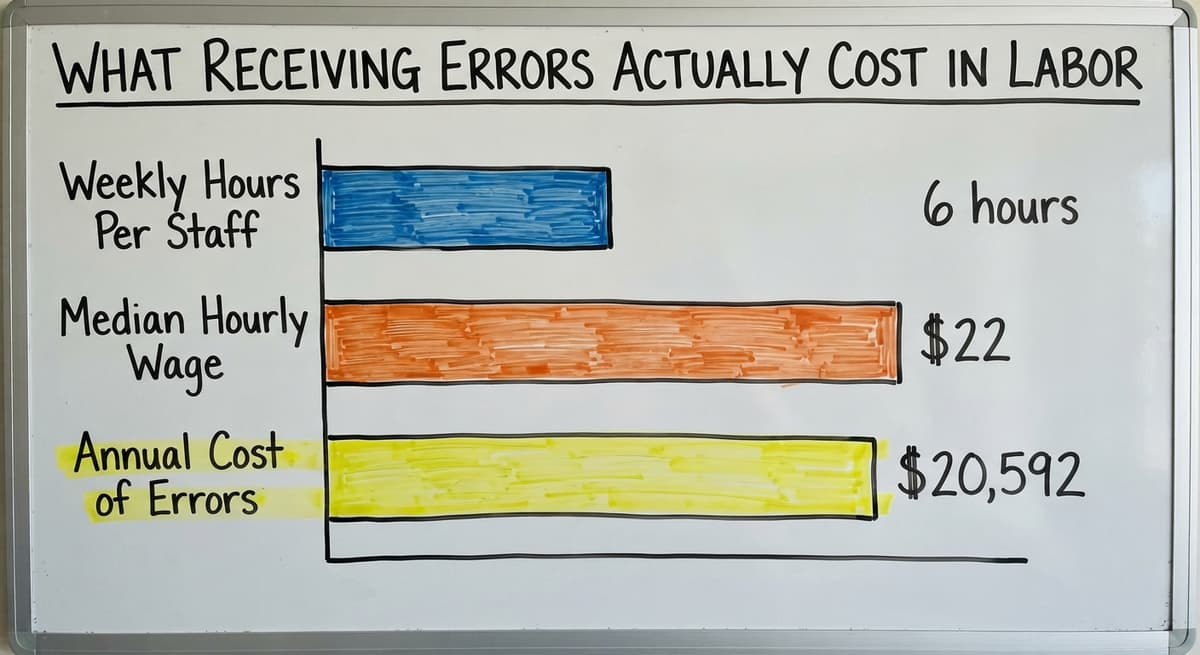
When receiving and inventory records run separately, you end up ordering product you already have. Consider what that costs: 3 staff members spending 6 hours a week each reconciling receiving errors at $22 an hour, the current median wage for stock clerks per the US Bureau of Labor Statistics, adds up to $20,592 a year in labor alone, before counting the cost of the duplicate orders themselves.
How Can a Small Food Warehouse Automate Inventory Without a Big ERP?
Automating does not need a large system. Start with the 1 or 2 steps that cost you the most time each week and build from there.
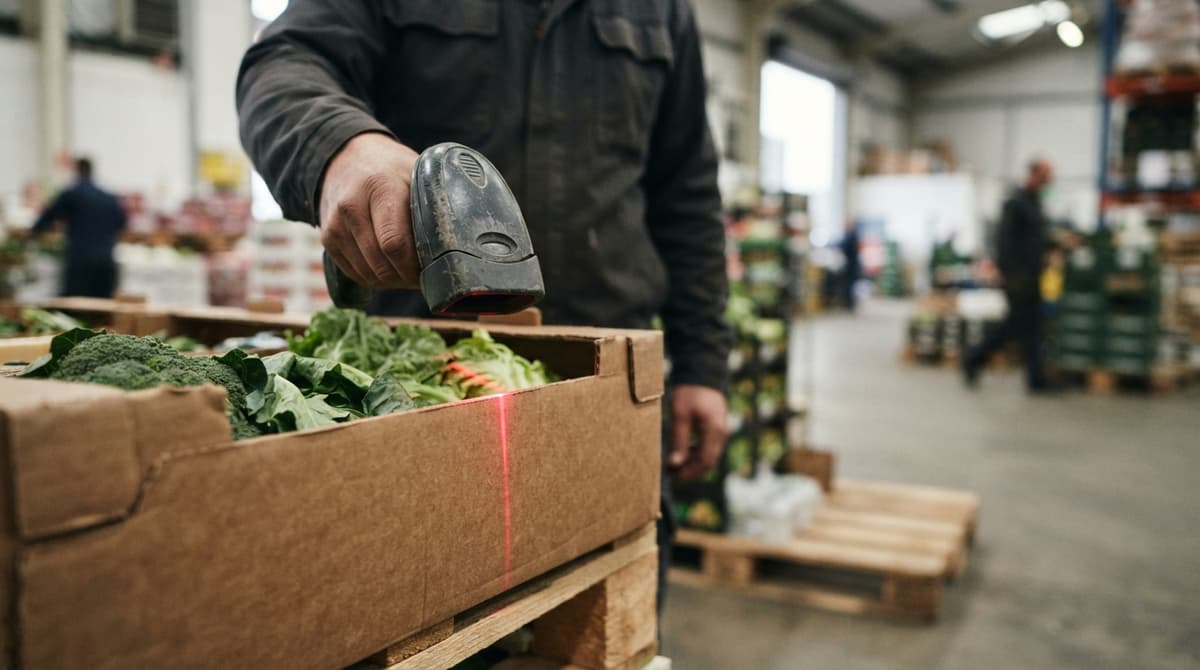
Manual data entry is the biggest source of inventory errors in small food operations. Automating reorder alerts based on par levels removes the daily guesswork of checking every SKU by hand. A system built around your existing workflow can flag expiring lots, generate pick lists, and update stock counts without requiring staff to learn an entirely new platform.
Custom workflow tools can handle routine tasks and feed clean data into your accounting package, including integrations built for wholesale and distribution, without replacing the financial system your team already knows. Inventory management software for small distributors does not have to mean a six-figure rollout. It can mean replacing the one spreadsheet that breaks every Friday afternoon.
Keep Your Accounting Software Where It Works
Many food distributors already run their financials in a small-business accounting package and do not need to replace it. The problem is that an accounting package was not built for warehouse-level lot control, expiration date tracking, or pick management.
The practical fix is to add an working layer that handles the warehouse work and feeds clean data back to the accounting package. This avoids a disruptive migration while closing the gaps that spreadsheets cannot fill.
Custom warehouse software built around your workflow can sit between your warehouse floor and your financial records, handling receiving, lot tracking, FIFO enforcement, and reorder alerts, while your accounting software stays the system of record for invoices and financials. You keep what works and replace only the manual steps that are slowing you down.
Tighter Inventory Control Pays More in Volatile Markets
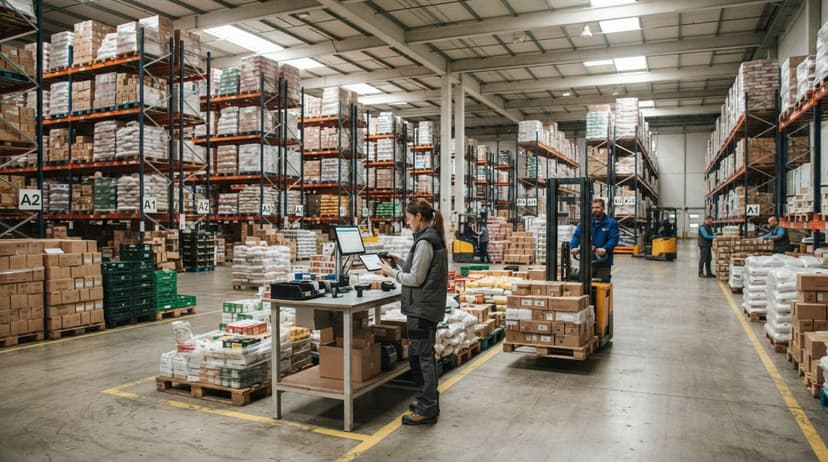
The US Census Bureau's Monthly Wholesale Trade data shows that wholesale inventory-to-sales ratios shift with market conditions, which means the cost of carrying excess or spoiled stock is not fixed. Tighter inventory control pays more in volatile periods.
Not sure this is the right shape for your operation
Describe how the work runs today. We map it on a call and show you what it would look like built around that, before you spend anything.
Book a callCommon Mistakes That Derail Food Inventory Management
Small food operations tend to run into the same problems. Knowing them in advance is cheaper than learning them from a write-off.
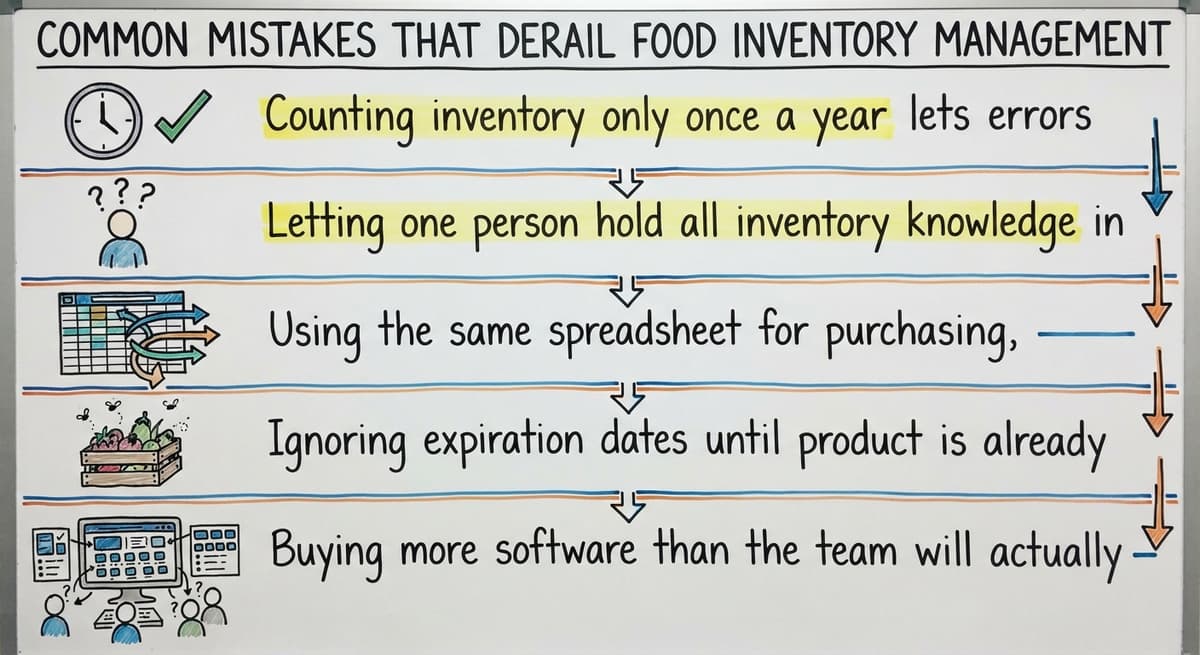
- Counting inventory only once a year lets errors build for months before anyone notices them.
- Letting one person hold all inventory knowledge in their head creates a single point of failure that shows up the moment that person is unavailable.
- Using the same spreadsheet for purchasing, receiving, and picking creates version conflicts and missed updates that no one catches until a customer complains.
- Ignoring expiration dates until product is already unsellable turns a manageable rotation problem into a direct loss.
- Buying more software than the team will actually use: adoption matters more than features, and a system no one opens solves nothing.
Inventory Is an Operational Task, Not a Back-Office One
The most expensive mistake is treating inventory as a back-office task rather than an working one. Every pick, every receipt, and every count either keeps your numbers accurate or erodes them.
When Should a Food Distributor Stop Using Spreadsheets?
Spreadsheets work at very small scale. They break when more than 1 person needs to update them at the same time, or when the operation moves faster than a human can type.
The signs you have outgrown them are specific: frequent stockouts despite having product on hand, regular spoilage write-offs on items that should have shipped, and time spent reconciling counts that never quite match. If any of those sound familiar, the spreadsheet is the problem.
Choosing the Right Next Step After Spreadsheets
The right next step is not always a large ERP. For many small distributors, it is purpose-built software that fits the operation as it already runs. How to replace Excel and spreadsheets in a warehouse operation is a practical question with a practical answer: find a tool that handles the specific steps where your current process breaks, and connect it to the financial system you already use.
A local rollout partner who builds around your workflow, rather than forcing a migration, is a realistic option for operations with 5 to 100 staff. The goal is not a perfect system on day one. It is a system that stops the losses you can already see.
If your food distribution operation is running on spreadsheets and a small-business accounting package and the gaps are starting to cost you, the next step is a conversation about what a connected workflow could look like for your specific operation. No migration required, no features you will never use.
Frequently asked questions
What is the 80/20 rule in inventory?
The 80/20 rule in inventory, also called the Pareto principle, holds that roughly 80% of your sales volume comes from about 20% of your SKUs. In a food warehouse, this means a small group of products drives most of your revenue and most of your picking activity. Knowing which items fall into that 20% tells you where to focus your tightest controls: more frequent cycle counts, tighter par levels, and prime slot placement near the dock. The remaining 80% of SKUs still need tracking, but they do not need the same daily attention.
What is the 2-2-2 rule for food storage?
The 2-2-2 rule is a food safety guideline for perishable items: refrigerate within 2 hours of cooking or receiving, store at or below 40 degrees Fahrenheit, and consume or discard within 2 days. Some versions extend the final window to 2 weeks for certain packaged items. In a distribution context, the rule is a reminder that temperature and time both affect product safety, and that your receiving process needs to move fast enough to keep perishables inside safe windows from the moment they arrive at the dock.
What is the 30/30/30 rule for restaurants?
The 30/30/30 rule is a food cost guideline sometimes used in restaurant operations: roughly 30% of revenue goes to food cost, 30% to labor, and 30% to overhead, leaving about 10% as profit. It is a restaurant management benchmark rather than a warehouse inventory rule. For food distributors, the more relevant framework is tracking inventory turnover and spoilage rates, since your margin lives in the gap between what you paid for product and what you sold it for before it expired.
What is the best way to track food inventory?
There is no single best answer. The right approach depends on your volume, the number of SKUs you carry, how many people update your records, and whether you need lot tracking for compliance. A spreadsheet works for very small operations with one person managing stock. A dedicated inventory app fits small teams that need real-time counts and basic lot tracking. A cloud platform or custom-built system makes sense when you have multiple users, expiration date alerts, and a need to connect warehouse data to an accounting package. Start with the method that covers your biggest current gap, not the most feature-rich option available.
How do you track expiration dates and lot numbers in a food distribution operation?
Record the lot number and expiration date at receiving, not at pick time. Link each lot to its buy order so you can trace a quality problem back to the supplier. In your inventory system, flag items whose expiration date falls within a set window, such as 30 or 60 days out, so you can rank them for shipment before they become a loss. A system that shows expiration dates by location, not just by SKU, makes FIFO rotation easier to enforce across the warehouse floor.
How do you set par levels for food products?
Multiply your average daily usage for an item by your supplier's lead time in days, then add a safety buffer for demand spikes or late deliveries. Review par levels at least seasonally, since a product that moves fast in summer may sit slow in winter. Document par levels in a shared location so the whole team can see them and act on them without waiting for one person to approve a reorder.
How do you connect inventory management to your accounting software without replacing it?
Add an working layer between your warehouse floor and your accounting software that handles receiving, lot tracking, FIFO enforcement, and reorder alerts. That layer feeds clean, reconciled data back to your accounting software for invoicing and financials. Your accounting software stays the system of record for money. The warehouse tool handles the physical stock. This approach avoids a migration and closes the gaps that spreadsheets create without forcing your team to learn an entirely new financial platform.
Start with a free first look
A 30 minute call, your operation mapped, and a clear picture of what we would build. No obligation and nothing to install.
Book a callRelated guides
The rest of this guide, for the parts of the job this page does not cover.
Guides
- Multi Location Inventory Management Software
- Inventory Management for Multiple Locations
- Inventory Management System for Manufacturing
- Inventory Management Pics
- B2b Inventory Management
- Jewelry Inventory Management
- Dental Inventory Management
- The Objective of Inventory Management is To
- Qr Code for Inventory Management
- Hvac Inventory Management Software
- Real Food Barcodes
Common questions
- How to Improve Inventory Management
- How to Manage Fba Inventory
- How to Manage Pharmacy Inventory
- How to Manage Hardware Inventory
- How to Manage Inventory Efficiently
- How to Manage Consignment Inventory
- How to Keep Track of Inventory
- How to Record Inventory on Hand
- How to Manage Inventory in a Warehouse
- How to Manage Inventory for Small Business
- How to Manage Inventory Between Etsy and Shopify
- How to Manage Inventory in Retail Store
- What is Inventory Management and Its Types