


How To Keep Track Of Inventory Small Business
The easiest way to keep track of inventory for a small business is to match your method to your volume. Under 50 SKUs and low order flow, a spreadsheet works. Above that, use dedicated inventory software or barcode scanning. Most small businesses already use the accounting software. Adding a purpose-built inventory layer on top of it solves the gap without replacing what works.
Reviewed August 2026. Each figure comes from the assumptions stated beside it, so you can substitute your own and the arithmetic still holds.
Published 3 August 2026. Reviewed and updated 15 September 2026.
Book a callWhy Does Inventory Tracking Break Down in Small Businesses?
Most small businesses start with a notebook, a printed sheet, or a spreadsheet. That works fine at first. Then order volume grows. A second person starts updating the same file.
Someone forgets to log a return. Suddenly the number on the screen and the count on the shelf are two different things.
The pain points are predictable:
- Overselling items that are already out of stock
- Stock going missing between receiving and the shelf
- Manual count errors that compound week over week
- No real-time view of what is actually available right now
Would you rather have it built around your operation?
The first look is free. If you would rather not compare products, describe how your operation already works and we build the system around it.
No build cost. You see it running on your own process first, and the monthly subscription starts only once it is live.
Book a callWhy Are Spreadsheets and the Accounting Software Not Warehouse Tools?
The breakdown is not a discipline problem. The tools were not built for inventory work. A spreadsheet is a calculation tool. The accounting software is an accounting tool.
Using them as a warehouse system is like using a tape measure as a level. They are close enough to feel useful and wrong enough to cause damage.
Many small business owners live inside a stack of the accounting package, spreadsheets, and printed pick sheets. That is the starting point, not a failure. The goal here is to improve what you have, not tear it out.
The IRS makes the stakes clear. IRS Publication 538 states: "To figure taxable income, you must value your inventory at the beginning and end of each tax year." Inventory counting is a legal obligation, not just an operational preference.
What Does Good Inventory Tracking Actually Look Like?
Good inventory tracking means knowing 3 things at any moment: what you have, where it is, and when to reorder. That is the whole job.
Real-time or near real-time visibility is what separates a working system from a guessing game. End-of-day reconciliation is better than nothing. But if a customer calls at 2pm asking about stock, you need an answer that does not require a walk to the shelf.
How Do the Four Steps of Inventory Connect?
Good tracking connects four steps into one picture:
- Purchasing: what you ordered and from whom
- Receiving: what actually arrived and when
- Picking: what left the shelf to fill an order
- Shipping: what went out the door and to which customer
When those steps live in separate tools, errors hide in the gaps. The US Census Bureau's Monthly Wholesale Trade data shows how sensitive wholesale businesses are to inventory-to-sales ratios. A count that is off by even a small margin ripples into fulfillment, cash flow, and customer trust. For small businesses, the goal is not a perfect system. It is an accurate and fast one.
Accuracy means your numbers match your shelf. Speed means you find the error before the customer does. As GS1 explains, barcode standards exist to create "a common language for business" so that every scan means the same thing regardless of who made the product or who receives it.
Method 1: Are Spreadsheets Good Enough for Small Business Inventory?
Spreadsheets are good enough when your SKU count is low, your transaction volume is light, and only one person updates the file. The moment any of those conditions changes, the spreadsheet starts working against you.
A basic inventory spreadsheet should include these columns:
- SKU or item code
- Product description
- Quantity on hand
- Reorder point (the count that triggers a purchase)
- Supplier name and lead time in days
Keep one master file. Do not email copies. Use a shared drive with edit history turned on so you can see who changed what and when.
When Should You Stop Using Spreadsheets for Inventory?
The risks are real. Version control breaks down fast when 2 or more people work from the same file. There are no automatic alerts when stock drops below the reorder point. One wrong formula can cascade across every row below it.
Stop using spreadsheets when more than one person needs to update stock levels regularly, when you are regularly finding errors you cannot trace, or when you cannot answer a stock question in under a minute. Those are the signals that the tool has hit its ceiling. The honest advice: spreadsheets work until they do not. If you recognise those signs now, skip ahead to the method that fits your current scale.
Method 2: Using the accounting software for Inventory
The accounting software has built-in inventory features that many small business owners have never turned on. It can track stock levels tied to purchase orders, record bills from suppliers, and adjust quantities when sales go through. For a business with simple needs, that is a solid start.
What the accounting software handles well:
- Purchase orders linked to supplier records
- Bills matched to received goods
- Basic stock level adjustments tied to sales transactions
- Inventory valuation for tax and accounting purposes
Is the comparison easier when one option is built for you?
Yes. Off-the-shelf means fitting your process to the software, and custom is the other way round. The first look costs nothing.
Book a callWhere Does the Accounting Software Fall Short on Operations?
Where the accounting software falls short is on the operational side. It does not track warehouse bin locations. It does not support lot or serial number tracking in most versions. It has no picking workflow and no real-time scan integration for receiving.
The practical fix: keep the accounting software for financials and layer a dedicated inventory tool on top for operations. accounting integration for wholesale distributors is a common need, and purpose-built tools are designed to sync with it rather than replace it. Your accounting stays clean. Your warehouse gets the visibility it needs.
Method 3: Barcode Scanning and Point-of-Receiving Systems
Barcode scanning removes the single biggest source of receiving errors: manual data entry. When a shipment arrives and a staff member types quantities by hand, errors are almost guaranteed over time.
A scan takes a fraction of a second and writes directly to the system.
A basic barcode setup does not require enterprise software or a large budget. You need:
- A barcode scanner (USB or wireless, starting around $50)
- Labels on your products or shelving locations
- Software that reads the scan and updates the count

How Does the Barcode Receiving Flow Work?
The receiving flow looks like this:
- Shipment arrives at the dock
- Staff scans each item as it comes off the pallet
- The system matches the scan to the open purchase order
- Quantity on hand updates automatically
- Any discrepancy flags immediately for review
GS1 barcode standards define how product identifiers are structured so that a scan on your dock reads the same way as a scan at the supplier's warehouse. This is what makes the system reliable across different vendors and product types. Barcode scanning is a strong fit for businesses receiving moderate to high volumes of SKUs each day.
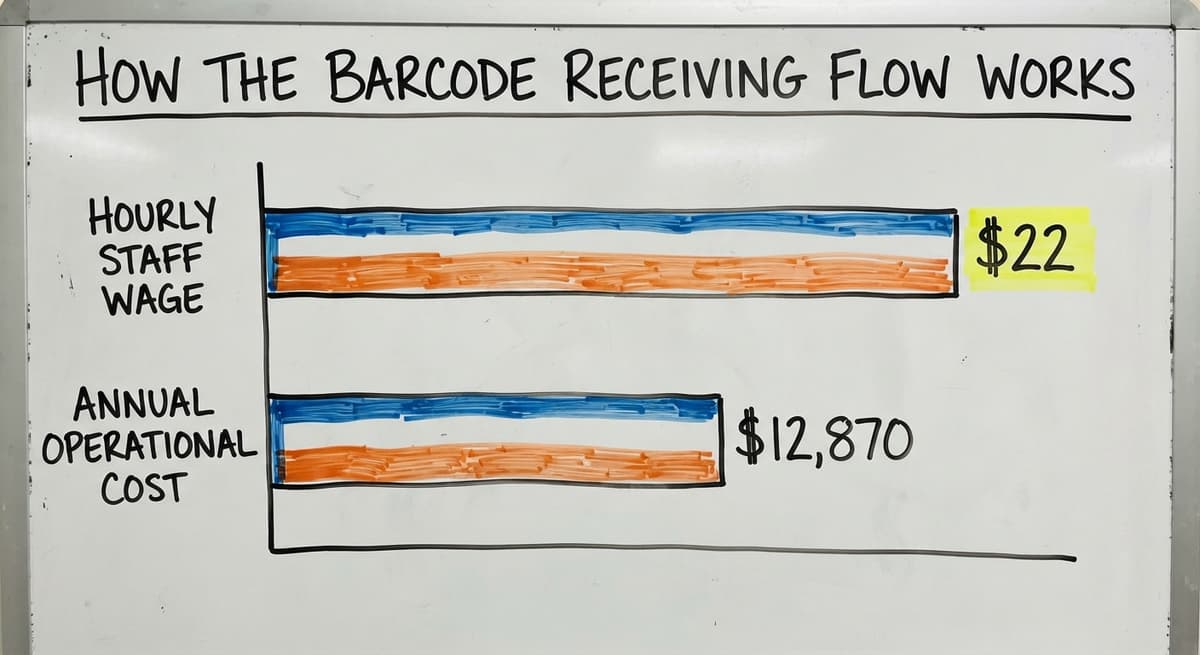
If your team spends more than 30 minutes a day on manual receiving entry, scanning pays for itself quickly. 3 staff members spending 45 minutes each on manual entry at $22 an hour (the BLS median for stock and order fillers) costs roughly $12,870 a year. A scanner setup costs a fraction of that.
Method 4: Dedicated Inventory Management Software
Off-the-shelf inventory software exists at every price point. Some tools start under $50 a month. Others scale into hundreds. The price is rarely the deciding factor. Fit to your workflow is.
When evaluating any inventory management platform, check for:
- Ease of use for the people doing the daily work, not just the owner
- The accounting software sync that does not require manual exports
- Reorder alerts that fire automatically when stock hits the threshold
- Reporting that shows stock value, turnover, and slow-moving items
Why Do Retail-First Platforms Fail Wholesale Businesses?
One honest warning: most inventory platforms target retail or e-commerce. They assume a single location, a point-of-sale setup, and a customer-facing front end. Wholesale and distribution businesses have different needs. Multi-location receiving, purchase order matching, and pick-and-ship workflows are missing or awkward in retail-first tools. Before you commit to any platform, run your actual workflow through it.
Can you receive a partial shipment against a purchase order? Can you pick from multiple bin locations? Can you see what is on order versus what is on hand? If the software forces you to change how you work rather than fitting how you already work, the adoption rate will be low and the investment will be wasted.

Method 5: Custom Inventory Tracking Built Around Your Operation
When off-the-shelf tools do not fit, a custom inventory system built around your specific workflow is a real option. Custom does not mean slow or expensive. For a small warehouse operation, a focused build ship in weeks, not months.
The best case for custom inventory software is a business with steps that generic platforms cannot handle. Examples include:
- Unique receiving rules tied to specific suppliers or product types
- Picking workflows that split orders across multiple warehouse zones
- Fulfillment steps that involve kitting, labeling, or staging before shipment
- Integration needs with industry-specific tools that major platforms ignore
What does it look like running on your own process?
The first thing you see is it running on your own process, at no build cost. The subscription starts once it is live and doing the job, not before.
Book a callWhat Does a Custom Build Keep, and What Does It Replace?
Custom warehouse management software for small operations keeps the accounting software in place for accounting. The custom layer handles only the operational steps where manual work causes errors. That means less risk, faster rollout, and no disruption to your financial records.
The NIST Manufacturing Extension Partnership provides vendor-neutral guidance on supply chain processes and notes that small manufacturers and distributors benefit most from systems aligned to their actual workflow rather than systems that require process changes to fit the software. Replacing spreadsheet and Access with a purpose-built operations system is one of the most common requests from small warehouse operators who have grown past manual tools but are not ready for a full ERP.
How Do You Set Up a Reorder Point System?
A reorder point tells you when to buy before you run out, not after. That distinction matters. Waiting until a shelf is empty means your next order arrives too late and your customer waits.
The formula is simple:
Reorder point = average daily usage x lead time in days
For example: if you sell 20 units of an item per day and your supplier takes 5 days to deliver, your reorder point is 100 units. When stock drops to 100, place the order.

Adding Safety Stock and Automating Reorder Alerts
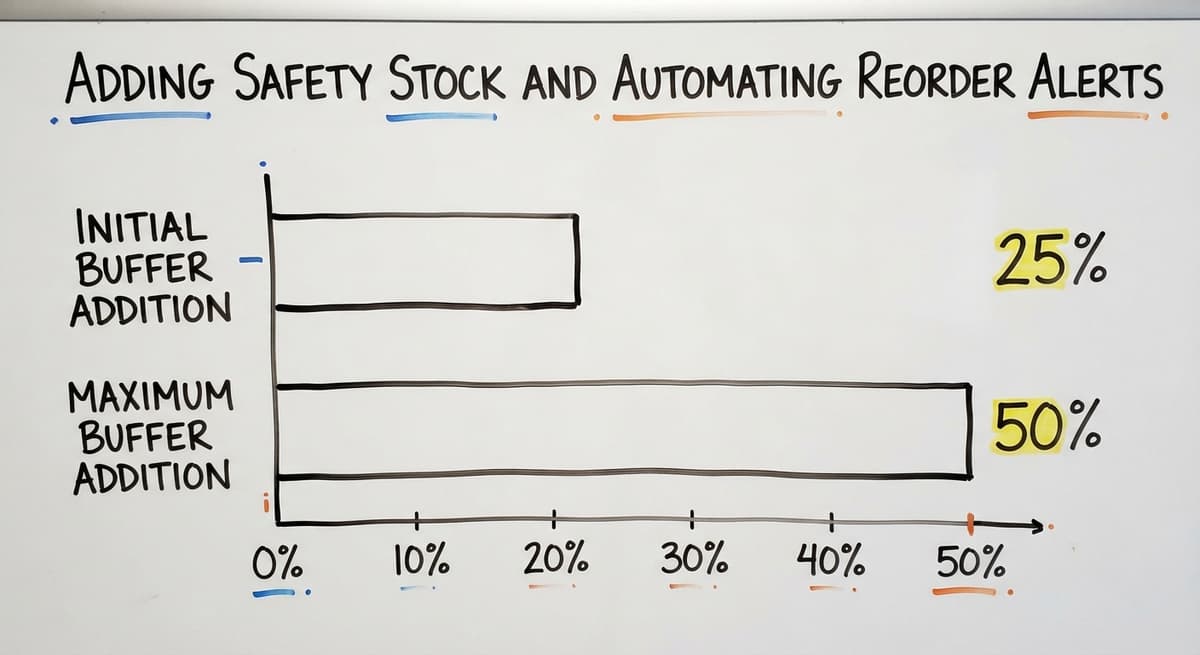
Add a safety stock buffer for items that sell unpredictably or come from suppliers with inconsistent lead times. A common approach is to add 25% to 50% of the lead time demand as a buffer. For the example above, that means holding 125 to 150 units before reordering rather than 100. Any system you choose should surface reorder alerts without you having to check manually.
A spreadsheet can do this with a conditional formatting rule. Inventory software should do it automatically. If your current system makes you hunt for low-stock items, that is a gap worth closing. Accurate reorder points also protect you under the FTC's Mail, Internet, or Telephone Order Merchandise Rule, which requires businesses to ship orders when promised or notify customers of delays.
How Do You Do a Physical Inventory Count Without Stopping Operations?
You do a physical inventory count without stopping operations by using cycle counting, which means counting a portion of your inventory on a rolling schedule rather than counting everything at once.
Cycle counting divides your inventory into sections or categories and assigns each a count date across the month or quarter. Fast-moving items get counted more often. Slow-moving items get counted less. The result is that every item gets counted regularly without a full shutdown.
Tips for Accurate Counts and Count Frequency
A full physical count is still useful once a year. It gives you a clean baseline and satisfies the IRS valuation requirement. But relying on a single annual count as your only check means errors can hide for months.
Tips for accurate counts, whether cycle or full: freeze transactions during the count window so no stock moves in or out while counting; use 2 counters on each section and reconcile any difference before moving on; reconcile the count against the system the same day, not at the end of the week; flag damaged or returned items separately and process them before closing the count. At minimum, count quarterly for all items, monthly for fast-moving SKUs, and run weekly spot checks on your top 20% of items if inventory turns over more than 12 times a year.

Common Inventory Tracking Mistakes Small Businesses Make
Most inventory problems come from a short list of repeatable mistakes. Knowing them makes them easier to avoid.
Returns and damaged goods go unrecorded. When a customer sends something back or a received item is damaged, it needs to go back into the system. If it does not, your count is wrong from that moment forward.
Three More Mistakes That Compound Over Time
Multiple people updating the same spreadsheet with no version control is the fastest way to lose trust in your numbers. One person should own each update, or the system should log changes automatically. Tracking quantity only and ignoring location is a problem that grows with warehouse size. Knowing you have 200 units is not useful if you cannot find them.
Bin location tracking solves this and is available in most inventory software. Waiting until inventory is a crisis before investing in a better system is expensive. The cost of bad data, lost sales, and staff time spent reconciling errors almost always exceeds the cost of a better tool. How custom software works without a long ERP implementation is a question worth exploring before the pain becomes urgent.
Not sure this is the right shape for your operation?
The call is free. Describe how the work runs today. We map it on a call and show you what it would look like built around that, before you spend anything.
Book a callSigns You Have Outgrown Your Current Inventory System
Some signs are obvious. Others are slow enough that owners adjust around them without noticing the cost.
Your inventory system is no longer working if:
- You regularly oversell items because your count was wrong when the order came in
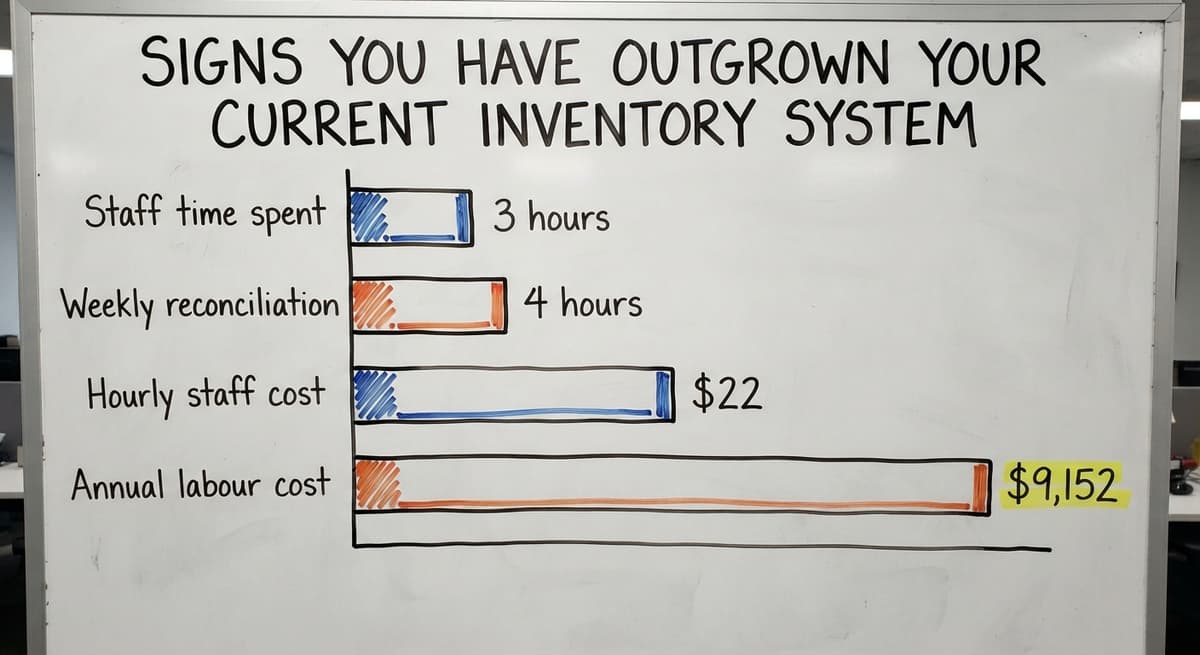
- Staff spend more than 3 hours a week reconciling spreadsheets or re-entering data between tools
- You cannot answer "how much of X do we have right now" without walking the floor or calling someone
- Your the accounting software balance and your physical shelf count rarely match at month end
- New hires take weeks to learn the system because it is not documented anywhere
These are not minor inefficiencies. 2 staff members spending 4 hours each week on reconciliation at $22 an hour adds up to $9,152 a year in labour alone, before counting the cost of the errors they are trying to fix.

Choosing the Right Inventory Tracking Method for Your Business
The right inventory tracking method depends on 3 factors: your SKU count, your daily order volume, and your team size. No single tool fits every business.
Use this as a starting guide:
| Situation | Best starting method |
|---|---|
| Under 50 SKUs, 1 person managing stock | Spreadsheet with reorder alerts |
| 50 to 300 SKUs, the accounting software already in use | The accounting software inventory features plus a dedicated add-on |
| High receiving volume, multiple SKUs daily | Barcode scanning with inventory software |
| Unique workflow, off-the-shelf tools do not fit | Custom inventory system built to your process |
How Do You Choose a Partner, Not Just a Platform?
Start simple and upgrade when the pain justifies it. The best system is the one your team will actually use every day. A sophisticated platform with low adoption is worse than a spreadsheet everyone trusts. Local support matters more than most buyers expect.
A partner who understands your receiving workflow and can adjust the system when your process changes beats a generic help desk every time. If you are weighing whether a custom build makes sense for your operation, the conversation starts with your workflow, not a product demo.

Frequently Asked Questions
What is the best inventory tracker for a small business?
There is no single best answer. The right tracker depends on your SKU count, order volume, and whether you need warehouse location tracking. Businesses under 50 SKUs do fine with a structured spreadsheet.
Businesses with higher volume and the accounting software already in place do better with a dedicated inventory add-on that syncs with the accounting software. Businesses with unique workflows sometimes need a custom build. The same 3 or 4 names come up in small business contexts, but fit matters more than brand.
What is the 80/20 rule in inventory?
The 80/20 rule in inventory means that roughly 80% of your sales come from 20% of your SKUs.
In practice, this tells you which items deserve the most attention: tighter reorder points, more frequent cycle counts, and better location tracking. It also tells you which slow-moving items tie up cash and shelf space without contributing much to revenue.
What's a good way to keep track of inventory?
A good way to keep track of inventory is to pick a method that matches your volume and stick to it consistently. For small operations, a well-structured spreadsheet with a clear reorder point column works.
For growing businesses, inventory software that syncs with the accounting software and sends automatic low-stock alerts is more reliable. The method matters less than the habit of updating it every time stock moves.
Can I use spreadsheet to keep track of inventory?
Yes, spreadsheet works for inventory tracking when your SKU count is low and one person manages the file. Set up columns for SKU, description, quantity on hand, reorder point, and supplier. Use conditional formatting to flag items below the reorder point.
The limits show up when multiple people need to update the file at the same time, when you need real-time visibility, or when transaction volume grows fast enough that manual entry becomes the bottleneck.
When should a small business stop using spreadsheets for inventory?
Stop using spreadsheets when more than one person needs to update stock levels regularly, when you are regularly finding errors you cannot trace, or when you cannot answer a stock question in under a minute. Those are the signals that the tool has hit its ceiling.
What is a reorder point and how do I calculate it?
A reorder point is the stock level that tells you to place a purchase order before you run out. Calculate it by multiplying your average daily sales of an item by your supplier's lead time in days.
If you sell 15 units a day and your supplier takes 6 days to deliver, your reorder point is 90 units. Add a safety buffer of 20% to 50% if that item sells unpredictably.
How do I keep inventory accurate when multiple people are updating it?
The most reliable fix is to move away from a shared spreadsheet and into a system that logs every change with a timestamp and a user name.
If you stay with a spreadsheet, assign one person as the owner of each update type: one person receives stock in, one person records outbound shipments. Never let two people edit the same file at the same time without a merge process.
Is custom inventory software affordable for small businesses?
Custom inventory software is more affordable than most small business owners expect, especially when the build is scoped tightly to the specific steps causing problems. A focused build that handles receiving, bin location tracking, and the accounting software sync costs far less than a full ERP and ship in weeks.
The cost comparison that matters is not the build price versus zero: it is the build price versus the ongoing cost of manual errors, staff time, and lost sales.
Frequently asked questions
Frequently asked questions
What is the best inventory tracker for a small business?
There is no single best answer. The right tracker depends on your SKU count, order volume, and whether you need warehouse location tracking. Businesses under 50 SKUs do fine with a structured spreadsheet.
Businesses with higher volume and the accounting software already in place do better with a dedicated inventory add-on that syncs with the accounting software. Businesses with unique workflows sometimes need a custom build. The same 3 or 4 names come up in small business contexts, but fit matters more than brand.
What is the 80/20 rule in inventory?
The 80/20 rule in inventory means that roughly 80% of your sales come from 20% of your SKUs.
In practice, this tells you which items deserve the most attention: tighter reorder points, more frequent cycle counts, and better location tracking. It also tells you which slow-moving items tie up cash and shelf space without contributing much to revenue.
What's a good way to keep track of inventory?
A good way to keep track of inventory is to pick a method that matches your volume and stick to it consistently. For small operations, a well-structured spreadsheet with a clear reorder point column works.
For growing businesses, inventory software that syncs with the accounting software and sends automatic low-stock alerts is more reliable. The method matters less than the habit of updating it every time stock moves.
Can I use spreadsheet to keep track of inventory?
Yes, spreadsheet works for inventory tracking when your SKU count is low and one person manages the file. Set up columns for SKU, description, quantity on hand, reorder point, and supplier. Use conditional formatting to flag items below the reorder point.
The limits show up when multiple people need to update the file at the same time, when you need real-time visibility, or when transaction volume grows fast enough that manual entry becomes the bottleneck.
When should a small business stop using spreadsheets for inventory?
Stop using spreadsheets when more than one person needs to update stock levels regularly, when you are regularly finding errors you cannot trace, or when you cannot answer a stock question in under a minute. Those are the signals that the tool has hit its ceiling.
What is a reorder point and how do I calculate it?
A reorder point is the stock level that tells you to place a purchase order before you run out. Calculate it by multiplying your average daily sales of an item by your supplier's lead time in days.
If you sell 15 units a day and your supplier takes 6 days to deliver, your reorder point is 90 units. Add a safety buffer of 20% to 50% if that item sells unpredictably.
How do I keep inventory accurate when multiple people are updating it?
The most reliable fix is to move away from a shared spreadsheet and into a system that logs every change with a timestamp and a user name.
If you stay with a spreadsheet, assign one person as the owner of each update type: one person receives stock in, one person records outbound shipments. Never let two people edit the same file at the same time without a merge process.
Is custom inventory software affordable for small businesses?
Custom inventory software is more affordable than most small business owners expect, especially when the build is scoped tightly to the specific steps causing problems. A focused build that handles receiving, bin location tracking, and the accounting software sync costs far less than a full ERP and ship in weeks.
The cost comparison that matters is not the build price versus zero: it is the build price versus the ongoing cost of manual errors, staff time, and lost sales.
How often should a small business count inventory?
Count the fast movers weekly, everything else monthly, and the whole stockroom once a year for the accountant. Cycle counting 20 items a day keeps the record within 2 percent without ever closing for a count.
How do I calculate reorder points and safety stock?
Reorder point is average daily sales multiplied by lead time in days, plus safety stock. Safety stock is maximum daily sales multiplied by maximum lead time, minus the average of each.
A product selling 4 to 6 a day on a 10 to 14 day lead time carries 36 units of safety stock and reorders at 76.
How can I reduce inventory shrinkage and stock discrepancies?
Scan every receipt and every pick instead of writing them down, count the top 20 percent of items weekly, and investigate any count that is off by more than 2 percent the same day.
Most shrinkage in a small business is unrecorded movement, not theft, and scanning removes it.
How can I track inventory across multiple locations?
Hold the stock in one system with a location code per site and per shelf, move stock between sites with a transfer that scans out at one end and in at the other, and set a reorder point per site.
A spreadsheet cannot do the transfer, which is why the second location is where most businesses move to software.
What is in a free first look?
A 30 minute call, your operation mapped, and a clear picture of what we would build. No obligation and nothing to install.
Book a callRelated guides
The rest of this guide, for the parts of the job this page does not cover.
Guides
- Inventory Tracking Software for Small Business
- Inventory Tracking Systems for Small Businesses
- Inventory Control Software for Small Business
- Inventory Management Small Businesses
- Simple Inventory System for Small Business
- Best Inventory Management Software for Small Businesses
- Inventory Sales Software Small Business
- Small Business Inventory Management System
- Inventory Control for Small Business
- Inventory System for Small Business
- Small Business Inventory Management
- Small Business Stock Management Software
- Wms for Small Business
- Accounting and Inventory Software for Small Business
- Free Inventory Management Software for Small Business
Common questions
- How to Organize Inventory for Small Business
- How to Manage Inventory for Small Business
- How to Keep Track of Inventory
- How to Keep Track of Inventory in Warehouse
- How to Keep Track of Ebay Inventory
- What is the Best Inventory Management Software for Small Business
- Why is Inventory Management Important for Small Businesses
- How to Create an Inventory Tracking System?
- What is the Best Inventory Management System for Small Businesses?