


How To Improve Inventory Management
Reviewed October 2026. To improve inventory management, clean up your item data first, then standardize receiving, then set reorder points, then look at software. Most small operations fail not because they lack tools but because the tools they have do not talk to each other. Fix the process before you fix the platform.
Book a callWhy Inventory Management Breaks Down in Small Operations
Small wholesale and distribution operations tend to run on a patchwork of tools. Your accounting software handles accounting. A spreadsheet tracks stock counts. Printed pick sheets move through the warehouse. Reorder requests go out by email. Each of those hand-offs is a gap where errors live.
A number gets typed into the spreadsheet but never makes it into your accounting software. A pick sheet reflects yesterday's count, not today's. An email reorder sits in someone's inbox over a weekend and stock runs out Monday morning. None of this is a failure of effort. It is a normal growing pain for any operation that built its process one tool at a time.
We build it for your operation, and the first look is free
If you would rather not compare products, describe how your operation already works and we build the system around it.
No build cost. You see it running on your own process first, and the monthly subscription starts only once it is live.
Book a callThese Gaps Are a Compliance Problem, Not Just an Operations Problem
The IRS notes that "to figure taxable income, you must value your inventory at the beginning and end of each tax year," per IRS Publication 538, which means the hand-off errors described above are not just an operations problem. They are a compliance problem too. The good news: each gap has a fix, and none of them need ripping out what you already have.
Start With a Clear Picture of What You Actually Stock
Inventory management improvement starts with a single, trusted list of every SKU, unit of measure, and storage location. Before adding any new process or tool, that list has to be clean.
Many operations have the same item listed under 3 different names across their accounting software and a spreadsheet. "Widget A," "Widget-A," and "Widget A (old)" are not the same record to a computer, even if they are the same physical product. That mismatch is where stock accuracy falls apart.
Do a one-time data cleanup. Pull every item name from every system. Deduplicate. Pick one naming format and stick to it. GS1, the global standards body behind product barcodes, explains that "barcodes are the most widely used technology for automatic data capture" in their barcode standards guide. Once your item list is clean, barcodes give you a fast, error-free way to keep it that way.
A clean item master is the foundation everything else is built on.
What Is a Reorder Point and How Do You Calculate One?
A reorder point is the quantity at which you place a new order so stock arrives before you run out. When on-hand units drop to that number, it is time to buy.
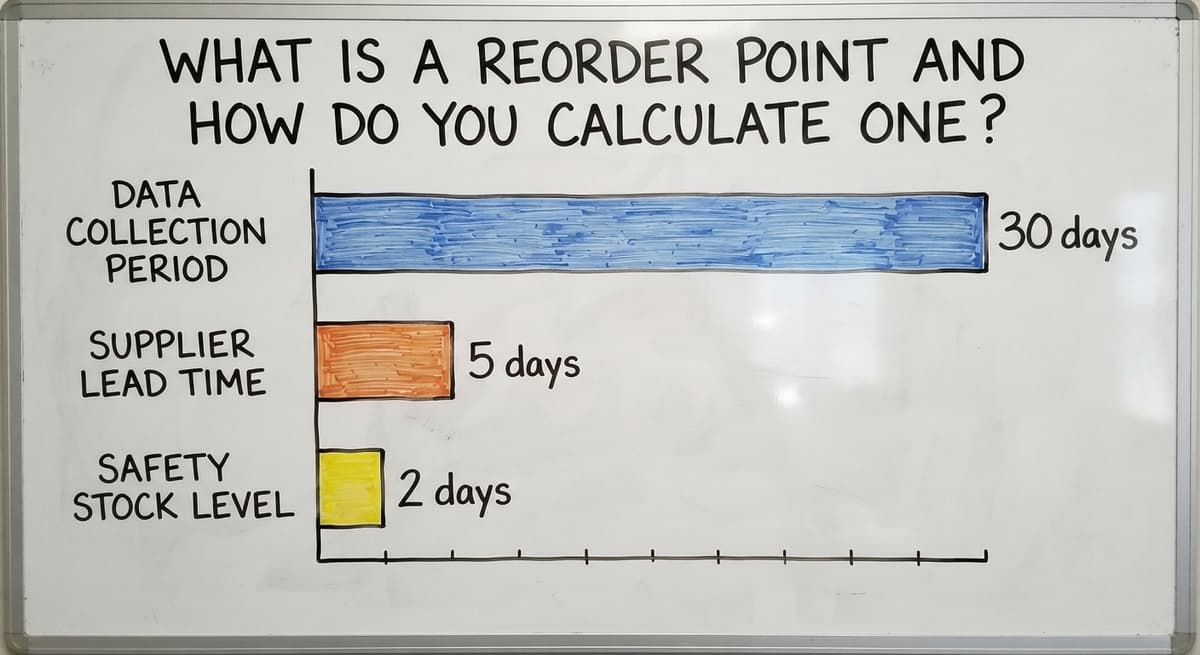
The math is simple. Multiply your average daily usage by your supplier's lead time in days. Then add a safety stock buffer for unexpected demand or late deliveries.
For example: you sell 20 units a day. Your supplier takes 5 days to deliver. You want 2 days of safety stock. Your reorder point is (20 x 5) + (20 x 2) = 140 units.
A rough reorder point beats no reorder point. Even if your daily usage varies, pick a conservative number and adjust it after 30 days of data. The NIST Manufacturing Extension Partnership recommends building inventory triggers from real working data rather than guesswork, and your own sales history is the best data source you have.
Reorder Points Also Protect You Legally
The FTC's Mail, Internet, or Telephone Order Merchandise Rule needs sellers to ship when promised. Running out of stock because no trigger existed is a preventable compliance risk. Set reorder points for your top 20 fastest-moving items first, then work down the list.
The comparison is easier when one option is built for you
Off-the-shelf means fitting your process to the software. We do it the other way round, and the first look costs nothing.
Book a callUse Cycle Counts Instead of Annual Physical Inventory
Cycle counting means counting a rotating subset of items each week rather than shutting down for a full count once a year. It is almost always the better method for a working warehouse.
Annual counts are disruptive. They need stopping operations, pulling staff off normal duties, and rushing through thousands of items in a compressed window. Errors made under pressure do not get caught until the next year.
Cycle counts catch shrinkage, data entry mistakes, and misplaced stock within days of the problem happening. Start with your highest-value or fastest-moving items. Count those weekly. Count slower movers monthly. Over time, every item in the warehouse gets checked on a rolling schedule without a single day of downtime.
The sooner you catch a discrepancy, the cheaper it is to fix.
Prioritizing What to Count First
Not every item deserves the same counting frequency. Rank your SKUs by value and by movement speed. Count the top tier weekly. Count the middle tier every 2 weeks. Count the bottom tier monthly. This keeps your team's time focused where stock accuracy matters most.
Assign Ownership for Every Inventory Task
Inventory errors often happen because no one person is clearly responsible for a specific step. When everyone owns a task, no one owns it.

Map each task to a named role, not a department. Receiving belongs to one person. Putaway belongs to one person. Cycle counting belongs to one person. That does not mean one person does everything. It means one person is accountable when something goes wrong.
Clear ownership also makes training faster. A new hire learns one role with one checklist. When a process breaks down, you know exactly where to look.
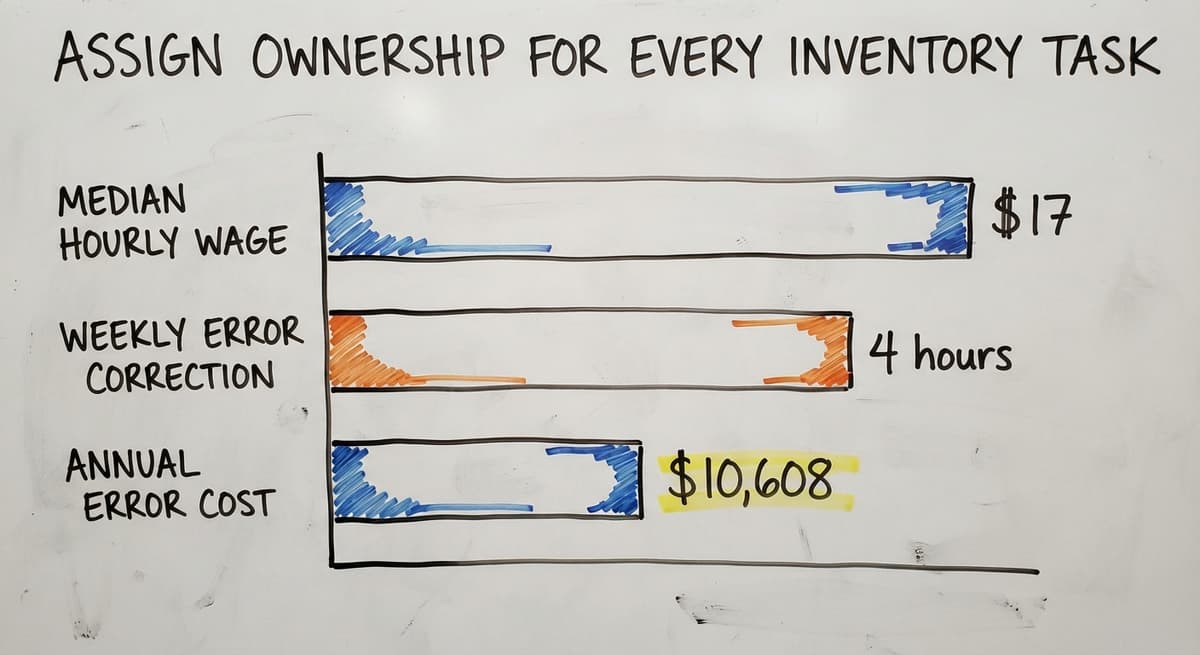
According to the US Bureau of Labor Statistics, the median wage for stock clerks and order fillers is around $17 an hour. Three people spending 4 hours a week correcting avoidable errors costs roughly $10,608 a year. Ownership removes most of that waste.
Accountability is not about blame. It is about knowing who to call when a count is off.
Standardize How Goods Are Received
Delays between physical receipt and system update are one of the most common sources of inventory discrepancies. A shipment sits on the dock for 3 hours before anyone records it. In that window, a picker pulls from stock that does not yet show as available, or a reorder fires for product that is already in the building.
A simple receiving checklist closes that gap. Every shipment, every time, in the same order:
- Verify quantity against the buy order before moving anything.
- Check for visible damage and note it on the carrier's delivery receipt.
- Record the lot number or serial number if the item needs it.
- Update stock counts in the system before the goods leave the receiving area.
The key word is "before." Not at the end of the shift. Not when someone gets a moment. Before the goods move. Keep the process identical every time so any staff member can follow it without asking for help.
A receiving checklist that runs the same way every time is worth more than any software upgrade.
When Receiving Goes Wrong
The most common receiving failure is partial updates. A shipment of 100 units arrives. Someone records 100 in the system but only 87 make it to the shelf. The other 13 are damaged, short-shipped, or set aside for inspection. If the discrepancy is not noted at receiving, the system shows 100 and the shelf has 87. That gap compounds every time someone picks from that location.

How Do You Track Inventory Without Replacing Your Accounting Software?
Many small distributors and warehouses already rely on their accounting software for accounting and do not want to abandon it. The goal is not to replace it. The goal is to stop using it for tasks it was not designed to handle.
Your accounting software is built for accounting. It tracks money well. Real-time inventory tracking across multiple locations, bin assignments, and live pick status are not what it was designed to do. Forcing it into that role creates workarounds that break under load.
See it running on your own process first
No build cost. The subscription starts once it is live and doing the job, not before.
Book a callWhat an Operations Layer Actually Does
A purpose-built operations layer sits between your warehouse floor and your accounting package. It tracks stock in real time, manages locations, and handles pick and receive workflows. Then it feeds clean, accurate data into your accounting software rather than asking your accounting software to do both jobs at once. The US Census Bureau's Monthly Wholesale Trade data shows that wholesale inventories relative to sales fluctuate significantly month to month. An accounting tool that lags real-time stock by even a day creates decisions based on stale numbers. The right question is not "what replaces your accounting software" but "what fills the gap your accounting software was never meant to fill."
Replace Spreadsheets With a Single Source of Truth
Spreadsheets fail inventory management in 3 specific ways. First, multiple versions exist at the same time. Second, there are no live updates. Third, there is no audit trail showing who changed what and when.
When 4 people keep 4 copies of the same spreadsheet, the real stock count is unknowable. Someone updates column C on their version. Someone else emails a different version to the buyer. By the time those files merge, the numbers are already wrong.
A single source of truth means one system that every team member reads from and writes to in real time. When a picker pulls 10 units, the count drops at once for everyone. When a receiver logs a shipment, the buyer sees it without asking.
Replacing Excel and Access with custom operations software does not need a massive enterprise resource planning system. A focused tool built around your actual workflow solves the problem without adding complexity your team does not need. The goal is one version of the data, always current, always visible.
Can a Small Warehouse Use Location Tracking Without a Big ERP?
Yes. Location tracking does not need an enterprise system. Even a single warehouse benefits from assigning a code to every bin, shelf, or zone and recording location alongside quantity.
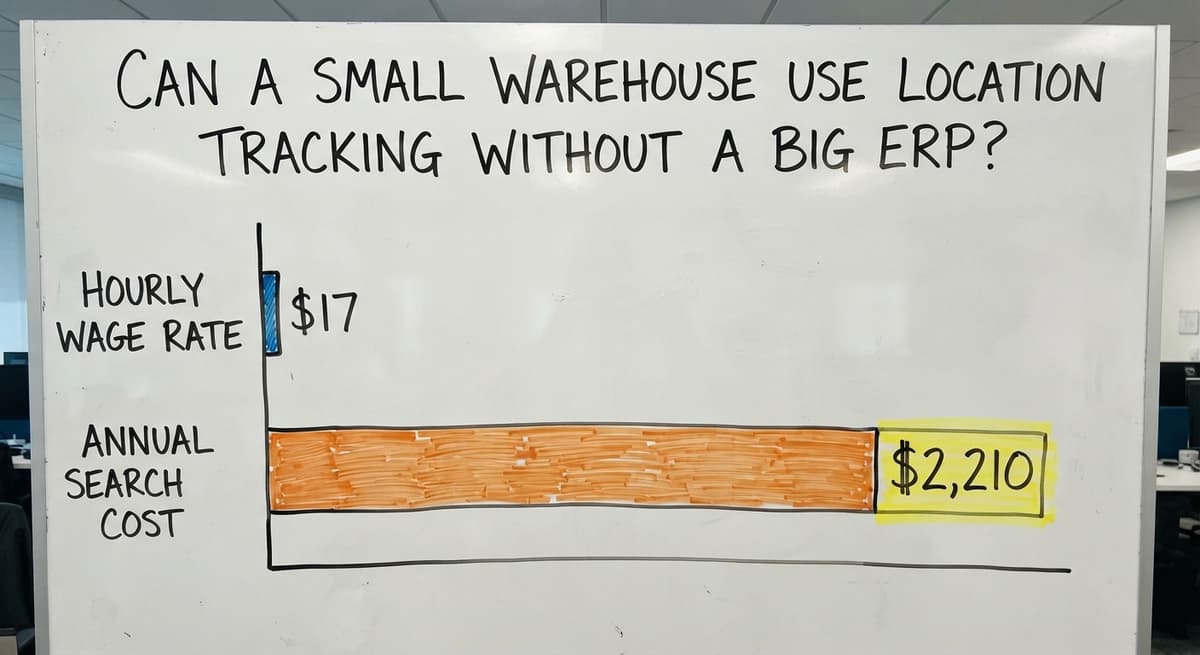
Without location data, stock gets lost inside the building. A picker searches 3 aisles for a product that is in the right quantity but in the wrong zone. That search time adds up fast. At $17 an hour, a picker spending 30 minutes a day searching for misplaced stock costs about $2,210 a year per person.
Start simple. Use a zone, row, and bin format: Zone A, Row 3, Bin 2 becomes A-3-2. That format works in a 2,000-square-foot warehouse and still makes sense when the operation grows to 20,000 square feet. Build the code structure once and do not change it. Label every shelf, record location when goods are received, and record location when goods are moved. Cycle counts run faster because the counter goes directly to the right spot. Warehouse management software for small teams can handle location tracking without the overhead of a full ERP. The system does not need to be complex. It needs to be consistent.
Location codes turn a search problem into a lookup problem, and lookups take seconds.
Setting Up Location Codes That Scale
Use a simple zone, row, and bin format: Zone A, Row 3, Bin 2 becomes A-3-2. That format works in a 2,000-square-foot warehouse and still makes sense when the operation grows to 20,000 square feet. Build the code structure once and do not change it.
Use Data to Spot Slow Movers and Dead Stock
Dead stock is inventory that has not sold or moved within a defined period. Slow movers are items that sell, but rarely. Both tie up cash and take up space that faster-moving items need.

A pallet of product that has not moved in 90 days is not an asset. It is a cost. It occupies shelf space, it needs counting, and it may be approaching an expiration date or becoming obsolete.
Run a report every month showing items with zero movement in the past 60 days. That list is your starting point. For each item, decide: discount it, return it to the supplier, or write it off. The IRS Publication 538 guidance on inventory valuation means dead stock also has tax implications. Holding it at cost when its real value is lower overstates your taxable income.
Dead stock is also feedback on purchasing habits. If the same category keeps producing slow movers, the reorder quantity is too high or the demand forecast is wrong. Use the dead stock list to adjust future orders before the problem repeats.
A monthly dead stock review turns a passive problem into an active decision.
Not sure this is the right shape for your operation
Describe how the work runs today. We map it on a call and show you what it would look like built around that, before you spend anything.
Book a callTurning Dead Stock Into a Buying Signal
Dead stock is also feedback on purchasing habits. If the same category keeps producing slow movers, the reorder quantity is too high or the demand forecast is wrong. Use the dead stock list to adjust future orders before the problem repeats.
Build the System Around How Your Operation Already Works
Generic software often forces an operation to change its workflow to match the software's logic. That creates friction. Staff work around the system instead of through it. Workarounds become the real process, and the software becomes shelfware.
Small and mid-sized distributors and fulfillment centers do not need enterprise-scale complexity. They need tools that fit their actual scale and team size. Custom software for fulfillment centers is built around the way work already flows, not around a vendor's idea of how a warehouse should run.

Why Fit Matters More Than Features
The best inventory improvement plan is one the team will actually follow. That means the receiving checklist matches the physical layout of the dock. The pick workflow matches the sequence staff already walk. The reorder alerts go to the person who actually places orders, not to a generic inbox. Custom inventory software for wholesale distributors removes the gap between what the software expects and what the operation actually does. When that gap closes, adoption goes up and errors go down.
A system that fits the team gets used. A system that fights the team gets ignored.
Where to Start When Everything Feels Broken
Trying to fix everything at once usually makes things worse. Pick one thing, fix it completely, then move to the next.
Here is a sequence that works for most small operations:
- Clean up item data first. One name per SKU, one unit of measure, one location field. This takes a weekend and costs nothing.
- Standardize receiving next. Write the checklist. Post it at the dock. Run it the same way for 30 days.
- Add reorder points for your top 20 SKUs. Use your own sales data. Adjust after a month. Not every item deserves the same counting frequency: rank your SKUs by value and movement speed, count the top tier weekly, the middle tier every 2 weeks, and the bottom tier monthly so your team's time stays focused where stock accuracy matters most.
- Then look at software. Once the process is clean, a tool built around that process will actually work.

Ready to Find Your Biggest Gap?
If your inventory process feels like a mess right now, that is a starting point, not a verdict. The team at this consultancy works with operations exactly like yours, already running an accounting package, already drowning in spreadsheets, and not looking for a six-figure platform migration. Reach out and walk us through what your operation actually looks like. We will tell you honestly where the biggest gap is and what it would take to close it.
The first fix is almost always free. The question is knowing which one to make first.
Frequently asked questions
Why does inventory management fail in small wholesale and distribution operations?
It fails because the tools do not connect. Your accounting software handles accounting, a spreadsheet tracks stock, and email handles reorders. Every hand-off between those tools is a place where data gets lost or delayed. The fix is not always new software. Often it starts with cleaning up item data and standardizing how goods are received.
What is cycle counting and is it better than an annual physical inventory?
Cycle counting means counting a rotating subset of items each week instead of stopping operations once a year for a full count. It catches errors faster, needs no downtime, and keeps stock accuracy higher throughout the year. For most small warehouses, cycle counting is the better method.
How do you track inventory without replacing your accounting software?
You add a purpose-built operations layer that handles real-time stock tracking, location management, and pick and receive workflows. That layer feeds clean data into your accounting software rather than asking your accounting software to do both jobs. The accounting package stays in place. The gap it was never designed to fill gets filled by a tool built for that specific job.
Why are spreadsheets a problem for inventory management?
Spreadsheets create multiple versions of the same data with no live updates and no audit trail. When several people keep separate copies, the real stock count becomes unknowable. A single source of truth, where every team member reads and writes to the same system in real time, eliminates that problem.
How do you identify and deal with dead stock?
Run a report every month showing items with zero movement in the past 60 days. For each item on that list, decide whether to discount it, return it to the supplier, or write it off. Dead stock also has tax implications under IRS inventory valuation rules, so holding it at cost when its real value is lower can overstate taxable income.
How do you assign accountability for inventory tasks in a small team?
Map each task to a named role, not a department. One person owns receiving. One person owns putaway. One person owns cycle counting. Clear ownership means faster training for new staff and a clear place to look when a count is off.
Where should a small distributor start when their inventory process is a mess?
Start with item data cleanup. One name per SKU, one unit of measure, one location field. Then standardize receiving with a simple checklist. Then set reorder points for your top 20 SKUs. Only after those steps are solid does it make sense to evaluate software. Fixing the process before the platform prevents the new tool from inheriting the old problems.
Start with a free first look
A 30 minute call, your operation mapped, and a clear picture of what we would build. No obligation and nothing to install.
Book a callRelated guides
The rest of this guide, for the parts of the job this page does not cover.
Guides
- Multi Location Inventory Management Software
- Inventory Management for Multiple Locations
- Inventory Management System for Manufacturing
- Inventory Management Pics
- B2b Inventory Management
- Jewelry Inventory Management
- Dental Inventory Management
- The Objective of Inventory Management is To
- Qr Code for Inventory Management
- Hvac Inventory Management Software
- Inventory Management Software for Schools
- Nonprofit Inventory Management
- Manual Inventory Management
- Inventory Management Photos
- Inventory Management Software Costs
- Hvac Inventory Management
- Automated Inventory Management System
- Warehouse Ideas Improvement