


How To Manage Fba Inventory
Updated October 2026. This guide covers how to manage FBA inventory for wholesale distributors and fulfillment operations running Amazon as one channel among several.
To manage FBA inventory well, track stock levels against your own buy records, set reorder points based on daily sales velocity and supplier lead time, reconcile Amazon's counts after every inbound shipment, and review inventory age monthly to avoid long-term storage fees. Amazon's dashboard alone is not enough.
Book a callWhy FBA Inventory Management Is Harder Than It Looks
FBA inventory management looks simple from the outside. You send stock, Amazon ships it. The reality is messier.
Amazon splits your inbound shipments across multiple fulfillment centers. You may have units in 4 or 5 locations at once, each with its own status. The dashboard shows totals, not the full picture behind them.
Sellers who rely on Amazon's numbers alone miss reserved stock, unfulfillable units, and stranded inventory sitting idle without an active listing. As SKU counts grow, spreadsheets can't keep up. A missed reorder point causes a stockout. Too much stock sent at once triggers long-term storage fees. Neither outcome is recoverable cheaply.
The fix starts with treating FBA as part of a real distribution workflow, not a separate system you check once a week.
We build it for your operation, and the first look is free
If you would rather not compare products, describe how your operation already works and we build the system around it.
No build cost. You see it running on your own process first, and the monthly subscription starts only once it is live.
Book a callUnderstand How Amazon Allocates Your Stock
Amazon distributes inbound shipments across fulfillment centers automatically. You choose what to send. Amazon decides where it lands.
Units move through several statuses: active (available to sell), reserved (awaiting fulfillment or transfer), and unfulfillable (damaged or unsellable). Knowing which units fall into each bucket matters because only active units drive revenue.
Every unit Amazon handles carries a barcode. As GS1 explains, barcode standards are the foundation of scan-based inventory tracking across global supply chains. Reconciling Amazon's received quantities against your own shipment records after every inbound prevents costly surprises and keeps your counts honest.
What the Statuses Actually Mean
- Active inventory is available for buy and counts toward your sellable stock.
- Reserved inventory is held for an open order or being transferred between fulfillment centers.
- Unfulfillable inventory cannot be sold and must be removed or disposed of.
- Stranded inventory has no active listing attached, so Amazon will not sell it even though it is physically in the warehouse.
Checking all 4 statuses weekly gives you a real count, not just a headline number.
What Is a Reorder Point and How Do I Calculate One for FBA?
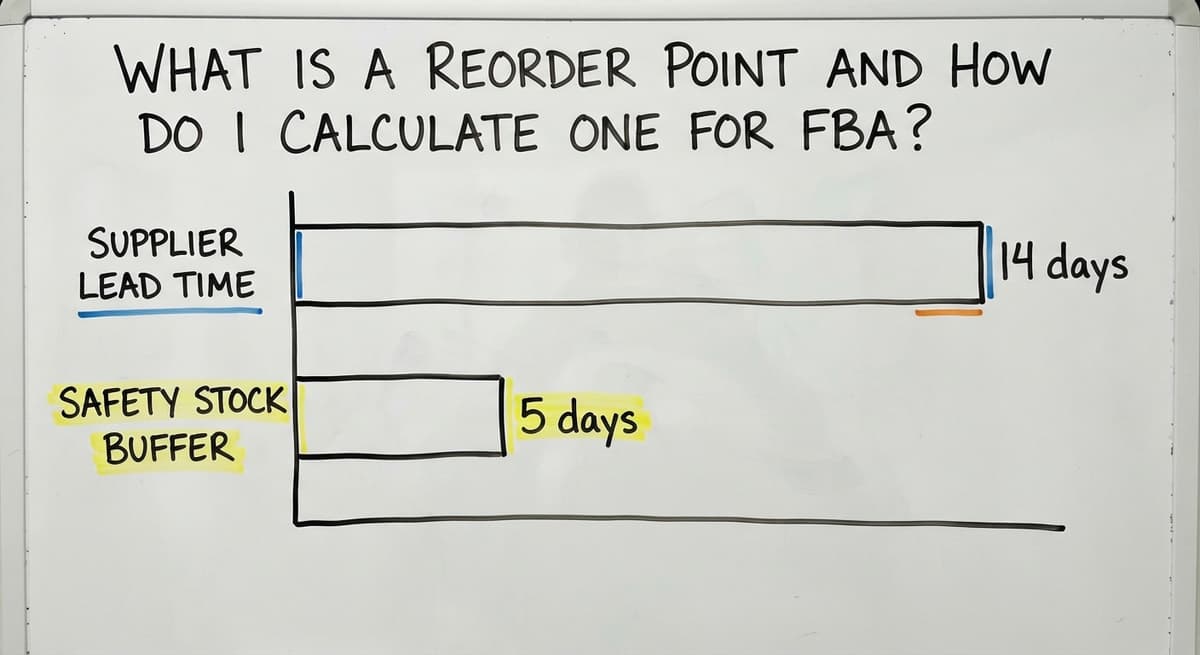
A reorder point is the stock level that tells you to place a new buy order before you run out. Calculate it by multiplying your average daily sales by your supplier lead time in days, then adding a safety stock buffer on top.
For example: if you sell 20 units a day and your supplier takes 14 days to deliver, your base reorder point is 280 units. Add 5 days of safety stock for delays and demand spikes, and the real trigger is 380 units.
Safety stock absorbs demand spikes and shipping delays without causing a stockout. Review reorder points every quarter. Seasonal products and promotional SKUs need adjusted numbers before peak periods, not after. A reorder point set in January may be wrong by October.
The comparison is easier when one option is built for you
Off-the-shelf means fitting your process to the software. We do it the other way round, and the first look costs nothing.
Book a callTrack Sell-Through Rate to Avoid Storage Fees
Sell-through rate measures how fast your inventory moves relative to how much Amazon is holding. A high rate means stock turns quickly. A low rate means units sit, and sitting units cost money.
Amazon charges long-term storage fees on units held longer than 365 days. Those fees compound quietly until they appear on your account statement.
A low sell-through rate is a signal to send smaller, more frequent shipments rather than large batches. Adjust quantities based on recent sales velocity, not last quarter's forecast. Keeping sell-through healthy also improves your placement in Amazon's inventory performance metrics, which affects your ability to send future inbound shipments without restrictions.

Reconcile Your FBA Inventory Regularly
Amazon can lose, damage, or miscount units during receiving and fulfillment. This is not rare. It happens across every fulfillment center at scale.
Inventory matching means comparing what you shipped against what Amazon says it received. Run this check after every inbound shipment closes. Look for shortages in received quantities and flag any units marked damaged on arrival.
When Amazon acknowledges a discrepancy, file a reimbursement claim promptly. Claims have time limits, and waiting reduces your chance of recovery. Keep your shipment records, box counts, and carrier tracking as supporting documents. The IRS is equally clear on why counts matter: IRS Publication 538 states, "To figure taxable income, you must value your inventory at the beginning and end of each tax year." Accurate matching is both an working and a legal requirement.
Manage Inbound Shipments Without Losing Track
Inbound shipments are where FBA inventory management either holds together or falls apart. A labeling error or a missing box count can delay receiving by days and throw off your available stock count.
Label every box to Amazon's specifications before it leaves your dock. Track each shipment inside Seller Central until it shows as fully received, not just delivered. Stagger shipments so you are not flooding 1 fulfillment center while another location runs low on your SKUs.
Keep a shipment log that ties each inbound to its buy order and supplier invoice. This log becomes your source of truth when Amazon's received quantity does not match what you sent. Without it, matching is guesswork. With it, discrepancies take minutes to identify and document for a reimbursement claim.
A Simple Shipment Log Should Capture
Tracking every inbound shipment in a consistent format gives you a reliable record to reference when Amazon reports quantity discrepancies or a buy order goes missing. A complete log entry covers the full lifecycle of a shipment from the moment it leaves your supplier to the moment it is confirmed received at the fulfillment center.
- Buy order number and supplier name
- Ship date and carrier tracking number
- Number of boxes and total units per SKU
- Amazon shipment ID and fulfillment center destination
- Date fully received and any quantity discrepancies noted
Connect FBA Inventory to Your Purchase Order Process
FBA inventory management starts upstream, before a unit ever reaches a fulfillment center. Buy orders, supplier lead times, and receiving records all feed into accurate stock levels. When those records live in separate spreadsheets and email threads, the gaps appear fast.
A distributor running 50 SKUs across 3 suppliers needs to know, at any moment, what is on hand, what is in transit, and what is on order. If those 3 numbers live in different places, the total is always wrong by the time someone checks it.
Connecting buy order data to FBA stock levels gives you 1 reliable number to plan from. That number drives reorder decisions, inbound shipment timing, and cash flow planning. Buy order management for small distributors works best when it feeds directly into the same system tracking Amazon stock, not a separate tab someone updates manually.
See it running on your own process first
No build cost. The subscription starts once it is live and doing the job, not before.
Book a callHandle Multi-Channel Inventory Without Double-Selling
Many distributors sell on Amazon FBA and through direct channels at the same time. A wholesale order, a direct website sale, and an Amazon order can all pull from the same physical stock. Without a shared inventory count, you risk committing units that are already spoken for.
Amazon's multi-channel fulfillment option lets FBA stock ship non-Amazon orders from the same pool. That is useful, but it needs your inventory record to reflect every channel in real time.
Overselling damages customer relationships and can trigger order cancellation obligations. The US Federal Trade Commission's Mail and Internet Order Rule needs sellers to ship when promised or offer a cancellation. A centralized inventory record is what makes that promise keepable across every channel you operate.
Steps to Prevent Double-Selling Across Channels
Selling the same SKU across multiple platforms without a unified inventory count is one of the fastest ways to oversell, damage your seller metrics, and lose customer trust. These steps create the structure needed to keep every channel drawing from accurate, up-to-date stock numbers.
- Keep a single inventory count that all channels draw from, not separate counts per channel.
- Update available quantities in real time when an order is placed on any platform.
- Set conservative buffer stock levels for fast-moving SKUs sold across 3 or more channels.
- Review channel assigning weekly to catch any channel consistently overselling its share.

What Does the Inventory Age Report Tell Me and Why Does It Matter?
Amazon's inventory age report shows exactly how long each ASIN has been sitting in a fulfillment center, broken down by age range. Use it to catch slow movers before they cross the 365-day threshold that triggers long-term storage fees.
Running this report monthly gives you time to act. Options include a price reduction to speed up sales, a removal order to pull stock back before fees hit, or bundling a slow SKU with a faster one to move both. Units approaching 300 days in the fulfillment center need a decision, not a note to revisit later. Inventory age reporting is the earliest warning system FBA gives you, and most distributors check it too infrequently to use it well.
Automate the Repetitive Parts of FBA Inventory Work
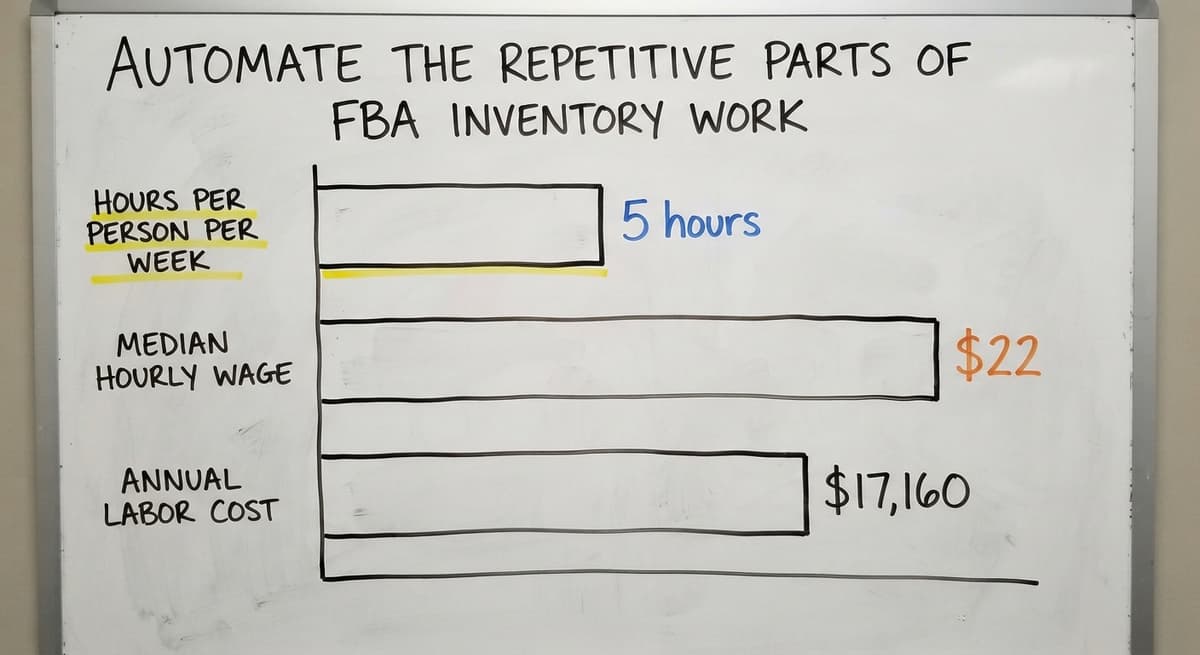
Manually checking stock levels, generating reorder alerts, and updating records wastes hours every week. Consider the math: 3 people each spending 5 hours a week on manual inventory tasks, at the median wage for stock clerks and order fillers of around $22 per hour per the US Bureau of Labor Statistics, adds up to roughly $17,160 a year in labor spent on work a system could handle.
Not sure this is the right shape for your operation
Describe how the work runs today. We map it on a call and show you what it would look like built around that, before you spend anything.
Book a call
What Automation Actually Handles in FBA Inventory
Automating can pull Amazon inventory data on a schedule and flag any SKU that hits its reorder threshold. Those alerts can trigger a buy order draft or a supplier alert without anyone opening a spreadsheet. Fulfillment center operations software built around your workflow can handle this without requiring a full platform switch. The goal is to spend your team's time on decisions, not on data entry. Automating handles the status checks. Your team handles what the data means.
When Spreadsheets and Basic Accounting Software Are No Longer Enough
Many wholesale and distribution operations start managing fulfillment inventory in spreadsheets and entry-level accounting software. At low volume, this works. At 80 SKUs across 3 channels with weekly inbound shipments, it breaks.
The problem is not the tools. Your accounting software handles accounting. Excel handles lists. Neither is built to sync Amazon stock counts, flag reorder points, and reconcile inbound shipments in real time. Keeping them aligned needs manual updates, and manual updates fall behind.
The US Census Bureau's Monthly Wholesale Trade data shows that inventories-to-sales ratios across wholesale trade shift month to month. Operations running on static spreadsheets cannot respond to those shifts fast enough to avoid either stockouts or excess storage costs. Accounting software integration for warehouse operations can bridge some of this gap, but only if the inventory data flowing into it is accurate and current.

Build a System That Fits How Your Operation Already Works
The best FBA inventory system is one your team uses every day without being reminded. A platform that needs a full workflow change will face resistance, and resistance means gaps in the data. Custom-built tools can connect your FBA data, buy orders, and accounting records without replacing the processes your team already knows. Inventory management software for wholesale distributors built around your existing workflow costs less to adopt because the learning curve is smaller. Custom warehouse management systems can pull Amazon stock counts, flag reorder triggers, and push buy order drafts into the tools your team already opens each morning.
Why Enterprise Platforms Often Fail Small and Mid-Size Distributors
For small to mid-size distributors, a tailored approach beats a large enterprise platform that was built for a company 10 times your size. The NIST Manufacturing Extension Partnership recommends aligning supply chain tools to actual working processes rather than forcing operations to conform to a tool's assumptions. Build the system around how your team works, and it will get used. Build it around a vendor's template, and it will get worked around. If your current setup is slowing you down, the next step is a conversation about what a connected system built for your operation would actually look like.
Frequently asked questions
How do I keep track of FBA inventory across multiple Amazon fulfillment centers?
Check all 4 inventory statuses in Seller Central weekly: active, reserved, unfulfillable, and stranded. Reconcile Amazon's totals against your own shipment records after every inbound. A shipment log tied to buy orders gives you a reliable count that Amazon's dashboard alone cannot provide.
How do I avoid long-term storage fees on FBA inventory?
Run Amazon's inventory age report monthly and act on any ASIN approaching 300 days in the fulfillment center. Options include a price reduction to speed sales, a removal order, or bundling the slow SKU with a faster mover. Sending smaller, more frequent inbound shipments also keeps sell-through rate healthy and reduces the risk of stock sitting too long.
How do I reconcile my FBA inventory when Amazon loses or damages units?
Compare your shipment records, box counts, and carrier tracking against Amazon's received quantities after every inbound shipment closes. When Amazon acknowledges a shortage or damage, file a reimbursement claim promptly. Claims have time limits, so waiting reduces your recovery rate. Keep all supporting documents on file for at least 18 months.
How do I manage FBA inventory alongside other sales channels without double-selling?
Keep a single inventory count that every channel draws from in real time. Update available quantities at once when any order is placed, regardless of channel. Set buffer stock levels for fast-moving SKUs sold across multiple platforms, and review channel assigning weekly to catch any channel consistently pulling more than its share.
What is a reorder point and how do I calculate one for FBA?
A reorder point is the stock level that triggers a new buy order. Calculate it by multiplying average daily sales by supplier lead time in days, then adding safety stock for delays and demand spikes. Review reorder points every quarter and adjust before seasonal peaks, not after.
When does managing FBA inventory in spreadsheets stop working?
Spreadsheets break down when SKU counts grow past roughly 50 to 80 items, when you sell across more than 2 channels, or when inbound shipments arrive more than once a week. At that point, manual updates fall behind fast enough to cause stockouts or missed reorder triggers. A connected system that pulls Amazon data automatically removes the lag.
How can I automate FBA inventory alerts and reorder triggers?
Set up a system that pulls Amazon inventory data on a schedule and compares each SKU against its reorder point. When stock hits the threshold, the system flags it and can draft a buy order or notify a supplier automatically. The goal is to remove the manual status-checking step so your team only acts on the alert, not on finding the problem.
What reports inside Amazon should I be checking regularly?
Check the inventory age report monthly to catch slow movers before long-term storage fees apply. Review the manage inventory page weekly for stranded and unfulfillable units. After every inbound shipment closes, check the shipment matching report for quantity discrepancies. These 3 reports cover the most common sources of lost margin in FBA operations.
Start with a free first look
A 30 minute call, your operation mapped, and a clear picture of what we would build. No obligation and nothing to install.
Book a callRelated guides
The rest of this guide, for the parts of the job this page does not cover.
Guides
- Multi Location Inventory Management Software
- Inventory Management for Multiple Locations
- Inventory Management System for Manufacturing
- Inventory Management Pics
- B2b Inventory Management
- Jewelry Inventory Management
- Dental Inventory Management
- The Objective of Inventory Management is To
- Qr Code for Inventory Management
- Hvac Inventory Management Software
- Inventory Management Software for Schools
Common questions
- How to Improve Inventory Management
- How to Manage Pharmacy Inventory
- How to Manage Hardware Inventory
- How to Manage Food Inventory
- How to Manage Inventory Efficiently
- How to Manage Consignment Inventory
- How to Keep Track of Inventory
- How to Record Inventory on Hand
- How to Manage Inventory in a Warehouse
- How to Manage Inventory for Small Business
- How to Manage Inventory Between Etsy and Shopify
- How to Manage Inventory in Retail Store
- What is Inventory Management and Its Types