


How To Keep Track Of Ebay Inventory
The simplest way to keep track of eBay inventory is to assign one internal SKU to every product, record every sale the moment it happens, and update your available quantity before the next order can come in. For low-volume sellers, a spreadsheet does that job. For operations with more SKUs, more channels, or existing accounting systems, a connected inventory system handles it faster and with fewer errors.
Reviewed and updated: October 2026
Book a callWhy eBay Inventory Tracking Breaks Down as You Grow
Manual tracking works at low volume. A seller with 20 active listings and 5 orders a day can update a spreadsheet without much trouble. Add more SKUs and the order rate climbs, and that same spreadsheet becomes the bottleneck.
The failure points are predictable. Overselling happens when a sale posts on eBay before the quantity is updated. Stockouts happen when no one notices a fast-moving item is almost gone. Duplicate listings push the same stock into two places at once. Matching errors pile up when the spreadsheet and the actual shelf count stop matching.
None of this is a discipline problem. It is a systems problem. A person updating records by hand cannot keep pace with a system that takes orders around the clock. The fix is not more effort; it is a better process.
We build it for your operation, and the first look is free
If you would rather not compare products, describe how your operation already works and we build the system around it.
No build cost. You see it running on your own process first, and the monthly subscription starts only once it is live.
Book a callWhat Good eBay Inventory Tracking Actually Looks Like
The core goal is one accurate number per SKU, updated close to real time. Good eBay inventory tracking connects 4 things: what is listed, what has sold, what is physically on hand, and what is on order from suppliers.
For a seller whose entire business runs through eBay, that connection can be relatively simple. For a wholesale distributor or fulfillment operation that uses eBay as one channel alongside a website or wholesale accounts, the same connection has to reach across every channel at once.
Barcode standards make scan-based counts possible at any scale. As GS1 notes, their barcode standards are "the most widely used supply chain standards system in the world," which is why most warehouse receiving and counting processes are built around them.
This page covers practical methods, ranked by working fit, not theory.
Does Your Product Catalog Need to Be Cleaned Up Before You Start Tracking?
Yes. Every tracking method depends on a clean, consistent product catalog. If your item names or numbers are inconsistent, no system can match a sale to the right record.
Standardize SKUs before building anything around them. A SKU (stock keeping unit) is simply a unique code you assign to each product. Map every eBay listing ID to one internal SKU so that when a sale comes in, it updates the right count automatically.
One SKU, one source of truth. Variants such as size or color need their own SKU entries, not notes inside a shared record. Duplicate or vague entries are the most common reason inventory numbers drift from reality before any sale is even recorded.
Method 1: Spreadsheet Tracking
A spreadsheet inventory log is the simplest way to track eBay inventory manually. Set up columns for SKU, description, quantity on hand, quantity listed, quantity sold, and reorder point. After each eBay sale, update the quantity on hand and quantity sold rows by hand.
A spreadsheet works for sellers with fewer than 100 active SKUs and a low daily order count, usually under 20 orders a day. Past that threshold, the manual update process falls behind the order rate, and the numbers stop being reliable.
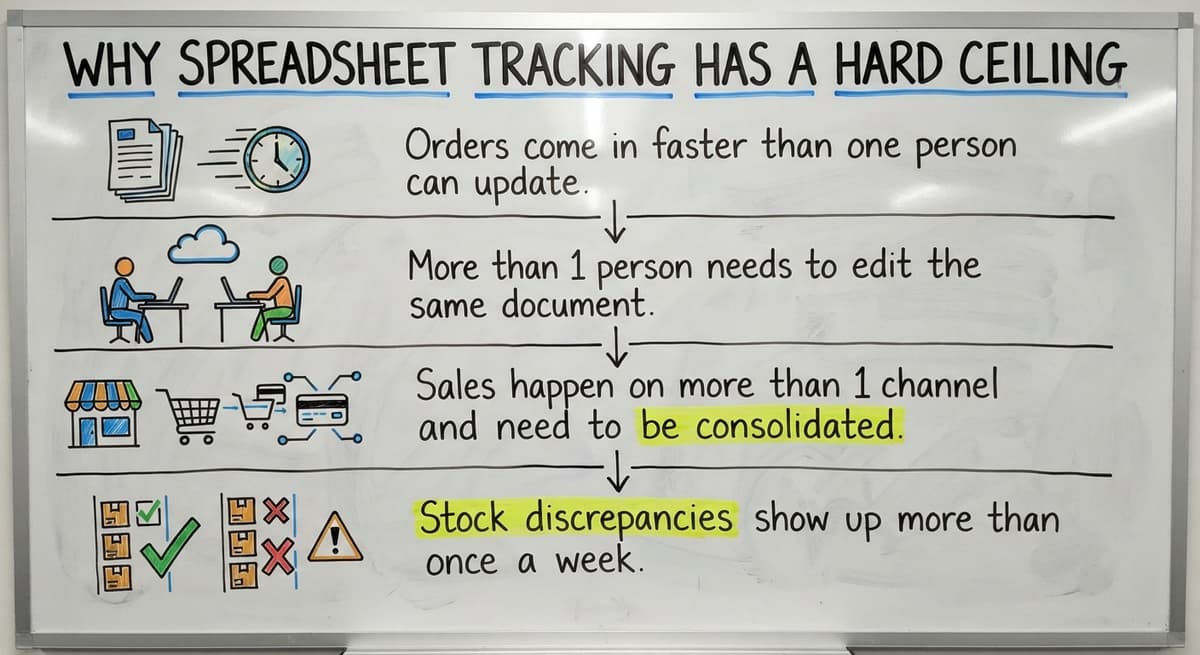
Why Spreadsheet Tracking Has a Hard Ceiling
Spreadsheets need someone to update them every time a sale happens. Concurrent edits from two people at once corrupt data. Nothing syncs automatically with eBay, so a sale that posts at 2 a.m. sits unrecorded until someone opens the file. The IRS is also clear on the obligation: IRS Publication 538 states, "To figure taxable income, you must value your inventory at the beginning and end of each tax year," which means accurate records are a legal requirement, not just a convenience.
When Does a Spreadsheet Stop Being Enough for eBay Inventory?
A spreadsheet stops being enough when any of these conditions appear:
- Orders come in faster than one person can update the file
- More than 1 person needs to edit the same document at the same time
- Sales happen on more than 1 channel and need to reduce a shared count
- Stock discrepancies show up more than once a week with no clear cause
At that point, replacing spreadsheets with purpose-built operations software is the more reliable path forward.
The comparison is easier when one option is built for you
Off-the-shelf means fitting your process to the software. We do it the other way round, and the first look costs nothing.
Book a callMethod 2: eBay's Built-In Inventory Tools
eBay Seller Hub gives sellers a basic inventory view, out-of-stock alerts, and the ability to manage listing quantities directly. For a seller whose entire operation lives on eBay and whose catalog is small, these tools cover the basics without any extra cost or setup.
The limits are large for anyone running a larger operation. Seller Hub shows you what is listed and sold on eBay. It does not show warehouse stock, open buy orders, or sales from any other channel. It has no connection to purchasing or accounting.
Use Seller Hub as a starting point, not as a long-term inventory system for any operation that ships more than a few dozen orders a day or sources stock from multiple suppliers.

Can I Connect My Online Marketplace Sales to My Accounting Software for Inventory Tracking?
Yes. Many wholesale sellers already run an accounting package to manage their books. Connecting online marketplace orders to accounting software inventory items keeps one financial record instead of two. Online marketplace sales feed into your accounting software through sync tools or direct integrations. Each sale posts as a transaction, reduces the inventory item count, and updates the cost of goods sold without manual entry. Accounting software integration for warehouse operations works best when the mapping between marketplace listing IDs and accounting software inventory items is set up correctly from the start.
Keeping Accounting Software Sync Reliable Over Time
The risk is drift. If the connection drops, if a mapping is wrong, or if someone adjusts a quantity in one system without touching the other, the two records separate. Check the sync regularly and set up alerts for failed transactions. This approach suits operations that want to keep their accounting software as the financial record while gaining marketplace-specific visibility, rather than replacing their accounting setup entirely.
Method 4: A Dedicated Inventory Management System
Inventory management software tracks stock levels, buy orders, receiving, and sales across channels, including eBay. When a sale posts on eBay, the system reduces the available count and can update the listing quantity automatically, which prevents oversells before they happen.
This approach suits sellers with high SKU counts, multiple warehouse locations, or sales on more than one channel. The right system fits the actual operation. A 500-SKU wholesale distributor does not need the same tool as a 50,000-SKU fulfillment center.
Inventory management software for wholesale distributors usually includes buy order tracking, supplier lead times, and multi-location stock counts, which are features that eBay's own tools and most spreadsheet setups cannot provide. The right fit reduces manual work without adding a new layer of complexity to manage.
See it running on your own process first
No build cost. The subscription starts once it is live and doing the job, not before.
Book a call
Multi-Channel Sellers: Keeping eBay in Sync With Other Channels
How do I stop overselling on eBay when I also sell through other channels? The answer is a single inventory record that every channel reads from and writes to at the same time.
Selling on eBay alongside a website, wholesale accounts, or other marketplaces means one sale anywhere must reduce the available count everywhere. Without that central record, 2 channels can both sell the last unit of a SKU at the same time. At volume, this is nearly guaranteed to happen.
Disconnected point tools, each managing their own count, cannot solve this. Multi-channel order management for growing sellers needs a system where the inventory number lives in one place and every sales channel pulls from that same source. The channel that posts the sale first wins the stock; every other channel sees the updated number at once.
What Does a Reorder Point Mean, and How Do I Set One?
A reorder point is the stock level at which you place a new order so that the replenishment arrives before you run out. Set it by multiplying your average daily sales by your supplier's lead time in days, then adding a small buffer for delays. For example: a SKU that sells 10 units a day with a 7-day lead time needs a reorder point of at least 70 units. Add 20 units as a buffer and the alert fires at 90 units on hand.
Why Reorder Point Alerts Are a Compliance Issue, Not Just an Operational One
Alerts should trigger before stock hits zero, not after a customer order fails. The FTC's Mail, Internet, or Telephone Order Rule needs sellers to ship within the time stated at the point of sale, which means a stockout is not just an working problem; it is a compliance risk. Good systems surface low-stock alerts automatically; manual systems need someone to check every SKU on a schedule.

Receiving and Purchase Orders: Closing the Loop
Inventory tracking is only accurate if incoming stock is recorded when it arrives. A buy order sets the expected quantity from a supplier. The receiving step confirms what actually came in. Discrepancies between the PO quantity and the received quantity need to be caught before the stock enters the available count. If a supplier ships 95 units against a PO for 100, the system should record 95, flag the shortfall, and prompt follow-up, not silently add 100.
Applying the Same Receiving Process Across Multiple Suppliers
Operations that skip this step will always have stock counts that drift from reality. How do I keep inventory accurate when stock comes in from multiple suppliers? The answer is the same for every supplier: log the PO, receive against it, and correct any gap before the units go live. A receiving process that matches POs to actual arrivals is what keeps the inventory number trustworthy over time. The NIST Manufacturing Extension Partnership provides vendor-neutral guidance on supply chain process design, including receiving controls that prevent exactly this kind of count drift.
Not sure this is the right shape for your operation
Describe how the work runs today. We map it on a call and show you what it would look like built around that, before you spend anything.
Book a callWhen a Custom System Makes More Sense Than Off-the-Shelf Software
Is custom inventory software a realistic option for a small wholesale operation? For many, yes, and it is often less expensive than the ongoing cost of manual workarounds. Off-the-shelf inventory tools are built around average workflows. They assume a standard warehouse layout, a standard purchasing process, and a standard set of sales channels. When your operation does not match that average, you spend time bending your process to fit the software. A custom system is built around how you already work. It keeps your accounting software where it performs well, connects to your sales marketplace for listing and order data, and handles the specific steps your warehouse or fulfillment process actually uses.

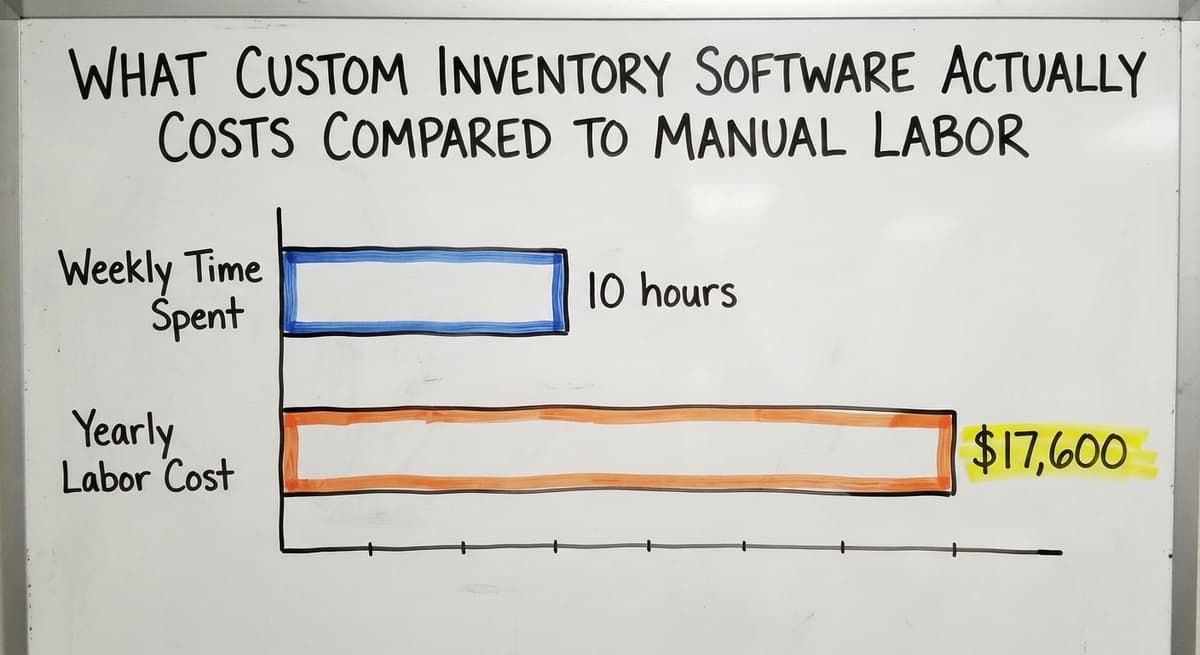
What Custom Inventory Software Actually Costs Compared to Manual Labor
Custom working software for fulfillment centers does not have to mean a large budget or a long build. It means the software fits the operation rather than the other way around. The Bureau of Labor Statistics puts the median hourly wage for stock clerks and order fillers at around $17. Two people spending 10 hours a week on manual inventory matching costs roughly $17,600 a year in labor alone, before errors and their downstream costs. A purpose-built system that removes that manual step pays for itself faster than most off-the-shelf subscriptions suggest. Custom does not mean complex to run; it means the system matches the people using it, which is why adoption tends to be higher than with generic tools.
Choosing the Right Approach for Your Operation
The right eBay inventory tracking method depends on 4 factors: SKU count, order volume, number of sales channels, and the systems you already run. Here is a practical way to decide:
- Low volume, single channel, under 100 SKUs: eBay's built-in tools or a spreadsheet may be enough for now, with a plan to move on as volume grows
- Growing volume, multiple channels, existing accounting setup: look for a system that connects to what you already run rather than replacing it; accounting software integration and multi-channel sync matter more than feature count
- Complex workflows, unique fulfillment steps, or high SKU counts: a custom-built system avoids forcing the business to fit software designed for a different kind of operation

Planning for a System That Scales With Market Conditions
The Census Bureau's Monthly Wholesale Trade data shows that wholesale inventories and the inventory-to-sales ratio shift with market conditions, which means the system that fits today needs to scale without a full rebuild tomorrow. The goal is not the most sophisticated system; it is the one that keeps every SKU count accurate across every channel your business actually uses.
If your operation has outgrown manual tracking and you want a system built around your real workflows rather than a generic template, a connected growth platform with custom workflow rollout may be the faster path. The right starting point is a clear look at where your current process breaks down and what it would take to close that gap without disrupting what already works.
Frequently asked questions
What is the simplest way to track eBay inventory manually?
A spreadsheet with columns for SKU, description, quantity on hand, quantity listed, quantity sold, and reorder point is the simplest manual method. Update it after every sale. It works reliably for sellers with fewer than 100 active SKUs and under 20 orders a day. Past that volume, manual updates fall behind the order rate and the numbers stop being accurate.
When does a spreadsheet stop being enough for eBay inventory tracking?
A spreadsheet stops being reliable when orders come in faster than one person can update the file, when more than one person needs to edit it at the same time, or when sales happen on more than one channel. Any of those conditions means the count will drift from reality on a regular basis.
What is the difference between eBay's built-in tools and a dedicated inventory system?
eBay's built-in tools show you what is listed and sold on eBay only. A dedicated inventory system connects eBay to your warehouse stock, buy orders, receiving records, and other sales channels. The built-in tools are a good starting point for small, single-channel sellers. A dedicated system is necessary once you have multiple channels, high SKU counts, or complex fulfillment workflows.
Can I connect my online marketplace sales to my accounting software for inventory tracking?
Yes. Sync tools map online marketplace orders to accounting software inventory items so each sale posts as a transaction, reduces the item count, and updates cost of goods sold without manual entry. The connection needs to be mapped correctly from the start and checked regularly. A broken or misconfigured sync causes the two records to separate, which is harder to fix the longer it goes unnoticed.
How do I stop overselling on eBay when I also sell through other channels?
The only reliable fix is a single inventory record that every channel reads from and writes to at the same time. When a sale posts on any channel, the available count drops at once and every other channel sees the updated number. Disconnected tools each managing their own count will eventually sell the same unit twice at enough order volume.
What does a reorder point mean and how do I set one for eBay inventory?
A reorder point is the stock level that triggers a new supplier order before you run out. Calculate it by multiplying average daily sales by your supplier's lead time in days, then add a safety buffer. A SKU selling 10 units a day with a 7-day lead time needs a reorder point of at least 70 units. Add a buffer of 20 and set the alert at 90 units on hand.
How do I keep inventory accurate when stock comes in from multiple suppliers?
Log a buy order for every supplier order, then receive against that PO when the shipment arrives. Record the actual quantity received, not the ordered quantity. Flag any discrepancy and resolve it before the units enter the available count. This process applies to every supplier and every shipment. Skipping it is the main reason stock counts drift from physical reality.
Is custom inventory software a realistic option for a small wholesale operation?
Yes, and it is often less expensive than it sounds when you factor in the ongoing cost of manual workarounds. A custom system is built around your existing process, connects to the accounting package you already run, and handles the specific steps your warehouse uses. It does not need a large budget or a long build time. The goal is software that fits the operation, not the other way around.
Start with a free first look
A 30 minute call, your operation mapped, and a clear picture of what we would build. No obligation and nothing to install.
Book a callRelated guides
The rest of this guide, for the parts of the job this page does not cover.
Guides
- Warehouse Inventory Tracking Software
- Warehouse Inventory Tracking System
- Inventory Tracking Software for Small Business
- Inventory Tracking Systems for Small Businesses
- Inventory Tracking Barcode
Common questions
- How to Keep Track of Inventory
- How to Keep Track of Inventory in Warehouse
- How to Keep Track of Inventory Small Business
- How to Record Inventory on Hand
- How to Improve Inventory Management
- How to Manage Fba Inventory
- How to Manage Pharmacy Inventory
- How to Manage Hardware Inventory
- How to Manage Food Inventory
- How to Manage Inventory Efficiently
- How to Manage Consignment Inventory
- How to Resolve Inventory Discrepancies
- How to Calculate Cycle Stock
- How to Maintain Stock Levels
- How to Prevent Stock Discrepancies
- How to Manage Inventory in a Warehouse
- How to Create a Barcode System for Inventory
- How to Organize Inventory for Small Business
- How to Manage Inventory for Small Business