


How To Keep Track Of Inventory In Warehouse
Keeping track of inventory in a warehouse is 4 habits. Give everything a unique SKU and a bin, scan at every movement, cycle count on a rolling schedule, and keep one record the books and the floor both trust. This guide, reviewed in September 2026, sets out each habit in order for a warehouse of 5 to 100 people, with the numbers a good count should hit.
Published 15 August 2026. Reviewed and updated 15 September 2026.
Reviewed August 2026. Each figure comes from the assumptions stated beside it, so you can substitute your own and the arithmetic still holds.
Book a callWhy Does Warehouse Inventory Tracking Go Wrong?
Most small warehouses lose accuracy the same way: data lives in too many places. One person tracks receipts in a notebook.
Another updates a spreadsheet at the end of the day. A third adjusts the count from memory after a return comes in. By Friday, no one knows which number is right.
This is not a technology problem. It is a process problem. Spreadsheets, printed pick sheets, and memory all work fine when order volume is low and the same 2 people handle everything.
Add a third person or double the order count, and the gaps show up fast.
The goal is not a perfect system on day one. The goal is a reliable one that grows with the operation. Start with what breaks first and fix that. Build from there.
Would you rather have it built around your operation?
The first look is free. If you would rather not compare products, describe how your operation already works and we build the system around it.
No build cost. You see it running on your own process first, and the monthly subscription starts only once it is live.
Book a callThe Core Goal: One Source of Truth
Every inventory problem traces back to one root cause: the real count and the recorded count live in different places. A single source of truth means one system holds the current stock level for every item, and every team member reads from and writes to that same system.
Accounting software is the right tool for purchasing, invoicing, and tax records. The IRS is clear on this obligation.
As IRS Publication 538 states: "To figure taxable income, you must value your inventory at the beginning and end of each tax year." The accounting package handles that well.
What it does not handle well is live bin-level movement: a pallet received at dock 2, split across 3 shelves, with 6 units pulled an hour later.
That gap between the accounting system and the warehouse floor is where stock goes missing. The fix is a lightweight layer that records physical movement and feeds the books, without replacing them.
Safety matters here too. OSHA notes that "the warehousing and storage industry includes establishments operating facilities for general merchandise, refrigerated goods, and other products," and that crowded, poorly organized storage creates real hazards for the people working in it. A clean inventory process is also a safer floor.
What Is the Fastest Way To Set Up SKUs and Bin Locations for the First Time?
No system works without an accurate starting count, and no count works without a label on every item and every location. Before you touch any software, spend a day on the floor.
Assign a SKU to Every Product
A SKU (stock keeping unit) is a short code that identifies one specific product. It should be unique, consistent, and short enough to scan or type without errors.
A good format uses a category prefix and a number: ELEC-0042 for an electronics item, PACK-0017 for a packaging supply.
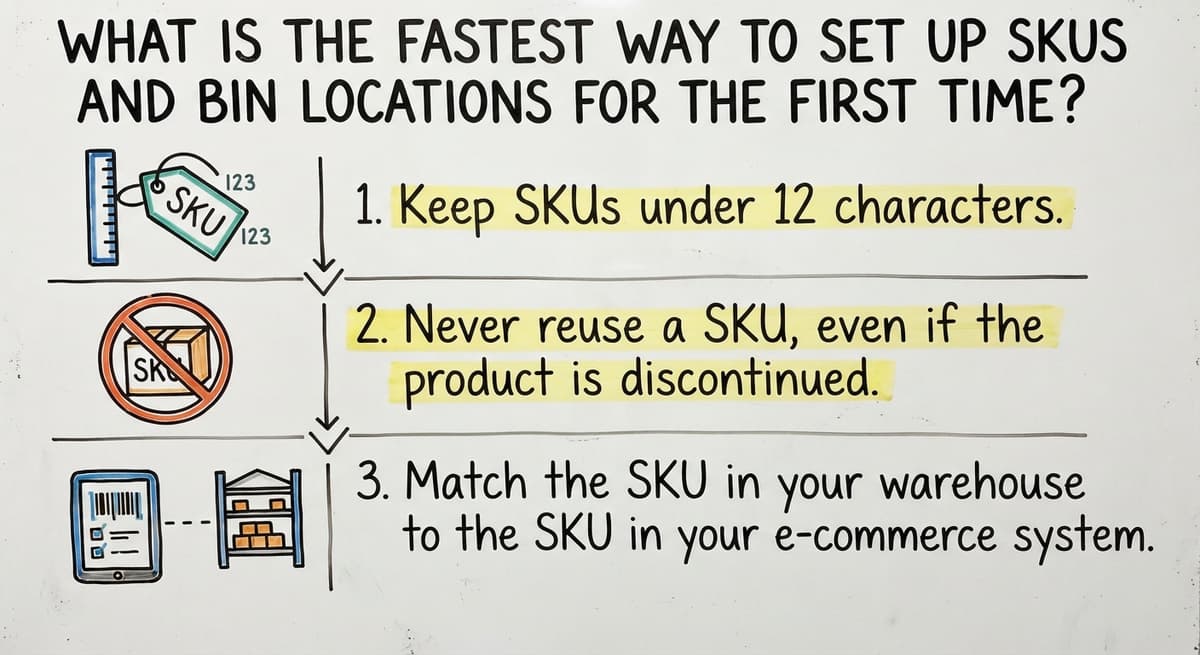
- Keep SKUs under 12 characters
- Never reuse a SKU, even if the product is discontinued
- Match the SKU in your warehouse to the SKU in the accounting system from day one
GS1 sets the global standard for barcodes so that a label printed in one facility scans correctly at another. If you ship to retailers or third-party logistics partners, use GS1-compliant barcodes from the start.
Label Every Bin Location
Bin locations tell a picker exactly where to find a SKU. A simple naming system works: Aisle-Bay-Level. A2-B3-L1 means Aisle 2, Bay 3, Level 1. Print labels, laminate them, and fix them to the shelf. Do not rely on memory or a hand-drawn map.
A physical count before going digital prevents compounding errors. If you load a wrong number into a new system, every transaction after that makes the error worse, not better.
Is the comparison easier when one option is built for you?
Yes. Off-the-shelf means fitting your process to the software, and custom is the other way round. The first look costs nothing.
Book a call
Step 2: Choose a Tracking Method That Fits Your Size
The right tracking method is the one your team will actually use every single day. A powerful system that gets skipped is worse than a simple one that gets followed.
Here is a plain comparison of the 3 most common methods:
| Method | Best For | Order Volume | Main Risk |
|---|---|---|---|
| Spreadsheet | 1 to 3 staff | Under 50 orders/day | Version drift, no live sync |
| Barcode scanning + simple app | 3 to 15 staff | 50 to 300 orders/day | Setup time, scanner cost |
| Warehouse management software | 15 to 100+ staff | 300+ orders/day | Over-engineering, cost |
A 5-person team does not need a full warehouse management software (WMS) rollout. A WMS is a dedicated software system that tracks every item from receiving to shipping. It is powerful and often overkill for a small warehouse.
Start with barcode scanning and a simple receiving log. Add a WMS layer only when the manual workarounds cost more than the fix.

How Does Barcode Scanning Change Daily Accuracy?
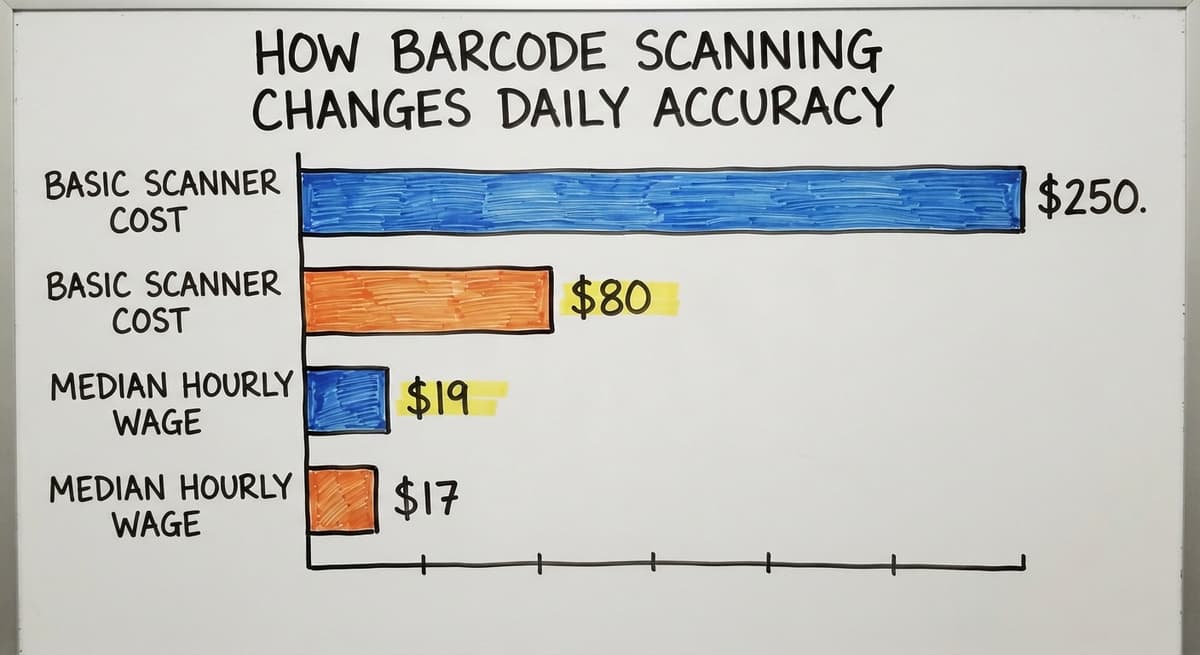
Barcode scanning removes the hand-entry errors that cause most count drift. Every time a person types a quantity by hand, there is a chance of a typo. Scanning removes that chance at the 3 points where errors happen most: receiving, picking, and shipping.
Basic USB or Bluetooth scanners cost between $80 and $250. That is a one-time cost. Compare that to the labor cost of re-counting mis-shipped orders.
According to the US Bureau of Labor Statistics, stock clerks and order fillers earn a median wage around $17 to $19 an hour. Three people spending 4 hours a week fixing count errors costs roughly $10,000 to $12,000 a year in labor alone.
The Receive-Scan-Put-Away Loop
The receive-scan-put-away loop is the daily habit that keeps counts clean:
- A shipment arrives at the dock
- The receiver scans each item barcode and confirms the quantity
- The system logs the receipt and updates the stock count
- The receiver moves the stock to its bin location and scans the bin label
- The system ties the item to the bin
That loop takes about 3 to 5 minutes per pallet. It replaces a manual receiving log that takes longer and still has errors.
Cycle counts (covered below) also run faster when every item has a scan history, because the system can flag locations that have not been touched recently.

Step 3: Record Every Movement, Not Just the Starting Count
Inventory accuracy depends on logging every movement, not just the opening balance. A starting count is a snapshot. The real count lives in the stream of transactions that follow.
Four movement types every warehouse must track:
- Receipts: Stock arriving from a supplier or transfer
- Picks: Stock removed to fill a customer order
- Adjustments: Corrections after a count reveals a discrepancy
- Returns: Stock coming back from a customer or rejected at receiving
Returns are the movement type most often skipped. A return lands on a shelf without a scan, the count stays low, and the system shows a shortage that does not exist.
Over a month, that drift adds up. Over a quarter, it can affect purchasing decisions and tax records.
Keep the log simple. A shared spreadsheet with columns for date, SKU, movement type, quantity, and the staff member's name works for a small team. The key is that no movement happens without a record.
What does it look like running on your own process?
The first thing you see is it running on your own process, at no build cost. The subscription starts once it is live and doing the job, not before.
Book a call
Step 4: Run Cycle Counts Instead of One Big Annual Count
Cycle counting means counting a small section of inventory on a rolling schedule, rather than shutting down for a full physical count once a year. It catches errors earlier and with far less disruption.
A simple weekly rotation for a small warehouse:
- Monday: Count Aisle 1
- Wednesday: Count Aisle 2
- Friday: Count Aisle 3
- Repeat through all aisles over the month
At that pace, every location gets counted roughly once a month. Errors surface within weeks, not at year-end when they are hard to trace.
The Warehousing Education and Research Council tracks distribution center performance benchmarks, and inventory accuracy is one of the core measures it monitors across the industry.
Cycle counts only work if the team records adjustments right away. A count that sits on a clipboard for 2 days before entry is nearly useless. The adjustment must go into the system the same day the count is done.

How to Keep the Books and Warehouse Counts in Sync
The gap between accounting-system inventory and actual bin-level counts is where most small warehouses lose control. The accounting system updates when an invoice is posted or a purchase order is received. The warehouse floor moves faster than that.
A pick happens at 10 a.m. The invoice does not go out until 3 p.m. For those 5 hours, the accounting system shows stock that is already gone.
If a second order comes in during that window, the system may allow a sale you cannot fill. The US Federal Trade Commission requires merchants to ship when promised or notify the customer. An inaccurate count makes that obligation harder to meet.
A Lightweight Layer That Works With the Accounting Software
The fix is not to replace the accounting software. The fix is to add a simple layer between the warehouse floor and the books that records physical movement in real time and pushes a summary to the accounting system on a set schedule.
This is what warehouse inventory management software overview tools are built to do. They sit between the scanner and the accounting system. They do not replace the accounting system.
For small operations, this layer can be as simple as a shared spreadsheet with a daily sync. For growing teams, a purpose-built accounting integration for warehouse operations handles the handoff automatically.

What Are the Most Common Reasons Warehouse Inventory Counts Go Wrong?
The most common reason counts go wrong is that stock moves without anyone recording it. That sounds obvious, but it happens in specific, fixable ways.
- Receiving without logging: A delivery arrives at the end of a shift. The team puts it away and plans to log it tomorrow. Tomorrow, no one remembers the exact count.
- One person holds all the knowledge: One staff member knows where everything is and what the real count is. When that person is out, the system breaks.
- Too many disconnected spreadsheets: Three versions of the same sheet exist. No one knows which is current. Changes in one do not appear in the others.
- Skipping adjustments: A count reveals a discrepancy. Entering the adjustment takes 3 minutes. The team skips it because the shift is busy. The error compounds.
None of these are failures of character. They are failures of process design. Each one has a direct fix: a receiving rule, a written procedure, one master file, and a daily adjustment habit.
The US Census Bureau's Monthly Wholesale Trade data shows that inventory-to-sales ratios shift month to month across wholesale firms, and operations that cannot track their own counts are the ones most exposed when demand changes fast.
What is in a free first look?
A 30 minute call, your operation mapped, and a clear picture of what we would build. No obligation and nothing to install.
Book a callWhat Does Good Inventory Tracking Look Like Day to Day?
A well-run small warehouse runs on short, repeatable habits, not heroic effort. Here is what a typical morning looks like when the process is working.
7:30 a.m.: The receiving team scans the overnight delivery. The system updates stock counts in real time. No clipboard, no catch-up entry later.
8:00 a.m.: The pick team pulls orders from the queue. Each pick is scanned at the bin. The system confirms the item and quantity before the picker moves on.
4:30 p.m.: One team member spends 15 minutes on that day's cycle count section. Any discrepancies go into the system before the shift ends.
That routine does not require extra headcount. It requires clear steps and the habit of following them. The result is fewer stockouts, faster shipping, and a count that matches the books at month-end without a scramble.
For teams looking to replace spreadsheet-based inventory tracking, this daily structure is the foundation before any new tool is added.
When Does a Custom Warehouse System Make Sense?
Spreadsheets and basic tools have a ceiling, and most small warehouses hit it somewhere between 150 and 300 orders a day. The signs are specific:
- Pickers pull the wrong item more than once a week
- Staff build their own workarounds because the official process is too slow
- Orders get lost between receiving and shipping with no clear audit trail
- The team spends more time fixing count errors than filling orders
When those signals appear, the answer is not a bigger spreadsheet. The answer is a system built around the actual operation, not a generic one that forces a process change to fit the software.
Custom warehouse software for small distributors keeps the accounting software in place and replaces only the manual parts: the paper receiving log, the clipboard pick sheet, the end-of-day count entry. It does not require an IT department or a months-long rollout.
For operations under 100 staff, a local implementation partner can have a working system running in weeks, not quarters.
Wholesale distribution software built for small teams works the same way. It connects the warehouse floor to the back office without forcing a full ERP replacement. The goal is always the same: one source of truth, every movement recorded, the accounting software stays intact.
Frequently Asked Questions
Frequently asked questions
Frequently asked questions
What is the 80/20 rule in inventory?
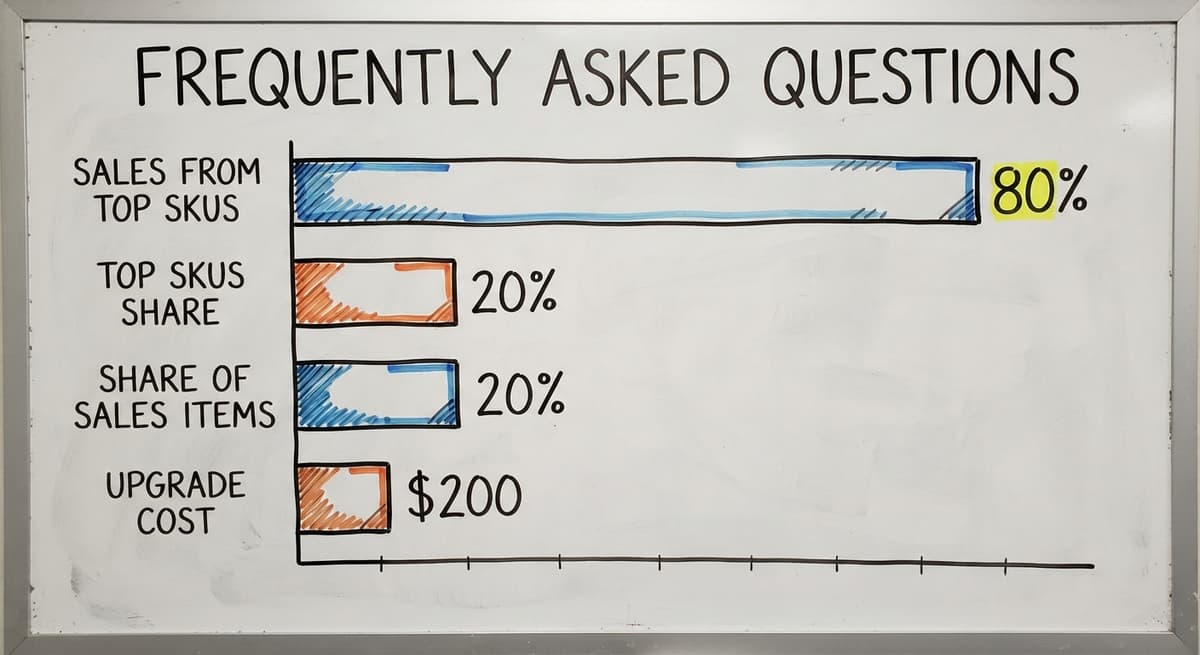
The 80/20 rule in inventory means roughly 80% of your sales come from 20% of your SKUs.
In practice, this tells you which items to count most often and keep closest to the shipping dock. Count your top 20% of SKUs every week. Count the rest less often.
What are the 5 KPIs for a warehouse?
The 5 most common warehouse performance measures are: inventory accuracy, order fill rate, on-time shipment rate, receiving cycle time, and pick accuracy. The Warehousing Education and Research Council publishes benchmark ranges for each at werc.org.
How to manually keep track of inventory?
Manual tracking works with 3 tools: a written receiving log, a bin location map, and a master count sheet. Log every receipt the moment it arrives.
Update the count sheet after every pick. Run a physical count of one section each week. The process breaks down only when steps are skipped.
What are the 5 steps of inventory management?
The 5 steps are: (1) count and label everything to get an accurate starting point, (2) choose a tracking method that fits your team size, (3) record every movement including receipts, picks, adjustments, and returns, (4) run cycle counts on a rolling weekly schedule, and (5) sync your warehouse count with your accounting system regularly.
What is the simplest way to track warehouse inventory for a small team?
For a team of 3 to 5 people, the simplest method is a shared spreadsheet with one row per movement, a printed bin location map, and a weekly cycle count of one aisle.
Add a barcode scanner when hand-entry errors become a daily problem. That upgrade costs under $200 and cuts most count drift immediately.
Can I use my accounting software to manage warehouse inventory?
Accounting software handles purchasing, invoicing, and year-end valuation well. It was not built to track live bin-level movement.
For a warehouse with more than 50 orders a day, a lightweight layer between the floor and the books prevents the gap between the physical count and the book count from growing. The accounting software stays in place. The layer handles the real-time movement.
How often should a small warehouse do a physical count?
A full physical count once a year is the legal minimum for tax purposes under IRS Publication 538.
In practice, weekly cycle counts replace the need for a disruptive annual shutdown. If cycle counts are done consistently, the year-end count is a quick check rather than a multi-day event.
When should a small warehouse move from spreadsheets to dedicated software?
Move when the manual workarounds cost more than the fix. Specific signals: mis-picks happening more than once a week, staff spending more than 5 hours a week on count corrections, or orders shipping late because the count was wrong.
At that point, the labor cost of staying on spreadsheets exceeds the cost of a purpose-built system.
How often should warehouse inventory be counted?
Continuously, in small pieces, rather than once a year in one big count. Cycle counting means counting a slice of the warehouse every day or every week, so every location is counted several times a year and fast-moving or high-value items more often.
A full physical count once a year satisfies the accountant; the cycle counts are what keep the record honest between those dates.
How do I create a warehouse bin-location system?
Give every storage spot an address the way a street does: zone, aisle, bay, shelf, then bin, so a location reads A-03-2-4.
Label the locations before you label the stock, put fast movers nearest the packing area, keep one SKU per bin where you can, and record every move so the system always knows where an item sits.
A location system that lives only in one person's head is not a system.
How can I reduce inventory discrepancies in my warehouse?
Record every movement at the moment it happens, scan instead of writing, receive against the purchase order at the dock, put stock away to an assigned location the same day, and cycle count so errors are caught in days rather than at year-end.
Most discrepancies come from the gap between the physical event and the record; closing that gap removes most of them.
How do I calculate reorder points and safety stock?
Reorder point is the stock you use during the supplier's lead time plus a safety buffer: average daily use multiplied by lead time in days, plus safety stock.
Safety stock covers the days when demand runs above average or a delivery runs late; a simple starting rule is the difference between the busiest daily use and the average, multiplied by the longest lead time you have seen. Review both every quarter as sales change.
Not sure this is the right shape for your operation?
The call is free. Describe how the work runs today. We map it on a call and show you what it would look like built around that, before you spend anything.
Book a callRelated guides
The rest of this guide, for the parts of the job this page does not cover.
Guides
- Warehouse Inventory Tracking Software
- Warehouse Inventory Tracking System
- Warehouse Tracking System
- Warehouse Inventory Management Software
- Warehouse Inventory Management Systems
- Warehouse Inventory Systems
- Inventory and Warehouse Management Software
- Warehouse Inventory Management System
- Warehouse Inventory Software Programs
- Inventory Software Warehouse
- Warehouse Inventory
Common questions
- How to Keep Track of Inventory
- How to Keep Track of Inventory Small Business
- How to Keep Track of Ebay Inventory
- How to Manage Inventory in a Warehouse
- How to Choose a Warehouse Management System
- How to Create a Warehouse Management System
- How to Build a Warehouse Management System
- How to Design a Warehouse Management System
- How to Set up a Warehouse Management System
- How Warehouse Management System Works
- Why is Warehousing and Inventory Management Important
- What is the Best Warehouse Inventory Management System?
- What is the Difference Between Warehousing and Inventory Management