

Warehouse Receiving Software
Warehouse receiving software is a tool that logs every shipment as it arrives. It checks the delivery against an open purchase order, flags any shortage or damage, and updates your stock count right away, so paper logs and manual re-entry go. A focused receiving tool solves most accuracy problems faster and at a lower cost than a full warehouse management system.
Published 28 July 2026. Reviewed and updated 15 September 2026.
Book a callWhat Does Warehouse Receiving Software Do?
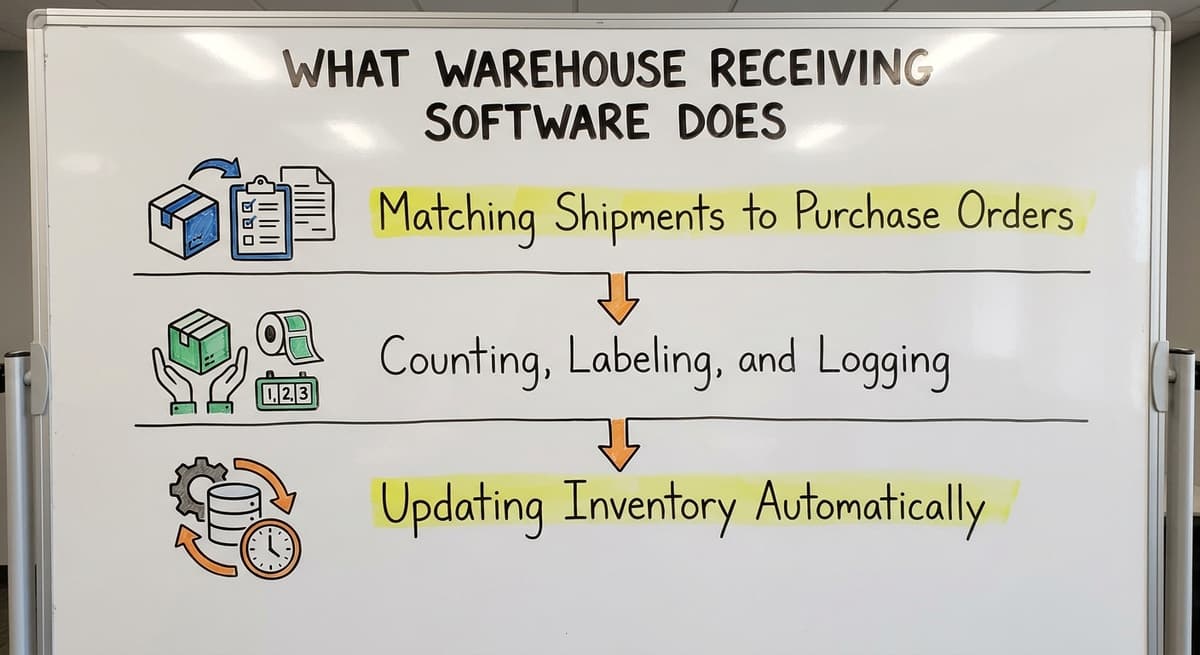
Receiving software handles the moment a truck pulls up to your dock. It connects what is on the purchase order to what is actually in the box. Most small warehouses handle this with a clipboard. Receiving software replaces the clipboard with a live system.
Matching Shipments to Purchase Orders
Matching shipments to purchase orders is the first job: the software pulls your open purchase orders (POs) from your system. When a shipment arrives, the receiver checks each item against the open PO in real time.
If 200 units were ordered and only 188 arrive, the system flags the shortage. No one has to remember to write it down or send an email later.
Counting, Labeling, and Logging
Counting, labeling, and logging begin when the receiver scans or keys each item.
The software counts as they go. It can print labels for each product or pallet. It logs who received the shipment, what time it came in, and the bin that took it. This creates a clean record without extra steps.
Updating Inventory Automatically
Once the receiver confirms the receipt, the software updates your stock count right away. It does not wait until end of day. That means your inventory data is live. Anyone checking stock levels sees the correct number within minutes of the put-away.
Would you rather have it built around your operation?
The first look is free. If you would rather not compare products, describe how your operation already works and we build the system around it.
No build cost. You see it running on your own process first, and the monthly subscription starts only once it is live.
Book a callWhy Is Receiving the Riskiest Step in the Warehouse?
Receiving is the riskiest step in the warehouse: errors at the dock multiply fast. A wrong count at receiving means wrong picks, wrong invoices, and unhappy customers.
Most warehouses automate picking or shipping before they ever touch receiving. That leaves the entry point wide open.
Put numbers on the errors and it gets clearer. 200 orders a day at a 2 percent mispick rate is 4 wrong shipments a day and roughly 1,000 orders a year going out wrong.
Cutting that to 0.5 percent leaves 250 orders a year: 750 fewer apologies.
The obligation behind all of this is not optional. IRS Publication 538 states: “To figure taxable income, you must value your inventory at the beginning and end of each tax year.” A stock figure nobody trusts makes that number a guess.
Errors That Hide for Weeks
Receiving errors can hide for weeks before anyone notices. A shipment received but never logged looks fine until someone tries to pick it. A shortage discovered at month-end means a credit dispute that is weeks old.
Staff rely on memory or sticky notes to fill the gap. By the time the error surfaces, no one can say exactly what happened or when.
The Cost in Real Terms
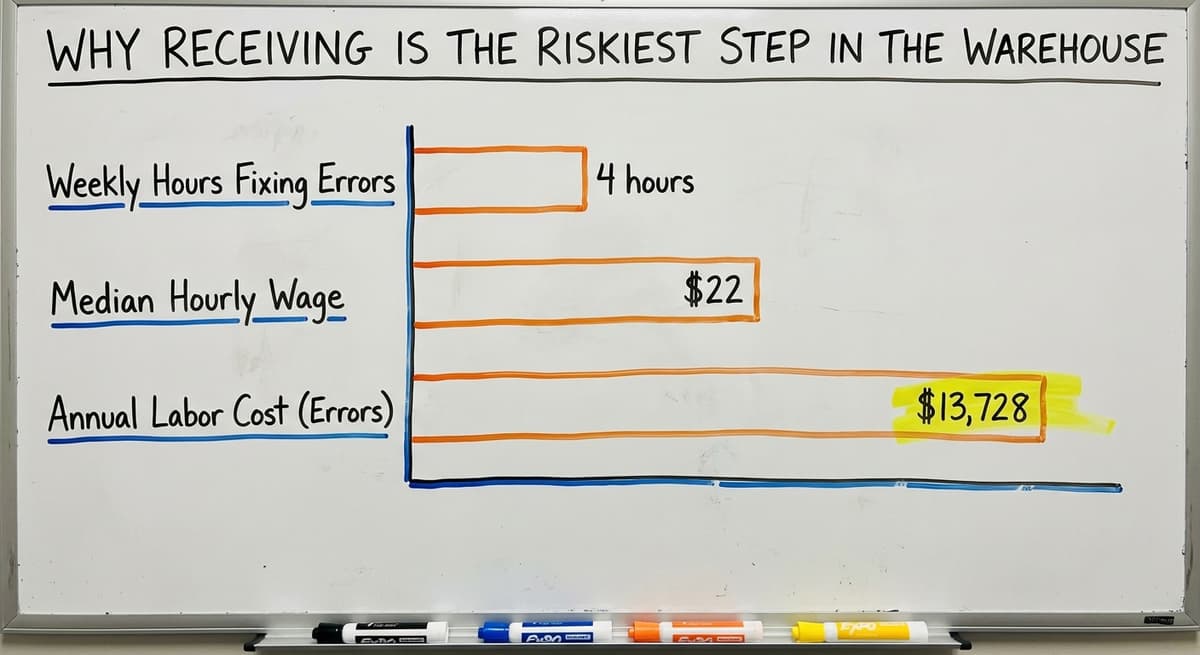
Consider 3 people spending 4 hours a week each fixing receiving errors at $22 an hour, based on the median wage for stock clerks reported by the US Bureau of Labor Statistics. That is $13,728 a year in labor alone, before you count vendor credit disputes or stock-outs on items that are physically sitting on the shelf.
The Accounting Gap
OSHA notes that "the warehousing and storage industry includes establishments operating facilities for general merchandise, refrigerated goods, and other products." Those facilities handle real physical goods, and every one of them has to account for what comes in.
Operations running an accounting package plus spreadsheets have no live link between what arrives at the dock and what the books show. That gap is where most receiving errors live.
Reviewed August 2026. Each figure comes from the assumptions stated beside it, so you can substitute your own and the arithmetic still holds.
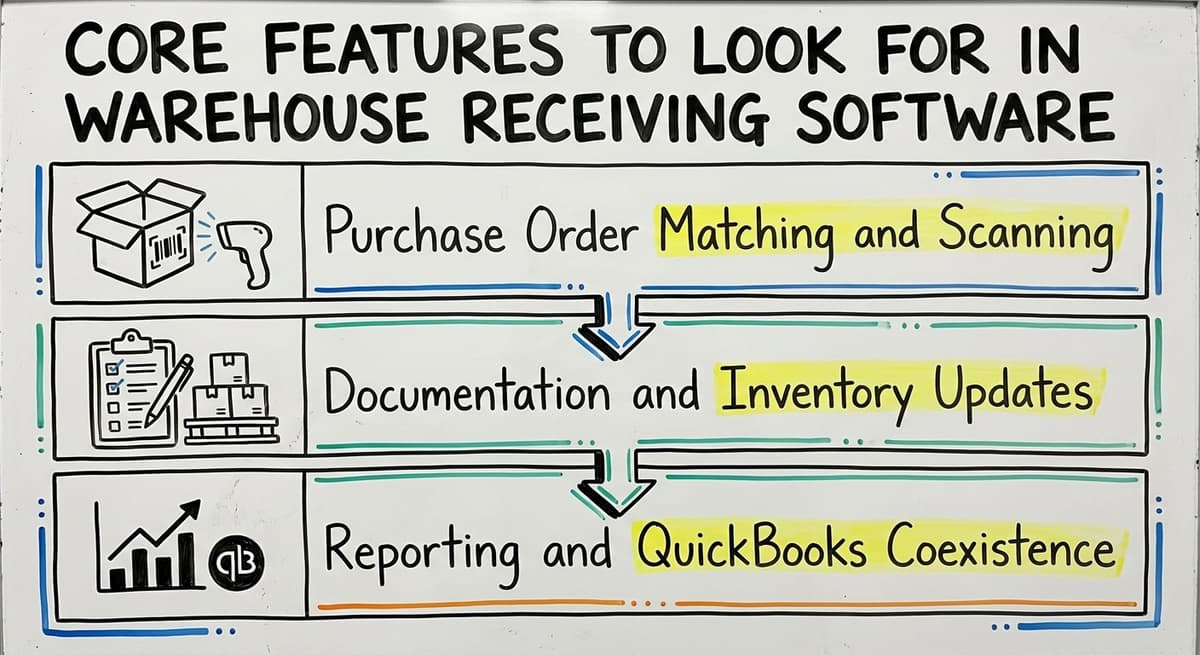
Core Features to Look for in Warehouse Receiving Software
Not every tool is the same, and 6 features separate the useful ones. Some are part of a large system. Some cover just the dock. Here is what matters for a small or mid-size warehouse.
Purchase Order Matching and Scanning
- Purchase order matching: The software pulls open POs and lets the receiver check items against them in real time. This is the most important feature. Without it, you are still guessing.
- Barcode or QR scanning: Speeds up receiving and cuts keying errors. GS1 standards mean a barcode printed by your vendor scans correctly on your equipment without any setup.
- Discrepancy flagging: Automatic alerts when received quantities do not match the PO. The system creates a log the team can refer back to, not just an email that gets buried.
Documentation and Inventory Updates
- Photo or note capture: Lets receivers document damage or partial shipments at the moment of arrival. This protects you in vendor disputes.
- Inventory update on receipt: Stock counts update the moment the receiver confirms a shipment. Not at end of day. Not after a manual sync. Right away.
- Location assignment: The system records the bin each item goes to. This matters when someone needs to find them an hour later.
Reporting and Accounting Coexistence
- Simple dashboard: Shows what was received today, what is pending, and what had discrepancies. One screen, not a spreadsheet.
- Accounting integration: For small distributors, the software should push data to the books or at minimum not create duplicate work. A live link to the accounting package is a real need, not a nice-to-have. The goal is one source of truth, not two systems that disagree.
Is the comparison easier when one option is built for you?
Yes. Off-the-shelf means fitting your process to the software, and custom is the other way round. The first look costs nothing.
Book a callHow Does Warehouse Receiving Software Connect to the Rest of Your Operation?
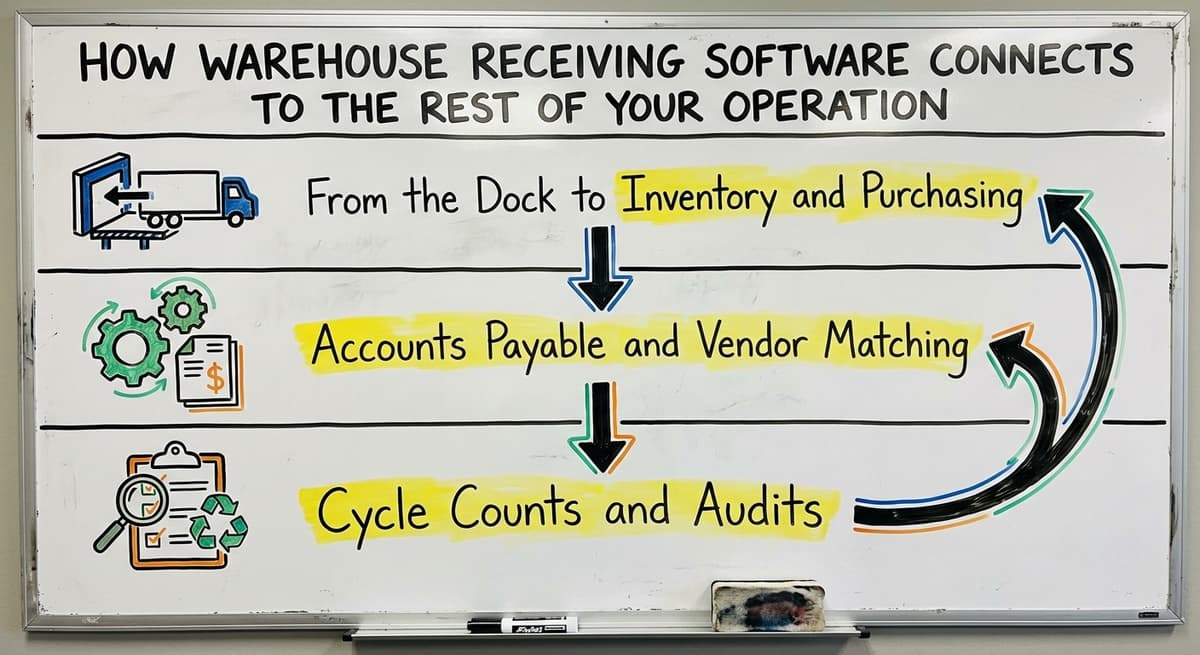
Receiving is the entry point for inventory accuracy. If the data is wrong here, every step downstream works from bad numbers. The connection runs further than most people expect.
From the Dock to Inventory and Purchasing
Confirmed receipts feed your inventory count in real time. Your purchasing team sees what actually arrived, not the order quantity. If a vendor is consistently short, the data shows it. You can act on it before it becomes a pattern that costs you stock-outs.
Warehouse Inventory Management Software depends on clean receiving data. A gap at receiving means the rest of the system is catching up all day.
Accounts Payable and Vendor Matching
A confirmed receipt with a discrepancy log makes invoice matching fast. Your accounts payable team sees exactly what arrived and what was short. They do not have to call the dock to ask.
The IRS requires that businesses "value your inventory at the beginning and end of each tax year." A clean receiving log makes that easier and more defensible.
Cycle Counts and Audits
Receiving records are a timestamped log of what came in and when.
Cycle counts (regular partial counts of inventory used to check accuracy) become faster once you can cross-reference what the system says arrived against what is on the shelf. Audits go smoother for the same reason.
What does it look like running on your own process?
The first thing you see is it running on your own process, at no build cost. The subscription starts once the software is live and doing the job, not before.
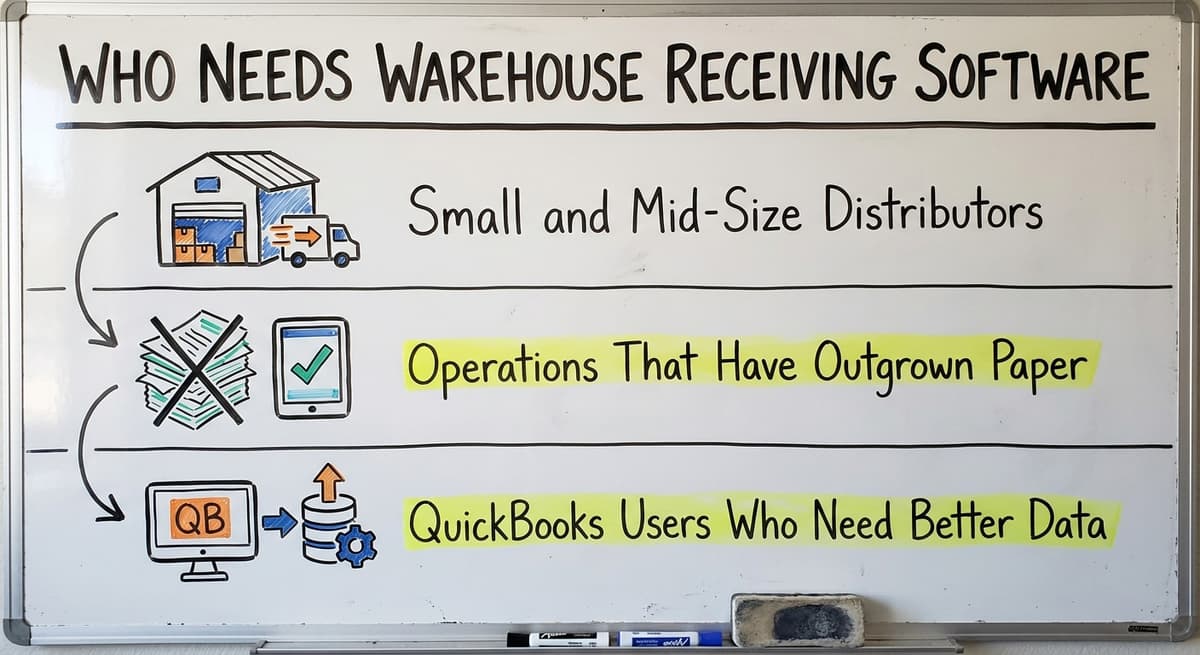
Book a callWho Needs Warehouse Receiving Software?
Warehouse receiving software is not for every business. It suits a specific kind of operation.
Small and Mid-Size Distributors
Small and mid-size wholesale distributors receiving multiple shipments a day from multiple vendors are the clearest fit. Inventory Tracking Software for Wholesale Distributors starts at receiving, the point where data first enters the system.
Fulfillment centers where accurate inventory counts affect order accuracy every hour also benefit. When the receiving team and the inventory team are different people, there is a handoff risk. Software closes that gap.
Operations That Have Outgrown Paper
Custom warehouse software is the right fit for a business that has outgrown paper logs and clipboards but is not ready for a full ERP or warehouse management system. Custom Warehouse Software for Small Distributors scopes down to exactly what the operation needs.
Warehouses with 5 to 100 staff are the sweet spot. One person's mistake at the dock can ripple through the whole day's work. A focused tool stops that mistake before it travels.
Accounting-Package Users Who Need Better Data
Companies that keep their books in a standard accounting package and need better operational data are a strong fit. The goal is not to replace the accounting software. It is to fill the gap between the dock and the books.

Warehouse Receiving Software vs a Full Warehouse Management System
A full warehouse management system (WMS) covers receiving, put-away, picking, packing, shipping, and often labor tracking. It is a large system with a long setup and a large price tag. That is not always what a small warehouse needs.
What Does a Full WMS Cover?
| Feature | Receiving Software | Full WMS |
|---|---|---|
| Dock receiving and PO matching | Yes | Yes |
| Barcode scanning | Yes | Yes |
| Inventory update on receipt | Yes | Yes |
| Pick, pack, and ship | No | Yes |
| Labor management | No | Yes |
| Setup time | Weeks | Months |
| Cost | Lower | Higher |
The Case for a Focused Tool
For many small distributors, a focused receiving tool solves 80 percent of their accuracy problems. It does not force the team to learn features they will never use.
Warehouse Management Software vs ERP: What Small Operations Actually Need is a real question worth asking before you sign anything.
The Right Question to Ask
When choosing warehouse software, the right question is not "what is the biggest system we can afford." It is "what part of our operation is causing the most pain right now." If the answer is receiving, start there. You can add more later.
What is in a free first look?
A 30 minute call, your operation mapped, and a clear picture of what we would build. No obligation and nothing to install.
Book a call
What Can a Custom Warehouse Receiving System Look Like?
A Columbus-area wholesale distributor receives 30 to 50 shipments a week. They log them on paper. At the end of each day, someone re-keys the counts into the accounting system. That re-entry step is where most errors happen.
Built Around How the Team Already Works
A custom receiving system built for that operation is 4 screens and a scanner. Dock staff scan or log items on a tablet.
The system pulls open POs from the accounting system and checks each item against them. The system flags any discrepancy right away, with a note field for the receiver to explain what they saw.
Confirmed receipts push back to the books automatically. The manual re-entry step disappears. The accounting software stays in place. The receiving software fills the gap between the dock and the books without replacing anything that is working.
Scope and Speed
A custom warehouse software build is a matter of weeks, not months, when the scope is focused. The NIST Manufacturing Extension Partnership recommends matching your process tools to your actual workflow rather than buying a system and bending your process to fit it.
A custom build does exactly that. The team learns one tool that matches how they already work, not a system built for a warehouse twice their size.

Questions to Ask Before Choosing Warehouse Receiving Software
Before you talk to any vendor, get clear on what you actually need. These questions will help.
Fit and Integration
- Does it connect to your accounting software, or will you be maintaining 2 separate records?
- Does it work on the devices your team already uses: tablets, phones, desktop?
- Does it adjust as your operation changes, or does a fixed set of features lock you in?
Process and Support
- How long does setup take, and what does the team need to do to get ready?
- What happens when there is a discrepancy: does the software create a record, or does someone still have to send an email?
- What does ongoing support look like after go-live?
- Is the vendor accessible, and do they understand small warehouse operations?

Getting Started with Warehouse Receiving Software
You do not need to overhaul your whole operation to fix your receiving process. Start small and build from there.
Map the Process First
- Step 1 is to write down who does what at the dock.
- Note where the handoffs happen between people or teams.
- Mark where errors most often show up and how long they take to find.
This map is the brief for any tool you choose. If a vendor cannot show you how their system handles each step on your list, it is not the right fit.
Pick One Pain Point and Pilot It
Step 2 is to identify the biggest problem. Is it missed discrepancies? Slow receiving? Inventory count errors? Manual re-entry into the books? Start with that one.
Run a short pilot on 1 receiving station or 1 product category before rolling out to the whole warehouse. Set a simple success metric: fewer discrepancy emails per week, faster receiving time, or fewer inventory count corrections at month-end.
Choose a Partner Who Stays Involved
The Warehousing Education and Research Council tracks distribution center performance benchmarks. The operations that improve fastest are the ones with consistent process support, not just a software license.
Choose a partner who will stay involved after launch. A system handed over and abandoned will drift back toward clipboards within 6 months. The goal is a tool that grows with the operation, supported by people who understand both the software and the warehouse floor.
If your team is still re-keying shipment counts into the accounting system at the end of each day, the fix is closer than you think. A focused receiving tool built around your workflow can close that gap in weeks.
The Software Society builds custom warehouse receiving systems for small and mid-size distributors who want better data without replacing what is already working. Start with a conversation about your dock process and we will show you exactly what a solution looks like for your operation.
Frequently asked questions
Frequently asked questions
What software do warehouses use?
Warehouses use a range of tools depending on their size and budget. Small operations run an accounting package alongside spreadsheets or paper logs for receiving. Mid-size distributors add dedicated receiving software or inventory tracking tools.
Larger operations use a full warehouse management system (WMS) from one of the enterprise or mid-market vendors. There is no single answer.
The right tool depends on how many shipments you handle, how many staff you have, and what your biggest pain point is right now.
What is the difference between a WMS and an ERP?
A WMS (warehouse management system) is software built to run warehouse operations: receiving, put-away, picking, packing, and shipping. An ERP (enterprise resource planning) system covers the whole business, including finance, HR, procurement, and supply chain.
Most ERPs include a warehouse module, but they are much larger and more expensive platforms. Most small and mid-size distributors do not need one.
A focused WMS or receiving tool is a better fit for operations that want to fix one part of the process without replacing everything else.
What are the four types of WMS?
The 4 common types are: standalone WMS (a dedicated system focused only on warehouse operations), ERP-integrated WMS (a module inside a larger enterprise system), cloud-based WMS (hosted software accessed via browser or app, with lower upfront cost), and supply chain management suites (broad platforms that include WMS as one part of a larger logistics tool).
For small distributors, a standalone or cloud-based tool is the fastest to set up and the easiest to learn.
What is the most popular WMS?
There is no single most popular WMS. Enterprise operations tend to run one of the large suites; mid-market operations use lighter cloud platforms. For small distributors, simpler tools or custom-built receiving software do more of the practical work at a fraction of the cost.
Popularity matters less than fit. The right question is which system handles your specific workflow without forcing you to change how your team already works.
Can warehouse receiving software work with your accounting software without replacing it?
Yes. Good receiving software is designed to coexist with your accounting software, not replace it. When the receiver confirms a shipment at the dock, the software pushes the receipt data to the books automatically. This removes the manual re-entry step that causes most errors.
The accounting package keeps handling accounting. The receiving software handles the dock. Each system does what it does best, and the data flows between them without anyone having to key it twice.
How long does it take to implement warehouse receiving software?
A focused receiving tool built around your existing workflow can be set up in weeks, not months. The timeline depends on how complex your PO process is, whether you need an accounting integration, and how many users need training.
A full WMS implementation can take 3 to 12 months. A custom receiving system scoped to one part of your operation is much faster because the scope is narrow and the team only learns what they will actually use.
Is custom-built receiving software a realistic option for a small distributor?
Yes, and for many small distributors it is a better option than an off-the-shelf tool. A custom build is scoped to your exact workflow. It connects to the systems you already use, accounting included. It does not include features you will never touch.
Setup is faster with no unused modules to configure. The cost is comparable to a year of subscription fees for a larger platform, and the result is a tool your team will actually use.
How does receiving software improve inventory accuracy?
Receiving software improves inventory accuracy by updating stock counts the moment a shipment is confirmed, not at end of day. It flags discrepancies between what was ordered and what arrived, so errors are caught at the dock rather than weeks later. It creates a timestamped log of every receipt, which makes cycle counts and audits faster.
The result is that your inventory data reflects what is actually on the shelf, not what someone typed into a spreadsheet hours after the truck left.
How much does warehouse receiving software cost?
The answer depends on scope. A focused receiving tool costs far less than a full warehouse management system because it covers one step of the operation.
Subscription products price by users or shipments, and a custom build is a one-time cost that is comparable to a year of subscription fees for a larger platform.
The number to compare is total cost over three years, including the manual re-entry hours the software removes.
What is the difference between receiving software and a full WMS?
Receiving software covers one step: matching shipments to purchase orders, counting and labeling, and updating inventory the moment goods arrive. A full WMS covers the whole flow through the building, including put-away, picking, packing, shipping and cycle counts.
Small distributors whose problems live at the dock get more from the focused tool, faster and at lower cost, and can grow into a wider system later.
What features should warehouse receiving software include?
At minimum: purchase order matching so every delivery is checked against what was ordered, barcode scanning so counts are recorded rather than remembered, discrepancy flags with a note field for the receiver, automatic inventory updates, and a live link to the accounting software so nothing is keyed twice.
Reporting on receiving accuracy and supplier performance is the feature that pays for itself over time.
Which warehouse receiving systems support barcode scanning?
Most modern receiving tools do, whether cloud subscriptions or custom builds, and it is the feature to insist on.
Scanning at the dock turns each carton into a recorded event tied to a purchase order, which is what removes the manual confirmation step behind most receiving errors.
Check that the system supports the scanners or phone cameras your team will actually carry, and that a scan updates inventory immediately.
Not sure this is the right shape for your operation?
The call is free. Describe how the work runs today. We map it on a call and show you what it would look like built around that, before you spend anything.
Book a callRelated guides
The rest of this guide, for the parts of the job this page does not cover.
Guides
- Warehouse Inventory Management Software
- Warehouse Inventory Tracking Software
- Warehouse Stock Management Software
- Software for Warehouse Management System
- Inventory and Warehouse Management Software
- List of Warehouse Management Software
- Online Warehouse Management Software
- Warehouse Stock Software
- Warehouse Inventory Software Programs
- Inventory Software Warehouse
- Software Warehouse Management
- Warehouse Software System
- Quickbooks Inventory Management Software
- Custom Inventory Management Software
- Warehouse Inventory Management Systems
- Pick and Pack in Warehouse
- Warehouse Inventory Systems
- Warehouse Management System Top 10
- Warehouse Shipment
- Warehouse Tracking System