


How To Manage Hardware Inventory
Updated October 2026. This guide was reviewed to reflect current practices for small wholesale distributors running on spreadsheets and accounting software.
To manage hardware inventory, assign every item a fixed bin location, set a reorder point for each SKU, log every movement in and out, and run cycle counts on a rotating schedule. Start with a verified physical count. Without accurate starting numbers, no system, simple or complex, will stay correct.
Book a callWhy Hardware Inventory Is Hard to Keep Accurate
Hardware items are small, cheap per unit, and stored in large quantities. Bolts, fittings, fasteners, and clips are easy to grab without logging. A bin that holds 500 pieces looks full at 400 and looks fine at 200. That gap is invisible until a job runs short.
Most small operations track hardware across a mix of printed sheets, spreadsheets, and memory. Each source drifts from the others. One wrong count compounds fast: a bin recorded at 300 units when it holds 150 will trigger a stockout before anyone sees it coming. Over-ordering is just as costly, tying up cash in parts that sit for months.
Hardware is uniquely hard compared to larger SKUs because the volume of distinct items is high and the cost per unit is low. That combination makes it easy to deprioritize accurate tracking, right up until the moment it causes a real problem.
We build it for your operation, and the first look is free
If you would rather not compare products, describe how your operation already works and we build the system around it.
No build cost. You see it running on your own process first, and the monthly subscription starts only once it is live.
Book a callStart with a Physical Count You Can Trust
What is the first step to managing hardware inventory correctly? Verify what you actually have before touching any system or spreadsheet.
Assign 1 person per zone or bin area. Two people counting the same bin creates confusion about which number is right. Count during a slow period or after hours so parts are not moving while you tally them. Write every count in a single document before entering anything into a system.
Barcode standards exist precisely to make this step repeatable. As GS1 explains, standardized barcodes "enable organizations to identify, capture and share information seamlessly." A label on each bin ties a scan to a location, removing the handwriting errors that corrupt a count before it starts.
A clean starting count is the foundation every later step depends on. Skip it, and every reorder point and cycle count you set will be built on a wrong number.
How Should You Organize Hardware So Counts Stay Fast?
Organize hardware by grouping like items together and labeling every storage location before you count anything. Fasteners in one zone, fittings in another, electrical in a third. Within each zone, assign a bin number to every drawer, shelf, and tray.
Use a consistent naming convention across all records. If the bin is labeled B-04-12, the system record reads B-04-12, not "bin 12" or "shelf 4." When a bin moves physically, the record moves the same day.
Grouping by type speeds up both daily pulls and periodic counts. A picker who knows all hex bolts live in row C does not need to read a full location list. Physical organization and system organization must match, or the system stops being trusted within weeks.
Set Minimum Stock Levels for Every Item
A reorder point is the quantity at which you place a new order, before the bin runs empty. Set it by asking 2 questions: how fast does this item move, and how long does it take to arrive after ordering?
An item that sells 20 units a day with a 5-day lead time needs a reorder point of at least 100 units. Add a safety buffer for items where a stockout causes a job delay. Hardware sourced from a local supplier can carry a smaller buffer than hardware shipped from a distant warehouse.
Write these levels into the system so any staff member can read them. Reorder points only protect you if someone acts on them without waiting to be told.
How Do You Set Reorder Points for Hardware Items?
Base each reorder point on 3 inputs: average daily usage, supplier lead time in days, and a safety stock quantity. Multiply daily usage by lead time, then add safety stock. Review the numbers every quarter. Usage patterns shift with seasons and customer mix, and a reorder point set 6 months ago may be wrong today.
The comparison is easier when one option is built for you
Off-the-shelf means fitting your process to the software. We do it the other way round, and the first look costs nothing.
Book a call
Track Every Movement In and Out
Inventory accuracy breaks down at the moment a part leaves a bin without a record. Receiving a shipment, pulling parts for a job, moving stock between locations, all of these are transactions that must be logged.
Informal handoffs are where most records fail. Someone grabs a handful of fittings for a quick repair and does not log it. That happens 10 times a week across 3 staff members, and by month-end the count is off by enough to trigger a wrong reorder.
The goal is a live count that matches the shelf at any moment. The IRS makes the stakes clear: Publication 538 states, "To figure taxable income, you must value your inventory at the beginning and end of each tax year." An unrecorded movement is not just an working problem. It is a record-keeping gap with tax consequences.
Use Barcodes or Bin Labels to Speed Up Counts
How do barcodes help with hardware inventory management? Scanning a barcode is faster and more accurate than typing a part number by hand, and bin labels with barcodes let staff scan a location rather than an individual item.
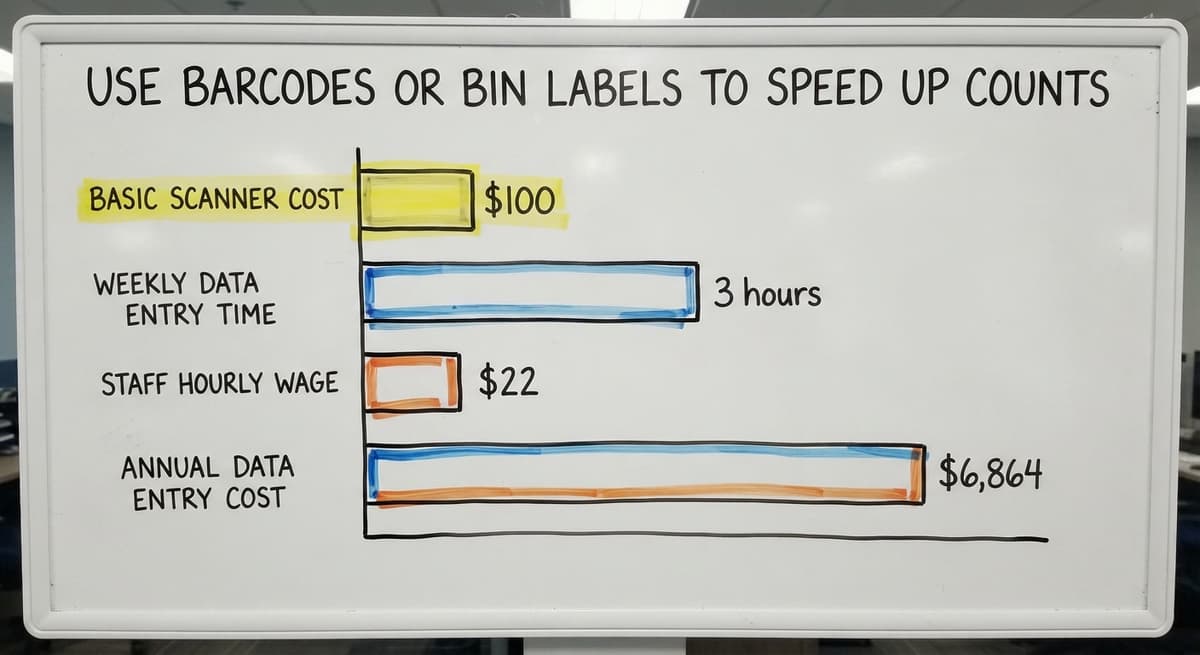
Basic barcode scanners cost well under $100 and connect to most inventory software without custom setup. A label on the bin face, printed with the location code and a scannable barcode, removes the transcription errors that silently corrupt records over time.
Consider the math: 2 staff members spending 3 hours each week on manual data entry at $22 an hour (near the median for stock clerks, per the US Bureau of Labor Statistics) costs about $6,864 a year. A label printer and 2 scanners pay for themselves in the first quarter. The real value is not speed; it is the errors that never happen.
Connect Inventory Records to Your Purchasing Workflow
When a reorder point is hit, a buy order should follow the same day. That only works if buying and inventory tracking share the same data.

Disconnected systems, one spreadsheet for stock levels and a separate one for orders, mean someone has to manually carry a number from one place to another. That step gets skipped. The US Census Bureau's Monthly Wholesale Trade data shows that inventories-to-sales ratios fluctuate across wholesale sectors, and operations with poor purchasing alignment tend to swing between overstock and shortage rather than holding a steady ratio.
Receiving a shipment should update on-hand counts in the same action. If a staff member has to enter a receipt twice, in the inventory system and then in the accounting package separately, one of those entries will eventually be missed. Purchasing and receiving are part of inventory management, not separate from it.
Run Cycle Counts Instead of One Big Annual Count
A cycle count checks a portion of your inventory on a rotating schedule, weekly or monthly, rather than shutting down for a full count once a year. Count a different section each week and every bin gets reviewed several times a year with far less disruption.
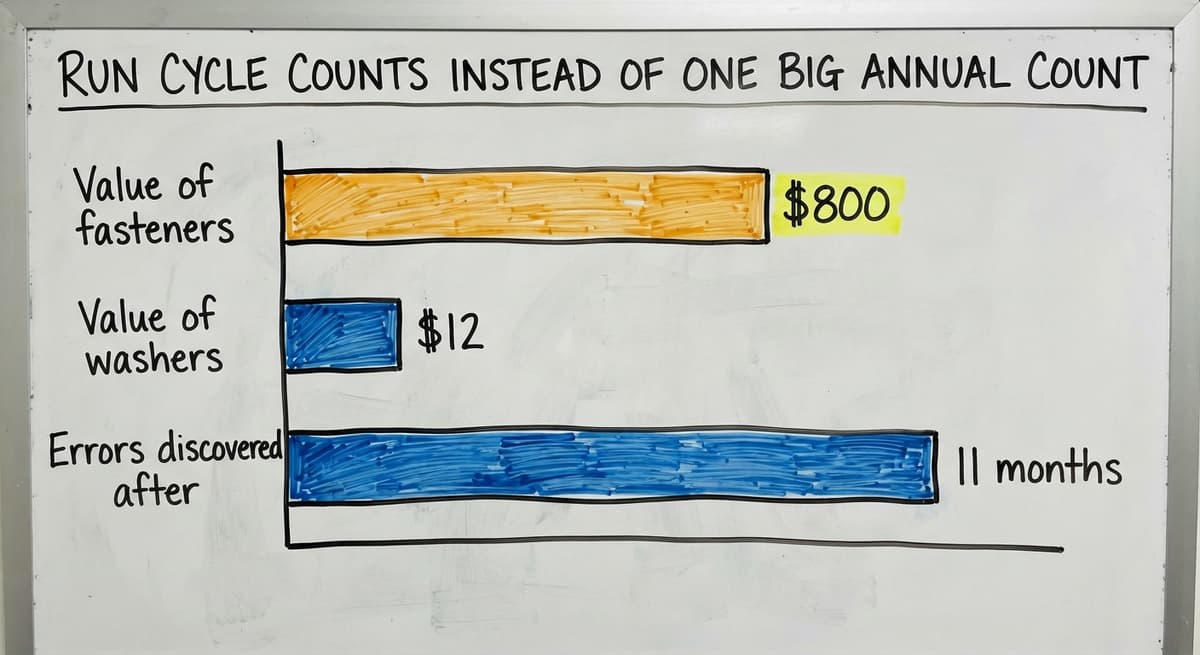
High-velocity items, those that move every day, should be counted more often than slow movers. High-value items deserve the same frequency. A bin of specialty fasteners worth $800 warrants a monthly check; a bin of common washers worth $12 can wait longer.
Cycle counts catch errors early, before a wrong number drives a bad buy order or a missed customer commitment. The NIST Manufacturing Extension Partnership identifies regular inventory check as a core supply chain practice for operations of any size.
What Is a Cycle Count and Why Is It Better Than an Annual Count?
A cycle count is a scheduled partial count, not a full-warehouse shutdown. It is better than an annual count because errors are found within weeks rather than discovered 11 months after they happened. By the time an annual count reveals a variance, the wrong number has already affected dozens of orders.
See it running on your own process first
No build cost. The subscription starts once it is live and doing the job, not before.
Book a callCan Your Accounting Software Handle Hardware Inventory on Its Own?
Your accounting software handles vendor bills, payments, and cost-of-goods tracking well. It is not built for real-time bin-level tracking, and small distributors who try to force it into that role end up with workarounds that break under pressure.

The accounting package was designed to record financial transactions. Bin locations, cycle counts, and movement logs are working data. Mixing them into one tool means both jobs get done poorly.
A dedicated inventory layer, whether off-the-shelf or custom-built, can sync values back to your accounting software without replacing it. Stock movements update the inventory system in real time. The accounting package receives summarized values for cost and valuation. The goal is the right tool for each job, connected cleanly, not one tool doing everything at half quality.
For teams already running an accounting integration for warehouse operations, the bridge between working stock data and financial records is usually the first place to build.
Assign Clear Ownership for Inventory Accuracy
Who should be responsible for keeping inventory records accurate? Name one person, not a team, as the owner of hardware inventory records.
That person approves adjustments, investigates variances, and keeps the system current. When a count does not match the record, they find out why before closing it out. When a reorder point looks wrong, they update it.
If everyone is responsible, no one acts. Ownership is a process decision, not a software feature. No system, simple or complex, stays accurate without a named person whose job includes keeping it that way.
Watch for the Warning Signs That Your System Is Breaking Down
What are the warning signs that an inventory system is failing? Frequent emergency buys are the clearest one. If you are calling a supplier to rush an order more than once a month, your reorder points are wrong or no one is acting on them.

Staff working around the system is the second sign. Sticky notes on bins, a personal spreadsheet someone keeps at their desk, a group chat used to track parts: each one is evidence the official system is too slow or unclear to use.
Growing variances are the third. If your cycle counts show differences that are getting larger over time, unrecorded movements are accumulating. These patterns are normal in a growing operation. The answer is to fix the process, starting with ownership and movement logging, not to add another spreadsheet layer on top of the ones already failing.
A system that staff work around is not a system; it is a suggestion.
When a Custom Inventory System Makes Sense
Off-the-shelf inventory software assumes a generic workflow. Hardware distributors often have specific rules: kitting orders where components are pulled from multiple bins, job costing tied to a specific customer project, or customer-specific pricing that changes what gets ordered and when.
A custom-built system matches the operation as it actually runs. It does not need migrating to someone else's process or paying for features that do not apply. Custom does not mean expensive or slow. It means building around the real bottlenecks, usually movement logging, reorder alerts, and the connection to the accounting package.
For operations running on an accounting package plus spreadsheets, a targeted custom layer often solves the problem without replacing anything. The accounting package keeps handling financials. The custom layer handles bin locations, cycle counts, and buy order triggers. Local teams in Columbus, Ohio can implement this kind of targeted build without the overhead and timeline of a large software vendor.
Inventory management software for small distributors built this way tends to hold up better than a generic platform forced into a workflow it was not designed for. When the operation has outgrown spreadsheets but does not fit a standard platform, replacing spreadsheets with a custom inventory system is often the most direct path forward.
The right time to build custom is when the workarounds cost more than the build.
Frequently asked questions
What is the inventory of equipment?
An equipment inventory is a record of every physical item a business owns or uses, including tools, machines, and hardware. Each record usually includes a description, location, quantity, and condition. For hardware distributors, this covers both the stock sold to customers and the tools used to run the warehouse.
What are the four types of hardware?
In a distribution context, hardware is commonly grouped into four categories: fasteners (bolts, screws, nuts, washers), fittings (pipe, hose, and tube connectors), tools (hand and power tools), and structural hardware (hinges, brackets, anchors). Organizing inventory by these categories makes counts faster and reorder points easier to set.
What is the 80/20 rule in inventory?
The 80/20 rule, also called the Pareto principle, holds that roughly 80% of your stockouts and inventory problems come from 20% of your SKUs. In practice, identify the items that move fastest or cause the most disruption when they run out, then count and monitor those items more often than the rest of your catalog.
What is KPI for inventory control?
Common inventory control KPIs include inventory accuracy rate (how often the system count matches the physical count), stockout frequency (how often a bin hits zero before a reorder arrives), inventory turnover (how many times stock sells through in a year), and days on hand (how long current stock would last at the current usage rate). Pick 2 or 3 that match your biggest pain points rather than tracking all of them at once.
How do you manage hardware inventory without expensive software?
Start with a verified physical count, assign every item a fixed bin location, and log every movement in a single shared document. Set a reorder point for each item and check it weekly. A simple spreadsheet can support this if one person owns it and the process is followed consistently. The discipline matters more than the tool at the start.
How often should you run a cycle count for small warehouse inventory?
Count high-velocity and high-value items monthly. Count slower-moving items quarterly. The goal is for every bin to be verified at least 3 to 4 times a year without shutting down operations for a full count. Adjust frequency based on how often variances appear: a bin that keeps coming up wrong needs more frequent attention.
What causes inventory accuracy to drop over time?
The most common causes are unrecorded movements (someone pulls parts without logging them), receiving errors (a shipment is put away before the count is entered), and adjustments that get made to the physical bin but not to the system. Ownership gaps, where no single person is responsible for the records, let all three problems grow unchecked.
Start with a free first look
A 30 minute call, your operation mapped, and a clear picture of what we would build. No obligation and nothing to install.
Book a callRelated guides
The rest of this guide, for the parts of the job this page does not cover.
Guides
- Multi Location Inventory Management Software
- Inventory Management for Multiple Locations
- Inventory Management System for Manufacturing
- Inventory Management Pics
- B2b Inventory Management
- Jewelry Inventory Management
- Dental Inventory Management
- The Objective of Inventory Management is To
- Qr Code for Inventory Management
- Hvac Inventory Management Software
- Inventory Management Software for Schools
Common questions
- How to Improve Inventory Management
- How to Manage Fba Inventory
- How to Manage Pharmacy Inventory
- How to Manage Food Inventory
- How to Manage Inventory Efficiently
- How to Manage Consignment Inventory
- How to Keep Track of Inventory
- How to Record Inventory on Hand
- How to Manage Inventory in a Warehouse
- How to Manage Inventory for Small Business
- How to Manage Inventory Between Etsy and Shopify
- How to Manage Inventory in Retail Store
- What is Inventory Management and Its Types