


How To Create An Inventory Tracking System?
To create an inventory tracking system, map your current process, define what data you need to capture, choose how you will identify items, and build workflows for receiving, picking, and adjusting stock. Connect those workflows to your accounting package so data flows one way, without double entry. The result is a live count your whole team can trust.
This guide was reviewed and updated in October 2026.
Book a callWhat an Inventory Tracking System Actually Does
An inventory tracking system tells you what you have, where it is, and when it moves. That is the whole job.
It is not the same as accounting software. Your accounting software records what things cost and what you earned. It does not tell you which bin a product sits in or whether a shipment was short. Those are working questions, and they need an working tool.
Set the right expectation from the start: a tracking system is an operations tool. It keeps product moving correctly. The financials still live in your accounting package.
We build it for your operation, and the first look is free
If you would rather not compare products, describe how your operation already works and we build the system around it.
No build cost. You see it running on your own process first, and the monthly subscription starts only once it is live.
Book a callWhy Spreadsheets Break Down and the IRS Requires a Count
Spreadsheets work at low volume. Once you have 3 staff updating the same file, errors compound fast. Printed pick sheets go stale the moment a second order touches the same item.
The IRS makes the count a legal requirement too. IRS Publication 538 states: "To figure taxable income, you must value your inventory at the beginning and end of each tax year." A tracking system makes that count accurate rather than a guess.
Map Your Current Inventory Process First
Before you build anything, walk the floor. Follow a product from the dock door to the shipping label and write down every step.
Note where staff use paper, where they rely on memory, and where one person hands off to another. Every handoff is a place where errors or delays happen. Those spots are where your system needs to be strongest.
This map becomes your blueprint. Build the system around how your operation already works, not around a vendor's default template.
GS1, the global standards body behind barcodes, notes that "barcodes are the foundation of supply chain visibility", meaning the physical label is only as useful as the process built around it.
If your map shows 6 handoff points, your system needs 6 clear transaction types. Start there.
What Data Does Your Inventory System Need to Capture?
Capture only the data your staff will actually use and keep current. A bloated data model breaks down fast when the team is busy.
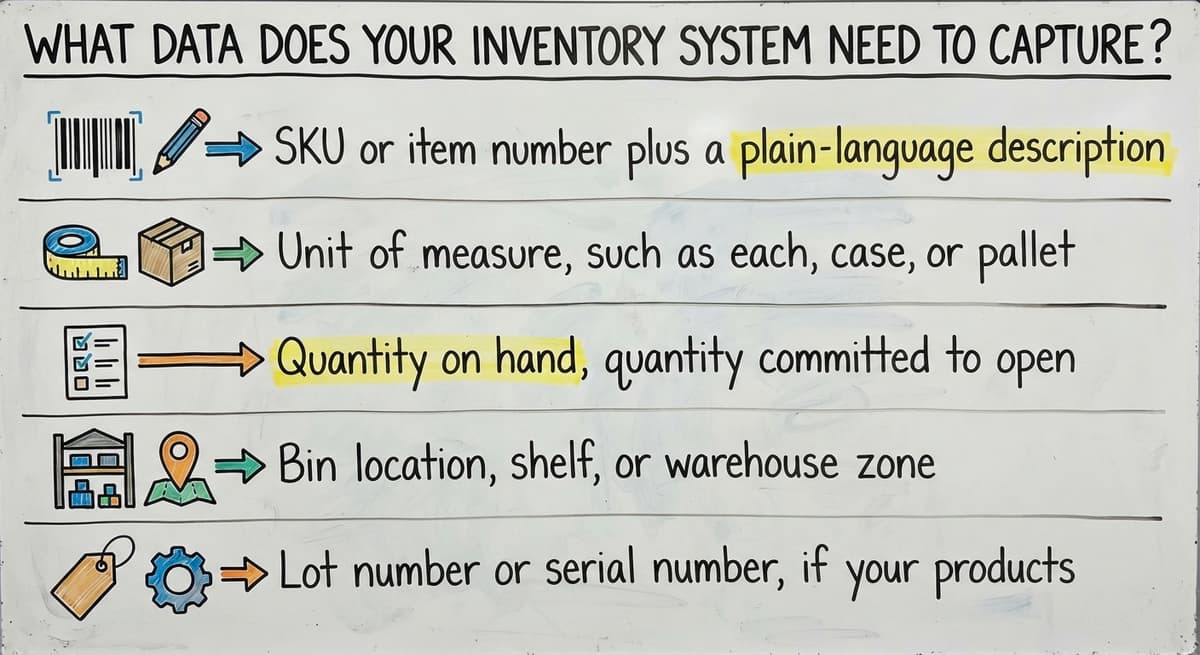
The core fields for most warehouse inventory systems are:
- SKU or item number plus a plain-language description
- Unit of measure, such as each, case, or pallet
- Quantity on hand, quantity committed to open orders, quantity on order from suppliers
- Bin location, shelf, or warehouse zone
- Lot number or serial number, if your products need traceability
Start lean. You can add fields later. A field no one fills in is noise, and noise erodes trust in the whole system.
Choose How You Will Identify and Count Items
The 3 main options are manual entry, barcode scanning, and RFID. Each has a different cost and a different fit.
Manual entry is free to start but slow and error-prone. One mistyped digit creates a count problem that takes hours to find.
Barcode scanning is the right starting point for most small-to-mid-size operations. Scanners are inexpensive, and GS1 barcode standards are widely supported across suppliers and carriers. Scanning removes the manual entry step that causes most receiving errors.
RFID reads many tags at once without line of sight. It suits high-volume operations with large product counts, but the hardware cost is higher and the setup is more complex.
The comparison is easier when one option is built for you
Off-the-shelf means fitting your process to the software. We do it the other way round, and the first look costs nothing.
Book a callMatch Your Counting Method to Your Operation Size
For counting, cycle counting beats a full physical inventory for most teams. Cycle counting means counting a portion of stock on a rotating schedule rather than shutting down to count everything at once. It is less disruptive and catches errors faster.
Match the method to your product mix. A 50-SKU wholesale operation needs a scanner and a solid cycle count schedule. A 5,000-SKU fulfillment center may need both.

Define the Transactions Your System Will Record
Every movement of stock is a transaction. Each one needs a trigger, a responsible staff role, and a timestamp.
The 4 core transaction types are:
- Receiving: A buy order is fulfilled. Staff count and inspect the delivery, then add the quantity to the correct bin location.
- Picking and shipping: An order goes out. The system reduces on-hand quantity at the moment of pick confirmation.
- Transfers: Stock moves between bins, shelves, or warehouse zones. Both the source and destination locations update.
- Adjustments: A cycle count or damage event corrects the recorded quantity. Adjustments need a reason code and a manager sign-off.
If a transaction type is missing, staff will find a workaround. Workarounds create counts you cannot trust.
How Do You Connect an Inventory Tracking System to Your Accounting Software Without Replacing It?
Your accounting software handles the financials. Your tracking system handles the working detail. The two should sync, not compete.
The right setup pushes data one way: stock movements in the tracking system generate the cost entries that land in your accounting software automatically. No one types the same number twice.
Double entry is the main source of errors in mixed systems. If a receiver enters a quantity in one place and a bookkeeper enters it again somewhere else, the two records will drift apart within weeks.
How a Well-Built Accounting Integration Keeps Both Systems Honest
A well-built accounting integration for warehouse operations does not replace your accounting software. It sits alongside it. Inventory movements trigger journal entries or update item records in your accounting software without any manual step. Your chart of accounts stays intact. Your existing reports still run.
Custom inventory management software for wholesale distributors is often built this way: the tracking layer connects directly to the existing accounting file, replacing only the parts that were causing pain.
The US Census Bureau tracks the inventories-to-sales ratio for wholesale firms, and tighter ratios mean less room for count errors before they affect cash flow. Accurate sync between your tracking system and your accounting package keeps both numbers honest.

Set Reorder Points and Low-Stock Alerts
A reorder point is the quantity at which a buy order should be triggered. When stock falls to that number, the system alerts the buyer.
The formula is straightforward: multiply average daily usage by your supplier's lead time in days. If you sell 20 units a day and your supplier takes 5 days to deliver, your reorder point is 100 units. Add a safety buffer if demand is uneven.
Build alerts into the system so managers see low-stock warnings on a dashboard, not buried in a report they have to remember to run. An alert that fires automatically is the one that gets acted on.
Review reorder points every quarter. Demand shifts with seasons and promotions. A static number set in January will be wrong by October.
See it running on your own process first
No build cost. The subscription starts once it is live and doing the job, not before.
Book a callBuild the Receiving Workflow
Receiving is where most inventory errors start. A clear workflow stops them before they reach the shelf.
The steps, in order:
- Match the delivery to the open buy order before anything is unloaded.
- Count and inspect items. Note any damage or shortage on the delivery record.
- Scan or enter quantities into the system against the buy order line.
- Assign stock to a bin location. The system records the location, not just the quantity.
- Close the buy order once all lines are confirmed.
Any discrepancy should trigger a hold and a alert to a supervisor. Workarounds at receiving, such as accepting a short shipment and adjusting later, create ghost inventory that never resolves cleanly.
Document who received the shipment and the exact time. That record matters when a supplier dispute arises weeks later.
How Should Pick, Pack, and Ship Work in an Inventory System?
The system should generate a pick list from open orders automatically, sorted by bin location to minimize travel time on the floor.
Picking must confirm both quantity and bin location, not just item number. A picker who grabs from the wrong bin creates a shortage in one location and a phantom surplus in another.

Why Real-Time Updates at Shipping Make the Difference
Packing and shipping steps should update real-time inventory the moment a shipment is confirmed. Available stock must reflect what is actually on the shelf, not what was there an hour ago.
Shipping confirmation can trigger the invoice or push an order status update directly to your accounting package. The FTC's Mail, Internet, or Telephone Order Rule needs sellers to ship within the time stated at the point of sale. An accurate live count is what makes that promise keepable. A tight pick and ship workflow is where real-time inventory pays off most visibly.
Plan for Adjustments and Shrinkage
No inventory tracking system runs perfectly. Damaged goods, miscounts, and theft happen in every warehouse.
Build an adjustment transaction that needs 2 things: a reason code and manager approval. Reason codes might include damage, recount correction, or supplier short-ship. Without them, adjustments are invisible losses.
Track adjustment history by bin and by product. A bin that is always off by 2 or 3 units has a labeling problem or a process problem, not a counting problem. The history shows you which.
Shrinkage reports give operations managers a place to look for root causes rather than just absorbing the loss each period. If inventory adjustments cluster around one product or one staff shift, that pattern is worth investigating.
Not sure this is the right shape for your operation
Describe how the work runs today. We map it on a call and show you what it would look like built around that, before you spend anything.
Book a callTrain Your Team Before You Go Live
A system is only as good as the data staff put into it. Generic software demos do not prepare a team for the actual workflows your operation runs.
Train on the exact screens and steps your staff will use every day. Walk through receiving, picking, adjustments, and transfers using real products and real orders.
Name 1 or 2 staff members as go-to resources for questions. Peer support resolves small issues faster than waiting for outside help.

Run a Parallel Period to Catch Gaps Before Go-Live
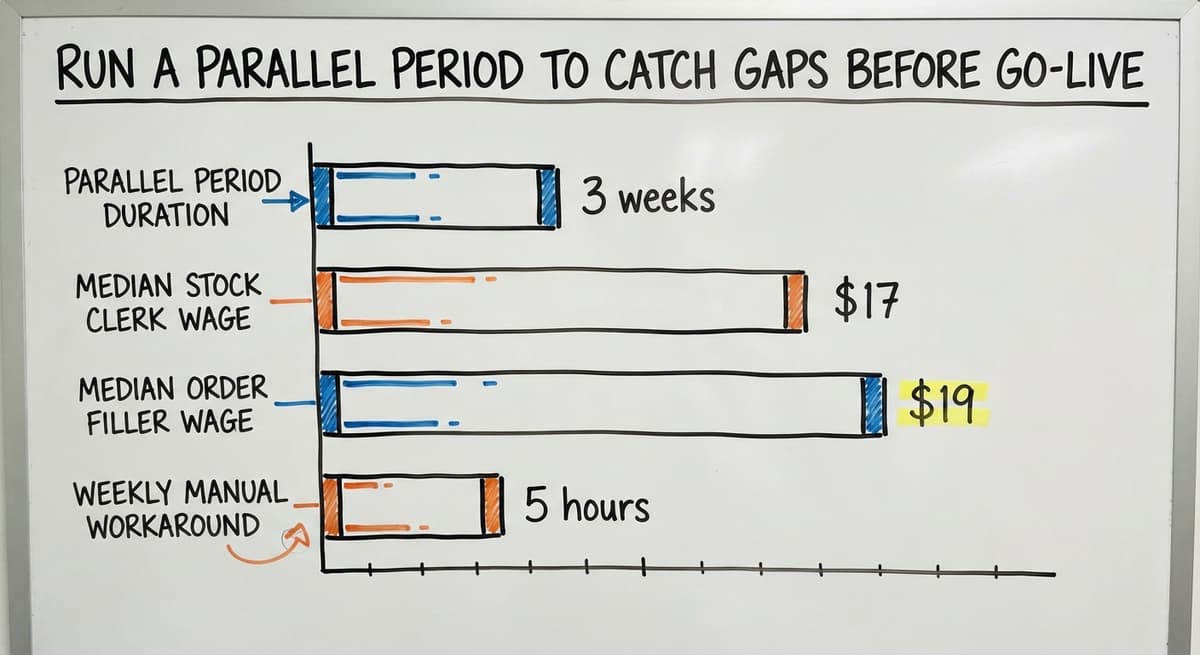
Run a parallel period of 2 to 3 weeks where the old process and the new system run side by side. This catches gaps before the old process is fully retired. Staff who find a gap during parallel running are more invested in fixing it than staff who find it after go-live.
The Bureau of Labor Statistics shows that stock clerks and order fillers earn a median wage around $17 to $19 an hour. Three staff spending 5 hours a week on manual workarounds costs roughly $13,000 to $15,000 a year in labor alone. A well-trained team using a working system recovers that quickly.
When Does a Custom-Built System Make More Sense Than Off-the-Shelf Software?
Off-the-shelf inventory software is built for a generic operation. It assumes your warehouse looks like thousands of others. When it does not fit, you change your process to match the software, not the other way around.
A custom-built system starts with your process map. The workflows, the transaction types, the bin structure, and the accounting software connection are all built to match how your team already works.
Custom does not mean slow or expensive. For a 5-to-100-person operation, a focused build can replace the manual parts without a full ERP rollout. Replacing Excel-based inventory tracking with custom software is often a matter of weeks, not months, when the builder understands wholesale and distribution.
Build the Process First, Then Pick the Tool That Fits It
The NIST Manufacturing Extension Partnership offers vendor-neutral guidance on supply chain process improvement, and its consistent finding is that process clarity comes before tool selection. Build the process first, then pick the tool that fits it.
Custom working software for fulfillment centers and warehouse management for small and mid-size operations both follow the same logic: keep your accounting software in place, keep what works, and replace only the parts that are causing pain. A local builder who knows your industry can deliver a working system faster than a large vendor who needs 6 months to configure a platform built for someone else. The result is a system your team actually uses, because it was built around what they already do.

Ready to Build a System Around Your Operation?
If your team is still using printed sheets, a shared spreadsheet, or a software package that does not quite fit, the fix is not a bigger software subscription. It is a system built around your actual process.
Map your workflows, define your transactions, and connect the result to your accounting software without replacing it. If you want a partner who builds around your operation rather than asking you to adapt to theirs, that is exactly what an rollout-led approach delivers.
Frequently asked questions
How to start an inventory system?
Start by walking your floor and mapping every step from receiving to shipping. Write down where staff use paper, memory, or spreadsheets. That map becomes your blueprint. Then decide what data you need to capture, choose how you will identify items (barcode scanning is the practical starting point for most operations), and define the transaction types your system will record. Build the receiving workflow first, since that is where most errors begin.
Is there a free Excel template for grocery store inventory?
Yes, free spreadsheet templates exist for basic stock tracking. They work at low volume with a small number of items and one or two staff. The limitation is that a spreadsheet does not update in real time, does not enforce a workflow, and breaks down quickly when more than one person edits it. For a grocery or retail operation with regular deliveries and multiple staff, a dedicated inventory tracking system with barcode scanning will be more reliable than any spreadsheet template.
Does Microsoft Office have an inventory management system?
Microsoft Office does not include a dedicated inventory management system. Excel can be used to build a basic stock tracking spreadsheet, and some templates are available for free online. However, Excel is not a real-time inventory tool. It does not support barcode scanning, enforce receiving workflows, or sync with accounting software automatically. For anything beyond a very small, low-volume operation, a purpose-built inventory tracking system will outperform a spreadsheet quickly.
What is the best inventory management system for a warehouse?
There is no single best answer. The right system depends on your product mix, staff size, order volume, and whether you need traceability features like lot or serial number tracking. A small warehouse with under 200 SKUs and a simple pick-and-ship process may do well with a focused barcode-scanning setup connected to its accounting package. A larger operation with multiple zones and complex receiving needs may need a more structured warehouse management layer. The deciding factors are fit to your actual workflow, ease of staff adoption, and how cleanly the system connects to your existing accounting software.
What is a reorder point and how do I calculate one?
A reorder point is the quantity at which your system should trigger a new buy order. Calculate it by multiplying your average daily usage by your supplier's lead time in days. For example, if you use 20 units a day and your supplier takes 5 days to deliver, your reorder point is 100 units. Add a safety buffer if your demand varies week to week. Review reorder points every quarter, because demand patterns shift and a static number goes stale.
How do I handle inventory adjustments and shrinkage in a tracking system?
Build an adjustment transaction that needs a reason code and manager approval before it posts. Common reason codes include damage, recount correction, and supplier short-ship. Track adjustment history by bin and by product so patterns become visible. A bin that is consistently off by a small amount has a labeling or process problem worth fixing. Shrinkage reports give managers a way to find root causes rather than simply absorbing the loss each period.
How do I connect an inventory tracking system to my accounting software without replacing it?
The right approach is a one-way sync: stock movements in your tracking system generate the cost entries that post to your accounting software automatically. No one types the same number twice. Your accounting file, chart of accounts, and existing reports stay in place. A custom-built tracking layer connects directly to your existing accounting file and replaces only the working parts that were causing problems, such as receiving, bin tracking, and pick confirmation.
When does it make more sense to build a custom system than buy off-the-shelf software?
Off-the-shelf software makes sense when your operation is close to a standard workflow and you are willing to adapt your process to match the software. A custom build makes more sense when your workflow is specific to your product mix or industry, when you have already tried a standard package and found it does not fit, or when you want to keep your accounting software in place and replace only the parts that are causing pain. For a 5-to-100-person wholesale or fulfillment operation, a focused custom build is often faster and cheaper than a long ERP rollout.
Start with a free first look
A 30 minute call, your operation mapped, and a clear picture of what we would build. No obligation and nothing to install.
Book a callRelated guides
The rest of this guide, for the parts of the job this page does not cover.
Guides
- Warehouse Inventory Tracking Software
- Warehouse Inventory Tracking System
- Inventory Tracking Software for Small Business
- Inventory Tracking Systems for Small Businesses
- Inventory Tracking Barcode
Common questions
- How to Keep Track of Inventory
- How to Keep Track of Ebay Inventory
- How to Create a Barcode System for Inventory
- How to Keep Track of Inventory in Warehouse
- How to Keep Track of Inventory Small Business
- How to Create a Warehouse Management System
- How to Create a Barcode
- How Do I Create My Own Barcodes
- How to Record Inventory on Hand
- How to Improve Inventory Management
- How to Manage Fba Inventory
- How to Manage Pharmacy Inventory
- How to Manage Hardware Inventory
- How to Manage Food Inventory
- How to Manage Inventory Efficiently
- How to Manage Consignment Inventory
- How to Resolve Inventory Discrepancies
- What is the Best Warehouse Inventory Management System?
- What is the Most Popular Warehouse Management System?