


What Is The Best Inventory Management Software For Small Business
The best inventory management software for small business is the one that fits how your team already works. For most small operations, that means something easy to learn, compatible with QuickBooks, and built around real tasks like stock counts, reorder alerts, and receiving. Reviewed and updated 15 September 2026.
Published 5 July 2026. Reviewed and updated 15 September 2026.
Book a callWhy Do Small Businesses Struggle to Find the Right Inventory Software?
Most inventory software is built for large companies with IT departments and six-figure budgets. Small teams end up with tools that are too complex, too expensive, or both. The result is a mix of QuickBooks, spreadsheets, and paper that no one fully trusts.
Reviewed September 2026. Each figure comes from the assumptions stated beside it, so you can substitute your own and the arithmetic still holds.
The wrong software creates more work, not less. Staff spend time on workarounds instead of shipping orders. Counts go out of date. Reorders get missed. The IRS requires that you value your inventory at the start and end of every tax year.
As IRS Publication 538 states: "To figure taxable income, you must value your inventory at the beginning and end of each tax year." That is not optional, and a broken system makes it harder to get right.
The fix is not always buying more software. It is finding a tool that matches how the business already runs.
The Hidden Cost of Manual Processes
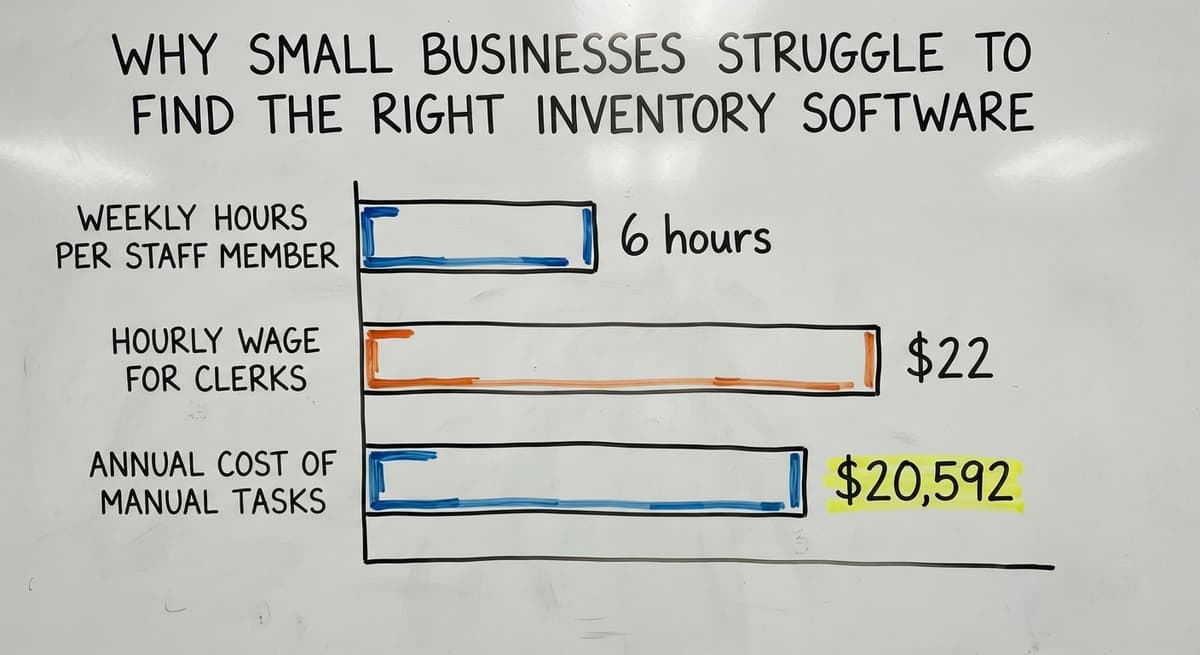
Manual stock management is not free. Consider 3 staff members each spending 6 hours a week on manual counts and data entry.
At the Bureau of Labor Statistics median wage for stock clerks of around $22 per hour, that is $20,592 a year spent on a task that better software could cut in half. That number does not include the cost of errors, missed reorders, or late shipments.
The US Federal Trade Commission requires businesses to ship orders when promised. An inaccurate stock count puts that at risk every day.
Would you rather have it built around your operation?
The first look is free. If you would rather not compare products, describe how your operation already works and we build the system around it.
No build cost. You see it running on your own process first, and the monthly subscription starts only once it is live.
Book a callWhat Should a Small Business Look for in Inventory Software?
The right small business inventory tracking tool does a short list of things well. It does not need to do everything.
Here is what actually matters for a small operation:
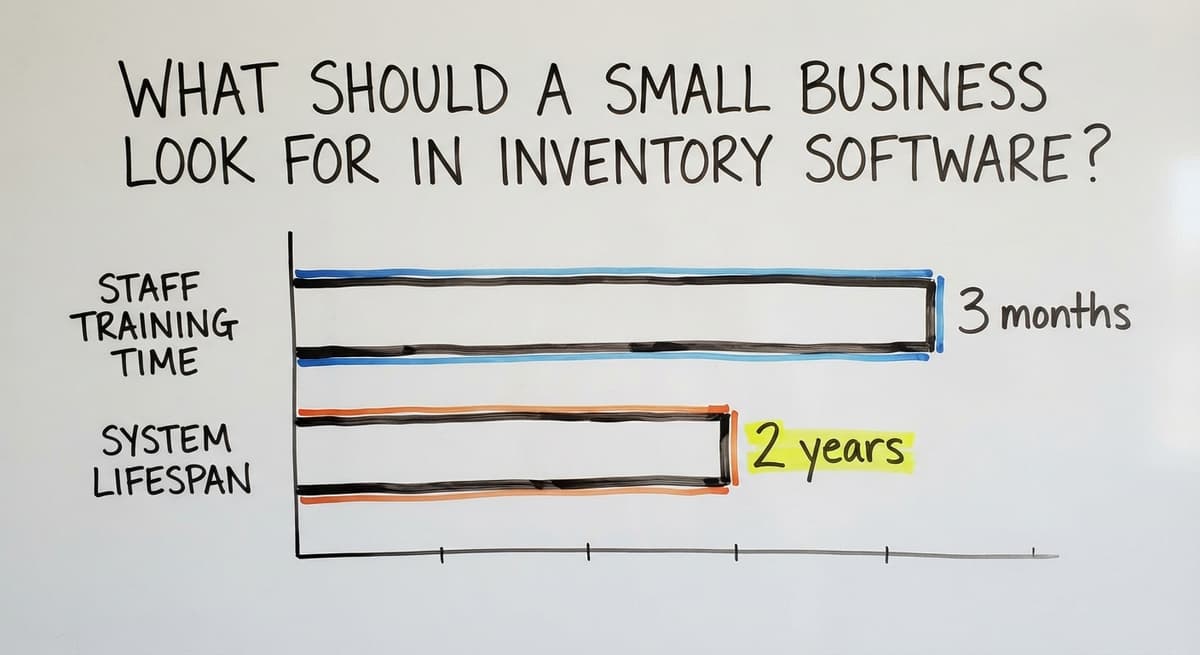
- Easy to learn in days, not months. A tool that takes 3 months to train staff on is already costing money before it saves any.
- Works with QuickBooks without replacing it. Most small businesses trust QuickBooks for accounting. The inventory layer should plug in, not compete.
- Handles the core tasks cleanly. Stock levels, low-stock alerts, receiving, and order fulfillment. These are the jobs that matter most.
- No IT team required to set it up. If you need a consultant just to get started, the tool is too complex for a lean team.
- Grows with the business. Moving to a new system every 2 years is expensive. The right tool scales without forcing a full overhaul.
Why Is Barcode Scanning Support Non-Negotiable?
Barcode scanning is worth calling out specifically. GS1, the global standards body for supply chain barcodes, notes that "barcodes are the most widely used automatic identification technology in the world," and any inventory tool worth using should support scan-based receiving and stock counts.
Which Inventory Management Software Options Are Worth Considering for Small Business?
There is no single best answer. The right tool depends on your workflow, your team size, and how you already manage orders. Here is an honest look at 5 well-known options, ranked by fit for small operations rather than by market share.
inFlow Inventory works well for small product businesses that sell across a few channels. It handles purchase orders, sales orders, and barcode scanning without requiring a technical setup.
The mobile app is practical for warehouse use. It does not connect natively to QuickBooks Desktop, which matters for some small distributors.
Zoho Inventory is a solid choice for businesses already in the Zoho ecosystem. It syncs with Zoho Books and has a free tier for very small operations. The free plan caps order volume, so fast-growing businesses will hit the ceiling quickly.
Cin7 covers multichannel retail and wholesale inventory management well. It has strong integrations and handles complex product variants. For a 5-person team that just needs stock counts and reorder alerts, Cin7 may be more tool than needed, and the price reflects that.
Is the comparison easier when one option is built for you?
Yes. Off-the-shelf means fitting your process to the software, and custom is the other way round. The first look costs nothing.
Book a callHow Do the Five Options Compare at a Glance?
Fishbowl is built specifically for QuickBooks integration. It sits alongside QuickBooks rather than replacing it, which makes it popular with small manufacturers and distributors. The upfront cost is higher than SaaS alternatives, but there is no monthly fee after purchase.
QuickBooks Commerce (formerly TradeGecko) is the native option for businesses already on QuickBooks Online. It handles wholesale inventory management and B2B ordering. Availability and feature sets have shifted over time, so confirm current offerings directly with Intuit before committing.
| Tool | Best For | QuickBooks Sync | Starting Price Range |
|---|---|---|---|
| inFlow | Small product businesses | QuickBooks Online | ~$89/mo |
| Zoho Inventory | Zoho ecosystem users | Zoho Books native | Free to ~$249/mo |
| Cin7 | Multichannel wholesale | Yes | ~$349/mo |
| Fishbowl | QB Desktop users | Native | One-time fee |
| QB Commerce | QB Online users | Native | Bundled with QB |
None of these tools is a perfect fit for every small business. Each one forces some trade-off between features, cost, and ease of use.
QuickBooks-Based Options Worth Considering
Many small businesses already run their accounting on QuickBooks. Replacing it to gain better inventory control is rarely worth the disruption. The smarter path is adding an inventory layer that connects to QuickBooks rather than fighting it.
Fishbowl is the most established option for QuickBooks Desktop users. It handles purchase orders, warehouse inventory software tasks, and manufacturing tracking while keeping QuickBooks as the accounting engine. Data flows between the two without double entry.

When Are Native QuickBooks Inventory Features Not Enough?
For QuickBooks Online users, the native inventory features inside QuickBooks work for very simple needs.
Businesses with more than a few dozen SKUs, multiple locations, or wholesale inventory management needs will outgrow those features fast. QuickBooks Commerce and third-party connectors like SOS Inventory fill that gap.
The key question to ask: does the tool write back to QuickBooks automatically, or does someone still have to enter data in both places? If the answer is both places, the integration is not actually saving time.
When Is Off-the-Shelf Software Not Enough?
Some small businesses have workflows that no standard product supports cleanly. This is more common than the software vendors admit.
Examples that break standard tools:
- A distributor that receives partial pallets and needs to split them across multiple locations at receiving time
- A wholesaler with product variations that do not map to standard SKU structures
- A fulfillment operation that runs both retail and wholesale orders from the same warehouse, with different pick and pack rules for each
Off-the-shelf stock management software is built for the average workflow. When your workflow is not average, the tool forces you to change how you work. That is backwards.
The business built its edge on how it operates. Changing that to fit software is giving something up.
What does it look like running on your own process?
The first thing you see is it running on your own process, at no build cost. The subscription starts once it is live and doing the job, not before.
Book a call
Signs the Current Tool Is the Wrong Fit
Signs your current system is not working:
- Staff have built workarounds in spreadsheets alongside the software
- Counts in the system rarely match counts on the shelf
- Someone manually re-enters data from one tool into another every week
- The team dreads the monthly stock count because nothing reconciles cleanly
If 3 or more of those are true, the tool is not the right fit. That is not a failure of the team. It is a mismatch between the software and the operation. This is where exploring custom warehouse management software for small distributors starts to make sense.
Custom Inventory Software Built Around Your Operation
Custom inventory software is built to match how the business works, not the other way around. It keeps QuickBooks in place, replaces only the manual parts that are causing pain, and skips every feature the team will never use.
This is not only for large companies. A small distributor with a specific receiving process, or a wholesaler with unusual product structures, can benefit from a purpose-built tool at a price that fits a small business budget.
Local development teams can build and support it without the enterprise overhead.
What custom software actually changes:
- Receiving screens match the physical process, so staff do not adapt their work to fit the screen
- Reorder rules reflect how the business actually buys, not a generic formula
- Reports show the numbers the owner actually checks, not a library of dashboards no one opens
- QuickBooks stays as the accounting record, and data flows to it automatically

When Is Custom Worth Exploring?
The NIST Manufacturing Extension Partnership advises small manufacturers to align their systems with their actual supply chain processes rather than forcing process changes to fit software. That guidance applies equally to distributors and fulfillment operations.
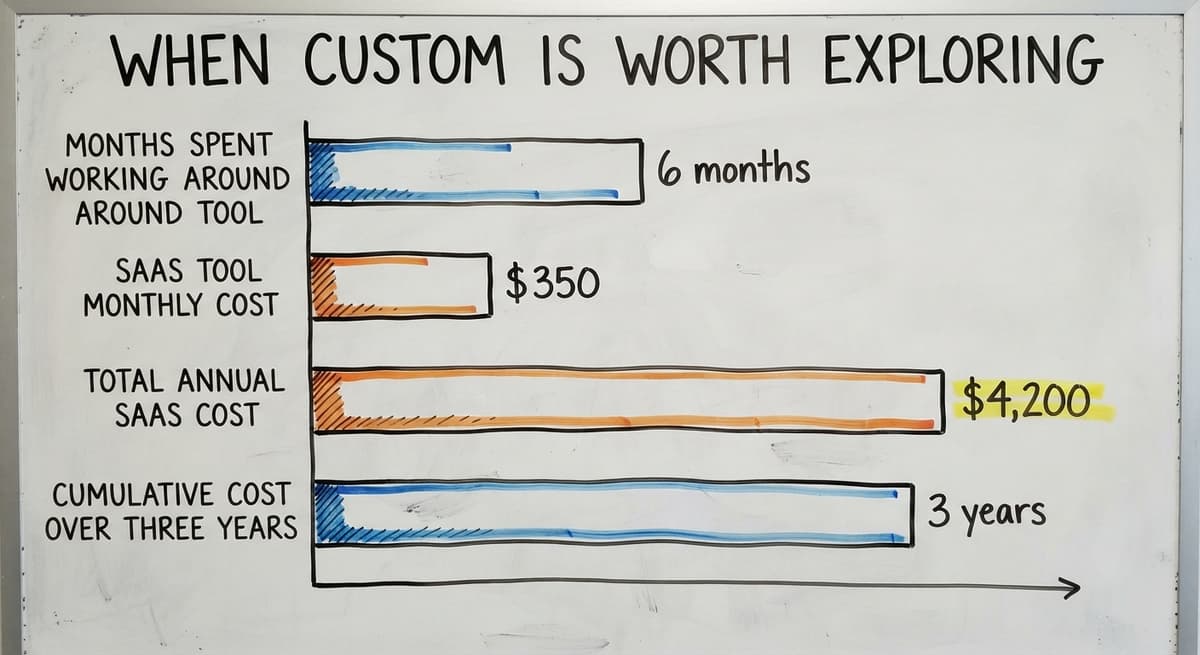
Custom is worth exploring when the business has a specific process that drives its competitive edge and no off-the-shelf tool supports it cleanly. It is also worth exploring when the team has spent more than 6 months working around a tool they bought to solve the problem.
If you are already wondering how to replace Excel and paper with a simple operations system, a custom build may be the faster path.
Is Custom Inventory Software Affordable for a Small Business?
Custom software is more affordable than most small business owners expect, especially when compared to the ongoing cost of a tool that does not fit. A SaaS tool at $350 per month costs $4,200 a year.
Over 3 years, that is $12,600, plus the cost of the workarounds the team still runs alongside it. A custom build that eliminates those workarounds can pay for itself inside 18 months for many small operations.
How Do You Choose Between Off-the-Shelf and Custom?
Start with the problem, not the software category. Write down the 5 tasks that take the most time or cause the most errors in the current system. Then ask whether any standard tool covers all 5 cleanly.
A practical decision framework:
- List the specific pain points in the current workflow
- Demo 2 or 3 tools against those exact pain points, not the marketing features
- If a standard tool covers 80% of the workflow without forcing major process changes, it is probably enough
- If the team is still running workarounds 90 days after setup, that is a clear signal
- Ask the vendor directly: what does your tool not do well? A vendor who cannot answer that question is not being straight with you
Not sure this is the right shape for your operation?
The call is free. Describe how the work runs today. We map it on a call and show you what it would look like built around that, before you spend anything.
Book a call
The Deciding Question
The deciding question is simple: does this software work the way we work, or do we have to change for it?
Changing a workflow to fit software is only worth it if the new workflow is genuinely better. If it is just different, the cost is not worth it.
For businesses that have outgrown their current tools, reviewing the signs your business has outgrown its current software setup is a useful starting point before committing to any new platform.
Red Flags to Watch for When Evaluating Any Software
Not every inventory software vendor is honest about what their tool does and does not do. These are the warning signs that a purchase will not go well.
- Long contracts before you have seen real results. A 12-month contract signed before a real trial is a risk the vendor is putting on you, not them.
- No clear support path when something breaks. Ask directly: who do I call at 8am on a Monday when the system is down? If the answer is a ticket queue, that is the real support model.
- Requires replacing QuickBooks or other trusted tools. Any vendor that says you must drop your current accounting system to use their product is asking for more disruption than most small teams can absorb.
- Promises enterprise features to a 10-person team. Advanced demand forecasting and AI-driven replenishment sound impressive. A team of 10 needs clean stock counts and reliable reorder alerts.
- No local or responsive support team. Time zones matter. A support team 12 hours ahead is not useful when a shipment is held up at 9am.

Why Does Flexible Reorder Logic Matter?
The US Census Bureau's Monthly Wholesale Trade data shows that inventory-to-sales ratios shift regularly across wholesale sectors. A tool locked to rigid reorder logic will not keep up with those shifts. Flexibility in the reorder rules is worth asking about before signing.
What Is the Best Inventory Management Software for Small Business?
The best inventory management software for small business is the one that fits how the team actually works, not the one with the longest feature list.
There is no single right answer across every small business, and anyone who tells you otherwise is selling something.
Start simple. Pick the tool that covers your core tasks cleanly. Test it with real workflows before committing to a long contract. If it still needs workarounds after 90 days, that is data, not a reason to try harder.

When Is a Custom Build the Right Starting Point?
If no standard tool fits, a custom-built solution is a real option and not just for large companies. Local teams can build inventory control for small business at a scale and price that makes sense for a lean operation.
The goal is a system that works the way the business works, keeps QuickBooks in place, and does not require a consultant to maintain.
If you are weighing QuickBooks add-ons for wholesale and distribution businesses against a custom build, the right starting point is a conversation with someone who understands both options and does not have a financial reason to push you toward one over the other.
Talk to a local team that knows small business operations before you commit to anything. The Software Society works with small and mid-market businesses to build connected systems around how they already operate, without forcing a migration or replacing tools that work.
If your current inventory setup is holding the business back, that is a good place to start the conversation.
Frequently asked questions
Frequently asked questions
What is the best inventory management system for small businesses?
There is no single best system for every small business. The right choice depends on how you receive stock, how you fulfill orders, and what tools you already use.
Businesses on QuickBooks Desktop do well with Fishbowl. QuickBooks Online users should look at QuickBooks Commerce or Zoho Inventory first. If no standard tool fits your workflow cleanly, a custom-built system is worth considering.
Can I use Excel for inventory management?
Excel works for very small inventories with a handful of SKUs and one location. It breaks down quickly when stock moves fast, when multiple people need to update the same file, or when counts need to sync with accounting.
The bigger risk is that Excel errors are invisible until a count is wrong or an order ships incorrectly. Most businesses outgrow it faster than they expect.
Is Zoho Inventory really free?
Zoho Inventory has a free plan, but it caps the number of orders per month and limits some features. For a very small business with low order volume, the free tier is a legitimate starting point.
Growing businesses will hit the ceiling and need a paid plan. Check the current plan limits directly on Zoho's site before building a workflow around the free version.
What are the top 10 inventory management software?
Commonly cited options include inFlow, Fishbowl, Cin7, Zoho Inventory, QuickBooks Commerce, Lightspeed, Katana, DEAR Inventory, Ordoro, and Finale Inventory. Ranking them by popularity is less useful than ranking them by fit for your specific operation.
A tool that ranks tenth overall may be the best fit for a small wholesale distributor running on QuickBooks Desktop.
Can I keep using QuickBooks and still improve my inventory management?
Yes. Several tools are built specifically to add inventory control on top of QuickBooks without replacing it. Fishbowl is the most established option for QuickBooks Desktop.
QuickBooks Commerce and SOS Inventory work well for QuickBooks Online users. The key is finding a tool that writes data back to QuickBooks automatically so no one is entering the same numbers in two places.
When does it make sense to use custom software instead of an off-the-shelf product?
Custom software makes sense when your workflow is specific enough that standard tools force you to change how you work rather than supporting how you already work.
If your team is running spreadsheet workarounds alongside a paid tool, or if counts never reconcile cleanly, those are signals. Custom is also worth exploring when the business has a process that drives its competitive edge and no standard product supports it.
What are the red flags to watch for when buying inventory software?
Watch for long contracts before a real trial, vague answers about what the tool does not do well, requirements to replace QuickBooks or other working tools, and support models that route every issue through a ticket queue.
Also be cautious of enterprise features pitched to a small team. A 10-person operation needs clean stock counts and reliable reorder alerts, not AI-driven demand forecasting.
What are the signs that my current inventory system is not working?
The clearest signs are staff running spreadsheets alongside the software, counts in the system that rarely match the shelf, someone manually re-entering data between two tools every week, and a monthly stock count that never reconciles cleanly.
If 3 or more of those are true, the system is not the right fit for the operation.
What is the cheapest inventory management software for a small business?
A free tier for one user and a few hundred items, then $30 to $100 a month for the entry-level tools.
The cheapest sticker price is rarely the cheapest cost: per-user fees, a second location, and barcode scanning are where the entry tools climb past $300.
How much does inventory management software cost?
Packaged tools run $50 to $300 a month for a small team, rising with users and locations. A build scoped to one operation runs $8,000 to $25,000 once with $100 to $400 a month for hosting and support. Scanners add $150 to $400 per station.
How can a small business track inventory with barcodes?
Give every product a SKU and every shelf a location code, print Code 128 labels for both on a $200 thermal printer, load the lists into the software, and run one full count scanning product and location together. From then on each receipt, move, and pick is a scan.
What inventory software integrates best with an online store?
Any of the five on this page connects to the major store platforms through their APIs and syncs stock both ways.
The difference is how often: some sync every few minutes, some hourly. For a store that sells the last unit of anything, ask for the sync interval in the demo.
What is in a free first look?
A 30 minute call, your operation mapped, and a clear picture of what we would build. No obligation and nothing to install.
Book a callRelated guides
The rest of this guide, for the parts of the job this page does not cover.
Guides
- Best Inventory Management Software for Small Businesses
- Small Business Stock Management Software
- Inventory Tracking Software for Small Business
- Inventory Control Software for Small Business
- Inventory Sales Software Small Business
- Inventory Management Small Businesses
- Small Business Inventory Management System
- Small Business Inventory Management
- Inventory Tracking Systems for Small Businesses
- Simple Inventory System for Small Business
- Inventory Control for Small Business
- Inventory System for Small Business
- Free Inventory Management Software for Small Business
- Accounting and Inventory Software for Small Business
- Wms for Small Business
- Small Business Warehouse Management System
- Warehouse Management System for Small Business
- Erp System for Small Businesses
Common questions
- Why is Inventory Management Important for Small Businesses
- How to Manage Inventory for Small Business
- What is the Best Inventory Management System for Small Businesses?
- How to Organize Inventory for Small Business
- How to Keep Track of Inventory Small Business
- What Software is Used for Inventory Management