


How To Keep Track Of Inventory
Updated October 2026. The best way to keep track of inventory is to record every receipt, pick, and shipment as it happens, in one place your whole team can see. A spreadsheet works at low volume. As orders grow, you need a system that updates stock levels in real time and feeds clean data back to your accounting package.
Book a callWhy Inventory Tracking Breaks Down in Growing Operations
Most small distributors start with the same setup: an accounting package for financials, a spreadsheet for stock counts, printed pick sheets on the floor, and email threads filling every gap in between. That patchwork works fine at 20 orders a week. At 200, it starts to crack. Stock counts go stale between updates. Someone ships from a bin that was already empty. The spreadsheet and the accounting package disagree, and nobody knows which one to trust.
This article is a practical guide to fixing that breakdown. The goal is not to replace what works. It is to close the gaps that cost you money.
We build it for your operation, and the first look is free
If you would rather not compare products, describe how your operation already works and we build the system around it.
No build cost. You see it running on your own process first, and the monthly subscription starts only once it is live.
Book a callWhat Keeping Track of Inventory Actually Means
Inventory tracking means knowing what you have, where it is, and how fast it moves. That sounds simple. In practice it covers two different things: counting stock that is sitting still, and managing stock that is in motion, meaning receiving, picking, shipping, and returns.
Tracking is a process, not a spreadsheet or a software license. The tools support the process. Without a clear process, even expensive software produces bad data. As GS1 explains when describing the barcode standards that underpin scan-based counts, consistent spotting of every item is the foundation any reliable tracking system builds on.

What Are the Core Methods for Tracking Inventory?
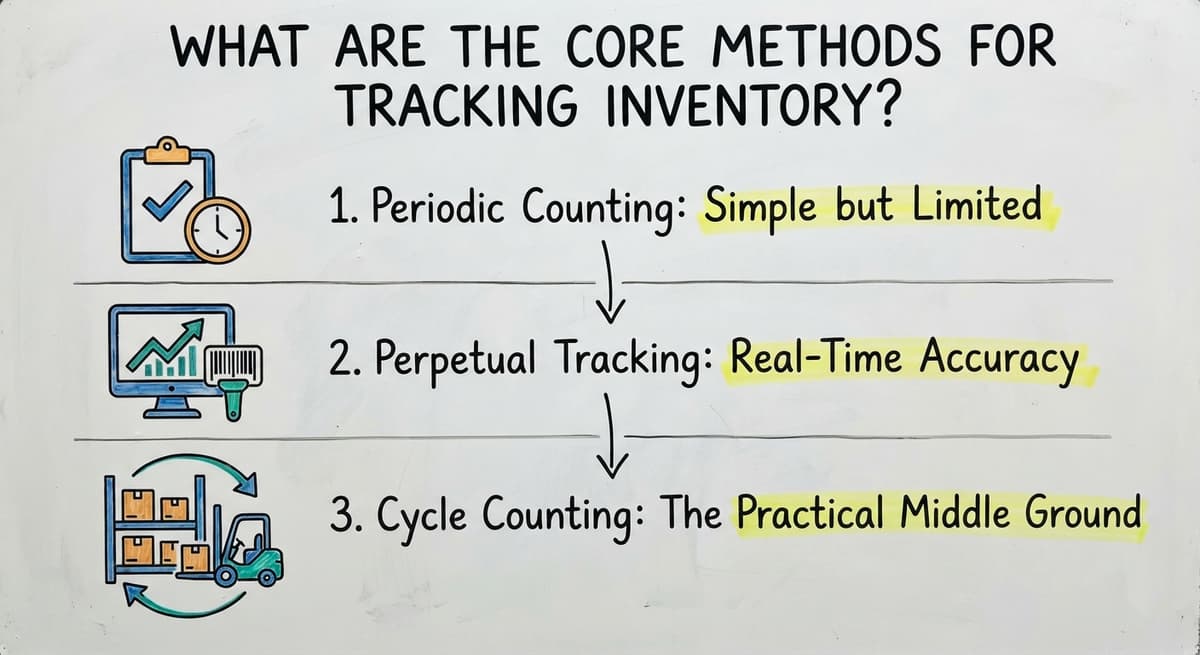
The 3 main methods are periodic counting, perpetual tracking, and cycle counting. Each one fits a different stage of growth. Most small distributors start with periodic counting and move toward perpetual tracking as order volume climbs.
Periodic Counting: Simple but Limited
Periodic counting means your staff count everything on a set schedule, then update the records. Weekly, monthly, or quarterly are common intervals. Stock levels are only accurate right after the count. Between counts, any receipt or shipment creates a gap between the records and reality. This method works for very small operations with slow-moving SKUs and low order volume. If you ship fewer than 30 orders a week and carry under 100 SKUs, periodic counting may be enough for now.
The comparison is easier when one option is built for you
Off-the-shelf means fitting your process to the software. We do it the other way round, and the first look costs nothing.
Book a callPerpetual Tracking: Real-Time Accuracy
Perpetual inventory tracking updates the count automatically every time a receipt, pick, or shipment is recorded. The system reflects what is actually in the warehouse right now, not what was there last Friday. That real-time view matters most when you are filling orders across many SKUs and more than 1 location. A picker who can see live stock levels before pulling an item avoids the empty-bin problem that triggers refunds and apology calls. Perpetual tracking needs a system that captures transactions as they happen, not at the end of the day.
Cycle Counting: The Practical Middle Ground
Cycle counting means counting a rotating subset of SKUs every day or week instead of shutting the warehouse down for a full physical count. Errors surface early, before a wrong count drives a bad shipment. Operations keep running while the count happens. Cycle counting works best when paired with a system that flags discrepancies automatically, so your team investigates a mismatch the same day it appears rather than discovering it at year-end.
The Information Every Inventory Record Needs
Every useful inventory record should carry at least these fields:

- SKU or item number so every record points to exactly one product
- Description, including unit of measure, so pickers pull the right quantity
- Quantity on hand, updated at every transaction
- Location or bin number so the picker goes to the right spot
- Reorder point, the quantity at which a new buy order should go out
- Supplier name and lead time so reorders happen before stock runs out
Incomplete records cause picking errors and over-ordering. A record missing the bin number sends a picker on a search. A record missing the reorder point means someone discovers a stockout only when a customer calls. Consistent data entry across the whole team matters as much as the fields themselves. One person abbreviating a unit of measure differently breaks every report that depends on it.
Where Your Accounting Software Fits and Where It Falls Short
Your accounting software handles the financial side of inventory well. It tracks cost of goods sold, manages buy orders, and records vendor bills. The IRS needs every business to value its inventory at the start and end of each tax year, and as IRS Publication 538 states: "To figure taxable income, you must value your inventory at the beginning and end of each tax year." Your accounting software satisfies that requirement cleanly.

Where it falls short is the warehouse floor. Your accounting software does not track inventory by bin location. It does not support barcode scanning at receiving or picking. It does not give a picker a real-time view of stock across multiple storage areas. It does not manage a pick-pack-ship workflow. These are not bugs; they are simply outside the scope of an accounting package. The gap is real, and it is worth filling.

How Can a Distributor Improve Inventory Accuracy Without Replacing Their Accounting Software?
The answer is to add an working layer that handles warehouse transactions and feeds clean data back to your accounting package. Your accounting setup stays exactly as it is. The working layer handles the work your accounting software was never designed to do.
That layer covers receiving and put-away, pick confirmation, cycle counts, and reorder alerts. Every transaction records in real time. When an order ships, the count drops. When a buy order is received, the count rises. Your accounting software sees the financial result without anyone re-entering data by hand. Your warehouse team gets real-time visibility. Your accountant gets clean numbers. Neither team has to change the tools they already know. For more on how this works in practice, see how a warehouse inventory platform integrates with your accounting software to keep both systems in sync.
See it running on your own process first
No build cost. The subscription starts once it is live and doing the job, not before.
Book a callSigns Your Current Tracking Method Is Costing You Money
Operations managers often know the system is failing before they can put a number on it. These signs each carry a measurable cost:

- Shipping the wrong item triggers a return, a replacement shipment, and a refund. The FTC's Mail and Telephone Order Rule needs you to ship when promised, and a bad count makes that impossible to guarantee.
- Discovering a stockout only when a customer calls means the lost order was never flagged internally. That is revenue that left quietly.
- Counting the same item twice during a physical count is a sign the count process itself is not controlled.
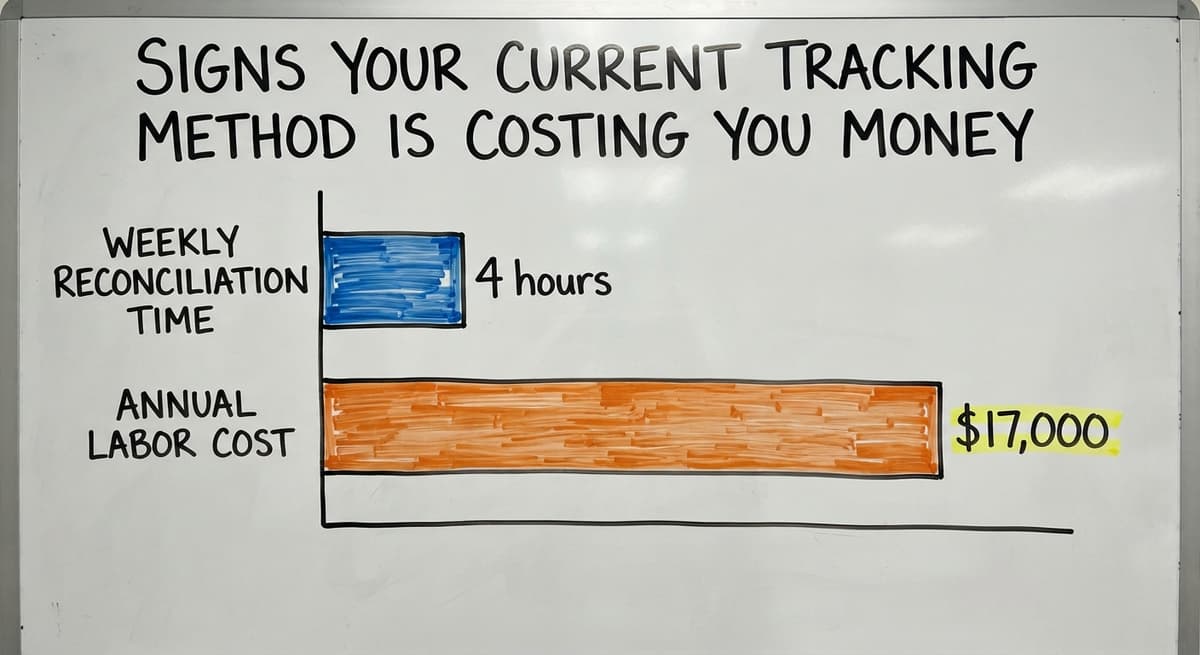
- Staff spending hours reconciling a spreadsheet to the accounting package is pure overhead. At the BLS median wage for stock clerks and order fillers, 3 people spending 4 hours a week on manual matching costs roughly $17,000 a year in labor alone, before you count errors those matchings miss.
Each sign is also evidence you can use to build an internal case for fixing the system.
What to Look for in an Inventory Tracking System
The right system for a small distributor meets a short list of practical tests. It should fit the way your team already works, not force a new workflow on day one. It should connect to your accounting package so data moves without manual re-entry. It should be usable at your current scale without a six-month rollout or a dedicated IT person to run it.
Watch out for systems built for enterprise volume. They carry features you will never use and rollout timelines measured in quarters. A system your team finds confusing will not get used consistently, and inconsistent use produces data that is worse than no data at all.
The criteria that actually matter:
- Integrates with your accounting package without a custom bridge you have to keep
- Works at your current SKU count and order volume without being oversized
- Supports barcode scanning so receiving and picking do not depend on manual entry
- Flags reorder points automatically so stockouts stop being surprises
- Can be set up and used without a dedicated IT team
The best system is the one your team uses every day. For operations that have outgrown spreadsheets, warehouse management for small operations covers what a purpose-built system adds at each stage of growth.
Getting Started: A Practical First Step
Before you touch any software, map your current inventory process on paper. Follow a single order from the moment a buy order goes out to the moment the shipment leaves the dock. Write down every step.
Then mark the points where data is lost or re-entered by hand. Most operations find 3 or 4 of them: a receiving count that gets written on paper and typed in later, a pick sheet that never makes it back to update the spreadsheet, a return that gets put back on the shelf without a record. Those gaps are where your count goes wrong.
That audit is the foundation for any fix, whether you adjust your current process, build a custom working layer, or explore replacing Excel-based inventory tracking with a custom system. You cannot close a gap you have not named. Start there, and the right next step becomes clear.
The US Census Bureau's Monthly Wholesale Trade data tracks the inventories-to-sales ratio across wholesale firms nationally, a useful benchmark for whether your stock levels are in line with your peers. The NIST Manufacturing Extension Partnership offers vendor-neutral guidance on supply chain process for small and mid-size manufacturers and distributors.
Frequently asked questions
What is the 80/20 rule in inventory?
The 80/20 rule in inventory, often called ABC analysis, holds that roughly 20% of your SKUs drive about 80% of your sales volume. In practice, that means a small number of items deserve tighter tracking, more frequent cycle counts, and lower reorder points than the rest of your catalog. Applying this rule helps a small team focus its attention where a stockout would hurt most.
Can I use Excel to keep track of inventory?
Yes, Excel works at low volume. If you carry fewer than 100 SKUs and ship fewer than 30 orders a week, a well-structured spreadsheet can track stock levels, reorder points, and supplier details without much trouble. The problems start when order volume grows. Spreadsheets do not update in real time, they break when two people edit at once, and they need manual matching with your accounting package. At that point, a dedicated inventory tracking system costs less in time than the spreadsheet does.
What is the best way to record inventory?
There is no single best way. The right method depends on your order volume, SKU count, and how many locations you manage. For very small operations, a spreadsheet updated after each count works. For operations filling dozens of orders a day across many SKUs, perpetual tracking that records every transaction as it happens is more reliable. The consistent rule across all methods is this: record the transaction at the moment it happens, not at the end of the day.
What are the two main methods for tracking inventory?
The two main methods are periodic counting and perpetual tracking. Periodic counting means staff count everything on a schedule and update records afterward. Perpetual tracking means every receipt, pick, and shipment updates the count automatically in real time. A third approach, cycle counting, rotates through a subset of SKUs regularly and sits between the two in complexity and accuracy.
What information should every inventory record include?
At minimum: a SKU or item number, a description with unit of measure, quantity on hand, bin or location, reorder point, and supplier name. Missing any one of these fields causes a specific, predictable problem. No bin location sends pickers searching. No reorder point means stockouts happen without warning. Consistent data entry across the whole team matters as much as having the right fields.
Why does accounting software alone fall short for warehouse inventory tracking?
Accounting software is an accounting package. It tracks the financial value of inventory, manages buy orders, and records vendor bills correctly. It does not track stock by bin location, support barcode scanning at receiving or picking, or manage a pick-pack-ship workflow. Those gaps are not flaws; they are simply outside its scope. A separate working layer that feeds data back to your accounting software fills those gaps without disrupting the accounting setup your business depends on.
What are the warning signs that your current inventory tracking method is failing?
The clearest signs are: shipping the wrong item more than once a month, finding out about a stockout only when a customer calls, running a physical count that takes more than a day and still produces numbers your team does not trust, and staff spending several hours a week reconciling a spreadsheet to your accounting package. Each sign has a direct cost: refunds, lost orders, overtime, or damaged customer relationships.
How do you get started improving inventory tracking without a big software project?
Map your current process on paper before touching any software. Follow one order from buy to shipment and write down every step. Then mark the 3 or 4 points where data is lost or re-entered by hand. Those gaps are where your count goes wrong. Fixing them, whether by adjusting the process or adding a tool, is faster and cheaper when you know exactly where the problem is.
Start with a free first look
A 30 minute call, your operation mapped, and a clear picture of what we would build. No obligation and nothing to install.
Book a callRelated guides
The rest of this guide, for the parts of the job this page does not cover.
Guides
- Warehouse Inventory Tracking Software
- Warehouse Inventory Tracking System
- Inventory Tracking Software for Small Business
- Inventory Tracking Systems for Small Businesses
- Inventory Tracking Barcode
- Warehouse Tracking System
- Tracking Number Barcode
- Classification of Inventory
- Excess Inventory
- Closed for Inventory
- Multi Location Inventory Management Software
- Ms Excel Inventory Template
- Inventory Management for Multiple Locations
Common questions
- How to Keep Track of Inventory in Warehouse
- How to Keep Track of Inventory Small Business
- How to Record Inventory on Hand
- How to Improve Inventory Management
- How to Calculate Cycle Stock
- How to Manage Inventory in a Warehouse
- How to Create a Barcode System for Inventory
- How to Organize Inventory for Small Business
- How to Manage Inventory for Small Business
- How to Manage Inventory Between Etsy and Shopify
- How to Manage Inventory in Retail Store