


How To Manage Inventory Efficiently
To manage inventory efficiently, start with a physical count to set up what you actually have, then classify items by value, set reorder points, and build a process your team can follow without relying on memory. You do not need a large ERP system to do this well. Most small and mid-size operations can make major gains by fixing process before touching software.
Reviewed and updated: October 2026
Book a callWhy Efficient Inventory Management Matters
Poor inventory control costs money in 2 directions at once. Stockouts push customers to competitors. Overstock ties up cash that could fund growth. Manual tracking with spreadsheets and printed sheets adds a third cost: errors that compound quietly until a count reveals a large gap.
Small and mid-size wholesale distributors feel this more sharply. A large operation absorbs a bad quarter. A 10-person shop may not. The IRS adds a legal layer on top: IRS Publication 538 states plainly, "To figure taxable income, you must value your inventory at the beginning and end of each tax year." Efficient inventory management keeps cash moving, customers happy, and your books clean.
We build it for your operation, and the first look is free
If you would rather not compare products, describe how your operation already works and we build the system around it.
No build cost. You see it running on your own process first, and the monthly subscription starts only once it is live.
Book a callKnow What You Have Before You Fix Anything
The first step to managing inventory more efficiently is a physical count. Before you change any process or add any tool, you need a reliable baseline.
Map where your data lives right now. Some items may be tracked in your accounting package. Others live in a spreadsheet on one person's laptop. Some exist only on a printed sheet by the dock door. Once you know where the data is, reconcile the numbers against what is actually on the shelf.
GS1 notes that "barcodes are the global language of business," and any scan-based count depends on items being labeled to a consistent standard. Fix labeling gaps during the count. A clean starting point stops bad data from compounding inside any new system you add later.
What Is ABC Analysis and How Does It Help With Inventory Control?
ABC analysis groups your stock into 3 tiers by value and volume, so a small team can focus effort where it produces the most return. Group A covers high-value, lower-volume items that drive most of your revenue. Group B is moderate on both measures. Group C covers low-value, high-volume items.
Apply tighter controls and reorder rules to A items first. These are the items where a stockout or an overcount hurts most. C items can often run on simple min-max triggers, where the system reorders when stock drops below a set floor. This tiered approach lets 3 people manage a warehouse that would otherwise need 5.
Set Reorder Points and Safety Stock Levels
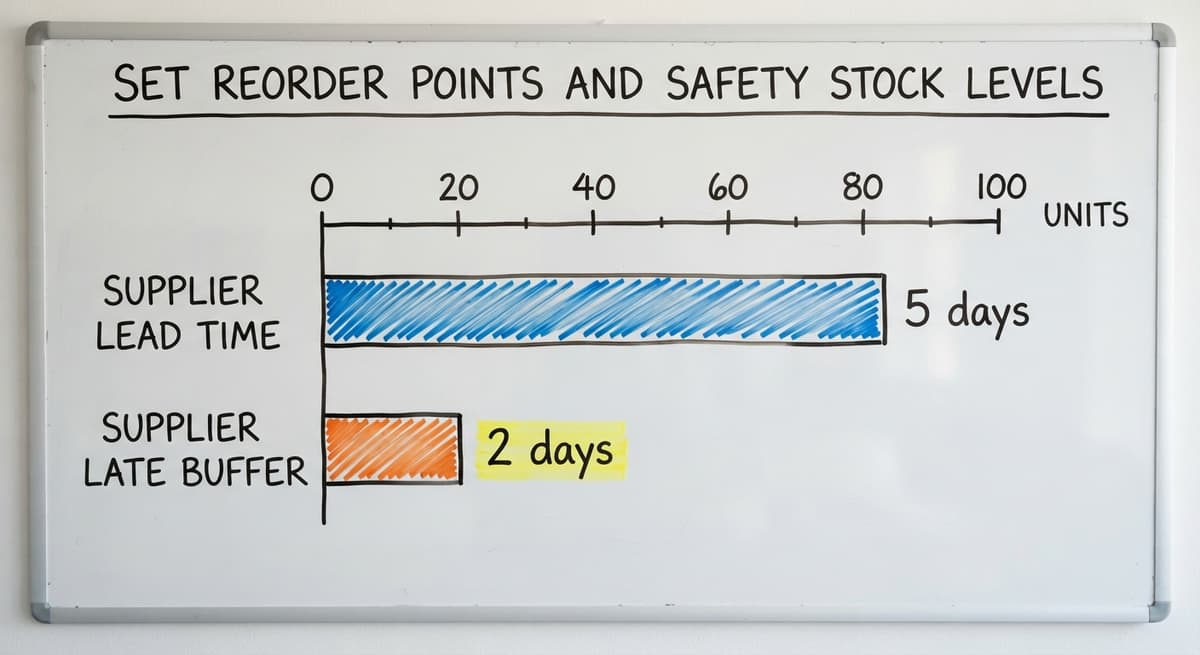
A reorder point is the stock quantity that triggers a buy order before you run out. Safety stock is a buffer that absorbs supplier delays and demand spikes.
Calculate a reorder point this way: multiply average daily usage by your supplier's lead time in days. If you sell 20 units a day and your supplier takes 5 days to deliver, your reorder point is 100 units. Safety stock sits on top of that. A supplier who is sometimes 2 days late adds 40 units of safety stock to that same item.
Document every reorder point and safety stock figure in one shared place. When these numbers live only in one person's head, any absence creates a gap. Any team member should be able to look up the rule and act on it without asking.
The US Census Bureau's Monthly Wholesale Trade data tracks the national inventories-to-sales ratio for wholesale firms. When that ratio climbs, it signals that distributors broadly are holding more stock than they are moving, which is a useful benchmark for checking whether your own stock levels are drifting out of line.
The comparison is easier when one option is built for you
Off-the-shelf means fitting your process to the software. We do it the other way round, and the first look costs nothing.
Book a call
Standardize How Inventory Moves Through Your Facility
Efficient warehouse inventory control depends on a defined process for every step: receiving, putaway, picking, and shipping. Any step that relies on memory or a verbal instruction will eventually fail, usually when a key person is out sick.
Written or digital workflows reduce errors when staff turns over. Consistent bin labels and location assignments speed up picking and make cycle counts faster. A new team member should be able to follow the process on day one without shadowing someone for a week.
- Label every storage location with a clear, consistent code so any picker can find it.
- Write receiving steps as a checklist, not a verbal handoff.
- Define who signs off on a shipment before it leaves the dock.
Standard processes also make it easier to spot where a bottleneck forms, because you can see exactly which step slowed down.
Run Cycle Counts Instead of Annual Shutdowns
Cycle counting means counting a portion of your stock on a rotating schedule rather than shutting down once a year to count everything at once. Small daily or weekly counts catch errors before they grow into large discrepancies.
Count A items most often, perhaps weekly. Count C items quarterly. This matches counting frequency to the cost of being wrong. Staff who count regularly also stay familiar with where stock actually lives, which speeds up every future count.
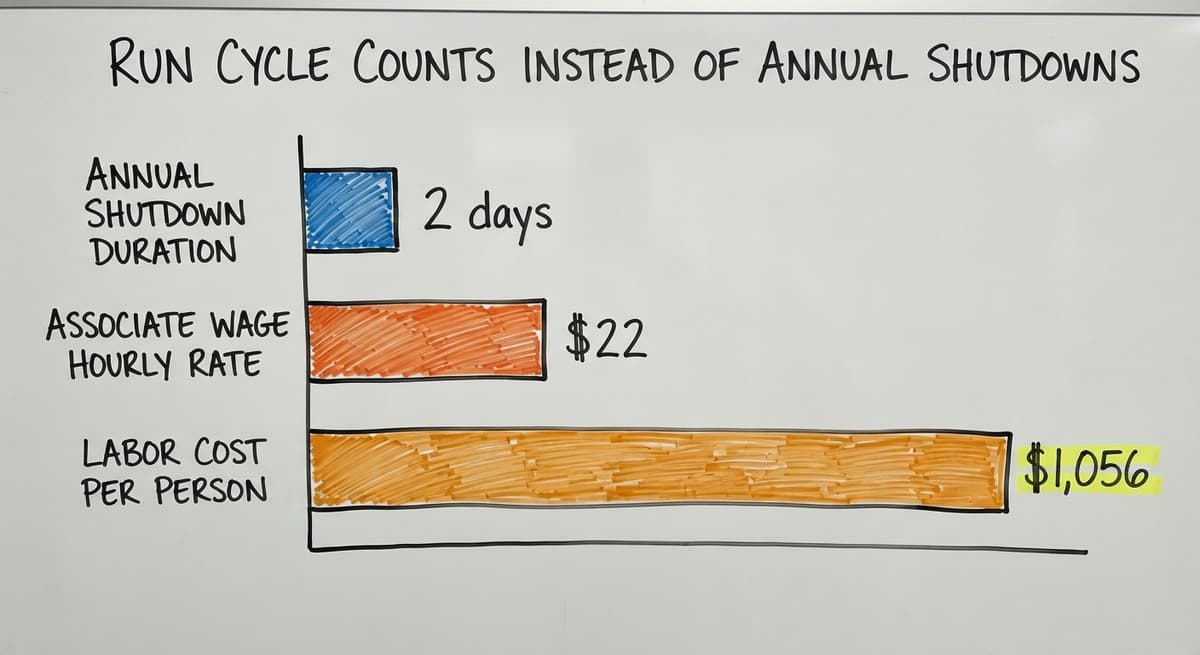
Consider the labor math: 3 people spending 2 days on an annual shutdown, at a warehouse associate wage of roughly $22 an hour (near the median reported by the US Bureau of Labor Statistics), costs about $1,056 in wages alone, before accounting for halted shipments. Spreading that effort across weekly 30-minute counts costs the same in hours but keeps operations running every day.

How Can I Manage Inventory Without Replacing My Accounting Software?
You do not need to replace your accounting package to fix your inventory problem. Your accounting software handles financials well. It was not built to track real-time warehouse movement at scale, and pushing it to do that creates gaps.
The goal is to let each tool do what it does best. Inventory quantities and locations should live in a system built for warehouse logic. That system then syncs financial data back to your accounting package. Your books stay accurate. Your warehouse team works in a tool that matches how a warehouse actually operates.
This is where connecting your warehouse operations to your accounting software adds the most value: not by replacing the accounting layer, but by removing the friction between the warehouse floor and the ledger. A clean sync means no manual re-entry and no matching surprises at month end.
Replace Spreadsheets Without Disrupting Operations
Spreadsheets break in predictable ways. Two people edit the same file at the same time and one version overwrites the other. A formula gets deleted and no one notices for 3 weeks. The fix is not a better spreadsheet. The fix is moving that data into a system with defined rules and user roles.
A good transition starts by mapping how the spreadsheet is actually used today. What data goes in? Who reads it? What decisions does it drive? Replacing manual processes with custom working software works best when the new tool mirrors those familiar steps rather than forcing new habits on a team that is already busy.
Staff adoption rises when people see that the new process is easier, not just different. Pilot the change with one product category or one team before rolling it out across the operation.
See it running on your own process first
No build cost. The subscription starts once it is live and doing the job, not before.
Book a call
How Can Automation Reduce the Manual Work in Inventory Management?
Automated low-stock alerts remove the need to scan reports every morning. Set an alert to fire when any item hits its reorder point, and your team acts on the exception rather than hunting for it.
Buy orders can be triggered automatically when stock drops to a defined level. Receiving alerts flag discrepancies at the dock before bad counts enter the system. The US Federal Trade Commission's guidance on order fulfillment makes clear that sellers must ship when promised, which means accurate stock levels are not just an operations goal but a compliance one.
Automating handles the routine so your team handles the exceptions. That shift alone can recover several hours a week per person.
Track Supplier Performance Alongside Inventory
Supplier data belongs in the same system as your stock levels. Lead time accuracy, fill rate, and damage rate all affect how much safety stock you need to carry for a given item.
If a supplier ships late 30% of the time, the safety stock formula for their items needs to reflect that. A supplier with a perfect fill rate earns a leaner buffer. Tracking this alongside inventory levels gives your purchasing team a complete picture when it is time to place an order or renegotiate terms.
The NIST Manufacturing Extension Partnership offers vendor-neutral guidance on supply chain process, including how supplier reliability feeds directly into inventory decisions. Better supplier data leads to fewer emergency orders and more predictable cash flow.
When to Consider Custom Inventory Software
Off-the-shelf inventory platforms are built for an average operation. If your fulfillment steps, product types, or pricing rules differ from that average, generic software creates workarounds. Workarounds slow people down and introduce errors.

Custom software built around your existing workflow removes those workarounds without a long ERP-style rollout. The right time to consider it is when the manual patches your team has built are consuming more hours than a proper system would cost to run.
A useful test: if onboarding a new employee needs weeks of tribal knowledge transfer, your process is not documented, it is memorized. That is a signal that the system needs to be rebuilt around how your operation actually works, not around what a generic platform assumes.
Custom inventory software for wholesale distributors built on your real workflow tends to see faster adoption and fewer workarounds than a platform your team has to adapt to.
Start Small and Build From What Works
Efficient inventory management does not need a big-bang overhaul. Pick the single most painful problem in your current process. Fix it with a clear written rule or a targeted tool. Then move to the next.

Operations that improve one step at a time tend to hold those gains. Teams that change everything at once often revert to old habits because the new system feels foreign before it feels useful.
Each fix builds a foundation. A reliable physical count makes ABC analysis easier. ABC analysis makes reorder points more accurate. Better reorder points make automating more effective. The work compounds, and so do the results.
The goal is a system your whole team can run, not one that only works when the right person is in the building.
If your operation is running on a patchwork of spreadsheets and manual checks, the next step is a straightforward review of where the gaps are costing you the most. Warehouse management for small and mid-size operations does not have to be complicated. It has to be consistent. Start with one process, document it, and build from there.
Frequently asked questions
What is the 80/20 rule in inventory?
The 80/20 rule in inventory holds that roughly 80% of your revenue comes from about 20% of your products. In practice, this means a small number of items deserve the tightest controls, the most accurate counts, and the most carefully set reorder points. It is the logic behind ABC analysis: focus your team's attention on the items where being wrong costs the most.
What is the most effective method for managing inventory?
There is no single method that fits every operation. The most effective approach combines a reliable physical count, ABC classification to rank effort, documented reorder points, and a consistent process for receiving and picking. Technology helps, but process comes first. A warehouse running a clean manual system will outperform one with expensive software and no defined workflow.
What are the 5 steps to effective inventory systems?
- Set up a baseline with a physical count. 2. Classify items by value using ABC analysis. 3. Set reorder points and safety stock levels for each category. 4. Document the receiving, putaway, picking, and shipping process. 5. Run cycle counts on a regular schedule to catch errors early. Each step builds on the one before it.
What are 8 best practices for inventory management?
- Start every improvement with an accurate physical count. 2. Use ABC analysis to focus effort on high-value items. 3. Set and document reorder points based on actual usage and lead time. 4. Carry safety stock sized to your supplier's reliability. 5. Standardize receiving and picking with written steps. 6. Run cycle counts instead of one annual shutdown. 7. Automate low-stock alerts so your team responds to exceptions rather than hunting for problems. 8. Track supplier fill rate and lead time accuracy alongside stock levels.
What is cycle counting and why is it better than an annual physical count?
Cycle counting means counting a portion of your inventory on a rotating schedule rather than stopping all operations once a year. It catches errors while they are still small, keeps staff familiar with where stock lives, and avoids the revenue loss that comes with a full shutdown. Counting A items weekly and C items quarterly spreads the labor evenly across the year.
How do I get my team to stop relying on spreadsheets for inventory tracking?
Map how the spreadsheet is actually used before you replace it. What data goes in, who reads it, and what decisions it drives. Then move that data into a system with user roles and defined rules. Staff adopt new tools faster when the new process mirrors familiar steps rather than forcing entirely new habits. Pilot with one product category first.
When does a small distributor or warehouse need dedicated inventory software?
The clearest signal is when manual patches consume more time than a proper system would cost to keep. A second signal is when onboarding a new employee needs weeks of knowledge transfer because the process lives in people's heads rather than in a documented system. At that point, the cost of not having a purpose-built tool is higher than the cost of building one.
Can I improve inventory management without a big ERP rollout?
Yes. Most meaningful gains come from process changes that cost nothing: a physical count, written receiving steps, documented reorder points, and regular cycle counts. When software does become the right next step, a targeted tool built around your existing workflow is usually faster to adopt and less disruptive than a full ERP rollout. Start with the most painful problem and fix that first.
Start with a free first look
A 30 minute call, your operation mapped, and a clear picture of what we would build. No obligation and nothing to install.
Book a callRelated guides
The rest of this guide, for the parts of the job this page does not cover.
Guides
- Multi Location Inventory Management Software
- Inventory Management for Multiple Locations
- Inventory Management System for Manufacturing
- Inventory Management Pics
- B2b Inventory Management
- Jewelry Inventory Management
- Dental Inventory Management
- The Objective of Inventory Management is To
- Qr Code for Inventory Management
- Hvac Inventory Management Software
- Inventory Management Software for Schools
Common questions
- How to Improve Inventory Management
- How to Manage Fba Inventory
- How to Manage Pharmacy Inventory
- How to Manage Hardware Inventory
- How to Manage Food Inventory
- How to Manage Consignment Inventory
- How to Keep Track of Inventory
- How to Record Inventory on Hand
- How to Manage Inventory in a Warehouse
- How to Manage Inventory for Small Business
- How to Manage Inventory Between Etsy and Shopify
- How to Manage Inventory in Retail Store
- What is Inventory Management and Its Types