


How to Keep Track of Product Inventory
To keep track of product inventory, give each item one number, keep one count per item, and write down every move of stock. Then count a few items on a set schedule and fix gaps. A spreadsheet can do this at small scale.
Book a callWhat does it mean to keep track of product inventory?
To keep track of product inventory means you know what you have, where it sits, and how much is ready to sell. You track 3 things for each item. Quantity is how many units you own. Location is the shelf, bin, or truck that holds them. Status says if units are on hand, held for an order, or still on order from a vendor. A small wholesale or warehouse team needs all 3 to answer a customer in one minute.
We build it for your operation, and the first look is free
If you would rather not compare products, describe how your operation already works and we build the system around it.
No build cost. You see it running on your own process first, and the monthly subscription starts only once it is live.
Book a callWhat is the simplest way to keep track of product inventory?
The simplest way is one list of items, one count per item, and a record each time stock moves. A spreadsheet or the item list in an accounting package can hold all of it. The tool matters less than the habit. A plain sheet that people update daily beats a costly system that people skip.
If you scan barcodes later, use a common standard. GS1 describes its work as "the most widely used supply chain standards system in the world", so labels you print now will still scan in other systems.
Do them in order.
Step 1: How do you name and number each product?
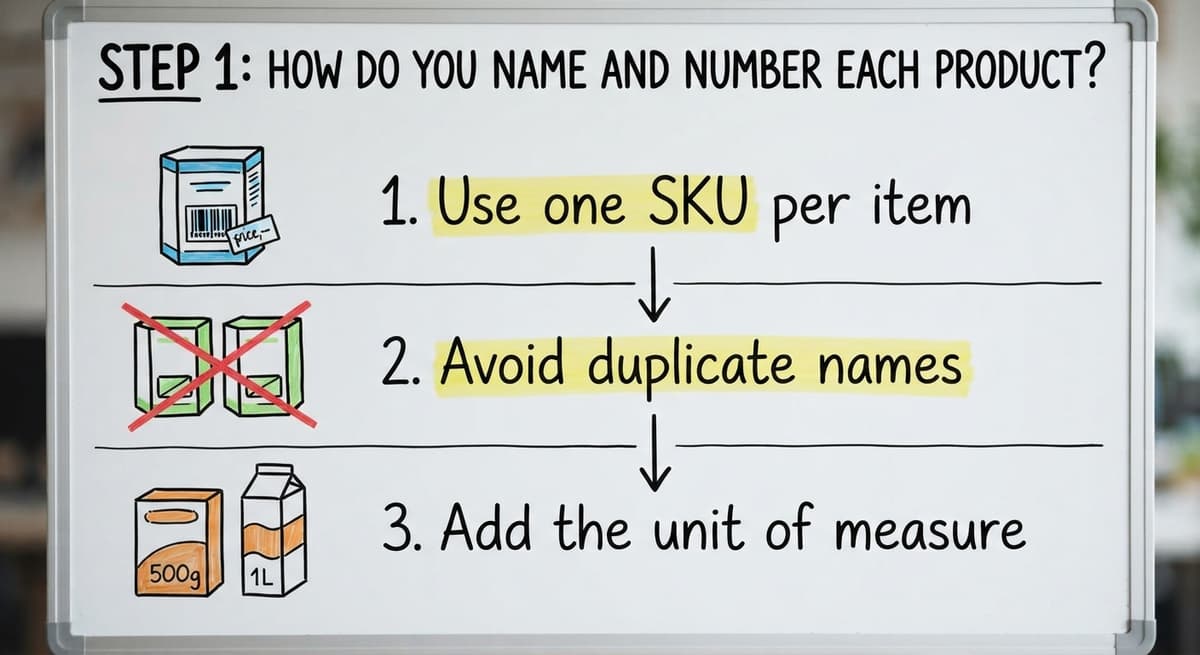
You name each product by giving it one SKU, which is a short, unique code for one item, plus one name in one format. Do this before anything else. A clean list is the base for every count you make later.
Use one SKU per item
Pick a code pattern and stick to it. For example, WID-BLU-SM could mean widget, blue, small. Never give two codes to one item. Never give one code to two items. A consistent pattern lets anyone read a code and know what the item is, and it keeps counts from splitting or merging by mistake. Write the pattern down where staff can see it.
Avoid duplicate names
People type the same thing in different ways. "Blue Widget" and "Widget - Blue" look like 2 products. Their counts split, and neither is right. Choose a name order and write it down where staff can see it. Check the item list now and then for near matches, and combine any that turn out to be the same product.
Add the unit of measure
State if the count is by each, case, or pallet. A case of 12 is not 12 cases. Many counts go wrong at this point. Keep one unit for counting and note how many sit in a case.
A clean list means every later count has one place to land.
Step 2: Decide where each product lives
Each product needs a home, and that home needs a label. When a person can find an item without asking anyone, the count stays honest. When items drift to random shelves, counts drift from the records.
Give each item one home
Name your aisles, shelves, and bins. A code such as A-03-2 can mean aisle A, shelf 3, level 2. Assign each SKU one home spot. Add an overflow spot for extra stock, and write both on the item list. When every item has a named place, staff stop guessing and counts go faster.
Label everything
Printed labels are fine at small scale. Use a plain label maker or a sheet of stickers. Put the label on the shelf edge, not the box. Boxes move. Shelves stay put. Include the SKU and the home spot on each label so a new hire can match an item to its place without asking.
One home per item is the rule that lets anyone find stock in seconds.
Step 3: Record every time stock moves
Every time stock moves, someone must write it down. Most inventory errors come from moves that were never recorded. The count was right on Monday. By Friday, 3 small moves went unlogged, and now the sheet is wrong.
What to log
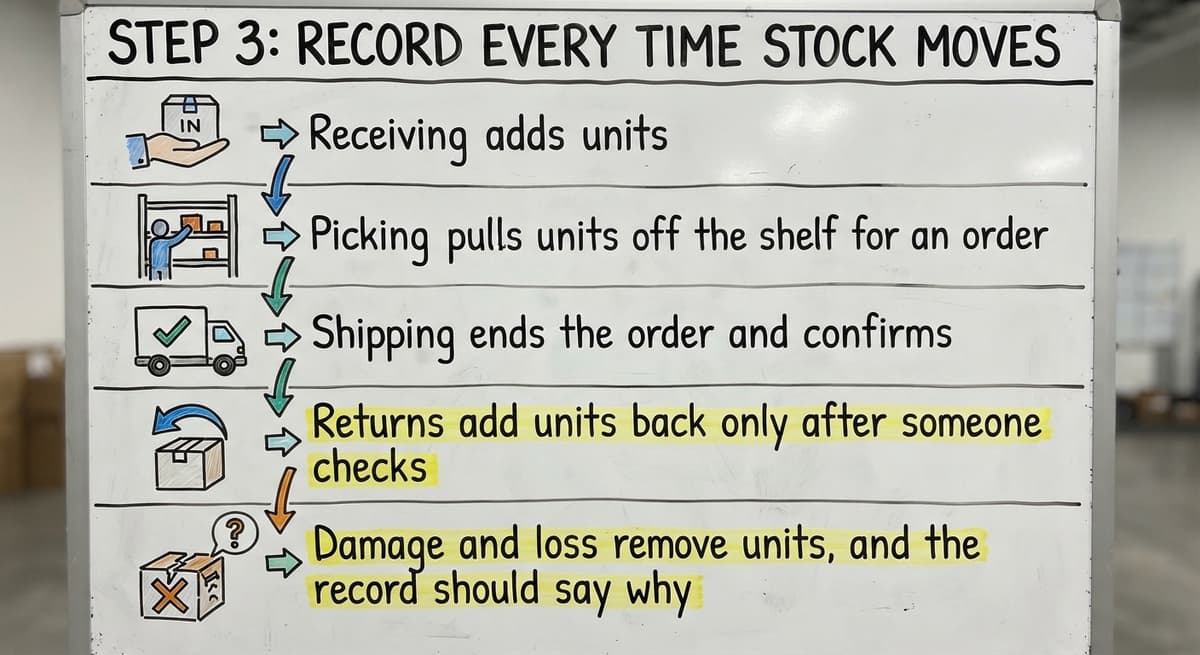
Five kinds of moves change a count:
- Receiving adds units when a vendor order arrives, and you should check the box count against the packing slip.
- Picking pulls units off the shelf for an order, so the on-hand number should drop at that moment.
- Shipping ends the order and confirms that the units have left the building.
- Returns add units back only after someone checks that they can be sold again.
- Damage and loss remove units, and the record should say why.
When to log
Write each move at the time it happens. Do not wait for the end of the day. By 5 p.m. nobody recalls which bin gave up the last 4 units. Keep a pen and a clipboard at the dock if a screen is far away.
A move that is not written down is a move that breaks your count.
Not sure this is the right shape for your operation
Describe how the work runs today. We map it on a call and show you what it would look like built around that, before you spend anything.
Book a callStep 4: Count your stock on a regular schedule
An inventory count is a physical check of what is on the shelf, compared with what your records say. Even good records drift, so you need to count on a schedule. The best method for most small teams is the cycle count, which avoids a full shutdown.
What is a cycle count?
A cycle count means you count a few items each week instead of closing the shop for one big count. You might count 1 aisle on Monday and 1 on Thursday. Over a month, you will have counted the whole room. Because each count is small, the shop keeps running, and you can fix errors while they are still fresh.
How often should I count inventory?
Count by risk. Fast sellers and high-value items need a check every week or two. Slow, cheap items can wait a quarter. A short rule helps:
- Count top sellers weekly.
- Count mid-range items monthly.
- Count slow and low-cost items every quarter.
Adjust the schedule if a count keeps coming up wrong.
Note the gap
When you count, write the shelf number beside the record number. The difference is your gap. Look for a cause before you fix the number. If the same item is off twice, a step in your process is broken.
The gap tells you where to look, so never erase it without asking why it exists.
Step 5: Set reorder points so you do not run out
A reorder point is the stock level at which you place a new order. It keeps you from running out while you wait for a vendor. The formula is simple: daily sales times lead time, plus a safety cushion. Lead time is the number of days between your order and the delivery.

A plain-number example
Say you sell 12 units a day. Your vendor takes 7 days to deliver. That is 12 x 7 = 84 units used while you wait. Add a cushion of 36 units for a late truck or a busy week. Your reorder point is 120 units. When the count falls to 120, you place the order.
Flag the slow movers
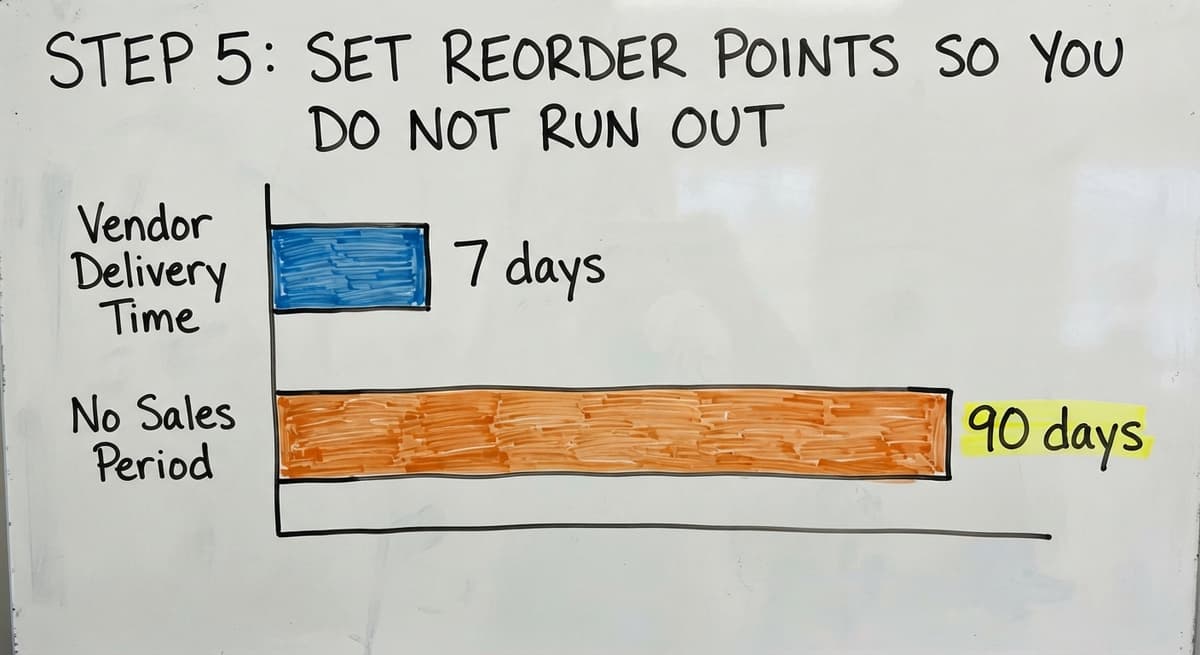
Some items barely sell. Each one ties up cash on a shelf. Once a quarter, list items with no sales in 90 days. Then decide to discount them, bundle them, or stop buying them. Freed-up shelf space and cash can go toward items that sell.
A reorder point turns "I think we are low" into a number anyone can read.
Can you keep track of inventory in an accounting package or a spreadsheet?
Yes. Both work for a small number of items and a single location. Each has a clear strength and a clear limit, so use each for what it does well.
Where an accounting package helps
An accounting package handles the money side well. It tracks costs, buy orders, and sales. It posts the value of your stock to the books. That helps at tax time, because you need a reliable value. Many owners use the inventory features in their accounting software for this work, and keep it in place alongside any shelf-level counting tools.
Where a spreadsheet helps and breaks
An inventory spreadsheet is quick to set up and easy to read. It works well while 1 or 2 people edit it. It breaks when several people change it at once. It also breaks when someone emails a copy and a second version appears.
Use these tools for what they do well, and watch for the point where they stop keeping up.
The comparison is easier when one option is built for you
Off-the-shelf means fitting your process to the software. We do it the other way round, and the first look costs nothing.
Book a call
What problems show up as you grow?
As you grow, your records and your shelves stop agreeing. Small gaps that you once fixed by hand become daily fights. Four signs show up most often.
- Counts that do not match the shelf. Units move faster than anyone writes them down.
- Printed pick sheets that go out of date. A sheet printed at 8 a.m. is wrong by 10 a.m.
- Several files that disagree. One sheet, one desktop database, and one email thread all hold stock numbers.
- Numbers kept in people's heads. One long-time worker knows where things are, and nobody else does.
Why does my inventory count not match what is on the shelf?
The cause is almost always a move that was missed, a wrong unit, or an item in the wrong spot. The table shows the usual match between cause and cure.
| Cause | What you see | Cure |
|---|---|---|
| Unlogged pick or return | Record is higher than shelf | Log moves at the time they happen |
| Wrong unit of measure | Off by a case size | Add a unit to each SKU |
| Item in the wrong bin | Shelf count is zero, record is not | Give each item one home |
| Two files in use | Totals differ by file | Keep one master list |
When you see these signs, your process has outgrown your tools.
When should you move beyond spreadsheets?
Move beyond spreadsheets when the cost of fixing errors is larger than the cost of a better tool. Watch for these signs:
- You run out of items you thought you had.
- You sell stock that is not there, which is called overselling.
- Staff spend hours each week to make the files agree.
- One person holds all the knowledge, and the shop stalls when they are out.
Do the math on manual work
Say 2 people spend 5 hours a week fixing counts at $20 an hour. That is 2 x 5 x 20 = $200 a week, or $10,400 a year. The U.S. Bureau of Labor Statistics lists pay data for shipping, receiving, and inventory clerks if you want to use a local wage instead.
You do not need a big ERP
An ERP is a large system that runs every part of a company. Most small distributors do not need one. You can fix only the manual steps and keep your accounting package as it is.
The real question is which steps cost you the most, not which giant system to buy.

What does custom inventory software change?
Custom inventory software is built around how your shop already works. You do not have to move all your data or change your habits to match a template. The Software Society is a local team in Columbus, Ohio that builds this kind of software.
- It follows your process. Your receiving, picking, and counting steps stay the same, but a screen replaces the paper.
- It keeps what works. Your accounting package stays in place for costs and books. We replace only the manual steps.
- It fits a small shop. You do not need 500 staff or 5 warehouses to benefit.
How does custom inventory software connect to your sales channels?
- It connects to your channels. We can connect to tools you already use, such as your accounting software, and to sales channels like an online storefront platform or an online marketplace.
If you sell online, the same ideas apply to how to keep track of ebay inventory, with one count shared across channels.
The goal is to remove the typing and guessing, and leave the parts of your business that already work.
See it running on your own process first
No build cost. The subscription starts once it is live and doing the job, not before.
Book a call
What are the most common inventory tracking mistakes?
The most common mistakes are habits, not tools. Each one is easy to spot once you know what to look for.
- Skipping counts. Without a count, you never learn how far the records drifted.
- Delaying entries. An entry made at day's end is a guess.
- Unclear locations. If two people think an item lives in two places, one of them is wrong.
- No record of who changed a number. When many people edit and nobody signs, you cannot trace an error.
- Keeping the same data in two places. Two copies will drift apart within weeks.
Fix the habit first, and the tool will matter far less.
Why does an accurate count matter?
An accurate count protects you in 3 ways: with the tax office, with your customers, and with your cash. These are not just good habits.

How does an accurate count affect your cash?
- Cash. The U.S. Census Bureau publishes the inventories-to-sales ratio for wholesale firms, which shows how much stock the sector holds against its sales. Too much stock ties up cash, and too little loses sales.
For process guidance that is not tied to a vendor, see the NIST Manufacturing Extension Partnership supply chain pages.
Good counts keep you legal, on time, and in cash.

Where to go from here
Start with one list, one home for each item, and a habit of writing every move. Add a weekly cycle count and a reorder point for your top 10 sellers. You can do all of this today with the tools you own. If you want broader reading, see our guides on how to keep track of inventory, how to keep track of inventory in warehouse, and how to keep track of inventory small business. Other guides cover how to keep track of consignment inventory and how to keep track of alcohol inventory.
If your files fight each other and counts keep missing, we can help. The Software Society builds custom software that replaces only your manual steps. Contact our Columbus, Ohio team to review your process and see what to fix first.
Frequently asked questions
How do I keep track of product inventory?
Give each item one SKU, keep one count per item, and record every move of stock when it happens. Count a few items each week and compare the count to your records. Set a reorder point for each fast seller.
What is the easiest way to track inventory for a small business?
Use one list in a spreadsheet or an accounting package. Add a SKU, a location, and a count for each item. Update it each time you receive, pick, ship, or take a return. The habit matters more than the tool.
How often should I count inventory?
Count by risk. Check fast-moving and high-value items every week or two. Count mid-range items monthly. Count slow, cheap items each quarter. A weekly cycle count of a few items beats one big yearly count.
What is a reorder point?
A reorder point is the stock level at which you place a new order. Multiply daily sales by lead time in days, then add a safety cushion. If you sell 12 a day, wait 7 days, and add 36, the point is 120 units.
Can I track inventory in a spreadsheet program or accounting software?
Yes, for a small number of items and one location. An accounting package is strong on costs, buy orders, and sales. A spreadsheet works until several people edit it or copies get emailed around.
Why does my inventory count not match what is on the shelf?
Usually a move was never written down. Other causes are a wrong unit of measure, an item in the wrong bin, or two files that disagree. Log moves at once and give each item one home to cut the gap.
When is it time to stop using spreadsheets for inventory?
Look for frequent stockouts, overselling, hours spent matching files, or one person who holds all the knowledge. You do not need a big ERP. You can fix only the manual steps and keep your accounting package.
Start with a free first look
A 30 minute call, your operation mapped, and a clear picture of what we would build. No obligation and nothing to install.
Book a callRelated guides
More on the same work.
- How to Keep Track of Inventory
- How to Keep Track of Inventory on Clover
- How to Keep Track of Computer Inventory
- How to Keep Track of Consignment Inventory
- How to Keep Track of Alcohol Inventory
- How to Keep Track of Ebay Inventory
- How to Keep Track of Poshmark Inventory
- How to Keep Track of Liquor Inventory
- How to Keep Track of Grocery Inventory
- How to Keep Track of Lularoe Inventory
- How to Keep Track of Freezer Inventory
- How to Keep Track of Cigarette Inventory
- How to Keep Track of Inventory Electronically
- How to Keep Track of Paparazzi Inventory
- How to Create an Inventory Tracking System?
- How to Track Non Inventory Items
- How to Keep Track of Inventory in Warehouse
- How to Keep Track of Inventory Small Business
- How to Record Inventory on Hand
- How to Manage Inventory in Rocket League
- How to Improve Inventory Management
- How to Manage Fba Inventory
- How to Manage Inventory in Stardew Valley
- How to Manage Inventory Fallout 76