


How to Track Non Inventory Items
To track non inventory items, list them, group them, give each a clear name, and record them in one place. Count only the items that stop work when they run out. Review the list on a set schedule. Bill and expense the rest by name.
Book a callWhat Are Non Inventory Items?
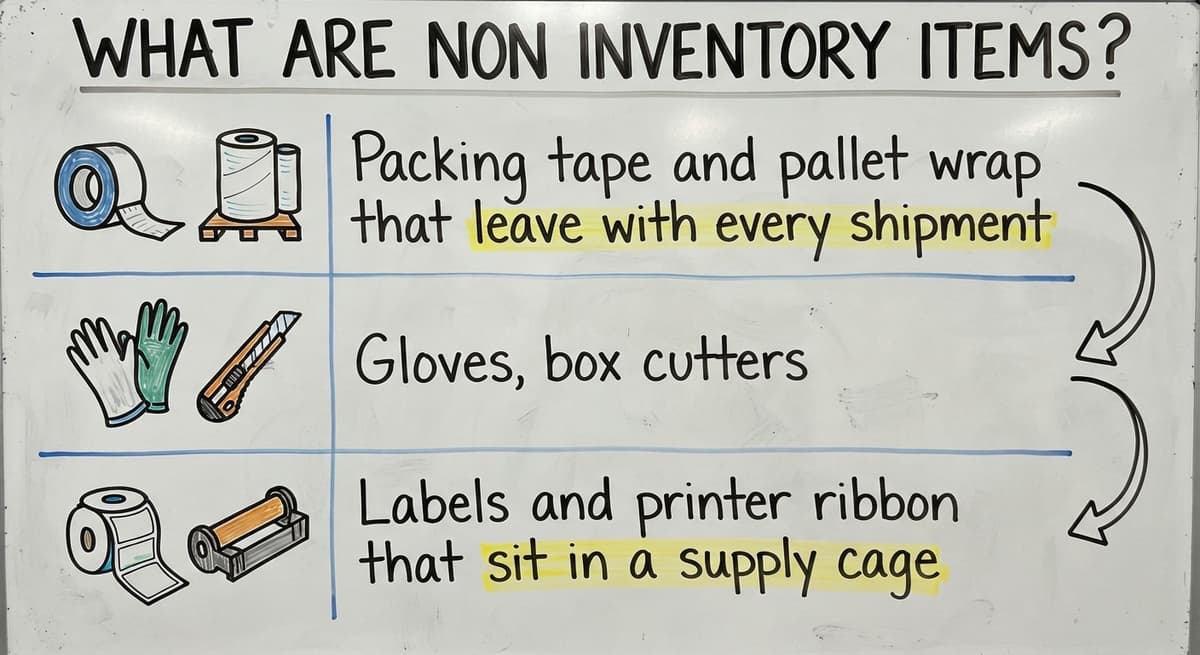
Non inventory items are things you buy or sell but do not count as stock on hand. You use them up or bill for them. You do not resell them from a shelf.
On the warehouse side, non inventory item examples include:
- Packing tape and pallet wrap that leave with every shipment.
- Gloves, box cutters, and cleaning supplies the crew uses each day.
- Labels and printer ribbon that sit in a supply cage.
On the sales side, they include delivery fees, handling charges, rush fees, and service labor. An inventory item is different. It has a count and a cost of goods sold, which is what you paid for what you sold. A non inventory item has neither.
We build it for your operation, and the first look is free
If you would rather not compare products, describe how your operation already works and we build the system around it.
No build cost. You see it running on your own process first, and the monthly subscription starts only once it is live.
Book a callWhy Should You Track Non Inventory Items?
You should track non inventory items because small costs add up and hide in the expense column. A roll of tape looks cheap. A year of tape, gloves, and labels does not.
Here is a simple case. A warehouse spends $120 a month on tape, $90 on gloves, $60 on labels, and $80 on cleaning supplies. That is $350 a month, or $4,200 a year. Most owners never see that number in one place.
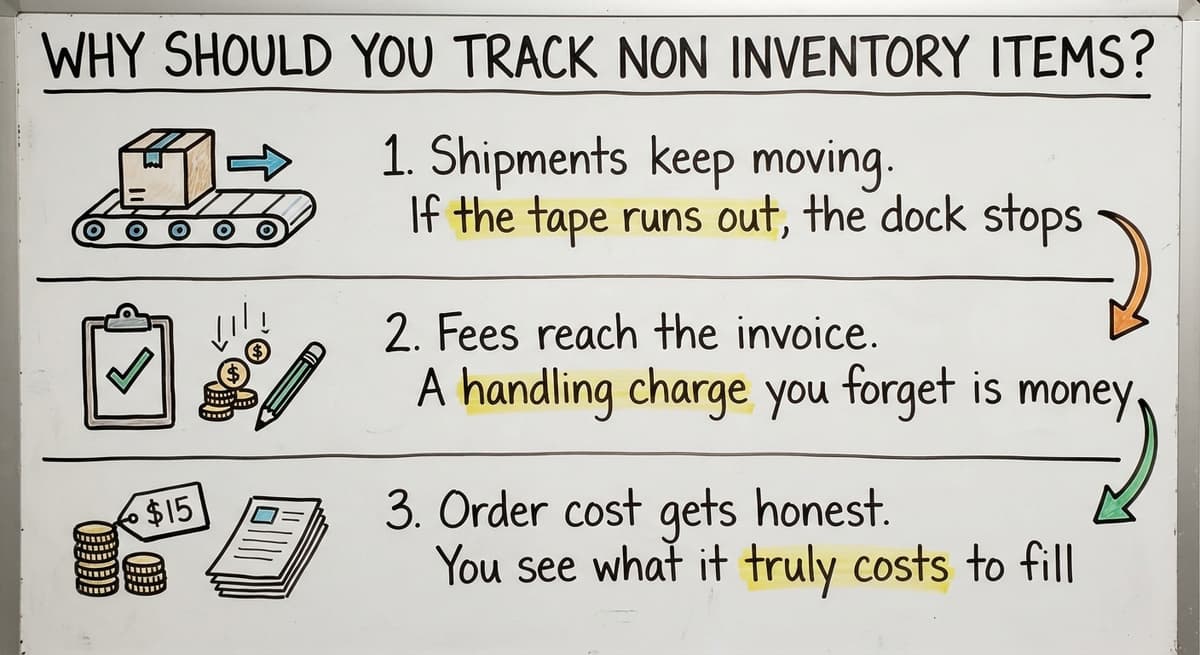
Tracking also helps in 3 other ways:
- Shipments keep moving. If the tape runs out, the dock stops.
- Fees reach the invoice. A handling charge you forget is money you lose.
- Order cost gets honest. You see what it truly costs to fill one order.
Even a scan-based count rests on shared rules. GS1 sets the barcode standards that many counts depend on, and the same habit of clear names helps with supplies too. Good tracking starts with knowing what you spend.
How Do You Track Non Inventory Items Step by Step?
You track non inventory items in 5 steps: list them, group them, name them, pick one place to record them, and review them on a schedule. Keep each step plain. Pick the lightest method that fits your size.
- List every item. Walk the dock, the supply cage, and the office. Write down what you buy and what you bill.
- Group the items. Use groups such as packing, safety, cleaning, and fees.
- Give each a name or code. Use short names. "Tape 2in clear" beats "the usual tape."
- Pick one place to record them. One sheet or one accounting list. Not three.
- Review on a set schedule. Check every week or every month. Put it on the calendar.
A 5-person shop may need only a sheet and a monthly look. A 60-person site may need more. Start small and add only when something breaks.
Which Non Inventory Items Need Quantity Counts?
Only the items that stop work when they run out need a quantity count. Boxes, tape, pallet wrap, and labels are the usual ones. If the line cannot ship without it, count it.
You do not need full stock accounting for these. Use a simple reorder level instead. That is the number at which you buy more. If you use 10 rolls of tape a week and the vendor takes 1 week to deliver, set the reorder level at 10 or a little more.
Items you buy once and rarely reorder can skip counts. A label printer or a floor mat is a good example. Log the buy and move on. Counts are for the items that hurt when they vanish.
Not sure this is the right shape for your operation
Describe how the work runs today. We map it on a call and show you what it would look like built around that, before you spend anything.
Book a callHow Do You Track Non Inventory Items in an Accounting Package?
An accounting package tracks non inventory items by recording buys and sales without a quantity on hand. It knows what you paid and what you charged. It does not know how many you hold.

This is the right fit for supplies and services you do not stock. Many teams use accounting software for this. The wording and menus change by version, so check your own screens. The idea stays the same in any package.
What the Item Type Does Well
The non-inventory item type is useful because it keeps your books clean. You can:
- Record a supply buy against a vendor so you see who gets your money.
- Sort spending by category, such as packing or safety.
- Add a service or fee to a sales invoice with a set name and price.
- Read reports that show spending over weeks and months.
That gives you a clear money trail. It is the first place to look for non-inventory items in your accounting software or any similar tool.
The Limit You Must Know
The accounting package will not tell you when you are running low. It has no count, so it has no alert. If your crew needs a warning before the tape runs out, you need a reorder level somewhere else. A sheet or a small tool can fill that gap. Accounting shows what you spent. It does not show what is left on the shelf.
Can You Track Non Inventory Items in a Spreadsheet?
Yes, a spreadsheet can track non inventory items well when the list is short and one person owns it. It costs nothing extra and most teams already know how to use one.

Keep the columns few. These work for most warehouses:
- Item: the clear name you chose in the steps above.
- Location: the shelf, bin, or cage where it lives.
- Cost: the last price you paid.
- Vendor: who you buy it from.
- Reorder level: the count that triggers a buy.
- Last count: the number you found and the date.
Do not look for a downloadable template here. Build the sheet yourself in 10 minutes. You will know every column. A sheet you built is a sheet you will keep up.
Where the Spreadsheet Breaks
Shared sheets get out of date fast. Someone saves a copy to the desktop. Another person edits an old version. Soon 4 files say 4 different things. A sheet also cannot warn anyone. It only holds what a person typed in. That works for 30 items and one owner. It strains past that.
What Is the Difference Between Inventory and Non Inventory Items?
An inventory item is counted, valued, and sold as stock. A non inventory item is expensed or billed and is not counted. That is the whole split in 2 sentences.

The rules behind inventory are not a preference. In IRS Publication 538, the agency says: "To figure taxable income, you must value your inventory at the beginning and end of each tax year." That is why stock gets counted and supplies usually do not.
| Point | Inventory items | Non inventory items |
|---|---|---|
| Counted | Yes, by quantity | No, or only by reorder level |
| Valued | Yes, at cost | No, expensed when bought |
| Sold as stock | Yes | No |
| Example | Cases of goods you resell | Tape, gloves, delivery fees |
Rule of thumb: if you resell it and need to know how many you have, treat it as inventory. For more on stock, see our guide on how to keep track of inventory. The line is simple. Resale and a need for a count means inventory.
How Do You Track Non Inventory Items You Resell?
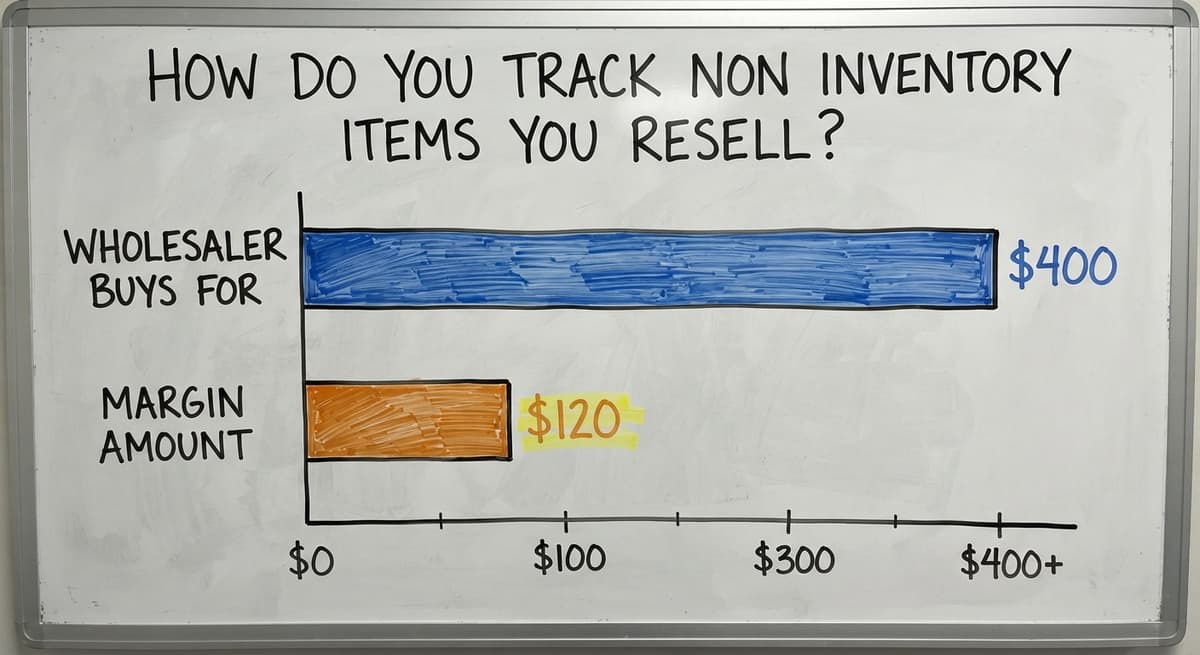
You track resold non inventory items by tying each buy to the customer order that caused it. Drop-ship and special-order goods fit here. You buy them only after a customer says yes.

Take a wholesaler who sells a pump the shop never stocks. A customer orders it. The wholesaler buys it from the maker for $400 and bills the customer $520. The order number links both sides. Cost and price now sit together, and the $120 margin is easy to see.
Two habits keep this clean:
- Put the customer order number on the buy order and the vendor bill.
- Keep these goods out of regular stock counts so the shelf numbers stay true.
If you also run consignment goods, our page on how to keep track of consignment inventory covers that case. Special-order goods stay clean when every cost carries an order number.
The comparison is easier when one option is built for you
Off-the-shelf means fitting your process to the software. We do it the other way round, and the first look costs nothing.
Book a call
How Do You Track Service and Fee Items?
You track service and fee items by giving each one a clear name and using that name every time. Freight, handling, kitting, and storage fees all need this.
A fee with 3 names is 3 lines on a report. Pick one name for each and keep it. Write them down so every clerk uses the same words.
- Freight: shipping you pass to the customer.
- Handling: the labor to pick and pack.
- Kitting: the work to bundle items into one set.
- Storage: the charge for holding goods past a set time.
Then check invoices against shipped orders each week. Say 5 orders a week miss a $15 handling fee. That is $75 a week, or $3,900 a year. A weekly check finds those gaps before they pile up.

What Mistakes Should You Avoid?
The 4 biggest mistakes are a catch-all category, mixed names, paper-only records, and too much counting. Each one makes the data less useful.
- One catch-all category. Putting every supply under "Misc" hides where the money goes.
- Different names for one item. "Wrap," "stretch film," and "pallet wrap" split one cost three ways.
- Email and paper only. A note in an inbox cannot be sorted or totaled.
- Counting too much. Say 2 staff spend 3 hours a week counting low-value items at $18 an hour. That is $5,616 a year. The Bureau of Labor Statistics publishes pay data for stock clerks if you want to use a local rate.
Count what hurts to lose. Let the rest go.
When Does Tracking Outgrow Spreadsheets?
Tracking outgrows a spreadsheet when the list causes more work than it saves. Watch for 4 signs:
- You run out of supplies and the line stops.
- Duplicate files pile up and nobody trusts the numbers.
- Nobody owns the list.
- Staff re-type data between sheets and the accounting package.
One sign is a nuisance. Three signs mean it is time for a change. You do not need a large system for this. Big ERP software, which runs a whole company in one package, often takes long to set up and asks your team to work in new ways.
A small custom tool is another path. It fits how your team already works. You keep your accounting package for the books. The tool replaces only the manual parts, such as counts and alerts. It needs no long rollout.
What the Manual Work Costs
Re-typing is a hidden cost. If 1 person spends 4 hours a week moving data at $18 an hour, that is $3,744 a year. The NIST Manufacturing Extension Partnership offers vendor-neutral guidance on supply chain process if you want to review yours first. Fix the manual step that costs the most.
How Can a Custom Tool Help Track Non Inventory Items?
A custom tool helps by matching the way your warehouse already works. It does not ask the crew to learn a new routine. It follows the one they have.
A small build can include:
- Reorder alerts for supplies, so tape never runs out unseen.
- One shared list that everyone edits, so copies stop piling up.
- Links to orders and fees, so costs and charges line up.
This works at small scale, from 5 to 100 staff. The Software Society is a local team in Columbus, Ohio. We build the software, the website, and the search presence for growing companies. We also connect to tools you may use, such as accounting software, so the books stay in one place. If your sheet is slipping, a short review of your process is a good first step.
Where to Start This Week
Start with one hour on the dock. List your supplies, fees, and special-order goods. Name each one. Pick the few that stop work when they run out and set a reorder level for them. If the list grows, see our notes on how to keep track of inventory in warehouse and how to keep track of inventory small business for the stock side. If you want a clear system built around your own process, learn how to create an inventory tracking system? with a short call to The Software Society.
Frequently asked questions
What is a simple way to track inventory?
A simple way is one shared sheet with item, location, cost, vendor, reorder level, and last count. Count on a set day each week. This suits a small list and one owner. There is no single best method. Size, staff, and how often stock changes decide it. A spreadsheet fits small teams. An inventory app or cloud platform fits more items and more people. A custom build fits teams with odd routines.
What is considered a non-inventory item?
A non-inventory item is something you buy or sell that you do not count as stock. Packing tape, gloves, and labels are common examples. Delivery fees, handling charges, and service labor count too. Goods you buy only after a customer order may also be treated this way. Resale goods you need to count belong in inventory.
Why track non inventory items?
Small supply costs add up and hide in the expense column. Running out of tape or boxes can stop shipments. Tracking also catches fees that never reach the invoice. It shows the true cost of filling an order.
Can you track non inventory items in a spreadsheet?
Yes. Use columns for item, location, cost, vendor, reorder level, and last count. It works for a short list and one owner. Shared copies get out of date, so name one person to keep it current.
How do you track non inventory items in your accounting software?
Use the non-inventory item type for supplies and services you do not stock. It records buys and sales but not quantity on hand. Add categories and vendors to see spending over time. It will not warn you when stock runs low, so keep a reorder level elsewhere.
How do you track drop-ship or special-order items?
Tie each buy to the customer order. Put the order number on the buy order and the vendor bill. That way cost and price sit together. Keep these goods out of regular stock counts.
When do spreadsheets stop working?
They stop working when supplies run out, duplicate files pile up, nobody owns the list, or staff re-type data between sheets and the accounting package. Two or three of these signs mean it is time for a small tool.
Start with a free first look
A 30 minute call, your operation mapped, and a clear picture of what we would build. No obligation and nothing to install.
Book a callRelated guides
More on the same work.
- How to Keep Track of Inventory
- How to Create an Inventory Tracking System?
- How to Keep Track of Inventory on Clover
- How to Keep Track of Computer Inventory
- How to Keep Track of Consignment Inventory
- How to Keep Track of Alcohol Inventory
- How to Keep Track of Product Inventory
- How to Keep Track of Ebay Inventory
- How to Keep Track of Poshmark Inventory
- How to Keep Track of Liquor Inventory
- How to Keep Track of Grocery Inventory
- How to Keep Track of Lularoe Inventory
- How to Keep Track of Freezer Inventory
- How to Keep Track of Cigarette Inventory
- How to Keep Track of Inventory Electronically
- How to Keep Track of Paparazzi Inventory
- What is the Difference Between Aggregate and Item Inventory Management
- What is the Management and Non Managerial Human Resources Inventory
- How to Keep Track of Inventory in Warehouse
- How to Keep Track of Inventory Small Business
- How to Record Inventory on Hand
- How to Manage Inventory in Rocket League
- How to Improve Inventory Management
- How to Manage Fba Inventory