


How to Keep Track of Inventory Electronically
To keep track of inventory electronically, give each item a unique number and label. Count everything once. Then record every receipt, move, pick, and shipment in one shared system as it happens. Scan barcodes instead of typing. Start small, and keep your accounting package.
Book a callWhat Does It Mean to Keep Track of Inventory Electronically?
To track inventory electronically means every item, count, and move lives in a computer system. Paper sheets and memory are out. One shared record shows what you own and where it sits. Everyone sees the same numbers, and the record changes as work happens. A worker scans a box, and the count updates. It can be small and simple. You do not need a big ERP (a large system that runs a whole company). Many teams of 5 to 100 people start with a basic inventory tracking system and grow from there.
We build it for your operation, and the first look is free
If you would rather not compare products, describe how your operation already works and we build the system around it.
No build cost. You see it running on your own process first, and the monthly subscription starts only once it is live.
Book a callWhy Paper Sheets and Spreadsheets Stop Working
Paper and spreadsheets fail for one reason: the record falls behind the floor. Printed sheets get lost, smudged, or typed in late. A spreadsheet gets copied, and soon 3 people work from 3 versions. Counts in a spreadsheet, your accounting package, and an email thread start to disagree. GS1, the standards body behind most barcodes, says its standards help businesses "uniquely identify" items, and you can read more on the GS1 barcode standards page. Without that clean identity, mistakes pile up. You run out of stock, order too much, or ship late.
What Do You Need Before You Start Electronic Inventory Tracking?
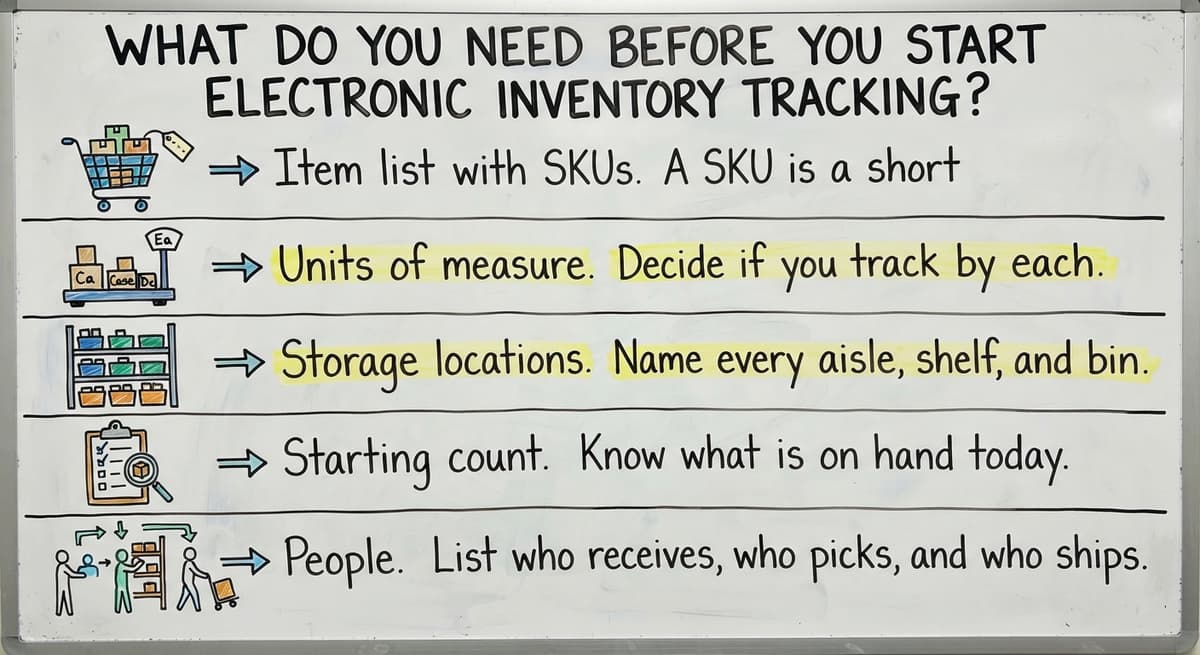
You need five things before you start: a clean item list, units of measure, storage locations, a starting count, and a list of who does what. Gather these first, and the rest goes fast. Skip them, and the new system just copies old confusion.
- Item list with SKUs. A SKU is a short, unique item number. Each item gets one clear name and one SKU.
- Units of measure. Decide if you track by each, case, or pallet. Note how many each fit in a case.
- Storage locations. Name every aisle, shelf, and bin.
- Starting count. Know what is on hand today.
- People. List who receives, who picks, and who ships.
A tidy list on day one saves weeks of cleanup later.
Step 1: Give Every Item and Location a Clear Label
Labels come first because every scan depends on them. A label ties a physical thing to a line in your system. If the label is vague, the record is vague. Put a label on each item and on each shelf or bin. Then a worker can scan the item, scan the shelf, and the system knows what moved where.
Name Things the Same Way Every Time
Write short naming rules and stick to them. Use one name per item. Do not let "blue widget" and "widget, blue" both exist. Put the size or color in the same spot each time. Number bins in a plain pattern, such as aisle, shelf, bin: A-03-02.
One name per item is what lets a count mean the same thing to everyone.
How Do Barcodes Help With Inventory Tracking?
Barcode scanning for inventory replaces typing with a quick scan. A scan takes about a second. Typing a long item number takes much longer and invites slips like a swapped digit. Simple label printing works for small teams. A basic label printer and a roll of labels are enough to start. Fast scans mean fewer typing errors and faster work.
Not sure this is the right shape for your operation
Describe how the work runs today. We map it on a call and show you what it would look like built around that, before you spend anything.
Book a callStep 2: Do One Full Count to Set Your Starting Numbers
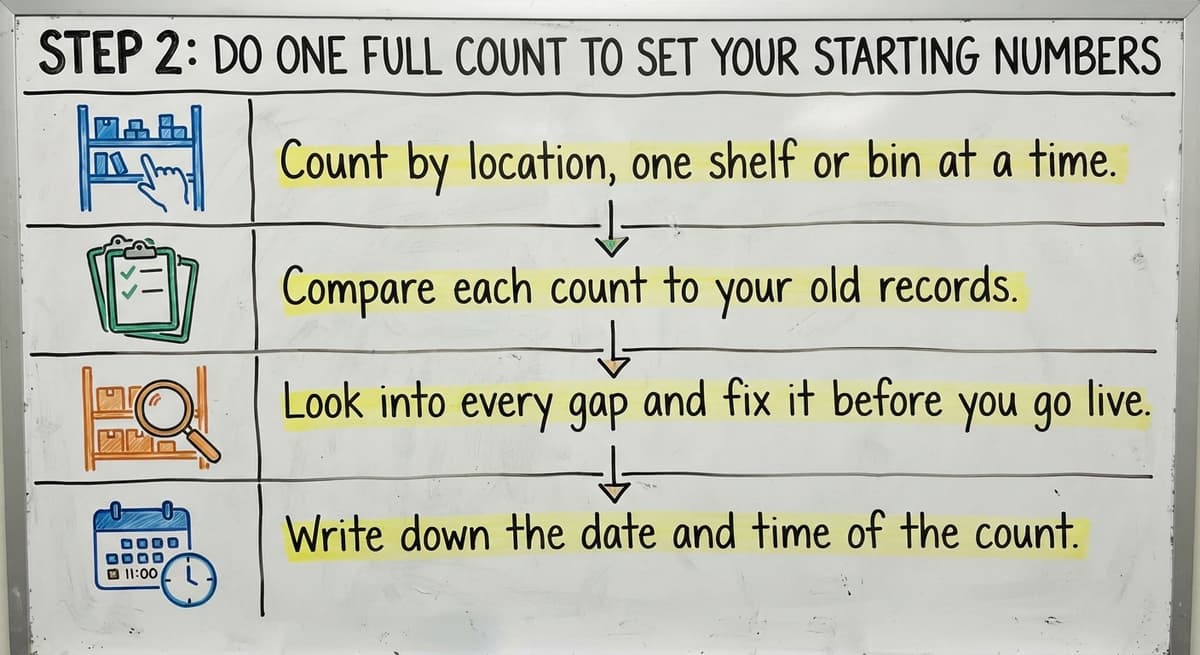
A full count sets the starting numbers your new system will trust. Without it, every later report carries old errors forward. Pick a slow day or work after hours. Fewer moves during the count means fewer surprises.
Work in this order:
- Count by location, one shelf or bin at a time.
- Compare each count to your old records.
- Look into every gap and fix it before you go live.
- Write down the date and time of the count.
That date matters. It marks the moment the new system begins. The IRS also expects this work. In IRS Publication 538, it says: "To figure taxable income, you must value your inventory at the beginning and end of each tax year." A clean, dated count helps you meet that rule.
One trusted count is the base every later number stands on.
Step 3: Record Every Move When It Happens
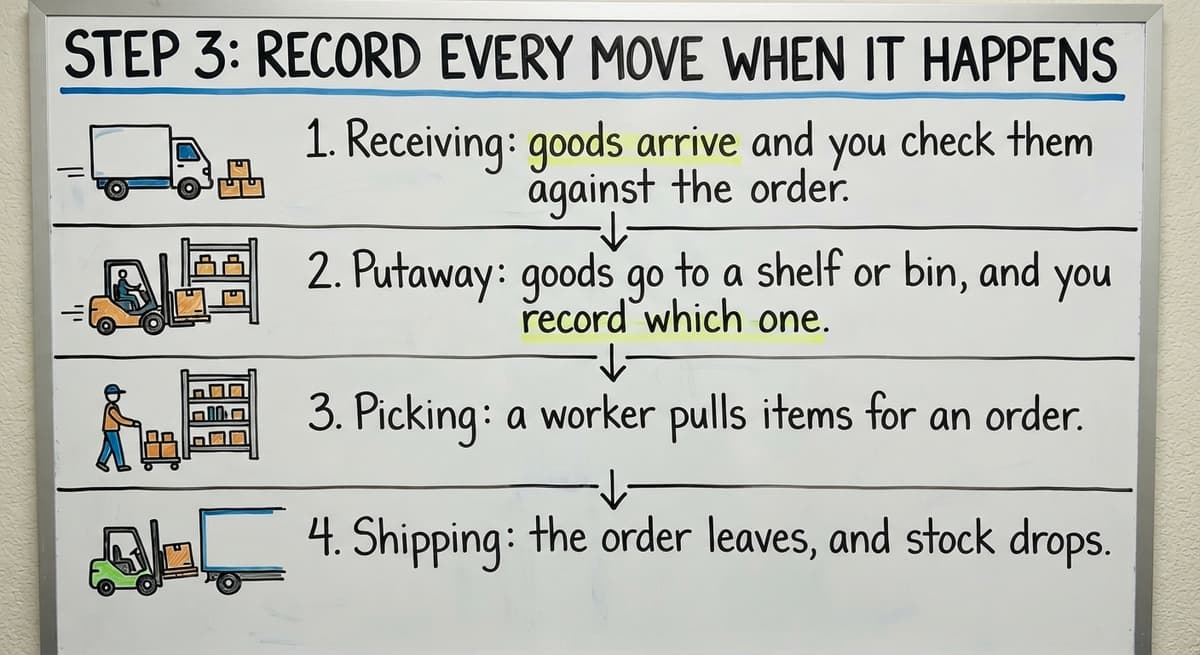
Electronic tracking only works if every move gets recorded when it happens. A late entry is just a paper sheet in a new costume. Staff should log a move at the moment they make it, not at the end of the day.
The Four Core Moves
Capture these four moves:
- Receiving: goods arrive and you check them against the order.
- Putaway: goods go to a shelf or bin, and you record which one.
- Picking: a worker pulls items for an order.
- Shipping: the order leaves, and stock drops.
Handheld scanners or ordinary phones can capture each move on the floor.
Log the Odd Events Too
Also record adjustments. Damage, returns, and counting errors all change the real number, even though they are not ordinary sales or receipts. If they go unrecorded, your system keeps showing stock that is no longer on the shelf. Give each adjustment a reason code, such as "damaged" or "returned." Those codes show you where loss comes from, so you can spot patterns and fix them at the source.
When every move is logged on the spot, the screen matches the shelf.

Step 4: Pick the Right Kind of Tool
Three kinds of tool can run electronic inventory tracking: a better spreadsheet, off-the-shelf inventory management software, or custom-built software. None is best for everyone. The right pick depends on volume, how many people touch stock, and how unusual your process is. Here is how they compare.
| Option | Cost to start | Best for | Main limit |
|---|---|---|---|
| Better spreadsheet | Lowest | Under 100 items, 1 or 2 users | Breaks as volume grows |
| Off-the-shelf software | Moderate monthly fee | Standard processes | You adapt to it |
| Custom software | Highest up front | Unusual workflows | Needs a build partner |
Weigh the table against how your team really works.
The comparison is easier when one option is built for you
Off-the-shelf means fitting your process to the software. We do it the other way round, and the first look costs nothing.
Book a callA Better Spreadsheet
A spreadsheet is cheap and familiar. It can work for a tiny stockroom. It breaks when many people edit it, since copies drift apart. If you plan to replace Excel inventory spreadsheet files, start by locking one master file and limiting who edits it. That buys time, but it is a patch.
Off-the-Shelf Software
Off-the-shelf tools are quick to start. You can often sign up and begin entering items within days. They also come with set screens and set rules. Your team may need to change how it works to fit the tool. That is fine when your process is common, because the software was built for cases like yours. It hurts when your process is not common, since workarounds pile up.
Custom-Built Software
Custom software fits the way you already run. Bin names, pick rules, and receiving steps match your floor. It costs more up front, and you need a partner who builds it. You can track inventory without an ERP in any of the three cases.
Choose the tool that fits your floor, not the one with the longest feature list.
Can You Keep Your Accounting Package While Tracking Inventory Electronically?
Yes. You can keep your accounting package and track stock electronically alongside it. Accounting software handles books, invoices, and taxes well. It is weaker at bin locations, pick lists, and receiving logs. So leave it where it works, and replace only the manual parts.
The manual parts are counts, bin locations, pick lists, and receiving logs. Move those into a tool built for the floor. Then connect the two so stock and cost data are not typed twice. Many inventory tools connect to accounting software, for example, and a custom build can too.
This path needs no forced migration and no long rollout. Your books stay put while the floor gets faster.
You keep the accounting you trust and fix only the work that slows you down.
How Do You Keep Electronic Inventory Counts Accurate?
You keep counts accurate by checking a few items often instead of everything once a year. Small, steady checks catch errors while the cause is still fresh. Two habits do most of the work.

Use Cycle Counts
Cycle counting means counting a few items each day instead of shutting down for one big yearly count. Say you stock 400 items and count 20 a day. You cover everything in 20 working days, and the work stays small enough to fit into a normal shift. Count fast-moving and high-value items more often, because errors there cost the most. Slow items need fewer checks.
Find the Cause of Every Difference
When a count is off, ask why instead of just fixing the number. Was it a wrong scan, a mis-shelved box, or theft? Each cause points to a different fix. Also limit who can change numbers, so fewer people can alter records. Log who made each change and when, so you can trace any gap back to its source.
A gap you explain once is a gap you rarely see again.
What Reports and Alerts Should You Set Up?
Set up a short list of reports your team will really read. A report nobody opens is noise. Start with these four:
- Low stock alerts and reorder points. The system warns you when an item falls below a set level, so you buy before you run out.
- On-hand by location. You see where each item sits right now.
- Slow-moving and overstock items. You spot cash tied up on shelves. The US Census Bureau tracks wholesale inventories and sales for the whole country, which shows how large that tied-up cash can get.
- Open receipts and unshipped orders. You see what arrived but is not on a shelf, and what has not left the dock.
A handful of used reports beats a dozen ignored ones.
See it running on your own process first
No build cost. The subscription starts once it is live and doing the job, not before.
Book a call
What Mistakes Should You Avoid When You Go Electronic?
Five mistakes cause most failed rollouts. Each one is easy to dodge once you know it.
- Switching everything in one day. Move one area first, learn, then add more.
- Skipping the starting count. Bad opening numbers poison every report.
- Letting staff keep side spreadsheets. Two records mean two truths.
- Buying a tool bigger than the business needs. You pay for features you never open.
- Not training the people on the floor. Staff who do not trust the scanner will work around it.
The NIST Manufacturing Extension Partnership offers vendor-neutral guidance on supply chain and inventory process if you want a second view.
A small, trained start beats a big, confusing one.
What Does Manual Tracking Cost You Each Year?
Manual tracking costs real money in staff hours. Take 3 people who spend 6 hours a week on counts, sheets, and re-typing. At $22 an hour, that is 3 x 6 x 52 x $22, or $20,592 a year. The Bureau of Labor Statistics publishes pay data for the staff who do this work, so you can swap in your own wage. Use your own hours too.
There is also a customer cost. The Federal Trade Commission needs sellers of mail, internet, or phone orders to ship when they said they would. A wrong count makes that promise hard to keep.
The real price of paper is the hours and the missed shipments.
When Is It Time to Get Custom Software for Inventory?
Custom inventory software makes sense when your workarounds grow faster than your team. Watch for these signs:
- Side files, email threads, and paper notes keep multiplying.
- Off-the-shelf tools do not match how you receive, pick, or ship.
- You want to avoid a big, costly ERP rollout.
A custom build can follow your current workflow at a small scale. You start with one process, such as receiving, and add more later. The Software Society is a Columbus, Ohio team that builds this kind of software. The same team can also handle your website and search presence, so you deal with one partner.
If you want to talk it through, reach out and describe your current process. Compare options first. Then pick the path that fits your floor.
Related Guides on Inventory Tracking
Your setup depends on what you sell and where. For a wider view, read how to keep track of inventory across any business. Read how to keep track of inventory in warehouse settings if you manage bins and pallets. Owners of small shops can read how to keep track of inventory small business style, with fewer tools. Sellers with special cases can see how to keep track of consignment inventory, how to keep track of alcohol inventory, how to keep track of ebay inventory, and how to keep track of poshmark inventory.
Pick the guide that matches your stock, then apply the same four steps.
Frequently asked questions
How does inventory tracking in accounting software work?
Accounting packages like popular small-business accounting software track inventory as items with quantities and costs. When you record a buy, stock goes up. When you record a sale, stock goes down and cost of goods sold updates. This works well for the books. It is weaker for bin locations, pick lists, and scan-based receiving. Many teams keep it for accounting and add a floor tool that connects to it.
What is a simple way to track inventory?
There is no single best way. The simplest start is a clean item list, a labeled shelf, and a single shared record that staff update when they move stock. A spreadsheet can do this for a very small stockroom. As items, people, and orders grow, an inventory app, a cloud platform, or a custom build fits better. Pick by volume, number of users, and how unusual your process is.
Is a spreadsheet good enough for tracking inventory?
A spreadsheet is fine for a small stockroom with 1 or 2 users and a short item list. It breaks as volume grows. Files get copied, people work from different versions, and counts drift. When you see that happening, move to a tool built for inventory.
How do barcodes help with inventory tracking?
Barcodes replace typing with a quick scan. That cuts typos and speeds up receiving, picking, and counting. Each barcode ties a physical item or shelf to one record in your system. GS1 publishes the barcode standards most businesses use.
Can I track inventory without an ERP?
Yes. An ERP is a large system that runs a whole company. You do not need one to track stock. A spreadsheet, off-the-shelf inventory software, or a small custom tool can track counts, locations, and moves. Many teams of 5 to 100 people do this and keep their accounting package for the books.
How often should I count inventory?
Count a few items every day through cycle counting instead of everything once a year. Count fast-moving and high-value items more often. Slow items can wait longer. Also do one full count before you go live so your starting numbers are trusted.
Can I keep using my accounting software and still track inventory electronically?
Yes. Keep your accounting software for accounting. Replace only the manual parts, such as counts, bin locations, pick lists, and receiving logs. Then connect the two so stock and cost data are not typed twice. No forced migration is needed.
When should a warehouse move to custom inventory software?
Move when workarounds keep growing and off-the-shelf tools do not match how you work. Signs include side files, email threads, and paper notes. Custom software also makes sense if you want to avoid a large ERP rollout. Start with one process and add more later.
Start with a free first look
A 30 minute call, your operation mapped, and a clear picture of what we would build. No obligation and nothing to install.
Book a callRelated guides
More on the same work.
- How to Keep Track of Inventory
- How to Keep Track of Inventory on Clover
- How to Keep Track of Computer Inventory
- How to Keep Track of Consignment Inventory
- How to Keep Track of Alcohol Inventory
- How to Keep Track of Product Inventory
- How to Keep Track of Ebay Inventory
- How to Keep Track of Poshmark Inventory
- How to Keep Track of Liquor Inventory
- How to Keep Track of Grocery Inventory
- How to Keep Track of Lularoe Inventory
- How to Keep Track of Freezer Inventory
- How to Keep Track of Cigarette Inventory
- How to Keep Track of Paparazzi Inventory
- How to Create an Inventory Tracking System?
- How to Track Non Inventory Items
- How to Keep Track of Inventory in Warehouse
- How to Keep Track of Inventory Small Business
- How to Record Inventory on Hand
- How to Manage Inventory in Rocket League
- How to Improve Inventory Management
- How to Manage Fba Inventory
- How to Manage Inventory in Stardew Valley
- How to Manage Inventory Fallout 76