

Distribution Management Software
Distribution management software is a system that tracks goods from the moment a supplier ships them to the moment a customer receives them. It handles inventory, orders, purchasing, and fulfilment in one place. If your team runs on an accounting package plus spreadsheets, this article explains what the software does, what it costs, and how to choose the right fit without buying more than you need.
Reviewed September 2026. Each figure comes from the assumptions stated beside it, so you can substitute your own and the arithmetic still holds.
Published 13 August 2026. Reviewed and updated 15 September 2026.
Book a callWhat Is Distribution Management Software, and What Does It Do?
Distribution management software connects the moving parts of a wholesale operation: stock levels, buy orders, customer orders, pick-pack-ship workflows, and the reports that tie them together. It is not general business software. Accounting tools track money. Distribution software tracks goods.
The gap matters. The accounting software tells you what you invoiced. Distribution software tells you what is on the shelf, what is on the truck, and what a customer ordered three days ago that has not shipped yet. Most small distributors need both, not one or the other.
The software sits between your suppliers and your customers. It gives every person on your team a single view of what is happening, so no one has to chase down a spreadsheet to answer a basic question.
Would you rather have it built around your operation?
The first look is free. If you would rather not compare products, describe how your operation already works and we build the system around it.
No build cost. You see it running on your own process first, and the monthly subscription starts only once it is live.
Book a callWho Needs Distribution Management Software?
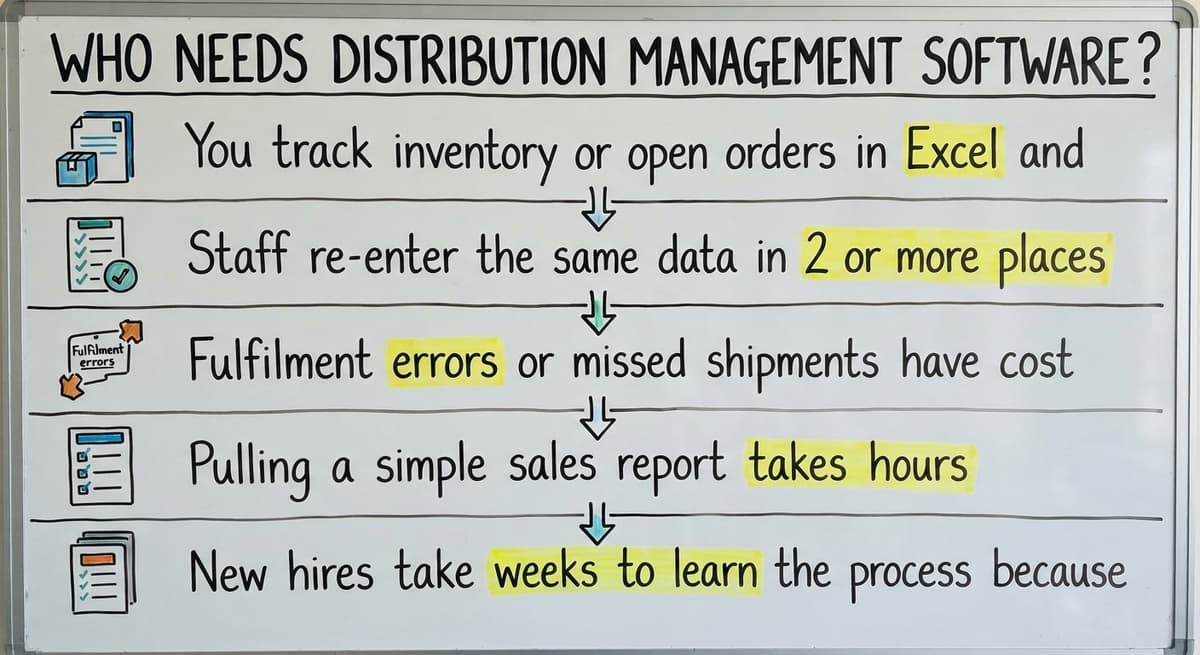
Wholesale distributors, fulfilment centres, and warehouses are the core users. The typical fit is a company with 5 to 100 staff that moves physical goods and has outgrown paper and spreadsheets.
A few clear signs your operation is ready:
- You track inventory or open orders in a spreadsheet and the file has multiple versions
- Staff re-enter the same data in 2 or more places
- Fulfilment errors or missed shipments have cost you a customer
- Pulling a simple sales report takes hours
- New hires take weeks to learn the process because it lives in people's heads
Inventory tracking is not just an working preference. The IRS makes it a legal one.
As IRS Publication 538 states: "To figure taxable income, you must value your inventory at the beginning and end of each tax year." A system that gives you an accurate count is not optional once your volume grows past what a spreadsheet can reliably hold.
What Problem Does Distribution Management Software Actually Solve?
The core problem is that data lives in too many places at once. Orders come in by email, phone, and a website.
Stock levels live in a spreadsheet one person keeps. Shipping info is in a carrier portal. Invoices go into the accounting software. None of these talk to each other.
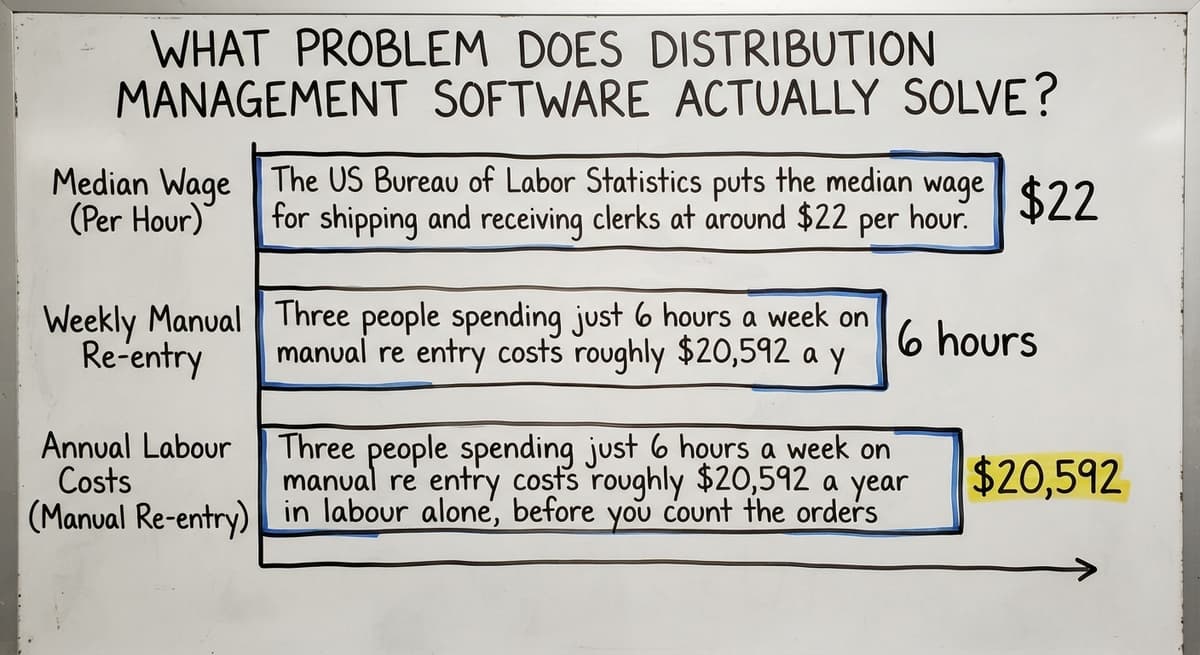
The result is predictable. Staff spend hours each week copying data from one place to another. Errors multiply as volume grows. The US Bureau of Labor Statistics puts the median wage for shipping and receiving clerks at around $22 per hour.
Three people spending just 6 hours a week on manual re-entry costs roughly $20,592 a year in labour alone, before you count the orders that fall through the cracks.
Distribution software replaces that patchwork with a single system. An order placed by a customer flows directly into a pick queue. Stock adjusts when goods leave the shelf. The accounting software receives the invoice data without anyone typing it twice.
Core Features of Distribution Management Software
Most systems cover the same broad areas. The depth and fit vary by product. Here is what each layer does in practice.
Inventory Tracking and Stock Control
Real-time inventory tracking means every pick, receipt, and transfer updates the count at once. You see what is on hand, what is reserved for open orders, and what is on its way from a supplier, all at once.
Key capabilities in this layer:
- Low-stock alerts that trigger a reorder before you run out, not after
- Lot, batch, and serial number tracking for products that need a trace trail
- Multi-location stock views for operations running more than 1 warehouse
- Overstock flags that highlight slow-moving lines tying up cash
Order Management
Order management software for wholesale distributors captures orders from every channel, phone, email, EDI, and web, into one queue. Staff see status at a glance. Customers can be told where their order is without anyone making a call.
The workflow covers picking, packing, shipping, backorders, and partial shipments. When a line item is out of stock, the system flags it rather than letting the order ship incomplete and wrong.
Purchasing and Supplier Management
Buy order management connects buying to inventory automatically. When a reorder point is hit, the system can draft a PO. When goods arrive, staff receive them against the original order so discrepancies surface at once rather than weeks later on a supplier invoice.
Supplier lead times and fill rates can be tracked over time. That data helps you choose which supplier to use when you have options and negotiate better terms when you do not.
How Does Warehouse Management Work Inside Distribution Software?
Warehouse management in a distribution system handles the physical movement of goods inside your building. Bin and location management means every product has a home address in the warehouse, so pickers do not wander.
Practical features include:
- Pick lists generated by warehouse zone to cut travel time per order
- Put-away workflows that direct staff where to place incoming stock
- Barcode scanning that removes the manual entry step causing most receiving errors
- Directed picking that routes staff through the warehouse in the most efficient sequence
A warehouse management system (WMS) focuses only on this layer. Distribution management software wraps it inside the full order-to-cash cycle.
Is the comparison easier when one option is built for you?
Yes. Off-the-shelf means fitting your process to the software, and custom is the other way round. The first look costs nothing.
Book a callShipping, Fulfilment, and Reporting
Fulfilment software handles carrier rate shopping, label printing, and automatic tracking number delivery to customers. Proof of delivery and exception alerts mean you know about a problem before the customer calls.
Reporting closes the loop. Sales by product, customer, and region. Inventory turnover and carrying cost. On-time delivery and fill rate. The owner sees a live dashboard instead of waiting for someone to build a spreadsheet on Friday afternoon.
How Does Distribution Management Software Work with the Accounting Software?
Most small distributors keep the accounting software for accounting, and that is the right call. accounting integration for distributors means the two systems share data without anyone re-entering it.
Distribution software handles operations. The accounting software handles the books. Each does what it was built for.
Why Is the Accounting Software Alone Not Enough?
The accounting software is an accounting tool. It was not built for pick-pack-ship workflows, multi-location stock control, or buy order management at any real volume. Inventory in the accounting software becomes unreliable as order count grows because it was not designed to handle warehouse-level transactions.
Adding distribution software fills that gap without touching your accounting setup. The integration pushes invoice data, payments, and cost of goods into the accounting software automatically. Your bookkeeper works in the same tool. Your warehouse team works in theirs. No one replaces anything.
What Types of Distribution Management Software Exist?
Choosing the right category matters as much as choosing the right product. The options differ in cost, fit, and how long they take to get running.
Off-the-Shelf vs Custom Distribution Software
Pre-built products are faster to start. They target many companies, which means they cover common workflows well and unusual ones poorly. You may need to change how your team works to match the software's logic, which creates friction and sometimes abandonment.
Custom distribution software is built around how your operation already works. It replaces the manual parts without forcing a redesign of the whole process.
For operations with specific pricing rules, unusual product types, or non-standard fulfilment flows, custom software costs less over 3 years than an off-the-shelf tool that never quite fits.
ERP vs Targeted Distribution Software
An ERP (enterprise resource planning system) covers finance, HR, operations, and more in one platform. It is built for large companies with large budgets and long rollout timelines, measured in months or years.
A 20-person distributor does not need the same tool as a 2,000-person manufacturer. Targeted distribution software solves the working layer faster and cheaper.
If the accounting software handles your accounting, you do not need an ERP to replace it. You need a system that handles what the accounting software cannot.
Cloud vs On-Premise
Cloud-based systems are accessible from any location, update automatically, and carry a lower upfront cost.
On-premise keeps data on your own servers and gives you more control, but it needs more IT overhead. Most small distributors benefit from cloud delivery. Custom software takes shape either way.
What does it look like running on your own process?
The first thing you see is it running on your own process, at no build cost. The subscription starts once it is live and doing the job, not before.
Book a call
What Should I Look for When Choosing Distribution Management Software?
The right system for a 5-to-100-person distributor is not the one with the longest feature list. It is the one your team will actually use.
Fit, Integration, and Scalability
Software should match how your team already works. Ask vendors to walk through your specific process before you buy, not a generic demo. If the demo does not include your edge cases, the software probably does not handle them well.
accounting integration is the first requirement. Check compatibility with your carriers, e-commerce platforms, and any EDI partners you work with. Poor integrations create new manual steps instead of removing them.
Scalability matters even if you are not planning to grow fast. Ask what happens when you add a second warehouse or a new sales channel.
Custom working software for wholesale businesses can be extended as the business changes. Off-the-shelf tools sometimes need a full migration when you outgrow a pricing tier.
Rollout Time, Cost, and Support
Long rollouts drain budgets and stall operations. Ask for a realistic go-live timeline before you commit. A phased rollout, starting with the highest-pain area first, reduces risk for small teams.
Total cost of ownership goes beyond the monthly subscription. Include rollout, training, and ongoing support. Compare that total to the cost of your current manual process in staff hours and fulfilment errors.
Support quality matters more than most buyers expect. Who do you call when something breaks? A dedicated contact who knows your setup is worth more than a helpdesk ticket queue.
Is the Interface Simple Enough for Warehouse Staff?
Warehouse staff need clear, simple screens. Complex interfaces slow adoption and create errors. Ask how long it takes a new hire to learn the system.
Good software cuts training time rather than adding to it. If the answer is "a few weeks", that is a warning sign, not a feature.
Involve warehouse staff and operations managers in the selection process. The best system is the one your team will actually use on day one, not the one that looked impressive in a boardroom demo.
How Is Distribution Management Software Implemented?
Rollout does not have to be disruptive. A focused rollout for a small distributor can be live in weeks, not months.
The typical phases run in this order:
- Discovery: Document how orders, inventory, and fulfilment currently flow. Identify the manual steps causing the most pain. This map defines what the software needs to do.
- Build or configure: Off-the-shelf tools are configured to match your workflow. Custom builds are constructed around your documented process. Both should involve your team in review.
- Data migration: Move product lists, customer records, and open orders into the new system. Clean the data before you migrate, not after. A phased approach reduces risk.
- Testing and training: Run real orders through the system before go-live. Train staff on their specific role, not the entire platform. Identify the edge cases your team hits regularly.
What Happens After Go-Live?
Plan the go-live for a lower-volume period if your business has seasonal patterns. Have your rollout partner available during the first weeks.
The system should improve as your business changes, not freeze at the state it was in on launch day. That ongoing relationship is what separates a good rollout from a software buy that collects dust.

Common Mistakes When Choosing Distribution Software
Small distributors make the same avoidable errors. Knowing them in advance saves time and money.
- Buying an ERP when you need an working layer. ERPs solve problems at enterprise scale. A targeted distribution tool solves your real problem faster and for less.
- Choosing a system that needs replacing the accounting software. If your accounting works, protect it. Add working control on top.
- Underestimating internal effort. Rollout takes time from your team, not just the vendor. Plan for it.
- Ignoring how your team actually works. Software that does not match real workflows gets abandoned. The tool your team uses imperfectly is worse than a simpler tool they use every day.
- Underestimating the cost of doing nothing. Manual processes have a real cost in labour, errors, and lost orders. Delayed decisions compound that cost every month.
The NIST Manufacturing Extension Partnership offers vendor-neutral guidance on supply chain process improvement, which is useful context before you start talking to any software vendor.
Not sure this is the right shape for your operation?
The call is free. Describe how the work runs today. We map it on a call and show you what it would look like built around that, before you spend anything.
Book a callHow Does Distribution Software Handle Multiple Warehouse Locations?
Can distribution management software track stock across more than one site? Yes, and for distributors planning to grow their footprint, this is one of the most important capabilities to confirm before you buy.
A multi-location system lets you:
- See stock levels at each site from a single screen
- Transfer goods between locations with a clear paper trail and automatic inventory updates
- Assign orders to the nearest or best-stocked location to cut shipping cost and time
- Report on performance by site so you can see which warehouse is carrying the load
The US Census Bureau's Monthly Wholesale Trade data tracks national inventory levels and the inventories-to-sales ratio for wholesale firms, which gives useful context for how much stock distributors carry relative to sales volume.
Carrying too much across multiple sites is expensive. A system that shows you the full picture helps you balance it.

Building a Business Case for Distribution Management Software
Decision-makers want a payback period, not a feature list. Build the case in plain numbers.
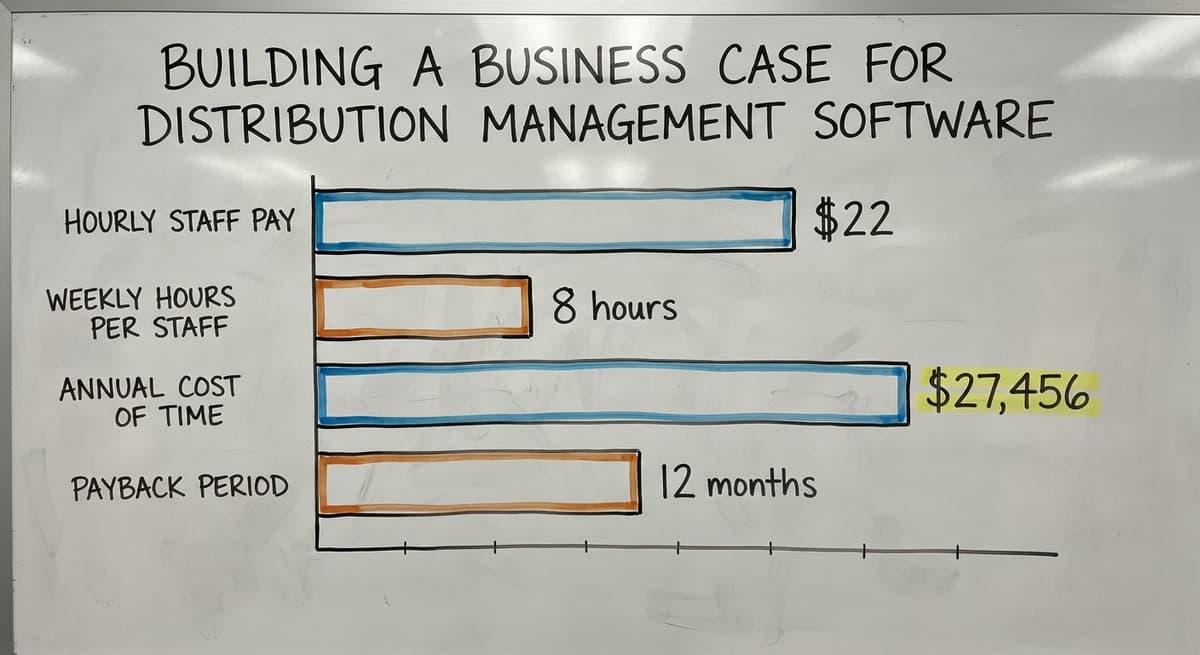
Start with your current cost. Count the hours your team spends each week on manual data entry, chasing order status, and fixing fulfilment errors. Multiply by the hourly wage. The Bureau of Labor Statistics reports median pay for shipping and receiving staff at around $22 per hour.
3 staff spending 8 hours a week on tasks the software would handle costs $27,456 a year. That number does not include the cost of errors, returns, or lost customers.
Then add the cost of the software and rollout. Divide the first number by the second. That is your payback period. For most small distributors, it is well under 12 months.
What Does Good Distribution Management Software Look Like Day to Day?
In practice, a well-implemented system changes the texture of the working day. A customer places an order and it flows directly into the pick queue, no one transcribes it. Staff pick and pack from a clear list, no paper confusion.
Inventory updates the moment goods leave the shelf. The accounting software receives the invoice data without anyone typing it. The owner opens a dashboard instead of waiting for Friday's report.
Inventory management for fulfilment centres works the same way. The difference is speed and accuracy at higher volume. The system carries the load that spreadsheets cannot.

Questions to Ask a Distribution Software Vendor
Before you commit, get direct answers to these:
- How long does rollout take for a company our size, and what does that assume about our involvement?
- Does the system integrate with the accounting software without replacing it?
- Can you walk through a workflow that matches our specific process, not a generic demo?
- Who handles support after go-live, and how do we reach them?
- What happens when we need a change or a new feature six months from now?
- What does total cost look like over 3 years, including rollout, training, and support?
A vendor who cannot answer these clearly is telling you something about what the relationship will look like after you sign.
How Do You Get Started?
Where do you begin when your operation is ready for distribution management software? Start by writing down how an order moves through your business right now, from the moment a customer calls to the moment the goods leave the dock.
Note every place where someone copies data, makes a phone call to check a status, or fixes a mistake.
That document is your requirements list. It tells you what the software needs to do and which gaps matter most. Wholesale distribution software overview pages and vendor demos are more useful once you know what you are looking for.
Decide whether off-the-shelf or custom is the right fit. Talk to vendors who have worked with distributors your size. Ask for a demo that uses your real workflow. Plan for a phased rollout that starts with the highest-pain area and expands from there.
The goal is not a perfect system on day one. The goal is a system that is better than what you have now, that your team will actually use, and that grows with you.
The Software Society builds custom working software for wholesale businesses and growing distributors. If your operation has outgrown spreadsheets and you want a system built around how you actually work, rather than a generic template, start with a conversation about your process.
Frequently asked questions
What software is best for distributors?
There is no single best answer. The right software depends on your team size, workflow, and whether you need a pre-built product or something built around your specific process. Off-the-shelf distribution tools suit operations with standard workflows.
Custom-built systems suit distributors with unique pricing rules, non-standard fulfilment flows, or existing tools they cannot replace. The best system is the one your team will actually use every day, not the one with the longest feature list.
What is the most popular WMS?
The warehouse management systems used widely by small and mid-size operations are a different group from the enterprise platforms. Popularity does not equal fit.
A system built for a 500-person operation will overwhelm a 20-person distributor. Before asking what is popular, ask what matches your volume, your team size, and your existing tools.
What is the best software for wholesale distribution?
For wholesale distributors under 100 staff, the best software is the one that integrates with the accounting software, matches your order workflow, and does not need a year-long rollout. A few packaged distribution tools cover most of that market.
Custom-built distribution software is worth considering if your pricing structure, product types, or fulfilment process do not fit a standard template. Ask any vendor to demo your actual workflow before you decide.
What are the top 5 inventory management software?
The widely used inventory tools for distributors each suit a different size and workflow: some handle multi-channel selling well, some integrate tightly with QuickBooks, some suit smaller operations getting started, and some lean toward light manufacturing.
None of them is universally best. Match the tool to your order volume, team size, and integration requirements.
Can distribution management software work with the accounting software?
Yes. Most modern distribution software integrates with the accounting software, pushing invoice data, payments, and cost of goods across automatically. The goal is to keep the accounting software for accounting and add working control on top.
You do not need to replace your accounting tool to get a working distribution system. Custom software takes shape with a the accounting software sync as a core requirement from day one.
How long does it take to implement distribution management software?
Off-the-shelf tools can go live in a few weeks for simple operations, or a few months for more complex ones. Custom builds depend on scope, but a focused first phase covering your highest-pain area can be live in weeks rather than months.
Longer timelines reflect more features being built at once, not better outcomes. A phased rollout reduces risk and gets your team using the system sooner.
What is the difference between distribution software and inventory software?
Inventory software tracks stock levels. Distribution management software covers inventory plus orders, purchasing, pick-pack-ship workflows, fulfilment, and reporting. Most growing distributors need the full picture, not just stock counts.
If you are also managing customer orders, supplier buy orders, and shipping from the same operation, inventory software alone will leave gaps that your team fills manually.
How much does distribution management software cost?
Packaged distribution management software runs $200 to $1,500 a month by user count and order volume, plus $2,000 to $15,000 to implement.
A build scoped to one distributor, covering orders, customer pricing, picking, and the accounting sync, runs $15,000 to $40,000 once with $200 to $600 a month after.
Which distribution software supports warehouse and route management?
The distribution suites built for delivered goods, where the order, the pick, and the truck stop are one record, and any distribution system that connects to a route planning tool through its API.
A distributor running its own trucks should ask for the route feature in the demo, not the brochure.
How do I choose distribution software for a food or beverage business?
Insist on lot tracking with expiry dates, first-expired-first-out picking, catch weights if you sell by weight, and a recall query that lists every customer who received a lot. Software without those 4 is retail software with a distribution label on it.
How does distribution software integrate with accounting and ERP systems?
Through the accounting package's API: customers, items, and prices sync down, invoices and stock values post up as orders ship and receipts land. The accounting package stays the ledger, the distribution management software runs the floor, and nobody keys an invoice twice.
What is in a free first look?
A 30 minute call, your operation mapped, and a clear picture of what we would build. No obligation and nothing to install.
Book a callRelated guides
The rest of this guide, for the parts of the job this page does not cover.
Guides
- Warehouse Inventory Management Software
- Quickbooks Inventory Management Software
- Warehouse Stock Management Software
- Software for Warehouse Management System
- Inventory and Warehouse Management Software
- Custom Inventory Management Software
- List of Warehouse Management Software
- Online Warehouse Management Software
- Multi Location Inventory Management Software
- Cloud Stock Management Software
- Manufacturing Inventory Management Software
- Cost of Inventory Management Software
- Small Business Stock Management Software
- Inventory Management Software Freeware
- Software Warehouse Management
- Order Management Software
- Best Inventory Management Software for Small Businesses
- Free Inventory Management Software for Small Business
- Inventory Management Software Barcode Scanner
- Inventory Management Software with Barcode
- Free Inventory Management Software with Barcode Scanner
- Hvac Inventory Management Software
- Inventory Management Software for Schools