

Best Inventory Management Software For Small Businesses
Reviewed and updated 15 September 2026. This guide covers the tools reviewed and the advice given as of this month.
Published 28 July 2026. Reviewed and updated 15 September 2026.
Reviewed August 2026. Each figure comes from the assumptions stated beside it, so you can substitute your own and the arithmetic still holds.
Book a callWhy Do Small Businesses Struggle with Inventory Management?
Most small operations track stock across spreadsheets, printed pick lists, and email threads. The problem is not effort. The problem is that none of those tools talk to each other.
A sale happens. Someone updates a spreadsheet. Someone else does not see it. A purchase order goes out for stock that was already on the shelf.
A customer waits for an item that shows as available but is not. These are not rare mistakes. They are the daily cost of disconnected systems.
The US Census Bureau's Monthly Wholesale Trade data tracks the inventories-to-sales ratio for wholesale firms across the country. When that ratio climbs, businesses are holding more stock than they are moving. Manual tracking is one of the reasons it climbs.
Small warehouse software does not need to be complex. It needs to be connected.
Would you rather have it built around your operation?
The first look is free. If you would rather not compare products, describe how your operation already works and we build the system around it.
No build cost. You see it running on your own process first, and the monthly subscription starts only once it is live.
Book a callWhat Does Inventory Management Software Actually Do?
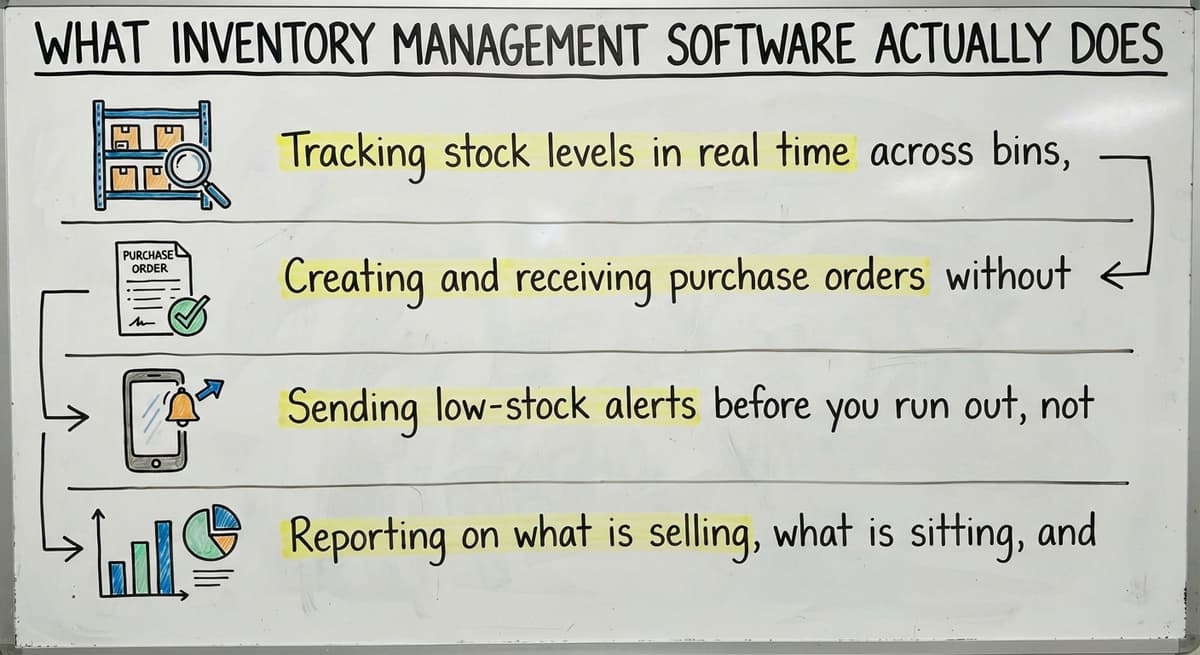
Inventory management software is a tool that tracks what you have, where it is, and when you need more. It replaces the spreadsheet and the printed sheet with a single live record that updates every time stock moves.
Core functions include:
- Tracking stock levels in real time across bins, shelves, or locations
- Creating and receiving purchase orders without retyping data
- Sending low-stock alerts before you run out, not after
- Reporting on what is selling, what is sitting, and what needs attention
Barcode scanning is central to how this works in practice. As GS1 explains at gs1.org/standards/barcodes, barcodes are "the foundation of global supply chains," providing the standard that lets any scanner read any label and record the result without manual entry. That single step removes most of the data errors that plague paper-based receiving.
Why Is Inventory Accuracy a Legal Requirement?
The IRS adds a legal reason to care. IRS Publication 538 states: "To figure taxable income, you must value your inventory at the beginning and end of each tax year." Accurate counts are not optional. Software makes them faster and more defensible.
Who Is This Guide For?
Owners and operations managers at small wholesale, distribution, and warehousing companies are the intended audience for this guide, not retail shops or enterprises with IT departments.
If your business currently runs accounting in QuickBooks and tracks inventory in Excel or on paper, this guide fits your situation. The advice here assumes you want to keep QuickBooks exactly where it is and replace only the manual work around it.
Enterprise ERP comparisons and retail point-of-sale reviews are not covered here. Those are different problems for different businesses.
The Most Important Features to Look For in Small Business Inventory Software
Not every feature list matters equally. For a small distributor or warehouse operator, 4 capabilities separate useful software from shelfware.
- Real-time stock visibility across every location or bin, so no one is working from yesterday's count
- Purchase order workflows that let you create, send, and receive orders inside the same system
- Reorder point alerts that trigger automatically when stock drops below a level you set
- Reports that answer practical questions: what do I need to order, what has not moved in 60 days, where am I losing margin
Mobile access belongs on this list too. Warehouse teams work on the floor. They need to receive a shipment, scan a label, or check a bin count from a phone or handheld scanner, not from a desk.
Look for inventory tracking software that runs on standard Android or iOS devices without a separate hardware contract.
QuickBooks Integration Should Be Non-Negotiable
Most small businesses already run their accounting in QuickBooks and have no interest in moving it. Good inventory software syncs with QuickBooks rather than competing with it.
The distinction matters. Some tools are built to sit alongside QuickBooks: a sale in the inventory system creates a record that flows into QuickBooks automatically, with no double entry.
Other tools are built to replace QuickBooks entirely, which means migrating years of financial history, retraining your bookkeeper, and taking on a much larger project than you planned.
QuickBooks integration for wholesale operations should be a baseline requirement, not a premium add-on. Ask any vendor to show you exactly how data moves between the two systems before you commit to anything.
What Does a Real-Time Sync Actually Mean?
Watch for tools that claim integration but only sync once a day or require a manual export. A sync that runs every few hours is not real-time. It is a scheduled copy that still leaves gaps.
Is the comparison easier when one option is built for you?
Yes. Off-the-shelf means fitting your process to the software, and custom is the other way round. The first look costs nothing.
Book a callBarcode Scanning, Mobile Access, and Multi-Location Support
Barcode inventory software reduces receiving errors by removing the manual entry step. When a staff member scans an item on the dock, the system records it.
No typing, no transposition, no lost paper. That single change cuts most of the receiving mistakes small warehouses deal with daily.
Mobile access extends that benefit across the whole operation. Pick, pack, count, and transfer, all from a phone or scanner on the floor.
Why Is Multi-Location Support Not an Advanced Feature?
Multi-location support is worth calling out separately because small distributors underestimate how quickly they need it. Even 2 storage locations create a tracking problem if the software treats them as one.
Stock transfers between locations should be a standard workflow, not a workaround. Avoid tools that charge enterprise-tier pricing just to unlock a second warehouse.
The NIST Manufacturing Extension Partnership offers vendor-neutral guidance on supply chain processes and consistently points to visibility across locations as a foundational requirement, not an advanced feature.

Ease of Use and How Long Implementation Should Take
Does software that is hard to use cause more problems than spreadsheets?
Yes. Complex software that staff avoid using creates worse tracking problems than the spreadsheets it replaced. A clean interface with minimal training required is not a nice-to-have. It is what determines whether the tool gets used at all.
Ask vendors for a real demo using your own products and your own workflow. A scripted demo shows you the best case. Your workflow shows you the real case.
How long does it take to implement inventory management software?
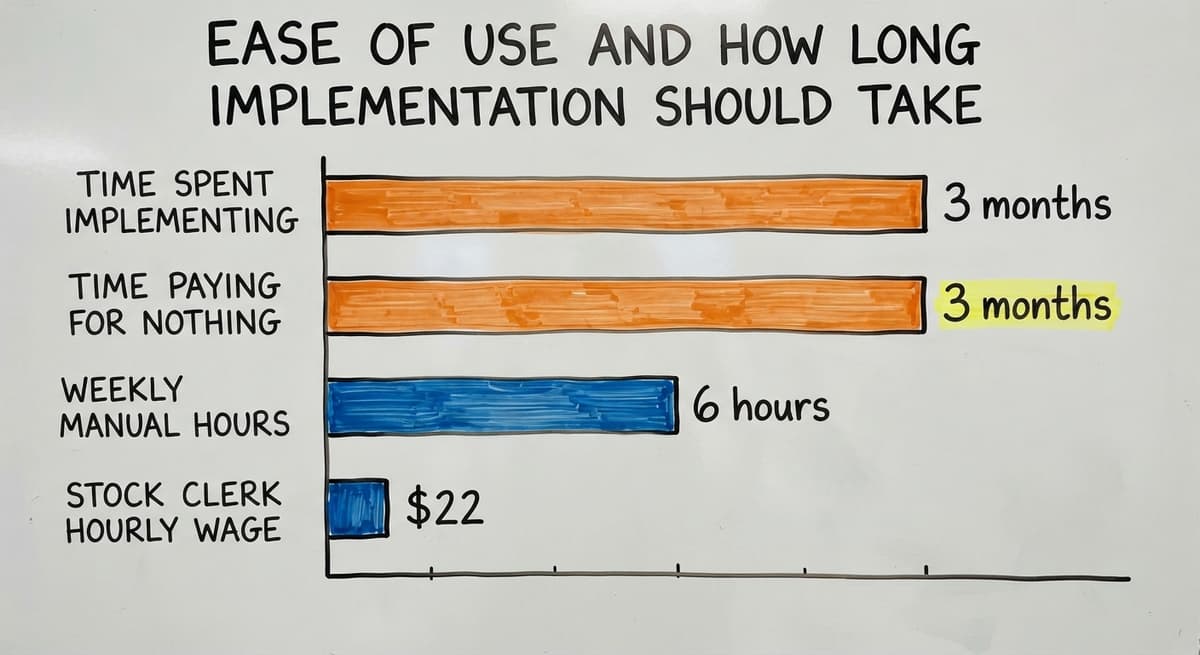
For a small business, good inventory software should be running in weeks, not quarters. A vendor who quotes a 6-month implementation timeline is describing a project sized for an enterprise, not a 20-person distributor.
Faster implementation means faster return on investment. If you spend 3 months getting the software running, you have spent 3 months paying for a tool that has not saved you anything yet.
Consider the cost of delay in concrete terms. If 3 staff members each spend 6 hours a week on manual inventory tasks, and the Bureau of Labor Statistics reports that stock clerks and order fillers earn around $22 an hour, that is roughly $20,592 a year in labor on work the software would handle. Every month of slow implementation extends that cost.
Off-the-Shelf vs. Custom Inventory Software
Most guides skip this question because they are written by review sites with affiliate deals. Here is the honest version.
Off-the-shelf tools target standard workflows. They work well when your operation matches the process the software was designed around. They deploy quickly and cost less upfront.
Custom inventory software is built around how your operation already runs. It does not ask you to adapt your process to fit a template. It fits your template.
Custom does not always mean expensive or slow, especially at small-business scale. When the scope is focused, a custom build can be running in the same timeframe as a complex off-the-shelf setup.
When is off-the-shelf the right answer?
A packaged product is a perfectly good fit when:
- Your workflows are standard with no unusual exceptions or steps
- Budget is tight and speed of deployment matters most
- The software will be used by 1 or 2 people with simple needs
- You are willing to adjust your process slightly to match the tool
When does a custom solution make more sense?
Custom inventory software for distributors earns its place when:
- Your operation has steps that no standard tool supports cleanly
- You have tried 2 or 3 off-the-shelf tools and always end up back in Excel
- You need the software to match your process, not the other way around
- You want to keep QuickBooks exactly as it is and automate only the manual overflow
Replacing Excel with operational software for small businesses does not have to mean buying a product that forces a new process on your team. Sometimes the better answer is building the right tool for the operation you already have.
What does it look like running on your own process?
The first thing you see is it running on your own process, at no build cost. The subscription starts once it is live and doing the job, not before.
Book a callPopular Off-the-Shelf Options and What They Cost
Several well-known tools serve small distributors and warehouse operators. None of them is right for every situation. Here is an honest overview.
Fishbowl is built for manufacturers and distributors who need deep QuickBooks integration. It handles multi-location tracking and barcode scanning well. It takes longer to set up than most tools in this category and carries a higher upfront cost.
inFlow works well for smaller operations with straightforward needs. The interface is clean, setup is fast, and pricing is accessible. It fits businesses with 1 to 5 warehouse staff better than larger teams.
Cin7 covers inventory, order management, and fulfillment in one platform. It suits businesses that sell across multiple channels and need those streams to connect. The feature depth comes with a learning curve.
Zoho Inventory is a lower-cost option that integrates with the broader Zoho ecosystem. It fits very small operations well but can feel limited as volume and complexity grow.

What Does Inventory Software Actually Cost at Small-Business Scale?
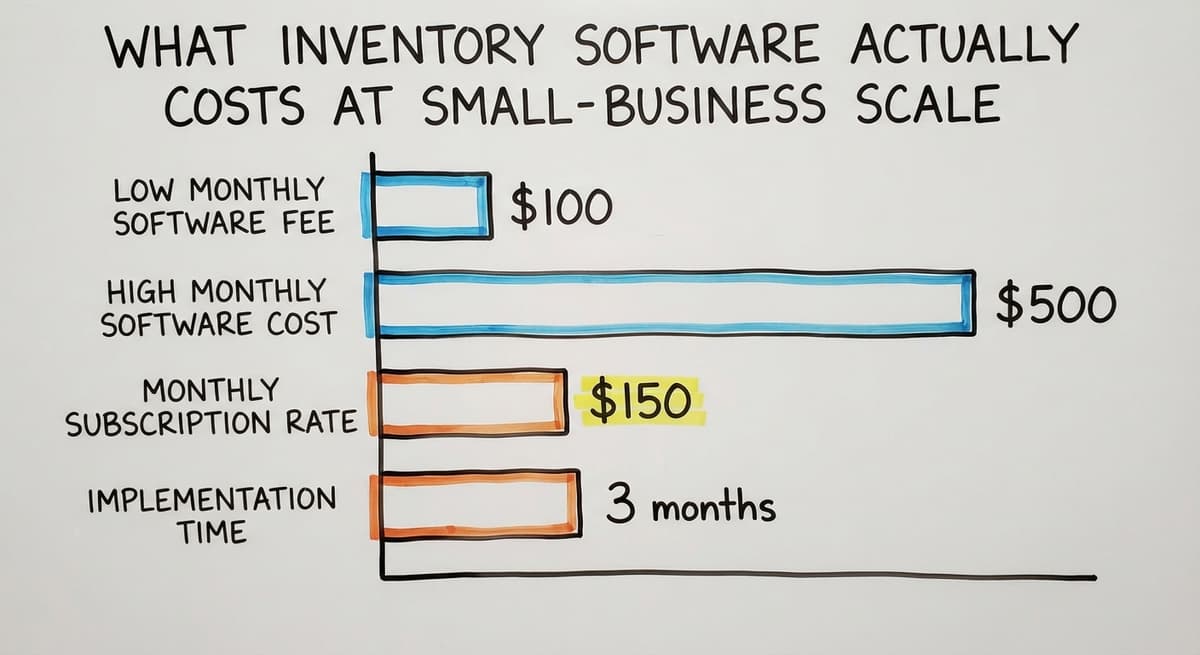
Realistic monthly costs at small-business scale run from roughly $100 to $500 a month for the software itself. That number changes when you add per-user fees, implementation charges, and any add-ons required to unlock features shown in the demo.
Factor in training time and the disruption of switching systems. A tool that costs $150 a month but takes 3 months to adopt properly costs more than it looks.
What Red Flags Should You Watch for When Evaluating Inventory Software Vendors?
Trust your instincts when a vendor does something that feels off. Specific patterns are worth walking away from.
- A vendor who pushes you toward a full ERP when you only need help with inventory tracking is sizing the solution for their revenue, not your problem
- Long contracts with no trial period or money-back option transfer all the risk to you
- Demos that show only polished best-case scenarios and sidestep your actual workflow are hiding something
- Implementations that require you to hire a separate consultant just to get started add cost that was never in the original quote
Why Is Inaccurate Inventory a Compliance Problem, Not Just an Operations Problem?
The FTC's guidance on order fulfillment is a useful reminder of why accurate inventory matters legally. When you cannot ship what you said you would ship, you have a compliance problem, not just an operations problem.
Software that creates false confidence in your stock counts is worse than no software at all.

Questions to Ask Before You Buy
Before signing anything, get clear answers to these questions from every vendor you consider.
- Does it connect to QuickBooks without replacing it, and can you show me exactly how that sync works?
- How long does a typical setup take for a team my size, and what does that process look like week by week?
- Can I see a demo using my actual products and my actual workflow, not a scripted example?
- What happens to my data if I cancel the subscription?
- Who do I call when something breaks during business hours, and what is the expected response time?
A vendor who cannot answer these questions clearly is not ready to support your operation.
How Do You Run a Pilot Without Disrupting Your Operation?
A pilot reduces risk and builds internal confidence before you commit fully. The approach is straightforward.
Start with 1 product category or 1 warehouse location. Run the new system alongside your current method for 2 to 4 weeks. Measure 3 things: accuracy compared to your existing records, time saved per week, and how comfortable your staff feel using the tool.
If the pilot goes well, expand. If it does not, you have learned something important without disrupting your whole operation. This approach also gives staff a chance to shape how the tool gets used, which matters more than most owners expect.
Not sure this is the right shape for your operation?
The call is free. Describe how the work runs today. We map it on a call and show you what it would look like built around that, before you spend anything.
Book a callInventory Accuracy, Cycle Counting, and Reporting That Helps You Decide
Even the best inventory management system requires regular physical counts to stay accurate. Cycle counting, which means checking a portion of your inventory on a rotating schedule rather than shutting down for an annual full count, keeps accuracy high without the disruption.
Good cycle counting software builds this into daily operations rather than treating it as a separate project. Staff count a section each day. The system flags discrepancies. Problems get caught early.

What Do Good Inventory Reports Actually Look Like?
Accurate counts feed better reports. The best reports answer real questions: what do I need to reorder this week, what has not moved in 90 days, where am I losing margin on a specific product line.
Avoid software that buries useful data inside complex dashboards that take 20 minutes to navigate. A report you can read in under 2 minutes and act on the same day is worth more than a dashboard that requires training to interpret.
Connecting inventory to your sales and fulfillment process is where the biggest time savings appear. When a sale automatically reduces available stock and the fulfillment team sees what to pick without waiting for a printed list, you have removed a full manual step from the day.
Fulfillment and order management software for small warehouses works best when inventory and orders share the same data, not separate spreadsheets.
What Does Good Support Look Like After Go-Live?
Software problems do not stop after launch day. The question is who answers when something goes wrong.
Look for vendors who offer a real person to call during business hours, not just a help center article and a 3-day ticket queue. Response time guarantees matter. Ask for them in writing before you sign.
Local or US-based support is worth paying for when your operation depends on the system working right now, not next week.
A national vendor with offshore support may be fine for a low-stakes tool. For the system that tracks your stock and feeds your accounting, proximity and accountability matter.
How Does The Software Society Approach Inventory for Small Operations?
The Software Society builds custom operational software for small distributors and warehouse operators, primarily in and around Columbus, Ohio, with clients across the country.
The approach is built around how your operation already works. The team learns your workflow first, then builds around it. QuickBooks stays in place. The software replaces only the manual overflow: the spreadsheets, the printed lists, the email chains that slow your team down.

What Does Working with The Software Society Look Like in Practice?
How custom operational software is built at The Software Society starts with a conversation about your actual process, not a demo of a template. The same team that builds the system handles support after go-live. There is no handoff to a separate support department.
This is not the right answer for every business. If your workflow is standard and a packaged tool fits it cleanly, buy the packaged tool. The goal is the right fit for your operation, not a custom build for its own sake.
Next Steps for Choosing the Right Inventory Software
Choosing inventory management software for small businesses comes down to a clear sequence of decisions.
- Map your current workflow before you look at any tool. Write down every step from receiving a shipment to updating your records. The gaps and pain points will tell you what features you actually need.
- Decide whether your workflow is standard enough for an off-the-shelf tool or specific enough to justify a custom build.
- Test 2 or 3 options with a real pilot, not a vendor demo. Use your own products and your own team.
- Ask every vendor the 5 questions listed above and walk away from any who cannot answer them clearly.
- Choose the tool that fits how your operation runs, not the one with the longest feature list.

When Should You Reach Out to The Software Society?
The right inventory management system does not ask your team to change everything. It makes what you already do faster and more accurate.
If you are not sure where to start, or if you have already tried a few tools and ended up back in Excel, a short conversation can help you figure out which direction makes sense.
Reach out to The Software Society and describe your operation. No pitch, no scripted demo. Just a straight conversation about what would actually help.
Frequently asked questions
What the manual process costs, in numbers
The best inventory management software for small businesses connects stock tracking, purchase orders, and reorder alerts in one place, without replacing QuickBooks.
For most small distributors and warehouse operators with 5 to 100 staff, the right tool runs in weeks, costs between $100 and $500 a month, and makes your team faster on day one.
Frequently asked questions
What is the best inventory management software for a small business?
The best inventory management software for a small business is the one that fits your actual workflow, connects to QuickBooks without replacing it, and can be running in weeks rather than months.
For standard operations, tools like inFlow, Fishbowl, Cin7, or Zoho Inventory are worth testing. If your workflow has steps those tools do not support, a custom build may be the better fit.
How do I choose inventory software without replacing QuickBooks?
Look for tools that describe themselves as QuickBooks integrations, not QuickBooks replacements. Ask the vendor to show you exactly how data moves between the two systems in a live demo.
Avoid any tool that requires you to migrate your accounting history or retrain your bookkeeper on a new platform.
How long does it take to implement inventory management software for a small business?
A small business should expect setup in 2 to 6 weeks for most off-the-shelf tools. A vendor quoting 3 to 6 months is describing an enterprise project, not a small-business one. The faster you are running, the sooner the software pays for itself.
What red flags should I watch for when evaluating inventory software vendors?
Walk away from vendors who push a full ERP when you only need inventory help, require a separate consultant just to get started, offer no trial period, or refuse to demo your actual workflow. These are signs the solution is sized for their revenue, not your problem.
What is the difference between off-the-shelf and custom inventory software?
Off-the-shelf software is built for standard workflows and asks you to adapt your process to fit the tool. Custom software is built around how your operation already runs.
Custom is not always more expensive or slower to deploy, especially when the scope is focused on replacing specific manual steps rather than rebuilding everything.
How much does inventory management software cost for a small business?
Most small business inventory tools run between $100 and $500 a month for the software itself. Add per-user fees, implementation charges, and any add-ons required to unlock key features.
Also factor in training time and the disruption of switching systems, which are real costs that rarely appear in a vendor's pricing page.
When does a small business need custom inventory software instead of a packaged tool?
Custom inventory software makes sense when your operation has steps no standard tool supports, when you have tried multiple off-the-shelf products and always ended up back in Excel, or when you need the software to match your process exactly rather than the other way around.
How do I run a pilot of new inventory software without disrupting my operation?
Start with one product category or one warehouse location. Run the new system alongside your current method for 2 to 4 weeks. Measure accuracy, time saved, and staff comfort before expanding. A pilot lets you learn what works without putting your whole operation at risk.
Do I need inventory management software, or can I use a spreadsheet?
A spreadsheet until the second person needs to update it or the first physical count disagrees with it, which for most businesses is under a year.
Software from then on, because the spreadsheet's errors cost more in a month of emergency orders than the $50 to $300 a month the software does.
What inventory software works best with QuickBooks?
Any current inventory system syncs items, stock values, and invoices with QuickBooks Online or Desktop through the QuickBooks API.
The difference between tools is how deep the sync goes: some post a daily stock value, some post every receipt and sale as it happens. Ask to see the sync running on your own file.
How do I choose inventory software for multiple sales channels?
Insist on one stock count that every channel reads from, an order queue that merges every channel, and a tracking push back to the channel the order came from. A tool that does those 3 handles multichannel; the rest is reporting.
How do I migrate my inventory from Excel to inventory software?
Export the item list with SKU, description, cost, and reorder point, remove the duplicates, and import it.
Then run one full count and enter it as the opening balance, so the system starts from the shelf rather than from the spreadsheet's drift. A 1,000-SKU stockroom takes a weekend.
What is in a free first look?
A 30 minute call, your operation mapped, and a clear picture of what we would build. No obligation and nothing to install.
Book a callRelated guides
The rest of this guide, for the parts of the job this page does not cover.
Guides
- Small Business Stock Management Software
- Inventory Tracking Software for Small Business
- Inventory Control Software for Small Business
- Inventory Sales Software Small Business
- Inventory Management Small Businesses
- Small Business Inventory Management System
- Small Business Inventory Management
- Inventory Tracking Systems for Small Businesses
- Simple Inventory System for Small Business
- Inventory Control for Small Business
- Inventory System for Small Business
- Free Inventory Management Software for Small Business
- Accounting and Inventory Software for Small Business
- Wms for Small Business
- Small Business Warehouse Management System
- Warehouse Management System for Small Business
- Erp System for Small Businesses
- Warehouse Inventory Management Software
Common questions
- What is the Best Inventory Management Software for Small Business
- Why is Inventory Management Important for Small Businesses
- How to Manage Inventory for Small Business
- How to Organize Inventory for Small Business
- How to Keep Track of Inventory Small Business
- What is the Best Inventory Management System for Small Businesses?