


Online Warehouse Management Software
Online warehouse management software is a web-based tool that tracks inventory, runs receiving and picking, and records orders as they happen. It needs a browser, not a server. This guide, reviewed in September 2026, covers what online warehouse management software does, the signs a warehouse of 5 to 100 people is ready for it, and how to choose between a cloud platform and a custom build.
Reviewed August 2026. Each figure comes from the assumptions stated beside it, so you can substitute your own and the arithmetic still holds.
Published 7 August 2026. Reviewed and updated 15 September 2026.
Book a callWhat Does Online Warehouse Management Software Actually Do?
Online warehouse management software sits between your accounting system and your warehouse floor. It is the layer that tracks what you have, where it is, and what needs to move next.
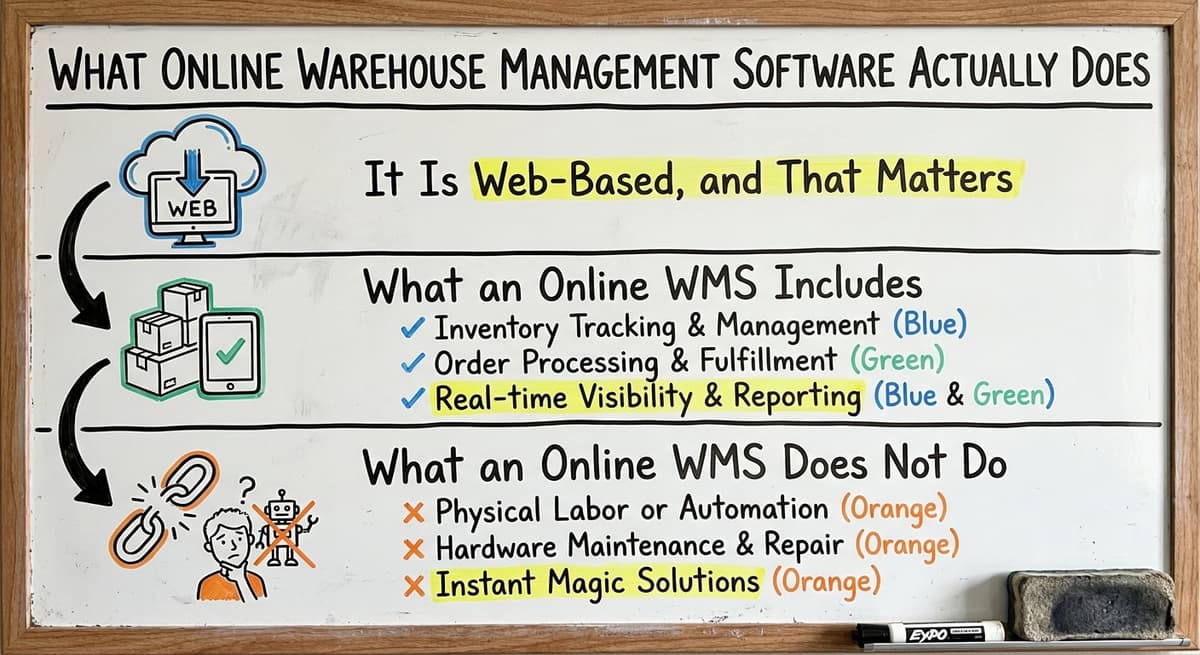
It Is Web-Based, and That Matters
Online warehouse management software runs in a browser, so no local server and no IT staff are needed to keep it running. A manager can check stock levels from the office.
A warehouse lead can scan a receipt on the floor. A business owner can pull a report from home. Everyone sees the same data at the same time. That is the core promise of cloud-based warehouse software.
Older on-premise systems required expensive hardware, a dedicated server room, and IT support to keep things running. Updates were slow. Remote access was hard. Most small warehouses could not afford them.
What an Online WMS Includes
Most online warehouse management software platforms include these core modules:
- Inventory tracking: know what you have and where it sits
- Receiving and putaway: record what arrives and where it goes
- Pick and pack: guide staff through pulling and packing orders
- Shipping: confirm dispatch and update order status
- Reporting and dashboards: see what is happening without walking the floor
Warehouse Inventory Management Software covers the full picture of how these modules connect across a growing operation.
What an Online WMS Does Not Do
Online warehouse management software is not an ERP. It is not an accounting system. It does not replace your accounting software. It does not manage payroll, invoices, or tax records.
As the IRS states in Publication 538, "To figure taxable income, you must value your inventory at the beginning and end of each tax year." That valuation lives in your accounting system. The WMS feeds it accurate numbers. The two tools work together.
Would you rather have it built around your operation?
The first look is free. If you would rather not compare products, describe how your operation already works and we build the system around it.
No build cost. You see it running on your own process first, and the monthly subscription starts only once it is live.
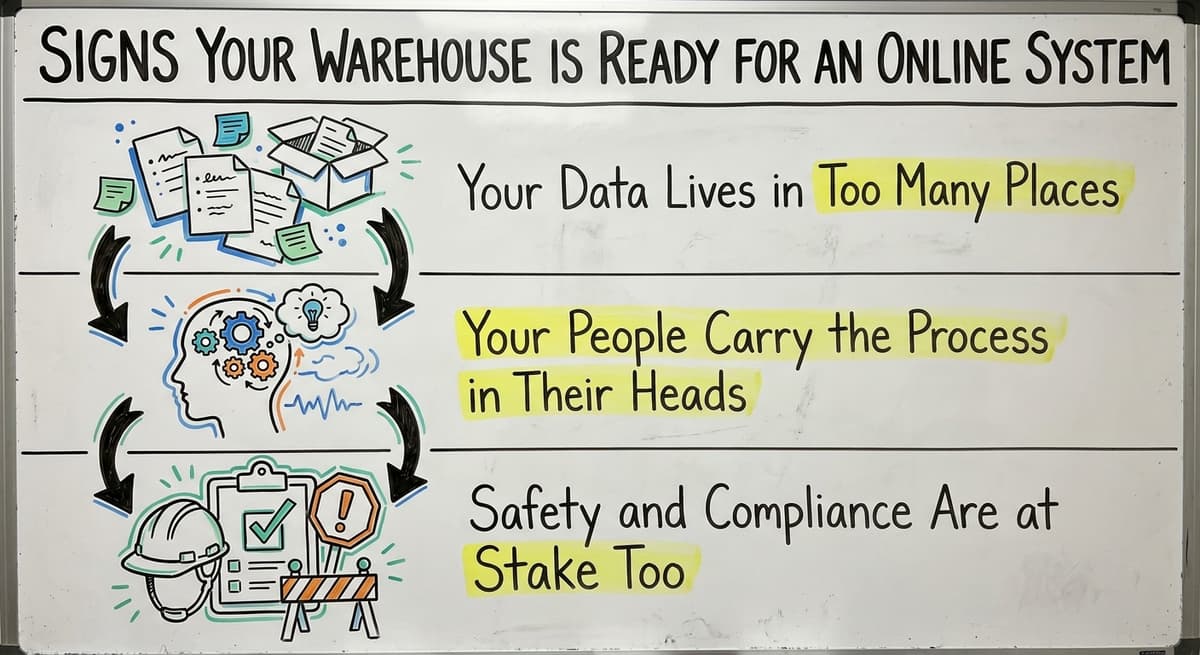
Book a callSigns Your Warehouse Is Ready for an Online System
Most small warehouses do not wake up one day and decide to buy online warehouse management software. They hit a breaking point. Here are the signs that point is close.
Your Data Lives in Too Many Places
- Inventory counts live in multiple spreadsheets that rarely agree
- Staff print pick lists, write on them by hand, and re-enter data later
- Orders get lost, delayed, or shipped wrong because there is no single source of truth
- The team emails or texts each other to find out what is in stock
- The accounting system holds the financial data but the warehouse numbers never quite match
If any 3 of these are true, the manual process is already costing you more than software would.
Your People Carry the Process in Their Heads
New hires take weeks to learn the process because it exists only in people's heads. When a key person is out, things fall apart. Owners and managers cannot see what is happening in the warehouse without walking the floor.
This is not a staffing problem. It is a systems problem. A warehouse management system makes the process visible and repeatable for anyone on the team.
Safety and Compliance Are at Stake Too
Disorganised warehouse operations are not just inefficient. They are dangerous. OSHA notes that "The warehousing and storage industry includes establishments operating facilities for general merchandise, refrigerated goods, and other products" and identifies this industry as one with significant hazard exposure.
Clear receiving and putaway workflows, tracked in real time, reduce the risk of misplaced stock and floor hazards.
How Does Online Warehouse Management Software Work Day to Day?
The best way to understand a warehouse management system is to walk through a single day.
From Receiving to Putaway
The receiving process in online warehouse management software begins the moment a shipment arrives. A staff member opens the receiving screen on a tablet or desktop. They scan each item's barcode or enter the quantity by hand.
The system checks the items against the purchase order and flags any shortages or extras. Stock levels update immediately. The system then tells the worker where to put each item, based on your bin and location rules. No paper. No re-entry later.
GS1 barcode standards make this possible across suppliers. A barcode printed by one company scans correctly at your dock because both follow the same global format.
Picking, Packing, and Shipping
When an order comes in, the system creates a pick list. Staff follow it on screen or on a printed sheet. Each item gets scanned as it is picked.
The system confirms the right item and quantity. After packing, the shipment is confirmed and the order status updates. Inventory drops automatically. No one has to update a spreadsheet.
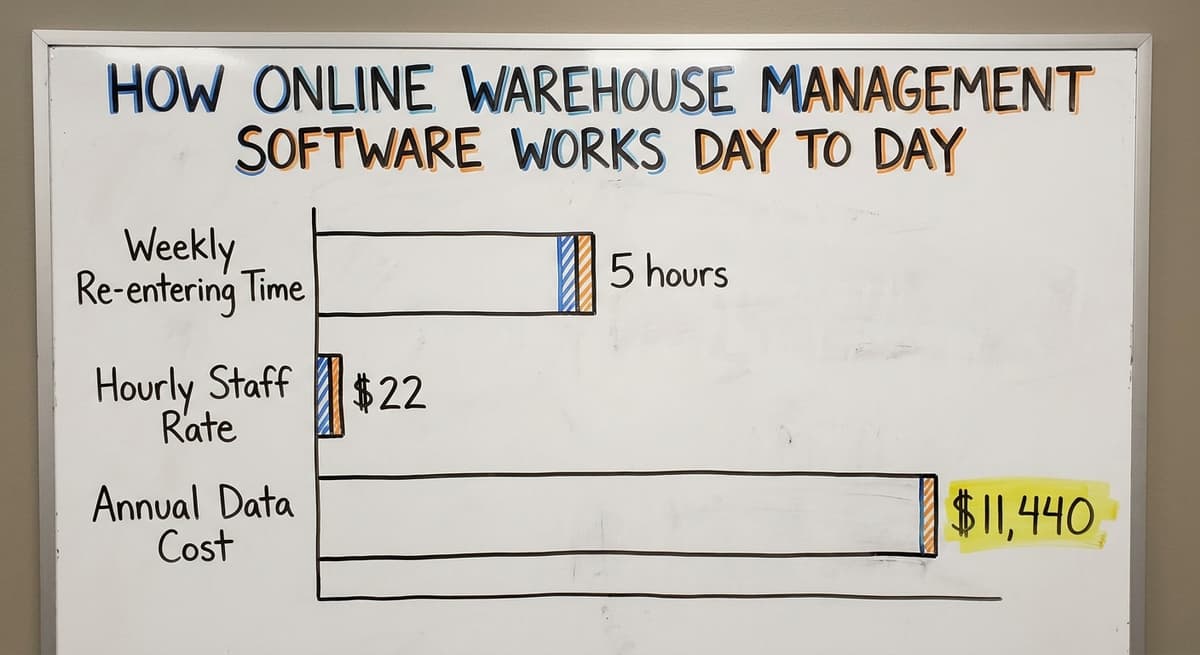
Consider what manual re-entry costs. If 2 staff members each spend 5 hours a week re-entering data at $22 an hour, that is $11,440 a year. That figure does not count the errors those hours introduce.
What Managers See in Real Time
Managers get a dashboard in the online warehouse management software that shows current stock levels, open orders, and team activity. Alerts fire when stock drops below a set level, when a shipment is overdue, or when a count does not match.
The warehouse floor and the front office see the same numbers at the same moment. That single source of truth is what makes the whole system work.
Is the comparison easier when one option is built for you?
Yes. Off-the-shelf means fitting your process to the software, and custom is the other way round. The first look costs nothing.
Book a callWhere Does an Online WMS Fit Alongside Your Accounting Software?
Most small warehouses and distributors already run their books in a standard accounting package. They do not want to abandon it. They should not have to.
Two Tools, Two Jobs
Online warehouse management software handles the operational side: inventory, orders, receiving, and order fulfillment. The accounting software handles the financial side: invoices, payments, and tax reporting. These are different jobs. One tool does not replace the other.
The right setup keeps the accounting software exactly where it is useful. The WMS replaces only the manual, error-prone parts: the spreadsheets, the paper pick lists, the re-entry.
How the Integration Works
A well-built accounting integration for warehouses passes data between the two systems automatically. When an order ships, the WMS sends the details to the books.
An invoice is created without anyone typing it twice. When a purchase order is received, stock values update in both systems.
This matters because duplicate entry is where errors live. Staff entering the same order into 2 systems will eventually enter it differently. The integration removes that risk.
What to Watch Out For
Some vendors push a full migration away from your accounting software as part of their sales pitch. Be cautious. If it is working for your books, there is no reason to replace it.
A WMS that cannot connect to it is a WMS that will create more manual work, not less. Accounting integration should be a standard feature, not an add-on.
Cloud-Based vs Custom Online Warehouse Management Software
Not all online WMS platforms are built the same way. The choice between off-the-shelf and custom matters more than most buyers expect.
Off-the-Shelf Cloud Platforms
Off-the-shelf cloud WMS platforms like those built for large 3PLs or enterprise distributors are fast to start. They have fixed features, monthly fees, and large user bases. They are also built for operations with hundreds of staff and complex multi-site networks.
For a 10 to 50 person team, that creates a problem. The platform has 200 features. Your team needs 20.
The rest become noise that slows people down and adds to training time. Staff spend weeks learning a system built for a company 10 times their size.
What does it look like running on your own process?
The first thing you see is it running on your own process, at no build cost. The subscription starts once it is live and doing the job, not before.
Book a callCustom Online Warehouse Management Software
Custom warehouse software for small distributors is built around the way the operation already works. It includes only what is needed. There are no tabs no one uses. No settings that do not apply. Staff learn it faster because it matches their actual workflow.
Custom does not have to mean slow or expensive. A focused build that solves 3 real problems can be live in weeks.
The NIST Manufacturing Extension Partnership offers vendor-neutral guidance on supply chain process design, and the core advice is consistent: fit the tool to the process, not the process to the tool.
When Each Option Makes Sense
| Situation | Off-the-Shelf | Custom |
|---|---|---|
| Team of 10 to 50 | Too complex | Better fit |
| Standard workflows | Good option | May not be needed |
| Unique processes | Poor fit | Strong fit |
| Fast start needed | Yes | Yes, if scope is focused |
| Budget is fixed monthly | Easy to plan | Requires upfront clarity |
The hidden cost of off-the-shelf is forcing your team to change every workflow to match a generic platform. That cost rarely appears in the sales demo.

Key Features to Look for in Online Warehouse Management Software
Not every feature matters equally. Here is what a small warehouse or distributor actually needs.
Inventory and Order Features
- Real-time inventory visibility across all locations and bins
- Receiving and putaway workflows that match how your warehouse actually receives goods
- Pick, pack, and ship workflows with barcode scanning support or simple manual entry
- Order management that connects to your sales channels or customer orders
- Accounting integration, a live connection to whatever accounting system you use
Inventory Tracking Software for Wholesale Distributors goes deeper on how these features apply to distribution-specific operations.
Usability and Access Features
- Reporting and dashboards that show what matters without needing a data analyst
- User roles and permissions so staff only see what they need to see
- Mobile-friendly or browser-based access so it works on tablets and phones on the floor
- Simple onboarding that does not require weeks of training
The Warehousing Education and Research Council publishes standard benchmarks for distribution center performance. Pick accuracy and order cycle time are two of the most tracked. Your WMS should make both visible without custom reports.
What to Skip
Avoid platforms that lead with feature count. A system with 150 features your team will never use is not more valuable than one with 20 that fit exactly.
Ask vendors to show you only the screens your staff will use every day. That demo tells you more than any feature list.

What Should Implementation Look Like for a Small Operation?
Warehouse software implementation is where most projects go wrong. A bad rollout can disrupt operations for months and leave staff using workarounds instead of the new system.
Start with the Biggest Pain Point
A phased approach works best for small warehouses. Start with the single biggest problem: inventory accuracy or pick errors. Get the team comfortable with that one piece. Then expand to receiving, then shipping, then reporting. Each phase builds confidence before adding complexity.
Good implementation starts with understanding how the operation actually works today. Not how a vendor thinks it should work. Not how a textbook says it should work. How your team actually does it on a Tuesday morning.
What is in a free first look?
A 30 minute call, your operation mapped, and a clear picture of what we would build. No obligation and nothing to install.
Book a callTraining Should Take Days, Not Weeks
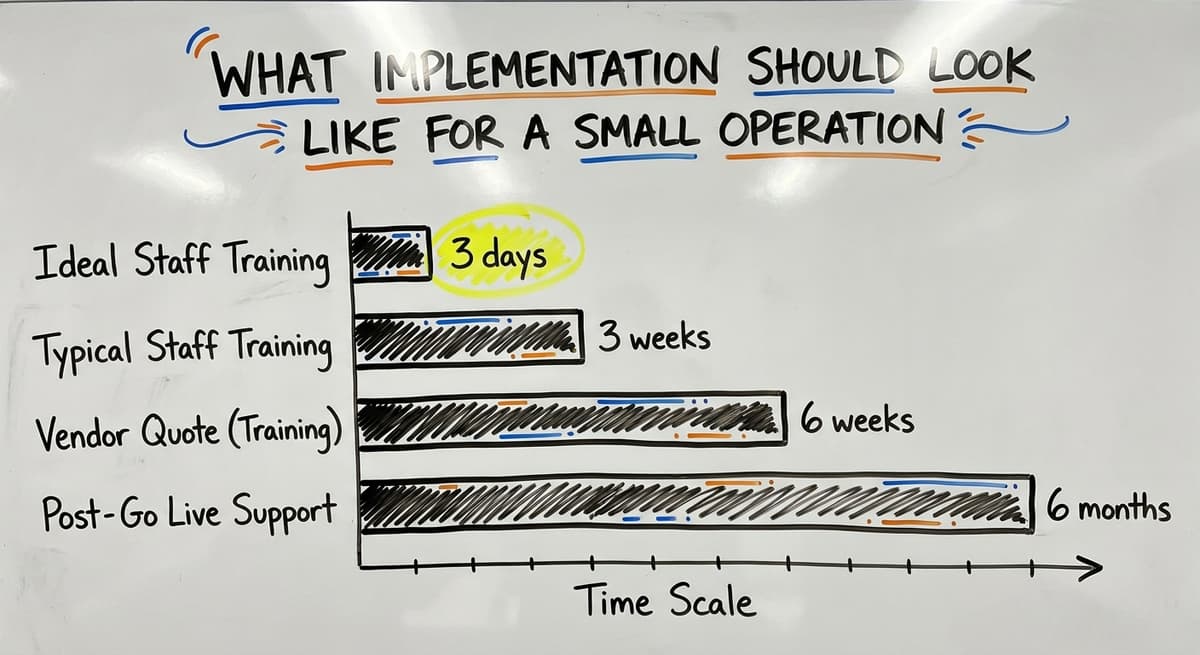
If the software is built around familiar workflows, staff training should take 2 to 3 days, not 2 to 3 weeks. If a vendor quotes you 6 weeks of training for a 15-person team, the software is probably not built for a 15-person team.
According to the US Bureau of Labor Statistics, warehouse workers and material movers earn a median wage in the range that makes extended downtime during training genuinely costly. Every day staff spend in training rather than working is a real cost.
Support After Go-Live
Ongoing support for online warehouse management software matters more than most buyers check before signing. Who do you call when something goes wrong 6 months after go-live? Is support local or offshore? Does the person you reach understand your specific setup?
Local support means faster response and a support team that already knows your operation. Offshore support means longer waits and generic answers. Ask this question before you buy, not after.
Fulfillment Center Software built for small operations should include support that scales with the team, not just a ticket queue.

Common Mistakes When Choosing Online Warehouse Management Software
Small warehouses make the same mistakes repeatedly. Knowing them in advance saves time and money.
Mistakes That Happen Before Purchase
- Choosing a platform built for enterprise and then struggling to configure it for a 15-person team
- Buying based on feature lists rather than fit with actual workflows
- Not involving warehouse staff in the selection process and ending up with a system nobody uses
- Assuming the cheapest monthly fee is the lowest total cost when setup and custom work are added later
The US Census Bureau's Monthly Wholesale Trade data shows that inventory-to-sales ratios in wholesale trade fluctuate with demand. A system that cannot adapt to your real stock patterns will create more problems than it solves.
Mistakes That Happen After Purchase
- Underestimating the disruption of migrating away from tools that are already working
- Picking a vendor with no local presence and discovering that matters when something breaks at 7am on a Monday
- Trying to solve every problem at once instead of starting with the highest-impact fix
The cleanest rollouts start narrow. Fix one thing well. Build trust with the team. Then grow the system from there. Custom Warehouse Software for Small Distributors is built on exactly this principle.

Questions to Ask Before You Choose a System
The following 8 questions cut through online warehouse management software demos and get to what actually matters for your operation.
Questions About Fit and Cost
- Will this system work the way we already work, or will we have to change our processes to fit the software?
- How does it connect to our accounting software and what data moves between the two systems?
- How long will implementation take and what will it disrupt?
- What does the total cost look like in year one and year three, not just the monthly fee?
A vendor who cannot answer the accounting question clearly is a vendor whose integration is probably not clean. A vendor who cannot give you a year-three cost is hiding something in the fine print.
Questions About Support and Growth
- Who trains our staff and how long does that take?
- Who do we call when something goes wrong and how fast do they respond?
- Can the system grow as we add locations, staff, or product lines?
Ask for a reference from a customer with a similar team size. A vendor who only shares references from large operations is telling you something about who they actually build for.

The Right System Does Not Replace What Is Working
The best online warehouse management software does not ask you to start over. It fills the gap between the accounting software and the paper-and-spreadsheet chaos in between.
Your books stay where they are. Your team keeps working the way they know. The WMS adds the layer that makes inventory accurate, orders reliable, and managers informed without walking the floor.
For a 10 to 50 person operation, that is enough. A focused system that solves real problems is worth more than a platform with 200 features and a 6-month rollout.
If your warehouse is running on spreadsheets and your team is re-entering data by hand, the cost of staying where you are is already higher than the cost of fixing it.
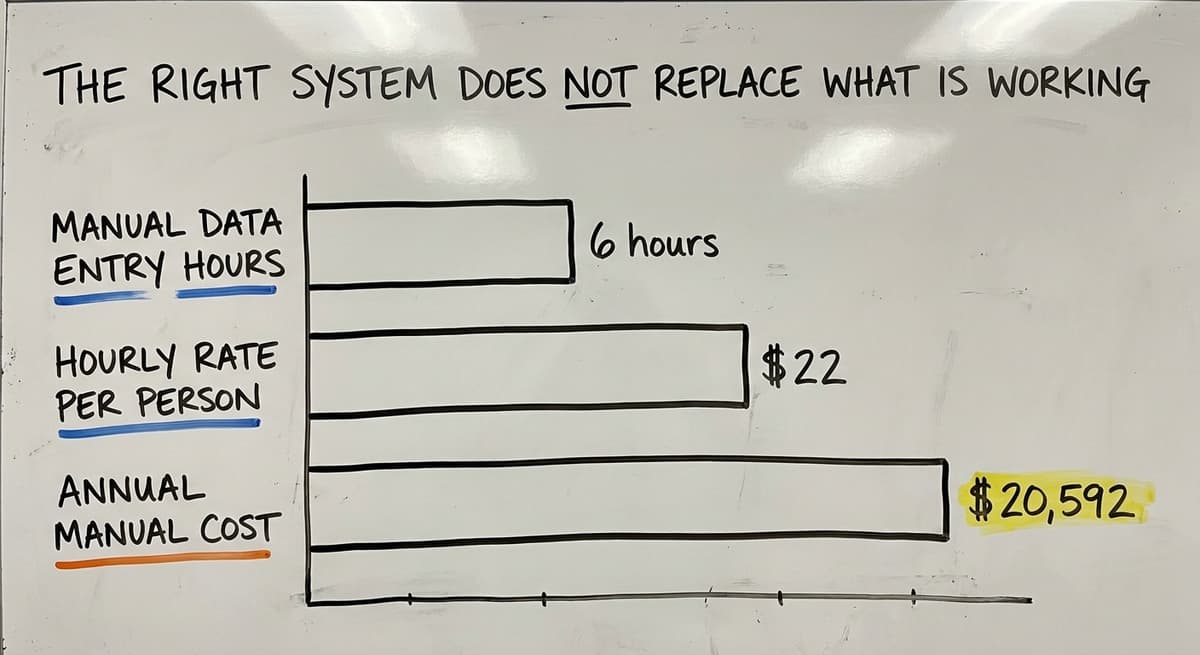
The math is simple: 3 people spending 6 hours a week on manual data entry at $22 an hour is $20,592 a year. A focused warehouse management system costs less than that and gives those hours back.
The Software Society builds custom workflow systems for operations exactly like this. No bloated platforms. No forced migrations.
A system built around how your team actually works, connected to your accounting software, and live in weeks. If that sounds like what your warehouse needs, start with a conversation about your biggest pain point.
Frequently asked questions
Frequently asked questions
What is the best software for warehouse management?
There is no single best warehouse management software for every operation. The right choice depends on team size, workflows, and what systems you already use.
For a small warehouse of 10 to 50 staff already running a standard accounting package, the best fit is a system that connects cleanly to it, matches your actual workflows, and does not require months of setup.
Off-the-shelf cloud platforms work well for standard operations. Custom-built systems work better when your processes do not fit a generic template.
What is the most popular WMS system?
Enterprise operations tend to run one of the large warehouse suites. Mid-market and small businesses tend to run lighter cloud platforms. Popularity does not equal fit.
A system built for a 500-person distribution center is not automatically a good choice for a 20-person warehouse. Ask which systems are most used by operations your size, not which ones are most used overall.
Can I learn WMS online?
Yes. Most modern warehouse management systems are browser-based and offer online training, video guides, and documentation. If a system is well designed for a small team, core training should take 2 to 3 days, not weeks.
Some platforms offer free trials or sandbox environments where staff can practice before going live. The simpler the system is built, the faster the team learns it.
How much does online warehouse management software cost?
Online warehouse management software is priced as a subscription, by user, by order volume or by location, with a setup fee and whatever scanners and label printers the floor needs on top.
The monthly figure is rarely the whole cost: integration fees, customisation and support tiers sit underneath it. A custom build is a one-time cost with a smaller ongoing charge. Compare total cost over three years against the manual hours and stock errors the system removes.
How does online warehouse management software work with accounting software?
A well-built integration passes data between the two systems automatically. When an order ships, the WMS sends the details to the accounting software and an invoice is created without manual entry. When stock is received, values update in both systems.
Staff do not enter the same information twice. The WMS handles inventory and fulfillment. The accounting software handles invoices, payments, and financial reporting. The two tools work together rather than replacing each other.
Is online warehouse management software right for a small warehouse with fewer than 50 employees?
Yes, and in many cases it is a better fit than large enterprise platforms. A focused online WMS built for a 10 to 50 person team replaces spreadsheets and paper pick lists without the complexity of a full ERP.
The key is choosing a system built for your scale, not one designed for a Fortune 500 operation that has been scaled down. Implementation should take weeks, not months, and training should take days, not weeks.
What is the difference between a cloud WMS and a custom-built online WMS?
A cloud WMS is an off-the-shelf platform hosted online with fixed features and a monthly subscription. It is fast to start but may include many features your team will never use.
A custom-built online WMS follows your specific workflows and includes only what your operation needs.
Custom does not always mean slow or expensive. A focused build for a small warehouse can be live in weeks and costs less in the long run than forcing a team to work around a generic platform.
How long does it take to implement online warehouse management software?
For a small warehouse with 10 to 50 staff, a focused implementation should take 2 to 8 weeks depending on complexity. A phased approach works best: start with the biggest pain point, get the team comfortable, then expand.
If a vendor quotes you 6 months for a 15-person operation, the system is probably not built for your scale. Training should take 2 to 3 days for core staff if the software matches familiar workflows.
What is the difference between WMS and inventory management software?
Inventory management software answers what you have, what you sold and when to reorder. Online warehouse management software answers where each item sits, who is picking it and in what order, and what has been received but not yet put away.
Small operations start with inventory software and outgrow it the day two pickers disagree on where something is; that is the point a WMS earns its keep.
How do I choose a cloud-based WMS?
Start from your own process, not a feature list. Map receiving, put-away, picking, packing and shipping as they run today and mark where the errors happen.
Shortlist systems that handle those steps without a process change, check the accounting connection on real orders, confirm it runs on the scanners or phones your team carries, and compare total cost over three years including setup, hardware and support.
How do I choose a warehouse management system for multiple locations?
Insist on location-level inventory as a first-class feature, not a workaround: stock, orders and counts per site, transfers between sites with in-transit tracking, and reporting that rolls up across all of them.
Check that permissions can be set per location, that a single sync feeds the accounting software for every site, and that adding a location is a setting change rather than a second system.
What is the best warehouse management software for small businesses?
The best online warehouse management software for a small business is the one that matches how orders already move through the building, keeps the accounting package in place and connected, runs on the devices staff carry, and is live in weeks.
Where no packaged product fits without changing the process, a custom system scoped to the real bottlenecks serves a 10 to 50 person warehouse better than a large platform.
Not sure this is the right shape for your operation?
The call is free. Describe how the work runs today. We map it on a call and show you what it would look like built around that, before you spend anything.
Book a callRelated guides
The rest of this guide, for the parts of the job this page does not cover.
Guides
- Warehouse Inventory Management Software
- Warehouse Stock Management Software
- Software for Warehouse Management System
- Inventory and Warehouse Management Software
- List of Warehouse Management Software
- Software Warehouse Management
- Warehouse Inventory Tracking Software
- Warehouse Receiving Software
- Warehouse Stock Software
- Warehouse Inventory Software Programs
- Inventory Software Warehouse
- Warehouse Software System
- Quickbooks Inventory Management Software
- Custom Inventory Management Software
- Warehouse Inventory Management Systems
- Warehouse Management System Top 10
- Small Business Warehouse Management System
- Cloud Based Warehouse Management
- Warehouse Management System Types
- Warehouse Inventory Management System
- Online Barcode