


Software For Warehouse Management System
Running a warehouse on spreadsheets and email threads works until it stops working. Orders get mixed up. Inventory numbers drift. New staff spend weeks figuring out where things live. If any of that sounds familiar, you are in the right place.
Published 29 July 2026. Reviewed and updated 15 September 2026.
Book a callWhat Does Software for a Warehouse Management System Actually Do?
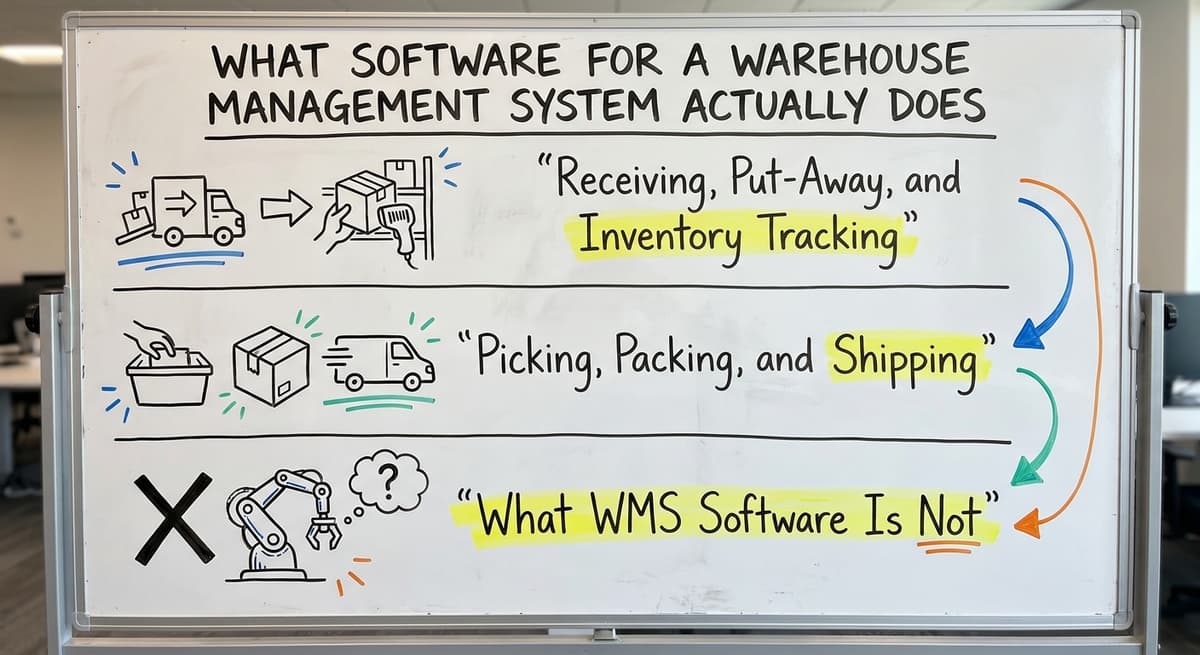
Warehouse management system software tracks the physical movement of goods through your facility. It knows what came in, which bin took it, who picked it, how the packer boxed it, and when it left. That is the short version.
Receiving, Put-Away, and Inventory Tracking
When a delivery arrives, WMS software records what came in and checks it against the purchase order. It then tells your team where to put each item, whether that is shelf B3 or a specific bin in aisle four.
From that moment, the system knows exactly where that stock lives. Real-time inventory means you are not guessing what is on hand. You know.
Picking, Packing, and Shipping
When an order comes in, the software builds a pick list. It routes your picker through the warehouse in a logical sequence so they are not walking back and forth.
After picking, the packer gets clear instructions. After shipping, the system records the dispatch. Every step leaves a log entry.
What Is WMS Software Not?
Warehouse management system software is not accounting software. It does not replace your bookkeeping software. It handles the physical side, where goods are, who moved them, and when. Your bookkeeping software handles the financial side.
The two work best connected, not competing. Many small warehouses currently do all of this with printed sheets, email chains, and a shared spreadsheet. WMS software replaces that manual layer with something reliable.
Would you rather have it built around your operation?
The first look is free. If you would rather not compare products, describe how your operation already works and we build the system around it.
No build cost. You see it running on your own process first, and the monthly subscription starts only once it is live.
Book a callSigns Your Warehouse Needs Management Software
Most small warehouses do not decide to buy software because they read an article. They decide because something breaks badly enough that the old way is no longer an option. Here are the signs that moment is approaching.
Put numbers on the errors and it gets clearer. 200 orders a day at a 2 percent mispick rate is 4 wrong shipments a day and roughly 1,000 orders a year going out wrong.
Cutting that to 0.5 percent leaves 250 orders a year, which is 750 fewer apologies.
The obligation behind all of this is not optional. IRS Publication 538 states: “To figure taxable income, you must value your inventory at the beginning and end of each tax year.” A stock figure nobody trusts makes that number a guess.
Reviewed August 2026. Each figure comes from the assumptions stated beside it, so you can substitute your own and the arithmetic still holds.
Errors, Mismatches, and Wasted Time
Picking errors are increasing. Staff spend their mornings fixing yesterday's mistakes instead of filling today's orders. Inventory counts are done manually, and the numbers rarely match what your accounting software shows.
Your operations manager spends hours each week reconciling the shipments against the invoices. These are not staff problems. They are system problems.
Knowledge Trapped in People's Heads
New hires take weeks to learn where things are because no system holds that knowledge. When your most experienced picker is out sick, orders slow down.
Orders live in email threads, sticky notes, or a shared spreadsheet that breaks under pressure. If the person who built the spreadsheet left tomorrow, would anyone know how it works?
Growth That Outpaces Headcount
The operation is growing, but adding more staff is not keeping up with the volume. That is a signal that the process itself needs to change, not just the headcount.
OSHA notes directly that "warehousing operations present a variety of hazards" and that organised, well-managed facilities reduce risk for workers, as outlined at https://www.osha.gov/warehousing. Disorganised manual processes do not just slow you down. They create risk.

Core Features to Look for in Warehouse Management System Software
Not every feature matters equally for every operation. Here is what actually makes a difference for a small distributor or fulfilment centre, explained in plain terms.
Is the comparison easier when one option is built for you?
Yes. Off-the-shelf means fitting your process to the software, and custom is the other way round. The first look costs nothing.
Book a callHow Does Warehouse Management System Software Connect to Your Accounting Software?
Most small distributors and fulfilment centres already run their books in their accounting software. They are not looking to replace it. Good warehouse management system software does not ask them to.
The Problem Your Accounting Software Was Not Built to Solve
General accounting software is excellent for tracking money, but it was not built to track bin locations, pick sequences, or real-time stock movement on a warehouse floor.
When businesses try to use it for both jobs, they end up with workarounds. Manual adjustments. Duplicate entries. Numbers that drift apart over time. Connecting accounting software with distribution operations solves this by giving each tool its proper job.
What Does a Healthy Integration Look Like?
A healthy accounting and warehouse management integration has a clear, automatic flow on both sides. Sales orders flow from your accounting software into the warehouse system. Fulfillment happens in the warehouse system.
Confirmed shipments flow back to your accounting software automatically. Your bookkeeper sees clean, accurate data without touching the warehouse side. Your operations manager sees real-time inventory without touching the accounting side. No double entry. No reconciliation headaches.
Built Around the Way You Already Work
A well-built integration does not require you to learn a new accounting system or retrain your bookkeeper. Custom operational software for wholesale and distribution can follow the exact version and workflow your business already uses in its accounting software. That matters.
Off-the-shelf WMS products sometimes require you to change your accounting workflow to match their integration. A custom build works the other way around.

Off-the-Shelf Software vs Custom-Built Warehouse Management Software
Off-the-shelf and custom-built warehouse management software both have a place. The right choice depends on how standard your operation is and how much pain the wrong fit will cause.
Where Does Off-the-Shelf Work, and Where Does It Fall Short?
Off-the-shelf small warehouse software works well for operations that fit a standard mould. If your receiving process, pick sequence, and labeling requirements match the software's assumptions, it can be a fast and cost-effective starting point.
The problems appear when your operation does not fit the mould. Common issues include:
- Modules you will never use, bundled into the price
- Rigid workflows that do not match how your team actually works
- Per-user pricing that scales fast as you grow
- Implementation costs that rival the software licence itself
- Support teams in different time zones who do not know your business
When Does Custom Warehouse Software Make Sense?
Custom warehouse software follows your operation as it exists today. Your receiving process. Your labeling system. Your pick sequence. Your customer-specific packing rules.
Replacing spreadsheets in warehouse operations with a system built around your actual workflows means your team learns faster and resists the change less.
Custom does not mean slow or expensive when the scope is focused: a receiving-only build runs $8,000 to $15,000 and goes live in 4 to 6 weeks. Replacing only the manual parts that cause the most pain is a valid and practical starting point.
How Do You Decide?
A three-question framework
Choosing between off-the-shelf and custom warehouse software is easier with a simple framework to guide the decision:
| Situation | Off-the-Shelf | Custom Build |
|---|---|---|
| Standard pick, pack, ship workflow | Good fit | May be overkill |
| Customer-specific labeling or packing rules | Poor fit | Strong fit |
| your accounting software used in a non-standard way | Problematic | Can be matched exactly |
| Budget is the primary constraint | Lower upfront cost | Focused scope can be comparable |
| Need to be live quickly | Faster to start | Fast if scope is tight |
Be honest with yourself about which column describes your operation.
What Does a Warehouse Management System Implementation Look Like for a Small Operation?
The fear of a long, disruptive implementation stops many small warehouses from moving forward. That fear is understandable. It is also based on stories about enterprise implementations, not focused builds for 10 to 50 person operations.
Discovery and Build
A good implementation partner starts by learning how the operation currently works before writing a single line of code. That means sitting with your team, mapping out how orders, inventory, and warehouse receiving actually move through the facility right now.
What you contribute at this stage is time and access. The person who runs day-to-day operations maps out current workflows. The team who uses the system daily gives input. You set clear priorities about what to fix first. That discovery phase shapes everything that follows.
Testing, Training, and Go-Live
A phased rollout can keep your old process running alongside the new system during the transition. That removes the all-or-nothing risk. Staff training on a system built around familiar workflows is far faster than training on a generic platform.
Your team is not learning a new way to work. They are doing the same work with better tools. A realistic timeline for a focused build targeting two or three core pain points is weeks, not months.
What does it look like running on your own process?
The first thing you see is it running on your own process, at no build cost. The subscription starts once the system is live and doing the job, not before.
Book a callSupport After Go-Live
Local support is a practical advantage that is easy to underestimate until something goes wrong during peak season. Being able to call or visit the team who built the software matters.
A remote SaaS vendor's support ticket system does not offer the same accountability. Fulfilment centre software solutions built and supported locally mean someone who knows your setup is reachable when you need them.

Questions to Ask Before Choosing Warehouse Management System Software
The following due diligence questions are ones any operations manager should ask any vendor, including a custom builder. Do not skip them because a vendor seems trustworthy.
Integration and Fit Questions
- Does it integrate with our accounting software the way we actually use it, or will we need to change our accounting workflow?
- Can it handle our specific product types, whether bulk items, serialised goods, lot tracking, or customer-specific labeling?
- Can we start with the biggest pain points and add more later, or do we have to implement everything at once?
Cost and Ownership Questions
- What does the total cost look like over three years, including implementation, training, support, and per-user fees?
- What happens when we need a change? Who owns the software and can we get modifications made quickly?
- Do we own the system or are we renting access to it?
Support and Risk Questions
- Who supports us after go-live and how fast do they respond when there is a problem?
- Can we see a reference from a business similar to ours in size and industry?
- What does the migration path look like if we outgrow this solution?
Any vendor who hesitates on these questions is telling you something important.
How Do Small Warehouses Get Started?
The right starting point for a small warehouse is not a lengthy RFP process or a product demo from a vendor who has never seen your warehouse. It is a direct conversation about what is breaking today.
Start With the Workflow, Not the Software
Starting with a workflow review, not the software, is the right first step. Map out how orders, inventory, and receiving actually move through your operation right now. Write it down. Where do things slow down? Where do errors happen?
Where does your team spend time fixing problems instead of filling orders? That map becomes the brief for whatever system gets built or bought. Working with a local team means faster discovery, easier communication, and accountability that a remote SaaS vendor cannot offer.
Focus on the Problem, Not the Perfect System
The goal of choosing warehouse management software is not to replace your accounting software or overhaul the entire business. It is to remove the manual bottlenecks that slow your team down and cause errors.
Think about one or two specific problems you want solved rather than trying to define the perfect system upfront. Distribution software built around a focused scope delivers faster results and costs less than a system built to cover every possible scenario.
If your warehouse is running on spreadsheets and the cracks are showing, the next step is a conversation, not a contract. Talk to a team that will start by understanding how your operation works before suggesting a single feature.
Ready to map out what a focused warehouse software build would look like for your operation? The Software Society works with small distributors and fulfilment centres to replace manual bottlenecks with systems built around the way they already work. Start with a workflow conversation, not a sales pitch.
Frequently asked questions
The sources behind this guide
The guide explains what software for a warehouse management system actually does, how it fits alongside popular accounting software, and how a small operation can get started without buying an enterprise system built for a company ten times its size.
Frequently asked questions
What software is commonly used for warehouse management?
Common warehouse management system software options for small to mid-size operations include lightweight inventory platforms, cloud-based logistics tools, and dedicated fulfilment suites. Larger operations use large-scale supply chain platforms built by major enterprise vendors.
The right choice depends on your operation size, product types, and whether you need integration with your accounting software. Many small warehouses also work with custom-built software when off-the-shelf products no longer fit their specific workflows.
What is the best warehouse management software?
There is no single best warehouse management software. The right answer depends on your operation.
For small warehouses with 10 to 50 staff, the best software is the one that matches your actual workflows, integrates cleanly with your accounting software, and has someone to support it after go-live.
A few established small-business inventory platforms are well-regarded for small distributors. Custom-built software is worth considering when off-the-shelf products force you to change your workflow rather than supporting the way you already operate.
What is the best free warehouse management software?
Truly free WMS software with meaningful features is rare. Some lightweight inventory tools offer a limited free tier. Certain open-source platforms include warehouse management, but implementation requires technical resources.
Most free options cap users, transactions, or locations quickly. For a small operation outgrowing spreadsheets, a low-cost paid tool or a focused custom build delivers better value than a free product with significant limitations.
What is the most common WMS?
In the small and mid-market space, a handful of established small-business platforms are among the most commonly used warehouse management systems. In enterprise settings, a few large enterprise-grade platforms are widely deployed.
The most common system in any given industry tends to be the one that integrates best with the accounting software that industry already uses, which is why clean accounting integration is a deciding factor for many small distributors.
How is WMS software different from your accounting software or accounting software?
Your accounting software manages the financial side of your business: invoices, payments, and general ledger entries. Warehouse management system software manages the physical side: where stock sits, who picked it, how the packer boxed it, and when it shipped.
The two tools complement each other. WMS software tracks what happens on the warehouse floor and passes confirmed data to your accounting software for invoicing and accounting, removing the need for manual double entry.
How long does it take to implement warehouse management system software for a small operation?
For a focused implementation targeting two or three core pain points in a 10 to 50 person warehouse, a realistic timeline is four to ten weeks from discovery to go-live.
Enterprise implementations take longer because the scope is larger. A phased approach, where the new system runs alongside existing processes during transition, reduces disruption and allows the team to build confidence before fully switching over.
Do we have to change how we work to use a warehouse management system?
With off-the-shelf software, the workflow has to change in places to match the system's built-in processes. With custom-built warehouse management software, the system follows how your operation already works. That means less retraining, faster adoption, and fewer workarounds.
The goal of good WMS software is to make your current process more reliable, not to replace it with someone else's idea of how a warehouse should run.
What features matter most for a wholesale distributor or fulfilment centre?
For most small wholesale distributors and fulfilment operations, the features that deliver the most value are real-time inventory tracking, barcode scanning support, pick list generation with logical routing, warehouse receiving with purchase order matching, and clean accounting-software integration.
Low-stock alerts and audit trails are also high value. Features like advanced robotics integration or multi-site management are rarely needed at this scale and add cost without adding benefit.
How much does warehouse management software cost?
Cost varies widely depending on whether you choose an off-the-shelf product or a custom-built system. Off-the-shelf options involve licence fees, per-user pricing that grows as you scale, and sometimes hefty implementation costs.
Custom systems can avoid paying for unused modules and instead focus only on replacing the manual processes causing the most pain, which can make the overall investment more predictable and proportional to your actual needs.
What is the difference between WMS and ERP software?
A warehouse management system tracks the physical movement of goods, recording what arrives, which location holds it, who picks and packs it, and when it ships.
Broader business or accounting systems, by contrast, handle financial data like invoicing and taxable income. These tools work best connected, not competing: one manages the warehouse floor, the other manages the books.
What is the best warehouse management software for small businesses?
The best option depends on how standard your operation is. Off-the-shelf software can be a fast, cost-effective starting point if the way you receive stock, sequence picks, and label items matches its design.
If your workflows are unique, a system built around your existing process, connected cleanly to your accounting software, fits better and avoids paying for unused features or rigid workflows that do not match how your team works.
How do I choose a WMS for multiple warehouses?
Start by identifying whether your operations across locations follow standard, repeatable processes or vary significantly. If receiving, picking, and labeling are consistent across sites, an off-the-shelf system may scale well.
If each location has different workflows or customer requirements, look for software that can be tailored to each site's actual process, integrates cleanly with your accounting system, and gives real-time visibility into inventory across every location.
What is in a free first look?
A 30 minute call, your operation mapped, and a clear picture of what we would build. No obligation and nothing to install.
Book a callRelated guides
The rest of this guide, for the parts of the job this page does not cover.
Guides
- Warehouse Software System
- Warehouse Inventory Management Software
- Warehouse Stock Management Software
- Inventory and Warehouse Management Software
- List of Warehouse Management Software
- Online Warehouse Management Software
- Software Warehouse Management
- Warehouse Inventory Management Systems
- Warehouse Management System Top 10
- Small Business Warehouse Management System
- Warehouse Management System Types
- Warehouse Inventory Management System
- Warehouse Management System Examples
- Warehouse Management System Implementation
- Cloud Warehouse Management System
Common questions
- What Are the Benefits of Warehouse Management System
- What is the Point of Warehouse Management System
- How to Choose a Warehouse Management System
- What is Asn in Warehouse Management System
- How to Create a Warehouse Management System
- What is a Warehouse Management System
- Which Warehouse Management System Would a Jeweler Most Likely Use
- How to Build a Warehouse Management System
- What is a Warehouse Management System Used For