


Quickbooks Inventory Management Software
QuickBooks inventory management software is the part of QuickBooks that tracks what you buy and sell, and it stops at the warehouse door. This guide covers what it does, where it runs out of road, and the options when it does.
Published 6 August 2026. Reviewed and updated 15 September 2026.
Book a callWhat Does QuickBooks Inventory Management Software Actually Do?
QuickBooks inventory management software is not a warehouse management system. It is accounting software with inventory features built in. That distinction matters before you go any further.
The Basic Definition
QuickBooks inventory management software is the part of QuickBooks that tracks the products you buy and sell inside the same system you use for accounting.
When you sell a product, QuickBooks reduces the quantity on hand. When you receive a shipment, it adds to your count. It connects your stock levels to your financial records automatically.
That connection is the main value. You do not need to update two separate systems when a sale happens. QuickBooks does it in one step.
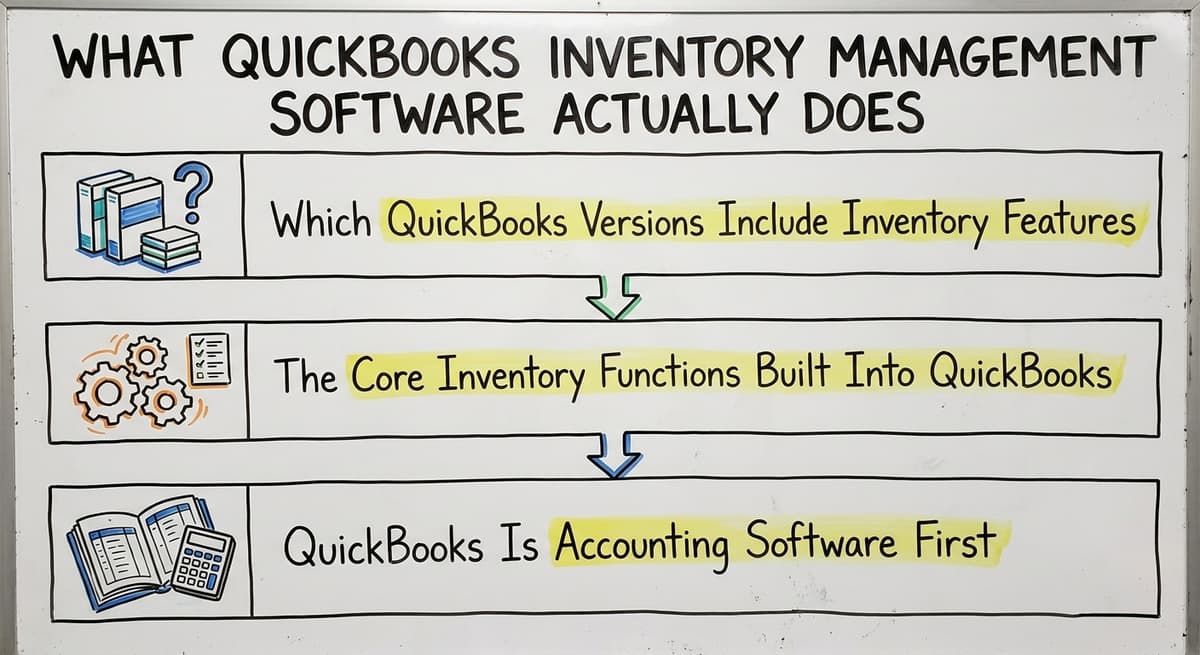
Which Versions Include Inventory Features
Not every version of QuickBooks includes inventory tracking. Here is what you need to know:
- QuickBooks Online Plus includes basic inventory tracking. You can add products, track quantities, and set reorder points.
- QuickBooks Online Advanced includes everything in Plus, with better reporting and more user seats.
- QuickBooks Desktop Enterprise includes the most powerful QuickBooks inventory features, including advanced inventory with bin tracking and barcode scanning.
- QuickBooks Online Simple Start and Essentials do not include inventory management at all.
If you are on a lower-tier plan and wondering why inventory features are missing, that is likely the reason.
Would you rather have it built around your operation?
The first look is free. If you would rather not compare products, describe how your operation already works and we build the system around it.
No build cost. You see it running on your own process first, and the monthly subscription starts only once it is live.
Book a callWhat the Core Features Do
Here is what QuickBooks inventory management software can do at its baseline:
The obligation behind all of this is not optional. IRS Publication 538 states: “To figure taxable income, you must value your inventory at the beginning and end of each tax year.” A stock figure nobody trusts makes that number a guess.
- Add products and assign SKUs
- Track quantity on hand as sales and purchases happen
- Set reorder points so you get a low-stock alert
- Create purchase orders and send them to vendors
- Sync inventory counts to invoices and sales receipts automatically
- Calculate cost of goods sold for accounting purposes
Think of QuickBooks like a pickup truck. It handles most jobs well. It is reliable, affordable, and most people already know how to drive one.
But it is not built to haul a full warehouse load. If your operation is growing, you are asking the truck to do more than its makers intended.
Who Uses QuickBooks for Inventory
Understanding who QuickBooks inventory software is built for helps you figure out if it fits your situation.
Reviewed August 2026. Each figure comes from the assumptions stated beside it, so you can substitute your own and the arithmetic still holds.
The Typical QuickBooks Inventory User
Most businesses running QuickBooks inventory management software are small to mid-size operations. Think wholesale distributors, light manufacturers, fulfilment centres, and product-based retailers with 5 to 100 staff. They are not tiny, but they are not enterprise either.
They chose QuickBooks for practical reasons: it was affordable, their accountant already knew it, and it handled the books well. Inventory came along for the ride.
How the Setup Usually Starts
For many small warehouses and wholesale distributors, the setup is the same. QuickBooks handles the accounting. A spreadsheet handles the overflow. Printed pick sheets go to the warehouse floor. Email fills the communication gaps between purchasing, the warehouse, and the office.
At low volume, this works. Orders go out. Customers are happy. The owner knows roughly what is in stock. The system is held together with habit and familiarity, and that is fine, until it is not.
GS1, the global standards organization, notes that "barcodes are the most widely used automatic identification technology in the world" and provides open standards for product identification at gs1.org/standards/barcodes.
Most small operations do not use barcodes at all in the early days. That becomes a problem later.
The Fear Behind the Status Quo
Here is what most owners will not say out loud: they know the current setup has cracks. But the alternative they imagine is a giant ERP system with a year-long implementation and a six-figure price tag.
So they keep patching the gaps and hope the volume does not grow faster than the patches can hold.
That fear is legitimate. But it is also based on a false choice. There is a middle path, and this guide will get there.
The Built-In Inventory Features of QuickBooks
Before talking about gaps, it is worth understanding what QuickBooks inventory tracking actually delivers. Many businesses underuse the features they already have.
Inventory Items and SKU Setup
In QuickBooks, each product you sell is set up as an inventory item. You give it a name, a SKU, a cost, and a selling price.
You set a starting quantity on hand. QuickBooks then tracks that product every time it appears on a purchase order, a bill, an invoice, or a sales receipt.
This is the foundation. If your items are not set up correctly, nothing else works right. Duplicate SKUs, missing costs, and sloppy item names cause problems downstream in every report and every transaction.
Quantity on Hand and Cost of Goods Sold
Every time you sell a product, QuickBooks reduces the quantity on hand by 1 unit.
Every time you receive inventory against a purchase order, it adds to the count. It also calculates the cost of goods sold using either the average cost method or, in Desktop Enterprise, FIFO (first in, first out).
This automatic COGS calculation is genuinely useful. It keeps your financials accurate without manual journal entries. For small operations, that alone saves hours of accounting work each month.
Low Stock Alerts and Purchase Orders
You can set a reorder point for each inventory item. When the quantity on hand drops below that number, QuickBooks flags it. You can then create a purchase order directly inside QuickBooks and email it to your vendor.
When the shipment arrives and you enter the bill, QuickBooks updates the quantity on hand automatically. The loop closes inside one system.
Basic Inventory Reports
QuickBooks includes several standard inventory reports:
- Inventory Valuation Summary: shows the value of your current stock
- Inventory Stock Status by Item: shows quantity on hand and reorder status
- Sales by Product or Service: shows what is selling and how fast
- Purchase Orders by Vendor: shows open orders and delivery status
These reports are useful for basic decision-making. They are not designed for warehouse operations analysis, but for a small business owner reviewing stock levels weekly, they cover the basics.
The comparison is easier when one option is built for you
Choosing between off-the-shelf software and a custom-built system is easier when one option is built for you. Off-the-shelf means fitting your process to the software. We do it the other way round, and the first look costs nothing.
Book a call
Where Does QuickBooks Inventory Management Fall Short?
QuickBooks inventory management has real limits that most articles skip or soften. They are not bugs or failures. They are the natural result of building inventory features into accounting software rather than building a warehouse system from the ground up.
Here is where the limits show up most clearly:
No bin or location tracking in most versions. QuickBooks Online does not know where in your warehouse a product lives. It knows you have 40 units of SKU-1234. It does not know they are split across three bins in two aisles.
QuickBooks Desktop Enterprise has bin-level tracking, but it requires setup work and has limits compared to a real WMS.
No pick, pack, and ship workflow. QuickBooks can create an invoice or sales order. It cannot generate a pick list, guide a picker through the warehouse, confirm a pack, or generate a shipping label natively. Those steps happen outside QuickBooks, on paper or in a separate system.
Limited multi-location inventory tracking. QuickBooks Online Plus and Advanced support multiple locations in a basic way. But if you have two warehouses with different bin structures, different receiving processes, and different staff, QuickBooks multi-location inventory gets complicated fast.
No real-time barcode scanning in QuickBooks Online. QuickBooks Desktop Enterprise supports barcode scanning for inventory. QuickBooks Online does not have native barcode scanning built in. You need a third-party add-on for that.
Inventory counts drift. Without a system enforcing every movement, quantities go wrong. A return gets shelved without a receipt. A sample goes out without an adjustment.
Over time, what QuickBooks says you have and what is actually on the shelf diverge. Fixing inventory discrepancies in QuickBooks takes time and requires someone who knows what they are doing.
No receiving workflow. QuickBooks records that you received against a purchase order. It does not manage the physical process: checking quantities, flagging damages, putting items away in the right location, or notifying the purchasing team that a partial shipment arrived.
Reporting depth is limited. QuickBooks inventory reports show you what happened. They do not show you velocity by location, pick accuracy rates, days on hand by SKU, or the other metrics a warehouse manager needs to make good decisions.
None of these limits make QuickBooks a bad choice for every business. But for a growing warehouse or distributor, they are real friction points that show up in real operations every week.
How Do Businesses Patch the Gaps Today?
Most businesses running QuickBooks for inventory management do not just use QuickBooks. They use QuickBooks plus a collection of workarounds. If you recognize your own operation in this section, that is the point.
The Spreadsheet Layer
The spreadsheet is the most common patch. Bin locations live in a spreadsheet. Pick lists get built from a spreadsheet. Someone exports the QuickBooks inventory report every morning and pastes it into a master tracker. Another person updates it throughout the day.
This works. Until two people edit the file at the same time. Until someone saves over the wrong version. Until the person who built the spreadsheet leaves the company and no one else fully understands it.
Replacing spreadsheets and printed sheets in warehouse operations is one of the most common problems small distributors face. The spreadsheet is not the enemy. The problem is when the spreadsheet becomes load-bearing infrastructure.
The Paper Layer
The paper layer is the printed pick sheets that go to the warehouse floor. A picker grabs the sheet, pulls the items, marks them off with a pen, and hands the sheet to the packer.
The packer checks the items, boxes them, and hands the sheet to someone who enters the shipment into QuickBooks.
Every step in that chain is a chance for an error. A misread handwriting. A quantity entered wrong. A sheet that got wet or lost. And every step requires someone to re-enter data that already existed somewhere else.
The Email Layer
The email layer is where QuickBooks inventory questions go to wait: it runs through nearly every communication in the operation. Receiving notifications go through email.
Vendor questions go through email. The warehouse manager emails the office when stock runs low. The office emails the warehouse when a rush order comes in.
Email is flexible and familiar. It is also invisible to anyone not on the thread. When something goes wrong, reconstructing what happened means digging through inboxes.
The Real Cost of the Patchwork
The real cost of running paper, email, and QuickBooks as separate systems is not just the time spent re-entering data. It is the errors that come from manual processes. It is the staff frustration when the system makes their job harder. It is the inability to scale without adding headcount: every new order means more manual steps.
Many business owners know this is not sustainable. They keep running it; the alternative they imagine, a big ERP with a long implementation and a huge price tag, feels worse.
The good news is there is a middle path between QuickBooks-only and a full ERP. The next two sections cover it.
QuickBooks Inventory Add-Ons and Integrations
The QuickBooks ecosystem includes dozens of third-party tools that extend what QuickBooks inventory management software can do. These are legitimate options worth understanding before you decide anything.
Warehouse and Fulfilment Add-Ons
Warehouse and fulfilment add-ons connect to QuickBooks and add warehouse-specific features:
- Full warehouse add-ons: The most widely used category. They add manufacturing, bin tracking, barcode scanning, and multi-location support, and sync with QuickBooks for accounting. These are real warehouse tools, not light add-ons.
- Small-manufacturer add-ons: Designed for small manufacturers and distributors. They add lot tracking, serial number tracking, and multi-location inventory, and integrate with QuickBooks Online.
- Multichannel inventory and order platforms: Broader systems that connect to QuickBooks and work well for businesses selling across several channels, with strong purchasing and manufacturing features.
Fulfilment centre software for small operations starts here, with one of these platforms connecting to QuickBooks for the financial side.
Barcode Scanning Tools
Barcode scanning software for QuickBooks users is available through several paths:
- QuickBooks Desktop Enterprise includes barcode scanning natively
- Most full warehouse add-ons support barcode scanning
- Standalone barcode apps can connect to QuickBooks through APIs or middleware
Barcode scanning changes the speed and accuracy of receiving, picking, and cycle counts. If your operation is manually counting and entering quantities, adding a barcode layer is one of the highest-return improvements available.
Shipping and Order Management
Shipping and fulfillment tools connect to QuickBooks and add shipping label generation, carrier rate shopping, and order routing. They do not replace QuickBooks inventory management, but they close the gap between a sales order in QuickBooks and a box leaving the dock.
What to Watch For With Add-Ons
Off-the-shelf add-ons target common workflows. If your operation has unusual steps, custom pricing rules, or specific processes that do not match what the add-on expects, you will spend time working around the tool instead of using it. That is not a reason to avoid add-ons. It is a reason to evaluate them carefully against your actual workflow before you buy.
What does it look like running on your own process?
The first thing you see is it running on your own process, at no build cost. The subscription starts once the software is live and doing the job, not before.
Book a call
Custom Inventory Software Built Around QuickBooks
Some businesses are past the patchwork approach: they looked at the off-the-shelf add-ons and still found that nothing fit quite right. Their operation has specific steps, specific rules, or specific integrations that generic tools do not handle well.
For those businesses, custom inventory software built around QuickBooks is a real option.
What Custom Means in This Context
Custom inventory software does not mean replacing QuickBooks. It means building a layer on top of QuickBooks that handles the warehouse-specific work: pick lists, receiving workflows, bin assignments, barcode scanning, shipping confirmations, and whatever else the operation needs.
QuickBooks stays in place for accounting, invoicing, and payroll. The custom layer handles the warehouse floor.
This is different from buying an off-the-shelf add-on. An off-the-shelf tool is built for a general audience. A custom solution is built for how your operation actually works, including the steps that are unique to your business.
Who This Fits
Custom warehouse management software for small distributors is the right call when:
- Off-the-shelf add-ons require too many workarounds to fit your workflow
- Your operation has specific rules or processes that generic tools do not support
- You have tried adding tools before and found the implementation painful
- You want one accountable partner who builds and maintains the system, not a software vendor who sells licenses and leaves
This is not the right fit for every business. If an off-the-shelf add-on covers your needs cleanly, use it. Custom software takes more time to build and requires a partner who understands both the software and the operation.
How It Works Alongside QuickBooks
The connection is the QuickBooks API: the custom layer reads and writes through it. When an order comes in, the custom system pulls it from QuickBooks, generates a pick list, guides the picker, confirms the pack, and pushes the shipment information back to QuickBooks.
The accounting stays in QuickBooks. The warehouse work happens in a system built for the warehouse.
How to connect QuickBooks to warehouse operations through a custom layer is a conversation worth having if you have exhausted the off-the-shelf options and still find the gaps are costing you time and money every day.
How to Evaluate Your QuickBooks Inventory Setup
Before you add anything, it helps to be honest about where your QuickBooks inventory setup actually stands. Here is a simple self-assessment.
Signs Your Current Setup Is Working
The setup is working when these 5 things are true:
- You can tell a customer their order status in under two minutes without calling the warehouse
- Your QuickBooks inventory counts match the physical shelf within a small margin
- Your staff spend most of their time doing work, not re-entering data
- You can onboard a new warehouse employee without a week of tribal knowledge transfer
- Your inventory reports give you enough information to make purchasing decisions confidently
If most of those are true, your setup is working. You may still want to improve it, but you are not in a crisis.
Signs You Have Outgrown QuickBooks Inventory Management
The setup is past its limit when 3 or more of these are true:
- You discover inventory discrepancies regularly and do not know how they happened
- Your team uses spreadsheets or paper to track things QuickBooks should be tracking
- Adding a new employee does not reduce the workload because the manual process does not scale
- You have lost a customer or a sale because of a stock count error
- Your warehouse manager cannot answer basic questions without checking multiple sources
- You are spending hours each week reconciling QuickBooks to a spreadsheet
If three or more of those are true, the current setup is costing you real money. The question is not whether to change something. The question is what to change.
The Questions to Ask Before Adding Software
Before you add any tool, off-the-shelf or custom, answer these:
- What specific problem am I solving? Name it exactly.
- Who will use the new system, and do they want it?
- What does success look like in 90 days?
- Who is accountable for implementation, not just purchase?
- What happens to my QuickBooks data during and after the change?
These questions sound simple. Most businesses skip them and end up with software that solves the wrong problem or gets abandoned after 60 days.
QuickBooks Inventory Management Software Compared to a Full WMS
A full warehouse management system and QuickBooks inventory management software are not the same thing. But they are not always in competition either. Here is a plain-language comparison.
What QuickBooks Inventory Does Well
QuickBooks is excellent accounting software. Its inventory features are good enough for many small businesses. Here is where it earns its place:
- Connects inventory directly to accounting with no extra step
- Affordable compared to enterprise warehouse software
- Familiar to most small business owners and accountants
- Fast to set up for basic product tracking
- Handles purchase orders and vendor management in one system
For a business with a small SKU count, predictable order volume, and one location, QuickBooks inventory management software may be all you need for years.
What a Full WMS Does Well
A purpose-built warehouse management system targets warehouse operations first. It handles:
- Bin-level location tracking across multiple zones and locations
- Directed put-away and picking to optimize warehouse movement
- Real-time barcode scanning at every step: receiving, put-away, picking, packing, shipping
- Wave picking, batch picking, and zone picking workflows
- Carrier integration and shipping label generation
- Cycle count management and full inventory audit trails
- Performance metrics: pick accuracy, orders per hour, receiving speed
A full WMS is powerful. It is also complex, expensive to implement, and often built for operations much larger than a 5-to-100-person business.
What is in a free first look?
A 30 minute call, your operation mapped, and a clear picture of what we would build. No obligation and nothing to install.
Book a callA Plain Comparison
| Feature | QuickBooks Inventory | Full WMS |
|---|---|---|
| Accounting integration | Native | Requires integration |
| Bin-level tracking | Desktop Enterprise only | Standard |
| Barcode scanning | Desktop Enterprise only | Standard |
| Pick, pack, ship workflow | Not included | Standard |
| Multi-location inventory | Basic | Full |
| Implementation time | Days to weeks | Months to a year |
| Cost for small operations | Low | High |
| Reporting depth | Basic | Advanced |
| Best fit | Small businesses, low SKU count | Mid to large warehouses |
The Middle Path
Inventory software for wholesale distributors and small warehouse operations is the ground between these two extremes.
A custom layer built on top of QuickBooks, or a well-chosen off-the-shelf add-on, can give you most of the WMS features that matter for your operation without the cost and complexity of a full enterprise system.
Warehouse inventory management software overview resources can help you understand the full landscape before you commit to any direction. The goal is to match the tool to the operation, not to buy the most powerful thing available.

Getting More from QuickBooks Inventory Without Replacing It
If you are not ready to add new software, there are real improvements you can make inside QuickBooks right now.
Frequently Asked Questions About QuickBooks Inventory Management Software
Does QuickBooks have inventory management?
Yes. QuickBooks Online Plus, QuickBooks Online Advanced, and QuickBooks Desktop Enterprise all include inventory management features. Lower-tier QuickBooks Online plans do not include inventory tracking. The features available depend on the version you use.
Which version of QuickBooks is best for inventory?
QuickBooks Desktop Enterprise has the most powerful inventory features, including bin tracking, barcode scanning, and FIFO costing. For businesses on QuickBooks Online, Advanced gives the most flexibility. If you need warehouse-level features, Enterprise or an add-on is the better choice.
Can QuickBooks track inventory across multiple warehouse locations?
QuickBooks Online Plus and Advanced support basic multi-location inventory. QuickBooks Desktop Enterprise supports more detailed location and bin tracking. Neither version matches the multi-location capabilities of a purpose-built WMS, but for simple two-location operations, QuickBooks multi-location inventory is sufficient.
Does QuickBooks support barcode scanning for inventory?
QuickBooks Desktop Enterprise includes barcode scanning for inventory management. QuickBooks Online does not have native barcode scanning. QuickBooks Online users who need barcode scanning need a third-party QuickBooks inventory add-on that supports scanning.
What is the difference between QuickBooks inventory and a full warehouse management system?
QuickBooks inventory management software is built for accounting with inventory features added. A full WMS is built for warehouse operations first. QuickBooks handles the financial side well.
A WMS handles picking, packing, bin tracking, and real-time scanning better. For most small operations, QuickBooks plus a targeted add-on covers the gap without the cost of a full WMS.
When should I add custom inventory software instead of an off-the-shelf add-on?
Custom inventory software makes sense when off-the-shelf tools require too many workarounds to fit your specific workflow.
If you have tried add-ons and found they solve 80% of the problem but create new friction for the other 20%, a custom layer built around QuickBooks may be a better fit. It keeps QuickBooks in place and replaces only the manual parts that are costing you time.
How do I know if I have outgrown QuickBooks inventory management?
The clearest signs are: regular inventory discrepancies you cannot explain, staff spending significant time re-entering data between systems, stockouts that QuickBooks did not warn you about, and inability to answer basic order status questions without checking multiple sources.
If these are weekly occurrences, the current setup is costing you money and it is time to evaluate your options.
What does a pick, pack, and ship workflow look like when using QuickBooks?
In a QuickBooks-only setup, the workflow is mostly manual. A sales order is created in QuickBooks. Someone prints it or exports it to a pick list. A picker pulls the items. A packer boxes them.
Someone enters the shipment into QuickBooks and marks the invoice paid. Each step is a manual handoff. Adding pick and pack software that works with QuickBooks automates the handoffs and reduces the chances of an error at each step.
The Honest Bottom Line
QuickBooks inventory management software is a solid tool for what it is: accounting software with inventory features. It handles the basics well. It connects your stock counts to your books automatically. It creates purchase orders, tracks quantities, and generates useful reports.
For many small businesses, that is enough. For growing warehouses and distributors, the gaps are real: no bin tracking in most versions, no pick and pack workflow, limited barcode scanning, and inventory counts that drift without tight process discipline.
The answer is not always to replace QuickBooks. It is to add the right layer on top of it, whether that is a well-chosen off-the-shelf add-on or a custom solution built around how your operation actually works.
If you are running a 5-to-100-person operation and the patchwork of QuickBooks, spreadsheets, and printed sheets is starting to crack, the next step is an honest conversation about what the gaps are actually costing you and what it would take to close them.
The Software Society builds custom workflow systems that keep QuickBooks in place and replace only the manual parts that are slowing you down.
If that sounds like the middle path you have been looking for, start with a basic review of your current setup. No pressure, no pitch. Just a clear look at where you are and what your options are.
Frequently asked questions
Frequently asked questions
Does QuickBooks have inventory management?
Yes. QuickBooks Online Plus, QuickBooks Online Advanced, and QuickBooks Desktop Enterprise all include inventory management features. Lower-tier QuickBooks Online plans do not include inventory tracking. The features available depend on the version you use.
Which version of QuickBooks is best for inventory?
QuickBooks Desktop Enterprise has the most powerful inventory features, including bin tracking, barcode scanning, and FIFO costing. For businesses on QuickBooks Online, Advanced gives the most flexibility. If you need warehouse-level features, Enterprise or a QuickBooks inventory add-on is the better choice.
Can QuickBooks track inventory across multiple warehouse locations?
QuickBooks Online Plus and Advanced support basic multi-location inventory. QuickBooks Desktop Enterprise supports more detailed location and bin tracking. Neither version matches the multi-location capabilities of a purpose-built WMS, but for simple two-location operations, QuickBooks multi-location inventory is sufficient.
Does QuickBooks support barcode scanning for inventory?
QuickBooks Desktop Enterprise includes barcode scanning for inventory management. QuickBooks Online does not have native barcode scanning. QuickBooks Online users who need barcode scanning need a third-party QuickBooks inventory add-on that supports scanning.
What is the difference between QuickBooks inventory and a full warehouse management system?
QuickBooks inventory management software is built for accounting with inventory features added. A full WMS is built for warehouse operations first. QuickBooks handles the financial side well.
A WMS handles picking, packing, bin tracking, and real-time scanning better. For most small operations, QuickBooks plus a targeted add-on covers the gap without the cost of a full WMS.
When should I add custom inventory software instead of an off-the-shelf add-on?
Custom inventory software makes sense when off-the-shelf tools require too many workarounds to fit your specific workflow.
If you have tried add-ons and found they solve 80% of the problem but create new friction for the other 20%, a custom layer built around QuickBooks may be a better fit. It keeps QuickBooks in place and replaces only the manual parts that are costing you time.
How do I know if I have outgrown QuickBooks inventory management?
The clearest signs are regular inventory discrepancies you cannot explain, staff spending significant time re-entering data between systems, stockouts that QuickBooks did not warn you about, and inability to answer basic order status questions without checking multiple sources.
If these are weekly occurrences, the current setup is costing you money.
What does a pick, pack, and ship workflow look like when using QuickBooks?
In a QuickBooks-only setup, the workflow is mostly manual. A sales order is created in QuickBooks, someone prints a pick list, a picker pulls the items, a packer boxes them, and someone enters the shipment into QuickBooks.
Adding pick and pack software that works with QuickBooks automates the handoffs and reduces errors at each step.
What is the best inventory software that integrates with QuickBooks?
There is no single best option. The right add-on depends on what QuickBooks is missing for you: bin locations and pick lists, barcode scanning, lot or serial tracking, multi-warehouse counts, or manufacturing.
Any add-on worth using syncs quantities and cost of goods back to QuickBooks so the books stay the record. For operations with steps no packaged add-on covers, a custom layer built around QuickBooks is the better fit.
Does QuickBooks Online track inventory automatically?
Yes, within limits. With inventory tracking turned on in the plans that include it, QuickBooks Online reduces quantity on hand when you record a sale and updates cost of goods sold.
What it does not do automatically is track where an item sits, who picked it, or what has been received at the dock but not yet invoiced. Those warehouse steps need an add-on or a custom system that feeds QuickBooks.
How much does QuickBooks inventory management cost?
Inventory tracking is included in the QuickBooks plans that carry it, so the accounting side costs nothing extra.
The real cost is what you add for the warehouse: a packaged add-on is priced per user or per month on top of QuickBooks, and a custom system is a one-time build with a smaller ongoing fee.
Compare total cost over three years against the hours of re-keying and the stock errors the system removes.
How do I set up inventory tracking in QuickBooks Online?
Turn on inventory tracking in the account settings, then add each product as an inventory item with a starting quantity, a cost and a reorder point. From that point sales and purchase orders move quantity on hand and cost of goods automatically.
Set reorder points so low-stock alerts fire, and keep SKUs consistent with whatever the warehouse scans, because that shared SKU is what any add-on or custom system will match on.
Not sure this is the right shape for your operation?
The call is free. Describe how the work runs today. We map it on a call and show you what it would look like built around that, before you spend anything.
Book a callRelated guides
The rest of this guide, for the parts of the job this page does not cover.
Guides
- Warehouse Inventory Management Software
- Inventory and Warehouse Management Software
- Custom Inventory Management Software
- Warehouse Stock Management Software
- Software for Warehouse Management System
- List of Warehouse Management Software
- Online Warehouse Management Software
- Software Warehouse Management
- Warehouse Inventory Tracking Software
- Warehouse Inventory Software Programs
- Inventory Software Warehouse
- Quickbooks Inventory Scanner
- Multi Location Inventory Management Software
- Manufacturing Inventory Management Software
- Cost of Inventory Management Software
- Inventory Management Software Freeware
- Best Inventory Management Software for Small Businesses
- Free Inventory Management Software for Small Business
- Inventory Management Software Barcode Scanner
- Inventory Management Software with Barcode
- Free Inventory Management Software with Barcode Scanner
- Hvac Inventory Management Software
- Inventory Management Software for Schools