

Warehouse Stock Software
Warehouse stock software is the record of what you have, where it is, and what is moving. It is not a full ERP and it does not replace your accounting software. For a small or mid-size warehouse it replaces the spreadsheet with a count that updates on every scan, and this guide, reviewed in September 2026, covers what it does, the features that matter, and a 4-step rollout.
Published 10 August 2026. Reviewed and updated 15 September 2026.
Book a callWhat Does Warehouse Stock Software Actually Do?
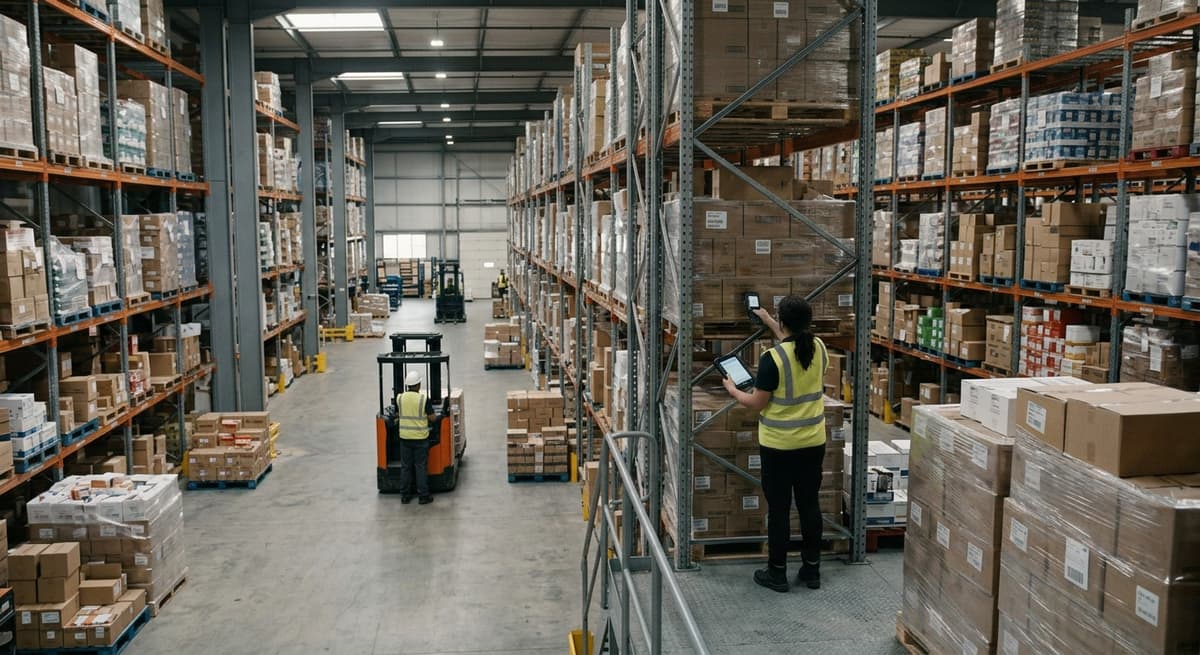
Warehouse stock software gives your team a live picture of every item in your building. Staff scan goods in, the system updates the count, and anyone with access can see what is where.
Reviewed August 2026. Each figure comes from the assumptions stated beside it, so you can substitute your own and the arithmetic still holds.
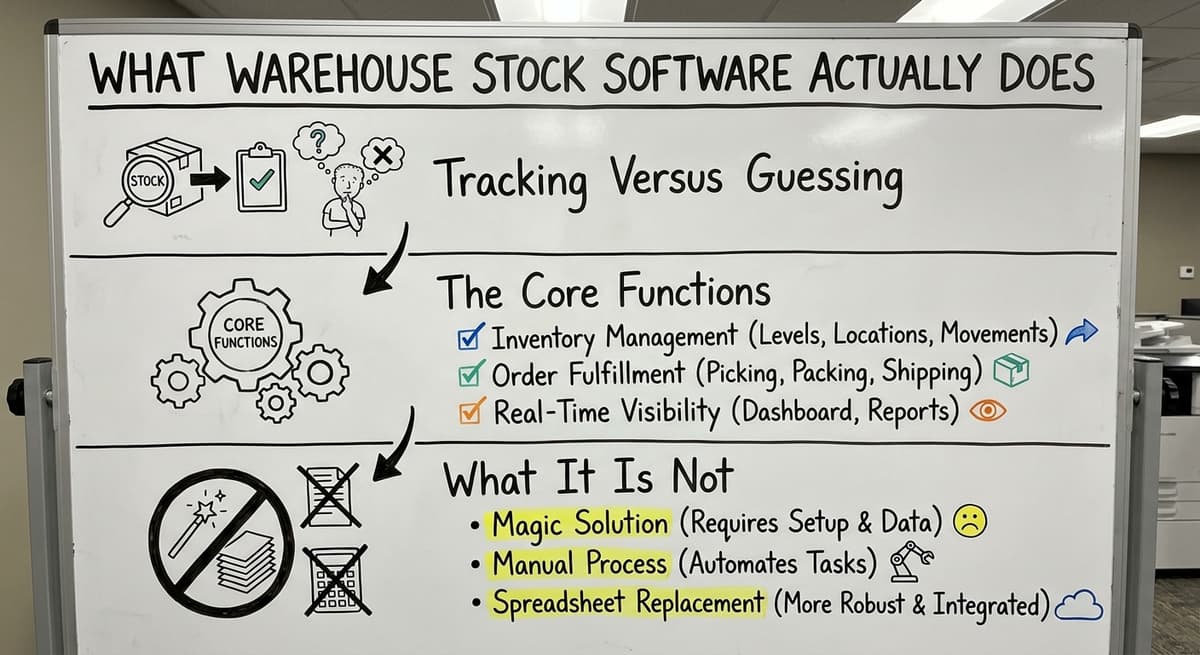
Tracking Versus Guessing
A spreadsheet is a record of what you had when someone last typed a number in. Warehouse stock software tells you what you have right now. That difference sounds small.
On a busy shipping day, it is the difference between sending the right order and sending an apology.
Basic inventory tools count items. Purpose-built warehouse stock software also tracks bin locations, movement history, and who touched what and when.
The Core Functions
Good warehouse stock software handles the full cycle of stock movement:
- Receiving: goods arrive, staff scan them in, stock updates at once
- Putaway: the system tells staff which bin to use
- Picking: a pick list guides staff to the right location
- Packing and shipping: the system checks the order before it leaves
- Stock counts: cycle counts run against live data, not a printed sheet
What It Is Not
Warehouse stock software is not an ERP. It does not run your payroll, generate your financial statements, or replace your accounting system.
The IRS is clear that businesses must track and value inventory: as IRS Publication 538 states, "To figure taxable income, you must value your inventory at the beginning and end of each tax year." The software helps you do that accurately. Your accountant still works in the accounting package.
Would you rather have it built around your operation?
The first look is free. If you would rather not compare products, describe how your operation already works and we build the system around it.
No build cost. You see it running on your own process first, and the monthly subscription starts only once it is live.
Book a callSigns Your Current System Is Holding You Back
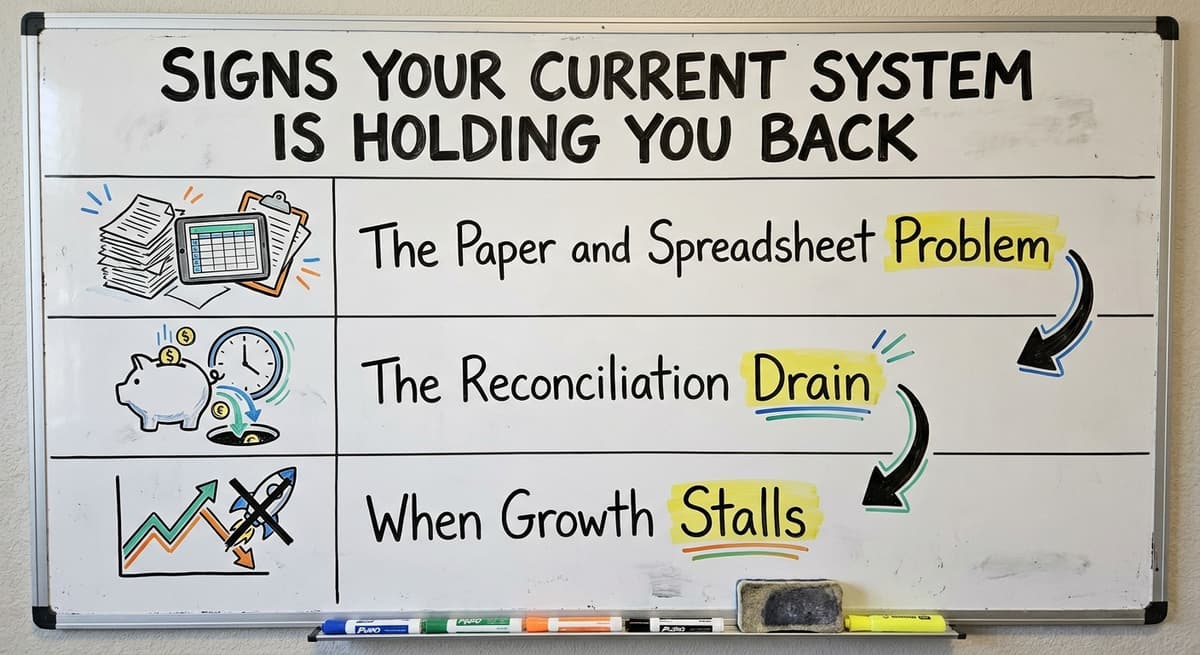
Most warehouse teams know something is wrong before they can name it. The signs show up in small, daily frustrations that add up fast.
The Paper and Spreadsheet Problem
Stock counts done on paper rarely match what is on the shelf. Someone updates a cell in a spreadsheet. Someone else ships from a bin that was already empty. By the time the discrepancy surfaces, the customer has already called.
OSHA notes that "The warehousing and storage industry includes establishments operating facilities for general merchandise, refrigerated goods, and other products," and the risks on a busy warehouse floor, including mis-picks and rushed movements, are real. OSHA publishes guidance on these risks at https://www.osha.gov/warehousing.
The Reconciliation Drain
Staff spending hours matching the accounting system to a separate inventory list is not a minor inconvenience. That time has a real cost.
According to the US Bureau of Labor Statistics, stock clerks and order fillers earn a median wage that makes every hour of manual reconciliation a measurable expense. When those hours happen every week, the total adds up fast.
When Growth Stalls
Managers who buy on numbers they do not fully trust are certain to buy too much of one thing and run out of another. Order volume grows.
The manual system cannot keep up. New staff make errors with no system to guide them. Growth stalls not because demand dried up but because the back end cannot handle it.
The comparison is easier when one option is built for you
Comparing a custom-built system with off-the-shelf options is easier when one of them is already shaped around your process. A custom-built system works the other way round, and the first look costs nothing.
Book a callCore Features to Look for in Warehouse Stock Software
Not every feature in a vendor's brochure matters to a warehouse with 10 to 50 staff. Focus on the ones that solve real problems on your floor.
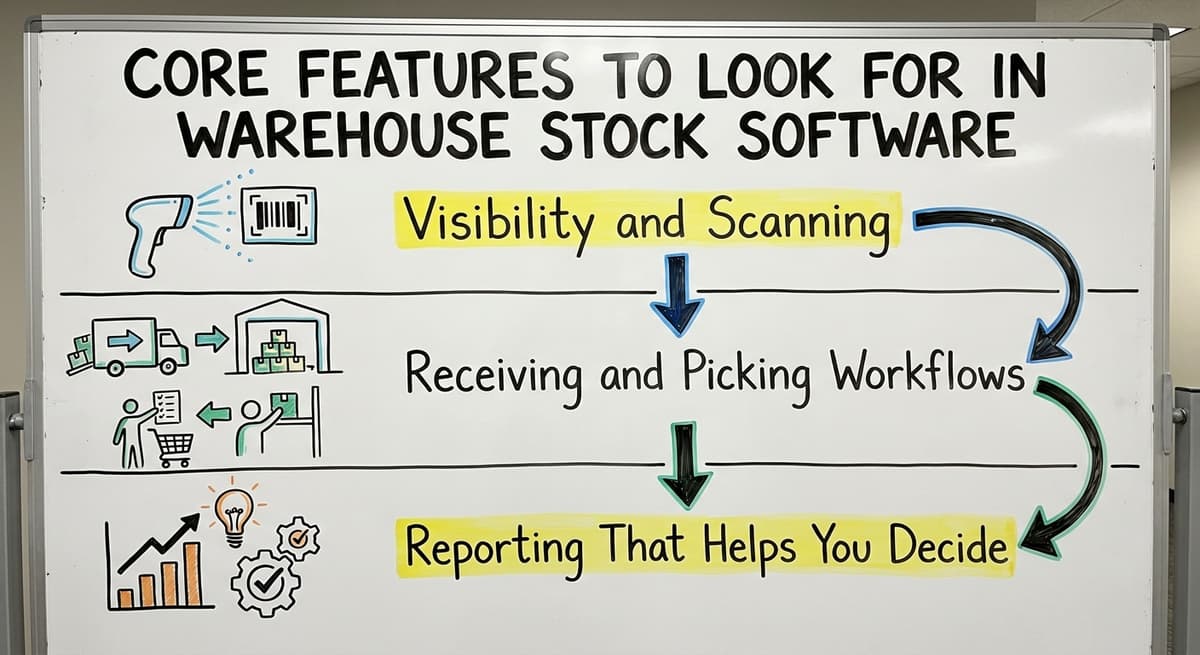
Visibility and Scanning
Real-time stock visibility means every location and bin shows a live count. No waiting for end-of-day updates. Barcode scanning for receiving and picking removes the manual entry step that causes most errors.
GS1 sets the global standards that make barcodes readable across systems, meaning a barcode printed by your supplier scans correctly in your warehouse without any manual setup. Learn more at https://www.gs1.org/standards/barcodes.
Key visibility features to look for:
- Bin location tracking so every item has a named home
- Mobile scanning on a handheld device, not a desktop
- Low-stock alerts that trigger before you run out
- Lot, batch, or serial number tracking for items that need a full history
Receiving and Picking Workflows
A receiving workflow that updates stock the moment goods arrive stops the gap where items sit in a corner and nobody knows they are there.
Pick and pack workflows guide staff to the right bin and check the order before it ships. Both reduce errors without requiring staff to memorise the warehouse layout.
Reporting That Helps You Decide
Good reporting shows stock movement, turnover rate, and dead stock. Dead stock is inventory that has not moved in a set period and is tying up cash.
A report that flags it weekly lets you act before it becomes a write-off. The Warehousing Education and Research Council publishes standard benchmarks for distribution centre performance at https://www.werc.org/resources/dc-measures/ that can help you measure your own results.
How Does Warehouse Stock Software Work With Your Accounting Software?
Most small warehouses already run their financials in a standard accounting package. Switching to a full ERP is not on the table. Good warehouse stock software does not ask you to switch.
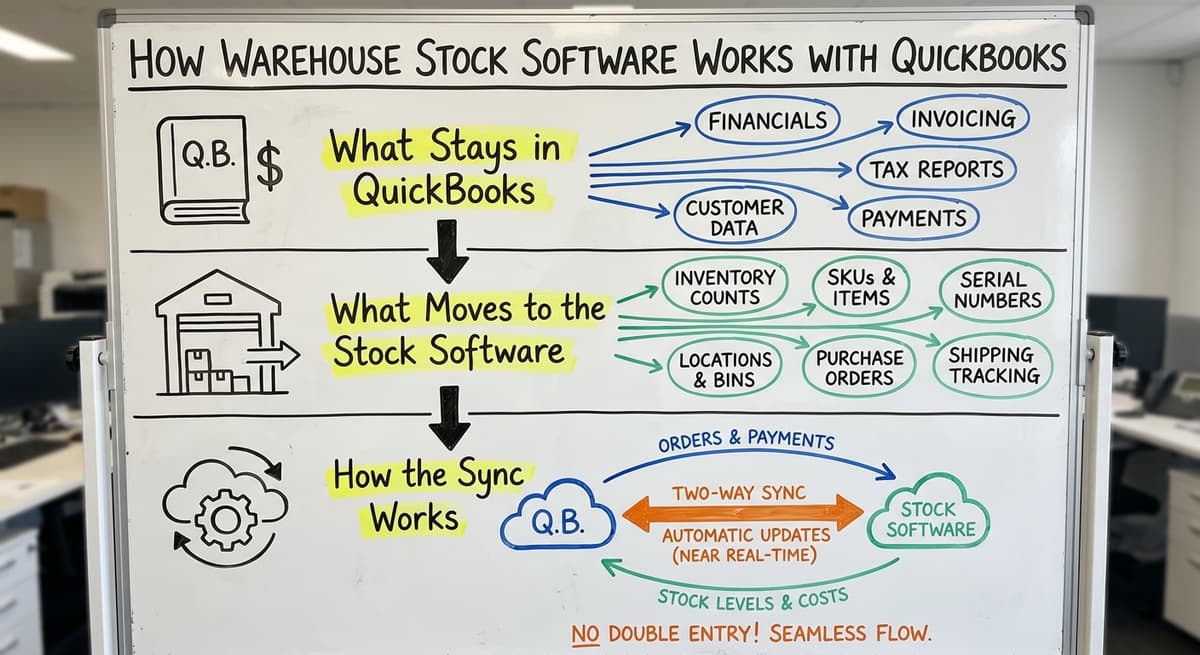
What Stays in the Accounting Software
The accounting software keeps doing what it does well:
- Invoices and payments
- Vendor bills
- Financial reporting and tax prep
- Payroll if you run it there
None of that moves. Your accountant does not need to learn a new system.
What Moves to the Stock Software
The warehouse stock software takes over the tasks an accounting package was never built for:
- Bin location tracking
- Live stock counts
- Pick lists and packing slips
- Receiving logs with timestamps
- Low-stock alerts and reorder triggers
This is not a migration. It is an extension. You add a layer on top of what already works. For a deeper look at how this connection is built, see our guide to accounting integration for warehouses.
How the Sync Works
When a purchase order is received in the stock software, the system records the items and their locations. It then passes the financial data, the cost, the vendor, the quantity, to the accounting software.
The two systems stay in sync without anyone re-entering data. Staff on the floor use the stock software. Your bookkeeper stays in the accounting package. Each system does one job and does it well.
What does it look like running on your own process?
The first thing you see is it running on your own process, at no build cost. The subscription starts once the system is live and doing the job, not before.
Book a call
Off-the-Shelf Software Versus Custom-Built Warehouse Stock Software
The choice between off-the-shelf software and custom-built warehouse stock software is the decision most warehouse managers face once they decide to move off spreadsheets. Both options have real trade-offs.
The Off-the-Shelf Reality
Off-the-shelf tools target a generic warehouse. They come with features for industries you are not in and workflows that do not match yours. Getting them to fit your operation takes months of configuration.
You end up paying for a system you use at 40 percent of its capacity, and you still have to change how your team works to match the software.
Smaller operations are underserved by enterprise software vendors. The sales process is built for large accounts. The support queue is built for the same.
The Case for Custom Warehouse Stock Software
Custom warehouse stock software is built around how your team already works. The receiving process your staff knows stays intact. The bin naming system you use stays in place. The software fits the operation, not the other way around.
Implementation is faster with no generic template to strip out. Training is shorter when the screens match the real workflow. For operations that need this fit, Inventory Tracking Software for Small Business built to spec outperforms a generic tool on day one.
Comparing the Two
| Factor | Off-the-Shelf | Custom-Built |
|---|---|---|
| Setup time | Months of configuration | Weeks, built to your workflow |
| Feature use | 40% or less | Built for your actual needs |
| Training load | High, new concepts to learn | Low, matches existing process |
| Ongoing cost | Monthly subscription, full price | Scoped to what you actually use |
| Flexibility | Limited by vendor roadmap | Updated as your business grows |

What Does a Warehouse Stock Software Implementation Actually Look Like?
If you have tried software before and it did not stick, the problem was the process, not the idea. A good implementation follows a clear path.
Steps One and Two: Map and Identify
- Step 1 is the map of the current workflow: receiving, storage, picking, shipping. Write down every step, including the manual ones that only one person knows how to do.
- Identify the steps that cause the most errors or waste the most time. These are the places the software must solve first.
This work takes a day or two. It is not glamorous. It is the reason the build works when it goes live.
Steps Three and Four: Build and Train
- Step 3 is the build: configure the software around those specific pain points. Not every feature. The ones that matter to your floor.
- Train the team on the floor, not in a conference room. Staff learn faster when they are scanning real items in real bins, not clicking through a demo.
For operations that need a full picture of how this fits together, Warehouse Inventory Management Software covers the broader system design.
Start with a free first look
A 30 minute call maps your operation and gives you a clear picture of what we would build. No obligation and nothing to install.
Book a callStep Five: Go Live With Support
- Go live with a real person nearby, not a ticket queue. The first week is where trust is built or lost. A good implementation partner stays close during that week and does not disappear after launch.
The fear that software will not work is a fear of being left alone with something broken. Address that fear by choosing a partner who defines success by what happens after go-live, not just at it.

Real Results Warehouse Teams See After Switching
The results that follow a good warehouse inventory software implementation are specific and repeatable.
Accuracy and Speed
Stock accuracy improves because counts update in real time. Staff do not wait until the end of the day to log a receipt. The system updates the moment the scan happens.
Fewer mis-picks follow once the software guides the picker to the right bin. The picker does not need to know the warehouse layout. The screen tells them where to go.
Better Decisions, Faster Onboarding
Managers can see stock levels from anywhere, not just from the warehouse floor. Purchasing decisions get easier with data people trust. Buying too much or running out both become less common.
New staff get up to speed faster. The system tells them what to do next. They do not need to shadow a senior colleague for two weeks to learn where things live.
Less Time on Reconciliation
The hours spent matching the accounting system to a separate spreadsheet drop sharply. The two systems stay in sync. The bookkeeper works from clean data.
The warehouse manager stops fielding calls about stock numbers that do not add up. For wholesale operations with complex stock needs, Custom Inventory Software for Wholesale Distributors covers how this scales.

Frequently Asked Questions About Warehouse Stock Software
Will this replace my accounting software?
No. Warehouse stock software works alongside your accounting software. Your financials, invoices, and vendor bills stay there. The stock software handles bin locations, pick lists, and receiving logs. The two systems share data without either one replacing the other.
Do my staff need to be tech-savvy?
No. Good warehouse stock software is designed for the floor, not for IT departments. Staff scan a barcode and the system does the rest. If your team can use a smartphone, they can use the software.
Is this only for large warehouses?
No. Warehouse stock software works well for operations with 5 to 100 staff. Smaller teams see the biggest gains because they have the most to lose from manual errors and the least capacity to absorb them.

Ready to Stop Managing Stock on Spreadsheets
Warehouse stock software is not a big, painful project when the scope is right. The right approach starts with your current workflow and builds from there. No ripping out what works. No forcing your team into a system built for someone else's warehouse.
If your stock counts do not match your shelves, your team is spending time on reconciliation instead of fulfilment, or your purchasing decisions feel like guesswork, the system is the problem, not the people.
The Software Society builds warehouse stock software around how your operation already runs. We map your workflow, build to your specific pain points, and stay close through go-live and beyond.
If you want to see what that looks like for your warehouse, start with a conversation. No generic demo. No enterprise sales process. Just a clear look at what a system built for your floor would actually do.
Frequently asked questions
Frequently asked questions
What is warehouse stock software and how is it different from a spreadsheet?
Warehouse stock software tracks stock in real time as goods move in, around, and out of your facility. A spreadsheet shows you what someone typed in last. The software updates the moment a scan happens, so your counts stay accurate without manual entry.
How does warehouse stock software work with accounting software without replacing it?
The stock software handles bin locations, pick lists, receiving logs, and live counts. The accounting software keeps handling invoices, payments, and financial reporting. When a receipt is logged in the stock software, the financial data passes to it automatically. No re-entry, no separate reconciliation.
What features does a small warehouse actually need in stock software?
Focus on real-time stock visibility, barcode scanning for receiving and picking, bin location tracking, low-stock alerts, and basic reporting on stock movement and dead stock. You do not need every feature in a vendor's catalogue. You need the ones that fix your specific errors.
How long does it take to implement warehouse stock software?
A focused custom build for a small or mid-size warehouse can go live in weeks, not months.
The timeline depends on how complex your workflow is and how many locations or integrations are involved. A good implementation partner maps your workflow first, then builds. That order matters.
What is the difference between off-the-shelf and custom-built warehouse stock software?
Off-the-shelf tools target a generic warehouse and require your team to adapt to the software. Custom-built software follows how your team already works.
Custom builds go live faster, require less training, and are used more fully because they match your actual workflow.
What results can a warehouse team realistically expect after switching from spreadsheets?
Stock accuracy improves once counts update in real time. Mis-picks drop because the software guides staff to the right bin.
Time spent reconciling the accounting system with a separate list falls sharply. Purchasing decisions get easier with data people trust. New staff get productive faster.
How much does warehouse stock software cost?
Cost depends on scope, the number of users, locations, and integrations involved. The better comparison is against what you are already spending: staff hours on reconciliation, the cost of mis-picks and returns, and the value of stock that goes missing or expires.
For most small warehouses, those costs exceed the software cost within a year.
What happens if my warehouse operation changes after the software is built?
Custom warehouse stock software can be updated as your business grows. If you add a new location, a new product line, or a new fulfilment process, the system can be adjusted.
You are not locked into a vendor's release schedule or a generic feature set that may never match your new needs.
What is the best warehouse stock software for a small business?
There is no single best product. The right warehouse stock software for a small business matches how stock already moves through the building, connects to the accounting package without replacing it, runs on the scanners or phones the team carries, and is live in weeks.
If no packaged product fits without changing the process, a custom system scoped to the real bottlenecks serves a 10 to 50 person warehouse better.
What is the difference between inventory software and a WMS?
Inventory software records what you have, what you sold and when to reorder. Warehouse stock software, or a WMS, records where each item sits, who is picking it and in what order, and what has been received but not yet put away.
Small operations start with inventory software and outgrow it the day two pickers disagree about where something is.
Which warehouse software supports barcode scanners?
Most modern warehouse stock software does, whether a cloud subscription or a custom build, and it is the feature to insist on. Scanning at receiving and picking turns each movement into a recorded event instead of a memory.
Check that the system supports the scanners or phone cameras your team will actually carry, that a scan updates stock immediately, and that labels can be printed from the same system.
Can warehouse stock software integrate with an online store and accounting software?
Yes, and it should. Orders flow in from the store, the stock software handles picking, packing and shipping confirmations, and stock levels, receipts and cost of goods flow back to the accounting package so nothing is keyed twice.
Ask any vendor to show the connections working on your own data before you sign, and confirm exactly which fields sync.
Not sure this is the right shape for your operation?
The call is free. Describe how the work runs today. We map it on a call and show you what it would look like built around that, before you spend anything.
Book a callRelated guides
The rest of this guide, for the parts of the job this page does not cover.
Guides
- Warehouse Stock Management Software
- Warehouse Stock Management System
- Warehouse Inventory Management Software
- Warehouse Inventory Tracking Software
- Warehouse Receiving Software
- Software for Warehouse Management System
- Inventory and Warehouse Management Software
- List of Warehouse Management Software
- Online Warehouse Management Software
- Warehouse Inventory Software Programs
- Inventory Software Warehouse
- Software Warehouse Management
- Warehouse Software System
- Cloud Stock Management Software
- Small Business Stock Management Software
- Stock Software
- Quickbooks Inventory Management Software
- Custom Inventory Management Software
- Hospital Stock Management System
- Make to Stock Examples
- Types of Stock Control Systems