

Order Management Software
Order management software is the system that records every order from arrival to invoice. It shows the status of each one without a phone call to the warehouse, at $100 to $500 a month packaged or $10,000 to $30,000 once for a build around your own pricing and packing rules.
Reviewed August 2026. Each figure comes from the assumptions stated beside it, so you can substitute your own and the arithmetic still holds.
Published 25 July 2026. Reviewed and updated 15 September 2026.
Book a callWhat Is Order Management Software?
Order management software tracks an order through every step your team touches. A customer places an order.
The system logs it, alerts the warehouse, guides picking and packing, confirms the shipment, and hands the invoice data to your accounting tool. Every person on your team sees the same record at the same time.
This is not an ERP (enterprise resource planning system, which manages finance, HR, and operations in one giant platform). It is not an accounting system.
Order management software handles the operational steps between a customer's order and your bank account. the accounting software handles what happens after.
Think of it as the layer between your sales channel and your accounting ledger.
Would you rather have it built around your operation?
The first look is free. If you would rather not compare products, describe how your operation already works and we build the system around it.
No build cost. You see it running on your own process first, and the monthly subscription starts only once it is live.
Book a callHow Do Orders Move Through a Typical Distribution Business?
Picture one order at a wholesale distributor. A buyer emails in a purchase order on Monday morning. Someone on your team copies the details into a spreadsheet. A pick list gets printed and handed to the warehouse. The picker walks the floor, pulls the items, and hands the box to the packing station.
Someone else checks the count, seals the box, and calls a shipping label. Later, a third person logs the shipment and emails the customer. On Friday, someone re-enters the order details into the accounting software to generate an invoice.
That is 5 to 7 manual handoffs for a single order. Each one is a place where something can go wrong or get lost.
Why Do Accurate Order Records Matter at Tax Time?
The IRS makes clear why tracking inventory matters beyond just shipping. IRS Publication 538 states: "To figure taxable income, you must value your inventory at the beginning and end of each tax year." Accurate order records feed accurate inventory counts, which feed accurate tax filings. Manual tracking makes that chain fragile.
Most wholesale operations run this way until volume grows past the point where the manual steps can keep up.
Are These Signs That My Current Process Is Breaking Down?
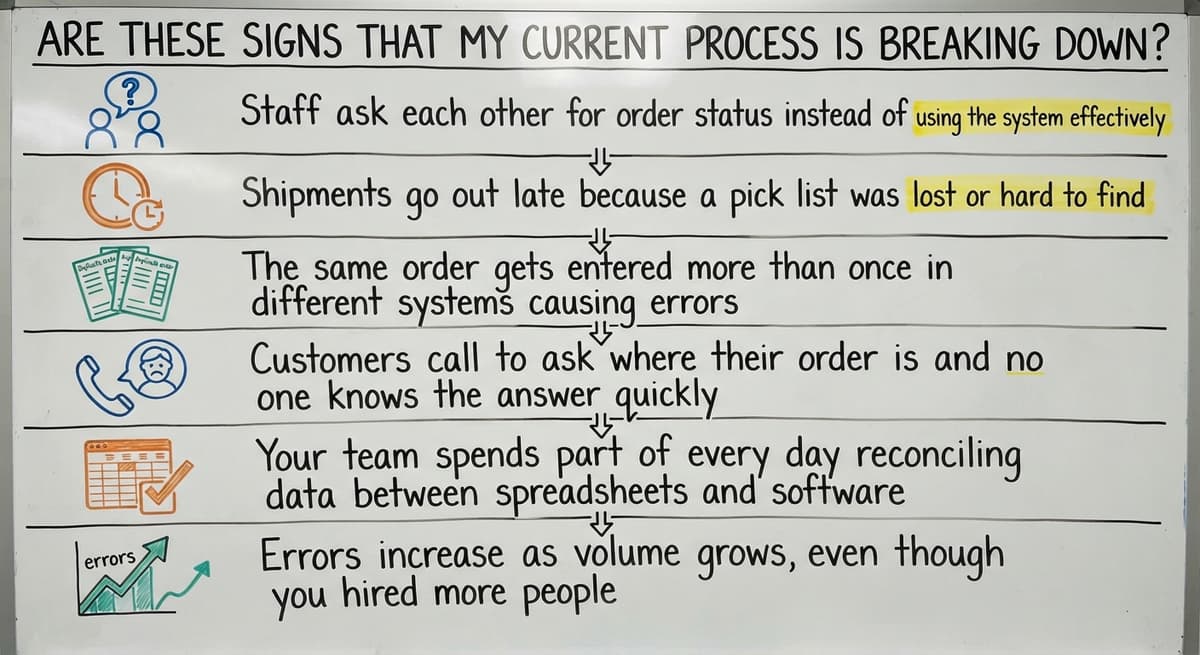
Yes. If any of the items below sound familiar, your process has reached its limit, and that is a normal result of growth, not a failure.
Common symptoms:
- Staff ask each other for order status instead of checking a shared record
- Shipments go out late because a pick list was missed or misread
- The same order gets entered more than once in different places
- Customers call to ask where their order is and no one has a fast answer
- Your team spends part of every day reconciling spreadsheets or email threads
- Errors increase as volume grows, even though nothing else changed
Manual order processing works until it does not. The point where it stops working is not a sign that your team is doing something wrong. It is a sign that the process needs a better tool.
What Does Manual Order Tracking Actually Cost?
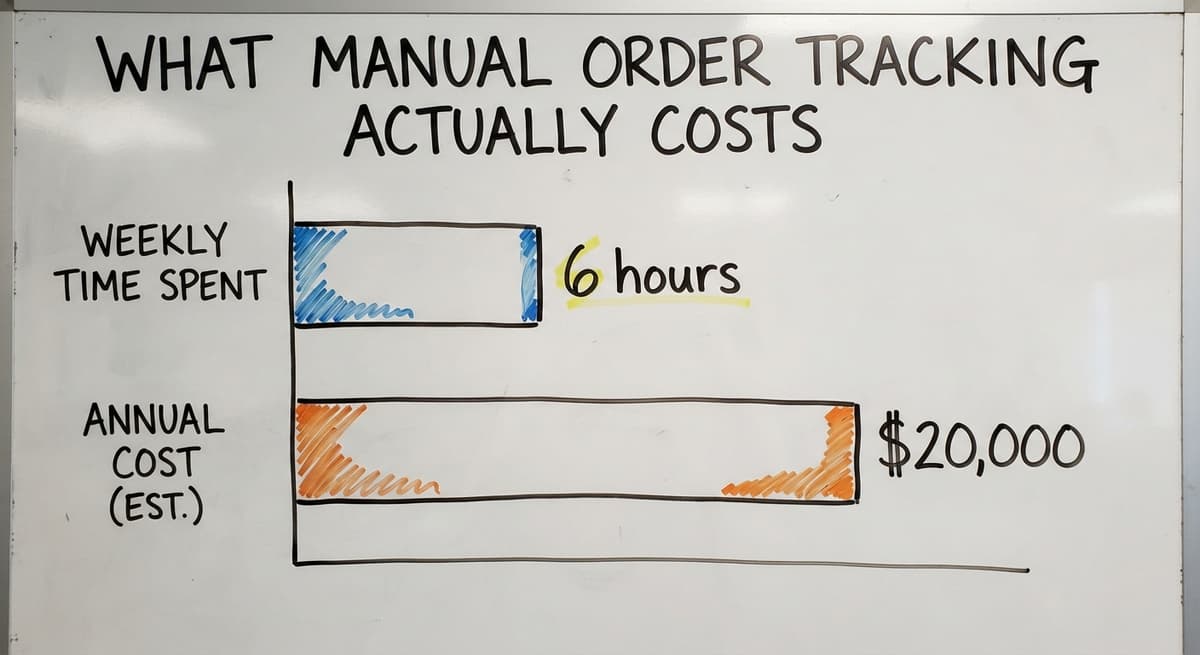
A business with 3 people each spending 6 hours a week on manual order tracking, at the median wage for shipping and receiving clerks reported by the US Bureau of Labor Statistics, is spending more than $20,000 a year on steps that software can handle in seconds. That number is worth knowing before you decide whether a system is worth the cost.
Is the comparison easier when one option is built for you?
Yes. Off-the-shelf means fitting your process to the software, and custom is the other way round. The first look costs nothing.
Book a callWhat Does Order Management Software Actually Do?
Good order management software replaces manual steps. It does not add new ones. The core functions map directly to the steps your team already takes by hand: receiving an order, creating a pick list, confirming a shipment, and generating an invoice.
Where those steps currently move between people, inboxes, and spreadsheets, the software holds them in one place so every person on the team sees the same record at the same time.
Order Entry and Confirmation
Orders come in by email, phone, or online form, and the software logs each one in a single place, which for most distributors is 3 to 5 sources merged into 1 queue.
No more copying details from an email into a spreadsheet. The system sends an automatic confirmation to the customer and alerts the warehouse that a new order is ready. One step replaces three.
Inventory Visibility Across the Warehouse
Every open order ties to your stock levels in real time. When an order is logged, the system reserves the inventory. Staff see current counts without walking the floor.
Overselling stops because the system knows what is available before the order is confirmed. Picking errors drop because the count is accurate before anyone touches a shelf.
The US Census Bureau's Monthly Wholesale Trade data tracks the national inventories-to-sales ratio for wholesale firms.
When that ratio shifts, distributors who track inventory manually are the last to know. Real-time inventory management software closes that gap.
Pick, Pack, and Ship Workflow
The software generates a pick list the moment an order is confirmed. The list goes to the right person with the right items and locations.
When the box is packed and the label is scanned, the system updates the order record automatically. No verbal handoff. No paper trail. The customer gets a shipment notification and your team moves to the next order.

How Does Order Management Software Work With the Accounting Software?
The accounting software stays in place. This is the question most owners ask first, and the answer is straightforward.
Order management software handles the operational side: order entry, picking, packing, and shipping. The accounting software handles the accounting side: invoices, payments, and financial records.
When an order is marked complete, the system pushes the invoice data to the accounting software without anyone re-entering it. No accounting migration. No new chart of accounts. No retraining your bookkeeper.
accounting integration for wholesale businesses is one of the most common reasons distributors choose a purpose-built order management tool over a spreadsheet or a full ERP.
The two systems do different jobs and work better together than either does alone.
Off-the-Shelf Software Versus Custom-Built: Which One Fits?
Neither is always the right answer. The right answer depends on how your operation actually runs.
Off-the-shelf order management tools target a wide range of businesses. They cover common workflows well. They are faster to set up and often cheaper to start. For a business with a standard process, they work fine.
The frustration comes when your process does not match the template the software was built around. You end up changing how you work to fit the software.
Or you pay for modules you never use. Or you build workarounds in spreadsheets that sit alongside the system you just bought.
Why Do Small Distributors Often Outgrow Packaged Tools?
Packaged tools target an average business. Your business is not average. It has specific pricing rules, specific customer requirements, and specific ways of moving product through the warehouse.
Over time, the gaps show up as extra steps. A spreadsheet to handle a pricing exception. A manual override for a customer who gets partial shipments.
A paper log for items that the system cannot track the way you track them. These workarounds are not user errors. They are signals that the software does not fit the operation.
What Does Custom Order Management Software Look Like?
Custom order management software is built around the way your business already works. Not a template. Not a configuration of someone else's platform.
A wholesale distributor with customer-specific pricing gets a system where those rules are built in from the start.
A fulfillment center with non-standard packing requirements gets pick lists that match the actual packing stations, not a generic format. The software adapts to the operation. The team does not adapt to the software.
Custom operational software for distributors takes longer to build than an off-the-shelf subscription. It costs more upfront.
For businesses where the standard tools keep producing workarounds, the math favors custom within the first year.
What does it look like running on your own process?
The first thing you see is it running on your own process, at no build cost. The subscription starts once it is live and doing the job, not before.
Book a call
What Does a Realistic Implementation Look Like?
Long ERP rollouts that take 18 months and shut down operations are not the only model. A well-run order management implementation looks different.
A phased approach works like this:
- Map the current process, step by step, including the workarounds
- Find the 2 or 3 manual steps that cause the most pain
- Build and test those first
- Roll out to the team while the operation keeps running
- Add more as the team gets comfortable
The operation does not stop while the system is being built. Your team keeps working. The new system gets tested in parallel before anything switches over.
The NIST Manufacturing Extension Partnership offers vendor-neutral guidance on supply chain process improvement. Their framework supports a phased approach: fix the highest-impact bottleneck first, confirm the gain, then move to the next one.
Starting Small and Adding as You Grow
A good implementation starts with 1 or 2 core problems. Order entry and confirmation. Or pick list generation. Or shipping confirmation tied to inventory updates.
Starting with one problem does not mean settling for less. It means getting real value fast before building further.
As the team gets comfortable, the system grows. New features get added when the business needs them, not because a vendor's roadmap decided it was time.
Who Needs Order Management Software
Company size matters less than workflow complexity. A 10-person distributor with 200 orders a week and 4 manual handoffs per order needs this more than a 50-person company with a simple, consistent process.
Roles that benefit most:
- Operations managers who spend time answering status questions
- Warehouse staff who work from printed lists and verbal instructions
- Owners who check order status by asking someone instead of looking it up
The trigger is not headcount. It is the number of manual steps that break down when volume grows.
Are You a Wholesale Distributor Spending Too Much Time on Manual Order Tracking?
Yes, if you manage customer-specific pricing, partial shipments, or backorder tracking by hand, you are a strong candidate for order management software.
Wholesale distribution software handles these without a full ERP:
- Customer-specific price lists applied at order entry
- Partial shipments tracked against open order balances
- Backorders flagged and held until stock arrives
- Shipping confirmations sent to the right buyer contact automatically
These are not advanced features. They are the basic requirements of wholesale work, and most packaged tools handle them poorly or require expensive add-ons.
Fulfillment Centers and Warehouses
High order volume, multiple clients, and tight shipping deadlines make manual tracking unsustainable fast.
Fulfillment center software built to match the exact picking and packing rules already in place removes the gap between how the software works and how the floor works.
A custom system can match your bin locations, your packing station layout, and your carrier rules. An off-the-shelf tool asks you to match its assumptions instead.
For fulfillment operations with non-standard workflows, that gap costs time every single day.

Key Features to Look for in Order Management Software
The best feature list is the one that matches your actual workflow. Use these questions to check any system you are considering:
| Question to Ask | What You Are Checking |
|---|---|
| Can every team member see order status in real time? | Order visibility |
| Does stock update the moment an order is confirmed? | Inventory sync |
| Will it connect to the accounting software without replacing it? | accounting integration |
| Can we set who sees and edits what? | User permissions |
| Can we pull a report on errors, late shipments, or open orders? | Reporting |
| Does the pick list match the way our floor is laid out? | Pick and pack workflow |
| What happens when we need a change six months after launch? | Ongoing support |
Warehouse order management tools that score well on all 7 are worth a closer look. Tools that require process changes to check even 3 of these boxes deserve a harder question.
Questions to Ask Before You Choose a System
There are 7 due diligence questions that separate a good fit from an expensive mistake:
- Can the software match our current process, or do we have to change our process to match it?
- Will it connect to the accounting software without replacing it?
- How long does implementation take and who runs it?
- What happens when we need a change after launch?
- Is there a local contact we can call, or does support go through a ticket queue?
The answers to these questions tell you more than any feature list. A vendor who cannot answer the first one clearly is telling you something important.
What is in a free first look?
A 30 minute call, your operation mapped, and a clear picture of what we would build. No obligation and nothing to install.
Book a call
How Do You Measure Whether Order Management Software Is Working?
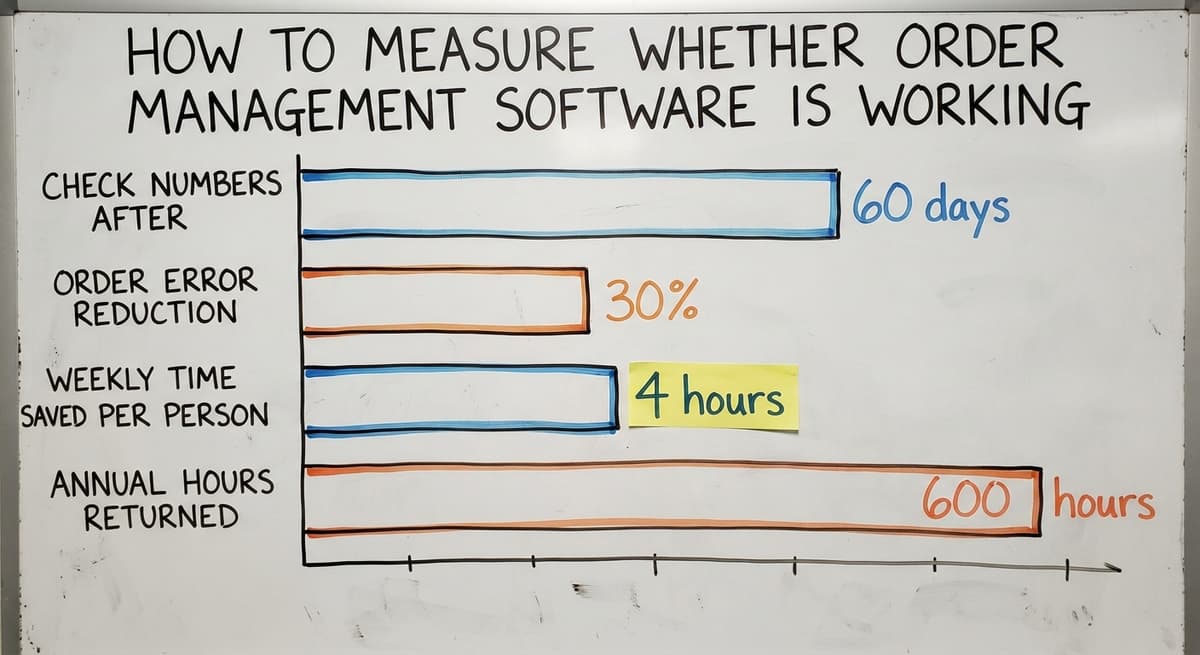
Set a baseline before the system goes live. Then check the same numbers 60 days after.
Simple metrics to track:
- Hours spent entering orders each week
- Number of order errors or mis-ships per week
- Hours spent answering order status questions
- Time from order received to pick list generated
A 30% drop in any one of these is worth the investment. Improvement does not have to be dramatic to pay off.
If 3 people each save 4 hours a week, that is more than 600 hours a year returned to work that actually moves the business forward.
Common Mistakes When Choosing Order Management Software
The same 5 mistakes show up repeatedly across distribution and warehouse operations:
- Buying for features you do not need yet. A system with 40 modules you will use 4 of is not a bargain.
- Choosing a system that requires changing a process that already works. If your picking method is efficient, the software should match it.
- Underestimating training time. A system your team does not use correctly is worse than the spreadsheet it replaced.
- Skipping the question of post-launch support. Most problems appear 90 days after go-live, not on day one.
None of these are rare. They are the normal result of buying on features rather than fit.
Does Having a Local Implementation Partner Actually Make a Difference?
Yes. The difference between a remote SaaS vendor and a local implementation partner shows up before the system is even built.
A local team can walk your floor. They see how orders actually move, where the bottlenecks are, and what the printed pick list looks like. They build the system around what they observed, not what you described in a form.
For businesses in and around Columbus, Ohio, a local partner means a phone call instead of a ticket. It means someone who can come back when something needs to change.
Remote vendors update on their own schedule. A local partner adjusts when your operation changes.
Accountability is easier to hold when the person who built the system is reachable. That is not a soft benefit. It is a practical one that shows up every time something needs fixing.
What Happens After the Software Goes Live?
A well-built system is not a finished project. It is a working tool that changes as your business changes.
Ongoing support covers:
- Fixes when something breaks
- Adjustments when a process changes
- New features added as the operation grows
- Reports built when a new question needs answering
Packaged software updates on the vendor's schedule. Custom operational software for distributors updates on yours. That difference matters most when your business changes faster than a vendor's roadmap allows.
The goal is a system that keeps working without requiring your team to manage it. Operational management software built with that goal in mind earns its cost over time, not just at launch.

Next Steps for Businesses Ready to Replace Manual Order Tracking
If manual steps are slowing your operation, order management software is the right category to explore. The specific tool depends on your workflow, your volume, and how far the standard options fall short.
Start with a process review before you choose anything. Map every step an order takes from receipt to invoice. Count the manual handoffs.
Note the workarounds. That map tells you what the software needs to do and whether an off-the-shelf tool can do it or a custom build makes more sense.
The goal is not to replace everything. It is to remove the steps that break down under volume.
If you want to talk through your current workflow and find out where the gaps are, The Software Society starts with that conversation. No pitch, no demo of a product you did not ask for.
Just a plain look at how your orders move and what a better system could look like. Describe your process and we will tell you honestly what fits.
Frequently asked questions
Frequently asked questions
What is the best order management software?
There is no single best answer. The right order management software depends on your workflow, your order volume, and whether an off-the-shelf tool can match how your operation runs. For straightforward wholesale or distribution work, the packaged distribution tools handle common needs well.
For operations with non-standard pricing, packing rules, or fulfillment requirements, a custom-built system fits better than any packaged product. Start by listing what your current process requires, then check whether any tool covers it without forcing a process change.
What are the top 10 order management systems?
The commonly cited options number about 10 and each targets a different size and type of operation: a few suit small to mid-size distributors, a few target e-commerce sellers, and the enterprise suites target larger companies with complex needs.
None of these is the right answer for every business. The list that matters is the one that matches your actual workflow, not the one with the most features.
What is the best free order management software?
Free tools exist but come with real limits. One or two inventory apps offer a free tier for very small operations, and the open-source suites are free to download but need technical setup. Most free options cap the number of orders, users, or integrations.
For a business processing more than a few dozen orders a week, free tools create more workarounds than they remove. A paid tool that fits the workflow costs less in staff time than a free one that does not.
What is the best work order management software?
Work order management, used in service or maintenance operations, is a different category from order management software for distribution and fulfillment. For service businesses, tools like Jobber, ServiceTitan, and FieldEdge are built around scheduling, technician dispatch, and job tracking.
For warehouses and distributors, the tools listed above apply. The right answer depends on whether your orders are for physical goods shipped to customers or for service jobs assigned to field staff.
Do I need to replace the accounting software to use order management software?
No. Order management software handles the operational steps: order entry, picking, packing, and shipping. The accounting software handles accounting.
When an order is complete, the system pushes invoice data to the accounting software automatically. No re-entry, no migration, no change to how your bookkeeper works.
How long does it take to implement order management software?
A phased implementation for a small or mid-size distributor runs 4 to 12 weeks for the first working version. The range depends on how complex the current process is and how many manual steps need to be replaced.
A good implementation partner starts with the highest-pain steps and gets those working before adding more. The operation keeps running throughout.
Is order management software only for large companies?
No. Company size is not the deciding factor. Workflow complexity and order volume are. A 10-person distributor processing 200 orders a week with multiple manual handoffs needs order management software more than a 50-person company with a simple, consistent process.
If manual steps are creating errors or eating staff time, the business is ready regardless of headcount.
What is the difference between order management software and an ERP?
An ERP (enterprise resource planning system) manages finance, HR, purchasing, and operations in one large platform. Order management software handles one specific part of operations: the steps between a customer order and a completed shipment.
Order management software is faster to implement, less expensive, and does not require replacing the accounting software or any other existing tool.
How much does order management software cost?
Packaged tools run $100 to $500 a month for a small distributor, climbing with users and channels.
A build scoped to one operation runs $10,000 to $30,000 once with $150 to $500 a month for hosting and support. Either way the accounting package stays and receives the invoices.
Which order management software integrates with online marketplaces?
Any current system pulls orders from the major store platforms and marketplaces through their APIs, pushes tracking back, and writes stock counts to each channel.
Ask the vendor to show your specific channels connected in the demo, not on the integrations page.
How do I choose an order management system for a multichannel business?
Insist on one order queue for every channel, one stock count that each channel reads from, and a tracking push back to the channel the order came from.
A system that handles those 3 handles multichannel; the rest is reporting.
How do I choose an order management system for multiple warehouses?
The system has to hold stock per warehouse, route each order to the warehouse nearest the customer that has the items, and split an order across 2 warehouses when one cannot fill it.
Ask to see the routing rule in the demo, because that is the feature the single-warehouse tools lack.
Not sure this is the right shape for your operation?
The call is free. Describe how the work runs today. We map it on a call and show you what it would look like built around that, before you spend anything.
Book a callRelated guides
The rest of this guide, for the parts of the job this page does not cover.
Guides
- Ordering Management System
- Order Management System
- Order Management Program
- Cloud-based Purchase Order System
- Work Flow Software
- Warehouse Inventory Management Software
- Quickbooks Inventory Management Software
- Warehouse Stock Management Software
- Software for Warehouse Management System
- Inventory and Warehouse Management Software
- Custom Inventory Management Software
- List of Warehouse Management Software
- Online Warehouse Management Software
- Multi Location Inventory Management Software
- Cloud Stock Management Software
- Manufacturing Inventory Management Software
- Cost of Inventory Management Software
- Small Business Stock Management Software
- Inventory Management Software Freeware
- Distribution Management Software
- Software Warehouse Management
- Best Inventory Management Software for Small Businesses
- Free Inventory Management Software for Small Business