


List Of Warehouse Management Software
A list of warehouse management software is only useful sorted by who each tool serves. The main options fall into 5 categories: enterprise WMS suites, mid-market cloud WMS, lightweight small-business tools, warehouse modules inside ERP systems, and custom builds. This guide, reviewed in September 2026, walks each category with its typical cost, rollout time, and the operation it suits, so a 5-to-100-person warehouse can find its tier in a minute and skip the ones priced for 500.
Published 2 August 2026. Reviewed and updated 15 September 2026.
Reviewed and updated 15 September 2026.
Book a callWhat Does Warehouse Management Software Actually Do?
Warehouse management software, called a WMS, is a system that tracks what comes in, what sits on your shelves, and what goes out. It replaces clipboards, spreadsheets, and memory.
The Core Problems a WMS Solves
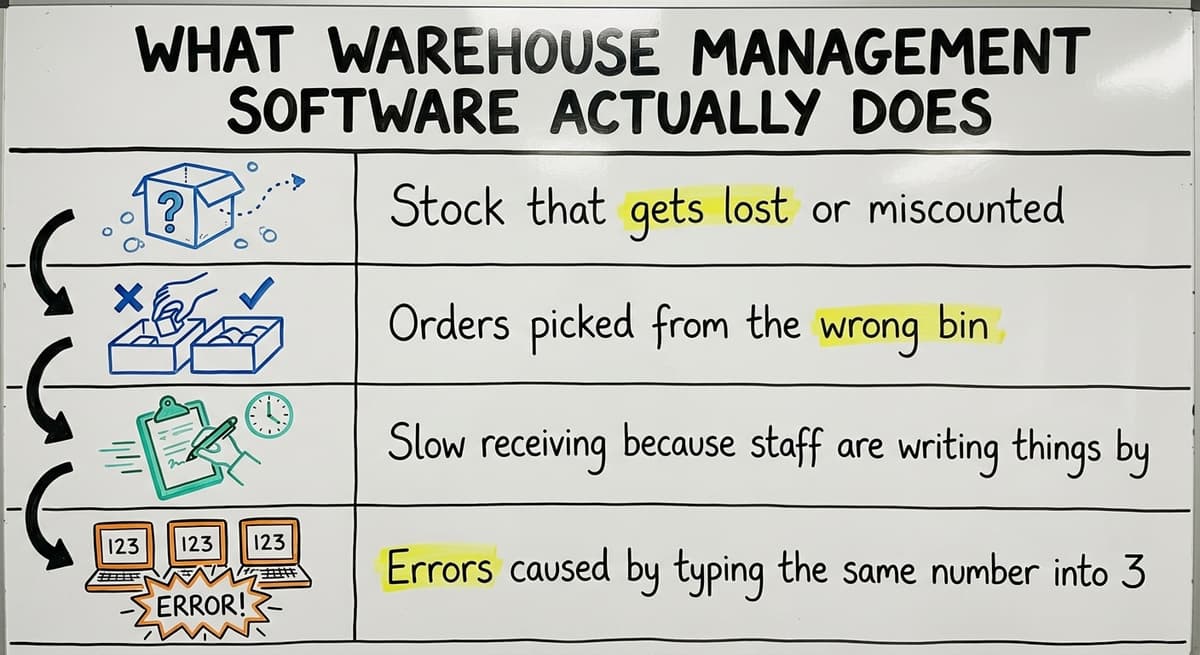
A warehouse management system handles the daily work that breaks down without one:
- Stock that gets lost or miscounted
- Orders picked from the wrong bin
- Slow receiving because staff are writing things by hand
- Errors caused by typing the same number into 3 different places
The IRS makes inventory tracking a legal requirement, not just a good idea. IRS Publication 538 states: "To figure taxable income, you must value your inventory at the beginning and end of each tax year." A WMS makes that count accurate and fast.
Not All Warehouse Software Is the Same
Some warehouse management software is a full ERP suite that runs your whole business. Some is a standalone WMS that connects to your existing tools. Some is built from scratch for one specific operation.
The page lists the main named options by category. The goal is to help you rule things out quickly, not to sell you on any one product. Read through each category and find the one that matches your size and situation.
Would you rather have it built around your operation?
The first look is free. If you would rather not compare products, describe how your operation already works and we build the system around it.
No build cost. You see it running on your own process first, and the monthly subscription starts only once it is live.
Book a callHow Do You Read This List Before You Pick a System?
The warehouse management software reviewed here is split into 5 categories. Knowing which category fits your operation saves you weeks of wasted demos.
Reviewed August 2026. Each figure comes from the assumptions stated beside it, so you can substitute your own and the arithmetic still holds.
The Three Main Categories (and Two More)
The 5 categories on this page are:
- Enterprise WMS, built for large operations with dedicated IT staff
- Mid-market WMS, built for growing distributors, 20 to 200 staff
- Lightweight tools, fast to set up, best for smaller or e-commerce operations
- ERP modules, warehouse features inside a full business system
- Custom-built WMS, software built around how your warehouse already works
Most named products on comparison sites target large operations. They will ask you to change your process to fit their software, not the other way around.
Match Software to Your Pain Points, Not a Feature List
Small warehouses with 5 to 100 staff have different needs than a 500-person distribution center. A system that works brilliantly at scale can break a small team.
OSHA notes that "the warehousing and storage industry includes establishments operating facilities for general merchandise, refrigerated goods, and other products." That covers a wide range of operations. Your software should fit your specific one.
Start with what is broken right now. Then find the category that fixes it without adding problems you do not have yet.
Enterprise Warehouse Management Software
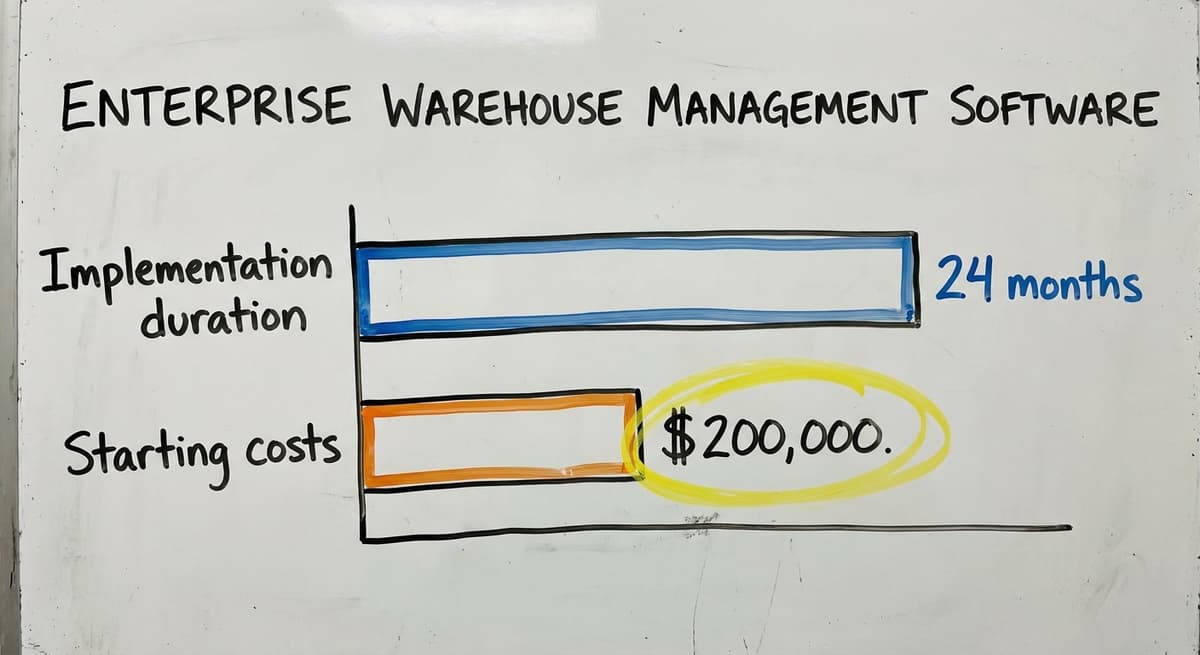
Enterprise WMS platforms are powerful. They are also expensive, slow to set up, and built for operations with full IT departments. If you run a warehouse with fewer than 100 staff, read this section to rule these out, not to shortlist them.
Warehouse Management Software Vendors
the software WMS is one of the most widely used enterprise platforms in the world. It handles complex fulfillment, labor tracking, and multi-site operations. It is built for retailers and large distributors. Implementation takes 12 to 24 months and costs start well above $200,000.
the software (formerly the software) is a supply chain and warehouse platform used by large manufacturers and retailers. It covers demand planning as well as warehouse execution. It requires a dedicated project team and a long rollout. Small operations will not get good value from it.
Warehouse Management Software Vendors
the software WMS Cloud is the software's cloud-based warehouse management system. It connects to the software's wider ERP tools and suits large, multi-warehouse businesses. Setup requires the software consultants and takes months.
the software (the software) is part of the software's the software platform. It is among the most feature-rich WMS products available. It is also among the most complex.
Businesses already running the software may find it a natural fit. Everyone else will face a steep climb.
A Warehouse Management Software Vendor
the software (formerly the software) is a flexible enterprise WMS used by 3PLs and large distributors. It supports complex workflows and have settings for many industries.
Like the others in this category, it needs IT support, a long timeline, and a serious budget. If you are under 100 staff, move to the next section.
The comparison is easier when one option is built for you
Off-the-shelf warehouse software means fitting your process to the software. We do it the other way round, and the first look costs nothing.
Book a callMid-Market Warehouse Management Software
Mid-market WMS tools target growing businesses. They are more affordable than enterprise systems and faster to set up. Most target warehouses with 10 to 200 staff.
Warehouse Management Software Vendors
the software Warehouse is one of the most common your accounting software warehouse integrations on the market. It adds inventory tracking, pick and pack, and manufacturing features to your accounting software. It is a strong fit for small manufacturers and distributors already on your accounting software. It has limits at scale and some users find it slow to update.
the software (now the software) is built for third-party logistics providers. If you run a warehouse for other companies' goods, this is worth looking at. It handles billing, client portals, and multi-client inventory. It is less suited to single-brand warehouses.
Warehouse Management Software Vendors
the software is a cloud-based WMS for mid-size distributors and fulfillment operations. It handles omnichannel orders and connects to major carriers and marketplaces. Implementation is faster than enterprise tools but still takes weeks to months.
the software is a WMS built for e-commerce fulfillment. It is strong on order routing and shipping rules. It is less suited to wholesale or B2B distribution without customization.
Warehouse Management Software Vendors
the software WMS targets e-commerce and direct-to-consumer fulfillment. It is cloud-based and fast to set up for that use case. B2B or wholesale distributors may find it lacks the workflow support they need.
the software is a mid-market WMS focused on distributors. It supports lot tracking, serial numbers, and multi-location inventory. It is less well-known but worth including for wholesale distribution operations.
A Warehouse Management Software Vendor
Latitude WMS by the software is a configurable WMS for distributors and 3PLs. It supports directed put-away, wave picking, and labor tracking. It can connect to existing ERP or accounting tools. Ongoing customization is available but may require vendor involvement.
Lightweight and Small Business Warehouse Software
Lightweight and small business warehouse software tools are faster to set up and easier to learn. Most work well for small operations. Many hit a ceiling as the business grows.
Warehouse Management Software Vendors
the software is a simple inventory and order management tool for small warehouses and distributors. It connects to your accounting software and is fast to set up. It suits operations under 20 staff well. It may not scale past that without workarounds.
the software is a cloud-based inventory platform for product businesses. It handles multi-channel orders and connects to accounting tools including your accounting software. It is stronger for retail and e-commerce than for wholesale distribution.
the software is a shipping and inventory tool aimed at e-commerce sellers. It is not a full WMS but handles order routing and label printing well. It connects to your accounting software Online.
Warehouse Management Software Vendors
the software is a multi-channel inventory and order management platform. It connects to marketplaces and shipping carriers. It is built for e-commerce and may need workarounds for B2B workflows.
the software is now part of the software. It focuses on warehouse inventory accuracy and picking. It connects to your accounting software and suits small fulfillment operations.
the software is a simple visual inventory tool. It is best for small teams tracking assets or stock in one location. It is not a full WMS and does not handle order management or shipping.
Warehouse Management Software Vendors
the software is a retail operations platform with inventory and order features. It suits multi-channel retailers more than wholesale distributors.
the software is a cloud inventory tool for product businesses. It connects to your accounting software and your accounting software. It handles purchasing and sales well but is not a full warehouse management system.
the software is part of the the software suite. It is affordable and connects to your accounting software. It suits very small operations. It will hit limits quickly for any warehouse doing serious volume.
All of these tools are faster to start than enterprise or mid-market WMS. The trade-off is that most target e-commerce or retail. Wholesale and B2B distribution workflows need workarounds.
What does it look like running on your own process?
The first thing you see is it running on your own process, at no build cost. The subscription starts once it is live and doing the job, not before.
Book a call
Warehouse Modules Inside ERP Systems
Some businesses skip standalone warehouse software and choose an ERP system with a built-in warehouse module instead. This is a different kind of decision.
What Does an ERP Module Mean in Practice?
An ERP (enterprise resource planning) system runs your whole business in one place: accounting, purchasing, HR, and warehouse operations. Adding a WMS module means you get one system for everything.
The trade-off is real. You do not just migrate your warehouse. You migrate everything. Accounting, purchasing, payroll, and reporting all move at once. That is a major project.
The NIST Manufacturing Extension Partnership offers vendor-neutral guidance on this kind of supply chain decision for smaller manufacturers.
ERP Software Vendors
your accounting software WMS module adds warehouse features to your accounting software's cloud ERP. It is a strong fit for businesses already on your accounting software. For businesses on your accounting software, switching to your accounting software means replacing your accounting system entirely.
the software Distribution Edition is a cloud ERP with strong warehouse and distribution features. It is more flexible than your accounting software and suits mid-size distributors. It still requires a full ERP migration.
the platform Dynamics 365 Supply Chain is a large-scale ERP and WMS platform. It suits businesses with complex supply chains and IT support. It is not suited to operations under 100 staff.
ERP Software Vendors
your accounting software X3 is an ERP for mid-size manufacturers and distributors. It includes warehouse and inventory features. It is more affordable than the software or the software but still requires a significant migration.
SYSPRO is an ERP built for manufacturers and distributors. It handles inventory, purchasing, and production. It is a reasonable fit for mid-size operations that want one system for everything.
For most operations under 100 staff that are running well on your accounting software, a full ERP migration is overkill. The problem is usually not the accounting. It is everything around it.

Custom Warehouse Management Software
Custom-built warehouse software does not appear on most comparison lists. It should. For many small and mid-size operations, it is the most practical option available.
What Does Custom Actually Mean?
Custom warehouse management software is built around how your warehouse already works. You do not adapt your process to fit a product. The product is built to fit your process.
This matters most for operations that have outgrown spreadsheets and your accounting software workarounds but are not ready for a full enterprise WMS.
The Warehousing Education and Research Council tracks performance benchmarks for distribution centers. Many smaller operations never reach those benchmarks because their tools do not match their workflow, not because their team is not capable.
The Accounting Software Advantage
One of the biggest advantages of a custom WMS is that your accounting software stays in place. The custom system handles only the parts that are broken: receiving, picking, stock counts, order tracking. your accounting software keeps doing what it does well.
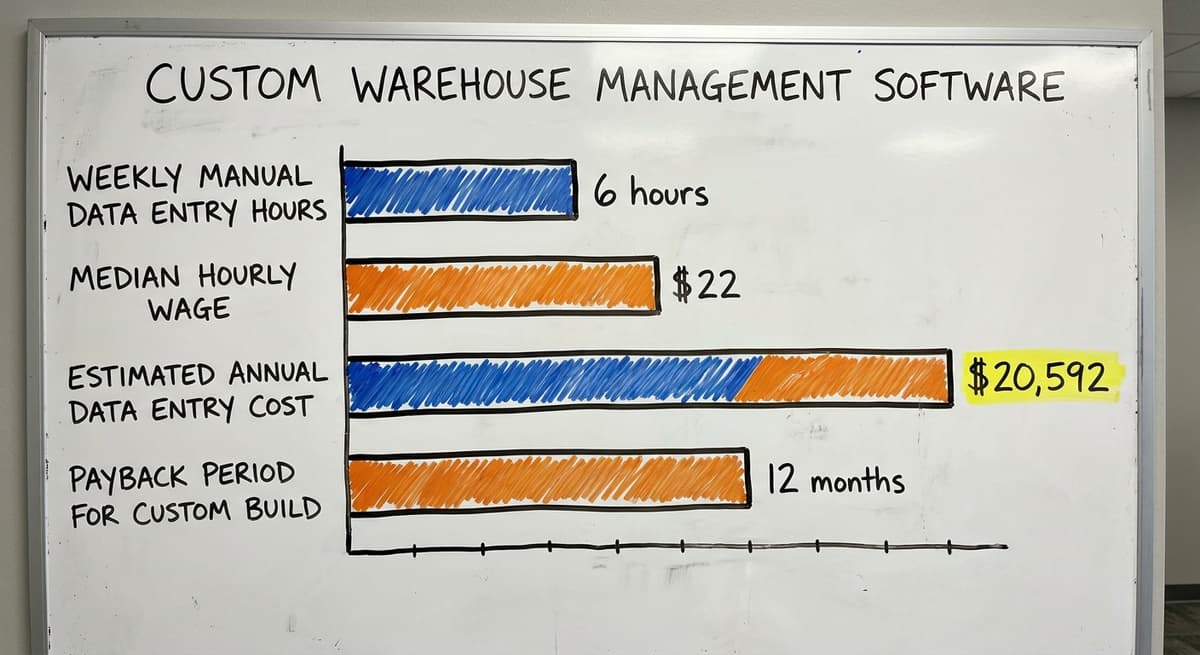
Consider this: 3 warehouse staff spending 6 hours a week each on manual data entry, at $22 an hour (the Bureau of Labor Statistics reports median pay for stock clerks and order fillers), costs $20,592 a year.
A focused custom build can pay for itself in under 12 months just by cutting that manual work.
Why Is Custom Not Always Slow or Expensive?
The common concern about custom warehouse software is that it means expensive and slow. That is sometimes true for large, open-ended projects. It is not true for a focused build that solves 3 to 5 specific problems in one warehouse.
A failed packaged WMS implementation can cost more than a custom build, in both money and lost time. Custom software can also change as the business changes. A packaged product changes on the vendor's schedule, not yours.
This is the kind of work The Software Society builds for warehouses and distributors in and around Columbus, Ohio. The goal is always to fix what is broken without replacing what is working.
If you want to explore what a custom build might look like for your operation, that conversation starts with your actual workflow, not a feature list.
What is in a free first look?
A 30 minute call, your operation mapped, and a clear picture of what we would build. No obligation and nothing to install.
Book a call
How Do You Choose from This List of Warehouse Management Software?
The right warehouse management software is the one that fits your operation right now, not the one with the longest feature list.
Four Questions That Point You to the Right Category
Answer these honestly:
- How many staff work in your warehouse? Under 20: start with lightweight tools or custom. 20 to 100: mid-market WMS or custom. Over 100: mid-market or enterprise.
- Do you want to keep your accounting software? Yes: avoid ERP modules. Look at mid-market WMS with your accounting software integration, lightweight tools, or custom.
- How fast do you need this running? Under 3 months: lightweight tools or custom. 3 to 12 months: mid-market WMS. Over 12 months: enterprise or ERP.
- Do you have IT support in house? No: avoid enterprise WMS and ERP modules. Yes: more options are open.
Do Not Choose on Features Alone
Most WMS products have similar feature lists. The difference is in implementation. A system that takes 18 months to go live and requires 3 consultants is not a better system just because it has more features.
Warehouse Inventory Management Software decisions go wrong most often when buyers compare checkboxes instead of asking: what does it take to actually get this running in my building, with my staff, on my timeline?
Start With the Pain, Not the Software
Ask yourself: what is breaking right now? Is it receiving? Picking errors? Stock counts? Order accuracy?
Name the 3 things that cost you the most time or money each week. Then find the category on this list that fixes those 3 things with the least disruption to everything else.
Talk to someone who has seen these systems go live before you put anything on a shortlist.

What Do Small Warehouses Often Get Wrong When Picking Software?
Most mistakes small warehouses make when picking software happen before anyone looks at a single demo. They happen in how the decision gets framed.
Picking for the Wrong Reasons
The most common mistakes small warehouses make:
- Picking by brand name or copying what a competitor uses, without checking if it fits their own size
- Assuming more features means better, a complex system in the wrong hands creates new problems
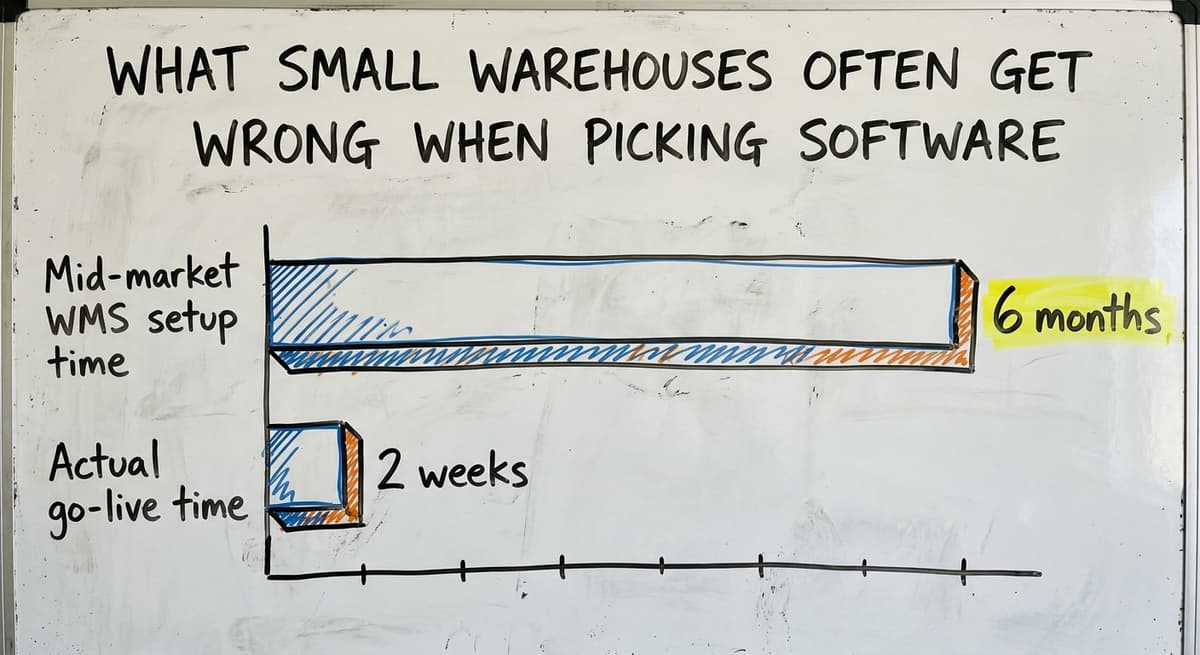
- Underestimating setup time, most mid-market WMS tools take 2 to 6 months to go live, not 2 weeks
- Ignoring the cost of change, training staff, managing resistance, and lost output during rollout are real costs that do not appear on a pricing page
The Accounting Software Mistake and the Waiting Mistake
Two mistakes come up again and again in small warehouse operations.
The first is replacing your accounting software when it is working fine. The accounting is usually not the problem.
The problem is everything around it: receiving, picking, stock counts, and order tracking. Replacing your accounting software to fix a warehouse problem is like replacing the engine to fix a flat tyre.
The second is waiting too long because no option on the list feels like a perfect fit. No packaged product will ever be a perfect fit.
The question is: which option fixes the most important problems with the least disruption? How to replace spreadsheets in your warehouse is the right first question, not which enterprise platform to buy.
If you are running a wholesale or B2B distribution operation and nothing on this list feels right, that is a signal worth paying attention to.
Warehouse software for wholesale distributors needs more flexibility than packaged tools provide. Custom warehouse software for small distributors exists for exactly that reason.
The sources behind this guide
The public record on this is worth reading directly: GS1 covers why a barcode printed by one company scans at another.
The public record on this is worth reading directly: Auburn University RFID Lab covers independent research on RFID in retail and supply chain.
Frequently Asked Questions
Frequently asked questions
Frequently asked questions
What is the best software for warehouse management?
There is no single best option. The right warehouse management software depends on your size, budget, and workflow. For large operations with IT staff, the software or the software are industry leaders.
For mid-size distributors, the software or the software are common choices. For small teams or operations with specific workflows, a custom-built system outperforms any packaged product. Start with your pain points, not a brand name.
What are the top 20 WMS systems?
The most commonly referenced warehouse management systems include: the software, the software, the software WMS Cloud, the software, the software, the software, the software, 3PL Central (the software), Infoplus, the software, Latitude WMS, the software, your accounting software WMS, the software, the platform Dynamics 365 Supply Chain, your accounting software X3, SYSPRO, the software, the software, and the software Inventory.
Custom-built WMS platforms should also be on this list for operations with specific workflows.
What are some popular warehouse management systems?
The most widely used systems by category are: enterprise (the software, the software, the software WMS Cloud), mid-market (the software, the software, the software), lightweight (the software, the software, the software), and ERP-based (your accounting software, the software).
Each category suits a different size and type of operation. Popularity does not mean fit. A system used by a 500-person distribution center is not automatically a good choice for a 20-person warehouse.
What are the top 10 inventory management software?
For inventory tracking software specifically, the most referenced options are: the software Inventory, the software, the software, the software, the software, the software, your accounting software, the software, the software, and the software.
For operations that need more than basic inventory tracking and want to keep your accounting software, a custom warehouse management system is a better fit than any of these.
Which warehouse management software works with accounting software?
Several mid-market and lightweight tools connect to your accounting software. the software Warehouse is the most widely known your accounting software warehouse integration. the software, the software, the software, and Unleashed also connect to your accounting software Online or Desktop.
ERP modules like your accounting software and the software require you to replace your accounting software entirely. Custom-built WMS tools can be connected to your accounting software without replacing it.
Do I need to replace accounting software to get warehouse management software?
No. Most mid-market WMS tools and lightweight options connect to your accounting software rather than replace it. ERP systems like your accounting software or the platform Dynamics 365 do require a full migration away from your accounting software.
For most small and mid-size warehouses, the accounting is not the problem. A WMS that sits alongside your accounting software and handles inventory, picking, and shipping is the right move.
What does custom warehouse management software mean and is it a real option?
Custom warehouse management software is software built specifically for one operation. It is not a packaged product. It follows your existing workflow, your terminology, and your tools. It is a real option and often a better one for small and mid-size warehouses that have outgrown spreadsheets but do not need a full enterprise WMS.
The Software Society builds this kind of system for warehouses and distributors in and around Columbus, Ohio.
How long does it take to implement warehouse management software?
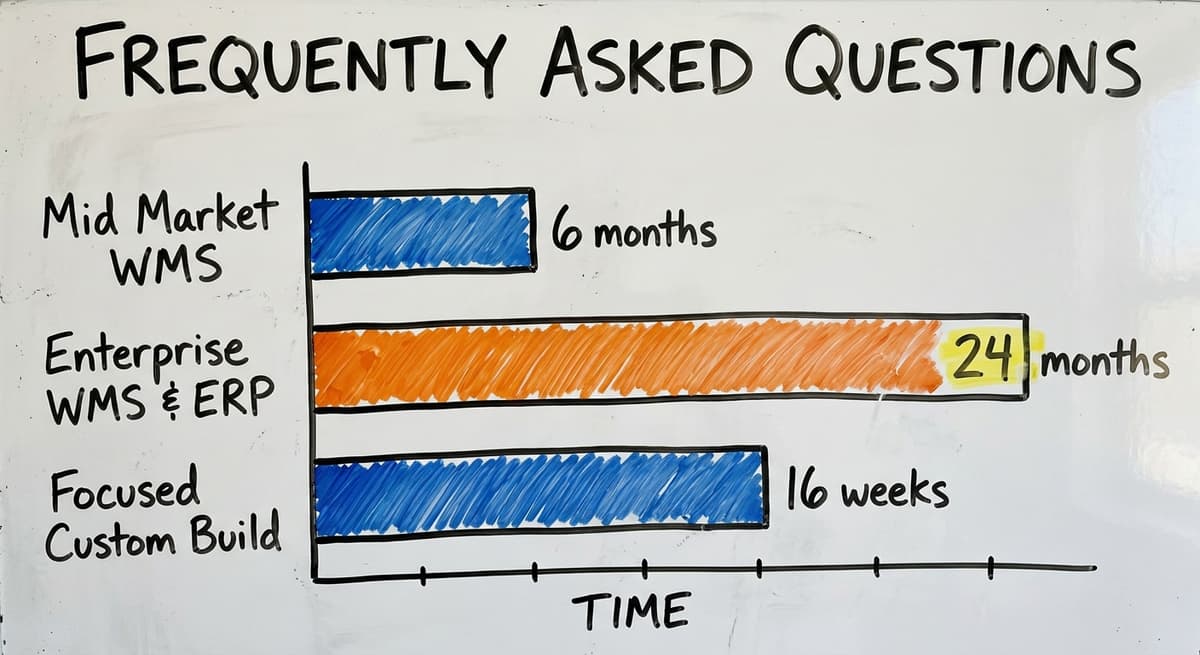
Implementation time varies by category. Lightweight tools can go live in days to a few weeks. Mid-market WMS takes 2 to 6 months. Enterprise WMS and ERP modules take 12 to 24 months or more.
A focused custom build for a specific workflow can go live in 6 to 16 weeks, faster than many mid-market packaged products, because it is built around what you already do rather than asking you to change everything at once.
What is the best warehouse management software for small businesses?
The best option for a small business is a lightweight tool built for smaller or e-commerce operations, since it sets up fast and does not demand IT staff.
Mid-market systems can also work once a business grows past a handful of staff. The right pick depends on current pain points rather than feature lists, so start with what is actually broken before comparing systems.
How much does warehouse management software cost?
Cost varies widely by category. Enterprise platforms require large budgets, long implementations, and dedicated IT teams, making them expensive for smaller operations. Mid-market and lightweight tools are more affordable and quicker to set up.
Custom-built systems can avoid upfront licensing costs entirely, with fees only starting once the system is live. The right cost depends on warehouse size, complexity, and how much existing software must be replaced.
What is the difference between WMS and ERP software?
A warehouse management system focuses specifically on tracking inventory as it arrives, sits on shelves, and ships out, replacing manual methods like spreadsheets.
An ERP system is a broader business platform that runs finances, operations, and other functions, sometimes including a built-in warehouse module. Standalone WMS tools connect to existing business software, while ERP warehouse modules are bundled inside a larger suite rather than sold separately.
How do I choose the right warehouse management system?
Choosing the right system starts with identifying what is actually broken in daily operations, such as miscounted stock or slow receiving, rather than chasing a long feature list.
Match the category, enterprise, mid-market, lightweight, ERP module, or custom-built, to your staff size, budget, and IT resources. Smaller operations should avoid enterprise platforms built for large distributors and instead look at options designed for their scale.
Not sure this is the right shape for your operation?
The call is free. Describe how the work runs today. We map it on a call and show you what it would look like built around that, before you spend anything.
Book a callRelated guides
The rest of this guide, for the parts of the job this page does not cover.
Guides
- Warehouse Inventory Management Software
- Warehouse Stock Management Software
- Software for Warehouse Management System
- Inventory and Warehouse Management Software
- Online Warehouse Management Software
- Software Warehouse Management
- Warehouse Inventory Tracking Software
- Warehouse Receiving Software
- Warehouse Stock Software
- Warehouse Inventory Software Programs
- Inventory Software Warehouse
- Warehouse Software System
- Pick List
- Quickbooks Inventory Management Software
- Custom Inventory Management Software
- Warehouse Inventory Management Systems
- Warehouse Management System Top 10
- Small Business Warehouse Management System
- Cloud Based Warehouse Management
- Warehouse Management System Types
- Warehouse Inventory Management System